
TV-518 SI - Television ORION - Free user manual and instructions
Find the device manual for free TV-518 SI ORION in PDF.


Pick your language and provide your email: we'll send you a specifically translated version.
| Product Type | Television |
| Brand | Orion |
| Model | TV-518 SI |
| Screen Size | 51 cm (20 inches) diagonal |
| Display Technology | CRT |
| Dimensions (with stand) | 450 x 370 x 420 mm |
| Weight | 12 kg |
| Power Supply | 110-240 V AC, 50/60 Hz |
| Power Consumption (max) | 70 W |
| Standby Power Consumption | < 1 W |
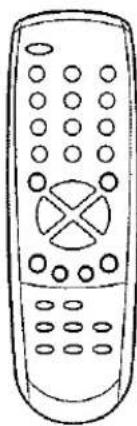
| Remote Control | Included (batteries not included) |
| AV Inputs | 1 x Composite (RCA), 1 x SCART |
| Tuner | Analog (PAL/SECAM) |
| Teletext | Yes |
| Speaker Power | 2 x 5 W |
| Child Lock | Yes (parental control) |
| Wall Mount Compatible | No (tabletop only) |
| Cleaning | Unplug before cleaning; use a soft dry cloth |
| Safety Warnings | Do not block ventilation openings; avoid moisture |
| Spare Parts Availability | Contact Orion service center |
| Manual Pages | 24 pages |
Frequently Asked Questions - TV-518 SI ORION
How do I connect an external device like a DVD player?
Use the AV input on the back of the TV. Connect the yellow (video) and red/white (audio) RCA cables to the corresponding ports. Select the AV source using the SOURCE button on the remote.
How can I set up automatic channel search?
Press the MENU button, navigate to 'Channel Setup' or 'Tuning', select 'Auto Search' or 'Auto Program', then press OK. The TV will scan and store all available channels.
What batteries does the remote control require?
The remote requires two AAA batteries (not included). Open the battery compartment on the back, insert batteries with correct polarity, and close the cover.
How do I adjust the picture settings?
Press the MENU button, select 'Picture' or 'Image'. You can adjust Brightness, Contrast, Color, and Sharpness. Use the arrow keys to change values.
Why is there no sound?
Check if the TV is muted by pressing the MUTE button. Also verify the volume level. If using external speakers or AV input, ensure connections are secure and the source device is playing audio.
How do I use the child lock feature?
Access the MENU, go to 'Settings' or 'Lock', enable Child Lock, and set a 4-digit PIN. This prevents unauthorized use or channel changes.
Can I watch digital TV with this model?
No, the TV-518 SI is an analog TV with a PAL/SECAM tuner. To receive digital broadcasts, you need an external digital set-top box connected via AV input.
What should I do if the TV does not turn on?
Check the power cord connection and ensure the wall outlet is working. Try a different outlet. If still no power, the internal fuse may be blown; contact a qualified technician.
How do I clean the TV screen?
Unplug the TV. Use a soft, dry, lint-free cloth to gently wipe the screen. Do not apply any liquids directly; they can damage the screen. For stubborn spots, slightly dampen the cloth with water.
Where can I download the full manual?
The manual is available for free download in PDF format on notice-facile.com for the Orion TV-518 SI. You can also request a translated version via email.
User questions about TV-518 SI ORION
0 question about this device. Answer the ones you know or ask your own.
Ask a new question about this device
No questions yet. Be the first to ask one.
Download the instructions for your Television in PDF format for free! Find your manual TV-518 SI - ORION and take your electronic device back in hand. On this page are published all the documents necessary for the use of your device. TV-518 SI by ORION.
USER MANUAL TV-518 SI ORION
(MODEL TV-3789F SI / TV-3789F)
3 Deckel schließen.


Hinweise:


Table of contents
Click a title to access it
Manual assistant
Powered by Anthropic
Waiting for your message
Product information
Brand : ORION
Model : TV-518 SI
Category : Television