
SMART Security M3P4 - Motion detector iGET - Free user manual and instructions
Find the device manual for free SMART Security M3P4 iGET in PDF.


| Product Type | Wireless Contact Sensor (Door/Window Sensor) |
| Brand | iGET |
| Model | SMART Security M3P4 |
| Category | Motion Detector (actually contact sensor) |
| Working Voltage | DC 1.5V |
| Battery Type | AAA (1.5V) |
| Battery Quantity | 1 |
| Working Current | 55~65mA |
| Standby Current | 9.5~11µA |
| Transmission Distance | 100 m (no obstacle) |
| Transmission Frequency | 433.29 MHz |
| Operating Temperature | -20°C to 50°C |
| Humidity | ≤90% RH (non-condensing) |
| Weight (without battery) | 35.5 g |
| Weight (with battery) | 46.7 g |
| Transmitter Dimensions (L×W×H) | 80.0 × 38.2 × 13.3 mm |
| Magnet Dimensions (L×W×H) | 80.0 × 14.8 × 12.9 mm |
| LED Indication | Flash once: door/window opened; steady on: low battery |
| Pairing Method | QR code scan via App, confirmed by SMS |
| Installation Method | Double-sided tape or screws |
| Max Gap Between Transmitter and Magnet | < 1 cm (at same level) |
| Special Features | Transmitter can be on left or right of magnet; "Ready to Arm" check |
| Included Items | Transmitter, magnet, battery, manual |
Frequently Asked Questions - SMART Security M3P4 iGET
User questions about SMART Security M3P4 iGET
0 question about this device. Answer the ones you know or ask your own.
Ask a new question about this device
Download the instructions for your Motion detector in PDF format for free! Find your manual SMART Security M3P4 - iGET and take your electronic device back in hand. On this page are published all the documents necessary for the use of your device. SMART Security M3P4 by iGET.
USER MANUAL SMART Security M3P4 iGET
Exclusive importer of products Shenzhen Dinsafe Intelligence Co., Ltd.
for the Czech Republic and Slovak Republic
Copyright © 2015 INTELEK spol. s r.o. All rights reserved.


SECURITY M3P4

natural_image
Two rectangular devices, one vertical and one horizontal, with no visible text or symbols on the devices themselves.EN Installation manual | Wireless Contact Sensor
The M3P4 wireless contact sensor is an accessory of iGET SECURITY M3 series smart alarm system. It's fashion design, energy saving, and low battery warning supported. The main panel will send a SMS to user for battery replacement when needed. It's easy to setup and works well with most doors and windows. When transmitter and magnet are apart, the sensor triggers alarm. Two great features:
- Transmitter can be put on either of magnet's left or right side.
- When "Ready to Arm" feature turned on, DMC01O will ask the system to inform user for checking the door or window if closed well or not when it received Arm command with its transmitter and magnet are apart.
Parameters
| • Working Voltage DC 1.5V | |
| • Battery 1 × AAA battery(1.5V) | |
| • Working Current 55~65mA | |
| • Standby Current 9.5μA~11μA | |
| • Transmission Distance Without obstacle 100m | |
| • Transmission Frequency 433.29MHz | |
| • Working Temperature -20 | °C~50°C |
| • Humidity ≤90%rh (non-condensing) | |
| • Weight 35.5g(battery not included) 46.7g(battery included) | |
| • Dimension Transmitter: 80.0mm*38.2mm*13.3mm Magnet: 80.0mm*14.8*12.9mm (L*W*H) | |
Appearance

PCB Layout

LED Indication
LED flashes once: Door/window is opened and transmitter sends signal to the main panel.
LED lights stays on: Low battery, please replace the battery immediately.
Operating Instructions
- Working principle
The transmitter sends trigger signal to main panel paired when the magnet mounted near is moved apart. - Pairing with main panel by App
① Scan the QR code printed on the sensor.
② The pairing result would be confirmed by SMS sent from main panel.
Installation & Notice
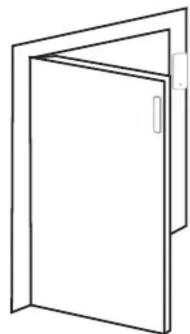
- Open the case and remove the battery insulative strip.
• Pairing to main panel by App before installing. - Attach the transmitter and magnet separately on door/window and its frame with double-side sticky tape or fix with screws.
Transmitter can be put on either of magnet's left or right side. - Make sure the distance between transmitter and magnet is less than 1cm and at the same level.
- Avoid installing the sensors in area with a large amount of metal or electric wire.
natural_image
Simple line drawing of a door with open lid and side panel (no text or symbols)
natural_image
Simple line drawing of a rectangular frame with a small rectangular cutout on the right side (no text or symbols)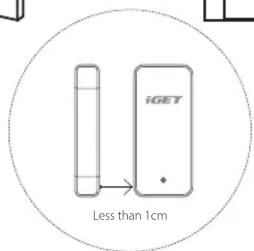

O produktu
LED flashes once: Door/window is opened and transmitter sends signal to the main panel.
LED lights stays on: Low battery, please replace the battery immediately.
natural_image
Simple line drawing of a door with open lid and side panel (no text or symbols)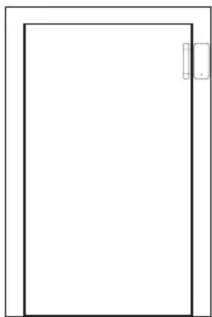
natural_image
Blank rectangular frame with a small rectangular cutout on the right side (no text or symbols)
LED didoda stále svieti: Low battery, please replace the battery immediately.
natural_image
Simple line drawing of a door with open lid and side panel (no text or symbols)
natural_image
Simple line drawing of a rectangular frame with a small rectangular cutout on the right side (no text or symbols)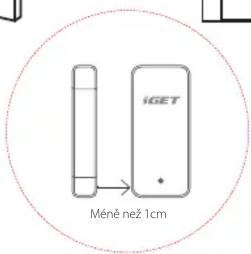


Brand : iGET
Model : SMART Security M3P4
Category : Motion detector