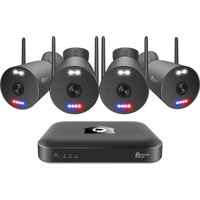
HomeGuard HGNVK109104 - Surveillance Camera iGET - Free user manual and instructions
Find the device manual for free HomeGuard HGNVK109104 iGET in PDF.


Pick your language and provide your email: we'll send you a specifically translated version.
| Product Type | Surveillance Camera (IP Camera) |
| Brand | iGET |
| Model | HomeGuard HGNVK109104 |
| Resolution | 1080p Full HD (1920x1080) |
| Night Vision | Up to 10 meters IR distance |
| Field of View | 90° diagonal |
| Connectivity | Wi-Fi 802.11 b/g/n, 2.4 GHz |
| Power Supply | DC 5V 1A via Micro USB |
| Dimensions | 70 x 70 x 120 mm |
| Weight | 250 g |
| Weather Resistance | IP65 (outdoor use) |
| Audio | Two-way audio (built-in mic & speaker) |
| Motion Detection | Yes, with push notifications |
| Storage | MicroSD card (up to 128 GB), Cloud storage supported |
| App Compatibility | iGET Smart App (iOS & Android) |
| Mounting | Wall or ceiling mount included |
| Operating Temperature | -10°C to 50°C |
| Cleaning | Wipe with a soft, dry cloth; avoid liquids |
| Safety | SSL encryption, no default password required |
| Spare Parts & Repairability | Contact iGET support for spare parts; non-user-serviceable |
| Warranty | 2 years limited warranty |
Frequently Asked Questions - HomeGuard HGNVK109104 iGET
How do I reset the HomeGuard HGNVK109104 camera to factory defaults?
Press and hold the reset button (located on the bottom of the camera) for about 10 seconds until the LED blinks rapidly. The camera will restart and restore default settings.
Can I use this camera outdoors without direct exposure to rain?
Yes, the camera has an IP65 weatherproof rating, making it resistant to dust and low-pressure water jets. It can be installed under an eave or in a sheltered outdoor location.
What is the maximum SD card capacity supported?
The camera supports MicroSD cards up to 128 GB (not included). Format the card to FAT32 before use for optimal compatibility.
How do I connect the camera to Wi-Fi?
Download the iGET Smart app, create an account, and follow the in-app instructions. During setup, the camera will emit a QR code sound; the app will detect it and configure the Wi-Fi connection.
Does the camera support two-way audio?
Yes, the built-in microphone and speaker enable two-way conversation. You can listen and talk through the app in real-time.
How can I view the camera feed remotely?
Open the iGET Smart app on your smartphone or tablet. Ensure the camera is connected to the internet. The live feed will appear on the home screen. You can also share access with family members.
What should I do if the camera goes offline?
First, check your Wi-Fi router and reboot it. Then, power cycle the camera by unplugging it for 10 seconds. If the issue persists, try resetting the camera and re-adding it to the app.
Is cloud recording available?
Yes, the camera supports cloud storage for motion events. You can subscribe to a cloud plan via the app. Alternatively, use a MicroSD card for local recording.
Can I set up motion detection zones?
Yes, in the app settings under Motion Detection, you can draw custom activity zones to specify areas where you want to be alerted. Adjust sensitivity to reduce false alarms.
How do I clean the camera lens?
Use a soft, lint-free cloth slightly dampened with water or lens cleaner. Gently wipe the lens in a circular motion. Avoid using abrasive materials or harsh chemicals.
User questions about HomeGuard HGNVK109104 iGET
0 question about this device. Answer the ones you know or ask your own.
Ask a new question about this device
No questions yet. Be the first to ask one.
Download the instructions for your Surveillance Camera in PDF format for free! Find your manual HomeGuard HGNVK109104 - iGET and take your electronic device back in hand. On this page are published all the documents necessary for the use of your device. HomeGuard HGNVK109104 by iGET.
USER MANUAL HomeGuard HGNVK109104 iGET


Manual assistant
Powered by Anthropic
Waiting for your message
Product information
Brand : iGET
Model : HomeGuard HGNVK109104
Category : Surveillance Camera