
SMART Security M3P1 - Motion detector iGET - Free user manual and instructions
Find the device manual for free SMART Security M3P1 iGET in PDF.


| Product Type | Wireless Motion Sensor |
| Brand | iGET |
| Model | SMART Security M3P1 |
| Category | Motion Detector |
| Working Voltage | 3V DC |
| Battery Type | 2 × AA (1.5V each) |
| Working Current | 22mA |
| Standby Current | 60μA |
| Detection Range (Angle) | 110° |
| Detection Distance | 9m |
| Transmission Distance (Open Area) | 100m |
| Transmission Frequency | 433.29MHz |
| Operating Temperature | -10°C to 40°C |
| Humidity Range | ≤90%RH (non-condensing) |
| Weight (without battery) | 66g |
| Weight (with battery) | 112g |
| Bracket Weight | 62.3g |
| Dimensions (L×W×H) | 99.6mm × 54.0mm × 40.2mm (±0.1mm) |
| Detection Technology | Digital dual-core fuzzy logic + infrared sensor |
| Key Features | Automatic temperature compensation, intelligent analysis, false alarm prevention, low battery warning, 360° angle adjustment, energy saving |
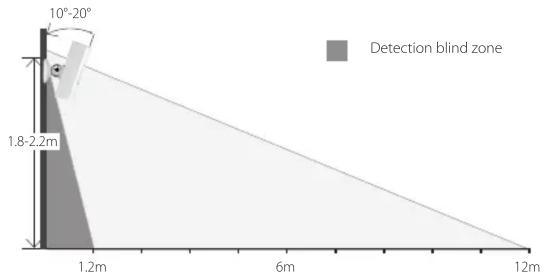
| Installation Height | 1.8–2.2m from ground, with 10°–20° tilt |
| Pairing Method | Scan QR code via iGET SECURITY app; SMS confirmation |
| Use Environment | Indoor use only; avoid strong light, rapid temperature changes, air drafts |
| Material | ABS plastic, stainless steel bead, magnetic slice |
| Compatibility | iGET SECURITY M3 series smart alarm system |
Frequently Asked Questions - SMART Security M3P1 iGET
User questions about SMART Security M3P1 iGET
0 question about this device. Answer the ones you know or ask your own.
Ask a new question about this device
Download the instructions for your Motion detector in PDF format for free! Find your manual SMART Security M3P1 - iGET and take your electronic device back in hand. On this page are published all the documents necessary for the use of your device. SMART Security M3P1 by iGET.
USER MANUAL SMART Security M3P1 iGET
natural_image
Simple line drawing of a computer mouse (no text or symbols)Exclusive importer of products Shenzhen Dinsafe Intelligence Co., Ltd.
for the Czech Republic and Slovak Republic
Copyright © 2015 INTELEK spol. s r.o. All rights reserved.

iGET
SECURITY M3P1

The M3P1 wireless motion sensor is an accessory of iGET SECURITY M3 series smart alarm system, mainly for indoor use. With high performance infrared sensor, works under digital dual-core fuzzy logic operative programming and intelligent analysis, it accurately detects human body movement and effectively avoids false alarms. Featured with automatic temperature compensation technology, it ensures high intelligence, sensitivity, and stability. It's fashion design, energy saving, low battery warning supported and with long transmission distance. The main panel will send a SMS to user for battery changing when needed. With 360° angle adjustment supported, it's easy to setup and never get stuck.
Parameters
| • Working Voltage | DC 3V |
| • Battery | 2 × AA battery(1.5V) |
| • Working Current | 22mA |
| • Standby Current | 60μA |
| • Detective Range | 110° |
| • Detective Distance | 9m |
| • Transmission Distance | Without obstacle 100m |
| • Transmission Frequency | 433.29MHz |
| • Working Temperature | -10°C~40°C |
| • Humidity | ≤90%rh (non-condensing) |
| • Weight | 66g (battery not included) 112g (battery included) 62.3g (Bracket) |
| • Dimension 99.6mm*54.0mm*40.2mm L*W*H(±0.1mm) | |
Appearance

PCB Layout

Operating Instructions
- Working principle
with digital dual-core fuzzy logic operative programming and intelligent analysis, it accurately detects human body movement with infrared sensor and sends signal to main panel. - Pairing with main panel by App
① Scan the QR code printed on the sensor.
② The pairing result would be confirmed by SMS sent from main panel.
Installation & Notice
- Open the case and remove the battery insulative strip.
- Pairing with main panel by App before installing.
- Fix the bracket with double-side sticky tape or screws on wall, connect the sensor to bracket, adjust a proper angle. 360^ angle adjustment is easily available with connection of bead and magnetic slice.
- Recommended to install at height of 1.8-2.2m from ground, with gradient 10^ 20^ .
- Indoor use only. Avoid installing the sensors in area with strong light, temperature changes rapidly or the air stream flows frequently, like close to windows, air conditioner, refrigerator, heater, oven, and large obstacles.
- Aovid installing two sensors in the same detection scope to interference.
- The sensor is more sensitive to the cross movement than to the vertical movement, so the preference of sensor is best when the detection direction is vertical to the walking direction of people.
EN
O produktu


Brand : iGET
Model : SMART Security M3P1
Category : Motion detector