The 'No Disc' error on your Sencor SPT 229 M means that the CD player is not detecting the inserted disc. This multifunction portable player (CD, USB, MP3) has a disc detection sensor that may need to be reset or have its lens cleaned. Follow these steps in order:
Step 1: Check the disc insertion
- Open the disc tray by gently pressing the eject button located on the device
- Place the CD with the printed label facing up in the cradle
- Gently close the tray until you hear a click indicating it is fully closed
- Wait 2 to 3 seconds for the player to detect and initialize the disc
Step 2: Clean the disc and the lens
- Eject the disc and visually inspect it to see if it is scratched or damaged
- Gently clean the disc with a soft cloth from the center to the edges (never in a circular motion) to remove dust and fingerprints
- To clean the internal laser lens, leave the tray open and use compressed air in short bursts (from a respectable distance) to remove dust
- Use a cotton swab slightly moistened with distilled water if any residue persists, then let it dry for a few minutes before trying again
Step 3: Check the power and test
- Ensure that your Sencor SPT 229 M has sufficient power (well-charged battery or correct 230V mains connection)
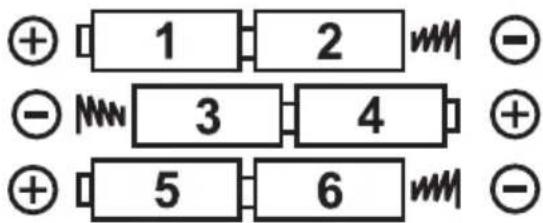
- Weak batteries may prevent the sensor from functioning properly - replace the 6 Type C or UM-2 batteries if they are old
- Test with a different CD (standard audio CD, CD-R, or CD-RW) to determine if the problem lies with the disc
- Briefly press the eject button to reset the player, wait a few seconds, then reinsert the disc
Additional checks
- Make sure the disc is a compatible format: your SPT 229 M plays standard audio CDs, CD-Rs, and CD-RWs
- Avoid shaking or moving the device during playback, as vibrations can affect detection
- Place the device on a stable, flat surface, not tilted or in an unstable position
If the 'No Disc' message persists after all these steps with several different discs, the detection sensor or the laser lens of the player may be defective. In this case, contact an authorized Sencor service center to have the device examined. Do not attempt to disassemble the device yourself, as this would void the warranty and could damage the fragile optical components.