
SPT 227 S - CD Player SENCOR - Free user manual and instructions
Find the device manual for free SPT 227 S SENCOR in PDF.


| Product Type | Portable CD/MP3/USB Player with FM Radio |
| Brand | Sencor |
| Model | SPT 227 S |
| Power Supply | AC 230V~50Hz or DC 2×6V (8×UM-2 batteries, not included) |
| Power Consumption | 10 W |
| Dimensions (W×D×H) | 257 × 200 × 118 mm |
| Weight | 1.25 kg |
| Frequency Range (FM) | 87.5 – 108 MHz |
| Output Power (RMS) | 1.2 W × 2 |
| Earphones Jack | 3.5 mm |
| Playable Disc Types | CD, CD-R, CD-RW, MP3 CD |
| USB Playback | MP3 files from USB devices |
| Programmable Tracks (CD) | Up to 20 tracks |
| Programmable Tracks (MP3/USB) | Up to 99 tracks |
| Play Modes | Repeat 1, Repeat All, Album, Random, Normal |
| Volume Control | Rotary dial |
| Antenna | Telescopic for FM |
| Display | LCD with track and folder info |
| Handle | Integrated carrying handle |
| Laser Class | Class 1 Laser Product |
| Maintenance | Clean with soft, dry cloth; do not use solvents |
| User-Serviceable Parts | No user-serviceable parts inside |
| Auto Standby | After 30 minutes of inactivity |
Frequently Asked Questions - SPT 227 S SENCOR
User questions about SPT 227 S SENCOR
0 question about this device. Answer the ones you know or ask your own.
Ask a new question about this device
Download the instructions for your CD Player in PDF format for free! Find your manual SPT 227 S - SENCOR and take your electronic device back in hand. On this page are published all the documents necessary for the use of your device. SPT 227 S by SENCOR.
USER MANUAL SPT 227 S SENCOR
natural_image
Technical line drawing of a VR headset with transparent casing and control buttons (no text or symbols)USER'S MANUAL
PORTABLE CD/MP3/USB -ANALOGUE FM RADIO
Safety Precautions
- Read all instructions carefully before using the unit and keep them for further reference.
- Retain the manual. If you pass the unit onto a third party make sure to include this manual.
• Check that the voltage marked on the rating label matches your mains voltage.
Damage
- Please inspect the unit for damage after unpacking.
- Do not continued to operate the unit if you are in any doubt about it working normally, or if it is damaged in any way - switch off, withdraw the mains plug and consult your dealer.
Location of Unit
• The unit must be placed on the flat stable surface and should not be subjected to vibrations.
- Do not place the unit on sloped or unstable surfaces as the unit may fall off ir tip over.
• The mains socket must be located near the unit and should be easily accessible.
Temperature
- Avoid extreme degrees of temperature, either hot or cold. Place the unit well away from heat sources such as radiators or gas/electric fires.
- Avoid exposure to direct sunlight and other sources of heat.
Naked Flames
• Never place any type of candle or naked flame on the top of or near the unit.
Moisture
• To reduce the risk of fire, electric shock or product damage, do not expose this unit to rain, moisture, dripping or splashing. No objects filled with liquids, such as vases, should be placed on the unit.
- If you spill any liquid into the unit, it can cause serious damage. Switch it off at the mains immediately. Withdraw the mains plug and consult your dealer.
Ventilation
• To prevent the risk of electric shock or fire hazard due to overheating, ensure that curtains and other materials do not obstruct the ventilation vents.
- Do not install or place this unit in a bookcase, built-in cabinet or in another confined space. Ensure the unit is well ventilated.
Safety
• Always disconnect the unit from the mains supply before connecting/disconnecting other devices or moving the unit.
• Unplug the unit from the mains socket during a lightning storm.
Mains Cable
• Make sure the unit or unit stand is not resting on top of the mains cable, as the weight of the unit may damage the mains cable and create a safety hazard.
- If the mains cable is damaged it must be replaced by the manufacturer, its service agent, or similarly qualified persons in order to avoid a hazard.
Interference
- Do not place the unit on or near appliances which may cause electromagnetic interference. If you do it, it may adversely affect the operating performance of the unit, and cause a distorted picture or sound.
Batteries
• Batteries used in the unit are easily swallowed by young children and this is dangerous.
- Keep loose batteries away from young children and make sure that the battery holder tray is secure in the unit. Seek medical advice if you believe a cell has been swallowed.
- Please dispose of batteries correctly by following the guidance in this manual.
Earphones
• Listening to loud sounds for prolonged periods of time may permanently damage your hearing.
- Before putting on earphones, turn the volume down then put the earphones on and slowly increase the volume until you reach a comfortable listening level.
Supervision
• Children should supervised to ensure that they do not play with the unit and the remote control.
- Never let anymore especially children push anything into the holes, slots or any other openings in the case - this could result in a fatal electric shock.
Service
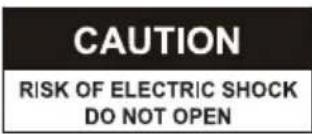
• To reduce the risk of electric shock, do not remove screws. The unit does not contain any user-serviceable parts. Please leave all maintenance work to qualified personnel.
Maintenance
- Ensure to unplug the unit from the mains socket before cleaning.
- Do not use any type of abrasive pad or abrasive cleaning solutions as these may damage the unit's surface.
• Do not use liquids to clean the unit.
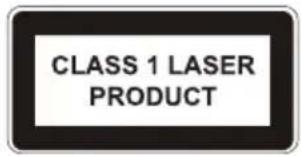
Class 1 Laser Product
- This unit utilises a laser. Use of controls, adjustments or performance of procedures other than those specified herein may result in hazardous radiation exposure.
• Before removing the unit, ensure the disc tray is empty.
• Always remove the disc when the unit is not in use.
• Failure to do so will risk severely damaging the disc and the unit.
- Do not stack devices, heat from other devices may affect the performance of the unit.
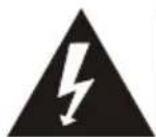
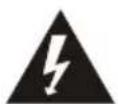
The lightning flash with arrowhead symbol, within an equilateral triangle, is intended to alert the user to the presence of uninsulated "dangerous voltage" within the unit's enclosure that may be of sufficient magnitude to constitute a risk of electric shock.
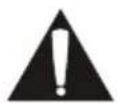
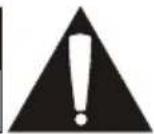
The exclamation point within an equilateral triangle is intended to alert the user to the presence of important operating and maintenance (servicing) instructions in the manual accompanying the unit.
Owner's record
For your convenience, record the model number and serial number for future reference.
Model no:
Serial no.:
Description of the product
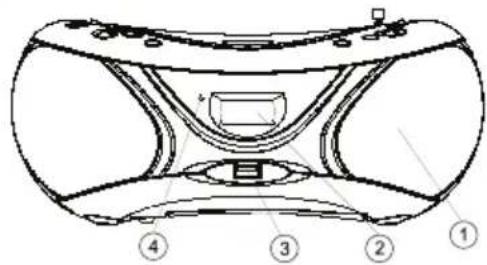
Front view
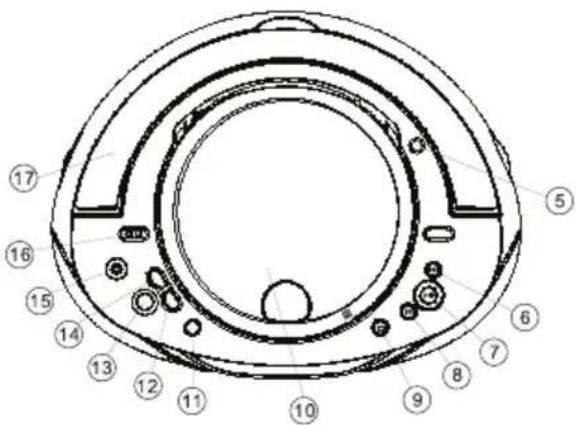
Top view
Rear view
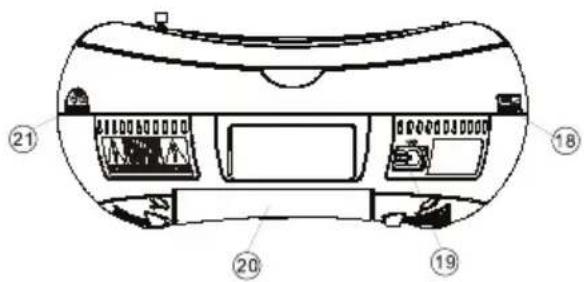
-
Speakers
-
LCD Display
-
USB Jack
-
FM Stereo Indicator
-
Telescopic Antenna
-
NEXT Button
CD: search the next track.
- BACK Button
CD: search the previous track.
- STOP Button
CD: stop playback or delete a program.
-
CD Door
-
MODE Button
-
FOLDER DN. Button
MP3/USB: select the previous folder.
-
PROGRAM/RESTART Button
-
FOLDER UP Button
MP3/USB: select the next folder.
-
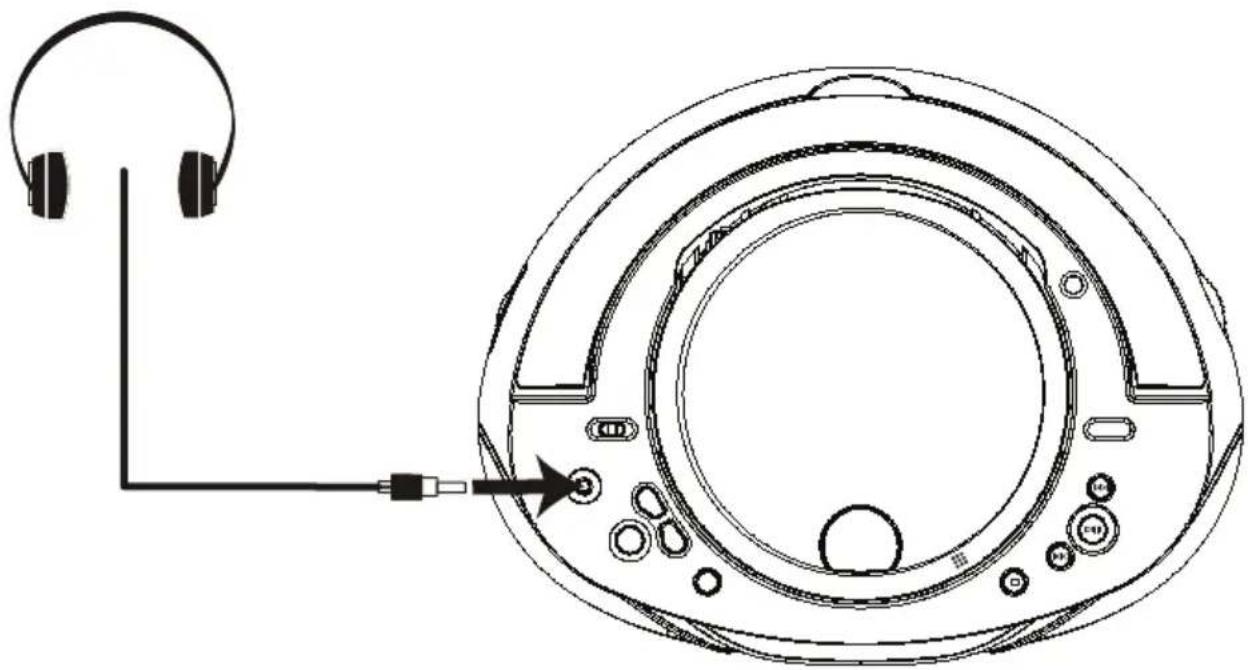
Earphones Jack
-
FUNCTION Selector
- select CD/MP3/USB, FM ST. and OFF.
-
Handle
-
VOLUME Control
-
AC IN Jack
- connect AC power cord to the mains socket.
-
Battery Compartment
-
TUNING Knob
- adjust the FM radio station.
Powering the device
Connect AC power
Caution:
- Risk of product damage! Ensure that the power supply voltage corresponds to the voltage printed on the rating label located on back or bottom of the unit.
Warning:
- Risk of electric shock! When you disconnect the AC power, always pull the plug from the wall outlet.
Note: Install the unit near the wall outlet and where the AC power plug can be easily reached.
- Connect the power cord to the AC IN jack on the unit and to the wall outlet.
- To save energy: After use, set the switch to OFF.
Install/Replace the Unit Batteries (not included)
Note: You can use both batteries and AC power as power supply of this unit.
- Open the battery compartment.
- Insert 8×UM-2 batteries with correct polarity (+/-) as indicated.
- Close the battery compartment.
Handling the batteries
- Improper or incorrect use of batteries may cause corrosion or battery leakage, which could cause fire, personal injury or damage to property.
- When the batteries are exhausted, the appliance will not function. Replace both batteries at the same time with new ones.
• Use only the types of batteries indicated in this manual. - Do not install new batteries with used ones and do not mix different types of batteries.
- Do not dispose of used batteries as domestic waste. Dispose of them in accordance with local regulations.
- Remove batteries from the unit if you do not plan to use it for a long period of time, otherwise the batteries may leak.
Note: When replacing the batteries, make sure you dispose of the old batteries in accordance with applicable regulations. They should be disposed of in a location specifically designated for that purpose so they can be recycled safely and without posing any risk for the environment. Do not burn or bury them.
General Operation
- To switch on and select your operation source, adjust the FUNCTION Selector to CD/MP3/USB or FM ST..
- Use the VOLUME dial to set the volume.
- To switch off the unit, adjust the FUNCTION Selector to OFF.
Note: To avoid unnecessary energy consumption, always adjust the FUNCTION Selector to OFF.
Radio Reception
- Adjust the FUNCTION Selector to FM ST..
- Turn the TUNING Knob to tune to a station.
Note The FM stereo indicator comes on if the band selector is set on FM stereo and you have tuned the radio to an FM stereo station.
Helpful hints:
• To improve FM reception, you can extend, incline or turn the telescopic antenna for best reception.
Using Earphones
Turn down the volume before connecting the earphones. Slowly raise the volume with the earphones on until you reach your desired volume. When earphones are connected, the speaker is automatically disabled.
Note: Avoid listening to sound at excessive levels which could be harmful to your ears. At full power, the prolonged listening can damage the ears of the user.
natural_image
Technical line drawing of a circular electronic device with earphones and connector, showing internal components and wiring (no text or symbols)CD/MP3/USB Operation
You can play commercially available audio CDs including CD-R, CD-RW, MP3 files and USB files.
Note:
• Even if this portable radio-CD player is able to read CD-R and CD-RW discs, in addition to conventional compact discs, it is not possible to offer a 100% guarantee that all CD-R/RW discs can be read; playback depends on the quality and condition of the blank discs that you use, among other things. A playback failure does not necessarily indicate that the unit is malfunctioning.
• You cannot play CDs encoded with copyright protection technologies.
Play a CD or MP3
- Adjust the FUNCTION Selector to CD/MP3/USB.
- Open the CD door by pressing the right corner.
- Insert a CD with the printed side facing up.
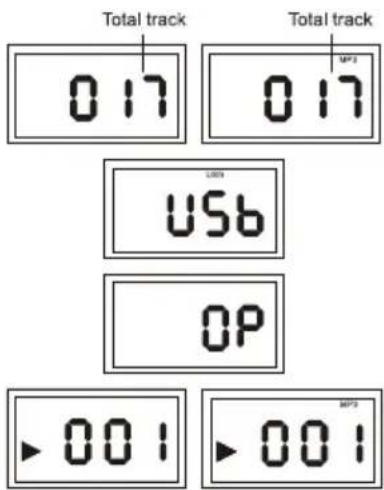
• The display will show the total number of tracks.
• If CD door is not closed, the display will show "OP".
• If disc is loading, the display will show “---”.
• If no disc, the display will show "USB".
- To start playback automatically or press the PLAY/PAUSE (CD/USB) button to start playback. Press again to stop playing track temporarily. Press again to resume playback.
-
Press the NEXT or BACK buttons to go to next track or back to the previous track.
-
press and hold while playing until you find the place on the track you want.
-
For MP3 discs, press the FOLDER UP or FOLDER DN. buttons repeatedly to select a folder, then press the NEXT or BACK buttons to select a file you want to play.
-
Press the STOP button to stop playback.
USB Connection
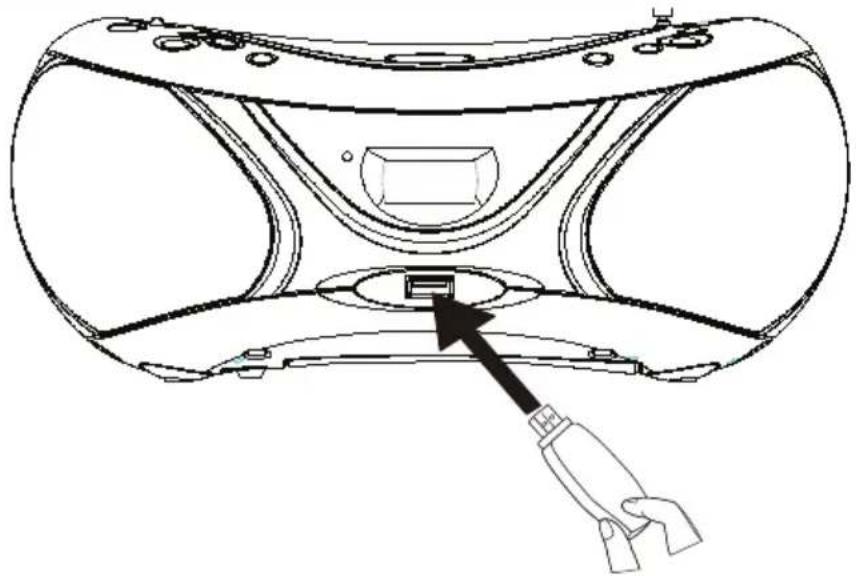
The USB jack is located on the front of the unit. Use a USB device to insert into the slot.
- the display will show the total number of folders then the total number of tracks after insert USB device into USB jack.
Note: To quit the USB mode, press and hold the PLAY/PAUSE (CD/USB) button for 2 seconds switch to CD/MP3 mode.
natural_image
Technical line drawing of a VR headset with a cable connector inserted into the base (no text or symbols)Play options
Adjust volume level
- During play, turn VOLUME Control to increase/decrease the volume level.
Select play modes
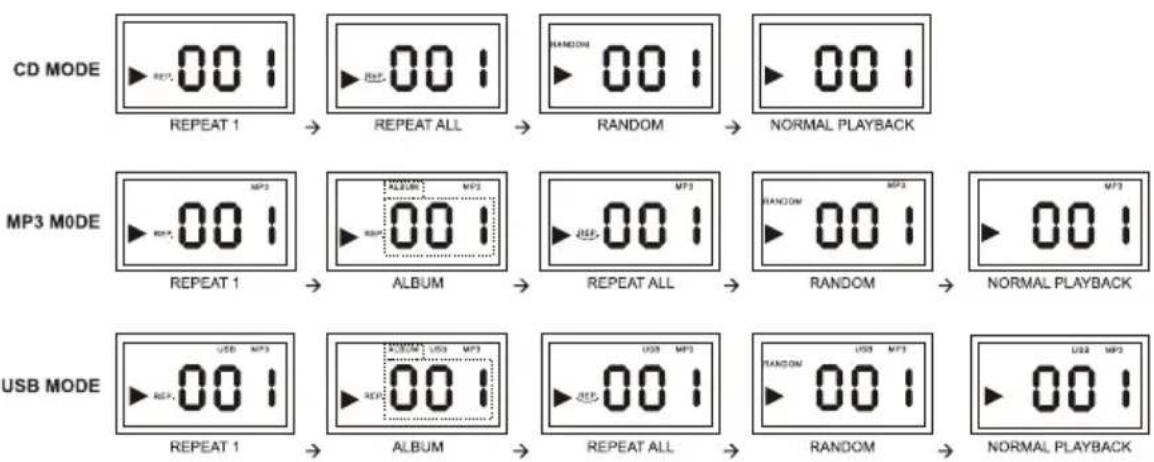
- Press the MODE button repeatedly to select a play mode:
• repeat: repeat the single track.
• repeat all: repeat the whole disc.
• album: repeat the selected folder.
• random: play tracks randomly.
- To return to normal play, press the MODE button repeatedly until play mode icons are no longer displayed.
flowchart
graph LR
    A["CD MODE"] --> B["REPEAT 1"]
    B --> C["REPEAT ALL"]
    C --> D["RANDOM"]
    D --> E["NORMAL PLAYBACK"]

    F["MP3 MODE"] --> G["REPEAT 1"]
    G --> H["ALBUM"]
    H --> I["REPEAT ALL"]
    I --> J["RANDOM"]
    J --> K["NORMAL PLAYBACK"]

    L["USB MODE"] --> M["REPEAT 1"]
    M --> N["ALBUM"]
    N --> O["REPEAT ALL"]
    O --> P["RANDOM"]
    P --> Q["NORMAL PLAYBACK"]
Program play sequence
You may store up to 20 tracks (in CD mode) or 99 tracks (in MP3 or USB mode) can be programmed for disc play in any order. Be sure to press the STOP button before use.
-
Press the PROGRAM/RESTART button to activate programming.
-
"PROG." and "P01" indicators will flash on the display.
-
For MP3/USB tracks, press the MODE button repeatedly to select an album, then press the FOLDER UP or FOLDER DN. buttons to select a folder you want.
-
Press the BACK or NEXT buttons to select your desired track number.
- Press the PROGRAM/RESTART button to store the desired track number.
- Repeat steps 2-3 to select additional tracks into program memory.
- When the memory is full, "FULL" will show on the display.
- To play your program, press the PLAY/PAUSE (CD/USB) button in stop mode.
• The "PROG." indicator will show on the display.
- To delete program, press the STOP button twice in stop mode or by opening the CD door.
• The "PROG." indicator will disappear.
Maintenance
Cleaning the Unit
• To clean the unit, wipe the case with slightly moist, lint-free cloth.
• Do not use any cleaning fluids containing alcohol, ammonia or abrasives.
• Do not spray any aerosol at or near the unit.
Note: Ensure the unit is fully unplugged from the mains socket before cleaning.
Handling Discs
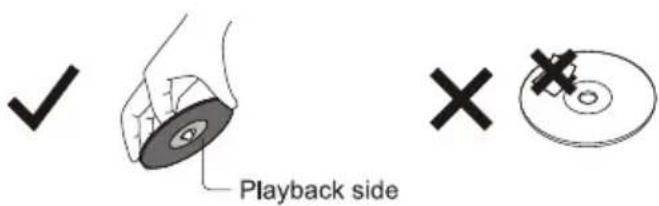
• Do not touch the playback side of the disc.
• Do not attach paper or tape to the disc.
Cleaning Discs
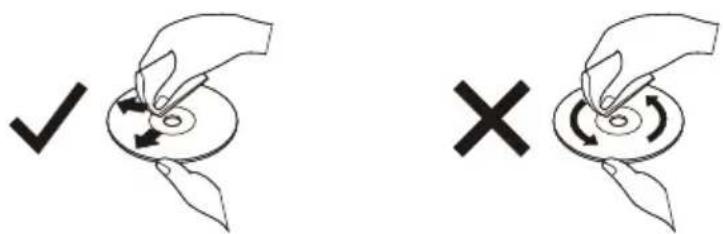
- Fingerprints and dust on the disc cause picture and sound deterioration. Wipe the disc from the center outwards with a soft cloth. Always keep the disc clean.
- If you cannot wipe off the dust with a soft cloth, wipe the disc lightly with a slightly moistened cloth and finish with a dry cloth.
- Do not use any type of solvent such as thinner, benzine, commercially available cleaners or antistatic spray. They may damage the disc.
Cleaning Disc Lens
- Clean the lens with a camera lens brush, or similar. Follow the instructions supplied with the cleaner.
Storing Discs
- Do not store discs in places subjected to direct sunlight or near heat sources.
- Do not store discs in places subjected to moisture and dust such as a bathroom or near a humidifier.
- Storing discs vertically in a case, stacking discs or placing objects on discs outside of their cases may cause warping.
Troubleshooting
If a fault occurs, first check the points listed below before taking the set for repair.
If you are unable to remedy a problem by following hints, consult your dealer or service center.
Note: Do not open the unit as there is a risk of electric shock. Under no circumstances should you try to repair the set yourself; as this will invalidate the guarantee.
No power
• Ensure that the power cord is connect securely.
• Ensure that there is power at the AC Mains.
• Ensure that the batteries are inserted correctly.
No sound or poor sound
- Adjust the volume.
No response from the unit
- Disconnect and reconnect the AC power cord, then turn on the unit again.
• Electrostatic discharge, re-connect the AC power cord after a few seconds.
CD does not play
• The disc is dirty. Clean the CD.
• The disc is placed upside down. Remove and place the CD right side up.
• Use a finalized CD or correct format disc.
The CD skips tracks
• Ensure that the CD is not damaged or dirty.
• Ensure that program mode is deactivated.
Poor radio reception
- Electrical interference in your home can cause poor reception. Move the unit away from them (especially those with motors and transformers).
• Fully extend the telescopic antenna.
The unit does not function properly while using batteries
• Batteries are dead. Replace the new batteries.
• The polarities of the batteries are incorrectly positioned.
- Reinsert the batteries ensuring the polarities (+/-) match the unit's indicated polarities (+/-).
File from USB device does not play
- Check the file format. This product only support MP3 format.
Remarks:
- If the unit is not used for 30 minutes or more, it will automatically enter STANDBY mode. Press the PROGRAM/RESTART button to resume use.
- If any anomaly occurs, switch the FUNCTION Selector to OFF position, and then switch it back to CD/MP/USB or FM ST. position again.
Environmental information
All unnecessary packaging materials has been omitted. The packaging can be easily separated into three materials: cardboard, polystyrene and plastic.
Your set consists of materials which can be recycled if disassembled by a specialized company. Please observe the local regulations regarding the disposal of packaging, dead batteries and old equipment.
Specifications
| Power Supply | Mains: AC 230V~50HzBattery: DC 2×6V (8×UM-2, batteries not included) |
| Power Consumption: | 10W |
| Dimensions: | 257(L)×200(W)×118(H) mm |
| Weight: | 1.25 kg |
| Frequency Range: | FM 87,5 - 108 MHz |
| Output Power (RMS): | 1.2W×2 |
| Earphones Jack: | 3.5mm |
(The technical characteristics are liable to change without notice)
INSTRUCTIONS AND INFORMATION REGARDING THE DISPOSAL OF USED PACKAGING MATERIALS
Dispose of packaging material at a public waste disposal site.
DISPOSAL OF USED ELECTRICAL AND ELECTRONIC APPLIANCES
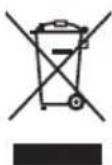
The meaning of the symbol on the product, its accessory or packaging indicates that this product shall not be treated as household waste. Please, dispose of this product at your applicable collection point for the recycling of electrical & electronic equipment waste. Alternatively in some states of the European Union or other European states you may return your products to your local retailer when buying an equivalent new product. The correct disposal of this product will help save valuable natural resources and help in preventing the potential negative impact on the environment and human health, which could be caused as a result of improper liquidation of waste. Please ask your local authorities or the nearest waste collection centre for further details. The improper disposal of this type of waste may fall subject to national regulations for fines.
For business entities in the European Union
If you wish to dispose of an electrical or electronic device, request the necessary information from your seller or supplier.
Disposal in other countries outside the European Union
If you wish to dispose of this product, request the necessary information about the correct disposal method from local government departments or from your seller.

This product meets all the basic EU regulation requirements that relate to it.
Changes to the text, design and technical specifications may occur without prior notice and we reserve the right to make these changes.



- Safety Precautions
- Damage
- Location of Unit
- Temperature
- Naked Flames
- Moisture
- Ventilation
- Safety
- Mains Cable
- Interference
- Batteries
- Earphones
- Supervision
- Service
- Maintenance
- Class 1 Laser Product
- Owner's record
- Description of the product
- Powering the device
- Connect AC power
- Caution:
- Warning:
- Install/Replace the Unit Batteries (not included)
- Handling the batteries
- General Operation
- Radio Reception
- Helpful hints:
- Using Earphones
- CD/MP3/USB Operation
- Note:
- Play a CD or MP3
- USB Connection
- Play options
- Adjust volume level
- Select play modes
- Program play sequence
- Cleaning the Unit
- Handling Discs
- Cleaning Discs
- Cleaning Disc Lens
- Storing Discs
- Troubleshooting
- No power
- No sound or poor sound
- No response from the unit
- CD does not play
- The CD skips tracks
- Poor radio reception
- The unit does not function properly while using batteries
- File from USB device does not play
- Remarks:
- Environmental information
- Specifications
- INSTRUCTIONS AND INFORMATION REGARDING THE DISPOSAL OF USED PACKAGING MATERIALS
- DISPOSAL OF USED ELECTRICAL AND ELECTRONIC APPLIANCES
- For business entities in the European Union
- Disposal in other countries outside the European Union
Brand : SENCOR
Model : SPT 227 S
Category : CD Player