
SPT 1600 - CD Player SENCOR - Free user manual and instructions
Find the device manual for free SPT 1600 SENCOR in PDF.


| Product Type | Portable CD Player |
| Brand | Sencor |
| Model | SPT 1600 |
| Disc Formats | CD, CD-R/RW, MP3 CD |
| Playback Modes | Normal, Repeat (1/All), Random, Program |
| Anti-Shock Protection | Yes (ESP – Electronic Skip Protection) |
| Audio Output | Headphone jack (3.5 mm) |
| Display | LCD with track number, elapsed time, and playback mode |
| Power Supply | AC adapter (100-240 V) or 2 x AA batteries |
| Battery Life | Approximately 8 hours (alkaline) |
| Dimensions (W x D x H) | 130 x 130 x 30 mm |
| Weight (without batteries) | Approximately 300 g |
| Speaker | No built-in speaker (headphones required) |
| Remote Control | Not included |
| Cleaning | Wipe exterior with a soft, dry cloth. Clean lens with CD lens cleaner if needed. |
| Safety Precautions | Do not expose to moisture or extreme temperatures. Use only recommended power adapter. |
| Spare Parts Availability | Contact Sencor service center for replacement parts (battery cover, adapter). |
| Repairability | Designed for professional repair only. Do not disassemble. |
| General Information | Supports MP3 playback via CD-R/RW discs. Allows program play of up to 20 tracks. |
Frequently Asked Questions - SPT 1600 SENCOR
User questions about SPT 1600 SENCOR
0 question about this device. Answer the ones you know or ask your own.
Ask a new question about this device
Download the instructions for your CD Player in PDF format for free! Find your manual SPT 1600 - SENCOR and take your electronic device back in hand. On this page are published all the documents necessary for the use of your device. SPT 1600 by SENCOR.
USER MANUAL SPT 1600 SENCOR
natural_image
Line drawing of a car front panel with buttons and ventilation grilles (no text or symbols)INSTRUCTION MANUAL
CD/MP3/USB/RADIO PORTABLE PLAYER
WARNING
- WARNING: Please refer the information on exterior bottom enclosure for electrical and safety information before installing or operating the apparatus.
- WARNING: To reduce the risk of fire or electric shock, do not expose this apparatus to rain or moisture. The apparatus shall not be exposed to dripping or splashing and that no objects filled with liquids, such as vases, shall be placed on apparatus.
- WARNING: The battery (battery or batteries or battery pack) shall not be exposed to excessive heat such as sunshine, fire or the like.
- WARNING: The mains plug is used as disconnect device, the disconnect device shall remain readily operable.
- Invisible laser radiation when open and interlocks defeated. Avoid exposure to beam of laser.
- Correct Disposal of this product. This marking indicates that this product should not be disposed with other household wastes throughout the EU. To prevent possible harm to the environment or human health from uncontrolled waste disposal, recycle it responsibly to promote the sustainable reuse of material resources. To return your used device, please use the return and collection systems or contact the retailer where the product was purchased. They can take this product for environmental safe recycling.
- No naked flame sources, such as lighted candles, should be placed on the apparatus.
- Attention should be drawn to environmental aspects of battery disposal.
- Use of the apparatus in moderate climates.
- The rating and marking information are located at the bottom of the unit.
- Excessive sound pressure from earphone and headphones can cause hearing loss.
- The mains plug of unit should be obstructed or should be easily accessed during intended use.
- To be completely disconnect the power input, the mains plug of apparatus shall be disconnected from the mains.
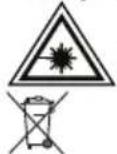
CAUTION
Danger of explosion if battery is incorrectly replaced.
Replace only with the same or equivalent type
TO PREVENT FIRE OR SHOCK HAZARD DO NOT EXPOSE THIS APPLIANCE TO RAIN OR MOISTURE.
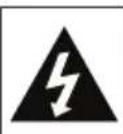
CAUTION RISK OF ELECTRIC SHOCK DO NOT OPEN


LIGHTNING FLASH WITH ARROWHEAD SYMBOL - within an equilateral triangle, is intended to alert the user to the presence of uninsulated dangerous voltage within the products enclosure that may be of sufficient magnitude to constitute a risk of electric shock to persons.

EXCLAMATION POINT - within an equilateral triangle, is used to indicate that a specific component shall be replaced only by the component specified in that documentation for safety reason.
The following label has been affixed to the unit, listing the proper procedure for working with the laser beam:
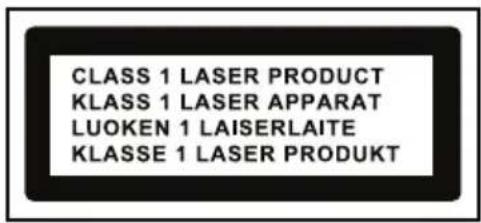
CLASS 1 LASER PRODUCT LABEL -
This label is attached to the place as illustrated to inform that the apparatus contains a laser component.
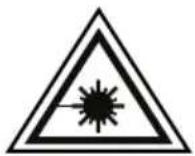
WARNING LABEL INFORMING OF RADIATION -
This label is placed inside the unit. As shown in the illustration. To warn against further measures on the unit. The equipment contains a laser radiating laser rays according to the limit of laser product of class 1.
- READ INSTRUCTIONS - All the safety and operating instructions should be read before the appliance is operated.
- RETAIN INSTRUCTIONS - The safety and operating instruction should be retained for future reference.
- HEED WARNINGS - All warnings on the appliance and in the operating instructions should be adhered to.
- FOLLOW INSTRUCTIONS - All operating instructions should be followed.
- WATER AND MOISTURE - The appliance should not be used near water, for example, near a bathtub, washbowl, kitchen sink, laundrytub, swimming pool or in a wet basement.
- VENTILATION - The appliance should be situated so that its location or position does not interfere with its proper ventilation. Do not place on bed, sofa, rug or similar surface that may block the ventilation openings, in a built-in installation, such as a bookcase or cabinet that may impede the flow of air through the ventilation openings.
- HEAT - The appliance should be situated away from heat sources such as radiators, stoves, or other appliances (including amplifiers) that produce heat.
- POWER SOURCE - The appliance should be connected to power supply only of the type described in the operating instructions or as marked on the appliance.
- POWER CORD PROTECTION - Power supply cords should be routed so that they are not likely to be walked on or pinched by items placed upon or against them.
- POWER LINES - An outdoor antenna should be located away from power lines.
- OBJECT and LIQUID ENTRY - Care should be taken so that objects do not fall and liquids are not spilled into the enclosure through openings.
- ESD WARNING - The display does not function properly or no reaction to operation of any the control may due to the electrostatic discharge. Switch off and unplug the set. Reconnect after a few seconds.
- DAMAGE REQUIRING SERVICE - The appliance should be serviced by qualified service personnel when:
POWER SOURCES
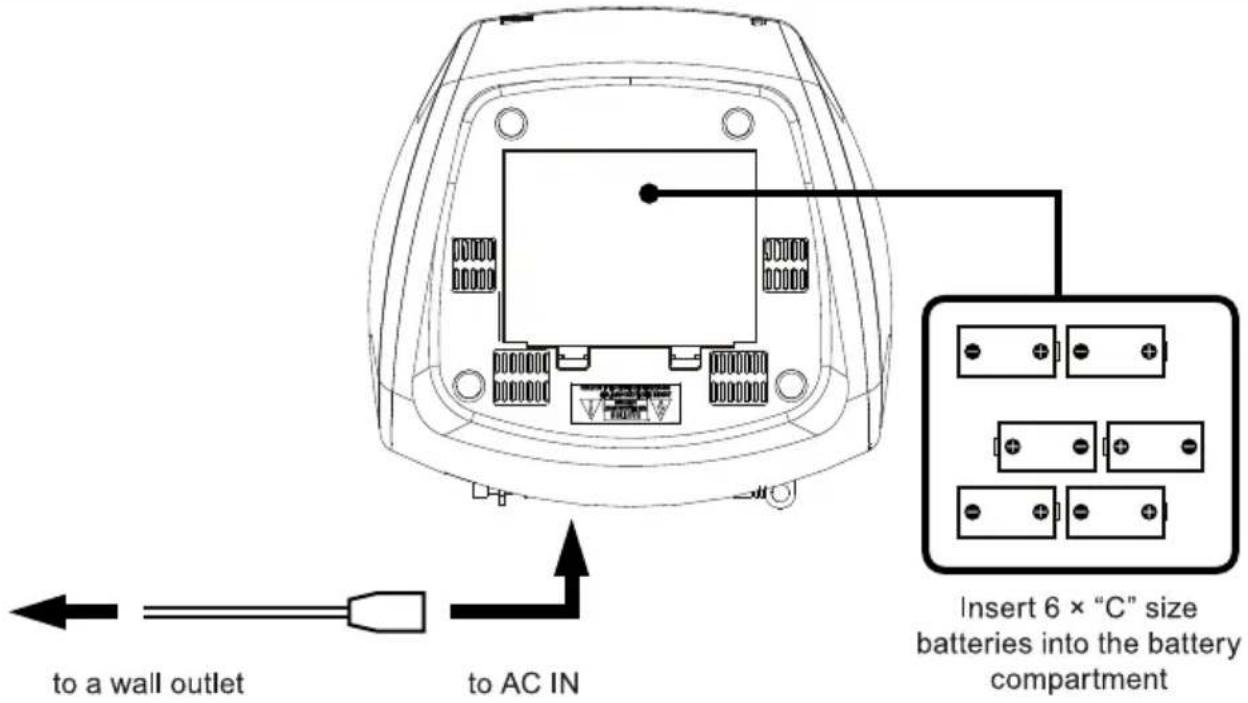
AC POWER
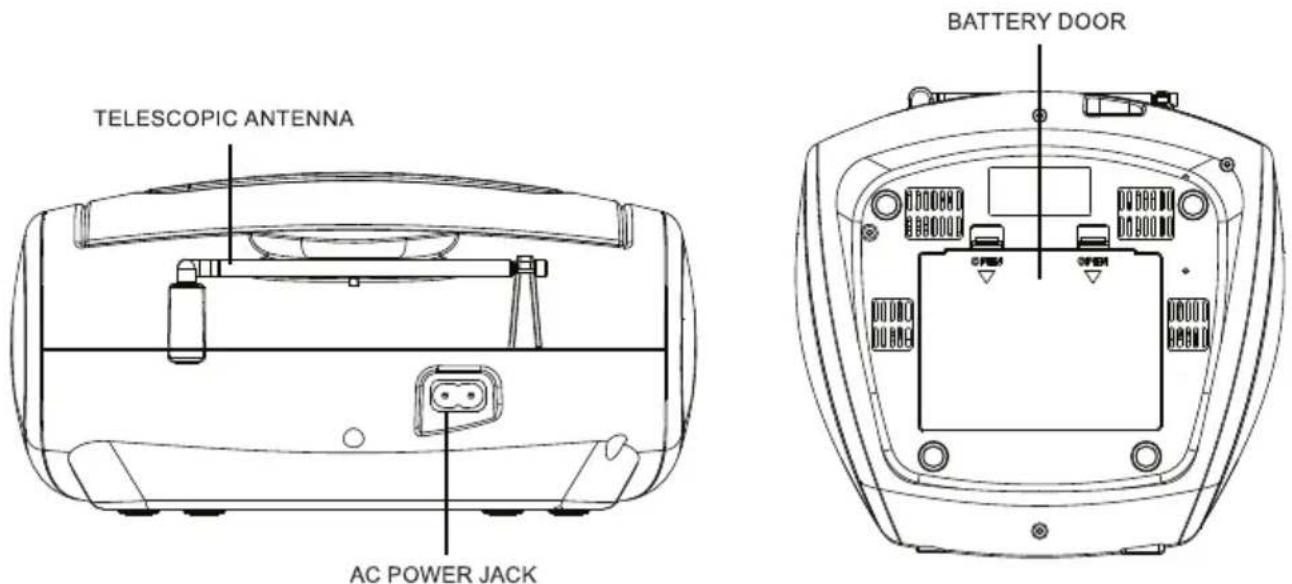
You can power your portable system by plugging the detachable AC power cord into the AC inlet at the back of the unit and into a wall AC power outlet. Check that the rated voltage of your appliance matches your local voltage. Make sure that the AC power cord is fully inserted into the appliance.
BATTERY POWER
Insert 6 × "C" size batteries into the battery compartment. Be sure that the batteries are inserted correctly to avoid damage to the appliance. Always remove the batteries when appliance will not be used for a long period of time, as this will cause leakage to the batteries and subsequently damage to your set.
Notes:
- Use batteries of the same type. Never use different types of batteries together.
- To use the appliance with batteries, disconnect the AC power cord from it.
Attention:
- During battery-powered operation, the appliance in stand-by mode consumes electrical power.
- When not using it for an extended period of time, we recommend removing the battery.
LOCATION OF CONTROL
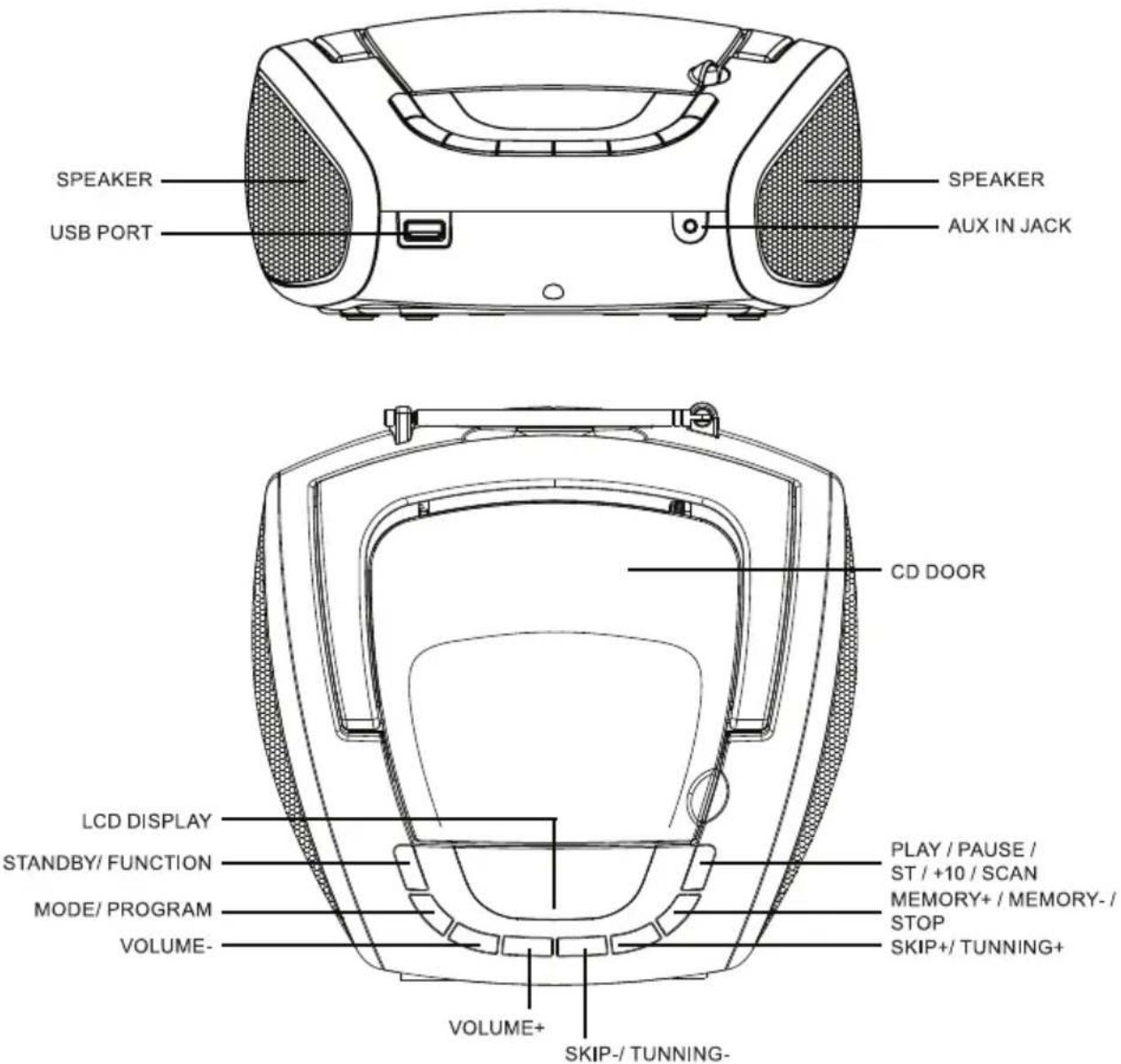
BASIC FUNCTION
GENERAL OPERATION
- At standby mode, press the "STANDBY/FUNCTION" button to switch on the unit.
- Press the "STANDBY/FUNCTION" button once to switch other mode (Only have Radio mode and CD/MP3/USB/AUX-IN.)
- Press and hold the "FUNCTION" button for 2 seconds to switch off the unit. (No matter in which mode.)
RADIO OPERATION
GENERAL OPERATION
- Press the "FUNCTION" button to select "FM" mode.
- Adjust radio frequency to your desired station by press the "SKIP+" or "SKIP-" button.
- Press and hold the "SKIP+" or "SKIP-" button2 seconds to start automatic tuning process, when a station is tuned in the tuning process, it will stop automatically
FOR BETTER RECEPTION
FM
This appliance has a FM antenna located at the rear cabinet. This wire is completely unraveled and extended for better reception.
STEREO
- Press "ST" button to choose Mono or Stereo.
- ST will be shown on display in Stereo mode.
PRESET STATION
Up to 30 stations can be preset
- Select desired radio station by "SKIP+" or "SKIP-".
- Press the "MODE" button, the display will show "P01".
- Press the "SKIP+" or "SKIP-" to select the preset station position.
- Press the "MODE" button again to confirm desired radio station in memory.
- Repeat step 1,2,3 and 4 to save others radio station in memory.
- Press "M+/ M-/ STOP" button to select your preset station, the display will show "PXX", press "M+/ M-/ STOP" button to go to next preset radio station, press and hold "M+/ M-/ STOP" button over 2 seconds to go to previous preset radio station.
AUTO SEARCH
Up to 30 stations can be saved
- Press and hold the "SCAN" button 2 second to start auto search function.
- Unit will auto search and save all available radio station
- Press the "M+" button to select your preset station.
CD / MP3 OPERATION
GENERAL OPERATION
PLAY / PAUSE ▶II
Press to start playing CD / MP3 disc.
Press again to stop playing CD / MP3 operation temporarily.
Press again to resume playback.
Press to go to the next track or back to the previous track.
Press and hold while playing until you find the point of the sound.
STOP ■
Press to stop all CD / MP3 operation.
+10
Pressing the button for 2 seconds shifts playback 10 tracks - for disks with MP3 tracks only.
PLAYBACK
- Press the "FUNCTION" button to select "CD" mode.
- Open the CD door and place a CD / MP3 disc with the label up in the CD compartment.
- Close the CD door.
- Focus search is performed if disc is inside.
For CD/ MP3 disc - Total number of tracks is read and appears on the display. - Playback will start automatically from the first track.
- Press the "VOL+" or "VOL-" button to adjust the volume to desired level.
- Press the "PLAY / PAUSE" button again when you want to stop playback temporarily.
- Press the "STOP" button when finished.
CD / MP3 OPERATION
PROGRAM
Up to 20 tracks fo CD disc, 99 tracks of MP3 disc can be programmed for disc play in any order. Be sure to press the "STOP" button before use.
- Press the "MODE" button, the display will show "P01".
- Select desired track by using the "SKIP +" or "SKIP -" button.
- Press the "MODE" button again to confirm desired track into the program memory.
- Repeat step 2 and 3 to enter additional tracks into the program memory.
- When all the desired tracks have been programmed, press the "PLAY / PAUSE" button to play the disc in the order you have programmed.
- Press the "STOP" button twice to terminate programmed playback.
MODE
Press the "MODE" button during playing CD / MP3 disc, each press switches the mode function as follows:
1 - REPEAT 1
2 - REPEAT FOLDER (For MP3 only)
3 - REPEAT ALL
4 - RANDOM
5 - NORMAL PLAYBACK
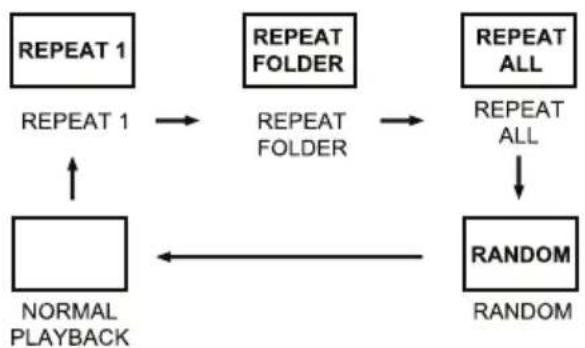
flowchart
graph TD
    A["NORMAL PLAYBACK"] --> B["REPEAT 1"]
    B --> C["REPEAT FOLDER"]
    C --> D["REPEAT ALL"]
    D --> E["RANDOM"]
    E --> F["RANDOM"]
    F --> A
USB OPERATION
GENERAL OPERATION
PLAY /PAUSE ▶II
Press to start playing tracks from the USB.
Press again to stop playing USB operation temporarily.
Press again to resume playback.
Press to go to the next track or back to the previous track.
Press and hold while playing until you find the point of the sound.
STOP ■
Press to stop all USB operation.
+10
Press and hold "+10" button 2 seconds then playback go up +10
PLAYBACK
- Plug or slot in USB device to the port.
- Press the "FUNCTION" button to select "USB" mode.
- Playback will start automatically from the first track and the display will show "USB".
- Press the "PLAY/ PAUSE" button again when you want to stop playback temporarily.
- Press the "STOP" button when finished.
PROGRAM, MODE
The operation of PROGRAM, MODE are as the same as that of CD / MP3. Please refer to CD / MP3 OPERATION.
OTHER FEATURES
AUX-IN
- Connect 3.5 mm cable to this unit and your device with 3.5 mm output jack.
- Press the "FUNCTION" button to select "AUX" mode.
- Press play on your device and enjoy.
Remark:
- 3.5 mm Aux-in cable not include
AUTO-OFF
This product is equipped with an auto power-save function in the CD/MP3/USB/AUX-IN mode, if the unit remains in STOP, PAUSE or NO DISC mode for more than 10 minutes it will automatically switch off.
Please press "POWER/ FUNCTION" button again to re-active the unit.
INSTRUCTIONS AND INFORMATION REGARDING THE DISPOSAL OF USED PACKAGING MATERIALS
Dispose of used packaging material at a site designated for waste in your municipality.
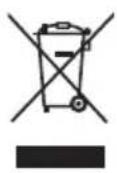
DISPOSAL OF USED ELECTRICAL AND ELECTRONIC EQUIPMENT
This symbol on products or original documents means that used electric or electronic products must not be added to ordinary municipal waste. For proper disposal, renewal and recycling hand over these products to determined collection points. Or as an alternative in some European Union states or other European countries you may return your products to the local retailer when buying an equivalent new product.
Correct disposal of this product helps save valuable natural resources and prevents damage to the environment caused by improper waste disposal. Ask your local authorities or collection facility for more details.
In accordance with national regulations penalties may be imposed for the incorrect disposal of this type of waste.
For business entities in European Union states
If you want to dispose of electric or electronic appliances, ask your retailer or supplier for the necessary information.
Disposal in other countries outside the European Union
This symbol is valid in the European Union. If you wish to dispose of this product, request the necessary information about the correct disposal method from the local council or from your retailer.

This product meets all the basic requirements of EU directives that apply to it.
Changes in the text, design and technical specifications may change without prior notice and we reserve the right to make these changes.
SENCOR®
EN Warranty conditions
Warranty card is not a part of the device packaging.
This product is warranted for the period of 24 months from the date of purchase to the end-user. Warranty is limited to the following conditions. Warranty is referred only to the customer goods using for common domestic use. The claim for service can be applied either at dealer's shop where the product was bought, or at below mentioned authorized service shops. The end-user is obligated to set up a claim immediately when the defects appeared but only till the end of warranty period. The end user is obligated to cooperate to certify the claiming defects. Only completed and clean (according to hygienic standards) product will be accepted. In case of eligible warranty claim the warranty period will be prolonged by the period from the date of claim application till the date of taking over the product by end-user, or the date the end-user is obligated to take it over. To obtain the service under this warranty, end-user is obligated to certify his claim with duly completed following documents: receipt, certificate of warranty, certificate of installation.
This warranty is void especially if apply as follows:
■ Defects which were put on sale.
■ Wear-out or damage caused by common use.
The product was damaged by unprofessional or wrong installation, used in contrary to the applicable instruction manual, used in contrary to legal enactment and common process of use or used for another purpose which has been designed for.
■ The product was damaged by uncared-for or insufficient maintenance.
■ The product was damaged by dirt, accident of force majeure (natural disaster, fire, and flood).
■ Defects on functionality caused by low duality of signal, electromagnetic field interference etc.
The product was mechanically damaged (e.g. broken button, fall).
■ Damage caused by use of unsuitable media, fillings, expendable supplies (batteries) or by unsuitable working conditions (e.g. high temperatures, high humidity, quakes).
■ Repair, modification or other failure action to the product by unauthorized person.
■ End-user did not prove enough his right to claim (time and place of purchase).
■ Data on presented documents differs from data on products.
■ Cases when the claiming product cannot be identified according to the presented documents (e.g. the serial number or the warranty seal has been damaged).
Authorized service centers
Visit www.sencor.eu for detailed information about authorized service centers.


- WARNING
- CAUTION
- TO PREVENT FIRE OR SHOCK HAZARD DO NOT EXPOSE THIS APPLIANCE TO RAIN OR MOISTURE.
- CAUTION RISK OF ELECTRIC SHOCK DO NOT OPEN
- CLASS 1 LASER PRODUCT LABEL -
- WARNING LABEL INFORMING OF RADIATION -
- POWER SOURCES
- AC POWER
- BATTERY POWER
- Notes:
- Attention:
- LOCATION OF CONTROL
- BASIC FUNCTION
- GENERAL OPERATION
- RADIO OPERATION
- FOR BETTER RECEPTION
- FM
- STEREO
- PRESET STATION
- AUTO SEARCH
- CD / MP3 OPERATION
- PLAYBACK
- PROGRAM
- MODE
- USB OPERATION
- PROGRAM, MODE
- OTHER FEATURES
- AUX-IN
- AUTO-OFF
- INSTRUCTIONS AND INFORMATION REGARDING THE DISPOSAL OF USED PACKAGING MATERIALS
- DISPOSAL OF USED ELECTRICAL AND ELECTRONIC EQUIPMENT
- For business entities in European Union states
- Disposal in other countries outside the European Union
- SENCOR®
- EN Warranty conditions
- This warranty is void especially if apply as follows:
- Authorized service centers
Brand : SENCOR
Model : SPT 1600
Category : CD Player