
PFL-E01 - Photo accessory OLYMPUS - Free user manual and instructions
Find the device manual for free PFL-E01 OLYMPUS in PDF.


| Product type | Waterproof housing for electronic flash |
| Compatible model | OLYMPUS FL-36 |
| Maximum depth | 60 meters |
| Dimensions (L × H × D) | 132 × 205 × 145 mm |
| Weight (without flash or accessories) | 1380 g |
| Main materials | Polycarbonate, nickel-plated brass, BERIC alloy, PVC |
| Seal | Silicone rubber O-ring (ref. POL-E201) |
| Available flash modes | TTL AUTO and MANUAL |
| Diffuser | Removable, approximately 3 IL reduction |
| Connectivity | Underwater TTL cable (5-pin), hot shoe cable |
| Arm support | Width 12 mm, with tightening screw |
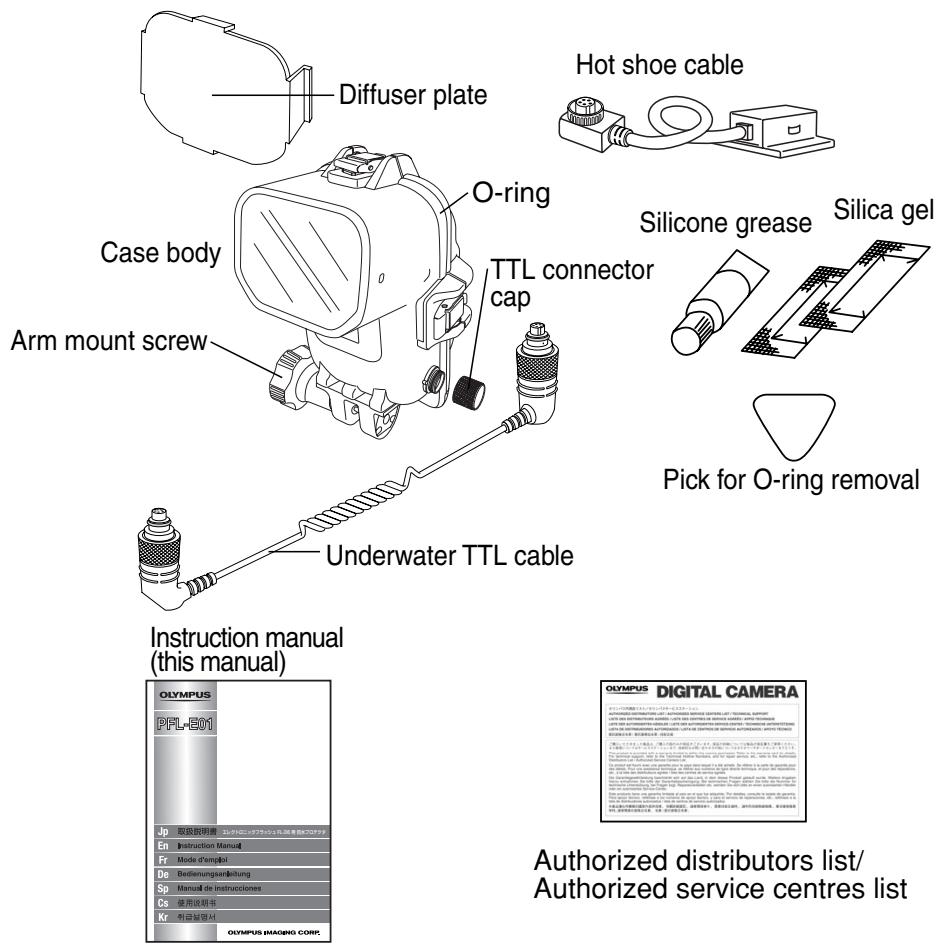
| Supplied accessories | Diffuser, hot shoe cable, silicone grease, silica gel packet, O-ring removal tool |
| Recommended maintenance | Clean with fresh water, replace O-ring at least once a year |
| Operating temperature | Avoid extreme temperatures or sudden changes |
| Precautions | Do not use organic solvents, chemical detergents, or unspecified grease |
| Warranty | Warranty void if unauthorized disassembly or modification |
| Available spare parts | O-ring (POL-E201), silicone grease (PSOLG-1), silica gel (SILCA-5) |
Frequently Asked Questions - PFL-E01 OLYMPUS
User questions about PFL-E01 OLYMPUS
0 question about this device. Answer the ones you know or ask your own.
Ask a new question about this device
Download the instructions for your Photo accessory in PDF format for free! Find your manual PFL-E01 - OLYMPUS and take your electronic device back in hand. On this page are published all the documents necessary for the use of your device. PFL-E01 by OLYMPUS.
USER MANUAL PFL-E01 OLYMPUS
Thank you for buying the Underwater Case PFL-E01.
Please read this instruction manual carefully and use the product safely and correctly.
Please keep this instruction manual for reference after reading it.
- Wrong use may cause damage to the flash on the inside from water leakage, and repair may not be possible.
Before use, perform an advance check as described in this manual.
Disclaimer
- Unauthorised copying of this manual in part or in full, except for private use, is prohibited.
Unauthorised reproduction is strictly prohibited. - OLYMPUS IMAGING CORP. shall not be responsible in any way for lost profits or any claims by third parties in case of any damage occurring from incorrect use of this product.
- OLYMPUS IMAGING CORP. shall not be responsible in any way for damage, lost profits, etc. caused by the loss of image data due to defects, disassembly, repair or modification of this product by people, other than third parties specifically authorised by OLYMPUS IMAGING CORP. or for other reasons.
Please read the following before using the product
This product has been precision-crafted from high quality polycarbonate. When used correctly, it lets you take photographs safely up to a water pressure equivalent to a depth of 60 metres.
- To ensure correct and safe use of the case, please read all instructions on handling and carrying out the system check as well as care, maintenance and storage of the case.
- OLYMPUS IMAGING CORP. shall in no way be responsible for damage caused by water to the flash contained in the case.
- OLYMPUS IMAGING CORP. shall not pay any compensation for accidents (injuries or material damage) that may occur during the use of this product.
- When using the Case, only the TTL AUTO and MANUAL flash modes can be used.
- When using the Case, flash bounce angle adjustment and test flashing are not available.
- When using the Case, the flash's wide panel cannot be pulled in or out.
A bracket or arm is required to use this Case in combination with a Digital Camera Case equipped with a TTL cable connector.
For safe use
This instruction manual uses various pictographs for correct use of the product and to prevent danger to the user and other persons as well as property damage. These pictographs and their meanings are shown below.
WARNING This indicates contents for which the possibility of human death or severe injury in case of handling under disregard of this indication can be assumed.
CAUTION This indicates contents for which the possibility of human injury or the possibility of material damage in case of handling under disregard of this indication can be assumed.
WARNING
-
Keep this product out of the reach of babies, infants, and children. There is the possibility of occurrence of the following types of accidents.
-
Injury by dropping onto the body from a height.
- Injury from parts of the body getting caught in parts which open and close.
- Swallowing of small parts. Please consult a physician immediately if any parts have been swallowed.
-
Triggering of the flash in front of the eyes may cause permanent vision impairment etc.
-
Never store this product with an electronic flash with batteries inside. Battery leakage could result in a fire or an explosion.
- If water comes into contact with the electronic flash inside this product, remove the batteries from the flash immediately. Otherwise, hydrogen gas could be produced, which could lead to a fire or an explosion.
- This product is made of resin. There is the possibility that injuries may be caused when it becomes broken because of strong impact with a rock or other hard objects. Please handle with sufficient care.
- The silica gel and the grease for silicone O-rings for this product are not edible.
CAUTION
- Do not disassemble or modify this product. This may cause water leakage or trouble. In case of disassembly or modification by persons other than those appointed by OLYMPUS IMAGING CORP., the guarantee shall not apply.
- Do not place this product at locations with abnormally high or abnormally low temperatures or at locations with extreme temperature changes. The product may deteriorate.
- Opening and closing at locations with much sand, dust, or dirt may impair the waterproof characteristic and cause water leakage. This should be avoided.
- This product is suitable for use at water pressures equivalent to depths of up to 60 meters. Please note that diving at depths greater than 60 meters may result in deformation or damage to this product, as well as to the camera and lens. In this case, water penetration may occur.
- To prevent water leakage, do not handle the Case roughly. For example, do not throw the Case overboard or dive into water while holding the Case in your hands. Be sure to handle the Case carefully when passing it to another person.
- If the electronic flash contained in the case gets wet, wipe off all moisture immediately and check the flash is working correctly.
- Before traveling by air, please make sure you remove the O-rings, otherwise the difference in air pressure may make it impossible to open the case.
- To ensure safe and trouble-free handling and operation of the electronic flash in this product, please read the flash's instruction manual carefully.
- When sealing this product, please take care to ensure no foreign matter such as sand, dirt or hair is on the O-rings or contact surfaces.
- Before storing this product, always be sure to take out the flash.
- When using this product, do not fire the flash at close range to a person or animal.
Batteries
The flash is powered by a pair of "AA"-size LR6 alkaline batteries, FR6 lithium batteries, ZR6 nickel-manganese batteries, nickel-hydrogen (Ni-MH) batteries, nickel-cadmium (Ni-Cd) batteries or ZR6Y "Oxyride" batteries. The flash can also be powered with a CR-V3 type lithium battery pack (Olympus Model LB-01).
- Keep the batteries' contacts away from damp and humidity to avoid impairing performance and/or causing an accident.
- For other battery handling precautions, please read the relevant sections in the electronic flash's instruction manual.
For Prevention of Water Leakage Accidents
If water gets inside this product during use, irreparable damage may be caused to the electronic flash inside the case. Please note the following points.
- When sealing this product, make sure that no hairs, fibers, sand particles or other foreign matter stick not only to the O-ring, but also to the contact surface. Even a single hair or a single grain of sand may cause water leakage. Please check with special care.
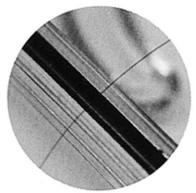
Examples for foreign matter sticking to the O-ring
Hair
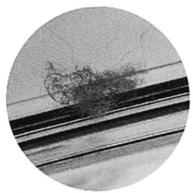
Fibers
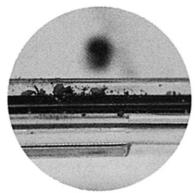
Grains of sand
- The O-ring is a consumption product. Please replace it at least once a year by new one. Also perform maintenance for every use.
- Deterioration of the O-ring will progress according to the use conditions and the storage conditions. Immediately replace the O-ring by a new one if it is damaged, shows cracks, or has lost its elasticity.
- At the time of O-ring maintenance, clean the inside of the O-ring groove and confirm the absence of dirt, dust, sand, and other foreign matter.
- Apply the specified silicone O-ring grease to the O-ring.
- The waterproof function is not effective when the O-ring is not installed correctly. When installing the O-ring, take care that it does not project from the groove and that it is not twisted. Also, when sealing the Case, close the lid after confirming that the O-ring has not come out of the groove.
- This product is an airtight construction made of plastic (polycarbonate). When it is left for a long time in a car, on a boat, at the beach, or at other places reaching a high temperature, or when it is subjected for a long time to uneven external force, it may be deformed and the waterproof function may be lost. Pay sufficient attention to temperature control. Also do not place heavy objects onto the product during storage or transport, and avoid unreasonable storage.
- When the O-ring contact surface is pressed strongly from the outside of the Case, or when the Case is twisted, the waterproof function may be lost. Take care not to exert excessive force.
- Please be sure to perform the advance test and the final test each time before using the case.
- If you see any drops of water or any other signs of water penetration during use, stop the dive immediately. Carefully dry from the flash and waterproof case, and then perform the "Final System Check" and confirm whether any water actually penetrated this product.
Handling the Product
- Use or storage of the product at the following locations may cause defective operation, defects, trouble, damage, fire, internal clouding, or water leakage. Always avoid these locations.
- Places where high temperatures exist, such as in direct sunlight, in a closed vehicle, etc., and/or where extreme differences in temperatures exist.
- Places where there is a lot of dust.
- Places where there are open fires.
- Places subject to vibrations.
- Places where volatile chemicals are stored or used.
Water deeper than 60 meters.
This product is made of polycarbonate resin with excellent impact resistance, but it may be damaged by scraping against rocks etc. It also may break when it hits hard objects or is dropped.
This product is not intended as a case to protect the internal flash from heavy knocks. If the case is subjected to a heavy knock or significant pressure, the flash inside may be severely damaged. - When this product is not used for a long time, the O-rings may deteriorate, diminishing its waterproof properties. Therefore, please use the case only after first performing the first and final system checks described in this instruction manual.
- Do not apply excessive force to the arm mount and underwater TTL cable connector.
The range of the flash underwater may be lower than on land depending on the conditions at the time of shooting (clarity of the water, suspended matter, etc.). Be sure to check the image before actual shooting. - Do not use the following chemicals for cleaning, corrosion prevention, prevention of fogging, repair or other purposes. When these are used for the Case directly or indirectly (with the chemicals in vaporized state), they may cause cracking under high pressure or other problems.
| Chemicals which cannot be used | Explanation |
| Volatile organic solvents, chemical detergents | Do not clean the Case with alcohol, gasoline, thinner or other volatile organic solvents or with chemical detergents etc. Pure water or lukewarm water is sufficient. |
| Anticorrosion agent | Do not use anticorrosion agents. The metal parts use stainless steel or brass, and washing with pure water is sufficient. |
| Commercial defogging agents | Do not use commercial defogging agents. Always use the specified desiccant silica gel. |
| Grease other than specified silicone grease | Use only the specified silicone grease for the silicone O-ring, as otherwise the O-ring surface may deteriorate and water leakage may be caused. |
| Adhesive | Do not use adhesive for repairs or other purposes. When repair is required, please contact a dealer or a service station of our company. |
- Do not perform operations other than specified in this instruction manual, do not remove or modify parts other than specified, and do not use parts other than specified.
Any troubles in taking pictures or with the equipment resulting from the above actions shall be outside the guarantee.
Contents
Disclaimer E-1
Please read the following before using the product
For safe use E-1
Batteries E-2
For Prevention of Water Leakage Accidents E-3
Handling the product E-4
Contents E-5-6
1.Preparations E-7
Check the contents of the package. E-7
Names of the parts E-8
Preparing the case E-9
Attaching/detaching the diffuser E-9
Connection to the camera case E-9
1) Connecting the underwater TTL cable E-9
2) Connecting the hot shoe cable E-11
3) Mounting on an arm E-12
2. Advance Check of the Case E-13
Advance test before use E-13
Advance Test E-13
3. Inserting the electronic flash. E-14
Checking the electronic flash E-14
Loading the batteries E-14
Checking the batteries E-14
Inserting into the case E-14
Which electronic flashes can be used? E-14
Open the Case. E-15
Mounting the electronic flash E-15
Inserting the silica gel bag E-15
Check the loading status. E-16
Seal the Case. E-16
Perform the final checks. E-16
Visual inspection E-16
Switching the electronic flash on E-16
Final Test E-17
4. Taking photos underwater E-18
Setting the flash mode E-18
Underwater TTL AUTO shooting E-18
Underwater MANIUAL shooting E-18
5. Handling After Shooting E-19
Wipe off any waterdrop. E-19
Removing the electronic flash E-19
Cleaning the case with pure water E-20
Disconnecting the TTL cable E-20
Drying the case and TTL cable E-20
6. Maintaining the Waterproof Function E-21
Remove the O-ring. E-21
Remove any sand, dirt, etc. E-21
Install the O-ring E-22
How to Apply Grease to the O-ring E-22
Replace consumable products. E-22
7. Appendix E-23
Q&A on the use of the PFL-E01 E-23
Specifications E-26
1. Preparations
Check the contents of the package.
Check that all accessories are in the box.
Contact your dealer if accessories should be missing or damaged.
Names of the parts
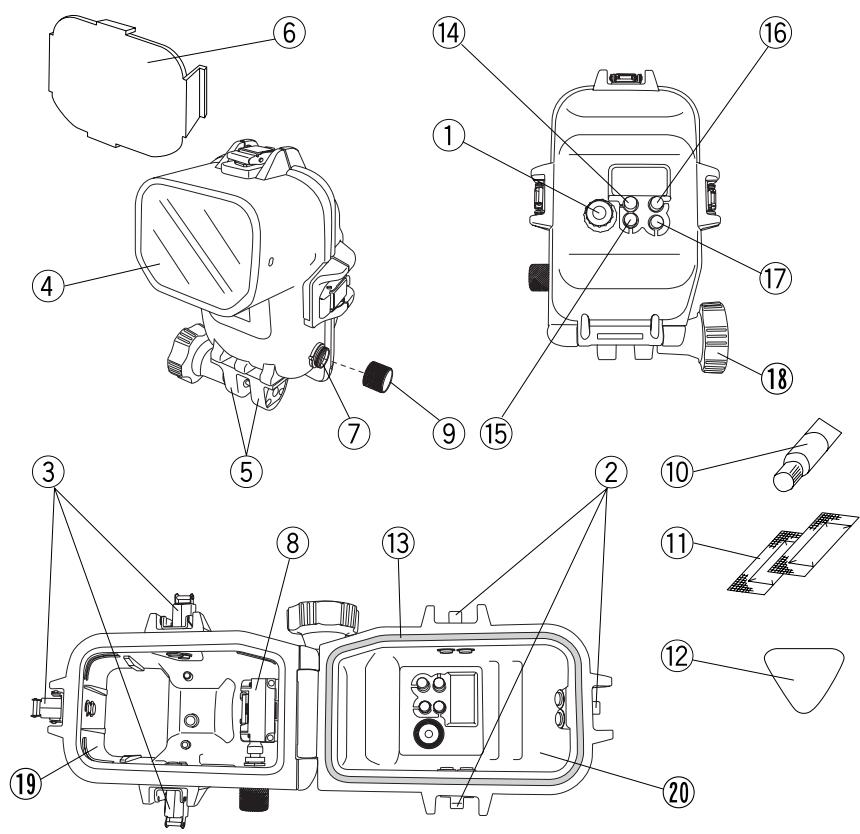
*① Select dial
②Buckle hook
③ Buckle lock/unlock lever
④ Light emitting window
⑤ Arm mount
⑥ Diffuser
⑦ Underwater TTL cable connector
Hot shoe
⑨ Underwater TTL cable connector cap
Grease for O-rings (White-cap tube)
① Silica gel
Pick for O-ring removal
③ O-ring (POL-E201)
⑭ MODE button
⑮ ZOOM button
^ 16 LIGHT button
⑰ Power button
Arm mount screw
⑨ Front lid
② Rear lid
Note : The case parts marked with an asterisk (*) correspond to functions on the electronic flash. Consequently, operation of these parts activates the corresponding functions in the flash. For details on these functions, refer to the electronic flash's instruction manual.
Preparing the case
Before shooting, prepare the case as described below.
Attaching/detaching the diffuser
The Case is provided with a diffuser to reduce the intensity of the light emitted by the flash. You can use the diffuser to reduce the amount of flash light directed at the subject, to minimize shadows produced by the illuminated subject, or reduce the light intensity of the flashlight. Attach or detach the diffuser as shown in the following illustrations.
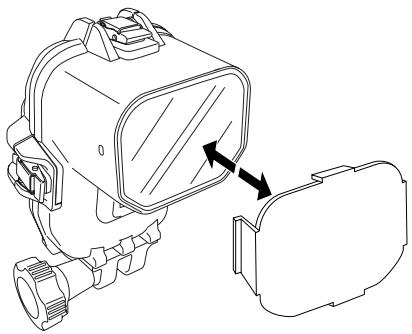
CAUTION : The diffuser makes it possible to reduce flash intensity by about 3 steps compared an undiffused flash. The diffuser is especially useful when you need to temporarily reduce the flash intensity for close-up macro shooting.
Connection to the camera case
To perform underwater TTL shooting using this case, connect the underwater TTL cable between this case and the camera case. Connect the hot shoe cable (provided with this case) between the TTL cable connector in the camera case and the camera's hot shoe.
1) Connecting the underwater TTL cable
① After making sure the Case is dry, loosen and remove the TTL cable connector cap on the Case so you can connect the underwater TTL cable to the TTL cable connector on the Case (you can use the connector at either end of the cable). Before connecting, apply a thin layer of the silicone grease provided with the Case to the thread of the TTL cable connector.
② Check the orientation of the cable's 5-pin plug and insert it into the TTL connector's 5-pin jack on the Case. To facilitate insertion, align the marking on the cable's connector with the marking on the Case's TTL cable connector.
③ Turn the connector lock dial on the Case all the way to lock the connection firmly.
To disconnect the underwater TTL cable, reverse the connection procedure. After disconnecting the cable, screw the TTL cable connector cap back on the Case. Make sure it is screwed on tightly.
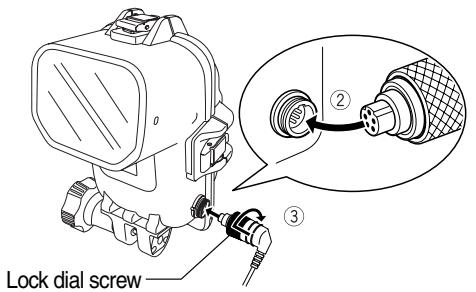
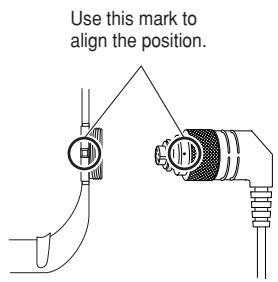
CAUTION : Always make sure that the case are completely dry before connecting or disconnecting the underwater TTL cable.
- O-rings are attached to the case's TTL connector caps and the underwater TTL cable's connectors to keep out water. If any fibers, sand or hair are attached to an O-ring, the integrity of the waterproof function will be affected and water penetration may result. Be sure to check and remove any foreign matter on the O-rings before connecting these connectors.
- Pay attention to the position of the 5 pins when connecting the connectors.
- Do not use excessive force when tightening the lock dial screw on the cable's connector.
- When the underwater TTL cable is not connected, be sure to put the caps back on the TTL cable connectors.
2)Connecting the hot shoe cable
Connect the hot shoe cable, provided with this case, between the TTL cable connector on the inner side of the camera case and the hot shoe of the camera. Pay attention to the following points:
① Before inserting the camera into the camera case, loosen and remove the cap on the TTL cable connector inside the camera case;
② Insert the 5-pin connector of the hot shoe cable into the TTL cable connector inside the camera case;
③ Turn the lock dial screw on the hot shoe cable's connector all the way clockwise to lock the connector firmly;
(4) Insert the camera in the camera case;
⑤ After inserting the camera, insert the hot shoe unit of the hot shoe cable all the way into the camera's hot shoe.
The hot show cable can be disconnected by reversing the connection steps. In the final step, screw the cap back onto the TTL cable connector inside the camera case until it stops.
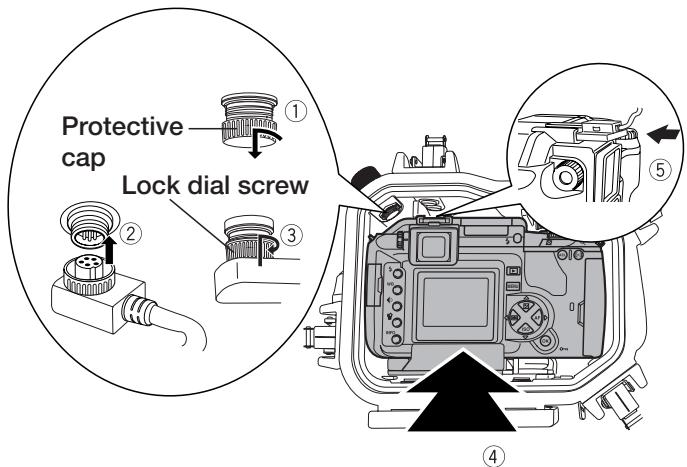
CAUTION: · Pay attention to the position of the 5 pins when connecting the connectors.
- When screwing in the lock dial screw for clamping the hot shoe connector, place the Case upside down. Be careful not to drop the Case.
- Do not use excessive force when tightening the lock dial screw on the cable's connector.
- When the hot shoe cable is not connected, be sure to put the caps back on the TTL cable connectors.
3) Mounting on an arm
The Case can be mounted on an arm as described below.
The Case can also be mounted on a commercially available arm with a width of 12mm .
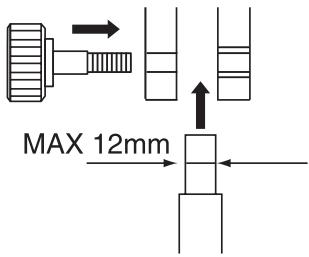
Insert the arm into the arm mount and turn the provided arm mount knob all the way to clamp the arm.
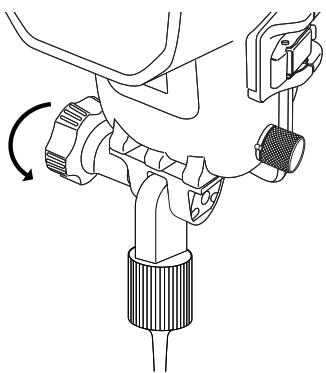
△CAUTION :· Do not use excessive force when tightening the arm mount knob.
2. Advance Check of the Case
Advance test before use
This Case has been the subject of thorough quality control for the parts during the manufacturing process and thorough function inspections during the assembly. In addition, a water pressure test is performed with a water pressure tester for all products to confirm that the performance conforms to the specifications. However, depending on the carrying and storage conditions, the maintenance status, etc., the waterproof function may be damaged.
Before diving, always perform the following advance test and the water leakage test after installation of the flash.
Advance Test
- Before inserting the electronic flash, take the empty case to the intended depth and make sure that no water gets inside the case.
-
Main causes of water leakage are as follows.
-
One or more O-rings have not been installed.
- Part of an O-ring or an entire O-ring is outside the specified groove.
- O-ring damage, cracks, deterioration or deformation.
- Sand, fibers, hair or other foreign matter sticking to the O-ring, the O-ring groove or the O-ring contact surface.
- Damage to an O-ring groove or O-ring contact surface.
- When all of the above causes have been eliminated, check the hand strap and silica gel when closing the Case.
CAUTION : The most suitable method for checking water leakage is to immerse the Case to the intended water depth. When this is difficult, water leakage also can be checked at a shallow depth with no water pressure. Do not feel that this is troublesome, but perform this test.
- If the advance test should show water leakage with normal handling, stop using the Case and contact your dealer or an Olympus service station (listed on the rear page of this instruction manual).
3. Inserting the electronic flash.
Checking the electronic flash
Loading the batteries
Insert two of any of the following types of batteries: LR6 alkali batteries, lithium batteries, nickel-manganese batteries, MH batteries, Ni-Cd batteries (KR-15/51) or Oxyride batteries (XR6Y) as shown in the illustration. The CR-V3 lithium battery pack (Olympus product LB-01) can also be loaded.
- "AA"-size manganese batteries cannot be used.
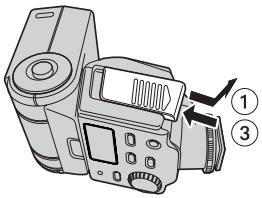
① Open the battery compartment cover.
② Insert batteries in the correct orientations.
③ Close the battery compartment cover.
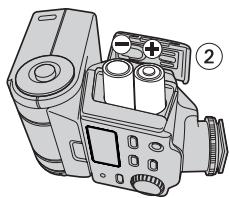
"AA"-size batteries
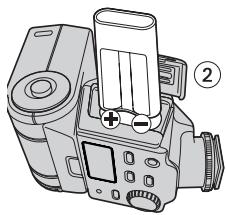
CR-V3
Checking the batteries
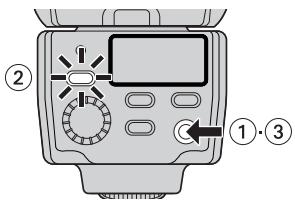
① Press the power button to switch the electronic flash on.
② Confirm that the charge lamp lights up.
③ Press the power button again to switch the electronic flash off.
Note: · To avoid running out power during shooting, it is recommended to load fully charged batteries before every diving session.
Inserting into the case
Which electronic flashes can be used?
The product (PFL-E01) is exclusively for use with the FL-36 Electronic Flash.
Open the Case.
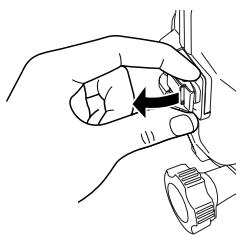
Insert a finger below each buckle lock/unlock lever as shown in the illustration. Pinch the buckle hook and pull it up slowly.
Mounting the electronic flash
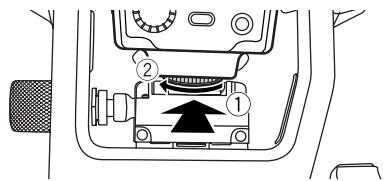
Mount the FL-36 flash on the Case's hot shoe as shown in the illustrations.
① Slide the electronic flash all the way into the hot shoe.
② Turn the shoe lock dial of the electronic flash to clamp it.
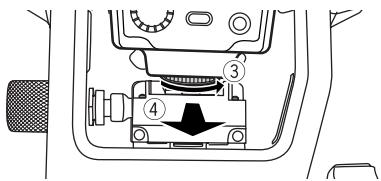
To remove the FL-36 flash from the Case:
③ Turn the shoe lock dial of the electronic flash to unclamp it.
(4) Hold the dial of the electronic flash firmly with a finger, and slide it out from the hot shoe.
△CAUTION : • Be sure to switch the electronic flash OFF before loading.
- Do not apply excessive force when loading the electronic flash.
- When removing the electronic flash, hold it firmly so you don't drop it.
Inserting the silica gel bag
Before sealing the Case, insert the accessory silica gel bag (for prevention of fogging) between the right side of the electronic flash and the Case. Insert the bag so that the longer glued side is on the inside.
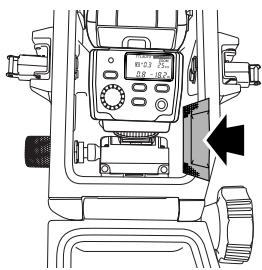
△CAUTION : • Insert the silica gel bag as far as it will go at the specified location and with the specified orientation. If the orientation is incorrect, the silica gel bag will catch when the Case is sealed and water will leak into the Case.
- If the bag is only inserted part of the way, it will get caught by the O-ring when you try to seal the Case and water will leak into the Case
- Once silica gel has been used, its moisture absorption performance will be impaired. Always change the silica gel when you open or close the Case.
Check the loading status.
Always perform the following final checks before sealing the Case.
- Is the electronic flash attached firmly to the hot shoe of the Case?
- Is the silica gel inserted all the way at the specified position?
- Is the O-ring installed properly?
- Are the O-ring and the O-ring contact surface free of dirt and other foreign matter?
Seal the Case.
Close the rear lid (gently, so that the O-ring will not come out of the groove), engage the buckles with the hooks on the rear lid, and push the buckle lock/unlock levers down in the direction of the arrows. The Case will be sealed airtight.
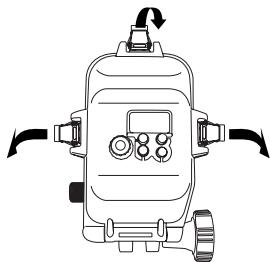
CAUTION: Seal the Case by pushing all three buckle lock/unlock levers down in the direction of the arrows.
- If one of the buckles is left open, the Case will not be sealed properly and water leaks will occur.
Perform the final checks.
Visual inspection
After sealing the Case, visually examine the sealed sections on the front and rear lids to confirm that the O-ring is not twisted or out of the groove and that no foreign matter has been caught.
CAUTION : Hairs, fibers and other small items are not easy to see, but they may allow water to get inside, so that special attention is required.
Switching the electronic flash on
Press the power button and confirm that the electronic flash power is switched ON/OFF. Turn the select dial and confirm that the electronic flash mode dial is set to the TTL AUTO or MANUAL position.
CAUTION: After loading the electronic flash in the Case, confirm that the select dial is rotatable. If not, there may be oil or grease on the dial knob. Wipe it off completely.
Final Test
After the electronic flash has been inserted in the case, you should perform the final system check. This covers all tests that you must carry out to make sure that no water can enter the case. The tests are easy to do and only take about 5 minutes. All you need is a bowl or tub of water.
The following procedure was originally developed to test for water penetration inside the camera case. The test procedure for the waterproof flash case is identical, so please follow these steps.
| Simple waterimmersion test | Explanatory image | Hints | |
| 1 | Place the Case slowly into the water. | As the Case is transparent, waterdrops entering into it can be confirmed easily. | |
| 2 | At first, immerse the Case for only three seconds. | In case of trouble with the O-ring, three seconds are enough for water to enter. Are there air bubbles coming out between the lids? Please check carefully. | |
| 3 | Check that no water has entered into the Case. | Remove the Case from the water and check that no water has accumulated at the bottom of the Case.Is there any water trickling down? | |
| 4 | Next, immerse the Case for 30 seconds. | Check carefully for air bubbles! Do not perform any operation yet, but just observe. | |
| 5 | Check that no water has entered. | Remove the Case from the water and check that no water has accumulated at the bottom of the Case.Perform very careful confirmation. | |
| 6 | Next, check by immersing for three minutes. | Check carefully for air bubbles! Try operation of the buttons used frequently. Check carefully for air bubbles! If there is still no entry of water, everything is OK! | |
| 7 | This is the final check.Has the silica gel become moist? | This is very important! Has the silica gel become moist? Please check carefully! As the inside can be seen, the inspection for entry of water also can be made securely! | |
| 8 | Now everything is all right. | Now everything is all right! Have a nice dive! |
4. Taking photos underwater
Setting the flash mode
This case enables underwater TTL AUTO shooting.
CAUTION : - When this Case is used, the AUTO shooting mode of the electronic flash cannot be used. Even if the mode button of the flash is set to AUTO, it will emit light at the maximum intensity.
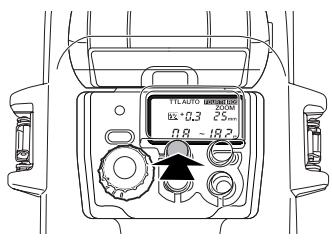
Underwater TTL AUTO shooting
Set the protector's mode button to set the electronic flash to the TTL AUTO mode. For details, including digital camera setup, refer to the instruction manuals for the camera and flash.
Underwater MANUAL shooting
Set the protector's mode button to set the electronic flash to the MANUAL mode. For details, including digital camera setup, refer to the instruction manuals for the camera and flash.
CAUTION : • For the camera's iris setting and standard shooting range, refer to the flash instruction manual.
- The underwater flash shooting range (distance) maybe reduced depending on the conditions at the time of shooting (clarity of the water, suspended matter, etc.). Be sure to check the image on the camera's LCD monitor before actual shooting.
5. Handling After Shooting
Wipe off any waterdrop.
After underwater shooting, remove any drops of water from the case.
Use pressurized air or a soft, lint-free cloth to carefully wipe away any moisture from the hinge between the front and rear lids, the TTL cable connector and the buckles.
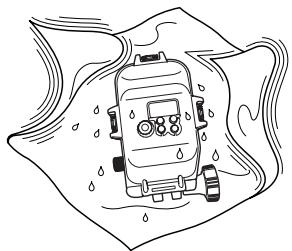
CAUTION : - Especially when waterdrops remain between the front and the rear lid, they may spill to the inside when the Case is opened. Take special care to wipe off all waterdrops.
- When opening the Case, take sufficient care that no water will drop from your hair or body onto the Case and the flash.
- Before opening the Case, make sure that your hands or gloves are free of sand, fibers, etc.
- Do not open or close the Case at locations where water or sand is to be sprayed. When this cannot be avoided because you have to exchange the battery, place a sheet downwind from some object and take care that no water or sand is sprayed.
- Never touch the electronic flash and/or batteries when your hands are wet with sea water.
Note : Moisten a towel etc. in advance with pure water and keep it in a plastic bag so that you can wipe the salt from your hands and fingers before handling the camera.
Removing the electronic flash
Carefully open the case, loosen the shoe lock dial of the flash and, while holding the mode dial knob on the case firmly, slide the flash out of the case's hot shoe.
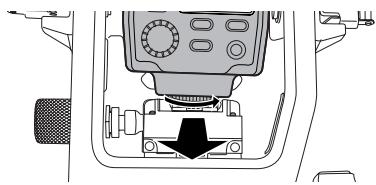
△CAUTION: After opening the case, always put it down it with the O-ring side face-up. Otherwise, dirt or other foreign matter could attach itself to the O-rings and/or the contact surfaces, allowing water to penetrate the case during the next dive.
- Before removing the flash, make sure the flash's shoe lock dial is loose. Never use force to remove the flash. This could damage the flash or the case.
Cleaning the case with pure water
After using this case, remove the flash, then seal it again with the TTL cable still connected, and rinse it with pure water as soon as possible. After use in salt water, the case should be immersed for an extended period of time in a bowl of pure water to remove any salt water or salt residues.
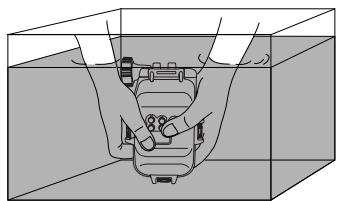
CAUTION : - Water may enter the case under localized high water pressure (such as from a hose.) Before cleaning the case with water, the flash should be removed.
- Operate the mode dial knob and buttons of the case when it is in clean tap water to remove any salt from their shafts. Do not disassemble the case for cleaning!
- If the case is dried before all salt has been removed, this could affect its performance. Always make sure all salt has been removed!
- If the case should be cleaned without the TTL cable connected to it, be sure to attach the cap to the connector in advance.
Disconnecting the TTL cable
After making sure that the case and TTL cable are free of water drops, loosen the lock dial screw and disconnect the TTL cable.
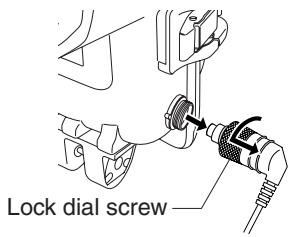
CAUTION : Do not apply excessive force when disconnecting the cable.
- Be careful not to leave dust or other foreign matter on the connector's O-ring. If dust or other foreign matter gets on the O-ring, clean it in the same way as the Case's O-ring.
- After disconnecting the cable, be sure to replace the TTL cable connector cap on the connector. Before doing so, however, apply a thin layer of the silicone grease provided with the Case to the threaded section of the TTL cable connector on the Case.
Drying the case and TTL cable
After washing the case and TTL cable, dry them with a clean, soft, lint-free cloth. Then, leave them to dry completely in a well-ventilated location protected from direct sunlight.
CAUTION: Never use hot air from a hair dryer or other appliance to dry the case and TTL cable, and never place them in direct sunlight to dry. This could deteriorate or deform the case, TTL cable and O-ring and lead to water penetration. When wiping the case, take care not to scratch it.
6. Maintaining the Waterproof Function
Remove the O-ring.
Open the Case and remove the O-ring from the Case.
Removal of the O-ring
① Insert the O-ring removal pick between the O-ring and the wall of the O-ring groove.
②Move the tip of the inserted pick under the O-ring. (Take care not to damage the O-ring groove with the tip of the pick.)
③Hold the O-ring with your fingertips after it has come out of the groove and remove it from the Case.
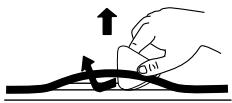
Remove any sand, dirt, etc.
After visually checking that dirt has been removed from the O-ring, checking for attached sand and other foreign matter, as well as for damage and cracks can be done by squeezing the entire circumference of the O-ring lightly with your fingertips.
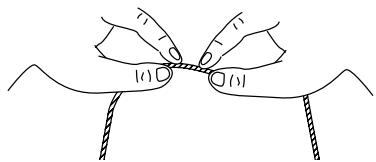
Use a lint-free clean cloth or cotton swab to remove the foreign matter attached to the O-ring groove. Also, remove any sand or dust from the O-ring contact surface on the Case.
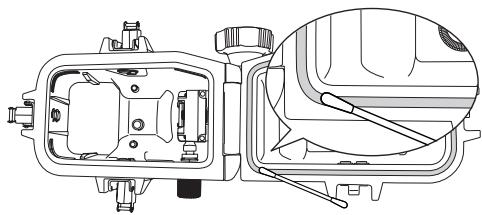
CAUTION: - When a mechanical pencil or a similar other sharp object is used to remove the O-ring or to clean the inside of the O-ring groove, the Case and the O-ring may be damaged and water leakage may be caused.
- When the O-ring is checked with the fingertips, take care not to stretch the O-ring.
- Never use alcohol, thinner, benzene or similar solvents or chemicals detergents to clean the O-ring. When such chemicals are used, it is likely that the O-ring will be damaged or that its deterioration will be accelerated.
Install the O-ring
Confirm that no foreign matter is attached, apply a thin coat of the accessory grease to the O-ring, and fit the O-ring into the groove. At this time, confirm that the O-ring does not stick out from the groove.
※This sections explains how to apply lubricant to the camera case. Use the same procedure for the flash case.
How to Apply Grease to the O-ring
| 1 | Apply the specified grease | Make sure there is no dirt on your fingers or on the O-ring; then squeeze about 5 mm of grease onto your fingertip. | |
| 2 | Spread the grease over the O-ring. | Using two fingers and a thumb, spread the grease over the O-ring while rubbing it in. Use caution not to squeeze or pull the O-ring too hard. | |
| 3 | Check that there is no damage or irregularities on the O-ring. | Once the grease has permeated throughout the O-ring, check it for damage or irregularities (both visually and by touch). If you notice any abnormalities, replace the O-ring with a new one. | |
| 4 | Apply the grease to the O-ring contact surface. | Use any residual grease on your fingertips to clean and lubricate the O-ring contact surface on the front lid. |
CAUTION : Always perform maintenance of the waterproof function even when the Case has been opened to exchange the battery or the image storage during shooting. Neglecting this maintenance may become the cause of water leakage.
- When the Case is not to be used for a long time, remove the O-ring from the groove to prevent deformation of the O-ring, apply a thin coat of silicone grease, and store it in a clean plastic bag or the like.
- When drying is done with salt attached, it is likely that a function impairment will be caused. After use, always wash off any salt.
Replace consumable products.
- The O-ring is a consumable product. Independent of the number of times the Case is used, it is recommended that the O-ring should be replaced by a new one at least once a year.
- Deterioration of the O-ring is accelerated by the use conditions and the storage conditions. Replace the O-ring even before a year has passed if it shows signs of damage, cracking or loss of elasticity.
Note : Please use original Olympus products for the silicone O-ring grease, the silica gel, and the O-ring. These consumable products also can be purchased at an Olympus service station.
7. Appendix
Q & A on the use of the PFL-E01
Q 1: Which electronic flashes can be used with this case?
A 1 :The PFL-E01 case is designed exclusively for the FL-36 Electronic Flash.
Q.2: What precautions must be taken when loading the electronic flash into the Case?
A 2: Pay special attention to the following items when loading the flash into the Case.
(1) Check that the remaining capacity of the batteries in the electronic flash is sufficient. Mount the electronic flash on the hot shoe of the Case correctly and tighten the shoe lock dial of the electronic flash tightly.
(2) Before sealing the Case, confirm that the O-ring has been installed properly in the Case.
(3) Confirm that the O-ring and the O-ring contact surface are free of dirt, hairs, and other foreign matter.
(4) Insert the silica gel for defogging. Please use silica gel specified for the Olympus Case.
(5) Confirm that the TTL cable and hot shoe cable are connected properly.
Q 3: What cautions must be observed when using and storing the Case?
A 3:Pay special attention to the following items.
(1) When the O-ring contact surface is pressed strongly from the outside of the Case, or when the Case is twisted, the waterproof function may be impaired and water leakage may be caused.
(2) When the Case is used, left or stored at the following locations, defective operation or trouble may be caused. Always avoid such locations.
(a) Places where the Case can reach high temperatures under direct sunlight or in a car, places with extremely low temperatures, and places with extreme temperature variations.
(b) Places with open fire
(c) Places with volatile substances
(d) Places with vibrations
(3) The following instances could lead to operational problems and/or damage to this case and the flash inserted in it. Avoid knocks and sudden increase in pressure caused by:
(a) Hitting other objects
(b) Dropping
(c) Placing heavy objects on top of the Case
(4) When the Case is not used for a long time, trouble from formation of mold etc. may be caused. Before use, confirm the operation of all operation parts and perform the advance test and the final test.
(5) When not using this case, be sure to take the flash out.
Q 4: What cautions must be observed when opening and closing the Case?
A 4 : Pay special attention to the following items.
(1) Do not open and close the Case at locations with water spray or sand spray.
(2) Wipe off all waterdrops from the gap between the front lid and the rear lid and around projections and recesses such as the buckles. When this is not done, entry of waterdrops into the Case is to be feared at the time of opening and closing.
(3) When opening the case, make sure no water from outside (e.g. dripping from your hair or diving suit) gets inside the case and/or on the flash!
(4) When the Case is open, check that there is no attachment of sand, fibers or other foreign matter to the O-ring and the O-ring contact surface.
(5) Never touch the flash with a hand wet with sea water.
(6) If you notice while diving that water has entered the case, stop the dive immediately and perform water leak test to check for water penetration. If any water has reached the electronic flash, do not use it, dry it immediately and contact your dealer or Olympus.
Q 5: How to handle the case after use?
A 5: After using the case, remove the flash and rinse the case off in pure water as soon as possible. After use in salt water, you should immerse the case for an extended period of time in pure water. Operate the mode dial knob and buttons of the case when it is in clean tap water to remove any salt from their shafts. After rinsing, remove moisture with a dry cloth free of salt, and dry the case in the shade. Never use hot air from a hair dryer or other appliances to dry the case, and never place it in direct sunlight to dry, as this could deform, discolor, damage or deteriorates the case and O-rings. The inner side of the case should be wiped with a soft, lint-free cloth. Remove the O-rings, wipe off the attached foreign matter such as salt, sand and dirt, also clean the grooves in which O-rings have been fit and the surfaces in contact with O-rings, and dry all of them. When removing an O-ring from the groove, do not use a sharp object to avoid damaging the O-ring and causing leaks. Be always sure to use the provided pick for removing the O-ring.
Q 6: What points should be considered when using the case underwater?
A 6: Please remember the following points.
(1) Install the Case properly on a bracket or arm.
(2) Adjust the case orientation so that the flash light is not obstructed.
(3) Set the flash mode to TTL AUTO or MANUAL. (For the camera setup in these modes, refer to the instruction manual for the camera or flash.)
Q 7: How can I check for water leakage?
A 7: Here you should carry out the first check and the final system check with the flash inside the case.
It is also recommended that you carry out the first check by diving to the intended depth with the empty case. If this is not possible, this test should be carried out at a depth of at least one meter or in a container of water (e.g. a bath, bucket, etc.). The final system check can then be carried out in a similar container of water.
Q 8: What are the causes for entry of water?
A 8: The main causes for the entry of water are shown below. Please check them most carefully.
(1) Forgetting to install the O-ring
(2) The O-ring is partly or completely outside the groove.
(3) Damage, deterioration, or deformation of the O-ring
(4) Sand, fibers, hair or other foreign matter on the O-ring
(5) Sand, fibers, hair or other foreign matter on the O-ring groove or the O-ring contact surface
(6) When the bag of silica gel is caught between the front and rear lids when closing the case.
(7) Throwing the Case from a boat into the water, jumping with the Case into the water, or other sudden application of strong forces onto the Case. When entering the water, hand the Case over quietly or avoid impacts in other ways.
Q 9: What are the important points for O-ring maintenance?
A 9: Please observe the following items.
(1) Never use alcohol, thinner, benzene or similar organic solvents or chemical detergents to clean the O-ring. When such chemicals are used, it is to be feared that the O-ring will be damaged or that its deterioration will be accelerated.
(2) Use the original Olympus silicone O-ring grease (white cap). The grease attached to Cases up to PT-008 (red cap) and the grease of other companies are not suitable for this silicone O-ring, and use of such grease may cause deterioration of the surface and impairment of the waterproof function.
(3) In order to avoid deformation of the O-ring when the Case is not used for a long time, remove the O-ring from the Case, apply a thin coat of the special grease, and store the O-ring in a clean plastic bag. For reuse, confirm that the O-ring is free of damage and cracks, that it has sufficient elasticity, that the surface is free of stickiness and other abnormalities, and use it after applying a thin coat of the special grease. Excessive application of grease does not improve the waterproof function or the permissible withstand pressure. However, it may facilitate attachment of sand, dirt, etc.
A thin, uniform coat produces the best result.
(4) The O-ring is a consumable product. Replace it at least once a year.
(5) Deterioration of the O-ring is accelerated by the use conditions and the storage conditions. Replace the O-ring immediately by a new one if it shows signs of damage, cracking or loss of elasticity.
Q10: What are the important points for Case maintenance?
A10:Please observe the following items.
(1) Never use the following chemicals for cleaning, corrosion protection, defogging, repair or other purposes.
- Never use alcohol, thinner, benzene or similar volatile organic solvents or chemical detergents to clean the Case. Pure water or lukewarm water is sufficient for cleaning.
-
Do not use anticorrosion agents on the metal parts. The metal parts are made of aluminum, brass or stainless steel. Cleaning with pure water is sufficient.
-
Do not use commercial defogging agents. Always use the original Olympus defogging silica gel.
- Do not use adhesive for repairs or other purposes. When repair is required, please contact a service station of our company or your dealer.
Q11:Please tell me about repairs.
A11: Please contact a service station of our company or your dealer, if repair should be necessary. Do not try to repair, disassemble or modify the Case yourself. Repair, disassembly or modification by you or third parties not authorized by Olympus invalidates the guarantee.
Q12: What are the model numbers of the PFL-E01 accessories?
A12:The following accessories are being sold.
(1) O-ring for the PFL-E01 body (POL-E201): This is a silicone rubber O-ring packing to be installed in the PFL-E01 body to make it waterproof. O-rings for other Case models cannot be used.
(2) Silicone O-ring grease (PSOLG-1): This is a special grease for silicone O-ring maintenance.
(3) Silica gel (SILCA-5): This is a desiccant used to prevent fogging of the glass parts of the Case. The quantity is five bags.
※You can order in large computer shops and camera mass sale stores.
※Please contact your dealer or a service station of our company when replacement is required. Replacement will be made against payment.
Specifications
| Available models | Olympus digital camera and Electronic Flash (FL-36) |
| Pressure resistance | Depth of up to 60 m |
| Main materials | Main body : Polycarbonate resin. Mode dial : Polycarbonate resin. Operation buttons/buckles/arm mount screw shafts: Nickel-plated brass. Arm screw mount : BERIC alloy Underwater TTL cable/hot shoe cable : PVC. O-rings : Silicone rubber. Diffuser : Milk-white acrylic resin. |
| Dimensions | Width 132 mm x height 205 mm x thickness 145 mm |
| Weight | 1,380 g (without flash and accessories) |
※We reserve the right to change the external appearance and the specifications without notice.
OLYMPUS
http://www.olympus.com/
OLYMPUS IMAGING CORP.
Shinjuku Monolith, 3-1 Nishi Shinjuku 2-chome, Shinjuku-ku, Tokyo, Japan
OLYMPUS IMAGING AMERICA INC.
Two Corporate Center Drive, Po Box 9058, Melville, NY 11747-9058, U.S.A. Tel. 631-844-5000
Technical Support (USA)
24/7 online automated help: http://www.olympusamerica.com/support
Phone customer support: Tel. 1-888-553-4448 (Toll-free)
Our phone customer support is available from 8 am to 10 pm
(Monday to Friday) ET
E-Mail: distec@olympus.com
Olympus software updates can be obtained at: http://www.olympus.com/digital/
OLYMPUS IMAGING EUROPA GMBH
Premises
: Wendenstrasse 14-18, 20097 Hamburg, Germany
Tel: +49 40-23 77 3-0 Fax: +49 40-23 07 61
Goods delivery: Bredowstrasse 20, 22113 Hamburg, Germany
Letters : Postfach 10 49 08, 20034 Hamburg, Germany
European Technical Customer Support:
Please visit our homepage http://www.olympus-europa.com
or call our TOLL FREE NUMBER*: 00800 - 67 10 83 00
for Austria, Belgium, Denmark, Finland, France, Germany, Italy, Luxembourg, Netherlands, Norway, Portugal, Spain, Sweden, Switzerland, United Kingdom
*Please note that some (mobile) phone services/provider do not permit access or request an additional prefix to +800 numbers.
For all not listed European Countries and in case that you can't get connected to the above mentioned number please make use of the following
CHARGED NUMBERS: +49 180 5 - 67 10 83 or +49 40 - 237 73 899
Our Technical Customer Support is available from 9am to 6pm MET (Monday to Friday)
- Disclaimer
- Please read the following before using the product
- For safe use
- WARNING
- CAUTION
- Batteries
- For Prevention of Water Leakage Accidents
- Handling the Product
- Contents
- Contents E-5-6
- 1.Preparations E-7
- Advance Check of the Case E-13
- Inserting the electronic flash. E-14
- Taking photos underwater E-18
- Handling After Shooting E-19
- Maintaining the Waterproof Function E-21
- Appendix E-23
- Preparations
- Check the contents of the package.
- Names of the parts
- Preparing the case
- Attaching/detaching the diffuser
- Connection to the camera case
- 2)Connecting the hot shoe cable
- 3) Mounting on an arm
- Advance Check of the Case
- Advance test before use
- Advance Test
- Inserting the electronic flash.
- Checking the electronic flash
- Loading the batteries
- Checking the batteries
- Inserting into the case
- Which electronic flashes can be used?
- Open the Case.
- Mounting the electronic flash
- Inserting the silica gel bag
- Check the loading status.
- Seal the Case.
- Perform the final checks.
- Visual inspection
- Switching the electronic flash on
- Final Test
- Taking photos underwater
- Setting the flash mode
- Underwater TTL AUTO shooting
- Underwater MANUAL shooting
- Handling After Shooting
- Wipe off any waterdrop.
- Removing the electronic flash
- Cleaning the case with pure water
- Disconnecting the TTL cable
- Drying the case and TTL cable
- Maintaining the Waterproof Function
- Remove the O-ring.
- Remove any sand, dirt, etc.
- Install the O-ring
- Replace consumable products.
- Appendix
- Q & A on the use of the PFL-E01
- OLYMPUS
- OLYMPUS IMAGING CORP.
- OLYMPUS IMAGING AMERICA INC.
- Technical Support (USA)
- OLYMPUS IMAGING EUROPA GMBH
- European Technical Customer Support:
Brand : OLYMPUS
Model : PFL-E01
Category : Photo accessory