
Freezer i30 - Computer Cooling Component ARCTIC COOLING - Free user manual and instructions
Find the device manual for free Freezer i30 ARCTIC COOLING in PDF.


| Product Type | CPU Cooler |
| Model | Freezer i30 |
| Brand | Arctic Cooling |
| Dimensions (with fan) | 127 x 75 x 154 mm |
| Weight | 500 g |
| Material | Aluminum fins, copper heatpipes |
| Fan Size | 120 mm |
| Fan Speed | 300 - 1350 RPM (PWM) |
| Airflow | 63.7 CFM |
| Acoustic Level | 16 - 24 dBA |
| Bearing Type | Fluid Dynamic Bearing |
| Fan Connector | 4-pin PWM |
| Socket Compatibility | Intel LGA115x, LGA1366, LGA2011; AMD AM2, AM3, AM3+, FM1, FM2, FM2+ |
| Maximum Power Dissipation | 160 W TDP |
| Thermal Grease Included | Yes, Arctic MX-2 |
| Installation Kit Included | Universal mounting bracket for Intel and AMD |
| Maintenance | Clean fan and heatsink with compressed air; reapply thermal paste if cooler is removed |
| Safety Notes | Ensure compatible socket; use provided mounting hardware; do not overtighten screws |
| Spare Parts Availability | Spare fans, mounting kits, and thermal paste available from manufacturer |
| General Information | High-performance air cooler with PWM control for quiet and efficient cooling |
Frequently Asked Questions - Freezer i30 ARCTIC COOLING
User questions about Freezer i30 ARCTIC COOLING
0 question about this device. Answer the ones you know or ask your own.
Ask a new question about this device
Download the instructions for your Computer Cooling Component in PDF format for free! Find your manual Freezer i30 - ARCTIC COOLING and take your electronic device back in hand. On this page are published all the documents necessary for the use of your device. Freezer i30 by ARCTIC COOLING.
USER MANUAL Freezer i30 ARCTIC COOLING
| 1 | 2 | 3 | 4 | Remove the residue paste by paper tissue carefully. |
Tips for Airflow Direction

flowchart
graph TD
    A["Silentium T11 Series\nSilentium T ECO 80 Series"] --> B["PC Case Fan"]
    B --> C["Mounting Clips Alignment"]
    C --> D["Typical ATX"]
    D --> E["PC Case Fan"]
    E --> F["Mounting Clips Alignment"]
    F --> G["Typical ATX"]
    G --> H["PC Case Fan"]
    H --> I["Mounting Clips Alignment"]
    I --> J["Typical ATX"]
    J --> K["PC Case Fan"]
    K --> L["Mounting Clips Alignment"]
    L --> M["Typical ATX"]
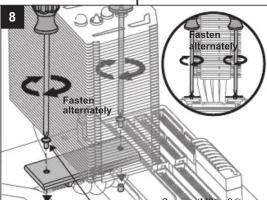
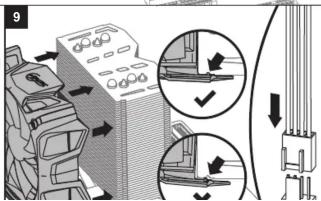
Installation for Intel Socket 2011


Installation for Intel Socket 1155, 1156


natural_image
Diagram of a computer monitor with a base, showing mechanical components and wiring (no text or symbols)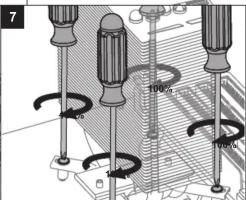
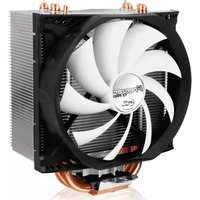

Brand : ARCTIC COOLING
Model : Freezer i30
Category : Computer Cooling Component