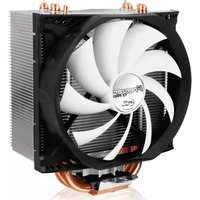
UCACO-FZP13-BL - Computer Cooling Component ARCTIC COOLING - Free user manual and instructions
Find the device manual for free UCACO-FZP13-BL ARCTIC COOLING in PDF.


| Type | Cooling Fan (Case/Radiator) |
| Brand | Arctic Cooling |
| Model | UCACO-FZP13-BL |
| Dimensions | 120 x 120 x 25 mm |
| Weight | 150 g |
| Bearing Type | Fluid Dynamic Bearing (FDB) |
| Speed Range | 200 - 1800 RPM (PWM controlled) |
| Airflow | 74 CFM |
| Noise Level | 0.3 Sone (approx. 22 dBA) |
| Voltage | 12 V DC |
| Current | 0.2 A |
| Connector | 4-pin PWM |
| LED Lighting | None |
| Compatibility | Universal: fits most cases, CPU coolers, and radiators (standard 120mm mounting) |
| Installation Method | Mount with included screws; connect to 4-pin PWM header on motherboard |
| Maintenance | Clean periodically with compressed air to remove dust |
| Safety Warnings | Do not operate without secure mounting; avoid contact with liquids; disconnect power before cleaning |
| Spare Parts | Fan is a sealed unit; no replaceable parts; replace entire fan if faulty |
| Warranty | 2 years limited warranty |
| Intended Use | Computer case cooling or radiator cooling |
Frequently Asked Questions - UCACO-FZP13-BL ARCTIC COOLING
User questions about UCACO-FZP13-BL ARCTIC COOLING
0 question about this device. Answer the ones you know or ask your own.
Ask a new question about this device
Download the instructions for your Computer Cooling Component in PDF format for free! Find your manual UCACO-FZP13-BL - ARCTIC COOLING and take your electronic device back in hand. On this page are published all the documents necessary for the use of your device. UCACO-FZP13-BL by ARCTIC COOLING.
USER MANUAL UCACO-FZP13-BL ARCTIC COOLING
For further information, please consult www.arctic.ac

For AMD Sockets
1

2

3

4

5

6

Warranty coverage does not include the following:
• A faulty product that leads to harm or damage to other products
• Damage of product as a result of other product components
- Incorrect method of operation or use of product not for intended use
• Any form of alteration to original product
- Inability to install the product as a result of incompatibility with other components
Thermal Compound
The thermal compound is already pre-applied to the heatsink. If the cooler has to be installed a second time, we highly recommend using the ARCTIC MX-2 or the ARCTC MX-4 from ARCTIC. Only our compound guarantees optimal performance in combination with the surface of our heatsinks.
ARCTIC Switzerland
Huobstrasse 4
8808, Pfäffikon, Switzerland www.arctic.ac
Copyright
2010 ARCTIC Switzerland. All Rights Reserved.
No part of this manual including the products described in it, may be reproduced, transmitted, stored in a retrieval system, or translated into any language in any form or by any means, except documentation kept by the purchaser for backup purposes, without the express written permission of ARCTIC Switzerland. In no event shall ARCTIC its directors or employees be liable for any indirect damages, incidental or consequential damages arising from any defect or error in this manual or product.


Brand : ARCTIC COOLING
Model : UCACO-FZP13-BL
Category : Computer Cooling Component