
MM210 - Radio Manta - Free user manual and instructions
Find the device manual for free MM210 Manta in PDF.


| Product Type | Portable Radio with FM, USB, and AUX-In |
| Brand | Manta |
| Model | MM210 |
| Radio Bands | FM |
| Playback Sources | USB flash drive, AUX input |
| Power On/Off | Press ON-OFF/MODE button |
| Mode Selection | ON-OFF/MODE: switches between USB, AUX IN, RADIO |
| FM Auto Scan | PLAY-PAUSE/AUTO SCAN button |
| FM Fine Tuning | REPEAT/TUNING- and EQUAL./TUNING+ buttons |
| FM Preset Stations | Long-press FOLDER/PREV or FOLDER/NEXT to change stored programs |
| USB Playback Controls | PLAY-PAUSE, REPEAT modes (ONE, ALL, RANDOM), EQUALIZER presets, FOLDER/PREV, FOLDER/NEXT |
| Volume Controls | VOLUME+ and VOLUME- buttons |
| Equalizer Modes | Available via EQUAL./TUNING+ during USB playback |
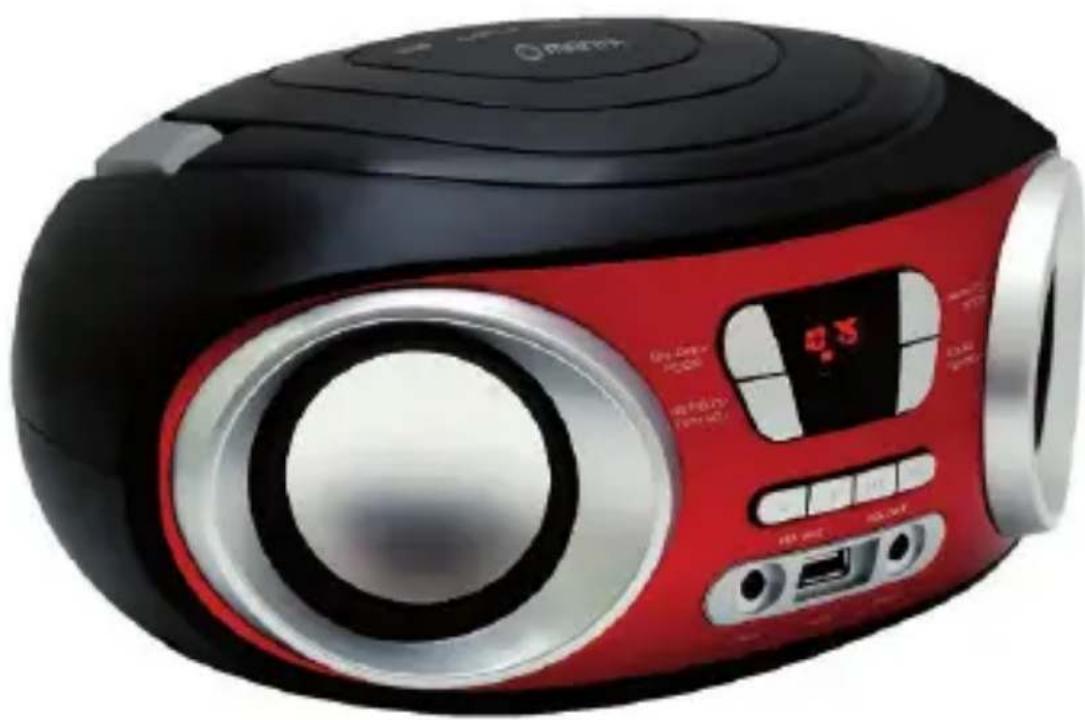
| Display | Analog clock (from product image) |
| Speaker | Built-in speaker grille |
| Power Source | Battery or AC adapter (specifics not provided) |
| Disposal | Do not dispose with household waste; take to designated collection point |
| Manufacturer | Manta Europe |
| Country of Origin | Made in P.R.C. |
Frequently Asked Questions - MM210 Manta
User questions about MM210 Manta
0 question about this device. Answer the ones you know or ask your own.
Ask a new question about this device
Download the instructions for your Radio in PDF format for free! Find your manual MM210 - Manta and take your electronic device back in hand. On this page are published all the documents necessary for the use of your device. MM210 by Manta.
USER MANUAL MM210 Manta
natural_image
Abstract black-and-white circular logo with interlocking curved shapes (no text or symbols)MANTA
ccchhhííllllllíí Bo
MM210
natural_image
Red and black portable electronic device with analog clock, ports, and speaker grille (no visible text or symbols)Instrukcja obsługi
User's Manual
OPIS PRZYCISKÓW:
ON-OFF/MODE:
natural_image
Symbol of a battery with crossed x-bracing and battery, no text or numbers present- Turn on/off
Press to turn on the unit while it's off. Long press to turn off the unit while it's on. - Select the input mode USB/AUX IN/RADIO
Press to change the playing mode circularly, while unit is on,(USB->AUX IN->RADIO).
PLAY-PAUSE/ AUTO SCAN
- Play/pause control during MP3 playing (USB MODE)
- Auto-Searching FM Radio Programs under FM Status;
REPEAT/TUNING-:
-
Change the playing Mode under MP3 playing (USB MODE)
REP ONE->REPEAT ALL->RANDOM. -
Under FM Status, press to FINE TUNING reduction of the frequency;
EQUAL./TUNING+:
- Under MP3 playing (USB Status), Pres to change the playing EQ mode.
2.Under FM Status, press to FINE TUNING increasing of the frequency;
VOLUME+ and VOLUME_:
Press to Reduce and Increase the playing Volume;
FOLDER/PREV:
- Under MP3 Playing (USB Status), short-press to change playing previous song, Long press to move previous folder and playing, it will move to first song to play if there is only one folder.
- Under FM Radio status, short press to AUTO-SEARCH previous program and start playing; Long-Press to change Previous stored program and start playing;
FOLDER/NEXT:
- Under MP3 Playing (USB Status), short-press to change playing next song, Long press to move next folder and playing, it will move to final song to play if there is only one folder.
- Under FM Radio status, short press to AUTO-SEARCH next program and start playing; Long-Press to change Next stored program and start playing;
Note!
Product design and Technical parameters may be change without notice. This mainly concerns parameters technical, software and user manual present. User's Manual is a general orientation on service product. Manufacturer and distributor do not assume any responsibility as compensation for any inaccuracies errors in the descriptions appearing in this user manual.
Note about disposal

natural_image
Symbol of a waste bin with crossed x-axes and a horizontal base (no text or numbers)Older appliances, which display the symbol as shown in the picture, may not be discarded in household waste. You must take them to a specific disposal site (check with your local authority) or to your retailer. These sites will guarantee disposal without harming the environment.

natural_image
Abstract black-and-white circular logo with interlocking curved shapes (no text or symbols)MANTA
INFOLINIA SERWISOWA
from Monday to Friday. 9.00-17.00
The manufacturer reserves the right to make changes to product specifications without notice.
Home: www.manta.com.pl
Home support: www.manta.info.pl


Made in P.R.C.
FOR MANTA EUROPE

Brand : Manta
Model : MM210
Category : Radio