
PL7510Gi - Powerline Adapter Mikrotik - Free user manual and instructions
Find the device manual for free PL7510Gi Mikrotik in PDF.


| Product Type | Powerline Adapter (HomePlug AV2) |
| Model | PL7510Gi |
| Brand | MikroTik |
| Data Rate | Up to 600 Mbps (using grounded sockets) |
| Ethernet Port | 1 x Gigabit Ethernet with 24V PoE output (default off) |
| Power Supply | Built-in, 100-230 V AC, 50/60 Hz |
| Power Consumption | 5 W (max) / 14 W with PoE out |
| Dimensions | Approximately 95 x 65 x 45 mm (estimated from manual) |
| Weight | Approximately 150 g (estimated) |
| Mounting | Wall-mountable (screws and sticker included) |
| IP Rating | IPX0 (indoor use only) |
| Pairing Method | Sync button: press 0.5-3s to pair, 5-8s for new key, 10-15s for reset |
| LED Indicators | Blue (power), Amber (link/search), Green (Ethernet), Red (PoE active) |
| Cable Requirement | Shielded Cat6 recommended |
| Compliance | FCC Part 15 Class B, CE, Industry Canada |
| Accessories | K-62 fastening set, EU/US power cord (30 cm) |
| Operating Temperature | Not specified, typical 0-40°C |
Frequently Asked Questions - PL7510Gi Mikrotik
User questions about PL7510Gi Mikrotik
0 question about this device. Answer the ones you know or ask your own.
Ask a new question about this device
Download the instructions for your Powerline Adapter in PDF format for free! Find your manual PL7510Gi - Mikrotik and take your electronic device back in hand. On this page are published all the documents necessary for the use of your device. PL7510Gi by Mikrotik.
USER MANUAL PL7510Gi Mikrotik
The PWR-LINE PRO allow Ethernet-like connectivity between supported devices over regular electrical power lines. When plugged into the same electrical circuit, the device will establish Ethernet connectivity by using the HomePlug AV 2 standard. PWR-LINE PRO does not require any system software or configuration, it's ready to use.
Connecting
√ Plug one PWR-LINE PRO device into a power socket.
√Connect to one of the LAN ports of your MikroTik router to the PWR-LINE PRO Ethernet port.
√ Plug another PWR-LINE PRO unit (or any other compatible device) somewhere in the same electrical circuit.
√ Use the sync button to connect the devices and your local network will automatically be extended. Please see PWR connection button (sync) section on how to pair additional PWR-LINE PRO devices.
√ PWR-LINE PRO supports PoE out from Ethernet port to power another Mikrotik device, this can be activated with a switch, please see LED lights and PoE switch section.
Mounting
PWR-LINE PRO can be mounted on the wall using four provided screws:
- To access mounting points, remove a center screw, that is holding top cover, using PH2 screwdriver.
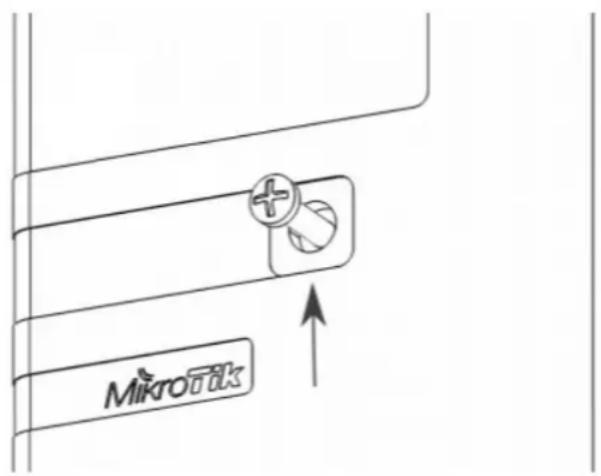
- Mark four points for screw holes in the desired place on the wall for PWR-LINE PRO.
- Drill using 5 mm drill bit for dowel holes and insert them by slight tapping if necessary.
- Mount PWR-LINE PRO and close top cover, center screw tightening force 0.5 – 0.7 Nm, attach provided 3M sticker to cover center screw.
The IP rating scale for this device is IPX0.
When mounting indoors, please ensure that cable feed is pointing downwards. We recommend using shielded Cat6 cables for our devices.
Powering

The device accepts powering directly from 100-230 V AC , 50/60 Hz wall socket it is plugged into. The power consumption under maximum load can reach 5 W. Max power consumption with PoE-Out 14 W.
In order to reach a speed of 600 Mbps, your electrical sockets needs to be grounded.

To connect with another PWR-LINE device, both need to be on the one electrical phase.
Expansion slots and ports
•One Gigabit Ethernet port, supporting 24 V PoE output by default settings is set to OFF.
Buttons and Jumpers
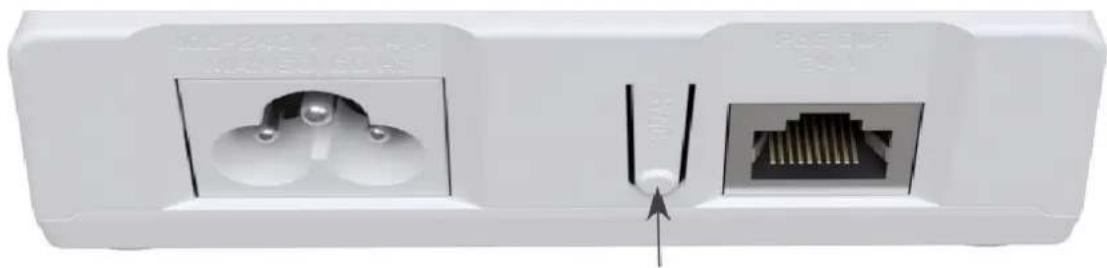
PWR connection button (sync)
natural_image
Close-up of a white electrical outlet socket with two internal components, one showing a metallic pin and arrow pointing to a terminal block (no text or symbols visible)- Hold 0.5 – 3 seconds. For 120 seconds will try to communicate with another PWR-LINE PRO device. A blinking amber LED light indicates that it is in search mode. You have to also do the same on the other PWR device, so they can synchronize. Press button again to cancel the search.
- Hold 5 – 8 seconds. A new security key is generated. This is needed to remove a PWR-LINE PRO device from an existing PWR network.
- Hold 10 – 15 seconds. Resets all PWR related settings.
- In case of trouble to pair device, hold the SYNC button for 5 - 8 seconds to generate new network key and then re-attempt to pair it in PWR-LINE PRO network again holding SYNC button for 0.5 - 3 seconds.
LED lights and PoE switch
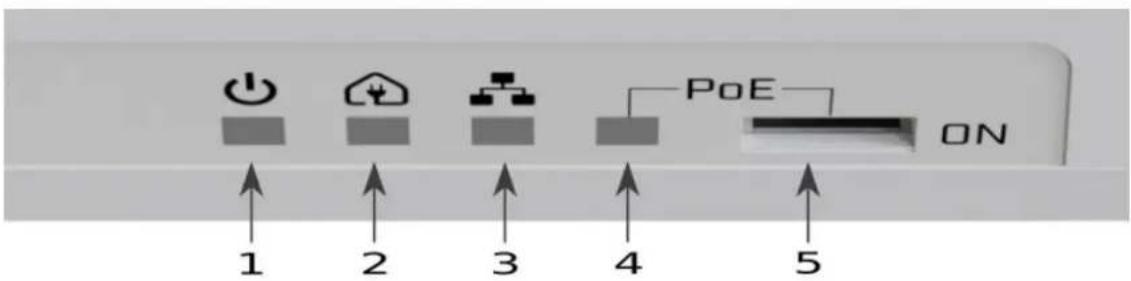
- Blue LED indicates device power ON state.
- Amber LED indicates that the device is paired, blinking amber indicated that the device is in search mode. Can be activated with sync button. Please refer to the PWR connection button (sync) section.
- Green LED indicates Ethernet port connectivity.
- Red LED indicates that PoE is active.
- PoE switch by default settings is set to OFF. A standard ballpoint pen can be used to switch positions. The Red light will indicate that PoE is active.
Accessories
Package includes the following accessories that come with the device:
•K-62 fastening set.
•EU/US power cord, D03+QT1 H03VV-F 0x0.75 mm2, 30 cm RoHS, White color.
Specifications
For more information about this product, specification and pictures please visit our web page: https://mikrotik.com/product/pl7510gi
Federal Communication Commission Interference Statement
This equipment has been tested and found to comply with the limits for a Class B digital device, pursuant to Part 15 of the FCC Rules. These limits are designed to provide reasonable protection against harmful interference in a residential installation.
This equipment generates, uses and can radiate radio frequency energy and, if not installed and used in accordance with the instructions, may cause harmful interference to radio communications. However, there is no guarantee that interference will not occur in a particular installation. If this equipment does cause harmful interference to radio or television reception, which can be determined by turning the equipment off and on, the user is encouraged to try to correct the interference by one of the following measures:
•Reorient or relocate the receiving antenna.
- Increase the separation between the equipment and receiver.
- Connect the equipment into an outlet on a circuit different from that to which the receiver is connected.
- Consult the dealer or an experienced radio/TV technician for help.

FCC Caution: Any changes or modifications not expressly approved by the party responsible for compliance could void the user's authority to operate this equipment.
This device complies with Part 15 of the FCC Rules. Operation is subject to the following two conditions: (1) This device may not cause harmful interference, and (2) this device must accept any interference received, including interference that may cause undesired operation.
Note: This unit was tested with shielded cables on the peripheral devices. Shielded cables must be used with the unit to ensure compliance.
Industry Canada
This device complies with Industry Canada licence-exempt RSS standard(s). Operation is subject to the following two conditions: (1) this device may not cause interference, and (2) this device must accept any interference, including interference that may cause undesired operation of the device.
CE Declaration of Conformity
Manufacturer: Mikrotikls SIA, Brivibas gatve 214i Riga, Latvia, LV1039.
| BG | С настоящото Mikrotikls SIA декларира, че този тип радиосъоръжение RouterBOARD е в съответствие с Директива 2014/53/EC. Цялостният текст на ЕС декларацията за съответствие може да се намери на следния интернет адрес: https://mikrotik.com/products |
| CS | Tímto Mikrotikls SIA prohlašuje, že typ rádiového zařízení RouterBOARD je v souladu se směrnici 2014/53/EU. Úplné znění EU prohlášení o shodě je k dispozici na této internetové adrese: https://mikrotik.com/products |
| DA | Hermed erklærer Mikrotikls SIA , at radioudstyrstypen RouterBOARD er i overensstemmelse med direktiv 2014/53/EU. EU-overensstemmelseserklæringens fulde tekst kan findes på fölgende internetadresse: https://mikrotik.com/products |
| DE | Hiermit erklärt Mikrotikls SIA , dass der Funkanlagentyp RouterBOARD der Richtlinie 2014/53/EU entspricht. Der vollständige Text der EU-Konformitätserklärung ist unter der folgenden Internetadresse verfügbar: https://mikrotik.com/products |
| EL | Με την παρούσα ο/η Mikrotikls SIA , δηλώνει ότι οραδιοεξοπλισμός RouterBOARD πληροί την οδηγία 2014/53/EE. Το πλήρες κείμενο της δήλωσης συμμόρφωσης EE διατίθεται στην ακόλουθη ιστοσελίδα στο διαδίκτυο: https://mikrotik.com/products |
| EN | Hereby, Mikrotikls SIA declares that the radio equipment type RouterBOARD is in compliance with Directive 2014/53/EU. The full text of the EU declaration of conformity is available at the following internet address: https://mikrotik.com/products |
| ES | Por la presente, Mikrotikls SIA declara que el tipo de equipo radioeléctrico RouterBOARD es conforme con la Directiva 2014/53/UE. El texto completo de la declaración UE de conformidad está disponible en la dirección Internet siguiente: https://mikrotik.com/products |
| ET | Käesolevaga deklareerib Mikrotikls SIA , et käesolev raadioseadme tüüp RouterBOARD vastab direktiivi 2014/53/EL nõuetele. ELi vastavusdeklaratsiooni täielik tekst on kättesaadav järgmisel internetiaadressil: https://mikrotik.com/products |
| FI | Mikrotikls SIA vakuuttaa, että radiolaitetyyppi RouterBOARD on direktiivin 2014/53/EU mukainen. EU-vaatimustenmukaisuusvakuutuksen täysimittainen teksti on saatavilla seuraavassa internetosoitteessa: https://mikrotik.com/products |
| FR | Le soussigné, Mikrotikls SIA , déclare que l'équipement radioélectrique du type RouterBOARD est conforme à la directive 2014/53/UE. Le texte complet de la déclaration UE de conformité est disponible à l'adresse internet suivante: https://mikrotik.com/products |
| HR | Mikrotikls SIA ovime izjavljuje da je radijska oprema tipa RouterBOARD u skladu s Direktivom 2014/53/EU. Cjeloviti tekst EU izjave o sukladnosti dostupan je na sljedećoj internetskoj adresi: https://mikrotik.com/products |
| HU | Mikrotikls SIA igazolja, hogy a RouterBOARD típusú rádióberendezés megfelel a 2014/53/EU irányelvnek. Az EU-megfelelőségi nyilatkozat teljes szövege elérhető a következő internetes címen: https://mikrotik.com/products |
| IT | Il fabbricante, Mikrotikls SIA , dichiara che il tipo di apparecchiatura radio RouterBOARD è conforme alla direttiva 2014/53/UE. Il testo completo della dichiarazione di conformità UE è disponibile al seguente indirizzo Internet: https://mikrotik.com/products |
| IS | Hér með lýsir Mikrotikls SIA pví yfir að RouterBOARD er í samræmi við grunnkröfur og aðrar kröfur, sem gerðar eru í tilskipun 2014/53/EU. Fullur texti ESB samræmisyfirlýsingar er að finna á eftirfarandi veffangi: https://mikrotik.com/products |
| LT | Aš, Mikrotikls SIA , patvirtinu, kad radijo jrenginių tipas RouterBOARD atitinka Direktyvą 2014/53/ES. Visas ES atitikties deklaracijos tekstas prieinamas šiuo interneto adresu: https://mikrotik.com/products |
| LV | Ar šo Mikrotikls SIA deklarė, ka radioiekärta RouterBOARD atbilst Direktīvai 2014/53/ES. Pilns ES atbilstības deklarācijas teksts ir pieejams šādā interneta vietnē: https://mikrotik.com/products |
| MT | B'dan, Mikrotikls SIA , niddikjara li dan it-tip ta' tagħmir tar-radju RouterBOARD huwa konformi mad-Direttiva 2014/53/UE. It-test kollu tad-dikjarazzjoni ta' konformità tal-UE huwa disponibbli f'dan I-indirizz tal-Internet li ğej: https://mikrotik.com/products |
| NL | Hierbij verklaar ik, Mikrotikls SIA , dat het type radioapparatuur RouterBOARD conform is met Richtlijn 2014/53/EU. De volledige tekst van de EU-conformiteitsverklaring kan worden geraadpleegd op het volgende internetadres: https://mikrotik.com/products |
| NO | Mikrotikls SIA erklærer herved at utstyret RouterBOARD er i samsvar med de grunnleggende krav og øvrige relevante krav i direktiv 2014/53/EU. Den fulle teksten til EU-samsvarserklæringen er tilgjengelig på fölgende internettadresse: https://mikrotik.com/products |
| PL | Mikrotikls SIA niniejszym oświadcza, że typ urządzenia radiowego RouterBOARD jest zgodny z dyrektywą 2014/53/UE. Pełny tekst deklaracji zgodności UE jest dostępny pod następującym adresem internetowym: https://mikrotik.com/products |
| PT | O(a) abaixo assinado(a) Mikrotikls SIA declara que o presente tipo de equipamento de rádio RouterBOARD está em conformidade com a Diretiva 2014/53/UE. O texto integral da declaração de conformidade está disponível no seguinte endereço de Internet: https://mikrotik.com/products |
| RO | Prin prezenta, Mikrotikls SIA declară că tipul de echipamente radio RouterBOARD este în conformitate cu Directiva 2014/53/UE. Textul integral al declarației UE de conformitate este disponibil la următoarea adresă internet: https://mikrotik.com/products |
| SK | Mikrotikls SIA týmto vyhlasuje, że rádiové zariadenie typu RouterBOARD je v súlade so smernicou 2014/53/EU. Uplné EU vyhlásenie o zhode je k dispozícii na tejto internetovej adrese: https://mikrotik.com/products |
| SL | Mikrotikls SIA potrjuje, da je tip radijske opreme RouterBOARD skladen z Direktivo 2014/53/EU. Celotno besedilo izjave EU o skladnosti je na voljo na naslednjem spletnem naslovu: https://mikrotik.com/products |
| SV | Härmed försäkrar Mikrotikls SIA att denna typ av radioutrustning RouterBOARD överensstämmer med direktiv 2014/53/EU. Den fullständiga texten till EU-försäkran om överensstämmelse finns på följande webbadress: https://mikrotik.com/products |
Note. Information contained here is subject to change. Please visit the product page on www.mikrotik.com for the most up to date version of this document.

BG. Инструкция: Свържете адаптера на захранване, за да включите устройството. Отворете 192.168.88.1 в уеб браузър, за да настроите продукта. Повече информация в http://mt.lv/help-bg
CS. Návod k použití: Připojte napájecí adaptér k zapnutí přístroje. Otevřete 192.168.88.1 ve webovém prohlížeči pro konfiguraci produktu. Více informací najdete v http://mt.lv/help-cs
DA. Instruktionsbog: Tilslut strømadapteren for at tænde for enheden. Åbn 192.168.88.1 i en webbrowser til at konfigurere produktet. Mere information i http://mt.lv/help-da
DE. Bedienungsanleitung: Verbinden Sie das Netzteil, um das Gerät einzuschalten. Öffnen Sie 192.168.88.1 in einem Web-Browser, um das Produkt zu konfigurieren. Weitere Informationen im http://mt.lv/help-de
EL. εγχειρίδιο οδηγιών: Συνδέστε τον προσαρμογέα τροφοδοσίας για να ενεργοποιήσετε τη μονάδα. Ανοίξτε 192.168.88.1 σε ένα πρόγραμμα περιήγησης στο Web για να διαμορφώσετε το προϊόν. Περισσότερες πληροφορίες στο http://mt.lv/help-el
EN. Instruction manual: Connect the power adapter to turn on the device. Open 192.168.88.1 in your web browser, to configure it. More information on http://mt.lv/help
ES. Manual de instrucciones: Conecte el adaptador de alimentación para encender la unidad. Abra 192.168.88.1 en un navegador web para configurar el producto. Más información en http://mt.lv/help-es
ET. Kasutusjuhend: Ühendage toiteadapter seadme sisselülitamiseks. Avatud 192.168.88.1 in veebilehitseja seadistada toodet. Rohkem teavet http://mt.lv/help-et
Fl. Käyttöohje: Kytke virtalähde päälle laitteen. Avaa 192.168.88.1 in selaimen määrittää tuotteen. Lisää tietoa http://mt.lv/help-fi
FR. Mode d'emploi: Connectez l'adaptateur d'alimentation pour allumer l'appareil. Ouvrez 192.168.88.1 dans un navigateur Web pour configurer le produit. Plus d'informations dans http://mt.lv/help-fr
HR. Uputa za uporabu: Priključite napajanje i uključite uređaj. Za konfiguraciju uređaja u pregledniku otvorite 192.168.88.1. Više informacija je na http://mt.lv/help-hr
HU. Használati utasítás: Csatlakoztassa a hálózati adaptert a készülék bekapcsolásához. Megnyitása 192.168.88.1 egy webböngészőben beállítani a terméket. Több információ http://mt.lv/help-hu
IT. Manuale di istruzioni: Collegare l'adattatore di alimentazione per accendere l'unità. Aprire 192.168.88.1 in un browser Web per configurare il prodotto. Maggiori informazioni in http://mt.lv/help-it
IS. Notkunarleiðbeiningar: Tengdu straumbreytinn til að kveikja á tækinu. Opnaðu 192.168.88.1 í vafra til að stilla það. Nánari upplýsingar á http://mt.lv/help-is
NO. Instruksjonsmanual: Koble strømadapteren for å slå på enheten. Åpne 192.168.88.1 i nettleseren din for å konfigurere den. Mer informasjon på http://mt.lv/help-no
LT. Naudojimosi instrukcija: Prijunkite maitinimo adapterj jjunkite jrenginj. I interneto naršyklę 192.168.88.1 Atidarykite galite konfigūruoti gaminį. Daugiau informacijos rasite http://mt.lv/help-lt
LV. Lietošanas instrukcija: Pievienojiet Strāvas adapteri, lai ieslēgtu ierīci. Atvērt 192.168.88.1 ar interneta pārlūku, lai konfigurētu produktu. Plašāka informācija http://mt.lv/help-lv
MT. Manwal tal-istruzzjoni: Qabbad l-adapter tal-qawwa biex iddawwar it-taghmir. Iftah 192.168.88.1 fil-web browser tieghek, biex jigi kkonfigurat. Aktar informazzjoni fuq http://mt.lv/help-mt
NL. Handleiding: Sluit voedingsadapter aan op het apparaat in te schakelen. Open 192.168.88.1 in een webbrowser om het product te configureren. Meer informatie in http://mt.lv/help-nl
PL. Instrukcja obsługi: Podłącz adapter zasilania, aby włączyć urządzenie. Otwórz 192.168.88.1 w przeglądarce internetowej, aby skonfigurować urządzenie. Więcej informacji w http://mt.lv/help-pl
PT. Manual de instruções: Conecte o adaptador de alimentação para ligar o aparelho. Abra 192.168.88.1 em um navegador da web para configurar o produto. Mais informações em http://mt.lv/help-pt
RO. Instructiuni de utilizare: Conectați adaptorul de alimentare pentru a porni aparatul. Deschide 192.168.88.1 într-un browser web pentru a configura produsul. Mai multe informații în http://mt.lv/help-ro
SK. Navodila: Priključite napajalnik za vklop naprave. Odprite 192.168.88.1 v spletnem brskalniku nastaviti izdelek. Več informacij v http://mt.lv/help-sk
SL. Návod na použitie: Pripojte napájací adaptér k zapnutiu prístroja. Otvorte 192.168.88.1 vo webovom prehliadači pre konfiguráciu produktu. Viac informácií nájdete v http://mt.lv/help-sl
SV. Instruktionsmanual: Anslut nätadaptern för att slå på enheten. Öppna 192.168.88.1 i en webbläsare för att konfigurera produkten. Mer information på http://mt.lv/help-sv
NO. Bruksanvisningen: Koble strømadapteren for å slå på enheten. Åpne 192.168.88.1 i en nettleser for å konfigurere produktet. Mer informasjon på http://mt.lv/help-no
RU. Руководство по эксплуатации: подключите адаптер питания чтобы включить устройство. Откройте 192.168.88.1 в своем веббраузере для конфигурации. Дополнительная информация http://mt.lv/help-ru
CN.说明书。连接电源适配器以打开设备。在Web浏览器中打开192.168.88.1进行配置。有关http://mt.lv/help-zh的更多信息
Brand : Mikrotik
Model : PL7510Gi
Category : Powerline Adapter