Espresso Capsule Coffee Maker - Coffee machine CRUX - Free user manual and instructions
Find the device manual for free Espresso Capsule Coffee Maker CRUX in PDF.


| Product Type | Espresso Capsule Coffee Maker |
| Brand | CRUX |
| Model | Espresso Capsule Coffee Maker |
| Dimensions (L x W x H) | 12.5 x 9 x 11 inches |
| Weight | 5.1 lbs |
| Power Supply | 120V, 60Hz, 1200W |
| Water Tank Capacity | 32 oz |
| Used Capsule Type | Standard espresso capsules (compatible with most brands) |
| Pump Pressure | 19 bar |
| Cup Size Options | Adjustable: single or double espresso |
| Heating System | Thermoblock fast heating |
| Auto Shut-Off | Yes, after 10 minutes of inactivity |
| Descaling Indicator | Yes, light alerts when descaling needed |
| Removable Drip Tray | Yes, dishwasher safe |
| Capsule Storage | Built-in compartment for up to 10 used capsules |
| Cleaning | Wipe exterior with damp cloth; run descaling cycle monthly |
| Safety Features | Auto shut-off, overheat protection, drip tray full detection |
| Spare Parts Available | Water tank, drip tray, capsule holder, descaling kit |
| Warranty | 1-year limited warranty |
Frequently Asked Questions - Espresso Capsule Coffee Maker CRUX
User questions about Espresso Capsule Coffee Maker CRUX
0 question about this device. Answer the ones you know or ask your own.
Ask a new question about this device
Download the instructions for your Coffee machine in PDF format for free! Find your manual Espresso Capsule Coffee Maker - CRUX and take your electronic device back in hand. On this page are published all the documents necessary for the use of your device. Espresso Capsule Coffee Maker by CRUX.
USER MANUAL Espresso Capsule Coffee Maker CRUX
Styled for Life Designed & Engineered in New York City
Thank You for choosing
CRUX®
We hope your new CRUX® small kitchen appliance will add sleek elegance to your kitchen
Table of Contents
Important Safeguards....2-4
Additional Important Safeguards 5-6
Notes On The Cord ....5
Notes On The Plug ....5
Plasticizer Warning....6
Electric Power....6
Getting To Know Your Coffee Maker 7
Before Using For The First Time....8
Using Your Coffee Maker 8-9
Programming The Water Volume....9
Reset To Factory Settings....10
Cleaning And Maintenance Instructions....10
Descaling Instructions....11
Storing Instructions....11
Warranty 12-13
IMPORTANT SAFEGUARDS
When using electrical appliances, basic safety precautions should always be followed including the following:
1. READ ALL INSTRUCTIONS.
- Make sure that your outlet voltage corresponds to the voltage stated on the rating label of the coffee maker.
- To protect against fire, electric shock and injury to persons do not immerse cord, plug or unit in water or other liquid.
- Close supervision is necessary when any appliance is used by or near children.
- Unplug from outlet when not in use and before cleaning. Allow unit to cool before putting on or taking off parts, and before cleaning the appliance.
- Do not operate any appliance with a damaged cord or plug or after the appliance malfunctions or has been damaged in any manner. Return appliance to an authorized service facility for examination, repair or adjustment.
- The use of accessories not recommended by the appliance manufacturer may result in fire, electric shock or injury to persons.
- Do not let cord hang over edge of table or counter or touch hot surface.
- Do not place on or near a hot gas or electric burner, or in a heated oven.
2
- Only fill the tank with clean and cold water. Never fill the tank with mineral water, milk or other liquids.
- Do not let the coffee maker operate without water.
- There is extremely hot water in the capsule holder during the brew process. To avoid risk of injury, do not lift the brew handle during brewing process.
- Never insert fingers into the capsule holder to avoid burning or injuring fingers.
- To disconnect, remove plug from wall outlet. Always hold the plug. But never pull from the cord.
- Some parts of the appliance are hot when operated, so do not touch with hands. Use handles or knobs only.
- Do not leave the appliance on unattended.
- The temperature of operating or storing the unit should be more than freezing point 32^ F ( 0^ C).
- Do not leave the appliance exposed to atmospheric agents (sun, rain, etc)
- This appliance is not intended for used by persons (including children) with reduced physical, sensory or mental capabilities, or lack of experience and knowledge, unless they have been given supervision or instruction concerning use of the appliances by a person responsible for their safety.
- Children should be supervised to ensure that they do not play with the appliance.
- Scalding may occur if the lid is removed during the brewing cycles
3
- Do not use appliance for other than intended use.
- Do not use for commercial purpose.
- Do not use outdoors.
- WARNING: To avoid the risk of injury, do not open the brew chamber during the brew process.
- Compatible with NESPRESSO® Original line capsules.
FOR HOUSEHOLD
USE ONLY
SAVE THESE
INSTRUCTIONS
4
ADDITIONAL IMPORTANT SAFEGUARDS
NOTES ON THE CORD
A. A short power-supply cord is provided to reduce the risk resulting from becoming entangled in or tripping over a longer cord.
B. Longer extension cords are available and may be used if care is exercised in their use.
C. If an extension cord is used:
-
The marked electrical rating of the cord set or extension cord should be at least as great as the electrical rating of the appliance;
-
The cord should be arranged so that it will not drape over the countertop or tabletop where it can be pulled on by children or tripped over unintentionally;
-
If the appliance is of the grounded type, the cord set or extension cord should be a grounding-type3-wire cord.
NOTES ON THE PLUG
This appliance has a polarized plug. To reduce the risk of electric shock, this plug is intended to fit into a polarized outlet only one way. If the plug does not fit fully into the outlet, reverse the plug. If it still does not fit, contact a qualified electrician. Do not attempt to modify the plug in any way.
5
PLASTICIZER WARNING
CAUTION: The feet on the base of unit contain substances in the plastic, known as plasticizers, that may migrate to the finish of a tabletop or countertop. To prevent this, place nonplastic coasters or placemats between the appliance and the countertop or tabletop.
Failure to do so may cause the finish to darken; permanent blemishes or stains can appear.
ELECTRIC POWER
If the electrical circuit is overloaded with other appliances, your appliance may not operate properly. It should be operated on a separate electrical circuit from other appliances.
6
GETTING TO KNOW YOUR COFFEE MAKER
Product may vary slightly from illustrations.
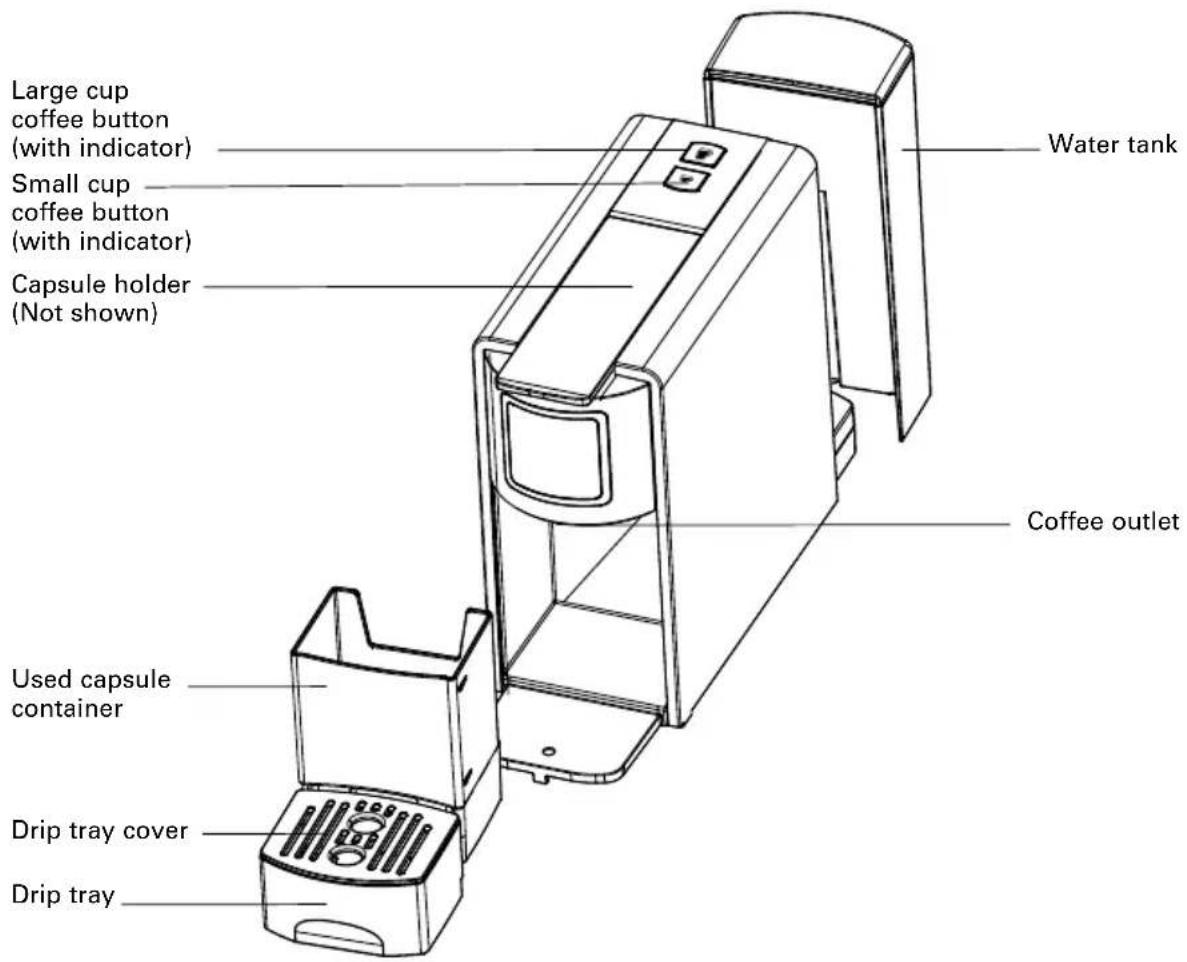
7
BEFORE USING FOR THE FIRST TIME
- Remove the water tank from the machine, pull the red silicone plug by the tab to remove and discard. Remove the warning sticker from the water tank. Fill the water tank with drinkable water. Do not exceed the MAX line.
- With the lid on the water tank place the water tank straight onto the base.
- You will see water bubbles flowing upwards, this is a sign that the water tank has been inserted correctly.
- Turn the unit on by pressing the small cup or large cup button. Do not insert capsule.
- Place a cup on the drip tray. Press the large cup button when both lights are blinking. The unit will remember the cup size selection and water will begin to dispense in a few seconds.
- If indicator lights blink rapidly and no water is dispensed, turn unit off, wait 2 minutes, and repeat steps 4 through 5.
NOTE: While pressing down the large cup or small cup coffee buttons, the machine may produce a pumping sound, which means the water is starting to brew the coffee.
- Fill the removable water tank with drinkable water. The water level should not exceed the MAX level marked on the tank.
- Open the handle by lifting it up completely and insert a coffee capsule. Close the handle by pushing it down completely.
- Position a cup on the drip tray cover. Make sure the drip tray is assembled in place.
- Plug the power cord into the outlet.
- Press the small cup or large cup button.
CAUTION: Do not open the handle during the brew cycle to avoid spillage
- The corresponding indicator light will start to flash and coffee will begin to fill the cup. Once the desired quantity has been reached, the coffee will stop flowing and the lights will be solidly lit.
NOTE: The unit will enter the standby mode and both the indicator lights will turn off if there is no operation within 4 minutes.
8
NOTE: Coffee volume will vary slightly. Small cup average is approximately 1 to 1.5 oz. (30-45ml), while the large cup average is 2 to 3 oz. (70-90 mL).
NOTE: While brewing coffee, you can interrupt the brewing process by pressing your selected coffee button once. To continue brewing, just press the button again.
-
During the brewing process, both the indicator lights of the small and large cup buttons will flash quickly if there is not enough water in the water tank, indicating that you that you need to add more water to the tank. Remove the water tank to refill.
After refilling it, replace the water tank and make sure that it is placed properly into position. You may now continue brewing coffee. -
Once you have finished brewing coffee, always expel the used capsule. Capsules are automatically discarded into the used capsule container by simply opening the handle.
CAUTION: Never open the handle during brewing cycles.
NOTE: The appliance will enter into standby mode and both the indicator lights will turn off if there is no operation within 4 minutes. To make another cup, insert a new capsule into the unit.
- If you want to make another cup of coffee, insert a new capsule in the unit.
- Empty the used capsule container and rinse the used capsule container, drip tray and water tank frequently.
- When not in use, disconnect the power supply.
PROGRAMMING THE WATER VOLUME
- Add fresh water to the tank.
- Once indicator lights stop flashing, insert capsule and place a cup on drip tray under coffee spout.
- Press and hold either the small or large cup button. Release button once desired volume is reached.
- New volume is now stored.
NOTE: Maximum volume setting for either cup is 100 mL or 3.3 oz.
9
RESET TO FACTORY SETTINGS
This appliance requires little maintenance. It contains no user-serviceable parts. Any servicing requiring disassembly other than cleaning must be performed by a qualified appliance repair technician.
- Press and hold down both the small and large cup buttons for 5 seconds.
- The buttons will flash quickly 3 times to confirm the unit has been reset.
- Both the small and large cup buttons will continue to flash normally.
- Solid lights mean the unit is ready to use.
CLEANING AND MAINTENANCE INSTRUCTIONS
Be sure to unplug this appliance and let it cool down before cleaning. To protect against electrical shock, do not immerse the cord, plug or unit in water or liquid. After each use, always make sure plug is removed from the wall outlet. We recommend that the following is performed on a periodical basis:
- Prepare one or more cups to wash the coffee distributor.
- Use a dry cloth to clean the removable water tank.
- Empty the used capsule container and clean it.
- Clean the capsule holder with a dry cloth.
- Use a damp cloth to gently wipe the drip tray cover. Empty the drip tray and rinse it.
- Clean the outside of the machine using a damp cloth. Never submerge the machine.
- Replace all parts.
This appliance requires little maintenance. It contains no user serviceable parts. Any servicing requiring disassembly other than cleaning must be performed by a qualified appliance repair technician.
10
DESCALING INSTRUCTIONS
To keep the coffee maker operating efficiently, clean away the mineral deposits left by water regularly.
- Fill the water tank with water and descaler to the MAX line (the ratio of water to descaler is 4:1). Only use household descaler. You can use white vinegar instead of descaler.
- Wait until the indicator lights are solidly lit.
- Position a container on the drip tray cover.
- Press the large cup button and allow the liquid to flow. Once the desired quantity has been reached, the water will stop flowing out.
- Wait for 20 minutes with the machine turned on.
- Press the large cup button until all of the water is used up.
- Rinse the tank well and fill with clean water. Press the large cup button until all of water is used up.
STORING INSTRUCTIONS
- Never store coffee maker while still plugged in.
- Unplug coffee maker and allow it to cool.
- Store coffee maker fully assembled.
- Close the handle.
- Store coffee maker in its box or in a cool, dry place.
11
Limited Two-Year Warranty
SENSIO Inc. hereby warrants that for a period of TWO YEARS from the date of purchase, this product will be free from mechanical defects in material and workmanship, and for 90 days in respect to non-mechanical parts. At its sole discretion, SENSIO Inc. will either repair or replace the product found to be defective, or issue a refund on the product during the warranty period.
The warranty is only valid for the original retail purchaser from the date of initial retail purchase and is not transferable. Keep the original sales receipt, as proof of purchase is required to obtain warranty validation. Retail stores selling this product do not have the right to alter, modify, or in any way revise the terms and conditions of the warranty.
Exclusions:
The warranty does not cover normal wear of parts or damage resulting from any of the following: negligent use of the product, use of improper voltage or current, improper routine maintenance, use contrary to the operating instructions, disassembly, repair, or alteration by anyone other than qualified SENSIO Inc. personnel. Also, the warranty does not cover Acts of God such as fire, floods, hurricanes, or tornadoes.
SENSIO Inc. shall not be liable for any incidental or consequential damages caused by the breach of any express or implied warranty.
Apart from the extent prohibited by applicable law, any implied warranty of merchantability or fitness for a particular purpose is limited in time to the duration of the warranty. Some states, provinces or jurisdictions do not allow the exclusion or limitation of incidental or consequential damages, or limitations on how long an implied warranty lasts, and therefore, the above exclusions or limitations may not apply to you. The warranty covers specific legal rights which may vary by state, province and/or jurisdiction.
12
How To Obtain Warranty Service:
You must contact Customer Service at our toll-free number: 1-866-832-4843. A Customer Service Representative will attempt to resolve warranty issues over the phone. If the Customer Service Representative is unable to resolve the problem, you will be provided with a case number and asked to return the product to SENSIO Inc. Attach a tag to the product that includes: your name, address, daytime contact telephone number, case number, and description of the problem.
Also, include a copy of the original sales receipt. Carefully package the tagged product with the sales receipt, and send it (with shipping and insurance prepaid) to SENSIO Inc.'s address. SENSIO Inc. shall bear no responsibility or liability for the returned product while in transit to SENSIO Inc.'s Customer Service Center.
CRUX®
13



For customer service questions or comments 1-866-832-4843
For Recipes and Cooking tips cruxkitchen.com
crux.kitchen
f cruxkitchen
cruxkitchen
cruxkitchen
CRUX kitchen
Sensio Inc. New York, NY 10016/USA
17477 Rev.1