
F4 Falcon - Regulator Gamesir - Free user manual and instructions
Find the device manual for free F4 Falcon Gamesir in PDF.


| Brand | GameSir |
| Model | F4 Falcon |
| Product Type | Mobile Gaming Controller (Regulator) |
| Compatible Phone Thickness | Less than 10mm (remove case) |
| Compatible Phone Width | 66mm - 85mm |
| Compatible Phone Length | Less than 170mm |
| Connectivity | Mechanical touchpoint simulation (no Bluetooth) |
| Power Source | Built-in rechargeable battery |
| Charging Port | Type-C (cable included, 30cm charging only) |
| Battery Indicator | Low battery: fast red flash; Charging: slow red flash; Full: steady green |
| Turbo Mode | 4 burst modes selectable via Turbo button, indicator color changes |
| Power Switch | Lever: pull to power on, retract to power off |
| Compatible Games | Games with draggable virtual buttons |
| Package Contents | Controller, Type-C cable, user manual |
| Warranty | 12-month replacement from date of receipt |
| Support | Free online technical support via website, email, hotline |
| Product Dimensions (Approx.) | 150mm x 80mm x 20mm (estimated) |
| Weight (Approx.) | 100g (estimated) |
| Cleaning | Wipe with soft dry cloth; no chemicals |
| Safety Warnings | Keep away from children under 3; avoid fire, sun, humidity, impact; do not disassemble |
Frequently Asked Questions - F4 Falcon Gamesir
User questions about F4 Falcon Gamesir
0 question about this device. Answer the ones you know or ask your own.
Ask a new question about this device
Download the instructions for your Regulator in PDF format for free! Find your manual F4 Falcon - Gamesir and take your electronic device back in hand. On this page are published all the documents necessary for the use of your device. F4 Falcon by Gamesir.
USER MANUAL F4 Falcon Gamesir
GameSir • Gaming is Winning.™
© 2019 GameSir Inc. All rights reserved. Product may vary slightly from those pictures.

GameSir*
GameSir F4 Falcon Mobile Gaming Controller
User Manual

Note: Fully charge GameSir F4 before the first use.
PACKAGE CONTENTS
GameSir F4 Falcon Mobile Gaming Controller
Type-C Cable (Length: 30cm, Charging Only)
User Manual
COMPATIBLE MOBILE PHONE SIZE
NOTE: REMOVE THE CASE BEFORE USE.
Mobile phone thickness: less than 10mm
Mobile phone width: 66mm-85mm
Mobile phone length: less than 170mm
COMPATIBLE MOBILE GAMES
Games whose virtual buttons can be dragged
REGISTRATION
Register your GameSir ID online at https://gamesir.hk/ to get real-time information on your product's warranty status and a series of exclusive benefits from GameSir.
YOUR BENEFITS
* 12-month replacement of the same model from the date you received it.
* Contact us for free online technical support
Website: https://gamesir.hk
E-mail: cs@gamesir.hk
Hotline: +1-888-937-1733 (USA & Canada)
Service Hours: Sat.-Sun. 9:00 AM-6:00 PM PST
Mon.-Wed. 6:00 AM-6:00 PM PST
Thur.-Fri. 6:00 AM-3:00 PM PST
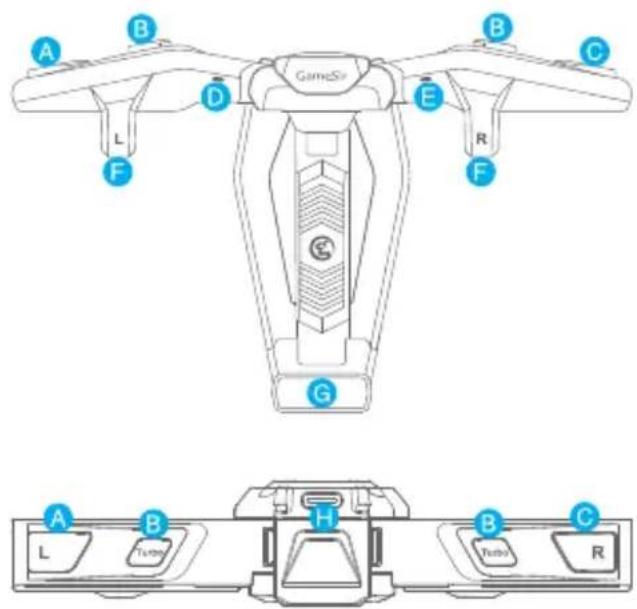
DEVICE LAYOUT

flowchart
graph TD
    A["Input Port 1"] --> B["Upture Loop"]
    B --> C["Output Port 2"]
    C --> D["Output Port 3"]
    D --> E["Output Port 4"]
    E --> F["Output Port 5"]
    F --> G["Output Port 6"]
    G --> H["Output Port 7"]
    H --> I["Output Port 8"]
    I --> J["Output Port 9"]
    J --> K["Output Port 10"]
A L Button
B Turbo Button
C R Button
D Left Indicator Light
Right Indicator Light
F Touchpoint
(Drag game's virtual button under here)
G Lever(Power Switch)
H Type-C Port
1 Type-C Cable
POWER ON/OFF
The power switch is controlled by a lever.
Power-on: pull the lever, the F4 controller is turned on, and its 2 indicator lights will be on in green, then will be off after 5 seconds.
Power-off: when the lever is fully retracted, the F4 controller is turned off.
CONNECTION
NOTE: REMOVE THE CASE BEFORE USE.

GameSir F4 Tutorial


b. Slide the one side of the mobile phone under the touchpoint first, then pull the lever and set the other side down.(Ensure the Power button of the mobile phone faces down)
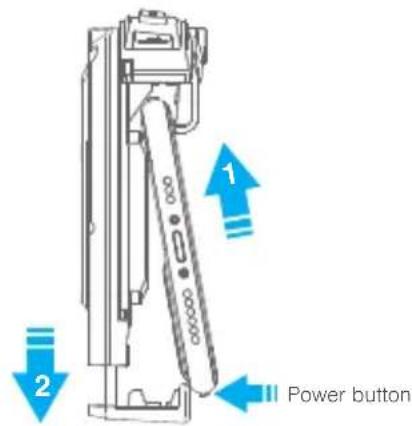
c. Fix the mobile phone on the center of the F4 controller, release the lever slowly, and ensure the F4 controller fits the mobile phone.

natural_image
Line drawing of a handheld device with labeled ports (no text or symbols on the device itself)d. Open the game custom setting, drag the shooting, aiming or jumping virtual button to the touch position, avoid overlapping the virtual buttons, ensure that the touch position corresponds to the only one virtual button, then save the setting.
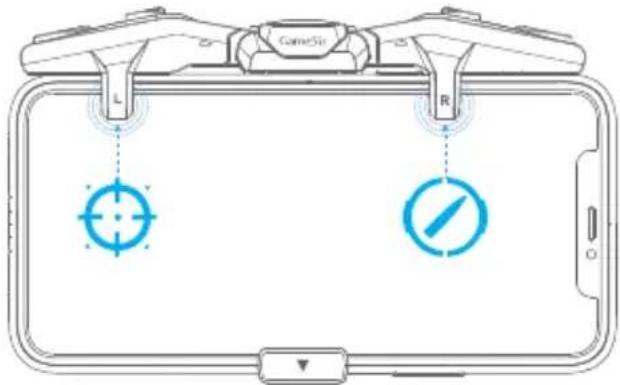
TURBO MODE
The "Turbo" buttons on the left and right wings of the F4 controller control the burst modes, which can be set separately.

natural_image
Diagram of a device with labeled ports L, R, and a central screen (no text or symbols beyond labels)SCREEN-OFF CORRECTION
During using, if the button or F4 controller does not work properly, try to turn the mobile phone screen off and then on to fix the problem.
BATTERY INDICATOR
Low battery: When the F4 controller's battery is lower than 10%, the 2 indicator lights will flash red quickly.
Charging: the 2 indicator lights will flash red slowly.
Full battery: the 2 indicator lights will stay on.
TURBO-INDICATOR LIGHT STATUS/COLOR
By pressing the "Turbo" button, you can select 4 burst modes. When the modes switched, the indicator light color will change accordingly, showing the current burst mode.
| Burst Mode | Indicator Color |


简体中文
包装内容
盖世小鸡F4游戏手柄
Type-C数据线(长度0.3m)
使用说明书
合格证
兼容的手机尺寸
使用时需取掉手机壳
手机厚度:10mm以内
手机宽度:66mm-85mm
手机长度:170mm以内
兼容的手机游戏
虚拟按钮可自定义移动的游戏
开机与关机
电源开关由拉杆进行控制
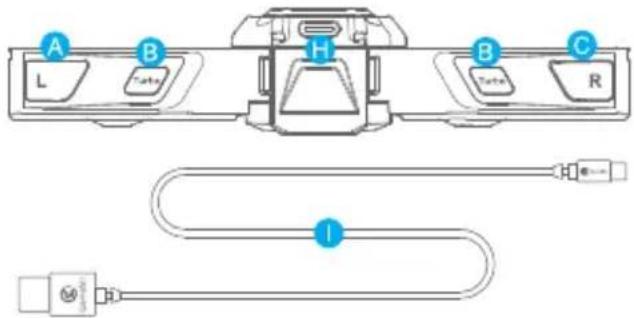
A L 按键
E 右指示灯
1 Type-C 数据线
B 连发按键
F 接触点(拖动游戏的虚拟下方的按钮)
C R按键
G 电源开关
D 左指示灯
H Type-C 充电口
第一步 安装手柄
使用时需取掉手机壳。
a. 展开手柄双翼。
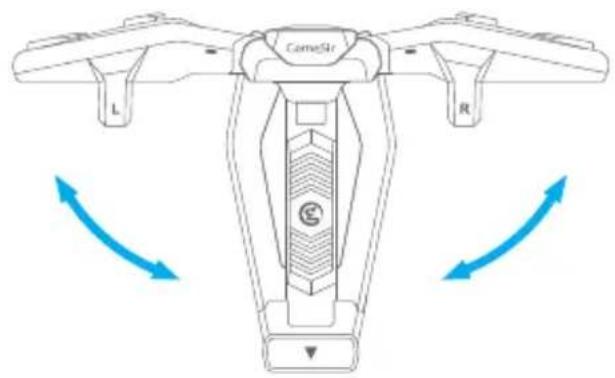
natural_image
Diagram of a camelis drone with labeled parts (L, R) and directional arrows indicating rotation or movement (no text or symbols beyond labels)b. 向下拉动拉杆,手柄进入开机状态。

natural_image
Line drawing of a mobile gaming device with labeled grip (no text or symbols)natural_image
Diagram of a device with labeled buttons L and R, no readable text or symbols beyond labelsNOTICE: Please read this Precautions carefully.
- CONTAINS SMALL PARTS. Keep out of reach of children under the age of 3. Seek immediate medical attention if swallowed or inhaled.
● DO NOT use the product near fire.
● DO NOT expose to direct sunlight or high temperatures.
● DO NOT leave the product in a humid or dusty environment.
● DO NOT impact the product or cause it to fall due to strong impact.
● DO NOT touch USB port directly or it might cause malfunctions.
● DO NOT strongly bend or pull cable parts. - Use a soft, dry cloth while cleaning.
● DO NOT use chemicals such as gasoline or thinner.
• DO NOT disassemble, repair or modify. - DO NOT use for purposes other than its original purpose. We are NOT responsible for accidents or damage when used for non-original purposes.
● DO NOT look directly at the optical light. It might damage your eyes. - If you have any quality concerns or suggestions, please contact GameSir or your local distributor.

注意事项

- PACKAGE CONTENTS
- COMPATIBLE MOBILE PHONE SIZE
- COMPATIBLE MOBILE GAMES
- REGISTRATION
- YOUR BENEFITS
- POWER ON/OFF
- CONNECTION
- TURBO MODE
- SCREEN-OFF CORRECTION
- BATTERY INDICATOR
- TURBO-INDICATOR LIGHT STATUS/COLOR
- 简体中文
- 包装内容
- 兼容的手机尺寸
- 兼容的手机游戏
- 开机与关机
- 第一步 安装手柄
- NOTICE: Please read this Precautions carefully.
- 注意事项
Brand : Gamesir
Model : F4 Falcon
Category : Regulator