
F4 Falcon - レギュレーター Gamesir - 無料のユーザーマニュアル
デバイスのマニュアルを無料で見つける F4 Falcon Gamesir PDF形式.


| ブランド | GameSir |
| モデル | F4 Falcon |
| 製品タイプ | モバイルゲーミングコントローラー(レギュレーター) |
| 対応スマートフォンの厚さ | 10mm未満(ケースなし) |
| 対応スマートフォンの幅 | 66mm - 85mm |
| 対応スマートフォンの長さ | 170mm未満 |
| 接続方式 | 機械式タッチポイントシミュレーション(Bluetoothなし) |
| 電源 | 内蔵充電式バッテリー |
| 充電ポート | Type-C(ケーブル付属、充電のみ30cm) |
| バッテリーインジケーター | バッテリー残量低下:赤色高速点滅;充電中:赤色低速点滅;フル充電:緑色常時点灯 |
| ターボモード | ターボボタンで4つのバーストモードを選択可能、インジケーターの色が変化 |
| 電源スイッチ | レバー:引き出して電源オン、押し込んで電源オフ |
| 対応ゲーム | ドラッグ可能な仮想ボタンがあるゲーム |
| パッケージ内容 | コントローラー、Type-Cケーブル、ユーザーマニュアル |
| 保証 | 受領日から12ヶ月間交換保証 |
| サポート | ウェブサイト、メール、ホットラインによる無料オンラインテクニカルサポート |
| 製品寸法(約) | 150mm x 80mm x 20mm(推定) |
| 重量(約) | 100g(推定) |
| お手入れ方法 | 柔らかい乾いた布で拭く;化学薬品は使用しない |
| 安全上の注意 | 3歳未満の子供の手の届かないところに保管;火気、直射日光、湿気、衝撃を避ける;分解しないでください |
よくある質問 - F4 Falcon Gamesir
ユーザーの質問 F4 Falcon Gamesir
0 質問 この機器について。知っているものに答えるか、ご自身の質問をしてください。
この機器について新しい質問をする
デバイスの取扱説明書をダウンロード レギュレーター 無料でPDF形式で!マニュアルを見つける F4 Falcon - Gamesir 電子デバイスをもとに戻しましょう。このページにはデバイスの使用に必要なすべての書類が掲載されています。 F4 Falcon ブランド Gamesir.
使用説明書 F4 Falcon Gamesir
GameSir • Gaming is Winning.™
© 2019 GameSir Inc. All rights reserved. Product may vary slightly from those pictures.

GameSir*
GameSir F4 Falcon Mobile Gaming Controller
User Manual

Note: Fully charge GameSir F4 before the first use.
PACKAGE CONTENTS
GameSir F4 Falcon Mobile Gaming Controller
Type-C Cable (Length: 30cm, Charging Only)
User Manual
COMPATIBLE MOBILE PHONE SIZE
NOTE: REMOVE THE CASE BEFORE USE.
Mobile phone thickness: less than 10mm
Mobile phone width: 66mm-85mm
Mobile phone length: less than 170mm
COMPATIBLE MOBILE GAMES
Games whose virtual buttons can be dragged
REGISTRATION
Register your GameSir ID online at https://gamesir.hk/ to get real-time information on your product's warranty status and a series of exclusive benefits from GameSir.
YOUR BENEFITS
* 12-month replacement of the same model from the date you received it.
* Contact us for free online technical support
Website: https://gamesir.hk
E-mail: cs@gamesir.hk
Hotline: +1-888-937-1733 (USA & Canada)
Service Hours: Sat.-Sun. 9:00 AM-6:00 PM PST
Mon.-Wed. 6:00 AM-6:00 PM PST
Thur.-Fri. 6:00 AM-3:00 PM PST
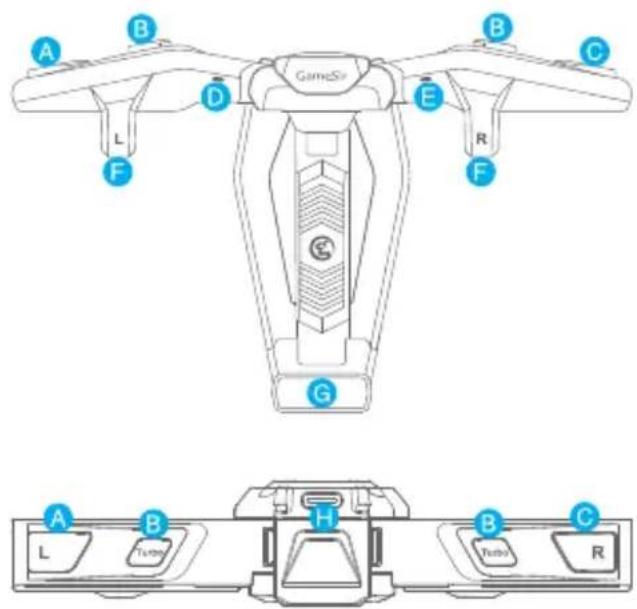
DEVICE LAYOUT

flowchart
graph TD
    A["Input Port 1"] --> B["Upture Loop"]
    B --> C["Output Port 2"]
    C --> D["Output Port 3"]
    D --> E["Output Port 4"]
    E --> F["Output Port 5"]
    F --> G["Output Port 6"]
    G --> H["Output Port 7"]
    H --> I["Output Port 8"]
    I --> J["Output Port 9"]
    J --> K["Output Port 10"]
A L Button
B Turbo Button
C R Button
D Left Indicator Light
Right Indicator Light
F Touchpoint
(Drag game's virtual button under here)
G Lever(Power Switch)
H Type-C Port
1 Type-C Cable
POWER ON/OFF
The power switch is controlled by a lever.
Power-on: pull the lever, the F4 controller is turned on, and its 2 indicator lights will be on in green, then will be off after 5 seconds.
Power-off: when the lever is fully retracted, the F4 controller is turned off.
CONNECTION
NOTE: REMOVE THE CASE BEFORE USE.

GameSir F4 Tutorial


b. Slide the one side of the mobile phone under the touchpoint first, then pull the lever and set the other side down.(Ensure the Power button of the mobile phone faces down)
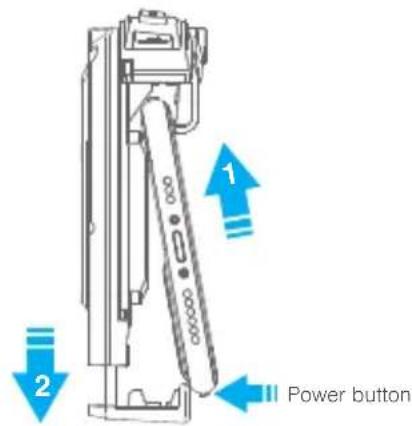
c. Fix the mobile phone on the center of the F4 controller, release the lever slowly, and ensure the F4 controller fits the mobile phone.

natural_image
Line drawing of a handheld device with labeled ports (no text or symbols on the device itself)d. Open the game custom setting, drag the shooting, aiming or jumping virtual button to the touch position, avoid overlapping the virtual buttons, ensure that the touch position corresponds to the only one virtual button, then save the setting.
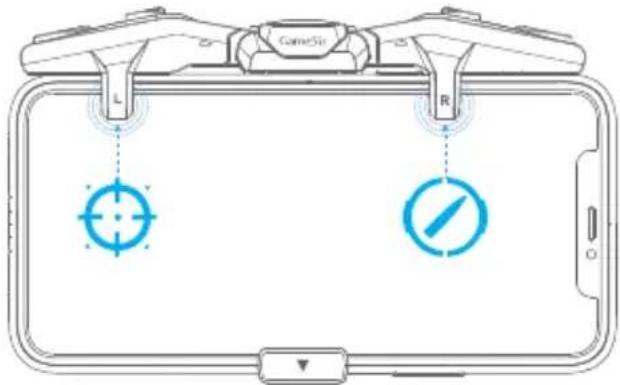
TURBO MODE
The "Turbo" buttons on the left and right wings of the F4 controller control the burst modes, which can be set separately.

natural_image
Diagram of a device with labeled ports L, R, and a central screen (no text or symbols beyond labels)SCREEN-OFF CORRECTION
During using, if the button or F4 controller does not work properly, try to turn the mobile phone screen off and then on to fix the problem.
BATTERY INDICATOR
Low battery: When the F4 controller's battery is lower than 10%, the 2 indicator lights will flash red quickly.
Charging: the 2 indicator lights will flash red slowly.
Full battery: the 2 indicator lights will stay on.
TURBO-INDICATOR LIGHT STATUS/COLOR
By pressing the "Turbo" button, you can select 4 burst modes. When the modes switched, the indicator light color will change accordingly, showing the current burst mode.
| Burst Mode | Indicator Color |


简体中文
包装内容
盖世小鸡F4游戏手柄
Type-C数据线(长度0.3m)
使用说明书
合格证
兼容的手机尺寸
使用时需取掉手机壳
手机厚度:10mm以内
手机宽度:66mm-85mm
手机长度:170mm以内
兼容的手机游戏
虚拟按钮可自定义移动的游戏
开机与关机
电源开关由拉杆进行控制
开机:向下拉动拉杆,手柄开机,两颗指示灯将点亮绿色,5秒后熄灭。
关机:当拉杆完全收回后,手柄关机。
设备布局

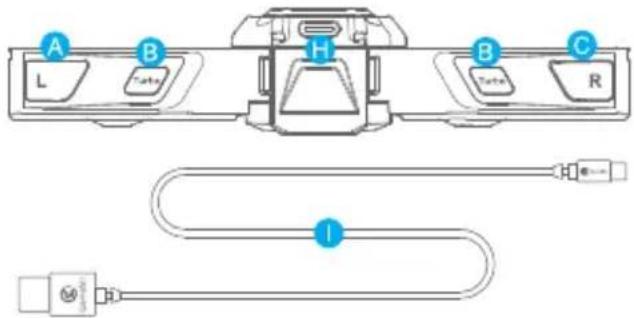
A L 按键
E 右指示灯
1 Type-C 数据线
B 连发按键
F 接触点(拖动游戏的虚拟下方的按钮)
C R按键
G 电源开关
D 左指示灯
H Type-C 充电口
第一步 安装手柄
使用时需取掉手机壳。
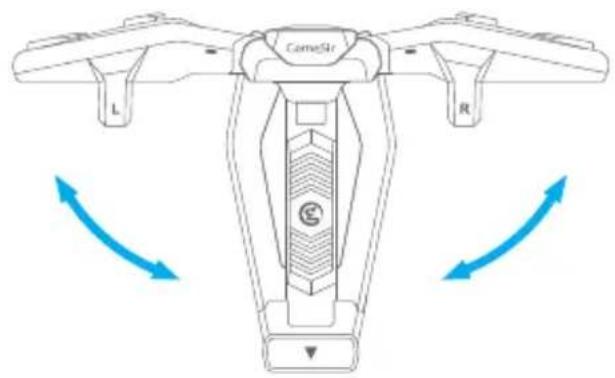
a. 展开手柄双翼。
natural_image
Diagram of a camelis drone with labeled parts (L, R) and directional arrows indicating rotation or movement (no text or symbols beyond labels)b. 向下拉动拉杆,手柄进入开机状态。

c. 将手机电源键朝下,滑入接触点下方的凹槽,然后拉动拉杆放下手机的另一侧。

d. 将手机装入手柄中心区域,松开拉杆,向下按压双翼确保与手机贴合。

natural_image
Line drawing of a mobile gaming device with labeled grip (no text or symbols)e. 进入游戏自定义设置,移动射击,瞄准或跳跃的虚拟按钮至触点位置,挪开重叠的虚拟按钮,确保触点位置仅对应1个虚拟按钮,保存设置。

f. 将手机屏幕关闭后重新打开,即可进行游戏。
连击模式
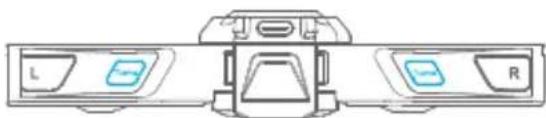
手柄顶部左右2侧的“Turbo”按键,分别控制2侧按键的连发频率。
natural_image
Diagram of a device with labeled buttons L and R, no readable text or symbols beyond labels通过按压“Turbo”按键,可在4档连发频率中循环切换,切换时指示灯颜色将会变化,提示当前连发频率状态。
| 状态指示灯 | 颜色 |
| 无连击 | |
| 3 连击 | |
| 6 连击 | |
| 9 连击 |
熄屏校正
使用过程中,按键若出现没反应/断触/失灵等现象,尝试将手机屏幕关闭后重新打开进行恢复。
电量指示
低电量:当手柄低于10%电量时,2颗指示灯,红灯快闪
充电时:2颗指示灯,红灯慢闪
充满时:2颗指示灯,绿灯常亮

扫码查看详细教程
NOTICE: Please read this Precautions carefully.
- CONTAINS SMALL PARTS. Keep out of reach of children under the age of 3. Seek immediate medical attention if swallowed or inhaled.
● DO NOT use the product near fire.
● DO NOT expose to direct sunlight or high temperatures.
● DO NOT leave the product in a humid or dusty environment.
● DO NOT impact the product or cause it to fall due to strong impact.
● DO NOT touch USB port directly or it might cause malfunctions.
● DO NOT strongly bend or pull cable parts. - Use a soft, dry cloth while cleaning.
● DO NOT use chemicals such as gasoline or thinner.
• DO NOT disassemble, repair or modify. - DO NOT use for purposes other than its original purpose. We are NOT responsible for accidents or damage when used for non-original purposes.
● DO NOT look directly at the optical light. It might damage your eyes. - If you have any quality concerns or suggestions, please contact GameSir or your local distributor.

注意事项
- 若商品有质量问题,请首先联系我们的客服进行登记。联系方式:
QQ: 800082537
电话:400-8828035(时间:9:00-18:00)
官网:www.xiaoji.com
出品:广州小鸡快跑网络科技有限公司
地址:广州市天河区建业路华翠街68号301A-1
- 如需退、换商品,请确保商品完好无损(包括商品外包装、附赠品、说明书、售后卡、标签等),不影响二次销售。
- 如要保修商品,请务必完整填写用户姓名、联系电话、联系地址,正确填选售后要求与详细说明售后原因,将售后卡随货寄回(如不完整填写保修卡信息,恕无法提供任何的售后服务)。
| 保修卡 | |
| (售后政策:非人为损坏,3个月包换、1年保修) | |
| 用户姓名 | |
| 联系电话 | |
| 联系地址 | |
| 售后要求 | □退换保修□ □ |
| 售后原因 | |
| 订单编号 | |
| (注:非小鸡官网途径购买的产品,售后问题请直接与购买商家联系) | |


- PACKAGE CONTENTS
- COMPATIBLE MOBILE PHONE SIZE
- COMPATIBLE MOBILE GAMES
- REGISTRATION
- YOUR BENEFITS
- POWER ON/OFF
- CONNECTION
- TURBO MODE
- SCREEN-OFF CORRECTION
- BATTERY INDICATOR
- TURBO-INDICATOR LIGHT STATUS/COLOR
- 简体中文
- 包装内容
- 兼容的手机尺寸
- 兼容的手机游戏
- 开机与关机
- 第一步 安装手柄
- 连击模式
- 熄屏校正
- 电量指示
- NOTICE: Please read this Precautions carefully.
- 注意事项
ブランド : Gamesir
モデル : F4 Falcon
カテゴリ : レギュレーター