
LS17182 - Motion detector JUNG - Free user manual and instructions
Find the device manual for free LS17182 JUNG in PDF.


| Product Type | Wall-mounted motion detector with LB Management system |
| Brand | JUNG |
| Model | LS17182 (Art. no. ..17182..) |
| Installation Height | 1.10 m |
| Detection Angle | 180° |
| Detection Principle | Passive infrared (PIR) for heat motion |
| Brightness Threshold | Approx. 5 ... 1000 lx plus day operation (⚙ setting) |
| Run-on Time | Selectable: approx. 10 s ... 30 min |
| Sensitivity | Fixed (not adjustable on this model) |
| Power Supply | Via system insert (230 V AC typical, depending on insert) |
| Operating Temperature | -20 ... +45 °C |
| Protection Class | IP20 |
| Mounting | Wall mounting on system insert |
| Compatible Inserts | Switching, dimming, or 3-wire extension inserts |
| Dimming Function | Yes (with dimming insert), adjustable switch-on brightness |
| Extension Capability | Yes, via 3-wire extension (LB Management) to expand detection field |
| Test Mode | Yes, switch on for approx. 1 second on motion detection |
| Self-Test After Power Failure | Maximum 60 seconds; load switched on during test |
| Accessories | Sealing gasket (551WU), sealing kit for 2.2 m (AS..50DS) |
| Safety | Installation by qualified electrician only; disconnect power before work |
| Maintenance | Clean with dry cloth; do not press on sensor window |
| Warranty | Statutory warranty via specialist trade |
Frequently Asked Questions - LS17182 JUNG
User questions about LS17182 JUNG
0 question about this device. Answer the ones you know or ask your own.
Ask a new question about this device
Download the instructions for your Motion detector in PDF format for free! Find your manual LS17182 - JUNG and take your electronic device back in hand. On this page are published all the documents necessary for the use of your device. LS17182 by JUNG.
USER MANUAL LS17182 JUNG
Operating instructions
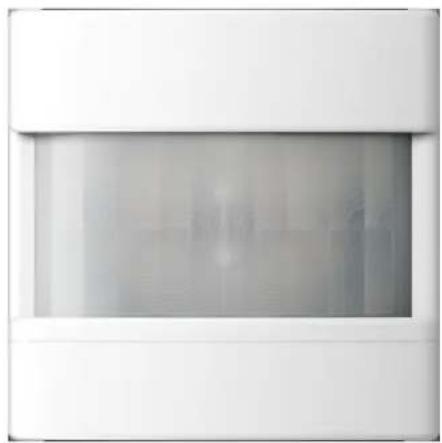
LB Management motion detector 1.1 m Art. no. ..17180..
LB Management motion detector 1.1 m Art. no. ..17182..
LB Management motion detector 2.2 m Art. no. ..17280..
natural_image
Exterior view of a modern office building (no signage)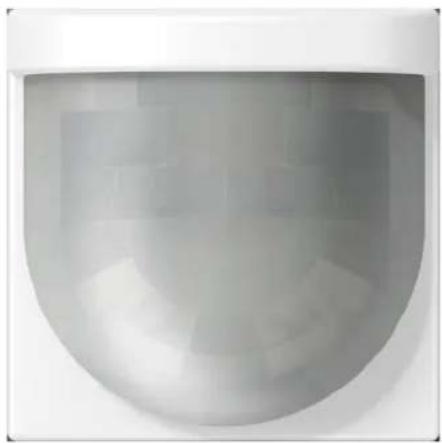
natural_image
Close-up of a modern, curved glass wall-mounted fixture with no visible text or symbolsALBRECHT JUNG GMBH & CO. KG
Vollmestraße 1
58579 Schalksmühle
GERMANY
Telefon: +49 2355 806-0
Telefax: +49 2355 806-204
kundencenter@jung.de
www.jung.de
Table of Contents
1 Safety instructions.... 3
2 Intended use 3
3 Operation 4
4 Information for electrically skilled persons 5
4.1 Mounting and electrical connection.... 5
4.2 Commissioning 12
4.1 Mounting and electrical connection.... 5
4.2 Commissioning.... 12
5 Technical data.... 14
6 Troubleshooting 14
7 Accessories.... 15
8 Warranty.... 15
1 Safety instructions

Electrical devices may only be mounted and connected by electrically skilled persons.
Serious injuries, fire or property damage possible. Please read and follow manual fully.
Danger of electric shock. Always disconnect before carrying out work on the device or load. In so doing, take all the circuit breakers into account, which support dangerous voltages to the device and or load.
Danger of electric shock. Device is not suitable for disconnection from supply voltage because – depending on the insert used – mains potential even is applied on the load when the device is switched off. Always disconnect before carrying out work on the device or load. To do so, switch off all associated circuit breakers.
Do not press on the sensor window. Device can be damaged.
The device is not suitable for use as a burglar alarm or other alarm.
This manual is an integral part of the product, and must remain with the end customer.
2 Intended use
– Automatic switching of lighting depending on the heat motion and ambient brightness
- Operation with system insert for switching or dimming, or 3-wire extension
– Wall installation on system insert
Product characteristics
- Extension of the detection field in combination with 3-wire extension
- Operation with 2-wire or 3-wire extension, rotary extension, or push-button
- Switch on with last saved brightness or saved switch-on brightness, with dimming insert
- Switch-on brightness can be saved permanently via extension, with dimming insert
- Dimming light via extension with dimming insert
Art.-no.: ..17180.., ..17280..
- Fixed run-on time
- Selectable sensitivity
- Selectable brightness threshold
Art. no. ..17182..
- Fixed sensitivity
- Selectable run-on time
- Selectable brightness threshold
Motion detector 1.10 m
– Screen for limiting the detection area
Automatic operation
The device detects heat motions of people, animals and objects.
- The light is switched on if a person enters the detection field and the brightness threshold is below the set brightness threshold.
- The run-on time restarts with each detected motion.
- The light is switched off if: no more movement is detected in the detection field and the run-on time has elapsed or the ambient light is too bright and the run-on time has elapsed.
To avoid any switch-on caused by a cooling lamp, no movement signals are evaluated for a brief lockout time after switching off. The motion detector adjusts itself to the ambient conditions to keep the time as short as possible.
Behaviour after a mains voltage failure
After mains voltage return, the device performs a self-test for a maximum of 60 seconds. After the self-test has been completed, the device is ready for operation.
The following applies during the self-test:
- The load is switched on.
- Movements are not detected.
3 Operation
Precondition: A 2-wire or 3-wire extension with LB Management push-button 1-gang or a push-button is connected.
Multiple extensions can be combined with each other. Operation with the rotary extension is described in the rotary extension instructions.
Switching on light for the duration of the run-on time
■ Press the operating cover or push-button for less than 0.4 seconds.
Light is switched on depending on brightness and motion. Movements are evaluated according to the brightness and prolong the run-on time.
If the operating cover or push-button is pressed again in the switched-on state, the run-on time is restarted. In combination with a dimming insert, switch-on brightness is switched on again.
Dim the light
Only in combination with a main device with a dimming insert.
■ Press the operating cover at the top or bottom or the push-button for longer than 0.4 seconds. Light becomes brighter or dimmer as far as the respective limit value.
i Push-button: The dimming direction is changed with each new long actuation.
Saving the switch-on brightness
Only in combination with a main device with a dimming insert.
In the state as supplied, the switch-on brightness is set to maximum brightness.
■ Set light to the required brightness.
■ Press operating cover over entire surface for longer than 4 seconds.
Switch-on brightness is saved. For confirmation, the light is switched off briefly and switched on again.
i An push-button cannot be used to save the switch-on brightness.
Deleting the switch-on brightness
Only in combination with a main device with a dimming insert.
■ Press the operating cover briefly: Light switches on at the saved switch-on brightness.
■ Press operating cover over entire surface for longer than 4 seconds.
The switch-on brightness is deleted. On switching on, the dimming insert switches to the last set brightness value. For confirmation, the light is switched off briefly and switched on again.
i A push-button cannot be used to delete the switch-on brightness.
4 Information for electrically skilled persons

DANGER!
Mortal danger of electric shock.
Disconnect the device. Cover up live parts.
4.1 Mounting and electrical connection
Motion detection
The detection of heat sources through a motion detector and thus the extent of the detection field is influenced by the following criteria:
Geometry of the detection field, assembly height and set sensitivity New fragment up to New fragment
Direction of movement : Passing the motion detector tangentially results in a heat signal which can be evaluated well. If movement is radial to the sensor, the heat signal is smaller and thus harder to evaluate, resulting in a smaller range.
The following specifications on the extent of the detection field are general guide values. Discrepancies can occur depending on the installation environment and the intensity of the heat motion.
Detection field and range for motion detector 1.10 m
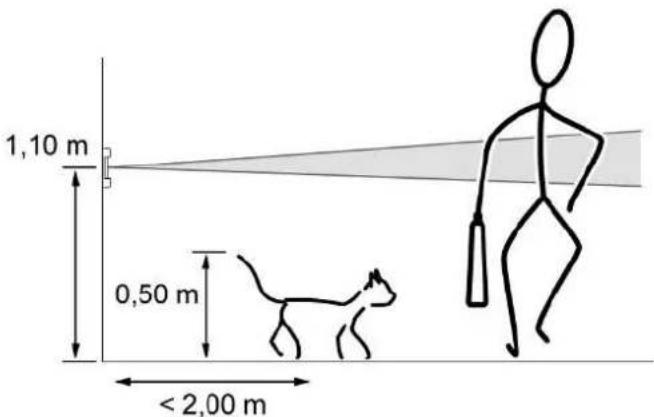
Image 1: Detection field and mounting height for motion detector 1.10 m
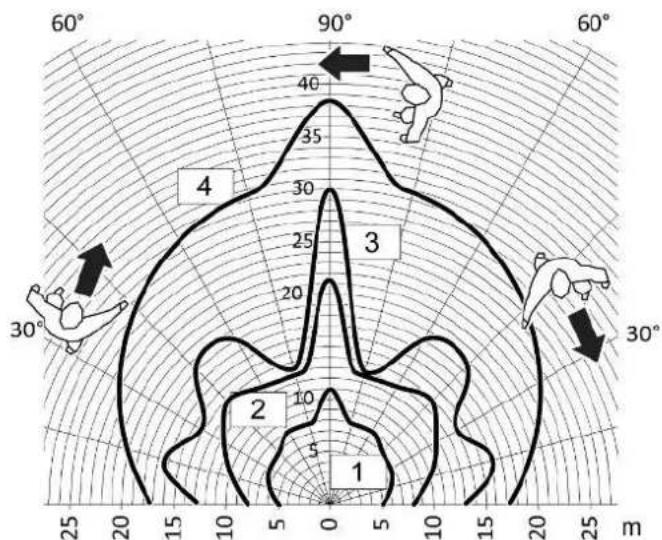
radar
| Region | Value | |---|---| | 1 | 5 | | 2 | 10 | | 3 | 30 | | 4 | 40 |Image 2: Range with tangential direction of motion for motion detector 1.10 m, art. no. ..17180..
1 25% sensitivity
2 50% sensitivity
3 75% sensitivity
4 100% sensitivity
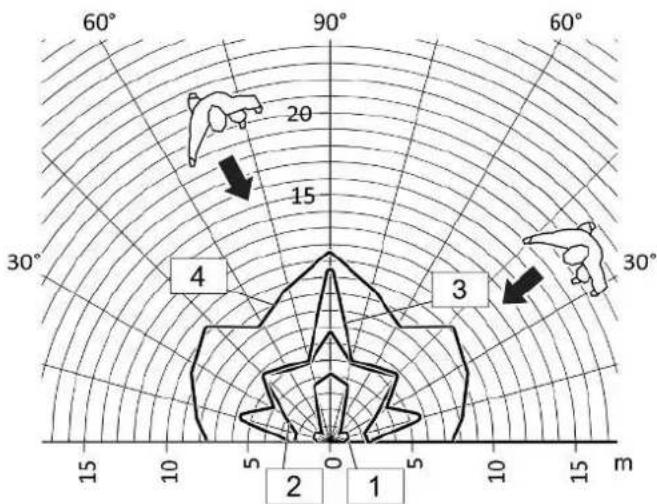
radar
| Category | Value | |---|---| | 1 | 2 | | 2 | 5 | | 3 | 15 | | 4 | 4 | | 5 | 10 |Image 3: Range with radial direction of motion for motion detector 1.10 m, art. no. ..17180..
1 25% sensitivity
2 50% sensitivity
3 75% sensitivity
4 100% sensitivity
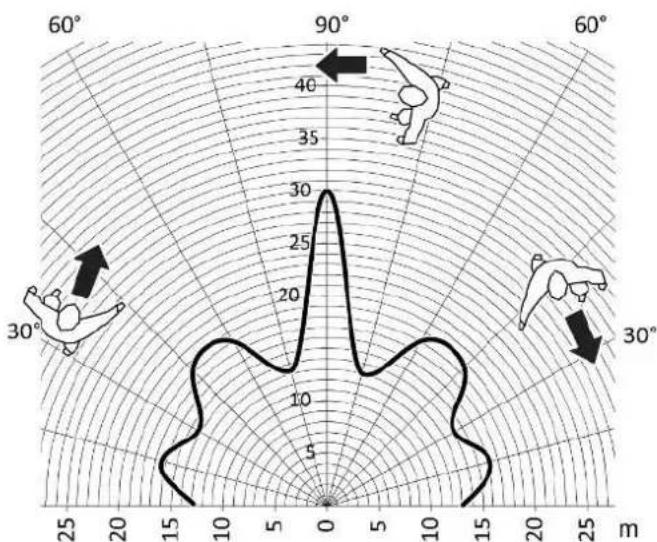
radar
| Angle | Value | |-------|-------| | 0 | 30 | | 30 | 10 | | 60 | 40 | | 90 | 35 | | 120 | 25 | | 150 | 15 | | 180 | 5 | | 210 | 10 | | 240 | 20 | | 270 | 30 | | 300 | 40 | | 330 | 35 | | 360 | 25 |Image 4: Range with tangential direction of motion for motion detector 1.10 m, art. no. ..17182..
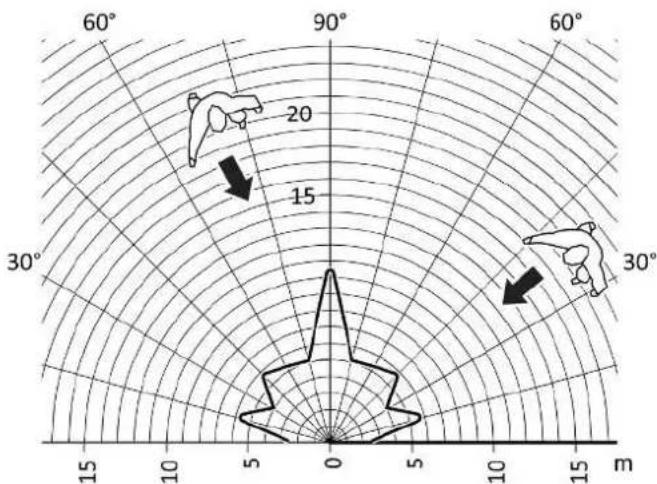
radar
| Angle | Value | |-------|-------| | 60° | 20 | | 90° | 15 | | 125° | 10 | | 150° | 5 | | 175° | 0 |Image 5: Range with radial direction of motion for motion detector 1.10 m, art. no. ..17182..
Detection field and range for motion detector 2.20 m
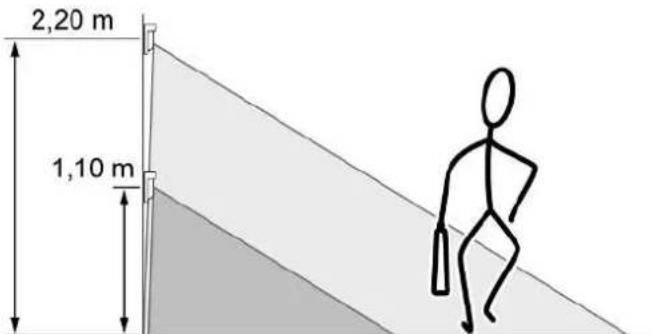
Image 6: Detection field and mounting height for motion detector 2.20 m
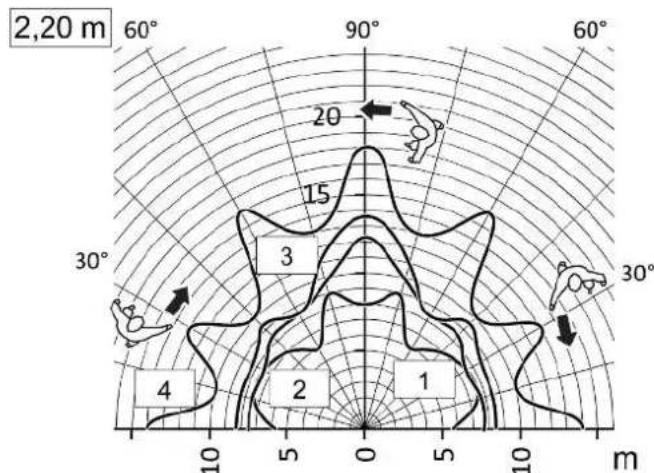
radar
| Angle | Value | |-------|-------| | 0° | 1 | | 30° | 2 | | 60° | 3 | | 90° | 4 | | 120° | 15 |Image 7: Range with tangential direction of motion for motion detector 2.20 m, mounting height 2.20 m
1 25% sensitivity
2 50% sensitivity
3 75% sensitivity
4 100% sensitivity
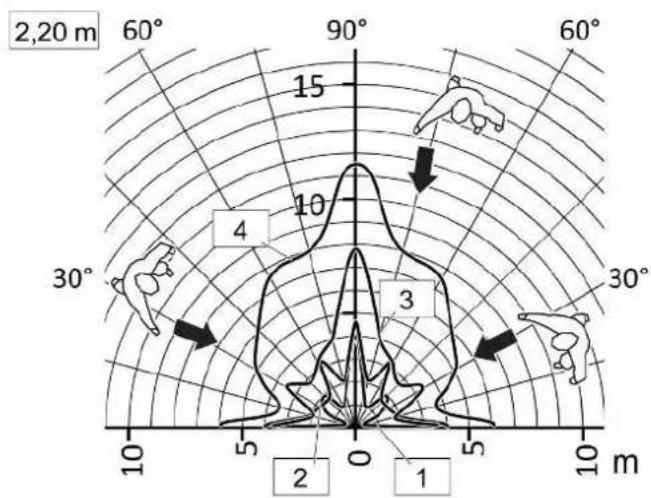
Image 8: Range with radial direction of motion for motion detector 2.20 m, mounting height 2.20 m
1 25% sensitivity
2 50% sensitivity
3 75% sensitivity
4 100% sensitivity
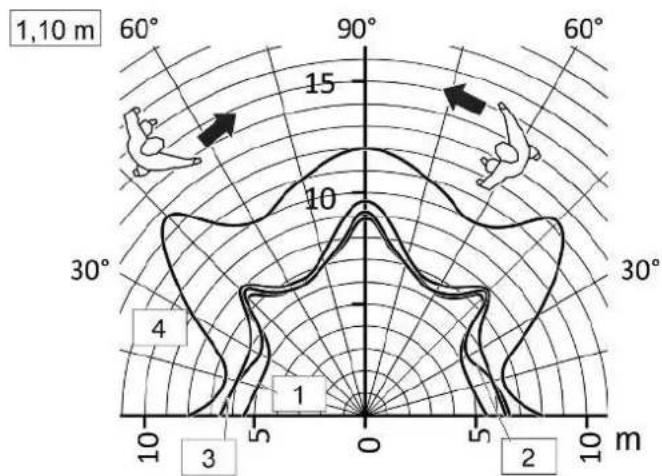
Image 9: Range with tangential direction of motion for motion detector 2.20 m, mounting height 1.10 m
1 25% sensitivity
2 50% sensitivity
3 75% sensitivity
4 100% sensitivity
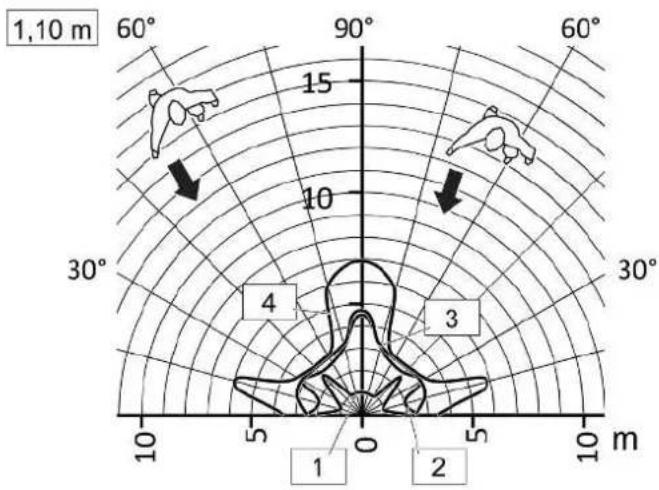
Image 10: Range with radial direction of motion for motion detector 2.20 m, mounting height 1.10 m
1 25% sensitivity
2 50% sensitivity
3 75% sensitivity
4 100% sensitivity
Selecting installation location
■ Select a vibration-free installation location. Vibrations can lead to unwanted switching.
■ To achieve optimum range, choose an installation location that is tangential to the direction of motion.
■ Avoid heat sources in the detection field such as heating units, outlets of ventilation systems or air conditioners, copiers, printers, coffee machines, draughty doorways, animals etc.
Mounting the cover
■ Connecting and mounting the system insert properly (see system insert instructions).
■ Fit the cover with frame on the system insert.
Further installation steps are necessary to ensure the degree of protection IP 44 (see Seal flange (1.1 m) or Seal set (2.2 m) instructions).
Expanding the detection field
To expand the detection field, connect a 3-wire extension with LB Management motion detector. The main device also evaluates signals of the extension and, if necessary, switches the lighting on.
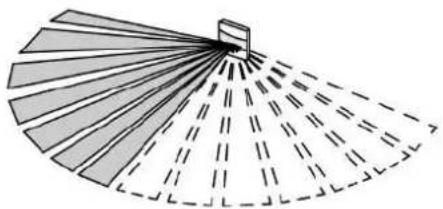
Limiting the detection field, motion detector 1.10 m
The detection field can be limited using a panel (see figure 11).
natural_image
Diagram of a fan-shaped fan with radial lines and a small rectangular object on top, no text or symbols present.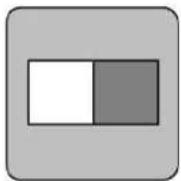
Image 11: Limiting the detection field, motion detector 1.10 ~m
Mounting the panel
natural_image
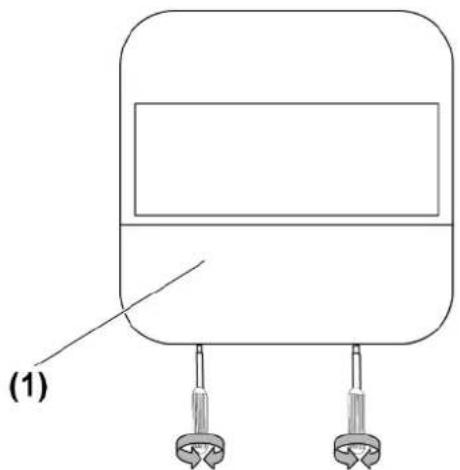
Simple line drawing of a device with two connectors and a label (1), no text or symbols present.Image 12: Dismounting the cover
natural_image
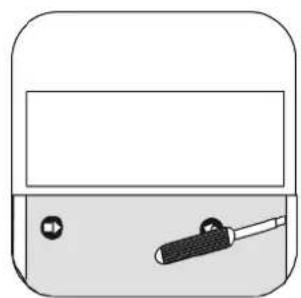
Simple line drawing of a container with a handle and two small objects inside (no text or symbols)Image 13: Dismounting of design cover
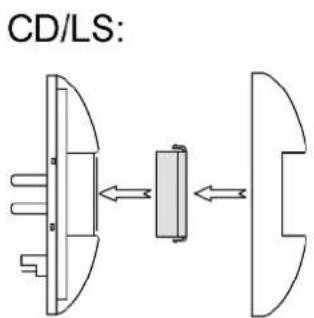
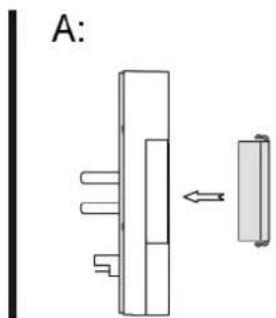
Image 14: Panel mounting, series CD/LS and A
Series CD, LS
■ Removing the cover (1) (see figure 12).
■ Use a screwdriver to carefully remove the design cover (see figure 13).
■ Mount the cover for the left or right side of the device (see figure 14).
Series A:
■ Mount the cover from the front on the left or right side of the device (see figure 14).
4.2 Commissioning
Make settings
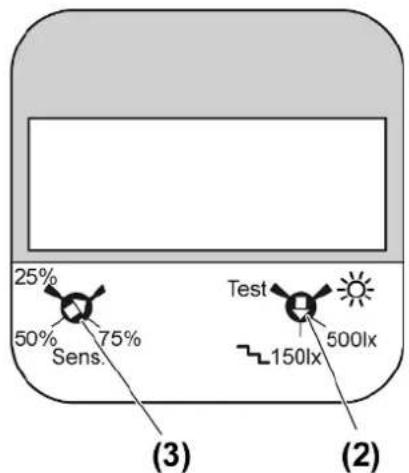
Image 15: Motion detection adjuster 1.10 m art. no...17180..
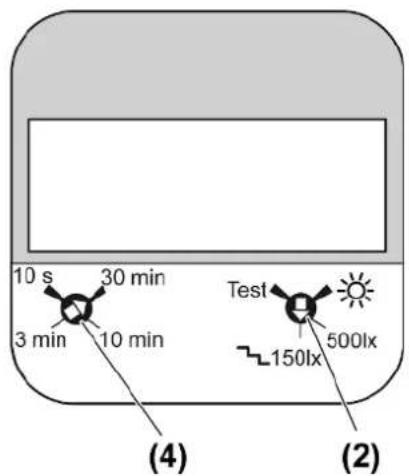
Image 16: Motion detection adjuster 1.1 m art. no. ..17182..
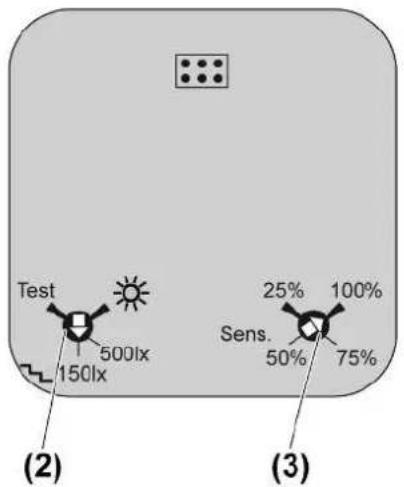
Image 17: Motion detection adjuster 2.20 m art. no. ..17280..
The adjusters for brightness threshold and sensitivity as well as run-on time are located behind the cover (1) of the motion detector 1.10 m and on the rear of the device at the motion detector 2.20 m. Using a screwdriver, carefully remove the cover (1) (see figure 12).
Setting the brightness threshold
Set the brightness threshold on the covers of the main device and all extensions. Different values can be set on the main device and extensions. There are 4 defined values for the brightness threshold. In setting ⚙, the motion detector operates independently of the brightness (day operation). Setting 150lx for stairways according to DIN EN12464-1, 2003-3.
■ Turn adjuster (2) (see figure 15) to (see figure 17).
Setting the sensitivity, art. no. ..17180.., ..17280..
Sensitivity can be set in 4 levels to minimize faulty switching.
■ Turn Sens. adjuster (3) (see figure 15), (see figure 17).
Set run-on time, art. no. ..17182..
Set run-on time at the main device.
■ Turn Time adjuster (4) (see figure 16).
Testing the detection field
■ Make the test settings. For this, turn Test adjuster (2) (see figure 15) to (see figure 17).
The motion detectors operates independently of the brightness and switches on for approx. 1 second when motion is detected. The sensitivity setting remains intact.
5 Technical data
Ambient temperature -20 ... +45 °C
Storage/transport temperature -25 ... +70 °C
Degree of protection
Art. no. ..17180.., ..17182.., ..17280.. IP20
Brightness threshold approx. 5 ... 1000 lx (and day
operation)
Sensitivity
Art. no. ..17180.., ..17280.. 25, 50, 75, 100%
Run-on time
Art. no. ..17180.., ..17280.. approx. 2 min
Art. no. ..17182.. approx. 10 s ... 30 min
Installation height
Art. no. ..17180.., ..17182.. 1.10 m
Art. no. ..17280.. 1.10 m / 2.20 m
Detection angle 180°
6 Troubleshooting
Motion detector does not switch on
Cause 1: The ambient brightness is greater than the adjusted brightness threshold.
Set brightness value (see Commissioning chapter).
Cause 2: Motion detector does not detect any motions.
Check detection field for any obstacles.
Motion detector switches on without motion
Cause: Motion detector detects motions.
Pay attention to heat sources such as heaters, fans and air-conditioners in the detection field.
Motion detector switches off despite motion
Cause: The ambient light is too bright and the switch-off threshold was exceeded.
Switch on motion detector.
Motion detector does not switch off after the run-on time has elapsed
Cause: Motion detector detects motions constantly.
Pay attention to heat sources such as heaters, fans and air-conditioners in the detection field.
7 Accessories
Sealing gasket Art. no. 551WU
Sealing kit for motion detector 2.2 m Art. no. AS..50DS
8 Warranty
The warranty is provided in accordance with statutory requirements via the specialist trade.
ALBRECHT JUNG GMBH & CO. KG
Vollmestraße 1
58579 Schalksmühle
GERMANY
Telefon: +49 2355 806-0
Telefax: +49 2355 806-204
kundencenter@jung.de
www.jung.de
- Operating instructions
- Table of Contents
- Safety instructions
- Intended use
- Product characteristics
- Automatic operation
- Behaviour after a mains voltage failure
- Operation
- Switching on light for the duration of the run-on time
- Dim the light
- Saving the switch-on brightness
- Deleting the switch-on brightness
- Information for electrically skilled persons
- DANGER!
- Mounting and electrical connection
- Motion detection
- Selecting installation location
- Mounting the cover
- Expanding the detection field
- Commissioning
- Setting the brightness threshold
- Testing the detection field
- Technical data
- Troubleshooting
- Accessories
- Warranty
Brand : JUNG
Model : LS17182
Category : Motion detector