
CD1790DWW - Motion detector JUNG - Free user manual and instructions
Find the device manual for free CD1790DWW JUNG in PDF.


| Product Type | Motion and presence detector |
| Model | CD1790DWW (Art. no. DWPM17360WW) |
| Brand | JUNG |
| Dimensions (Diameter × Height) | 103 mm × 66 mm |
| Weight | Approx. 100 g (estimated) |
| Installation Type | Ceiling installation on flush-mounted insert |
| Detection Angle | 360° |
| Detection Area | Up to ∅ 20 m (at 3 m installation height) |
| Installation Height | Recommended 2.2 – 6 m (motion detector); max 3.5 m for presence detection |
| Power Supply | Via flush-mounted insert (mains voltage, 230 V AC typical) |
| Ambient Temperature Range | -5 °C to +45 °C |
| Brightness Threshold (Motion Detector) | Approx. 5 – 500 lx (and day operation) |
| Brightness Threshold (Presence Detector) | Approx. 5 – 1000 lx (and day operation) |
| Run-on Time | 10 s to 60 min (default 2 min) |
| Sensitivity | Adjustable per sensor (0, 25, 50, 75, 100%) |
| Wireless Connectivity | Bluetooth 2.402 – 2.480 GHz, Class 2 (max 2.5 mW), range typ. 10 m |
| App Compatibility | Clever Config app (iOS and Android) |
| Key Functions | Automatic on/off, timer, alarm, presence simulation, constant light regulation, night light, hotel function, switch-off warning, pulse operation (with switch insert), dimming (with dimming insert), walking test |
| Accessories Included | Push-on cover for limiting detection field |
| Safety | Electrical safety: disconnect before work; not suitable for disconnection from supply; not for burglar alarm |
| Maintenance | Clean with dry cloth; do not press on sensor window |
| Warranty | Statutory warranty via specialist trade |
| Manufacturer | ALBRECHT JUNG GMBH & CO. KG, Volmestraße 1, 58579 Schalksmühle, Germany |
Frequently Asked Questions - CD1790DWW JUNG
User questions about CD1790DWW JUNG
0 question about this device. Answer the ones you know or ask your own.
Ask a new question about this device
Download the instructions for your Motion detector in PDF format for free! Find your manual CD1790DWW - JUNG and take your electronic device back in hand. On this page are published all the documents necessary for the use of your device. CD1790DWW by JUNG.
USER MANUAL CD1790DWW JUNG
Motion and presence detector
Art. no.: DWPM17360WW
Motion and presence detector
Art. no.: DWPM17360AL
Operating instructions
1 Safety instructions

Electrical devices may only be mounted and connected by electrically skilled persons.
Serious injuries, fire or property damage possible. Please read and follow manual fully.
Danger of electric shock. Always disconnect before carrying out work on the device or load. In so doing, take all the circuit breakers into account, which support dangerous voltages to the device and or load.
Danger of electric shock. The device is not suitable for disconnection from supply voltage. Depending on the insert used, the load is not electrically isolated from the mains, even when the device is switched off.
Do not press on the sensor window. Device can be damaged.
The device is not suitable for use as a burglar alarm or other alarm.
These instructions are an integral part of the product, and must remain with the end customer.
2 Device components
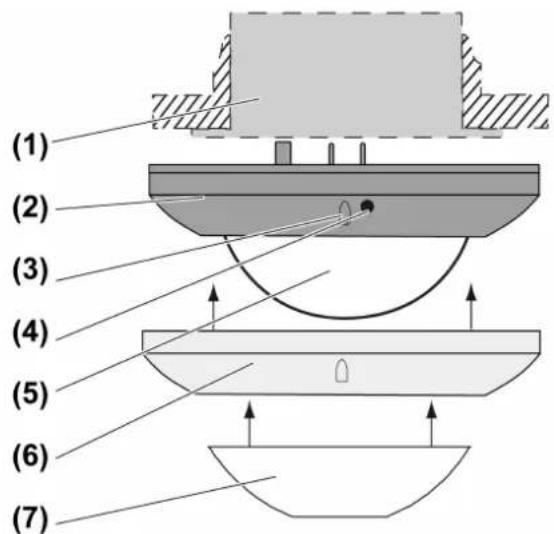
Figure 1: Device components
(1) FM insert
(2) Sensor top
(3) Brightness sensor
(4) Button Bluetooth
(5) Sensor window and status LEDs
(6) Decor ring
(7) Push-on cover
Status LED
| Red LED lights up Self-test | |
| Red LED flashes 3 s on / 3 s off Alarm function | active |
| Red LED flashes 0.5 s on / 0.5 s off Alarm was triggered | triggered |
| Red LED flashes three times followed by a 1 s pause | Cover was previously connected to another insert |
| Yellow LED lights up "Off" or "Off for 0.5 - 5 hours" function active | |
| Yellow LED flashes Presence simulation active | |
| Green LED lights up "On" or "On for 0.5 - 5 hours" function active | |
| Blue LED lights up Device is coupled with a mobile device and active app | |
| Blue LED flashes 0.5 s on / 0.5 s off Bluetooth coupling mode active | |
3 Intended use
- Automatic switching of lighting depending on the heat motion and ambient brightness
– Operation with flush-mounted insert for dimming or switching or 3-wire extension from LB management
– Ceiling installation on flush-mounted insert.
Product characteristics
Functions directly on the cover
- Extension of the detection area in combination with 3-wire extension
- Operation with 2-wire or 3-wire extension, rotary dimmer extension or push-button
- Dimming light via extension with dimming insert
- Resetting to factory setting
- Push-on cover for limiting the detection field
Functions via app
- Setting the device as presence detector or motion detector
- Setting the switch-on threshold
- Separate adjustment of the sensitivity of the three PIR sensors
- Setting the run-on time
- On or off
- On or off for 0.5 - 5 hours
- Switch-off warning
– Dynamic run-on time
– Presence simulation - Alarm function
- Timer function
- Walking test
In combination with a switch insert
- Pulse operation
In combination with a dimming insert
- Switch on with last saved brightness or saved switch-on brightness
- Adjusting the minimum brightness
- Adjusting the maximum brightness
-
Hotel function
-
Night light function
- Constant light regulation
Automatic operation
The device detects heat motions of people, animals and objects.
- The light is switched on if a person enters the detection field and the brightness threshold is below the set brightness threshold.
- The run-on time restarts with each detected motion.
- The light is switched off, if: no more movement is detected in the detection field and the run-on time has elapsed or the ambient light is too bright and the run-on time has elapsed.
To avoid any switch-on caused by a cooling illuminant, no movement signals are evaluated for a brief lockout time after switching off. The motion detector adjusts itself to the ambient conditions to keep the time as short as possible.
Behaviour after a mains voltage failure
After mains voltage return, the device performs a self-test for a maximum of 20 seconds. After the self-test has been completed, the device is ready for operation.
If the red status LED flashes three times at repeated intervals, the cover was previously connected to another insert. To enable the function again, either place the cover onto the respective insert or press the Bluetooth button (4) for longer than 4 seconds.
The following applies during the self-test:
- The red status LED is illuminated.
– The load is switched off.
– Movements are not detected
– The device can be operated via extensions
4 Commissioning
Install app on a mobile end device
Requirement for operation via app is a mobile end device with Bluetooth interface, running the Android operating system or iOS.
■ Download and install the Clever Config app from the iTunes App Store (iOS) or Google Play Store (Android).
Couple mobile end devices via Bluetooth
Precondition: insert and cover must be ready for operation. The mobile end device is located close to the cover.
■ Activate coupling mode: Press the Bluetooth § button (4) (Figure 1) for more than 4 seconds.
The blue LED flashes. The coupling mode is active for one minute.
■ Start the Bluetooth app and search for device to be coupled.
Cover is coupled with the end device and shown in the app.
The coupling mode is automatically exited after successful coupling. The blue LED lights up to confirm an active connection.
A maximum of 8 mobile end devices can be coupled with a cover. When coupling the 9th device, the oldest device will be deleted.
5 Operation
The app is used for the configuration and operation of the device. Some basic functions can also be operated via connected extensions.
Operation using 2-wire or 3-wire extension with button cover or push-button
Multiple extensions can be combined with each other. All operations described here are also possible via the app. Operation with the rotary dimmer extension is described in the rotary dimmer extension instructions.
Switching on light for the duration of the run-on time
i Short-time operation: When pressed, pulses are generated approx. every 3 seconds for 1 minute. Exception for 3-wire extension: only one pulse is generated.
■ Press the button cover or push-button briefly.
i Motion detector operation: If the button cover or push-button is pressed again after switching on, the run-on time is restarted. In combination with a dimming insert, switch-on brightness is switched on again.
Switching the light off for 3 minutes
This function can only be used in presence detector operation.
■ Press the button cover at the bottom or push-button briefly. The light is switched off for the period of 3 minutes. When movements are detected, the time is restarted.
Adjust the brightness, only in combination with dimming insert
■ Long press on button cover at the top or bottom or push-button.
Save switch-on brightness, only in combination with dimming insert
■ Adjust the brightness.
■ Press the button cover over entire surface for longer than 4 seconds.
i An push-button cannot be used to save the switch-on brightness.
Delete switch-on brightness, only in combination with dimming insert
■ Press the button cover briefly: Light switches on at the saved switch-on brightness.
■ Press the button cover over the entire surface for longer than 4 seconds: Switch-on brightness is deleted. Switching on takes place at the last brightness value set.
i A push-button cannot be used to delete the switch-on brightness.
6 Information for electrically skilled persons

DANGER!
Mortal danger of electric shock.
Disconnect the device. Cover up live parts.
Detection field and range
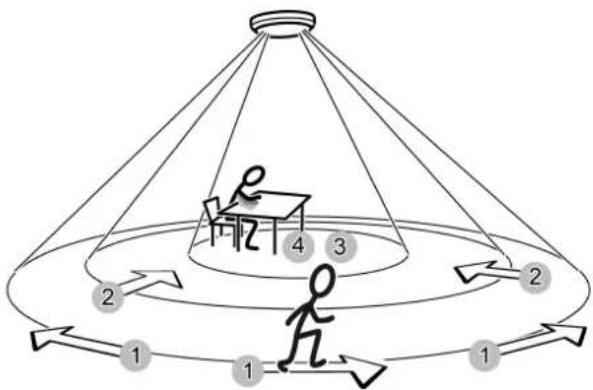
The device has a detection field of 360^ . The diameter of the detection field depends on the installation height and the direction of motion of persons in the detection field. The detection field becomes larger the greater the installation height, while the detection density and sensitivity are reduced at the same time.
flowchart
graph TD
    A["Person at table 4"] --> B["Step 2"]
    B --> C["Step 1"]
    C --> D["Step 3"]
    D --> E["Step 2"]
    E --> F["Step 1"]
    F --> G["Step 2"]
    G --> H["Step 3"]
    H --> I["Step 4"]
Figure 2: Detection range depending on the direction of movement
Diameter of detection field for direction of movement
| Installation height 1: 2: 3: 4: | |||
| 2.20 m 14.50 m 11.50 m 8.00 m 6.00 m | |||
| 2.50 m 16.50 m 13.00 m 10.00 m 7.00 m | |||
| 3.00 m 20.00 m 16.00 m 12.00 m 8.00 m | |||
| 3.50 m 23.00 m 18.50 m 14.00 m 9.00 m | |||
| 4.00 m 26.00 m 17.00 m 14.50 m *) - *) | |||
| 5.00 m 28.00 m 18.00 m 15.00 m *) - *) | |||
| 6.00 m 29.00 m 19.00 m - *) - *) |
1: Range for tangential movement on the ground
2: Range for radial movement on the ground
3: Range for typical movements at desks, e.g. torso movement
4: Range of fine detection at desks, e.g. mouse movements
*) When used as a presence detector: Installation height should not be more than 3.5 m, otherwise fine detection is not possible.
Selecting installation location
For use as a presence detector, the device is installed, for example, above a workplace and monitors the surface below it. For use as a motion detector, the device is installed, for example, in the hallway.
■ Select a vibration-free installation location. Vibrations can lead to unwanted switching.
■ Avoid interference sources in the detection area. Interference sources can trigger the motion detector, e.g. heat sources such as heating units, outlets from ventilation openings or air conditioners, copiers, printers, coffee machines, draughty doorways, animals etc.
The detection field can be limited in order to minimise the influence of interference sources. For this, use the push-on cover (see Limiting the detection field using the push-on cover) or switch off individual sensors (see Configuring device settings).
Aligning cover
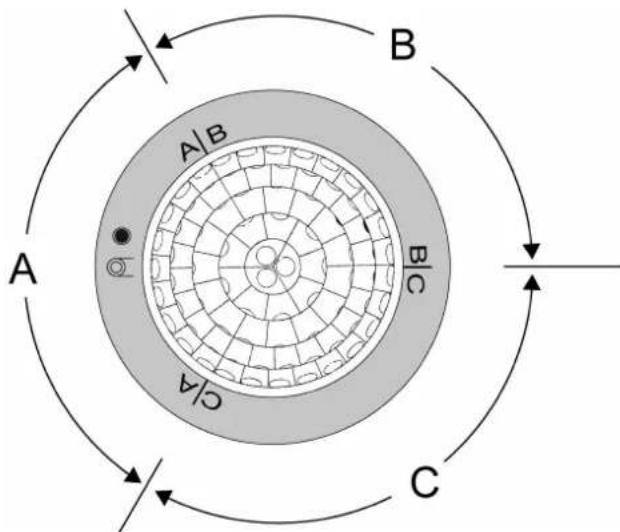
The device has three independent sensors for motion detection. The arrangement of the areas A, B and C is clearly evident under the decor ring (Figure 4).
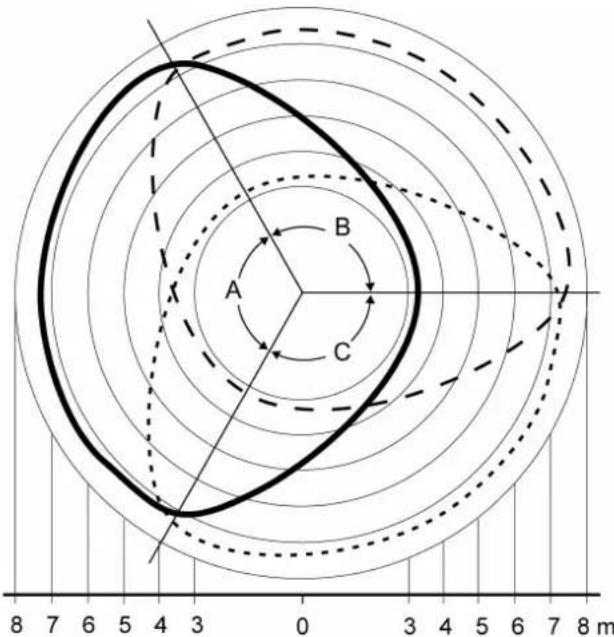
Figure 3: Detection field: areas A, B and C; installation height 2.20 m
flowchart
graph TD
    A["A"] --> B["B"]
    B --> C["C"]
    C --> A
    A -->|A/B| B
    B -->|B/C| C
    C -->|C/A| A
    style A fill:#f9f,stroke:#333
    style B fill:#ccf,stroke:#333
    style C fill:#cfc,stroke:#333
Figure 4: Arrangement of the areas A, B and C
■ Pay attention to correct alignment when mounting the appliance box and flush-mounted insert.
■ Align the cover so that the brightness sensor is on the side away from the windows. This reduces the effects of scattered light.
Fitting the cover
■ Connect flush-mounted insert properly and mount in accordance with the desired orientation of the cover (see instructions for flush-mounted insert).
■ Fit the cover on the flush-mounted insert
■ Switch on mains voltage.
If the red status LED flashes three times at repeated intervals, the cover was previously connected to another insert. If the cover is to remain on the insert, press the Bluetooth button (4) for longer than 4 seconds.
Limiting the detection field using the push-on cover
The push-on cover can be used to limit the detection field, e.g. in order to mask out interference sources.
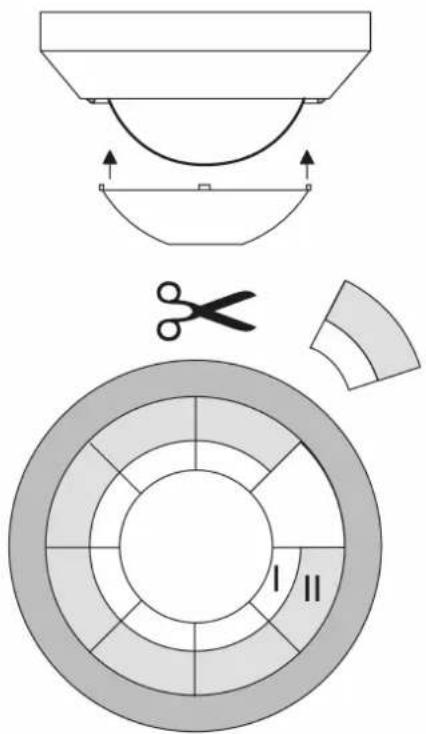
Figure 5: Push-on cover
| Size Range on the ground (mounting height 3 m) | |
| Complete push-on cover ∅ approx. 4.5 m | |
| Area I cut out ∅ approx. 7.5 m | |
| Areas I + II cut out ∅ approx. 12 m | |
| without push-on cover ∅ approx. 20 m |
■ Pull off push-on cover.
■ Using scissors, cut out push-on cover along the marked lines as required.
■ Push on push-on cover.
Alternatively, the detection field can also be limited via the app by reducing the sensitivity or switching off individual sensors.
Expanding the detection field
To expand the detection field, connect a 3-wire extension with presence or motion detector cover. The main device also evaluates signals of the extension and, if necessary, switches the lighting on.
Configuring device settings
Settings are configured via the app
Default settings
| Function Setting | |
| Operating mode Motion detector | |
| Operating function Automatic operation | |
| Sensitivity of sensors A-C 100 % | |
| Detection angle 360°, sensors A-C active | |
| Switch-on threshold 10 lux | |
| Run-on time 2 minutes | |
| Supplementary function switched-off |
Checking detection field
Any motions detected are displayed in the app and by the red LED. The lighting is switched on for approx. 1 second. If the light is not to be switched dependent on motion, the On or Off function should also be activated.
3-wire extension: detected motions are sent to the main device. This switches according to its settings.
■ Activate the walking test via the app and pace off the detection field. The function is automatically terminated after approx 5 minutes.
Restoring the device to factory settings
After resetting the device to the default setting, it has to be removed from the app. On iOS equipment, the device also has to be removed from the list of paired Bluetooth devices (Settings/Bluetooth). Otherwise, re-pairing will not be possible.
■ Briefly disconnect the device from the mains voltage. Red LED lights up, self-test runs.
■ Within 1 minute after switching on the mains voltage, press the Bluetooth ✝ button for longer than 20 seconds.
At the conclusion of the self-test or after 4 seconds, the blue LED flashes slowly. Coupling mode is active; keep the Bluetooth ✝ button pressed. After approx. 20 seconds, the blue LED goes out and the red LED flashes quickly.
■ Within 10 seconds, release the Bluetooth ✝ button and press briefly once again. The red LED flashes more slowly, device is reset to the factory settings and restarts.
7 Technical data
Ambient temperature -5 ... +45 °C
Storage/transport temperature -25 ... +70 °C
Dimensions ∅×H 103 × 66 mm
Installation height 3 m
Detection area ∅ approx. 20 m (installation height 3 m)
Detection angle 360°
Sensitivity 0, 25, 50, 75, 100 %
Brightness threshold
Motion detector operation approx. 5 ... 500 lx (and day operation)
Presence detector operation approx. 5 ... 1000 lx (and day operation)
Short time operation
pulse duration approx. 0.5 s
pulse stop approx. 3 s
Bluetooth
Radio frequency 2.402 ... 2.480 GHz
Transmission capacity max. 2.5 mW, Class 2
Transmitting range typ. 10 m
8 Parameter list
Adjustable parameter list via app
Depending on the insert, the following parameters can be changed with the app.
Settings for switch and dimming inserts
| Parameters Setting | options, default setting | Explanation |
| Operating function | Automatic on, offDefault setting: automatic | Automatic: The load is switched depending on motion and brightness.On or off: The load is permanently switched on or off.On or off for 0.5 - 5 hours: The load is switched on or off for the specified time. |
| Limiting the length | On, OffDefault setting: Off | Time for which the load remains on or off when the "On" or "Off" function is activated. Afterwards, the device is in automatic mode. The time can be set in the range of 0.5 - 5 hours.Default setting: 2 h |
| Detection setting | Sensitivity:0, 25, 50, 75, 100%Default setting: Sensitivity:100 %, walking test: Off, reduced basic sensitivity:Off | Sensitivity:Adjustable in 5 steps for each sensor A – C. To restrict the detection field, switch off individual sensors. To do this, set the sensitivity to 0 %.Walking test On:Checking the detection field. The function automatically terminates after 5 minutes.Reduced basic sensitivity On:Reduced basic sensitivity for use in environments with interference sources. |
| Brightness setting | Switch-on threshold:Motion detector: 5... 500 lx and day operationPresence detector: 5...1000 lx and day operationDefault setting: 5 lx, day operation Off | Switch-on threshold:The load is switched on if the brightness value falls below this value and if motion is detected.Day operation On:The device operates independently of the brightness. |
| Run-on time 10 s .. | 60 minDefault setting: 2 min, dynamic run-on time Off | The load remains switched on for this time, even if no more motion is detected or the ambient light is bright enough.Dynamic run-on time On:The device automatically determines a run-on time within specified limits and dynamically from detected motion. In so doing, the run-on time is increased if presence continues or de-creased if absence is detected. The maximum run-on time is the set run-on time. The shortest run-on time is 10 seconds. For run-on times times from 5 minutes, the brief presence detection function is also active. |
| Operating mode M | motion detector operation,presence detector operationDefault setting: motion detector operation | Setting whether the device operates as a motion detector or presence detector. |
| Operating lock On, | OffDefault setting: Off | The device cannot be operated on location if the operating lock is active. For use in public areas. |
| Starting presence simulation | On, OffDefault setting: Off | The function can only be activated after more than 24 hours of time was saved. In automatic mode, the times at which the lighting was switched on are continuously saved. A maximum of 60 switching operations are saved over a period of 24 hours. If more switching operations take place, the oldest ones are overwritten respectively. If the presence simulation is activated, the lighting is switched on at the saved times depending on the brightness. Switch-off takes place after the run-on time has elapsed. Detected motions prolong the run-on time or the light is switched on depending on brightness. Times are not saved. The dynamic run-on time is not taken into account. |
| Alarm function On, | OffDefault setting: Off | This function is used to monitor an area for unauthorised access during absence. If this is the case, the lighting flashes (1 second on, 1 second off) for the duration of the run-on time. In addition, a message is sent via the Bluetooth interface. When motions are detected, the run-on time is restarted. |
| Time change active | On, OffDefault setting: On | Activates automatic summer/wintertime changeover |
| Time controller 16 | switch pointsDefault setting: none | With this function it is possible to automatically switch on functions such as night light or hotel function for a defined period of time. A weekly timer is available for this purpose. The timer updates itself with every Bluetooth connection to a mobile end device. One function can be switched on or off per switch point. A time and one or more weekdays are assigned to each switch point. |
Settings only for switch inserts
| Parameters Setting | options, default setting | Explanation |
| Pulse operation On | , OffDefault setting:Off | If motion occurs, then a short pulse of approx. 0.5 seconds is triggered depending on the brightness. The pulse is repeated approx. every 3 seconds as long as motions are detected. |
| Switch-off warning | On, OffDefault setting:Off | If the switch-off warning is activated, the light is not switched off immediately after the run-on time has elapsed. Triple flashing at an interval of 10 seconds shows that the light will be switched off soon. The run-on time is thereby prolonged by approx. 30 seconds. If motion is detected during the switch-off warning, then the run-on time is restarted and the light remains on. |
Settings only for dimming inserts
| Parameters Setting | options, default setting | Explanation |
| Switch-off warning | On, OffDefault setting:Off | If the switch-off warning is activated, the light is not switched off immediately after the run-on time has elapsed. The light is first dimmed to minimum brightness within 30 seconds. The run-on time is thereby prolonged by approx. 30 seconds. If motion is detected during the switch-off warning, then the run-on time is restarted and the light switches back to the switch-on brightness. |
| Minimum brightness | 1 ... 67%Default setting:5 % | Specifies the minimum settable brightness. |
| Maximum brightness | 1 ... 100%Default setting:100 % | Specifies the maximum settable brightness. |
| Switch-on brightness | 5 ... 100 %Default setting:100% | The light is switched on to a stored brightness. |
| Switching on to the last value | On, OffDefault setting:Off | When it is switched on, the light is switched on to the last brightness value set. |
| Hotel function On, | OffDefault setting:Off | When the function is activated, it switches between two brightness values. If motions are detected, the light is switched to the switch-on brightness. |
| Brightness hotel function | 5 ... 100 %Default setting:20 % of the maximum brightness | Brightness to which the light is switched when the hotel function is activated and the run-on time has elapsed. It is a percentage of the maximum brightness. |
| Night light function | On, OffDefault setting:Off | When the function is activated, the light is not switched on to the switch-on brightness but to a defined brightness value when motion is detected. |
| Brightness night light function | 5 ... 100 %Default setting:20 % of the maximum brightness | Brightness to which the light is switched on when the night light function is switched on. It is a percentage of the maximum brightness. |
| Constant light regulation | On, OffDefault setting:Off | The motion detector determines the brightness value from artificial light and daylight. This value is kept constant at the set brightness level. |
| Set brightness 10 | ... 2000 lxDefault setting:0 lx | Value at which the light is kept constant. |
9 Troubleshooting
Device does not switch on
Cause 1: The ambient brightness is greater than the adjusted brightness threshold. Set the brightness value with the app.
Cause 2: Device does not detect any motions. Increase sensitivity with the app. Switch on all sensors with the app.
Cause 3: Off for 0.5 - 5 hours or Continuous off is activated. Activate the automatic mode with the app.
Device switches on without motions
Cause 1: Presence simulation is activated. Device switches at saved times. Switch off the presence simulation with the app.
Cause 2: Interference sources in the detection area. Remove interference sources if possible. Reduce sensitivity with the app. Limit the detection field with the app.
Device constantly switches on and off during motion
Cause 1: Short-time operation is switched on. Switch off the short time operation with the app.
Cause 2: Alarm function is switched on and an alarm was triggered. The red LED flashes. Switch off the alarm function with the app.
Device switches off despite motion
Cause 1: The device does not detect any motion. Increase sensitivity with the app.
Cause 2: Detection area is limited because a sensor was switched off. Switch on all sensors with the app.
Cause 3: Detection area is limited by push-on cover.
Check the push-on cover.
Device does not switch off
Cause 1: Interference sources in the detection field, device detects motions constantly.
Remove interference sources if possible.
Reduce sensitivity with the app.
Limit the detection field.
Cause 2: On for 0.5 - 5 hours or Continuous on is activated.
Activate the automatic mode with the app.
Device does not react to operation with mobile end device, the blue LED does not light.
Cause 1: The mobile end device is not coupled with the device.
Couple the devices.
Cause 2: The Bluetooth interface on the mobile end device is not switched on.
Switch on the Bluetooth interface.
10 Conformity
Albrecht Jung GmbH & Co. KG hereby declares that the radio system type art. no.
DWPM17360.. meets the directive 2014/53/EU. You can find the full article number on the device. The complete text of the EU Declaration of Conformity is available under the Internet address:
www.jung.de/ce
11 Warranty
The warranty is provided in accordance with statutory requirements via the specialist trade.
ALBRECHT JUNG GMBH & CO. KG
Volmestraße 1
58579 Schalksmühle
GERMANY
Telefon: +49 2355 806-0
Telefax: +49 2355 806-204
kundencenter@jung.de
www.jung.de
- Safety instructions
- Device components
- Push-on cover
- Intended use
- Product characteristics
- Automatic operation
- Behaviour after a mains voltage failure
- Commissioning
- Couple mobile end devices via Bluetooth
- Operation
- Information for electrically skilled persons
- DANGER!
- Detection field and range
- Selecting installation location
- Aligning cover
- Fitting the cover
- Expanding the detection field
- Configuring device settings
- Checking detection field
- Restoring the device to factory settings
- Technical data
- Parameter list
- Troubleshooting
- Device does not switch off
- Conformity
- Warranty
- ALBRECHT JUNG GMBH & CO. KG
Brand : JUNG
Model : CD1790DWW
Category : Motion detector