
CDR614U - Radio Reflexion - Free user manual and instructions
Find the device manual for free CDR614U Reflexion in PDF.


| Product Type | Radio with CD Player |
| Brand | Reflexion |
| Model | CDR614U |
| Power Supply | AC 230V~50Hz |
| Power Consumption | 15 W |
| Radio Bands | DAB+, FM (87.5-108 MHz) |
| Preset Stations | 20 (10 per band) |
| CD Playback | CD, CD-R, CD-RW |
| Speaker Output | 2 x 3 W RMS |
| Display | LCD with backlight |
| Headphone Jack | 3.5 mm stereo |
| AUX Input | 3.5 mm stereo |
| USB Port | USB 2.0 for MP3 playback |
| Bluetooth | Yes, version 4.2 |
| Remote Control | Included |
| Dimensions (W x H x D) | 20 x 10 x 15 cm |
| Weight | 1.2 kg |
| Alarm Function | Dual alarm with snooze |
| Sleep Timer | Yes, up to 90 minutes |
| Antenna | DAB/FM telescopic |
| Memory Backup | Battery (CR2032) for clock and presets |
Frequently Asked Questions - CDR614U Reflexion
User questions about CDR614U Reflexion
0 question about this device. Answer the ones you know or ask your own.
Ask a new question about this device
Download the instructions for your Radio in PDF format for free! Find your manual CDR614U - Reflexion and take your electronic device back in hand. On this page are published all the documents necessary for the use of your device. CDR614U by Reflexion.
USER MANUAL CDR614U Reflexion
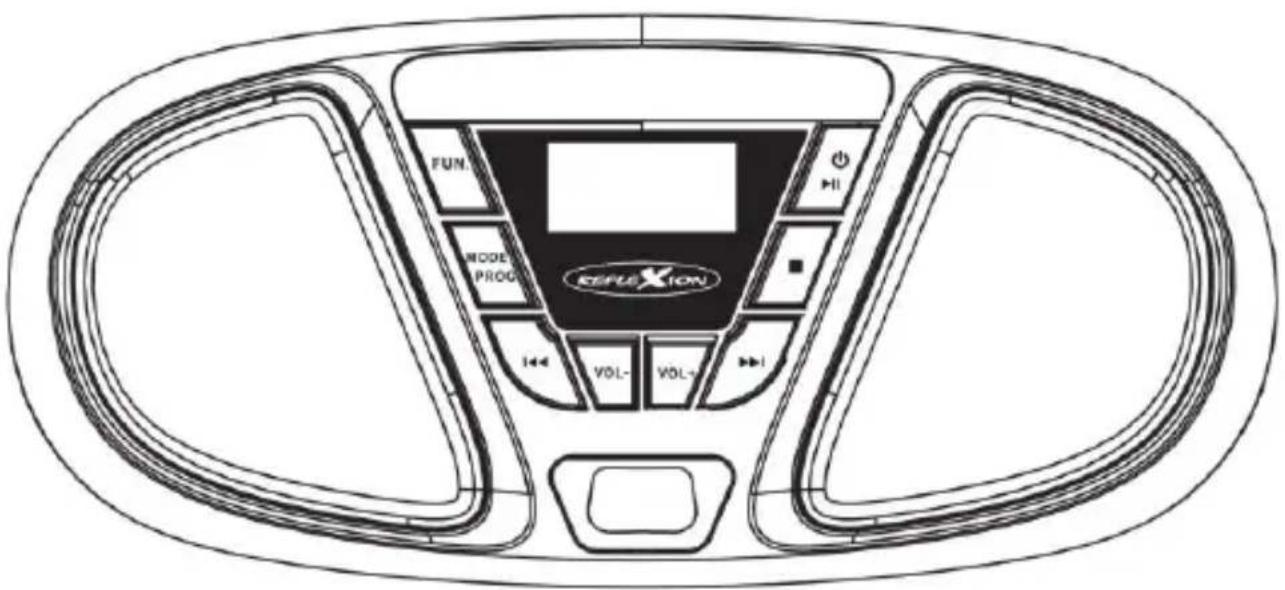
Boombox with CD and FM radio
Model No.: CDR614U
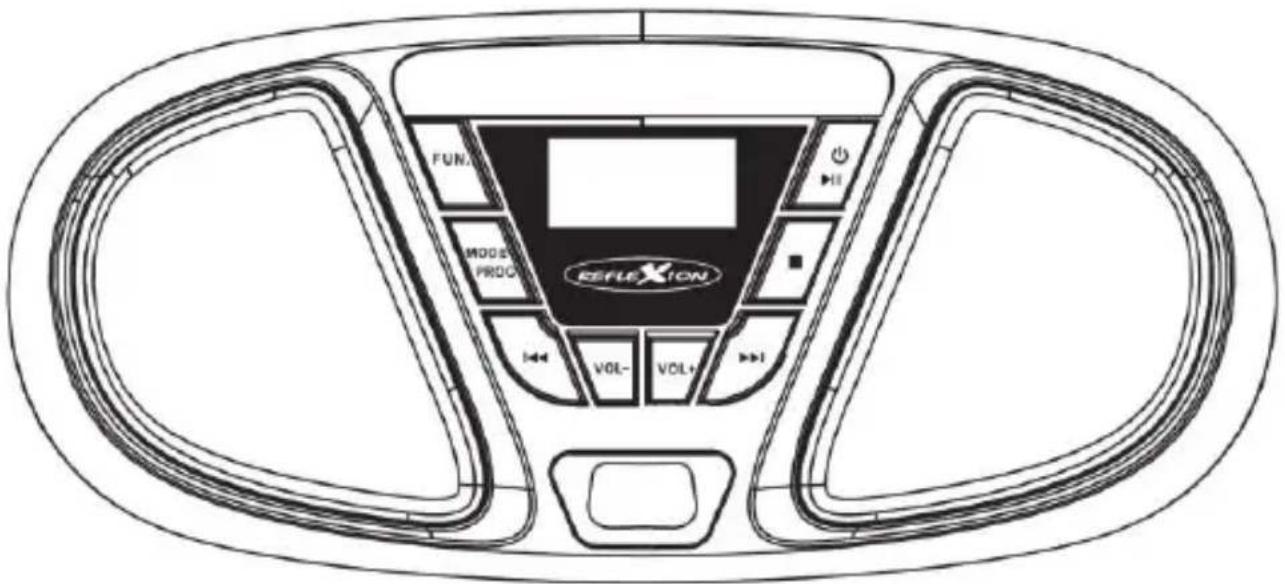
Read the entire manual of the appliance carefully before using the product. Keep them in a safe place for future use.

SAFETY INSTRUCTIONS
 | The operating and maintenance instructions (service) in this manual must be followed. Any other use may result in damage to health. |
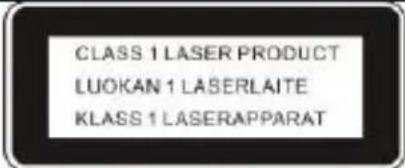 | The CD player is classified as a class 1 LASER PRODUCT. |
 | To avoid the risk of electric shock, do not open the housing under any circumstances. There are no parts inside that can be repaired by the user. Repairs may only be carried out by an authorised specialist workshop. |
 | This appliance is a Class II or double insulated electrical appliance. It has been designed so that it does not require a safety connection to electrical earth. |
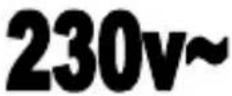 | This appliance is designed for 230V ~ 50Hz mains voltage. If the appliance is not used for a long time, disconnect the plug from the socket. |
 | Do not expose the unit to moisture or rain. |
 | Do not switch on the system until you have carefully checked all connections. |
 | Position the unit so that an undisturbed supply of fresh air is always ensured. Do not place the unit on carpets or near curtains and do not install it in bookshelves. |
 | Do not expose the unit to direct sunlight or heat sources. |
UK
SAFETY INSTRUCTIONS:
1) Read these operating instructions before using the appliance for the first time.
2) Keep this instruction manual in a safe place for future reference.
3) Do not expose the appliance to dripping or splashing and do not place objects filled with liquids, such as vases, on the appliance. Use only in dry areas.
4) Do not place naked flame sources, such as candles, on the appliance and keep the appliance away from naked flame sources.
5) Children should be supervised to ensure that they do not play with the appliance.
6) Do not obstruct ventilation by covering the vents.
7) Ensure that the unit is plugged into an AC 100-240V 60 / 50Hz outlet. Using higher voltage may cause the unit to malfunction. Switch off the unit before disconnecting it from the mains to turn it off completely.
8) If your hands are wet or damp, do not touch the mains plug.
9) Do not use force to insert the mains plug into the socket.
10) Only use accessories and spare parts approved by the manufacturer.
11) Install the appliance according to the manufacturer's instructions.
12) Install the unit only in adequately ventilated environments. Place the unit on a flat and stable surface.
13) Do not expose to temperatures above 40^ C.
14) When placing the unit, make sure that there is 30 cm to the rear and the top of the unit and 5 cm from each side.
15) Do not operate the unit's buttons with excessive force as this may cause damage.
16) When using batteries, please observe the correct polarity when inserting them. See the illustration in the battery compartment.
17) Dispose of batteries and rechargeable batteries in an environmentally friendly manner. When disposing of batteries, pay attention to environmental aspects. Batteries shall not be exposed to excessive heat such as sunshine, fire or the like.
18) Always make sure that the unit is disconnected from the power cable before
UK
transport or cleaning. Clean the unit only with a dry cloth.
19) In case of thunderstorms or if the unit will not be used for a long time, disconnect the unit from the mains.
20) This unit has no user-serviceable parts. Do not attempt to repair this unit yourself. Only qualified service personnel should perform maintenance. In the event of a defect, complain about the unit to your dealer.
21) Do not allow anyone, especially children, to push anything into holes, slots or any other openings in the body of the unit as this could result in a fatal electric shock.
22) Do not attach this unit to a wall or ceiling.
23) Do not place the unit near televisions, speakers and other objects that generate strong magnetic fields.
24) Do not leave the unit unattended when it is turned on.
NOTE:
If the unit will not be used for a long time, remove the batteries from the unit. Please also remove the power cable from the unit if it will not be used for a long time.
Headphone Warnings:
Set the volume of the device to minimum before using headphones. A volume that is set too high can lead to hearing impairment / damage over a long period of time. Therefore, to protect your hearing, use a comfortable room volume.
POWER SUPPLY
This unit can be operated as follows:
AC operation:
Plug the power cord with the matching side into your household socket and the other side of the power cord into the AC power socket of the unit.
UK
DC operation:
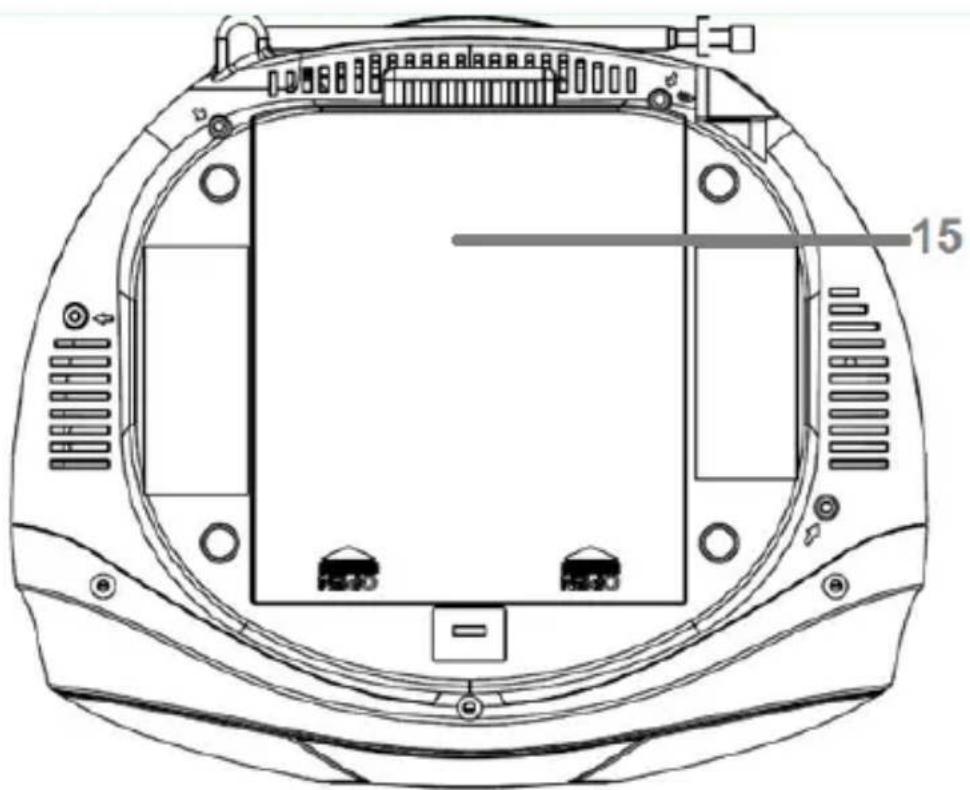
Open the battery compartment cover (15). Insert 6x UM-2/C batteries into the battery compartment (batteries not included). Please follow the correct polarity as indicated in the unit.
CAUTION:
Remove the batteries when they are empty or not used for a long period of time. Batteries contain chemical substances and must therefore be disposed of properly.
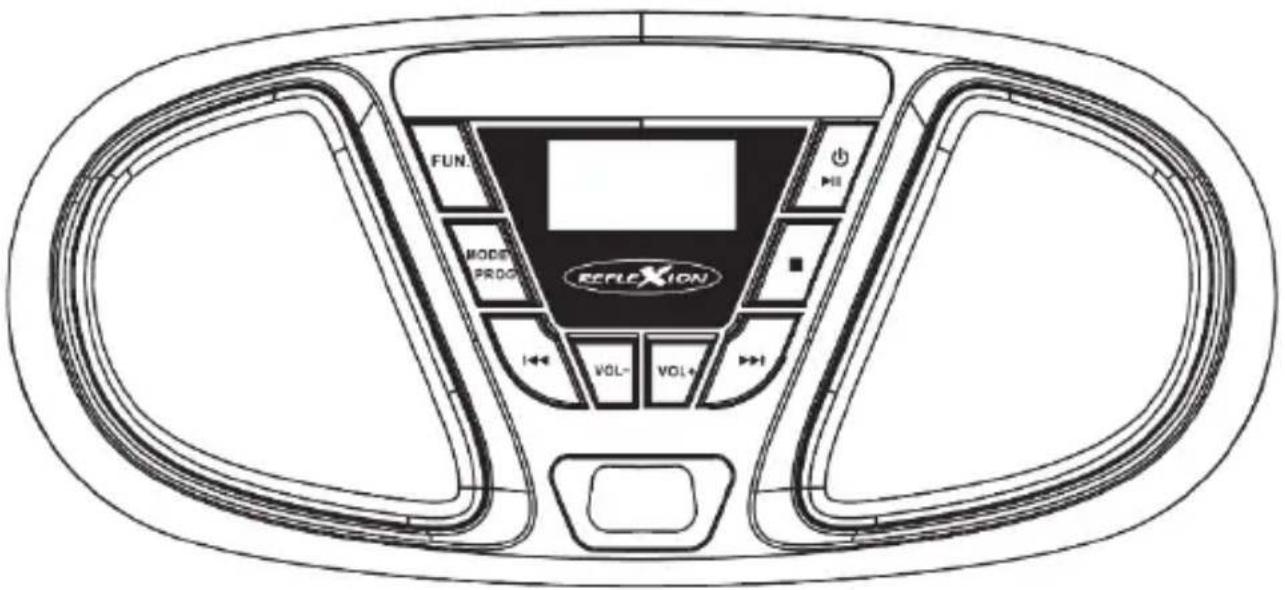
OPERATING KEYS
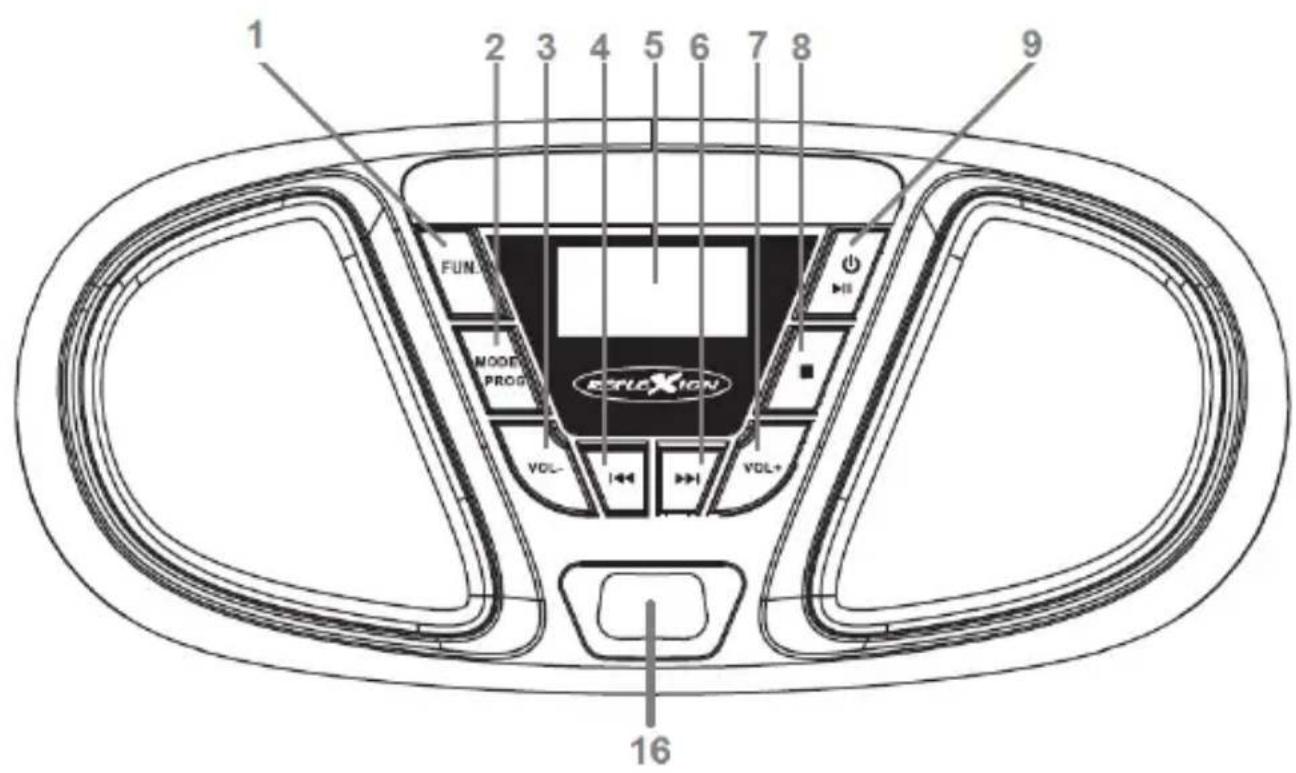
UK
natural_image
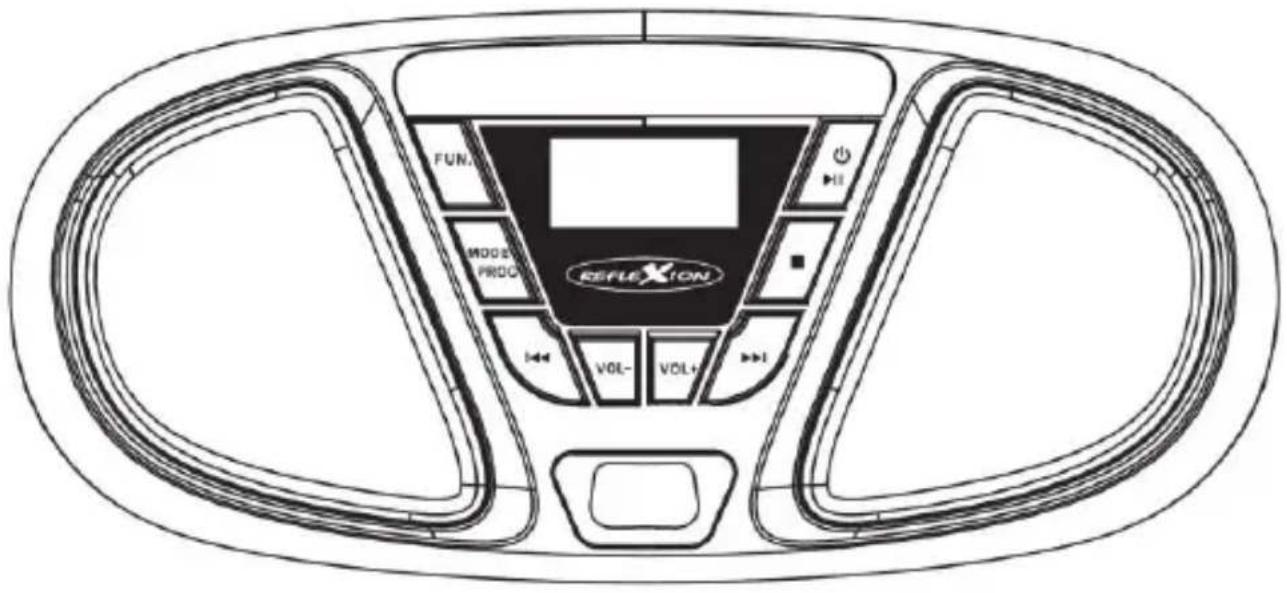
Technical line drawing of a mechanical component with mounting holes and internal structure (no text or symbols)| 1. | FUN. | Select the function mode: FM / CD / AUX |
UK
| 2. |  | In CD mode, set the play mode. • REP: Repeat the selected track • REP ALL: Repeat all track • RAN: Random playback |
 | In CD mode, programme the playback order | |
| 3. |  | Previous Title / Previous Radio Station |
| 4. |  | Volume: Quieter |
| 5. |  | Displays frequency and title |
| 6. |  | Volume: Louder |
| 7. |  | Next Title / Next Radio Station |
| 8. |  | Stop playback |
| 9. |  | Switch on / Switch off (hold down for approx. 3 seconds) |
 | Play / Pause |
UK
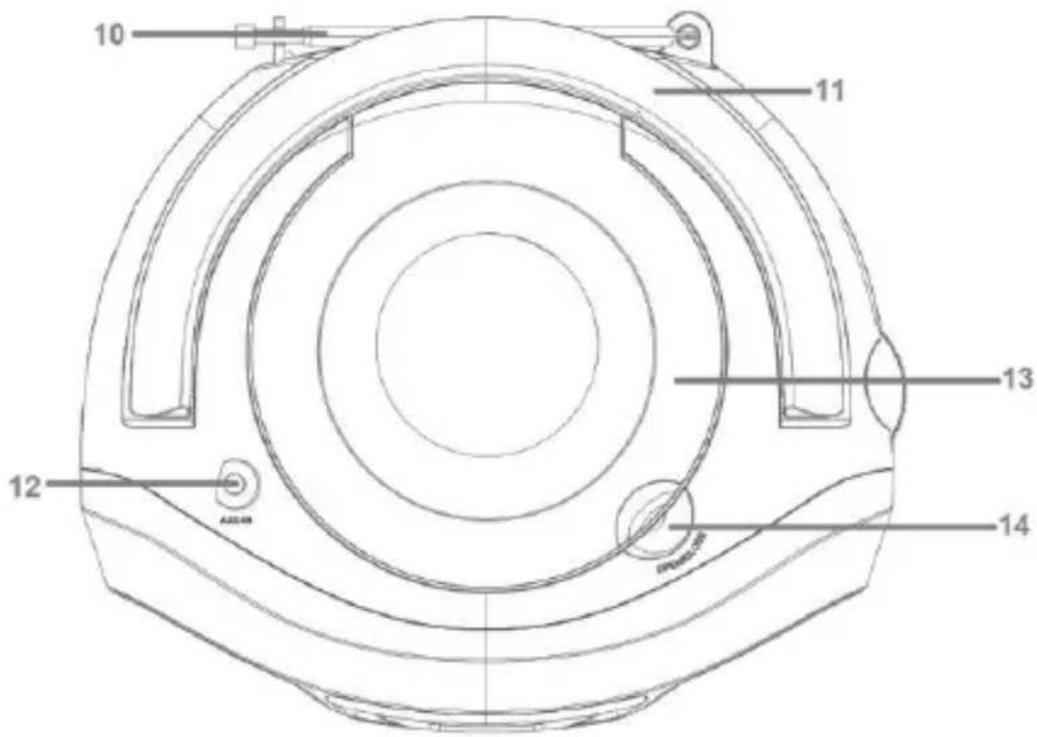
| 10. | ANTENNA | Antenna for FM reception |
| 11. | HANDLE | Carry handle |
| 12. | AUX-IN | 3.5mm AUX-IN connection |
| 13. |  | CD compartment for CD playback |
| 14. |  | Open and close the CD compartment |
| 15. |  | Battery compartment for 6xUM-2/C batteries |
| 16. |  | USB port for USB sticks max. 32GB |
BASIC OPERATION
Switching on the unit
- Switch on: Press and hold the
- Switch off: Press and hold the
[9] key for approx. 3 seconds.
[9] key for approx. 3 seconds.
UK
Remark:
- Before switching on the unit, please make sure that the unit is properly connected to the power supply or that the batteries still have sufficient power.
- Please use only one type of power supply at a time. Either AC by power cable or DC by batteries.
Note:
The unit will automatically switch to standby mode if no audio signal is active in AUX / CD mode within 15 minutes.
Please note that a low volume setting in the unit may be detected as "no audio signal" and the unit will automatically switch to standby mode. To switch the
To switch the unit on again, press and hold the [9] button for about 3 seconds.
Notes on electrostatic discharge
The unit may be reset due to electrostatic discharge.
If the unit can no longer be operated, simply switch the unit off and restart it.
Volume: Adjusting the volume
Press the [6] + [4] keys to increase or decrease the volume.
CD MODE
Starting CD playback
- Press the button FUN. [1] repeatedly until "CD" appears in the display.
- Open the CD compartment by lifting the OPEN / CLOSE [14] position. Insert the CD into the CD compartment with the title side facing upwards and close the CD compartment.
- The CD is now read in and the total number of tracks is shown in the display.
- The unit automatically starts playing the first track of the CD.
- When all tracks have been played, the unit stops automatically and the total number
UK
of tracks is shown again on the display.
Control playback:
- Play / Pause:
- Stop playback:
- Next track:
- Previous track:
- Fast forward: (button pressed and held)
- Rewind: (press and hold)
- Playback mode:
- Playback order:
- Louder:
- Quieter:




Set the playback mode:
- To set the playback mode, press the MODE [2] button repeatedly.
- The playback mode is shown in the display.
- The following playback modes are available:
• REP: Only the current track is repeated.
• REP ALL: All tracks are repeated.
• RAN: Random playback
CD playback Programming:
- Stop CD playback with the [8] button.
- Press the PROG [2] button. P01" flashes in the display.
UK
- Select the desired track with the [3] or [7] key and press the PROG [2] key again to save the track under "P01".
- “P02” flashes in the display.
- Repeat steps 2 and 3 to programme more titles for playback.
- After you have programmed all the titles you want, press button [9] and the unit will play the programmed titles. "PROG" appears in the display.
- To stop the programmed playback, press the [8] key to stop the playback and press the [8] key again and the "PROG" playback is deleted.
NOTE:
- A maximum of 20 tracks can be programmed ("P01 - P20").
- The following CD types are supported CD/CD-R/CD-RW.
• MP3 CDs are not supported.
Care of the CD disc
- Do not touch the playback side of the CD.
- Do not stick paper, tape or any other material on the CD.
- Fingerprints and dust on the disc will cause deterioration of playback. Wipe the disc from the centre outwards with a soft cloth. Always keep the disc clean.
- If dust or stains cannot be removed with a soft cloth, wipe the disc with a slightly damp soft cloth and then wipe with a soft, dry cloth.
- DO NOT use solvents, commercial cleaners or anti-static sprays for vinyl as these may damage the disc.
- Do not store CDs in places exposed to direct sunlight or near a heat source.
- Do not store CDs in locations exposed to moisture or dust, such as in a bathroom or near a humidifier.
• Always store CDs vertically in a case.
AUX IN MODE
You can play music from any external audio device (with a 3.5mm stereo jack) with the CDR614 unit.
- Connect the CDR614 to your external audio device using a 3.5mm audio cable (not included).
- Plug the audio cable into the jack AUX-IN [12] of the CDR614 unit and into the line out jack or headphone jack of your external audio device (e.g. smartphone, MP3 player).
- Press the button FUN. [1] repeatedly until "AUX" appears in the display.
- You control the playback on your external audio device.
- You can control the volume on the CDR614 unit with the buttons VOL+ [6] and VOL- [4].
FM MODE
- Press the button FUN. [1] repeatedly until the display shows "FM".
- Use the [3] or [7] button to search for the next or previous station.
- Press briefly to adjust the frequency.
- Press and hold to automatically search for the next radio station.
- Press briefly to adjust the frequency.
- ▶▶▶▶ Press and hold to automatically search for the next radio station.
Note:
For best FM reception, extend the antenna fully. Avoid proximity to equipment that may interfere with reception, such as speakers and TV sets.
Store FM Stations Automatically
- Press [9] and the unit will search all available FM radio stations and store them automatically.
UK
- After the search, the unit starts playing the first radio station.
Storing FM Stations Manually
- Select a radio station to be stored.
- Press and hold the PROG [2] key for approx. 3 seconds. P06", for example, flashes in the display.
- Use the [1] or [7] keys to select the memory location (P01 – P30) and press the [2] key again to store the radio station.
- Repeat steps 1-3 until all desired radio stations have been stored manually.
NOTE:
The unit can store a maximum of 30 radio stations "P01 – P30".
Selecting stored FM radio stations
- Press the [2] button.
- Use the [3] or [7] buttons to select the stored radio station you want to listen to.
USB MODE
You can play music from USB in MP3 format. Press FUNCTION button (1) to select USB, "USB" will be displayed on the (5) LCD screen.
- Press the FUN. [1] key repeatedly until "USB" appears on the display.
- Insert your USB stick with MP3 music into the USB connector (16) on the front of the device (not included).
- Use the following keys to control the playback.
• [6]: Volume up
• [4]: Volume down
• ▶▶▶▶ (7): Next title
• (3): Previous title
UK
• (9): Play / Pause
- (8): Stop playback
- You can also program playback of MP3 files by following the same steps as in "Programmed Playback" in the "CD" section.
TECHNICAL DATA
General
Power supply AC100-240V -60/50Hz
DC 9V (1.5V UM-2/C x 6 pcs.)
Max. Power consumption 12W
Dimensions 250(L) x 210(D) x 120(H) mm
Operating temperature + 5°C - + 35°C
USB port Version 2.0 / max. 32GB / MP3
CD CD / CD-R / CD-RW
Radio
Receiver band FM
Frequency range FM 87,5 - 108 MHz
Audio
Max. Music power 2x 16 Watt
AUX-IN socket 3.5mm
Accessories
User manual 1x
AC cable 1x
All information without guarantee.
Design and specifications are subject to change without notice.
BATTERIES AND RECHARGEABLE BATTERIES MUST NOT BE DISPOSED OF WITH HOUSEHOLD WASTE! NON-PROFESSIONAL DISPOSAL OF BATTERIES AND RECHARGEABLE BATTERIES CAUSES ENVIRONMENTAL POLLUTION / DAMAGE.
EVERY CONSUMER IS REQUIRED BY LAW TO RETURN BATTERIES AND ACCUMULATORS AT THE END OF THEIR WORKING LIFE CYCLE TO APPROPRIATE COLLECTION POINTS, SUCH AS THEIR MUNICIPALITY/BOROUGH OR RETAIL OUTLET.
UK
DROP-OFF AT COLLECTION POINTS IS FREE OF CHARGE. BY HANDING THEM IN AT COLLECTION POINTS, BATTERIES AND ACCUMULATORS ARE RECYCLED AND THUS DISPOSED OF IN AN ENVIRONMENTALLY FRIENDLY WAY.
DISPOSING OF BATTERIES AND RECHARGEABLE BATTERIES IN HOUSEHOLD WASTE DOES NOT ENSURE ENVIRONMENTALLY FRIENDLY DISPOSAL AND MAY CAUSE DAMAGE TO THE ENVIRONMENT.
BATTERIES AND ACCUMULATORS MUST BE REMOVED FROM THE DEVICE BEFORE DISPOSAL. PLEASE RETURN ONLY IN DISCHARGED CONDITION!
*) MARKED WITH:
CD = CADMIUM,
HG = MERCURY,
PB = LEAD
SIMPLIFIED EU DECLARATION OF CONFORMITY
Hereby, UltraMedia GmbH & Co. Handels KG that the radio equipment type CDR614U is in conformity with Directive 2014/53/EU.
The full text of the EU Declaration of Conformity can be requested at the following e-mail address.
We wish you much pleasure with the device.
Your UltraMedia Team
CE
DISPOSAL INSTRUCTIONS
This symbol on the product or in the instructions means that the appliance, electrical and electronic equipment and batteries must be disposed of separately from your household waste at the end of their working life. There are separate collection systems for recycling in the EU. For more information, please contact the local authority or your dealer where you purchased the product.
WARRANTY
Dear Customer,
Thank you for choosing one of our products. Our products undergo precise quality control in the course of production. If one of our devices gives you cause for complaint, or you have questions about one of our devices, please call our customer support.
We give a 36 month warranty on TV and SAT devices, and a 24 month warranty on portable DVD and audio devices from the date of purchase. Outside of the warranty, we offer you a paid repair based on a cost estimate. Please contact our customer support before submitting.
The warranty relates to material and production defects. Your device will be repaired or replaced during the warranty period. Unfortunately, UltraMedia cannot reimburse the purchase price. Damage caused by improper use, the use of third-party accessories, falls, dust, water damage and signs of wear (e.g. scratches, optical wear and tear) caused by the customer or external influences are excluded from the guarantee.
In order to assert the warranty claims, send the device with all accessories, a copy of the invoice and the description of the fault to the address given below. Devices that do not have a proof of purchase cannot be guaranteed. Please do not forget to include your full address and a telephone number / email address for any queries.
Shipping to us takes place at your own expense. Unpaid parcels cannot be accepted and are returned to the sender.
Please pack the device securely for transport. UltraMedia assumes no liability for damage in transit that occurs on the way to us. After receiving your submission, we will process your device as soon as possible and send it back to you.
Before sending your device in, please contact our customer support or your specialist dealer, as many problems can also be solved over the phone.
| UltraMedia GmbH & Co. Handels KG | service@ultramedia.de |
| Friedrich-Penseler-Str. 28 | Tel.: +49 / (0) 4131/9239-20 |
| D-21337 Lüneburg | Mo.-Do.: 08:00-17:00 |
| www.ultramedia.de | Fr.: 08:00-14:30 |
Manual de utilizare
natural_image
Technical line drawing of a mechanical component with mounting holes and internal structure (no text or symbols)RO
Vážený zákazník,
- Boombox with CD and FM radio
- Model No.: CDR614U
- SAFETY INSTRUCTIONS
- UK
- SAFETY INSTRUCTIONS:
- NOTE:
- Headphone Warnings:
- POWER SUPPLY
- AC operation:
- DC operation:
- CAUTION:
- OPERATING KEYS
- BASIC OPERATION
- Switching on the unit
- Remark:
- Notes on electrostatic discharge
- Volume: Adjusting the volume
- CD MODE
- Starting CD playback
- Control playback:
- Set the playback mode:
- CD playback Programming:
- Care of the CD disc
- AUX IN MODE
- FM MODE
- Store FM Stations Automatically
- Storing FM Stations Manually
- Selecting stored FM radio stations
- USB MODE
- TECHNICAL DATA
- General
- Radio
- Audio
- Accessories
- SIMPLIFIED EU DECLARATION OF CONFORMITY
- CE
- DISPOSAL INSTRUCTIONS
- WARRANTY
- Manual de utilizare
- RO
Brand : Reflexion
Model : CDR614U
Category : Radio