
Eagle KM1072 - Tablet Krüger&Matz - Free user manual and instructions
Find the device manual for free Eagle KM1072 Krüger&Matz in PDF.


| Product Type | Tablet |
| Model | Eagle KM1072 |
| Brand | Krüger&Matz |
| Display Size | 10.1 inches |
| Resolution | 1280 x 800 pixels (HD) |
| Processor | Quad-core 1.3 GHz |
| Operating System | Android 11 |
| RAM | 2 GB |
| Storage | 32 GB (expandable via microSD) |
| Battery Capacity | 5000 mAh |
| Battery Life | Up to 8 hours of mixed use |
| Connectivity | Wi-Fi 802.11 b/g/n, Bluetooth 4.2 |
| Cameras | Rear: 5 MP, Front: 2 MP |
| Dimensions | 240 x 170 x 9.5 mm |
| Weight | 510 g |
| Charging | Micro USB, 5V/2A adapter |
| Audio | Built-in speaker, 3.5 mm headphone jack |
| Care and Cleaning | Wipe with a soft, dry cloth. Avoid liquids and abrasives. |
| Safety | Do not expose to extreme temperatures or moisture. Use only approved chargers. |
| Spare Parts and Repairability | Battery and screen replacement available through authorized service centers. |
| General Information | Includes USB cable, charger, and quick start guide. |
Frequently Asked Questions - Eagle KM1072 Krüger&Matz
User questions about Eagle KM1072 Krüger&Matz
0 question about this device. Answer the ones you know or ask your own.
Ask a new question about this device
Download the instructions for your Tablet in PDF format for free! Find your manual Eagle KM1072 - Krüger&Matz and take your electronic device back in hand. On this page are published all the documents necessary for the use of your device. Eagle KM1072 by Krüger&Matz.
USER MANUAL Eagle KM1072 Krüger&Matz
10,1" TABLET EAGLE KM1072

BEDIENUNGSANLEITUNG
OWNER'S MANUAL
INSTRUKCJA OBSŁUGI
MANUAL DE UTILIZARE
All rights reserved. No part of this manual may be reproduced or transmitted in any form or by any means, without the prior written permission of the producer of this product.
Please note: illustrations and descriptions concerning operating system are for reference only, and may vary from actual software on your device!
Producer reserves the rights to errors and misprints.
Read the instruction manual carefully before first use and keep it for future reference.
-
Protect this product from moisture, humidity, water and any other liquid. Avoid using/storing it in extreme temperatures. Do not expose it to direct sunlight and sources of heat.
-
Avoid using/storing it in the strong magnetic environment.
-
Never use this device if the power adapter or the device itself is damaged.
-
Disconnect the device from the power supply if it is not going to be used for a long time.
-
Use only authorized accessories.
-
Prevent the device from falling on the ground or being strongly impacted.
-
This product is not a toy; keep it beyond children's reach.
-
Producer does not claim liability for any data loss, damage caused by inappropriate use and handling or any mechanical damage.
-
Do not attempt to repair/disassemble this device yourself. In case of damage, contact with an authorized service point for check-up/repair.
-
ALWAYS disconnect this device from power supply mains before cleaning. Clean this device with soft, slightly damp cloth. Do not use any abrasives or chemical agents to clean this product.
-
Do not disconnect the tablet suddenly when formatting or uploading and downloading, which can lead to program errors.
-
Producer does not claim liability to any damages caused by inappropriate upgrade performed by the user.
-
Road safety comes first: Do not use this device while driving or walking.
-
Switch off in aircraft: Wireless devices can cause interference in aircraft. Please make sure that your device is powered off (or switched to flight mode) during flight.
-
Switch off before entering risky areas: Strictly observe the relevant laws, codes, and regulations on the use of wireless devices in risky areas. Turn off your device before entering a place susceptible to explosion, such as an oil station, oil tank, chemical plant or a place where a blasting process is under way.
-
Observe all special regulations: Follow any special regulations in force in any area such as hospitals and always switch off your device whenever it is forbidden to use it or, when it may cause interference or danger. Properly use your device near medical apparatuses, such as pacemakers, hearing aids and some other electronic medical devices, as it may cause interference to such apparatuses.
-
NOTE: The battery is not detachable. Do not attempt to disassemble the battery.
Overheating
While charging, the temperature of the device and the charger may get increased. This does not affect the device's lifespan or performance and is in the device's normal range of operation.
However, if there is an excessive increase in temperature or overheating, depending on the factor that caused it: device's performance may be significantly reduced, charging process may be stopped, the device may turn off or display notification about switching off for cooling. Function available only in selected models. Important: if the device displays notification about overheat, turn it off and do not turn it back on until completely cooled down!
In case of overheat during charging:
- Disconnect the charger from the device.
- Close any running apps.
- Wait for the device to cool down, and then begin charging the device again. If the part of the device where the USB port is placed overheats, check for damage to the connected USB cable. Replace the damaged USB cable with a new authorized cable.
The device may also overheat during operation when using several battery consuming applications or functions.
In case of overheat during usage:
- Close any running apps.
- Disconnect any connectivity (Bluetooth, Wi-Fi, data transfer etc.).
- Lower the screen brightness settings.
- Wait for the device to cool down before attempting to use it again.
Safety precautions concerning operation environment
In order to maintain battery's longevity, and to avoid overheat, follow basic precautions including provisions listed below:
- Do not use / store the device in very hot or cold environments nor expose to direct sunlight (e.g. on a car's dashboard when using as a navigation).
- Do not place the device on surfaces that may cause overheat e.g. electric heating mat.
- Do not place near sources of heat e.g. radiators, microwave ovens, hot kitchen appliances nor high pressure containers.
- DO NOT use damaged charger or battery!
- Use only authorized chargers, batteries and cables! Using unauthorized accessories may damage the device or battery. Connecting charger with inadequate parameters may result with damage to the device and poses risk to the user.
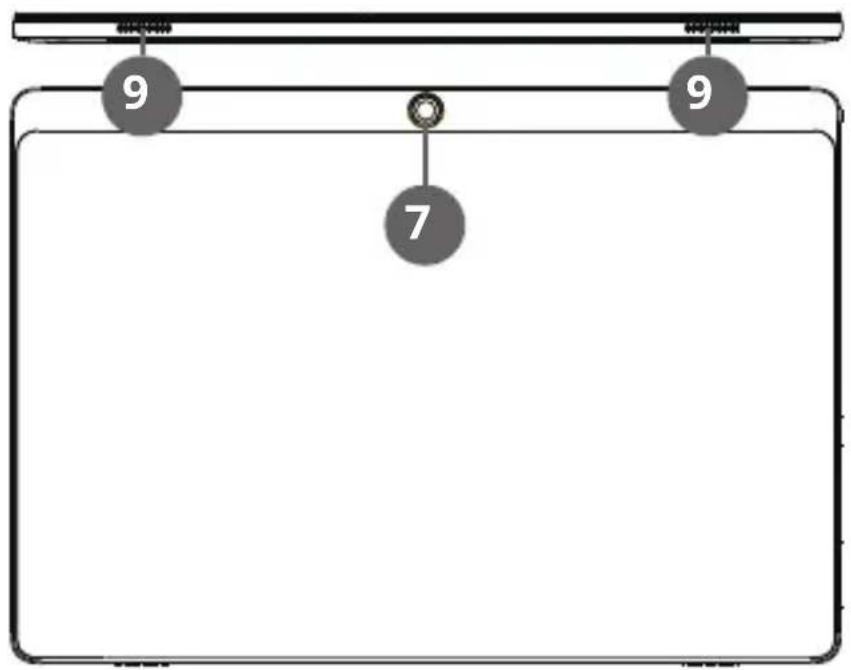
Keys and functions
| 1. Power and lock key 6. Nano SIM slot / microSD card slot | ||
| 2. Volume control button 7. Rear camera | ||
| 3. Earphone jack 8. Front camera | ||
| 4. Microphone 9. Speaker | ||
| 5. USB type C (charging) | ||

Z
Getting started
To eject the card tray, insert card tray pin into card tray hole and push lightly until the card tray pops up.
Retrieve the card tray and insert the nano SIM card and nano SIM card OR nano SIM card and microSD card as indicated.
Close the card tray.
![graph TD A["Device 1"] -->|Transformation Arrow| B["Screen Screen"] C["Device 2"] -->|Transformation Arrow| B D["..."] --> E["..."] F["EN"] --> G["Next Page"]](/content/2026/05/838466/images/8b50dd99ae7e68cc7e072304b172ccaaba08382d51b0ed5922f28afe952bf365.jpg)
Turn on
To switch on your tablet, press and hold the power key and wait until it starts. The device will start with locked screen:
- Tap and drag the icon upwards to unlock.
- Touch the upper edge of the screen and drag downwards to open quick settings.
Turn off
To power off your tablet, press and hold the power key until the pop-up window appears; tap "Power off" to power it off.
Lock/unlock the screen (sleep mode)
To save battery, you should put your tablet in sleep mode by turning off the LCD display. To do this, shortly press the power key! Press it again to wake up the screen.
Conserving energy
- Deactivate the Wi-Fi function when it is not in use.
- Keep the device connected to power mains only until it is fully charged.
- Reduce the display brightness in the unit settings.
- Switch to standby mode/turn it off when the device is not in use.
Learn more
For more information on this device visit: www.krugermatz.com. | Read owner's manual carefully before using your device. | Visit www.krugermatz.com website for more products and accessories. | In case of any doubts or questions reach out to our Frequently Asked Questions section.
Please note: below illustrations and descriptions concerning operating system are for reference only, and may vary from actual software on your device!
IMPORTANT: The producer allows the possibility for minor variations in display brightness and color between individual devices. There may be visible light or dark spots on the display. Up to 5 defective pixels are acceptable to be present on the display of the device. Above mentioned cases concerning device's display are not covered under warranty nor statutory warranty rights.
Lechpol Electronics Sp. z o.o. Sp.k. hereby declares that tablet KM1072 is consistent with directive 2014/53/UE. Full text of the EU Declaration of Conformity is available at following Internet address: www.lechpol.eu.

English Correct Disposal of This Product (Waste Electrical & Electronic Equipment)


(Applicable in the European Union and other European countries with separate collection systems) This marking shown on the product or Its literature, indicates that It should not be disposed with other household wastes at the end of its working life. To prevent possible harm to the environment or human health from uncontrolled waste disposal, please separate this from other types of wastes and recycle it responsibly to promote the sustainable reuse of material resources. Household users should contact either the retailer where they purchased this product, or their local government office, for details of where and how they can take this item for environmentally safe recycling. Business users should contact their supplier and check the terms and conditions of the purchase contract This product should not be mixed with other commercial wastes for disposal.
Made in China for LECHPOL ELECTRONICS Sp. z o.o. Sp.k., ul. Garwolińska 1, 08-400 Miętne.
Blocare/deblocare ecran (mod sleep)

www.krugermatz.com
Krüger&Matz is a registered trademark


Brand : Krüger&Matz
Model : Eagle KM1072
Category : Tablet