KM1089 - Tablet Krüger&Matz - Free user manual and instructions
Find the device manual for free KM1089 Krüger&Matz in PDF.


| Product Type | Tablet with detachable keyboard |
| Model | KM1089 |
| Brand | Krüger&Matz |
| Operating System | Windows (version not specified) |
| Display | Touchscreen (size not specified; likely 10-11 inches) |
| Processor | Intel or compatible (not specified) |
| RAM | Likely 2-4 GB (not specified) |
| Storage | Internal storage (capacity not specified; expandable via microSD) |
| Front Camera | Yes (resolution not specified) |
| Main Camera | Yes (resolution not specified) |
| Connectivity | Wi-Fi, USB-C (data only), USB 3.0, USB 2.0, Micro HDMI, headphone jack |
| Card Reader | microSD |
| Keyboard | Detachable model KM1089 with touchpad |
| Battery | Internal rechargeable, non-removable (capacity not specified) |
| Power Adapter | Included (specifications not provided) |
| Dimensions | Approx. 260 x 170 x 10 mm (estimated for tablet only) |
| Weight | Approx. 600 g (tablet only); with keyboard approx. 900 g |
| Cleaning | Use soft, slightly damp cloth; no abrasives or chemicals |
| Safety | Keep away from moisture, extreme temperatures, strong magnetic fields; disconnect when not in use for long periods |
| Warranty | Display brightness variation and up to 5 defective pixels not covered |
Frequently Asked Questions - KM1089 Krüger&Matz
User questions about KM1089 Krüger&Matz
0 question about this device. Answer the ones you know or ask your own.
Ask a new question about this device
Download the instructions for your Tablet in PDF format for free! Find your manual KM1089 - Krüger&Matz and take your electronic device back in hand. On this page are published all the documents necessary for the use of your device. KM1089 by Krüger&Matz.
USER MANUAL KM1089 Krüger&Matz
Tastatur (model KM1089)


natural_image
Line drawing of a laptop with two buttons and a blank screen, no text or symbols present

natural_image
Line drawing of a human hand making a peace sign gesture (no text or symbols)Tippen
natural_image
Line drawing of a hand with index finger pointing upward (no text or symbols)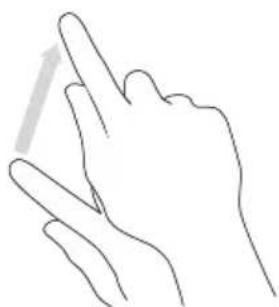
natural_image
Line drawing of a hand making a peace sign gesture (no text or symbols)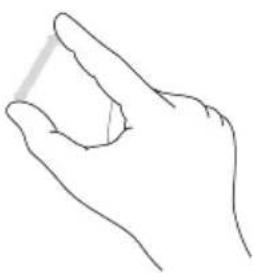
natural_image
Line drawing of a human hand making a gesture (no text or symbols)Read the instruction manual carefully before first use and keep it for future reference.
-
Protect this product from moisture, humidity, water and any other liquid. Avoid using/storing it in extreme temperatures. Do not expose it to direct sunlight and sources of heat. Avoid using it in the strong magnetic and strong static environment.
-
Never use this device if the power adapter or the device itself is damaged.
-
Disconnect the device from the power supply if it is not going to be used for a long time.
-
Use only authorized accessories.
-
Prevent the device from falling on the ground or being strongly impacted.
-
Producer does not claim liability for any data loss, damage caused by inappropriate use and handling or any mechanical damage. Please back up your important material at any time to avoid loss.
-
Do not attempt to repair this device yourself. In case of damage, contact with an authorized service point for check-up/repair.
-
ALWAYS disconnect this device from power supply mains before cleaning. Clean this device with soft, slightly damp cloth. Do not use any abrasives or chemical agents to clean this product.
-
Road safety comes first: Do not use this device while driving.
-
Switch off in aircraft: Wireless devices can cause interference in aircraft. Please make sure that your device is powered off (or switched to flight mode) during flight.
-
Switch off before entering risky areas: Strictly observe the relevant laws, codes, and regulations on the use of wireless devices in risky areas. Turn off your device before entering a place susceptible to explosion, such as an oil station, oil tank, chemical plant or a place where a blasting process is under way.
-
Observe all special regulations: Follow any special regulations in force in any area such as hospitals and always switch off your device whenever it is forbidden to use it or, when it may cause interference or danger. Properly use your device near medical apparatuses, such as pacemakers, hearing aids and some other electronic medical devices, as it may cause interference to such apparatuses.
-
NOTE: The battery is not detachable. Do not attempt to disassemble the battery.
PRODUCT OVERVIEW
-
Front camera
-
Windows button
-
LED indicator
-
Microphone
-
Headphone jack
-
USB-C socket (data only)
-
Micro HDMI socket
-
USB 3.0 socket
-
Charger socket
- microSD card reader
- Speaker
- Power button
- Volume buttons
- Keyboard interface
- Main camera
- USB 2.0 socket
- Touchpad
- Tablet interface
- Keyboard release button
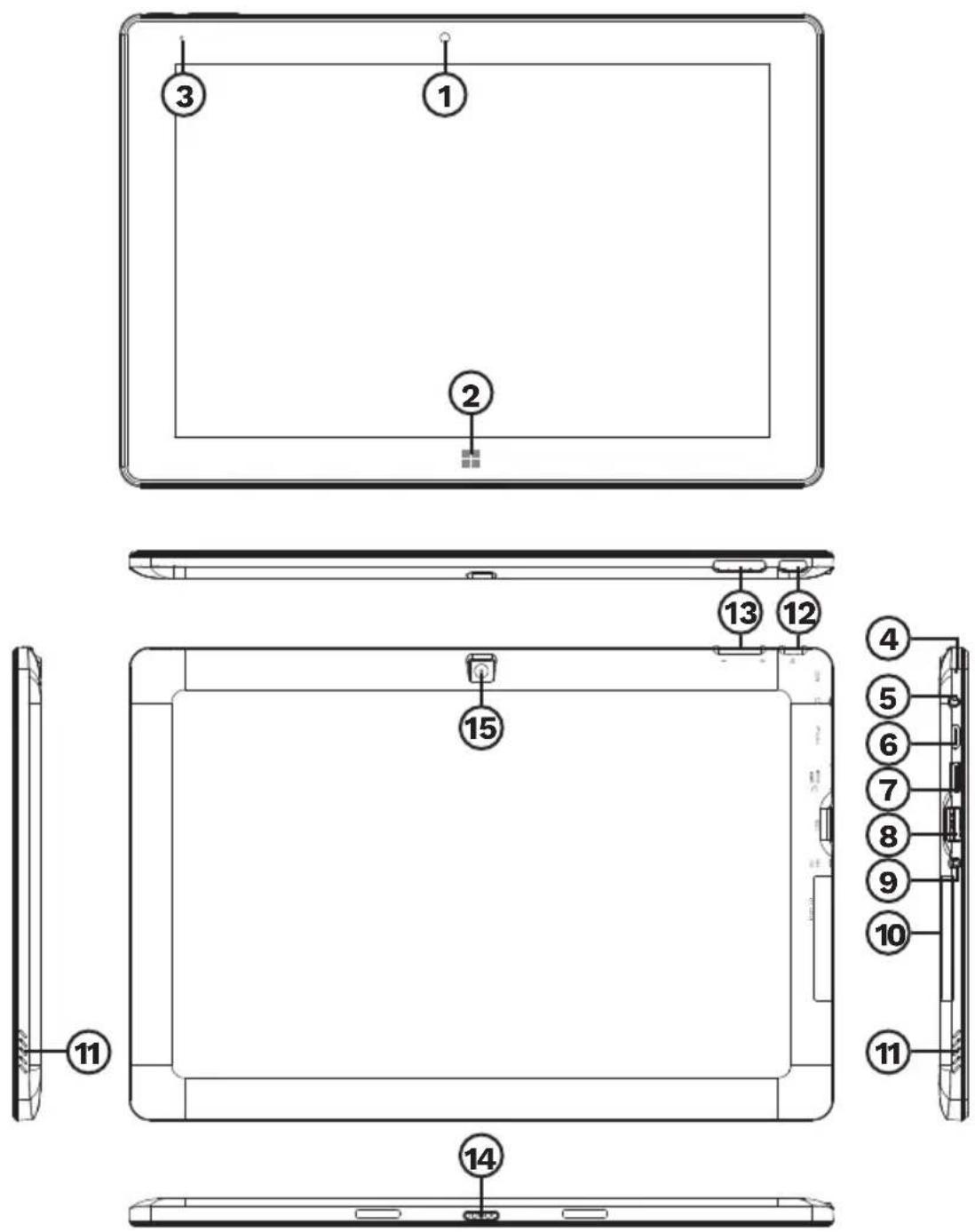
Keyboard (model KM1089)


To detach the keyboard from the tablet, press and hold the Keyboard release button, then pull the tablet up.

Please note: below illustrations and descriptions concerning Windows operating system are for reference only, and may vary from actual software on your device!
INSTALLING MEMORY CARD
- Open the card reader cover.
- Slide the microSD card (with pins facing the screen), until it clicks.
- To uninstall memory card, press it, then slide it out of the socket.
Caution: before ejecting a microSD card (or any USB storage) use the Safely Remove Hardware option, located next to the clock.
PREPARING THE DEVICE FOR OPERATION:
a. Connect one end of the power adapter to the device and the other to power mains outlet and charge the device fully.
b. Press the power switch for about 2-3 seconds to switch the device on.
c. Follow the instructions in the startup wizard to set up your device.

During the startup, the wizard prompts you to register for your Microsoft account. If you do not yet have a Microsoft account, please set one up here.
d. After completion of the startup, your device is configured. This may take several minutes to complete. Do not turn the device off during this process!
NAVIGATION
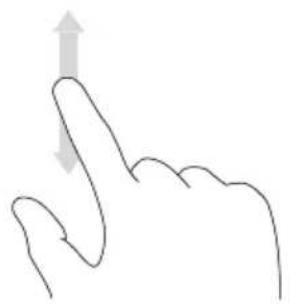
There are few simple gestures you need to know about to operate this device.

natural_image
Simple line drawing of a hand making a finger gesture (no text or symbols)Tap Swipe

natural_image
Line drawing of a hand with index finger pointing upward (no text or symbols)
natural_image
Line drawing of a hand making a peace sign gesture (no text or symbols)Drag

natural_image
Line drawing of a human hand making an 'K' gesture (no text or symbols)Pinch
Z
UNLOCKING THE DISPLAY
Drag the lock screen upwards to unlock the screen.
If your device is password-protected, you must then enter the password.
ENABLING WI-FI
a. Select „All settings" in the Info Center.
b. Tap „Network & Internet“ in the settings menu.
c. Tap „Wi-Fi“ on the left.
d. Move the slider for Wi-Fi from „Off" to „On".
e. Tap the network that you wish to connect to.
f. Tap „Connect”. Enter the network key (password) if necessary. The device connects to the selected network.
CONSERVING ENERGY
- Deactivate the Wi-Fi function when it is not in use.
- Keep the device connected to power mains only until it is fully charged.
- Reduce the display brightness in the unit settings.
- Switch to standby mode/turn it off when the device is not in use.
LEARN MORE
For more information on this device visit: www.krugermatz.com. | Read owner's manual carefully before using your device. | Visit www.krugermatz.com website for more products and accessories. | In case of any doubts or questions reach out to our Frequently Asked Questions section.
Please note: illustrations and descriptions concerning operating system are for reference only, and may vary from actual software on your device!
IMPORTANT: The producer allows the possibility for minor variations in display brightness and color between individual devices. There may be visible light or dark spots on the display. Up to 5 defective pixels are acceptable to be present on the display of the device. Above mentioned cases concerning device's display are not covered under warranty nor statutory warranty rights.
Lechpol Electronics Leszek Sp.k. hereby declares that tablet KM1089 is consistent with directive 2014/53/UE. Full text of the EU Declaration of Conformity is available at following Internet address: www.lechpol.pl.

English Correct Disposal of This Product (Waste Electrical & Electronic Equipment)

(Applicable in the European Union and other European countries with separate collection systems) This marking shown on the product or its literature, indicates that it should not be disposed with other household wastes at the end of its working life. To prevent possible harm to the environment or human health from uncontrolled waste disposal, please separate this from other types of wastes and recycle it responsibly to promote the sustainable reuse of material resources. Household users should contact either the retailer where they purchased this product, or their local government office, for details of where and how they can take this item for environmentally safe recycling. Business users should contact their supplier and check the terms and conditions of the purchase contract. This product should not be mixed with other commercial wastes for disposal.
Made in China for Lechpol Electronics Leszek Sp.k., ul. Garwolińska 1, 08-400 Miętne.
Legal notices
Microsoft, Windows, and Internet Explorer are trademarks of the Microsoft group of companies. Other company, product, or service names may be trademarks or service marks of others.
KWESTIE BEZPIECZEŃSTWA
natural_image
Line drawing of a laptop with two arrows pointing to its front panel (no text or symbols)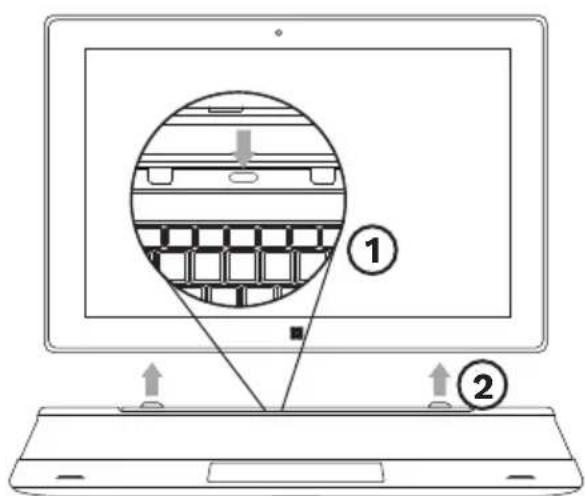

flowchart
graph TD
    A["1"] --> B["2"]
    B --> C["3"]

Tastatura (model KM1089)


natural_image
Line drawing of a laptop with two buttons and a blank screen, no text or symbols present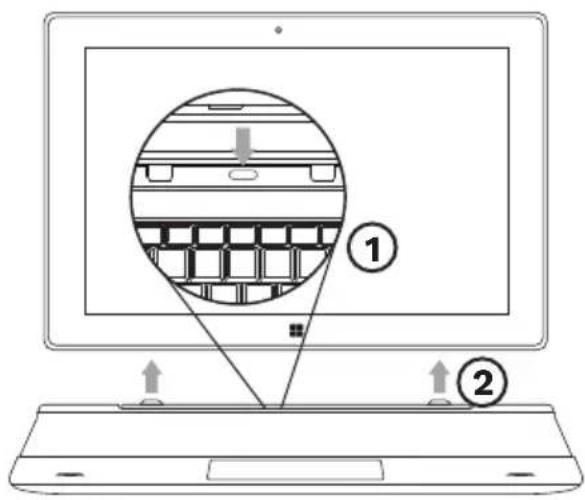

natural_image
Completely dark image with no visible content, text, or symbols.

www.krugermatz.com
Krüger&Matz is a registered trademark


- Tastatur (model KM1089)
- PRODUCT OVERVIEW
- Keyboard (model KM1089)
- INSTALLING MEMORY CARD
- PREPARING THE DEVICE FOR OPERATION:
- NAVIGATION
- UNLOCKING THE DISPLAY
- ENABLING WI-FI
- CONSERVING ENERGY
- LEARN MORE
- English Correct Disposal of This Product (Waste Electrical & Electronic Equipment)
- Legal notices
- KWESTIE BEZPIECZEŃSTWA
- Tastatura (model KM1089)
Brand : Krüger&Matz
Model : KM1089
Category : Tablet