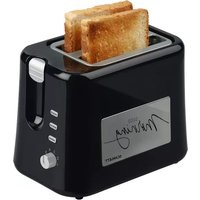
SC-TM11031 - Toaster Scarlett - Free user manual and instructions
Find the device manual for free SC-TM11031 Scarlett in PDF.


| Product Type | Toaster |
| Brand | Scarlett |
| Model | SC-TM11031 |
| Dimensions (approx) | 30 x 18 x 22 cm (L x W x H) |
| Weight (approx) | 1.2 kg |
| Power Consumption | 800-1000 W |
| Voltage | 220-240 V, 50/60 Hz |
| Number of Slots | 2 |
| Browning Control | 6 adjustable levels |
| Functions | Cancel, Defrost, Reheat |
| Self-Centering Racks | Yes |
| Removable Crumb Tray | Yes, for easy cleaning |
| High Lift Lever | Yes |
| Auto Shut-Off | Yes, with automatic pop-up |
| Cool-Touch Exterior | Yes |
| Material | Stainless steel and plastic |
| Cord Length | Approx. 80 cm |
| Cleaning | Unplug, wipe with damp cloth; empty crumb tray regularly |
| Spare Parts Availability | Contact Scarlett service center |
| Repairability Index | Not specified, but typical for toasters |
| Certifications | CE, RoHS |
| Instruction Manual Languages | Multiple languages (see manual) |
Frequently Asked Questions - SC-TM11031 Scarlett
User questions about SC-TM11031 Scarlett
0 question about this device. Answer the ones you know or ask your own.
Ask a new question about this device
Download the instructions for your Toaster in PDF format for free! Find your manual SC-TM11031 - Scarlett and take your electronic device back in hand. On this page are published all the documents necessary for the use of your device. SC-TM11031 by Scarlett.
USER MANUAL SC-TM11031 Scarlett
natural_image
Black and white photo of a SCARLETT 2007 instant toaster with two golden-brown slices, no visible text or symbols on the device itself.GB DESCRIPTION
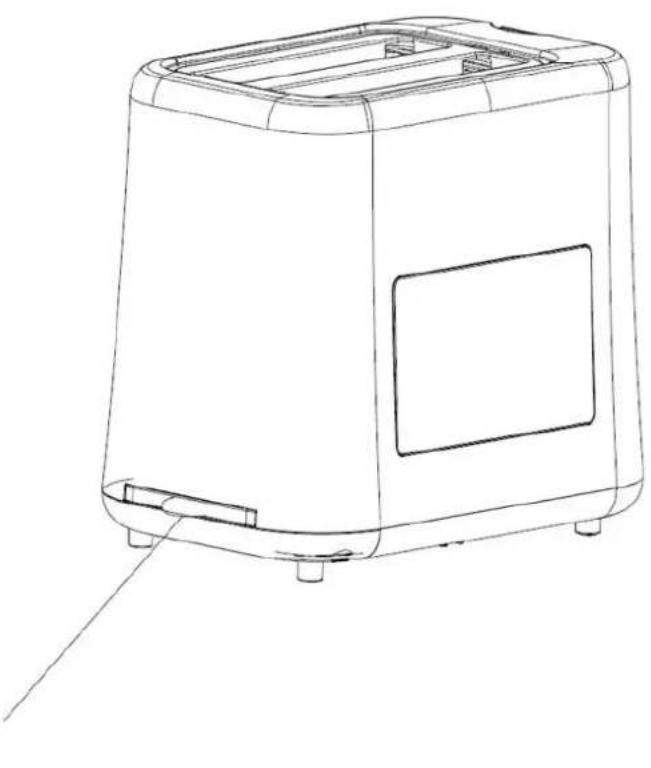
- Body
- Slide-out crumb tray
- Bread slot
- Sliding lever
- 6 settings timer
- Cancel button
- Reheat function button
- Defrost function button
UA ОПИС
natural_image
Line drawing of a rectangular toaster oven with front panel and side legs (no text or symbols)| 220-240 V ~ 50 Hz | 800 W | 0.97 / 1.19 kg | 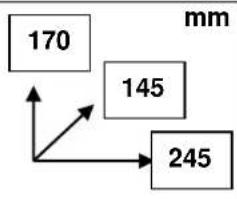 |
GB INSTRUCTION MANUAL IMPORTANT SAFEGARDS
- Please read these operating instructions carefully before connecting your device to the power supply, in order to avoid damage due to incorrect use.
- Before switching on the appliance for the first time please check if the technical specifications indicated on the unit correspond to the mains parameters.
• Incorrect operation and improper handling can lead to malfunction of the appliance and injuries to the user.
- The appliance is intended for use only in domestic aims. The unit is not intended for industrial and commercial use, and also for use in:
- kitchen area for the stuff of shops, offices and the other industrial places
- farm houses
– hotels, motels, rest homes and other similar places by residents.
• Do not use outdoors.
• Always unplug the appliance from the power supply before cleaning and when not in use.
• To prevent risk of electric shock and fire, do not immerse the appliance in water or any other liquids. If it has happened DO NOT TOUCH the appliance, unplug it immediately and check in a service center.
- Do not place the appliance or its parts close to open flame, cooking or other heating appliances.
- The appliance is not intended for use for physically, sensory or mental disabled person (including children) or for person with lack of life experience or knowledge, if only they are under supervision or have been instructed about the use of the unit by responsible person.
- This appliance can be used by children aged from 8 years and above and persons with reduced physical, sensory or mental capabilities or lack of experience and knowledge if they have been given supervision or instruction concerning use of the appliance in a safe way and understand the hazards involved. Cleaning and user maintenance shall not be made by children unless they are older than 8 and supervised. Keep the appliance and its cord out of reach of children aged less than 8 years.
- Children must be under control in order not to be allowed to play with the appliance.
• Do not leave the appliance switched on when not in use.
- Do not use other attachments than those supplied.
- In case of power cord is damaged, its replacement should be done by the manufacture or service department or the other high-skill person to avoid any danger.
- Do not attempt to repair, adjust or replace parts in the appliance. Check and repair the malfunctioning appliance in the nearest service center only.
- Keep the cord away from sharp edges and hot surfaces.
- Do not pull, twist, or wrap the power cord around the appliance.
- Do not move the appliance until it cools down completely.
- Never use sharp objects to take out sliced bread! When taking out sliced bread, be careful not to damage the heating wires.
- Do not touch any metal part of the outer surface of the appliance as it may heat to a very high temperature.
- Do not insert bread slices that are too thick or wrapped in aluminum foil to avoid electric shock or fire.
- ATTENTION: too long toasting may cause fire.
- Do not cover the toaster during operation.
- Toasts may burn, therefore do not use the toaster close to inflammable materials, such as curtains.
• The appliance is not designed for use with external timer or separate remote control system.
- If the product has been exposed to temperatures below 0^ for some time it should be kept at room temperature for at least 2 hours before turning it on.
- The manufacturer reserves the right to introduce minor changes into the product design without prior notice, unless such changes influence significantly the product safety, performance, and functions.
- Manufacturing date is indicated on the unit and/or on packing as well as in accompanying documents in the following format XX.XXXX where first two figures XX is the month of production, and following four figures XXXX is the year of production.
- When the temperature of accessible surfaces may be high.
INSTRUCITIONS FOR USE
BEFORE THE FIRST USE
- Before using the toaster for the first time clean your toaster (see Chapter “CARE AND CLEANING”). Operate the toaster at least two times without bread but on the highest setting. Ventilate the room during this period.
- As all new electric heating elements, your toaster may produce an unpleasant smell when it is first switched on. This is quite normal and not a cause for concern.
TOASTING
- Plug the toaster to the power supply and place 1 or 2 slices of bread into the bread slots of the appliance.
- A detailed description of the preparation can be found on the website in the "Recipes" section, or by clicking on the QR code located on the box of the device.
- Adjust the 6 setting timer to a desired level:
- 1 - minimum level;
-6 - maximum level.
- Press down the sliding lever, the toaster will start running automatically and light indicator will turn on.
- Bread slices will be ejected out and the appliance will shut down automatically when toasting is finished.
- Pull the sliding lever upright slightly to raise a small size toast out of the slot.
REHEAT FUNCTION
- You can use reheat function if toasted bread cools down.
- Insert a toast into the toaster and pull down the sliding lever. Press the reheat function button «reheat». The indicator will light up.
- The cold toast can be reheated in short time without overbrowning.
DEFROST FUNCTION
- Press the defrost function button «defrost» to prolong cooking time of frozen bread, the indicator light should light up.
CANCEL BUTTON
- Toasting can be cancelled anytime during toasting by pressing the «cancel», button, the indicator light will shut down.
CRUMB TRAY
- The crumb tray is intended for collecting the crumbs, which fall on the base of the toaster while toasting.
- Pull the crumb tray out, empty and place it back.
CARE AND CLEANING
- Ensure that the appliance is unplugged before cleaning.
- Let the unit cool down completely.
- Do not use abrasive detergents, any organic solvents or aggressive chemicals.
- Clean off crumbs.
STORAGE
- Switch off and unplug the appliance; let it cool down completely.
- Complete all requirements of chapter CARE AND CLEANING.
- Reel on the power cord.
- Keep the appliance in a dry cool place.

The symbol on the unit, packing materials and/or documentations means used electrical and electronic units should not be toss in the garbage with ordinary household garbage. These units should be pass to special receiving point.
For additional information about actual system of the garbage collection address to the local authority.
Valid utilization will help to save valuable resources and avoid negative work on the public health and environment which happens with incorrect using garbage.
Brand : Scarlett
Model : SC-TM11031
Category : Toaster