
LIFE E83010 (MD 85968) - Hi-Fi System MEDION - Free user manual and instructions
Find the device manual for free LIFE E83010 (MD 85968) MEDION in PDF.


| Product Type | Active 2.1 Sound System |
| Model | LIFE E83010 (MD 85968) |
| Brand | Medion |
| Power Supply | AC 230V ~ 50Hz via adapter (15V DC, 2A) |
| Satellite Power Output | 2 x 5W RMS |
| Subwoofer Power Output | 1 x 20W RMS |
| Audio Input | 3.5mm stereo jack |
| Speaker Output | Stereo RCA (white left, red right) |
| Controls | Volume (with On/Off), Bass |
| Illumination | Blue LED on speakers |
| Package Contents | Subwoofer, 2 satellites, power adapter, audio cable, manual |
| Safety Features | Overvoltage protection recommended; do not open housing |
| Cleaning | Disconnect power; no solvents or aerosol cleaners |
| Service | Contact customer care; no user-serviceable parts |
| Certifications | TÜV GS, Ecodesign compliant (2009/125/EG) |
| Ventilation Clearance | Minimum 10 cm around device |
| Operating Environment | Indoor, dry, avoid dust and direct sunlight |
| Disposal | Do not dispose with household waste; recycle |
Frequently Asked Questions - LIFE E83010 (MD 85968) MEDION
User questions about LIFE E83010 (MD 85968) MEDION
0 question about this device. Answer the ones you know or ask your own.
Ask a new question about this device
Download the instructions for your Hi-Fi System in PDF format for free! Find your manual LIFE E83010 (MD 85968) - MEDION and take your electronic device back in hand. On this page are published all the documents necessary for the use of your device. LIFE E83010 (MD 85968) by MEDION.
USER MANUAL LIFE E83010 (MD 85968) MEDION
Safety and Service 2
Operational Safety 2
Service 4
Cleaning 4
Disposal....4
Package Contents .... 5
Technical Data 5
Overview 6
Setting Up 7
Connecting the 2.1 System....7
Operation 8
Service....9
Support in the Event of a Malfunction 9
Copyright © 2009
All rights reserved.
This manual is protected by Copyright.
The Copyright is owned by MEDION®.
Trademarks:
All appearing trademarks are the property of their respective owners.
Technical specifications and optical characteristics are subject to change without notice. Printing errors might occur.
Safety and Service
Please read this chapter carefully and follow all instructions. By doing so you will ensure reliable operation and a long life of your 2.1 speaker system. Keep the manual close to your 2.1 system. Store the manual safely so that you can pass it on to the new owner should you sell your speakers.
Operational Safety

Never open the housing of the 2.1 system, the speakers or the power adapter! There is life threatening danger by electric shock if the housing of the power adapter is opened. There are no serviceable parts inside.
Children should never play unattended with electrical equipment. Children cannot always recognise potential hazards properly.
This 2.1 system is not designed for operation in a heavy industrial environment.
Location
In the first hours of operation, new devices may emit a typical, unavoidable but completely harmless smell, which will decline increasingly in the course of time. We recommend that you ventilate the room regularly, in order to counteract the formation of the smell. During the development of this product, we have made sure that, it is clearly below the applicable limits.
Do not expose the device or any connected devices to humidity. Avoid dust, heat and exposure to direct sunlight to prevent operating failure.
The device must not be subjected to drops of water or spray. Do not put any containers (vases or similar) filled with liquid on the device. The container can fall over and liquid can impair electrical safety.
Do not put any open sources of fire (candles or similar0 on the device or in its immediate vicinity.
Pay attention to large distances from the sides of furniture. Maintain a minimum distance of 10 cm around the device for sufficient ventilation.
Place and operate all the components on a stable and flat surface, free of vibrations, to prevent the loudspeakers from falling.
Operating safety
Children should be supervised, to ensure that they do not play with the device. This device is not intended to be used by individuals (including children) with restricted physical, sensory or intellectual abilities or with a lack of experience and or knowledge, unless they are supervised by an individual responsible for their safety or have received instructions about how the device must be used from such an individual.
Keep the packaging material, such as foil, away from children. There will be a danger of suffocation in the case of misuse.
Never open the casing of the device to avoid danger (electrical shock, short-circuit and danger of fire).
Do not put any objects into the device through the slots and openings (electrical shock, short-circuit and danger of fire).
The slots and openings of the device serve ventilation. Do not cover these openings (overheating, danger of fire).
Electricity supply
ATTENTION! Parts of the device will be subject to voltage even when it is switched off. Separate the device from the mains completely to interrupt the electricity supply to your device or to switch it free of voltage completely.
The plug-in power pack will consume electricity even when the device is switched off. Detach the plug-in power pack from of the socket to interrupt the electricity supply.
Operate the power adapter only on grounded power outlets with AC 230V \~ 50 Hz. When in doubt about the power type at your location, contact the related power utility company.
We recommend the use of protection against excess voltage, to protect the device against damage by voltage peaks or lightning strike from the electricity network, for additional safety.
A power supply socket must be close to the device and easily accessible.
Run cables in a way that no one can step or trip over them.
Use the plug-in power pack supplied with the device exclusively. Never attempt to connect the jack of the plug-in power pack to other sockets, because damage can be caused otherwise.
To avoid damage never place any objects on the power cord.
Service
Please contact our Customer Care should you experience technical problems with your 2.1 system. Repair is solely reserved for our authorised service partners.
Remove the power plug and contact our service organisation, if...
- liquid has penetrated to the inside of the device.
- the 2.1 system does not operate properly.
- the device has dropped, fallen or the housing is damaged.
Cleaning
- Always detach the mains plug and all connecting cables before cleaning.
- Do not use solvents or aerosol detergents.
Disposal
Packaging

All packaging and packaging materials that are no longer required can and should be recycled.
Device
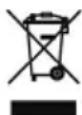
At the end of its life, the appliance must not be disposed of in household rubbish. Enquire about the options for environmentally-friendly disposal.
Package Contents
Please check whether the product is complete and inform us within 14 days of purchase if anything is missing. Your 2.1 system packaging should contain the following items:
- Subwoofer with integrated amplifier
• 2 satellite speakers with connection cables
• Power adapter (Model AK05G-1500200B)
• 1 Audio connection cable (3.5 mm stereo jack/jack)
• This manual and warranty documents
Technical Data
☐ Loudspeaker system
Active 2.1 sound system
Electricity supply
Mains adapter AK05G-1500200B
Input (primary): 230 V \~ 50 Hz
Output (secondary): 15 V = 2 A
Power Satellites: 2 x 5 watt (R.M.S.) Subwoofer: 1 x 20 watt (R.M.S.)
Audio connection Input: 3.5 mm stereo jack for a sound card Output: 2 RSA sockets for: Loudspeaker, left (white) Loudspeaker, right (red)


This device fulfils the basis requirements and the relevant regulation of the Ecodesign Guideline 2009/125/EG (Commission Regulation 1275/2008).
Overview
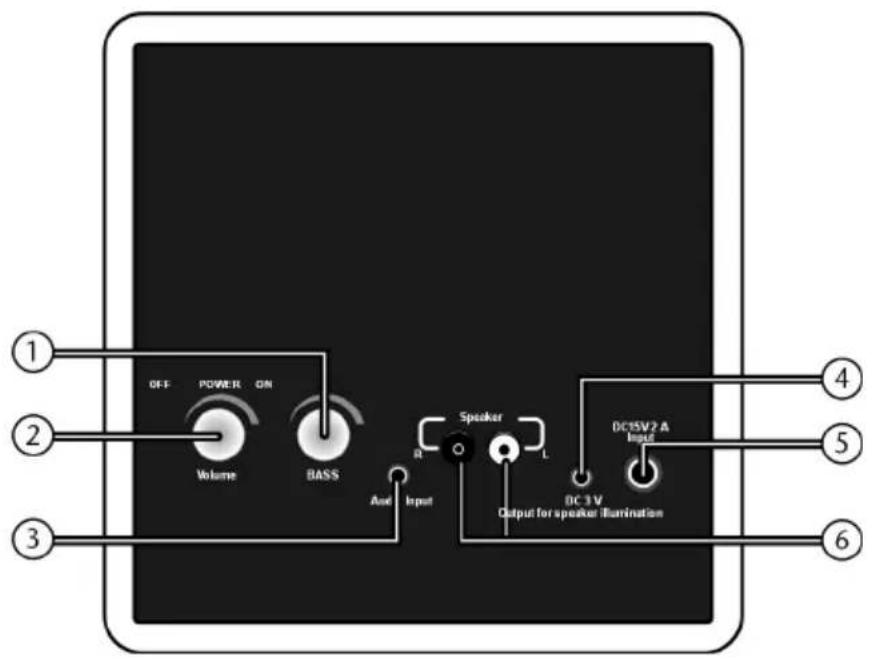
-
BASS: Loudspeaker control for the subwoofer
-
VOLUME:
Volume control for the loudspeaker; On/off switch
- AUDIO INPUT:
3.5 mm stereo jack for connection to the audio output of a computer/a sound card
-
DC/3V: For the connection of the DC cable for loudspeaker illumination
-
DC 15V 2A: Connection for a mains adapter
-
SPEAKER:
Stereo RSA socket for the connection of a loudspeaker
Setting Up
Connecting the 2.1 System
Note the instructions in the chapter "Safety and Service" (pages 1 and following).
1. Connecting the Speaker
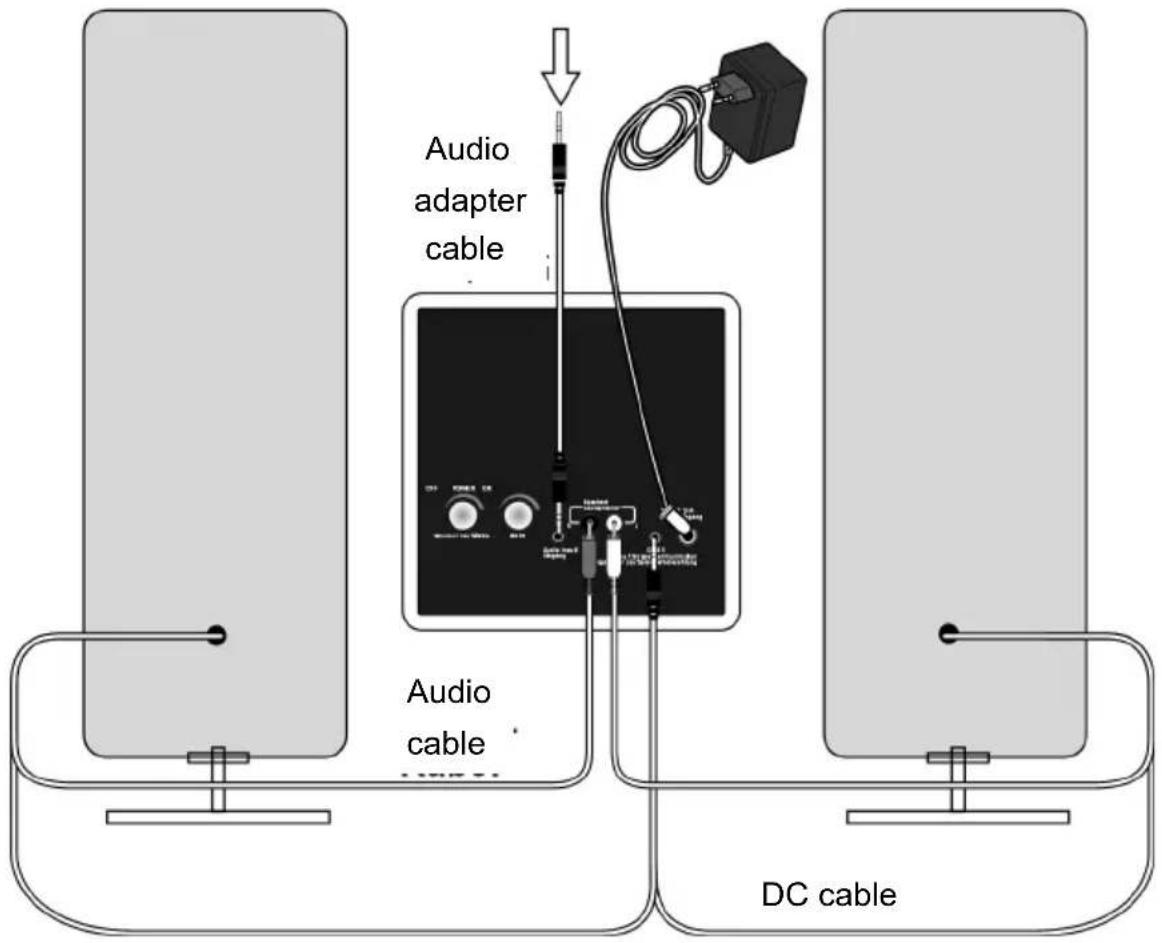
Connect the audio cable and the DC cable of the loudspeaker boxes after you have positioned the components. Follow the drawing below and the image legends on the previous page here:
| Loudspeaker Connection to the 2.1 system Jack | ||
| Left – RSA white | SA white | |
| Right – RSA red | RSA red | |
| Illumination | 3– DC/3V | 3.5 mm jack |
Loudspeaker output of the sound card/the computer
2. Connecting to a Sound Source
Your 2.1 system can take input from a sound card with the corresponding output connections. These are usually indicated with 'Line out' or 'Speaker out' and have a green colour indication as a rule. Read the operating instructions of your computer in the case of doubt.
Note: Use the audio cable for connecting the audio connection cable. You will have to use an appropriate adapter, if necessary, if this is not possible.
Attention! Digital connections are not supported and can damage the device.
Locate the output of the computer and connect it to the AUDIO INPUT 3 audio input on the 2.1 system by means of a 3.5 mm stereo phono connector. The connections are usually indicated by colour. It can be that the colours vary slightly. Refer to the operating instructions of your respective device to be certain.
3. Connecting the Power Adapter
Connect the supplied power adapter to the DC 15V 2A 5 connector on your 2.1 system and insert the power plug into an easily accessible power socket. Do NOT switch on the 2.1 system yet.
Operation
- Check that all volume controls are set to the lowest position. Turn the control of the loudspeakers 1 and 2 of the 2.1 system to the left, until a resistance has been overcome to do this.
- Switch on your sound source and play a suitable sound.
- Now, supply your 2.1 system with electricity, by turning the loudspeaker control 2 to the right, until a resistance has been overcome. The casings of the loudspeakers will shine blue as a sign that your system is being supplied with electricity.
- Now turn the volume controls of the loudspeaker boxes 2 and of the subwoofer 1 carefully to the right, until a comfortable volume and a balanced acoustic pattern has been reached. You will reduce the volume by turning the control to the left.
Take the volume back to the OFF position and then switch off the source of the sound, if you wish to end operation. The electricity supply will not be interrupted by turning the loudspeaker control back 2.
Service
Support in the Event of a Malfunction
Malfunctions can sometimes be caused by trivial issues and sometimes be complex in nature and require thorough analysis.
- Start with a careful visual inspection of all cable connections. If the indicators are not lit, then check whether the 2.1 system is properly supplied with power.
- Switch off the device and check all cable connections. When you are certain that the supply of power operates flawlessly and that all connections are correct, switch on the device again.
-
If the sound is distorted or too low, then adjust the volume controls until the desired volume level is obtained.
• If you do not hear any sound, then this could be caused because: -
the speakers are without power (wrong cabling).
• the volume control is turned down.
• sound output is deactivated, muted or faulty (wrong format).
Do You Require Additional Support?
If the suggestions in the previous section did not solve your problem, please contact us. It would help us if you could supply the following information:
- Are you using any other peripheral devices?
- Which steps have you already taken to solve the problem?
- If you have already received a customer number, please supply it to us.

- Safety and Service 2
- Package Contents .... 5
- Technical Data 5
- Overview 6
- Setting Up 7
- Operation 8
- Service....9
- Safety and Service
- Operational Safety
- Location
- Operating safety
- Electricity supply
- Service
- Cleaning
- Disposal
- Packaging
- Device
- Package Contents
- Technical Data
- Overview
- Setting Up
- Connecting the 2.1 System
- Connecting the Speaker
- Connecting to a Sound Source
- Connecting the Power Adapter
- Operation
- Support in the Event of a Malfunction
- Do You Require Additional Support?
Brand : MEDION
Model : LIFE E83010 (MD 85968)
Category : Hi-Fi System