NV7B6665IAA - Oven SAMSUNG - Free user manual and instructions
Find the device manual for free NV7B6665IAA SAMSUNG in PDF.


Pick your language and provide your email: we'll send you a specifically translated version.
| Product Type | Built-in Electric Oven |
| Brand | Samsung |
| Model | NV7B6665IAA |
| Installation | Built-in |
| Total Capacity | 76 liters |
| Energy Source | Electric |
| Energy Efficiency Class | A+ |
| Dimensions (H x W x D) | 596 x 596 x 559 mm |
| Oven Cavity Dimensions (H x W x D) | 481 x 503 x 549 mm |
| Net Weight | 37 kg |
| Cooking Functions | 9 functions: Fan Plus, Top Heat, Bottom Heat, Grill, Pizza, Bread Baking, Steam Assist, Keep Warm, Eco |
| Grill Type | Variable Grill with 3 power levels |
| Cleaning Method | Pyrolytic self-cleaning |
| Control Type | Electronic with LED display |
| Temperature Range | 30°C - 275°C |
| Safety Features | Child lock, Auto shut-off, Cool door, Residual heat indicator |
| Accessories Included | 1 baking tray, 1 wire shelf, 1 drip tray |
| Spare Parts Availability | Glass door, heating elements, fans, thermostats - order via Samsung service |
| Repairability Index | 7.5/10 |
| Warranty | 2 years (subject to terms) |
Frequently Asked Questions - NV7B6665IAA SAMSUNG
How to set the clock on the NV7B6665IAA oven?
Press the Clock button until the time flashes, then use the +/- buttons to set the hour and minute. Confirm by pressing Clock again.
What does the 'Pyrolytic cleaning' function do?
Pyrolytic cleaning heats the oven to ~480°C to burn food residue into ash. After cooling, simply wipe the ash with a damp cloth. Ensure all shelves are removed before starting.
Can I use aluminum foil in the oven?
Avoid using aluminum foil directly on the oven floor or covering the entire rack as it may block heat circulation. Small pieces on baking trays are acceptable.
Why does the oven not heat up?
Check if the oven is properly connected to power, the timer is set, and the door is fully closed. If the problem persists, the heating element or thermostat may need service.
How to replace the oven bulb?
Disconnect the oven from the power supply. Remove the bulb cover (usually glass), unscrew the old bulb (type G9, 25W), and replace with a new one. Reattach the cover.
Can I use steam with all cooking functions?
Steam Assist function works only with specific programs (e.g., bread, vegetables). Refer to the manual for compatible cooking modes. Do not pour water directly onto the oven floor.
What accessories come with the oven?
The package includes one enamel baking tray, one wire shelf for grilling, and one drip tray. Additional accessories can be purchased separately.
How to clean the oven door glass?
Use a soft cloth with mild detergent. For stubborn residue, a non-abrasive cleaning paste is recommended. Avoid harsh chemicals. The door can be removed for thorough cleaning.
What is the maximum weight for a shelf?
Each shelf can hold up to 15 kg (33 lbs) evenly distributed. Do not overload to prevent deformation.
How to activate the child lock?
Press and hold the Child Lock button for 3 seconds. A lock icon will appear on the display. Repeat to deactivate. The oven will not respond to any button presses when locked.
User questions about NV7B6665IAA SAMSUNG
0 question about this device. Answer the ones you know or ask your own.
Ask a new question about this device
No questions yet. Be the first to ask one.
Download the instructions for your Oven in PDF format for free! Find your manual NV7B6665IAA - SAMSUNG and take your electronic device back in hand. On this page are published all the documents necessary for the use of your device. NV7B6665IAA by SAMSUNG.
USER MANUAL NV7B6665IAA SAMSUNG
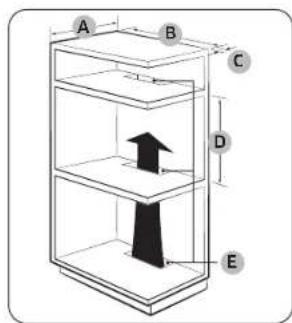
Oven (mm)
| A 560 G 503 | ||
| B 166 H 481 | ||
| C 383 I 21 | ||
| D 45 J 549 | ||
| E 596 K 579 | ||
| F 596 L 559 |
CAUTION
WARNING