
MWP-23 - Fan MPM - Free user manual and instructions
Find the device manual for free MWP-23 MPM in PDF.


| Product Type | Fan |
| Brand | MPM |
| Model | MWP-23 |
| Dimensions (H x W x D) | Approx. 35 x 30 x 30 cm |
| Weight | Approx. 2.5 kg |
| Power Supply | 220-240 V ~ 50 Hz |
| Power Consumption | Approx. 45 W |
| Number of Speed Settings | 3 |
| Oscillation | Yes, automatic 90° |
| Adjustable Tilt | Manual tilt adjustment |
| Blade Diameter | Approx. 30 cm |
| Safety Grille | Removable for cleaning |
| Control Type | Buttons on base |
| Noise Level | Approx. 45-60 dB |
| Cleaning Instructions | Wipe with damp cloth; do not immerse |
| Maintenance | Lubricate motor bearings annually |
| Safety Features | Overheat protection, stable base |
| Spare Parts Available | Replacement blades, screws |
| Repairability | User-replaceable components; professional repair for motor |
| Warranty | 2 years |
Frequently Asked Questions - MWP-23 MPM
User questions about MWP-23 MPM
0 question about this device. Answer the ones you know or ask your own.
Ask a new question about this device
Download the instructions for your Fan in PDF format for free! Find your manual MWP-23 - MPM and take your electronic device back in hand. On this page are published all the documents necessary for the use of your device. MWP-23 by MPM.
USER MANUAL MWP-23 MPM
natural_image
White MPM fan with three blades and mesh grille, no visible text or symbols on the fan bodyWENTYLATOR BIURKOWY
MWP-23, MWP-23/C
TABLE FAN/НАСТОЛЬНЫЙ ВЕНТИЛЯТОР/
TISCHVENTILATOR
PL INSTRUKCJA OBSŁUGI....3
EN USER MANUAL 8
RU ИНСТРУКЦИЯ ПО ОБСЛУЖИВАНИЮ.... 12
PRZYGOTOWANIE URZĄDZENIA DO PRACY
Read the instructions carefully before use.
Take special care when children are near the device.
Do not hang the cable on sharp edges or allow it to come into contact with hot surfaces.
Always remove the plug from the mains socket when not in use or before cleaning.
▶ Never use a damaged device, including one with a damaged cord or plug, in which case have it repaired at an authorised service centre.
Use of accessories not recommended by the manufacturer may cause damage to the device or personal injury.
Do not immerse the device, cord or plug in water or other liquids.
Do not leave the device unattended during operation. Remember to always switch off the device first before removing the plug from the mains socket.
Do not place the device near heat sources.
Do not use the device for purposes other than those for which it was intended.
Do not use fans in the open air.
Under no circumstances insert your fingers or any objects through the mesh of the propeller housing while the device is in operation.
Disconnect the device from the power supply before moving it to another location.
Do not cover the front and rear mesh housing of the propeller!
Do not place fans near open windows – raindrops can short-circuit the electrical system and cause an electric shock! It is advisable not to set up fans in rooms with a high level of humidity, such as bathrooms.
This equipment may be used by children of at least 8 years of age and by persons of diminished physical, mental capacity and lack of experience and knowledge of the equipment if supervision or instruction is provided regarding the safe use of the equipment so that the hazards involved are understood. Unsupervised children should not perform cleaning and maintenance on the equipment.
- Keep the device and its cord out of reach of children under 8 years of age.
Children should be supervised to ensure that they do not play with the device.
- The device is intended for domestic use only. - Do not connect the plug to the power socket with wet hands.
Do not pull the plug out of the power socket by pulling the cord.
Do not switch on the device without the front and rear covers in place.
Do not switch on the device until it is fully assembled. A partially assembled and commissioned device does not ensure safe and correct operation.
WARNING! Do not allow children to play with the film. Danger of suffocation!
For the safety of children, please do not leave freely accessible parts of the packaging (plastic bags, cardboard boxes, polystyrene, etc.).
DEVICE DESCRIPTION
- Decorative panel
- Front mesh propeller housing
- Propeller
- Protective nut for rear housing
- Rear propeller mesh housing
- Motor shaft
- Motor housing
- Rotary button
- Fan foot
- On/off and speed switches
- Base
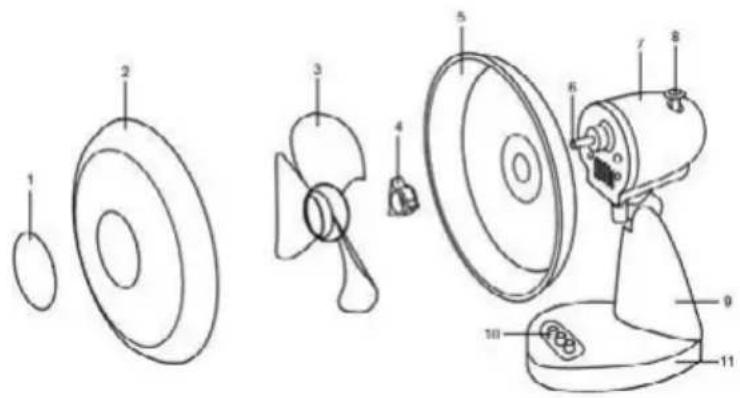
PREPARING THE DEVICE FOR OPERATION
CAUTION! Fans must stand on stable, flat and dry surfaces!
- Remove all protective films from the fan components.
- Unscrew the protective nut of the rear propeller mesh housing (9), located at the front of the motor housing (7).
- Fit the rear propeller mesh housing (8) with the handle upwards, matching the holes with the pins on the motor housing. Screw on the protective nut (9), making sure that these components are installed accurately.
- Remove the protective sleeve from the motor shaft (6).
- Put a safety band on the propeller shaft (3). Then install the propeller carefully on the motor shaft (6) and screw the propeller protection nut (2) counterclockwise.
- Fit the front propeller mesh housing (2) by attaching a keyed hook to the rear propeller mesh housing (5). Ensure that the holes for the fastening screw in the front and rear propeller mesh housing (12) are aligned with each other.
- Close the retaining hooks (11).
- Screw the propeller mesh housings together using a fixing bolt and nut.
BASE ASSEMBLY
- Place the speed switch housing (6) in the base (4).
- Tighten both parts on the underside with the four screws provided with the fan.
USE OF A FAN
CAUTION! Before switching on, make sure that the fan is standing on a flat, stable and dry surface!
- Connect the device to a power source.
- Set the desired speed, which is regulated by the following switches: "0" – off, "1" - speed \ "2" – speed II.
- To activate the rotating fan operation, press the rotating button (8) on the motor housing.
- To change the angle of the propeller and thus the angle of the air stream, simply tilt the fan head while holding the fan base with the other hand to prevent the fan from tipping over.
CLEANING AND MAINTENANCE
- Before cleaning, first disconnect the unit from the power supply.
- The motor housing, switch housings, stand and desk fan cross member can be cleaned with a damp cloth and a little detergent.
- Mesh housings and can be wiped down with a brush from time to time to remove any dust in the openings.
- After unscrewing the propeller, it can also be wiped with a damp cloth with some detergent.
Product data sheet:
MPM AGD S.A.
MODEL: MWP-23
Description Symbol Value Unit
| Maximum fan flow rate F 17,79 m | ^3/min | ||
| Fan power P 20,60 W | |||
| Operating value | SV | 0,86 | ( m^3/min )/W |
| Standby power consumption | P_SB | 0 | W |
| Fan sound power level | L_WA | 55,2 | dB(A) |
| Maximum air speed | c | 2,76 | m/s |
| Seasonal electricity consumption | Q | 6,59 | kWh/a |
| Standard for the measurement of in-service value | IEC 60879:1986 |
For further information, please contact MPM AGD S.A.
ul. Brzozowa 3
Milanówek 05-822, Poland
Phone (22) 380-52-00
BDO [waste database]: 000027599
Technical specifications are given on the product nameplate.
Noise level: L_WA = 48.7 dB
Length of mains cable: 1.75 m

CAUTION! MPM agd S.A. reserves the right to technical changes!
PROPER DISPOSAL OF THE PRODUCT (waste electrical and electronic equipment)
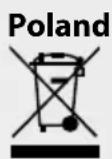
Marking on the product indicates that after the service–life of the product expires, it should not be disposed with other type of municipal waste. Used equipment may have a negative impact on the environment and health of people due to potentially containing hazardous substances, mixtures and components. Mixing electric waste with other types of waste or disassembling those in an unprofessional manner may cause a release of substances that are hazardous to the environment and health. Used equipment should be handed-over to a point for collection of electric waste. In order to obtain detailed information regarding the electric waste collection points, the user should contact the municipal point of electric waste collection or used equipment processing department.
We wish you satisfaction from using the product and invite you to check a wide range of other MPM appliances
natural_image
Simple line drawing of a vacuum cleaner with a cat silhouette and bulb (no text or symbols)MPM agd S.A.
- WENTYLATOR BIURKOWY
- MWP-23, MWP-23/C
- TABLE FAN/НАСТОЛЬНЫЙ ВЕНТИЛЯТОР/
- TISCHVENTILATOR
- PRZYGOTOWANIE URZĄDZENIA DO PRACY
- WARNING! Do not allow children to play with the film. Danger of suffocation!
- DEVICE DESCRIPTION
- PREPARING THE DEVICE FOR OPERATION
- CAUTION! Fans must stand on stable, flat and dry surfaces!
- BASE ASSEMBLY
- USE OF A FAN
- CAUTION! Before switching on, make sure that the fan is standing on a flat, stable and dry surface!
- CLEANING AND MAINTENANCE
- PROPER DISPOSAL OF THE PRODUCT (waste electrical and electronic equipment)
Brand : MPM
Model : MWP-23
Category : Fan