
Rocket 1580 - Regulator Highpoint - Free user manual and instructions
Find the device manual for free Rocket 1580 Highpoint in PDF.


| Product Type | PCIe 4.0 x16 NVMe Controller Card |
| Model | Rocket 1580 (R1580) |
| Brand | HighPoint Technologies |
| Host Interface | PCIe 4.0 x16 (compatible with PCIe 3.0 slots) |
| Device Ports | 4 x SFF-8654 connectors |
| Supported SSDs | U.2/U.3 NVMe SSDs (via SFF-8639 cable), also supports x8 x4 NVMe SSDs via optional cables (SFF-8643, SFF-8611) |
| Maximum SSDs per Port | Depends on cable: up to 2 NVMe SSDs per cable (for x8 bifurcation) |
| PCIe Generation | PCIe 4.0 |
| Form Factor | Low-profile (typical PCIe card) |
| Dimensions (approx.) | 167 mm x 111 mm (standard PCIe card) |
| Weight (approx.) | 50 g |
| Power Consumption | Powered via PCIe slot (75W max, actual depends on SSDs) |
| Operating Systems | Windows 11/10, Windows Server 2022/2019/2016, Microsoft Hyper-V, RHEL/Debian/Ubuntu/Fedora/Proxmox/Xenserver (Linux kernel 3.10+), FreeBSD 12.1+ |
| Included Accessories | Quick Installation Guide |
| Optional Cables | 8654-8643-210 (SFF-8654 to SFF-8643, 1m), 8654-8611-205 (SFF-8654 to SFF-8611, 0.5m), TS8i-8639-060 (SFF-8654 to SFF-8639 with 15-pin SATA power, 0.6m) |
| Installation | Plug card into PCIe slot, connect NVMe SSDs via compatible cables, secure connections |
| Maintenance | Keep card and connectors free of dust; ensure proper airflow |
| Safety | Follow standard ESD precautions; ensure system is powered off before installation |
| Spare Parts / Repairability | Only optional cables available; controller card is not user-serviceable |
| Warranty | Check HighPoint website for details |
Frequently Asked Questions - Rocket 1580 Highpoint
User questions about Rocket 1580 Highpoint
0 question about this device. Answer the ones you know or ask your own.
Ask a new question about this device
Download the instructions for your Regulator in PDF format for free! Find your manual Rocket 1580 - Highpoint and take your electronic device back in hand. On this page are published all the documents necessary for the use of your device. Rocket 1580 by Highpoint.
USER MANUAL Rocket 1580 Highpoint
Quick Installation Guide
V1.00
System Requirements
PC Requirements
- System with a free PCIe 4.0 (or 3.0) x16 slot
• Windows 11, 10 / Server 2022, 2019, 2016, Microsoft Hyper-V - RHEL/Debian/Ubuntu/Fedora/Proxmox/Xenserver (Linux kernel 3.10 and later)
• FreeBSD 12.1 and later
R1580 Kit Content
• R1580 Controller Card
- Quick Installation Guide
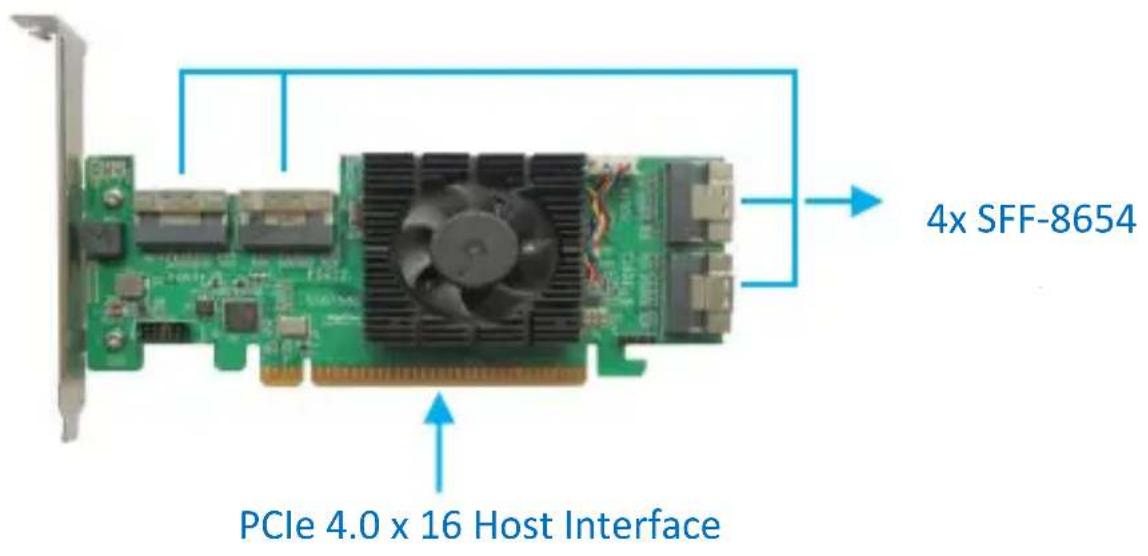
R1580 Hardware
Front View
Hardware Installation
Step 1: The R1580 provides four device ports which utilize SFF-8654 connectors. These ports accept a variety of HighPoint Certified Cable Accessories (see the Accessories section towards the end of this guide for more information). The following procedure explains how to connect U.2 NVMe SSDs directly to the R1580 using HighPoint TS8i-8639-060 NVMe cables.

SFF-8654
TS8i-8639-060 NVMe cable

SFF-8639
Step 2: Connecting the SSDs using TS8i-8639-060 cables. The SFF-8639 port should be connected to the NVMe SSD's U.2 port. The 15 pin SATA power connector should be connected to the system's power supply.
Step 3: Insert the R1580 controller into one of the motherboard's open PCI-E 4.0 × 16 slots.
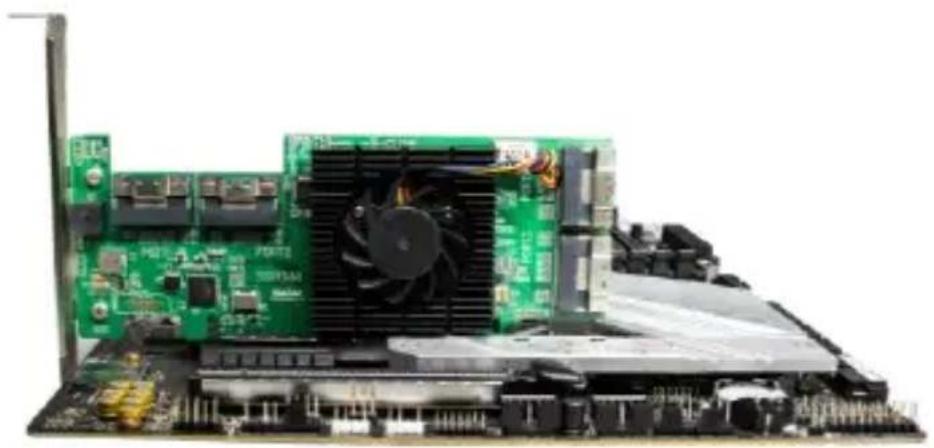
Step 4: As described in step 2, connect the SFF-8639 cable connectors to the U.2/U.3 SSDs. Next, connect the SFF-8654 cable connector to one of the R1580's four device ports (Ports 1 through 4)
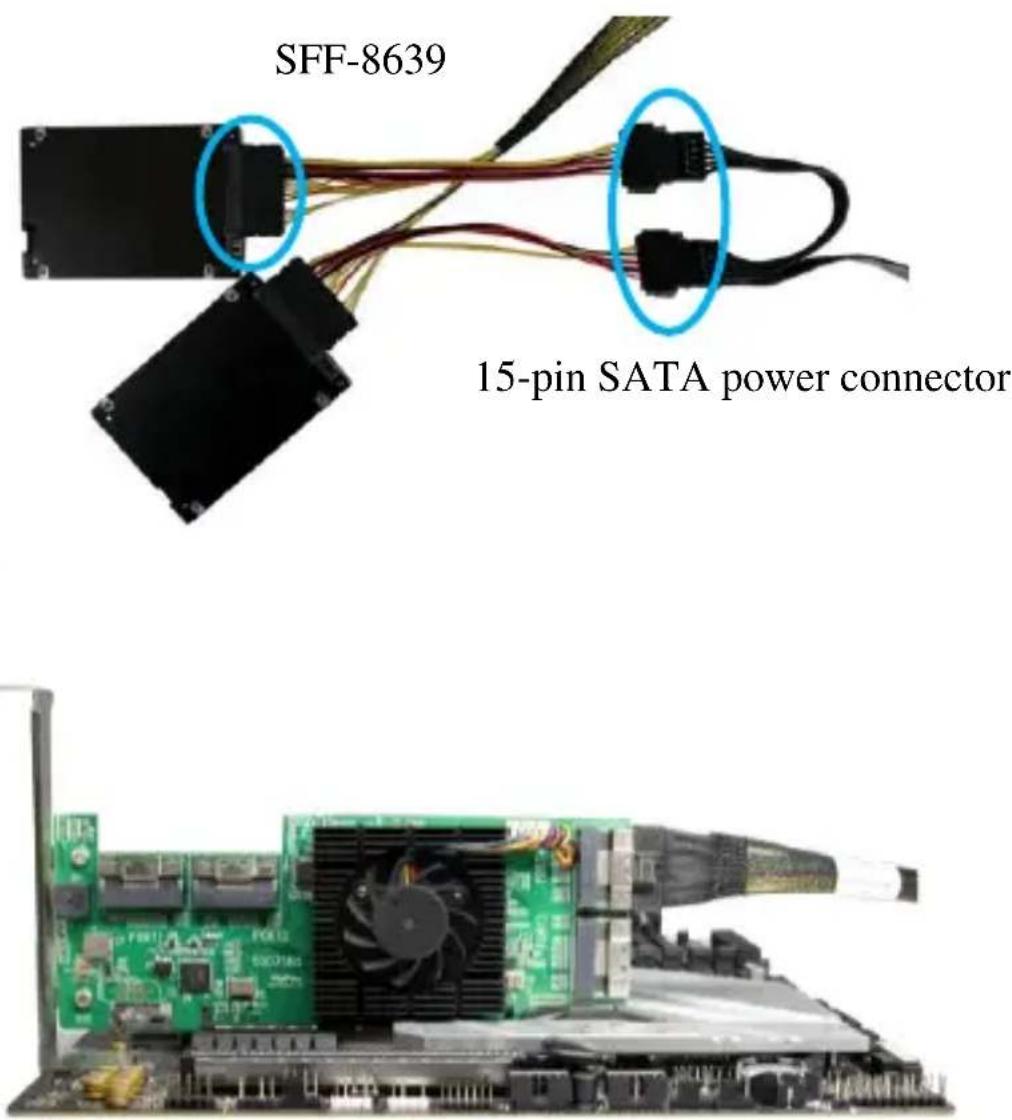
Step 5: Connect the remaining NVMe SSDs to the R1580 as described above. Once complete, Power on the system.
Note: Please make sure the cables are securely connected to the R1580's device ports and the NVMe SSDs or backplane. Loose connections can lead to a variety of problems including instability, slower than expected performance and dropped disks.
Optional Certified Cable Accessories
8654-8643-210 | SFF-8654 to SFF-8643 NVMe cable, 1meter lengthThe 8654-8643-210 is SFF-8654 (host) to SFF-8643 (device) PCIe 4.0 x8 NVMe cable, and each cable can host up to 2x NVMe SSDs. |
8654-8611-205 | SFF-8654 to SFF-8611 NVMe cable, 0.5 meter lengthThe 8654-8611-205 is SFF-8654 (host) to SFF-8611 (device) PCIe 4.0 x8 NVMe cable, and each cable can host up to 2x NVMe SSDs via an SFF-8611 Oculink connection. |
| TS8i-8639-060 | SFF-8654 to SFF-8639 cable,0.6meter lengthThe SFF-8654 to U.2 SFF-8639 cable with a 15-pin SATA power connector.Each cable supports two U.2 NVMe SSDs. |
Resources
We recommend visiting the Software Downloads webpage for the latest drivers, management interfaces, and installation guides.
Document Downloads:
https://www.highpoint-tech.com/hba-gen4-nvme-u2
Customer Support
If you encounter any problems while utilizing the R1580, or have any questions about this or any other HighPoint Technologies, Inc. product, feel free to contact our Customer Support Department.
Web Support:
https://www.highpoint-tech.com/support-and-services
HighPoint Technologies, Inc. websites:
https://www.highpoint-tech.com


Brand : Highpoint
Model : Rocket 1580
Category : Regulator