
NoiseWall SR-BH600 - Headphones Saramonic - Free user manual and instructions
Find the device manual for free NoiseWall SR-BH600 Saramonic in PDF.


| Product Type | Over-ear wireless headphones with active noise cancellation |
| Brand | Saramonic |
| Model | NoiseWall SR-BH600 |
| Driver Size | 40 mm dynamic drivers |
| Frequency Response | 20 Hz – 20 kHz |
| Impedance | 32 ohms |
| Bluetooth Version | 5.0 |
| Active Noise Cancellation | Hybrid ANC |
| Battery Type | Rechargeable lithium-ion |
| Battery Life | Up to 30 hours (ANC on) |
| Charging Time | Approximately 2.5 hours |
| Charging Port | USB-C |
| Microphone | Built-in with noise suppression |
| Controls | On-ear touch controls and buttons |
| Weight | Approx. 260 g |
| Foldable Design | Yes, for portability |
| Ear Cushions | Memory foam with leather cover |
| Headband Adjustment | Adjustable, padded |
| What's in the Box | Headphones, USB-C charging cable, 3.5mm audio cable, airplane adapter, carrying case, user manual |
| Warranty | 1 year limited |
Frequently Asked Questions - NoiseWall SR-BH600 Saramonic
User questions about NoiseWall SR-BH600 Saramonic
0 question about this device. Answer the ones you know or ask your own.
Ask a new question about this device
Download the instructions for your Headphones in PDF format for free! Find your manual NoiseWall SR-BH600 - Saramonic and take your electronic device back in hand. On this page are published all the documents necessary for the use of your device. NoiseWall SR-BH600 by Saramonic.
USER MANUAL NoiseWall SR-BH600 Saramonic
Wireless Active Noise-Cancelling Headphones
无线主动降噪立体声耳机
This manual is for reference only. Please refer to the actual product for the specific functions and appearance of the product. Please read it carefully before using this product and keep it in a safe place for future reference.
NoiseWall SR-BH600
Carrying Case

User Manual

Micro USB charging cable (60cm)

3.5mm audio cable(1m)

In-flight charging adapter
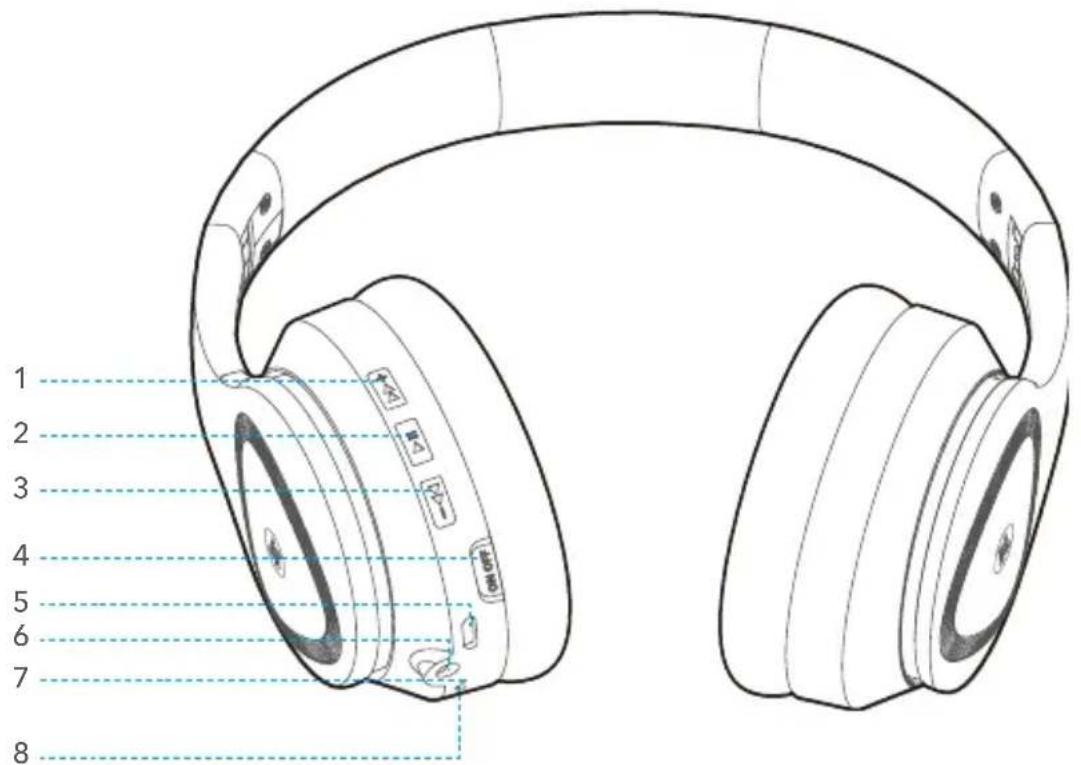
- Volume+ / Previous Button
- Multi-Function Button
- Volume- / Next Button
- ANC Switch (On/Off)
- Charging Port
- 3.5mm AUX port
- Microphone
- Indicator
Specifications
| Model SR-BH600 | |
| Bluetooth Version V5.0 | |
| Range approx.10m | |
| Frequency Response 20-20KHz | |
| Profile A2DP, AVRCP, HSP, HFP, CVC | |
| Supported Audio Format(s) SBC, AAC | |
| Impedance 32 Ω | |
| Driver | Φ40mm |
| Battery Capacity 400mAh | |
| Charge Time approx. 2.5 hrs | |
| Playtime | approx. 12 hrs (BT ON, ANC ON)approx. 16 hrs (BT ON, ANC OFF)approx. 40 hrs (BT OFF, ANC ON) |
| Standby time (BT connected) | approx. 33 hrs (ANC ON)approx. 65 hrs (ANC OFF) |
| Dimensions 185×170×75mm | |
| Weight 230g (approx.8oz) |

Note: BT=bluetooth, ANC=active noise cancelling
How to Wear
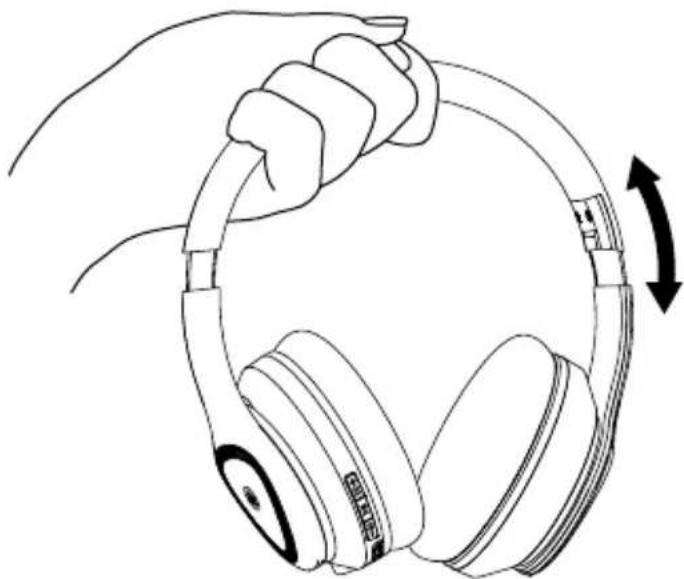
Wear the headphones and adjust to a comfortable size and position as the picture on the right.
Power On / Off
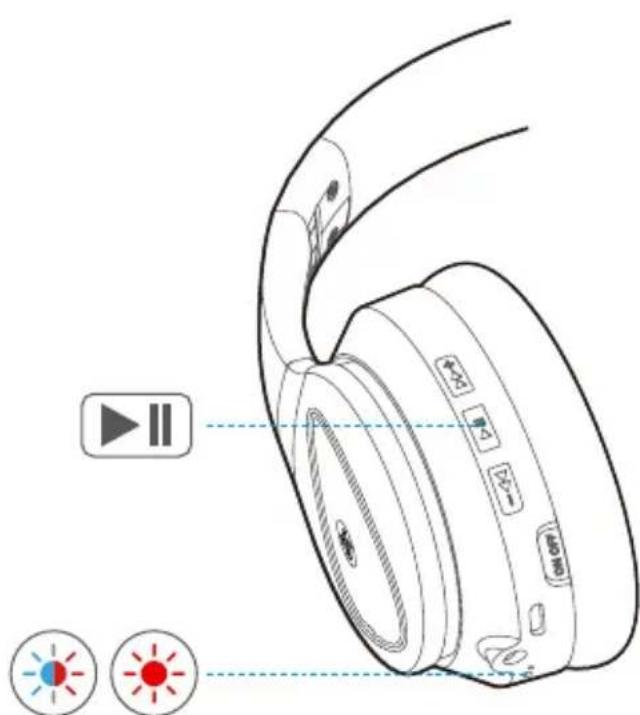
 Power ON Power ON | ▶II press and hold multi-function button for 4s, red & blue indicator flashing alternately, with voice prompts "power on" |
 Power OFF Power OFF | ▶II press and hold multi-function button for 4s, red indicator flashing 3 times, with voice prompts "power off" |


Pairing
- If not connected with any devices, the SR-BH600 will enter pairing mode automatically after power on.
-
If already connected with a device, the SR-BH600 will automatically connect with the last device connected. Or if you'd like to pair and connect SR-BH600 with another device, when SR-BH600 is powered off, press and hold multi-fuction button for 5 seconds to enter pairing mode. When entering pairing mode, red & blue indicator flashing alternately with voice prompts "pairing".
-
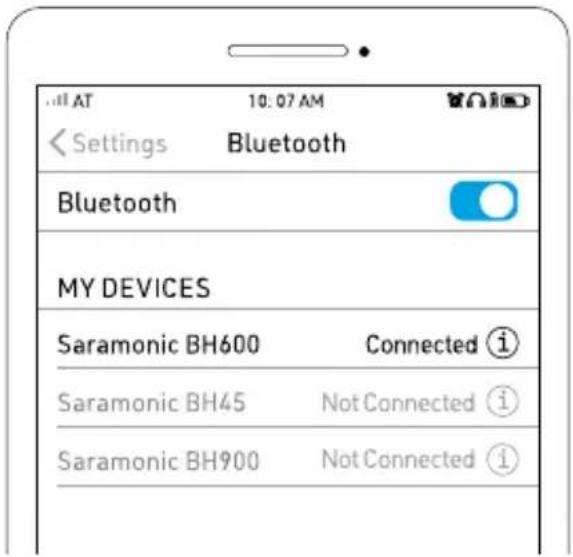
Select "Saramonic BH600" on your device.
-
Connected successfully with voice prompts "connected".
Notes: The pairing mode could last for 10 minutes. If not connected with any devices for more than 10 minutes, the headphone will be powered off automatically.
Reset
When SR-BH600 is powered on, press and hold +◀◀▶▶▶ the same time for 5s, the SR-BH600 will be reset with voice prompts "du", all pairing record will be cleared and SR-BH600 will enter pairing mode with red & blue indicator flashing alternately.

Button Controls
| Audio / Video Play | ||
| Play / Pause Press ×1 | ||
| Next Press and hold for 2 seconds | ||
| Previous Press and hold for 2 seconds | ||
| Volume up Press ×1 | ||
| Volume down Press ×1 | ||
| Calls | ||
| Answer / End a call Press ×1 | ||
| Reject a call Press ×2 | ||
| Call the latest number Press ×2 | ||
| Voice Assistant | ||
| Activate voice assistant Press ×3 | ||
Aux-in

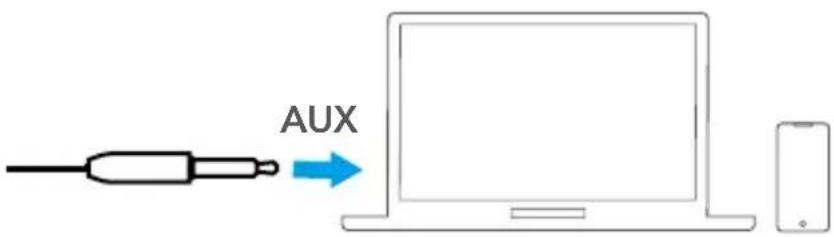
When the SR-BH600 is connected to the device using audio cable via the AUX port, the SR-BH600 will switch to AUX mode automatically, and Bluetooth connection and its function will be disabled.
ANC On / Off
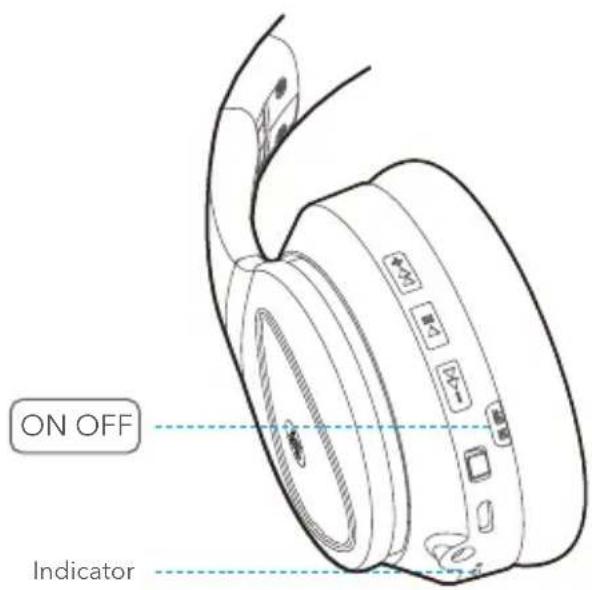
| ANC ON | Slide the ANC switch to ON, green indicator will be on |
| ANC OFF | Slide the ANC switch to OFF, indicator will be off |
Connect an Additional Bluetooth Devices

-
Please make sure the SR-BH600 is connected with the first device successfully.
-
Disconnect the bluetooth connection of the 1st device, the SR-BH600 will enter pairing mode automatically.
-
Pair and connect SR-BH600 with the second device.
-
Find SR-BH600 in the bluetooth list of the first device and connect again to connect two devices simultaneously.

Charge the headphones

Indicator & Voice Prompts Status

Red indicator flashing with "Dudu" Low battery

Solid red Charging

Indicator off Fully charged
Q&A
Q: Failed to connect devices with headphones?
A: Please ensure your headphones in pairing mode. Then delete the pairing record on the Bluetooth devices and reconnect with headphones.
Q: Failed to turn on the headphones?
A: Please check the battery status of your headphones.
Q: Can I replace the battery in the headphones?
A: No. These headphones use a built-in non-detachable Li-Polymer battery which can not be replaced.
Q: Can I use the headphones while driving?
A: For your safety, we strongly recommend you do not use headphones while driving in order to avoid distractions.
Q: Why is the connection sometimes disconnected within 10 meters?
A: If there are many WiFi routers, 4G signals, high-power electrical appliances and etc when using, it may be interfering with the Bluetooth connection. It can be solved by changing the environment or reconnecting.
Q: No sound from my computer or mobile phone?
A: Please check if the output channel of your computer supports the A2DP profile. Also check the volume settings on your headphones and computer/mobile phone.
Q: Why am I unable control the volume of a track playing on my mobile phone's APPs?
A: The configurations of various application softwares are different, the headphones may not be completely compatible with some APPs.
Q: What should I do if the Bluetooth connecting function cannot close or open?
A: Please reset the Bluetooth function of the headphones by inserting an audio cable into the audio port and removing it.
Q: Why does Bluetooth turn off when I connect an audio cable?
A: This is one of BH600 special features. When the user inserts an audio cable into the audio port, all Bluetooth feature buttons temporary stop working and Bluetooth turns off. The Bluetooth will be available again when pulling out the audio cable.
Safety Instructions
- Read, follow and keep these instructions.
- For the best possible experience, always use the product as described by the manufacturer.
- Always handle your headphones with care and protect them from external damage.
- Clean your headphones using a soft dry cloth. Never use water, cleaning detergent, leather polish or other substances as they may damage your headphones permanently.
- Avoid exposure to extreme conditions such as very cold or hot temperatures, magnetic fields or damp environments.
- Listening to music at high volume for prolonged periods of time can cause permanent damage to your hearing.
- Contains small parts and are not suitable for children age three (3) and below.
- The headphones contain magnetic material.
- The headphones contain a Lithium battery. If misused or damaged it can become a hazard and is at risk of explosion.
- Should a battery cell leak, do not allow the liquid to come in contact with skin or eyes.
- The headphones must be switched off before boarding an aircraft.
- The headphones must not be disposed of with regular household waste. Please dispose of in accordance with local regulations.
- Do not use your headphones in the immediate proximity (10 cm) of a pacemaker.
- Do not subject the product and included accessories to abnormal wear and tear.
- Do not expose the headphones to temperatures below -20°C or above +45°C.
- Do not charge the headphones in temperatures below 0°C or above +45°C.
- Do not attempt to burn the headphones. The battery could explode causing injury and death.
- Do not attempt to open, modify, disassemble, repair or in other way access the internal structure of the headphones. They are not user serviceable.
- Do not use or store the headphones near to a vehicle airbag due to risk of injury.
- Do not use headphones while driving, jogging or walking through traffic areas. Headphones effectively isolate external sound and noise, which means that when in use, you might not be able to hear your surroundings.
- Do not drop, sit on or cause other unusual impact to the headphones.
- Do not expose to fire, water or high voltage equipment.
- Do not expose the product to rain or moisture.
- Do not use the headphones near water, bathtubs, sinks, saunas, pools, other liquids or moist areas.
包装清单


电源开启 / 关闭

| 电源开启 | ▶▶长按多功能键4秒,红蓝灯交替闪烁,语音提示“Power On” |
| 电源关闭 | ▶▶长按多功能键4秒,红灯闪烁三次,语音提示“Power Off” |
配对
耳机充电

Brand : Saramonic
Model : NoiseWall SR-BH600
Category : Headphones