GamesMonic SR-BH60 - Headphones Saramonic - Free user manual and instructions
Find the device manual for free GamesMonic SR-BH60 Saramonic in PDF.


| Product Type | True Wireless Gaming Earbuds |
| Brand | Saramonic |
| Model | GamesMonic SR-BH60 |
| Connectivity | Bluetooth 5.0 |
| Bluetooth Name | Saramonic BH60 |
| Transmission Range | Approx. 10m (33 ft) |
| Latency | Approx. 60ms (Low-Latency Mode) |
| Earbud Battery Capacity | 60mAh / 3.7V each |
| Charging Case Battery Capacity | 500mAh / 3.7V |
| Music Playback Time | Approx. 7 hours (at 50% volume) |
| Game Playback Time | Approx. 6 hours (at 50% volume) |
| Charging Case Battery Life | Approx. 17 hours (total) |
| Earbud Charging Time | Approx. 1.5 hours |
| Charging Case Charging Time | Approx. 2 hours |
| Charging Port | USB Type-C |
| Charging Voltage (Earbuds) | 5V / 0.2A |
| Charging Voltage (Case) | 5V / 1A |
| Touch Controls | Play/Pause, Calls, Track Skip, Gaming Mode, Voice Assistant |
| Microphone | Built-in |
| Gaming Mode | Low Latency (Blue Breathing LED) |
| LED Indicators | Earbuds: Connection status, Charging; Case: Battery level (3 blue LEDs, red at <10%) |
| Voice Prompts | Power On/Off, Pairing, Connected, Disconnected |
| Included Accessories | Charging Case, Eartips (S), USB-C Cable, Storage Bag, Manual |
| Warranty | 1 year (see manual for details) |
Frequently Asked Questions - GamesMonic SR-BH60 Saramonic
User questions about GamesMonic SR-BH60 Saramonic
0 question about this device. Answer the ones you know or ask your own.
Ask a new question about this device
Download the instructions for your Headphones in PDF format for free! Find your manual GamesMonic SR-BH60 - Saramonic and take your electronic device back in hand. On this page are published all the documents necessary for the use of your device. GamesMonic SR-BH60 by Saramonic.
USER MANUAL GamesMonic SR-BH60 Saramonic
True Wireless Gaming Earbuds
真无线蓝牙游戏耳机
SR-BH60
This manual is for reference only. Please refer to the actual product for the specific functions and appearance of the product. Please read it carefully before using this product and keep it in a safe place for future reference.
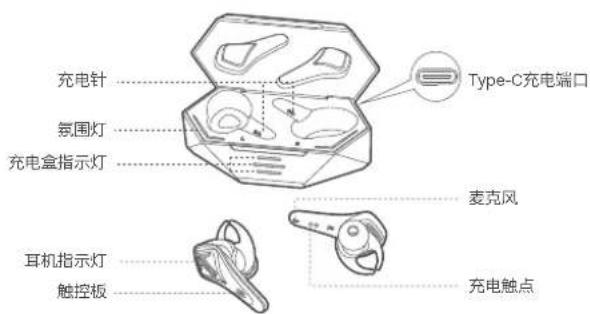
Product overview How to wear
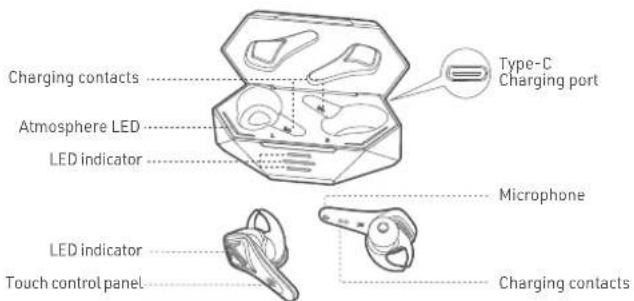
Earphone Specifications
| Bluetooth name | Saramonic BH60 |
| Bluetooth version | 5.0 |
| Battery capacity | 60mAh/3.7V |
| Transmission range | around 10m |
| Latency | around 60ms |
| Battery duration (music) | around 7h (50% volume) |
| Battery duration (game) | around 6h (50% volume) |
| Charging time | around 1.5h |
| Charging electric current | 5V=0.2A |
Charging Case Specifications
| Battery capacity | 500mAh/3.7V |
| Charging case battery life | around 17h |
| Charging time | around 2h |
| Charging voltage | 5V=1A |
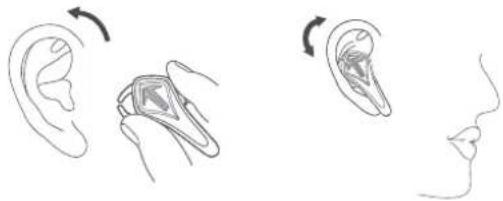
Choose suitable ear tips, put the earbuds in your ears, and rotate them as shown in the picture below until the earbuds fit your ears and make sure that the microphone points to your mouth.
natural_image
Illustration showing ear, earbell, and ear with directional arrows indicating rotation (no text or symbols)Power On/ Off
- Power On
a. With charging case: when opening the charging case, the earbuds will be power on automatically with voice prompts "Power on".
b. Without charging case: when earbuds are power off, touch the touch panel and hold for about 2 seconds, earbuds will be power on with voice prompts "Power on".
- Power Off
a. With charging case: put the earbuds into the charging case and close the lid, the earbus will be power off with voice prompts "Power off". b. Without charging case: when the earbuds are on, touch the touch panel and hold for about 8 seconds, the earbuds will be power off with voice prompts "Power off".
Pairing and connecting
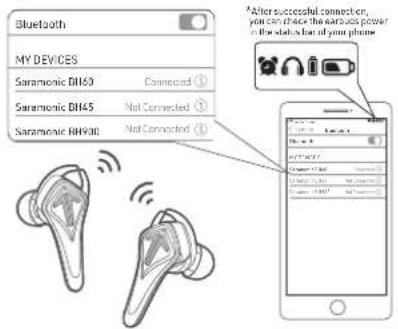
- Open the charging case, the two earbuds will be automatically power on and paired with each other within 5 seconds with voice prompts "Pairing". (Blue indicators and white indicators flash alternately).
- Turn on the Bluetooth list of devices, select "Saramonic BH60" and complete the pair and connection. If connected, the blue indicator will be on for 1s and off with voice prompts "Connected".
- If the connection fails, put the earbuds into the charging case and close the lid, then take out and repeat the above operations.
- After the first connection, the earbuds will automatically connect to the last paired device. (Bluetooth of the device needs to be turned on).
- If the distance between earbuds and the device is beyond transmission distance, they will be disconnected with voice prompts "faraway from devices", and the earbuds will try re-connect.
- The earbuds will be power off automatically if not connected with any devices for 5 mins.
Restore
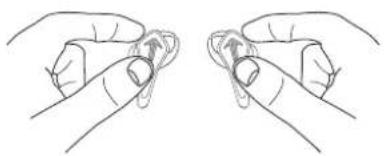
Turn off both earbuds, touch the control panel and hold for around 14 seconds. Voice prompts changed from "Power on" to "Pairing" and then "Dudududu". The Indicators changed from "blue indicators falsh "to" white & blue indicators flash alternately" and "white indicators turn on for 1 second then turn off". After the pairing record is cleared, the earbuds will power off automatically.
natural_image
Line drawing of two hands holding a circular object with directional arrows indicating movement (no text or symbols)Gaming mode
When the earbuds are connected, tap the right earbud touch panel 3 times to enter the low-latency mode, tap 3 times more to switch to Music Mode Indicators Light of Gaming Mode: blue breathing light.
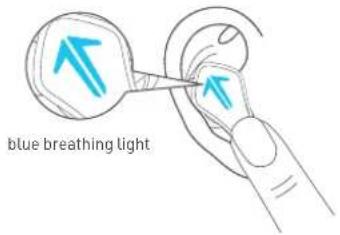
Touch control
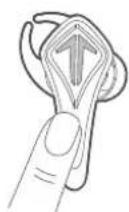

Play/ Pause Tap the L/R earbud 1 time

Answer/Reject a call Tap the L/R earbud 1 time

Next Tap the Left earbud 2 times

Reject a call Touch the L/R earbud and hold for 2 seconds

Previous Tap the right earbud 2 times

Enter/ Exit gaming mode Tap the L/R earbud 3 times
Charging status of charging case
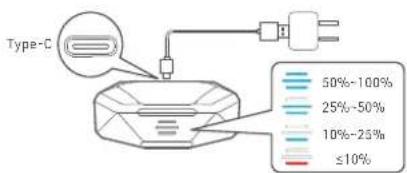
1 Charging & Battery Level of Charging Case
a. Battery level indicator: open the charging case, three blue LED indicators will be on simultaneously, and then will be off accordingly to show the current battery level of charging case. When the battery level is less than 10%, the shortest LED indicator will be solid red.
b. Charging Status:
Connect USB Type-C charging cable to charging port, the three blue LED indicator will show current battery level. When the charging case is fully charged, all three blue Indicators will be on. Remove the charging cable, and all the indicators will be off.
FAQ
Q: Only one earbud work?
A: Put the earbuds into charging case and take out, if still only one earbud works, restore to factory setting.
Q: Failed to connect devices with earbuds?
A: Delete the pairing record on the devices and reconnect with earbuds.
Q: No sound in the phone call?
A: Select "Saramonic BH60" as your audio input source in your device settings.
Q: Audio delay in video or gameplay?
A: Environment, WiFi, encode/decode speed of other devices and software are all possible factors to cause effect to the audio data transmission speed of the earbuds. For example, most game software set real-time audio transmission as a priority, which is possible to affect the speed.
Q: Why is there stuck / breakpoint?
A: If there are many WiFi routers, 4G signals, high-power electrical appliance and etc when using, it may be stuck or breakpoint. It can be solved by changing the environment or reconnecting.
Hazardous substances and their contents in the item After-sales and Supports

This form is made by SJ/T 11364 regulation
O: means that hazardous substance content in the homogeneous materials of this part are within the limits of GB / T 26572 regulation
X: means that hazardous substance content in, at least one certain homogeneous material of this part is beyond the limits of GB/T 26572 regulation.
Service life
As described in this manual, under normal use conditions, the environmental protection service life of this product is 10 years. During this period, the product will not leak any dangerous substances. This product can be recycled and must be disposed according to local regulations.
According to the relevant laws and regulations of consumer electronic products and the actual the situation of the industry, the following after-sales service regulations are formulated to provide consumers with satisfactory after-sales services:
1. Warranty certificate mainly includes:
warranty card and sales certificate.
2. After-sales service scope:
- During the warranty period of the product, the company will be responsible for providing free maintenance for any failure caused by the quality problem of the product itself under normal use without disassembly and repair;
- For products beyond the warranty period, the warranty certificate shall be issued and the maintenance fee shall be paid. If any spare parts are needed for repair cost for the spare parts would be born by the purchaser; please avoid repair and replace when the product is not tested by Saramonic after-sales department;
- Once the warranty certificate is altered, the warranty will become invalid immediately;
- The warranty certificate of the product shall be properly kept by the consumer and shall not be supplemented if lost.
3. Warranty Period:
- Within one year after purchasing this product, there are quality problems in normal use (non-human damage) without disassembly and repair;
- Consumers who have quality problems in normal use (non-human damage) within 7 days from the date of purchase, without repair, can enjoy the replacement service; 1-year warranty (including all accessories) from the date of issuing the sales certificate;
4. Regulations on invalidation of the warranty during the warranty period
4.1 In the following cases, the warranty is invalid, but the maintenance service is provided, the labor fee and parts fee are charged:
(1) any damage to accessories caused by improper use, maintenance and storage of consumers;
(2) damage caused by force majeure, such as natural disasters.
4.2 In the following cases, the company will refuse to provide maintenance services or provide charged maintenance services:
(1) fail to provide holograms on product packaging box;
(2) the contents of the holograms are altered or illegible;
(3) It is unable to provide the product warranty card or the content recorded in the warranty card is inconsistent with the product, or the content is altered or illegible;
(4) earbuds that have been removed by any unauthorized person of Shengyang acoustics Co., Ltd. (such as changing wires, removing voice coils, etc.);
(5) there is no sales voucher or the content of the sales voucher is inconsistent with the product.
5. We will not provide warranty service in the following cases
After our inquiry, if we find that your repair products are not our products, we will refuse to provide warranty service, or double the maintenance fee. Please attach the warranty certificate when you send the earbuds to our company for repair. If you don't have any certificate, our company will handle it as parallel imports.
Safety instruction
- Please use the original or with safety certification wire harness for charging.
- When using earbuds, please adjust the volume appropriately to avoid damaging the hearing.
- Please use the product correctly to avoid falling or heavy extrusion.
- Children should be accompanied by adults to avoid eating by mistake.
- Keep away from extreme environments such as high temperatures or humidity.
- Please do not disassemble this product.
Packing list
- Charging case
- Saramonic BH60
- Eartips (small size) × 1 pair
- Type-C charging cable
- Storage bag
- Manual (including warranty card)
产品介绍 佩戴方式
natural_image
Illustration showing ear anatomy with rotation arrows and side profile views (no text or symbols)操作方式
- 开机(耳机蓝灯快闪)
natural_image
Line drawing of two hands performing a finger manipulation or massage technique (no text or symbols)游戏模式
打开充电盒:
Please follow our WeChat account for more details.
扫描二维码关注枫笛Saramonic微信公众号。
www.saramonic.com
Saramonic is a trademark registered and owned by Shenzhen DSQN Investment CO., LTD. COPYRIGHT 2011-2021 SARAMONIC INTERNATIONAL (A brand of DSQN)
Room 2009, Shenzhou Bairuida Bldg, Banxuegang Road, Bantian Street, Longgang District, Shenzhen, China 518129 Tel: 400-613-1096 Email: info@saramonic.com
深圳市大盛青牛投资有限公司

- Product overview How to wear
- Power On/ Off
- Pairing and connecting
- Restore
- Gaming mode
- Touch control
- Charging status of charging case
- FAQ
- Hazardous substances and their contents in the item After-sales and Supports
- Service life
- Warranty certificate mainly includes:
- After-sales service scope:
- Warranty Period:
- Regulations on invalidation of the warranty during the warranty period
- We will not provide warranty service in the following cases
- Safety instruction
- Packing list
- 产品介绍 佩戴方式
- 操作方式
- 游戏模式
- 打开充电盒:
Brand : Saramonic
Model : GamesMonic SR-BH60
Category : Headphones