VC5ED-13D1 480/1 - Oven Vulcan - Free user manual and instructions
Find the device manual for free VC5ED-13D1 480/1 Vulcan in PDF.


Pick your language and provide your email: we'll send you a specifically translated version.
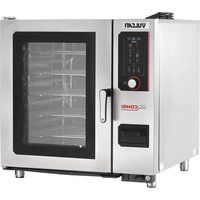
| Product Type | Electric Convection Oven |
| Model | VC5ED-13D1 480/1 |
| Brand | Vulcan |
| Power Supply | 480V, 1 Phase, 60 Hz |
| Power Rating | 10.5 kW |
| Oven Capacity | 5 Full-Size Sheet Pans |
| Temperature Range | 150°F – 500°F (65°C – 260°C) |
| Controls | Digital Thermostat with Timer |
| Cooking Modes | Convection, Standard Bake, Broil |
| Interior Material | Stainless Steel |
| Exterior Material | Stainless Steel with Insulated Body |
| Door Type | Double-Pane Glass with Cool-Touch Handle |
| Dimensions (W x D x H) | 38.5" x 36" x 58" (978 x 914 x 1473 mm) |
| Weight | 380 lbs (172 kg) |
| Cleaning | Manual Clean with Non-Abrasive Cleaners |
| Safety Features | Automatic Shutoff, Overheat Protection, Cool-Touch Exterior |
| Warranty | 1 Year Parts and Labor |
| Compliance | UL, NSF, CE |
| Installation | Freestanding, Ventilation Required |
Frequently Asked Questions - VC5ED-13D1 480/1 Vulcan
How do I set the temperature and timer on the Vulcan VC5ED-13D1?
Use the digital control panel. Press the TEMP button and adjust using the arrow keys. Then press TIMER and set desired time. The oven will beep when preheated and when the timer ends.
What is the recommended cleaning procedure for this oven?
Allow the oven to cool completely. Remove racks and wash with warm soapy water. Wipe interior with a damp cloth and mild detergent. Do not use abrasive cleaners or steel wool. Rinse and dry thoroughly before reuse.
Why is my oven not heating up?
Check that the power cord is plugged in and the circuit breaker is not tripped. Ensure the oven is set to a temperature above room temperature. If it still fails, the heating element or thermostat may be faulty – contact a qualified technician.
Can I use aluminum foil inside the oven?
Yes, but avoid covering the bottom or sides completely as it can restrict airflow. Use foil only on sheet pans or to catch drips. Never line the oven floor with foil as it may cause heat damage.
How do I switch between cooking modes?
Press the MODE button repeatedly to cycle through Convection, Bake, and Broil. The selected mode will be displayed. Adjust temperature and timer accordingly for each mode.
What type of pans are suitable for this oven?
Use standard full-size sheet pans (18" x 26") or half-size pans. Ensure pans are oven-safe up to 500°F. Avoid pans with warped bottoms for even cooking.
How often should I replace the door gasket?
Inspect the gasket monthly for cracks or wear. Replace if it no longer seals tightly. A damaged gasket can cause heat loss and increased energy consumption.
What are the electrical requirements for installation?
The oven requires a 480V, 1 phase, 60 Hz power supply with a dedicated circuit. Minimum 40 amp breaker. Hardwiring by a licensed electrician is recommended.
Is it normal for the oven to make noise during operation?
Yes, the convection fan and heating elements may produce a humming or clicking sound. This is normal. If you hear grinding or excessive vibration, inspect the fan blades or contact service.
Where can I find replacement parts for the VC5ED-13D1?
Replacement parts are available through authorized Vulcan dealers or online parts stores. Common parts include heating elements, thermostats, door gaskets, and fan motors. Use the model number for accurate ordering.
User questions about VC5ED-13D1 480/1 Vulcan
0 question about this device. Answer the ones you know or ask your own.
Ask a new question about this device
No questions yet. Be the first to ask one.
Download the instructions for your Oven in PDF format for free! Find your manual VC5ED-13D1 480/1 - Vulcan and take your electronic device back in hand. On this page are published all the documents necessary for the use of your device. VC5ED-13D1 480/1 by Vulcan.