
JVA030658 - Fan Jocel - Free user manual and instructions
Find the device manual for free JVA030658 Jocel in PDF.


| Product Type | 40cm Pedestal Mist Fan |
| Brand | Jocel |
| Model | JVA030658 |
| Power Supply | 220-240V ~ 50/60Hz |
| Fan Diameter | 40 cm (16 inches) |
| Speed Settings | Low, Medium, High |
| Wind Modes | Normal, Natural, Sleep (via remote) |
| Timer | 0.5 to 7.5 hours (30-minute increments) |
| Oscillation | Yes, ON/OFF button |
| Misting Function | Yes, with variable mist volume control |
| Water Tank Capacity | Approx. 2 liters (estimation based on typical designs) |
| Remote Control | Yes, requires 2 x AAA batteries (not included) |
| Control Panel | Touch buttons with indicator lights |
| Adjustability | Tiltable head (up/down), adjustable height via support poles |
| Base Weight | Included for stability |
| Construction | Metal poles, plastic grilles and housing |
| Cleaning | Mild soap and damp cloth; do not immerse in water |
| Safety Features | Overheat protection (assumed), auto shut-off when water empty for mist |
| Warranty | 2 years for domestic use |
| Certifications | CE compliant (Low Voltage and EMC directives) |
Frequently Asked Questions - JVA030658 Jocel
User questions about JVA030658 Jocel
0 question about this device. Answer the ones you know or ask your own.
Ask a new question about this device
Download the instructions for your Fan in PDF format for free! Find your manual JVA030658 - Jocel and take your electronic device back in hand. On this page are published all the documents necessary for the use of your device. JVA030658 by Jocel.
USER MANUAL JVA030658 Jocel
natural_image
Modern office desk fan with black and white design, mounted on a black base with a coiled cord (no visible text or symbols)JVA030658
MANUAL DE INSTRUÇÕES MANUAL DE INSTRUCCIONES INSTRUCTION MANUAL
INSTRUÇÕES GERAIS DE SEGURANÇA
MONTAR A SUA VENTOINHA
natural_image
Two metallic cylindrical objects with reflective surfaces, no visible text or markingsnatural_image
Two metallic cylindrical rods with engraved markings, no visible text or symbolsnatural_image
Close-up of mechanical components with black arrows indicating direction (no visible text or symbols)natural_image
Circular abstract pattern with radial lines and a white arrow pointing to a central region (no text or symbols)INCORRETO
natural_image
Circular diagram with grid pattern and central object, no visible text or symbolsCORRETO
natural_image
Close-up of a conical spray bottle with a black arrow pointing to its base (no text or symbols visible)natural_image
Close-up of mechanical components including a motor and a fan blade assembly (no visible text or symbols)natural_image
Close-up of a mechanical gear assembly with visible teeth and central shaft (no text or symbols)natural_image
Close-up of industrial machinery components with a black arrow pointing to a component (no visible text or symbols)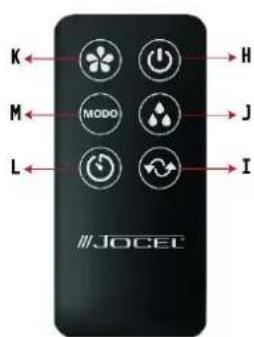
MONTAG DEL PRODUCTO
natural_image
Two metallic cylindrical objects with reflective surfaces, no visible text or markingsnatural_image
Two elongated metal rods with engraved markings, no visible text or symbolsnatural_image
Close-up of mechanical components with arrows indicating direction (no visible text or symbols)natural_image
Circular abstract pattern with radial lines and a white arrow pointing to a central region (no text or symbols)INCORRECTO
natural_image
Circular diagram with grid pattern and central structure, no visible text or symbolsCORRECTO
natural_image
Close-up of a transparent cylindrical object with a black arrow pointing to it, placed on a circular base (no text or symbols visible)natural_image
Close-up of mechanical components including a rotating shaft and a mesh fan assembly (no visible text or symbols)natural_image
Close-up of a mechanical gear assembly with a central shaft and flanged head (no visible text or symbols)natural_image
Close-up of industrial machinery components with a black arrow pointing to a component (no visible text or symbols)GENERAL SAFETY INSTRUCTIONS
- Before using this Mist fan, these instructions should be carefully read to ensure that the best result is obtained.
- Please keep these instructions; the guarantee certificate; the sales receipt; and if possible, the gift box with the inner packaging.
- The Mist Fan must only be used as intended in accordance with the enclosed operating instructions.
- Before plugging in the Mist Fan into the mains electrical supply, check that the voltage and power supply complies with the specification's indications on the rating plate of the appliance.
- Do not use the Mist Fan with damp or wet hands.
- Always place the Mist Fan against a stable, flat surface. Also ensure that the surface can take the weight of the unit during use.
• Always make sure the Mist Fan is securely in place before it is switched on. - The Mist Fan is intended for DOMESTIC USE ONLY and should NOT be used for commercial purposes.
- Switch off the Mist Fan and remove the power plug from the mains electrical supply whenever the Mist Fan is not in use, before cleaning or when changing accessories.
- Do not use the Mist Fan outdoors.
- Test the Mist Fan and the cable regularly for damage. If there is damage of any kind, the Mist Fan should not be used.
- Under no circumstances must the Mist Fan, the power cord or the power plug be placed in or come into contact with water or other liquid.
- Adequate air space should be provided for air circulation.
- Do not allow the power cord to hang over sharp table edges or come into contact with hot surfaces.
- Under no circumstances must the Mist Fan come into contact with curtains, clothing, dish, towels or other flammable material during use.
- The Mist Fan is not intended for use by persons (including children) with reduced physical or sensory capabilities or lack of experience and knowledge unless they have been given supervision or instruction concerning the use of the Mist Fan by a person responsible for their safety.
- Close adult supervision is necessary when the Mist Fan is being used by children.
- To unplug the Mist Fan, grasp the plug firmly and remove it from the mains electrical supply. DO NOT PULL ON THE CORD.
• Repairs to the Mist Fan should only be performed by the Technical Department. - Keep these instructions in a safe place for future reference.
COMPONENTS
Main Housing
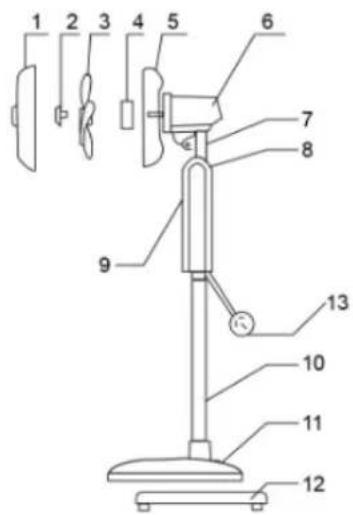
- Front Grill
- Fan blade nut
- Fan blade
- Rear grill lock nut
- Rear grill
- Motor body
- Tilt neck
- Switch housing
- Display & Control Panel
- Support poles
- Base
- Base weight
- Power cord & plug
Water components
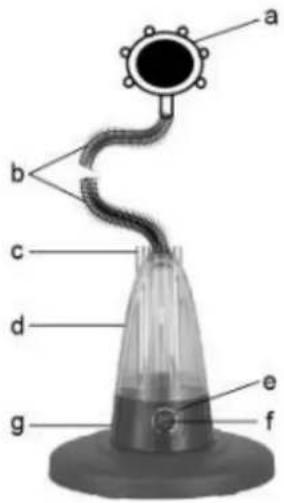
a) Mist Outlet
b) Mist delivery hose
c) Water tank cap
d) Water tank
e) Indicator light
f) Variable mist setting switch
g) Humidifier power base
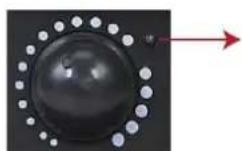
e) indicator light
Red color: no water in the water tank
Green color: in operation
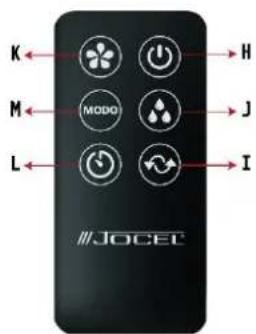
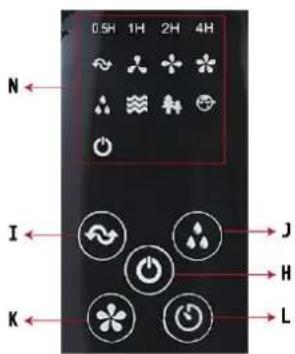
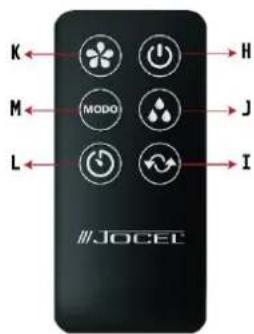
❖ Main unit control and remote control
h) Main power OFF button
i) -Oscillation ON/OFF button
j) Misting ON/OFF button
k) Main speed selector
I) Timer setting button
m) MODO (Mode) - Mode selector (Only on remote control)
n) Indicator lights/status lights (Only on main unit)
ASSEMBLING YOUR FAN
- Unpack all the parts of the fan and remove the packaging.
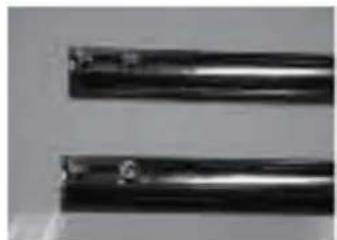
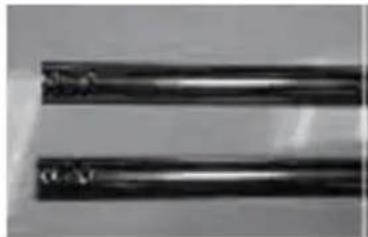
- Insert the 2 Standing Bars into the Base with 2 screws in each bar. Note that each Standing Bar has 2 holes on one side. This side with the holes must be installed into the base. (Each Standing Bar comes with 2 screws already fitted. Unscrew the screws from the Standing Bars and then insert the Standing Bars into the Base).
natural_image
Two metallic cylindrical objects with reflective surfaces, no visible text or symbols2 screws in each Standing Bar
natural_image
Two metallic cylindrical rods with visible surface wear and markings (no text or symbols)Remove screws first then attach Standing Bars to the Base. Tighten the screws after fixing Standing Bars to the Base.
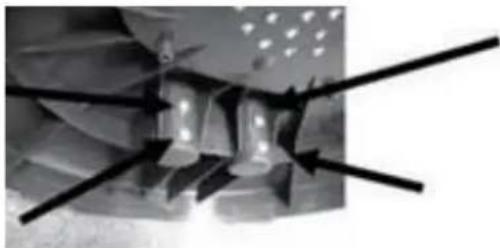
- Place the weight under the Base then assemble with 4 screws provided.
natural_image
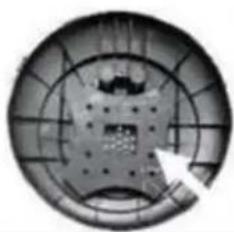
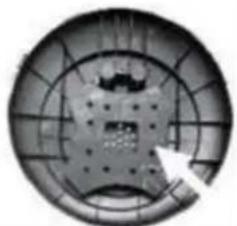
Close-up of mechanical components with directional arrows indicating motion or force (no visible text or symbols)- Ensure that the weight is correctly assembled as depicted in diagrams below.
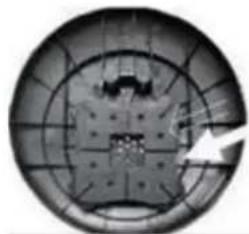
natural_image
Circular object with grid pattern and central dark structure, no visible text or symbolsINCORRECT
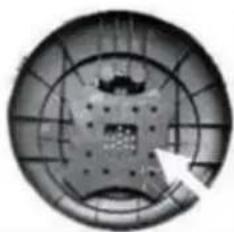
natural_image
Circular mechanical component with grid pattern and central hub (no visible text or symbols)CORRECT
- Assemble the main unit onto the 2 Standing Bars. Note that there are 2 screws on the Main Unit which the installer must loosen before installing. After installing, these 2 screws can be tightened.
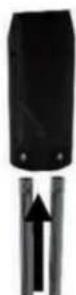
- Place the Humidifier Power Base onto the Base.
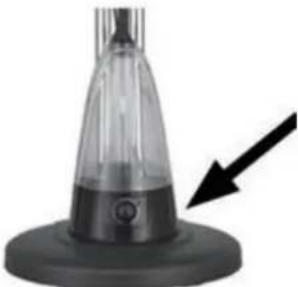
natural_image
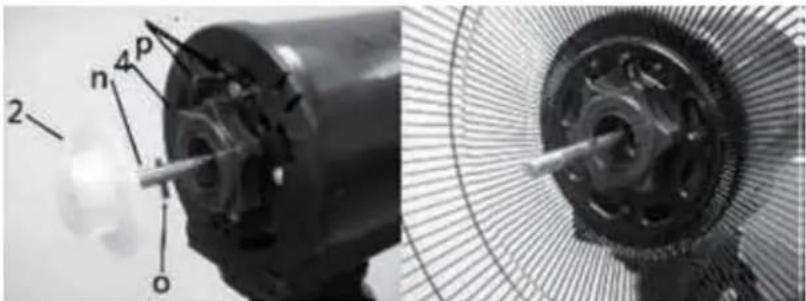
Close-up of a conical spray bottle with a black arrow pointing to its base (no text or symbols visible)- Remove the Fan Blade Nut (2) and the Rear Grille Lock Nut (4) from the Motor Shaft Spindle (n).
natural_image
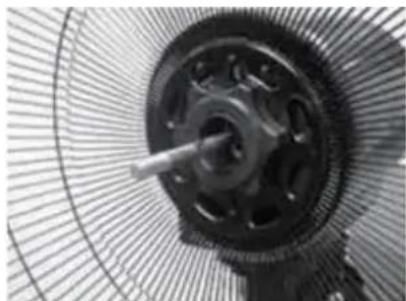
Close-up of mechanical components including a motor and a fan blade assembly (no visible text or symbols)- Fit the Rear Grille (5) by positioning it onto the location pins (p). Secure the grille (5) to the Motor Body with the Grille Lock Nut (4). Note: The handle on the Rear Grille (5) must face upward.
natural_image
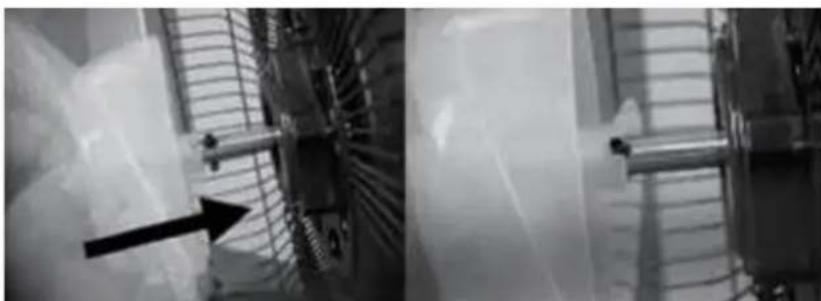
Close-up of a mechanical gear assembly with visible teeth and central shaft (no text or symbols)- Push the Fan Blade (3) onto the Motor Shaft Spindhe (n) by matching the Slots on the Base of the Fan Blade with the Shape Pin (o).
natural_image
Two grayscale industrial machinery close-up showing internal components and a black arrow indicating direction (no visible text or symbols)- Secure the Blade (3) with the fan Blade Nut (2) by turning it COUNTER - CLOCKWISE. Check that the fan blade rotates freely by turning it with your hand. - Open securing clips around the front grille and loosen the clip screw at the top of the front grille. Position the top clip on the uppermost part of the rear grille. Push the top clip down and press rim of the front grille onto the rear grille. Close all the clips and tighten the
safety screw.
- Place the Water Tank on the Humidifier Power Base.
- Connect the Mist Delivery Hose to the Mist Outlet and the Cap of Water Tank.
- Place the Cap of Water Tank on the Water Tank.
- Insert 2 x AAA size batteries (not supplied) into the remote control.
- The 40cm Pedestal Mist Fan is now ready to use.
- Remove the Water Tank from the Humidifier Power Base, turn it up-side down and you will see a small plastic cover.
- Open the cover by turning it in a counter-clockwise direction.
- Fill the Water Tank with clean water.
- Close the plastic cover by tightening it in a clockwise direction. Note that there is a white silicone ring which must not be loosened when filling the Water Tank with water.
- Place the Water Tank back onto the Humidifier Power Base.
- Plug the Mist Fan into the mains electrical supply. A “beep” sound will be heard indicating that the Mist Fan is connected to the power.
- The “Indicator light on the Main Control Panel will illuminate.
- Now the Mist Fan can be switched on either on its Main Control Panel or by the Remote Control.
- Press the “button to switch the Mist Fan on.
-
By default, the Mist Fan will be switched ON in
-
Low Speed Setting,
-
Fixed Direction and
– Normal Wind mode setting -
After switching on the Mist Fan you can select different Speed Settings or the Wind Mode that you prefer.
- The table below shows which switches perform which speed and wind functions:
| Remote Control | Main Control Panel | Indicator Lights | Features |
| OFF |  | Standby mode. The fan is ready to use but has not started operating yet. | |
| ON/SPEED | LOW | Press Once -Low Wind speed setting | |
| MED | Press Twice -Medium Wind speed setting | ||
| HIGH | Press Three Times -High Wind speed setting | ||
| OSC |  | Press Once -The Fan head will oscillateWhen pressing again -The Fan head will be fixed in one direction only | |
| MIST | MIST | Press Once -The Fan will generate mistWhen pressing again -The Fan will stop generating mist | |
| TIMER | 0,5H1H2H4H | Every press represents a time increase of 30 minutes. Max. time on the timer is 7,5 hours. When pressing again while it is set to7,5 hours all time settings will be canceled. | |
| Remote Control OnlyMODE (Modo) | NORNATSLEEP | For selecting different Wind outputs:- Normal Wind Mode- Natural Wind Mode- Sleep Wind Mode | |
| Variable MistSetting Switch(On the Power Base Only) | 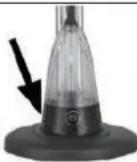  | To adjust the volume of mist to be generated:Counter-clockwise - Less Mist VolumeClockwise - Greater Mist Volume | |
- When there is no water in the Water Tank, the Humidifier power Base will stop working and the indicator Light will change from Green to Red.
- Should this occur, switch OFF the Mist Fan and re-fill the Water Tank with water so you can continue to use the Mist function as and when desired.
- The user can adjust the tilt angle by pushing downward from the top of the Grille or by pulling upward from the bottom of the Grille.
Caution: The 40cm Pedestal Mist Fan should always be switch off when making this adjustment.
CLEANING
- Switch off and unplug from the power supply before assembling or disassembling and before cleaning.
- Keep the air vents at the rear of the main body free from dust or fluff. Use a vacuum cleaner to remove these when necessary. Do not probe any opening to remove fluff.
- Fan component parts should be cleaned using mild soap and a damp cloth or sponge.
- Do not allow any water or other liquid to enter the motor housing.
- Remove soapy film with a damp cloth or sponge and then dry thoroughly.
CAUTION: Do not use harsh detergents, chemical cleaners or solvents as they may damage the surface finish of the fan components.
SPECIFICATIONS
- The warranty is valid only on presentation of invoice of purchase.
- This WARRANTY is limited exclusively to parts substitution ineffective due to faulty manufacture, made in our workshops.
- The elimination of several faults of the scope of the guarantee is made for repair or replacement of defective parts, according to the discretion of our technical services. Defective parts are our property.
- Are not covered under warranty damage caused by transportation, neglect or poor use, improper assembly or installation, as well as external influences such as: lightning strikes or power, flooding, humidity, etc.
- Lose warranty, all appliances that are not being used according to the instructions, or connected to FEEDING NETWORKS not guarantee a constant voltage of 220/240V.
- The warranty does not cover damages for personal injury or damage caused directly or indirectly in any capacity whatsoever.
- This warranty terminates when it is found to have been undergoing repairs, alterations or interventions by any person not authorized by Jocel.
THE WARRANTY EXPIRES
- If the appliance has not been installed by an Accredited Technician.
- Exceeded the period of 2 years for home appliances and 06 months for industrial appliances, warranty expires and assistance will be made by charging the costs of manpower, according to current fees.
- With the modification or disappearance of the nameplate of the appliance.
TECHNICAL ASSISTANCE
For technical assistance request, our services are available through the following contacts:
Telef. 00 351 252 910 362
Fax: 00 351 252 910367
DECLARATION OF CONFORMITY
CE
We declare on our own responsibility that the machine indicated below
Product MIST FAN
Brand JOCEL
Model JVA030658
Complies with the following European directives and standards implementation:
Low Voltage
2014/35/El EN 60335-1:2012+A11:2014+A13:
2017+A1:2019+A14:2019+A2:2019
EN 60335-2-80:2003+A1:2004+A2:2009
EN 60335-2-98:2003+A1:2005+A2:2008
EN 62233:2008
Electromagnetic Compatibility
2014/30/EU EN 55011:2016 + A1:2017
EN 55014-1:2006 + A1:2009 + A2:2011
EN 55014-1:2017
EN 55014-2:2015
EN 61000-3-2:2014
EN 61000-3-3:2013
Brand : Jocel
Model : JVA030658
Category : Fan