
DMX Split 8X RDM - Professional audio/video equipment Eurolite - Free user manual and instructions
Find the device manual for free DMX Split 8X RDM Eurolite in PDF.


| Type | DMX Splitter with RDM |
| Number of Outputs | 8 |
| RDM Support | Yes, RDM (Remote Device Management) compatible |
| Input | 1x XLR 3-pin female |
| Outputs | 8x XLR 3-pin male |
| Power Supply | 100-240 V AC, 50/60 Hz (IEC inlet); or optional 12V DC |
| Power Consumption | ~10 W |
| Dimensions (W x H x D) | 482 x 44 x 130 mm (19", 1U) |
| Weight | ~1.5 kg |
| Data Amplification | Yes, each output amplifies the DMX signal |
| Galvanic Isolation | Yes, between input and outputs |
| LED Indicators | Power, DMX signal, RDM activity per output |
| Mounting | 19" rackmount (1U), also stackable |
| Operating Temperature | 0°C to 40°C |
| Housing | Metal, black |
| Maintenance & Cleaning | Clean with dry cloth; avoid liquids and solvents |
| Safety | Use only with compatible DMX cables; do not exceed max load per output |
| Spare Parts & Repairability | No user-serviceable parts; contact authorized service center |
| General Information | Eurolite DMX Split 8X RDM; ideal for expanding DMX universes |
Frequently Asked Questions - DMX Split 8X RDM Eurolite
User questions about DMX Split 8X RDM Eurolite
0 question about this device. Answer the ones you know or ask your own.
Ask a new question about this device
Download the instructions for your Professional audio/video equipment in PDF format for free! Find your manual DMX Split 8X RDM - Eurolite and take your electronic device back in hand. On this page are published all the documents necessary for the use of your device. DMX Split 8X RDM by Eurolite.
USER MANUAL DMX Split 8X RDM Eurolite
8-fold DMX Splitter with RDM Support
- DMX splitter for splitting one DMX input signal to 8 DMX outputs
- Connections: 1 x DMX input, 1 x DMX feed-through output, 8 x DMX output
• Additional QuickDMX input for wireless reception of DMX signals
• Supports RDM for bidirectional communication over the DMX line - Switchable filter mode allows all RDM data to be filtered out in order to prevent problems when using fixtures intolerant of RDM
- Input and outputs XLR 3-pin and 5-pin each
- Input and outputs galvanically isolated
• Each DMX output with independent driver and status indicators - Input and outputs with a set of respective power supply and internal fuse
- Switchable termination resistor
- Rack mounting
INHALTSVERZEICHNIS
Deutsch
- INTRODUCTION 10
- SAFETY INSTRUCTIONS .... 10
- OPERATING DETERMINATIONS....12
- OPERATING ELEMENTS AND CONNECTIONS 13
- INSTALLATION AND CONNECTIONS.... 14
Installation 14
DMX512 Connection 14
Connection with the Mains 14
- CLEANING AND MAINTENANCE 15
Replacing the Fuse 15
- TECHNICAL SPECIFICATIONS.... 15
Accessory....15
Keep this device away from rain and moisture! Unplug mains lead before opening the housing!
For your own safety, please read this user manual carefully before your initial start-up.
Every person involved with the installation, operation and maintenance of this device has to
- be qualified
- follow the instructions of this manual
- consider this manual to be part of the total product
- keep this manual for the entire service life of the product
- pass this manual on to every further owner or user of the product
- download the latest version of the user manual from the Internet
1. INTRODUCTION
Thank you for having chosen a EUROLITE product. If you follow the instructions given in this manual, we are sure that you will enjoy this device for a long period of time. Unpack your product.
2. SAFETY INSTRUCTIONS
CAUTION!
Be careful with your operations. With a dangerous voltage you can suffer a dangerous electric shock when touching the wires!
This device has left our premises in absolutely perfect condition. In order to maintain this condition and to ensure a safe operation, it is absolutely necessary for the user to follow the safety instructions and warning notes written in this user manual.

Important:
Damages caused by the disregard of this user manual are not subject to warranty. The dealer will not accept liability for any resulting defects or problems.
If the device has been exposed to drastic temperature fluctuation (e.g. after transportation), do not switch it on immediately. The arising condensation water might damage your device. Leave the device switched off until it has reached room temperature.
English
Please make sure that there are no obvious transport damages. Should you notice any damages on the A/C connection cable or on the casing, do not take the device into operation and immediately consult your local dealer.
This device falls under protection-class I. The power plug must only be plugged into a protection class I outlet. The voltage and frequency must exactly be the same as stated on the device. Wrong voltages or power outlets can lead to the destruction of the device and to mortal electrical shock.
Always plug in the power plug least. The power plug must always be inserted without force. Make sure that the plug is tightly connected with the outlet.
Never let the power-cord come into contact with other cables! Handle the power-cord and all connections with the mains with particular caution! Never touch them with wet hands, as this could lead to mortal electrical shock.
Never modify, bend, strain mechanically, put pressure on, pull or heat up the power cord. Never operate next to sources of heat or cold. Disregard can lead to power cord damages, fire or mortal electrical shock.
The cable insert or the female part in the device must never be strained. There must always be sufficient cable to the device. Otherwise, the cable may be damaged which may lead to mortal damage.
Make sure that the power-cord is never crimped or damaged by sharp edges. Check the device and the power-cord from time to time.
If extension cords are used, make sure that the core diameter is sufficient for the required power consumption of the device. All warnings concerning the power cords are also valid for possible extension cords.
Always disconnect from the mains, when the device is not in use or before cleaning it. Only handle the power-cord by the plug. Never pull out the plug by tugging the power-cord. Otherwise, the cable or plug can be damaged leading to mortal electrical shock. If the power plug or the power switch is not accessible, the device must be disconnected via the mains.
If the power plug or the device is dusty, the device must be taken out of operation, disconnected and then be cleaned with a dry cloth. Dust can reduce the insulation which may lead to mortal electrical shock. More severe dirt in and at the device should only be removed by a specialist.
There must never enter any liquid into power outlets, extension cords or any holes in the housing of the device. If you suppose that also a minimal amount of liquid may have entered the device, it must immediately be disconnected. This is also valid, if the device was exposed to high humidity. Also if the device is still running, the device must be checked by a specialist if the liquid has reduced any insulation. Reduced insulation can cause mortal electrical shock.
There must never be any objects entering into the device. This is especially valid for metal parts. If any metal parts like staples or coarse metal chips enter into the device, the device must be taken out of operation and disconnected immediately. Malfunction or short-circuits caused by metal parts may cause mortal injuries.
Keep away children and amateurs!
Never leave this device running unattended.
3. OPERATING DETERMINATIONS
The DMX SPLIT 8X RDM is designed for splitting or amplifying DMX512 control signals in lighting installations. The unit features one DMX input and eight DMX outputs as well as an input feed-through terminal for connection to an additional DMX SPLIT 8X RDM. All 3-pin and 5-pin XLR input and output connectors are galvanically isolated and protected against accidental application of mains voltages. All outputs are fully buffered, which means a fault on any output line will not affect the other outputs. The outputs have LED indicators, enabling the user to check the status of all outputs. The DMX SPLIT 8X RDM is equipped with an alternative DMX input for a QuickDMX receiver (sold separately) which allows for wireless transmission of DMX control signals to the splitter. The DMX SPLIT 8X RDM supports RDM for bidirectional communication over the DMX line. If necessary, all RDM traffic can be filtered out for fixtures intolerant of RDM. The unit is designed for rack installation.
This product is allowed to be operated with an alternating current of 100-240 V, 50/60 Hz. The occupation of the connection cables is as follows:
| Cable | Pin | International |
| Brown Live L | ||
| Blue Neutral N | ||
| Yellow/Green | Earth |  |
Attention! The earth has to be connected! If the device will be directly connected with the local power supply network, a disconnection switch with a minimum opening of 3 mm at every pole has to be included in the permanent electrical installation. The device must only be connected with an electric installation carried out in compliance with the IEC standards. The electric installation must be equipped with a Residual Current Device (RCD) with a maximum fault current of 30 mA.
This product was designed for indoor use only.
Do not shake the device. Avoid brute force when installing or operating the device. When choosing the installation spot, please make sure that the device is not exposed to extreme heat, moisture or dust. There should not be any cables lying around. You endanger your own and the safety of others!
This device must never be operated or stockpiled in surroundings where splash water, rain, moisture or fog may harm the device. Moisture or very high humidity can reduce the insulation and lead to mortal electrical shocks. When using smoke machines, make sure that the device is never exposed to the direct smoke jet and is installed in a distance of 0.5 meters between smoke machine and device. The room must only be saturated with an amount of smoke that the visibility will always be more than 10 meters.
The ambient temperature must always be between -5^ C and +45^ C. Keep away from direct insulation (particularly in cars) and heaters. The relative humidity must not exceed 50 % with an ambient temperature of 45^ C. This device must only be operated in an altitude between -20 and 2000 m over NN.
Never use the device during thunderstorms. Over voltage could destroy the device. Always disconnect the device during thunderstorms.
Operate the device only after having familiarized with its functions. Do not permit operation by persons not qualified for operating the device. Most damages are the result of unprofessional operation!
Please use the original packaging if the device is to be transported.
Please consider that unauthorized modifications on the device are forbidden due to safety reasons!
Never remove the serial barcode from the device as this would make the guarantee void.
If this device will be operated in any way different to the one described in this manual, the product may suffer damages and the guarantee becomes void. Furthermore, any other operation may lead to dangers like short-circuit, burns, electric shock, etc.
English
4. OPERATING ELEMENTS AND CONNECTIONS
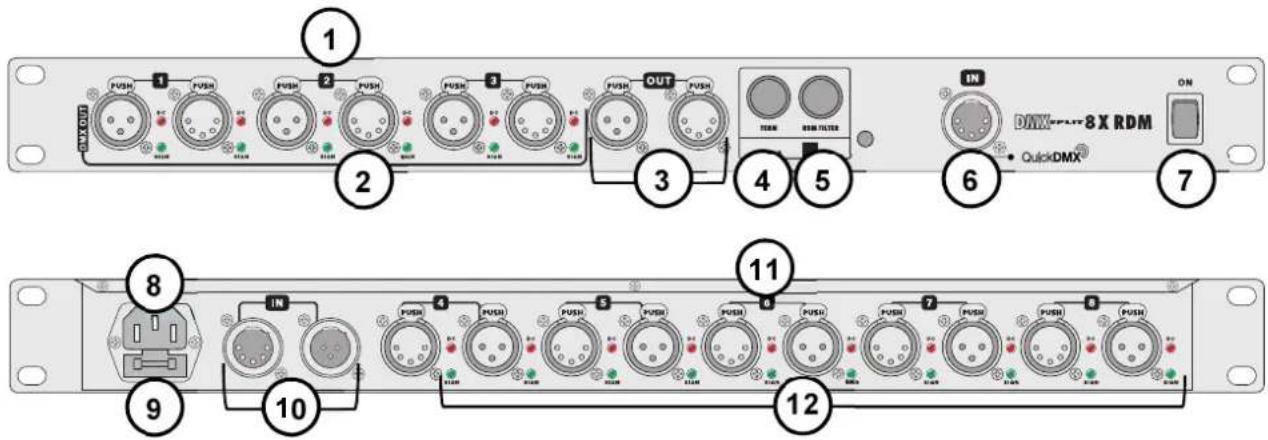
| 1 DMX512 outputs 1 - 3Rear DMX outputs 1 to 3 to connect further DMX chains. | |
| 2 Status indicators DC and SIGNDC (red) = port is powered, SIGN (green) = DMX signal is present. | |
| 3 DMX512 feed-through outputDirect DMX output for connecting additional DMX devices or DMX splitters within the same DMX chain as the DMX input. This output is only active when the TERM switch is not pressed. | |
| 4 TERM selector switchSwitch pressed: The DMX line of the DMX input is terminated by a resistor. The feed-through DMX output is disabled.Switch not pressed: The feed-through DMX output is active. | |
| 5 RDM FILTER selector switchSwitch pressed: The filter is active. All RDM data is filtered out of the DMX line.Switch not pressed: The filter is disabled. RDM information will be passed bidirectionally between all devices connected. | |
| 6 QuickDMX inputDMX signal input (5-pin XLR) for connecting a wireless QuickDMX receiver. The connector provides the required 5 V operating voltage. | |
| 7 Power switchTurns the unit on and off. | |
| 8 Power inputUsed to plug the supplied power cord in. | |
| 9 Fuse holderOnly replace the fuse when the device is disconnected from mains. Only use fuses of the same rating and power. The correct value is specified on the device. | |
| 10 DMX512 inputFor connecting the DMX control signal. | |
| 11 DMX512 outputs 4 - 8Rear DMX outputs 4 to 8 to connect further DMX chains. | |
| 12 Status indicators DC and SIGNDC (red) = port is powered, SIGN (green) = DMX signal is present. |
| 1 DMX512 outputs 1 - 3Rear DMX outputs 1 to 3 to connect further DMX chains. | |
| 2 Status indicators DC and SIGNDC (red) = port is powered, SIGN (green) = DMX signal is present. | |
| 3 DMX512 feed-through outputDirect DMX output for connecting additional DMX devices or DMX splitters within the same DMX chain as the DMX input. This output is only active when the TERM switch is not pressed. | |
| 4 TERM selector switchSwitch pressed: The DMX line of the DMX input is terminated by a resistor. The feed-through DMX output is disabled.Switch not pressed: The feed-through DMX output is active. | |
| 5 RDM FILTER selector switchSwitch pressed: The filter is active. All RDM data is filtered out of the DMX line.Switch not pressed: The filter is disabled. RDM information will be passed bidirectionally between all devices connected. | |
| 6 QuickDMX inputDMX signal input (5-pin XLR) for connecting a wireless QuickDMX receiver. The connector provides the required 5 V operating voltage. | |
| 7 Power switchTurns the unit on and off. | |
| 8 Power inputUsed to plug the supplied power cord in. | |
| 9 Fuse holderOnly replace the fuse when the device is disconnected from mains. Only use fuses of the same rating and power. The correct value is specified on the device. | |
| 10 DMX512 inputFor connecting the DMX control signal. | |
| 11 DMX512 outputs 4 - 8Rear DMX outputs 4 to 8 to connect further DMX chains. | |
| 12 Status indicators DC and SIGNDC (red) = port is powered, SIGN (green) = DMX signal is present. |
5. INSTALLATION AND CONNECTIONS
Installation
Install the unit on a plane surface or in a rack. The rack should be provided with doors on the front and rear panel and a cooling fan. When mounting the device into the rack, please make sure that there is enough space around the device so that the heated air can be passed on. Steady overheating will damage your device. You can fix the device with four screws M6 in the rack
DMX512 Connection
Switch off the DMX splitter prior to connecting any units or to changing any existing connections. For connection, use special DMX cables for high data flow.
1 Feed the DMX control signal to the rear XLR input IN.
2 The unit features an alternative DMX input for a QuickDMX receiver (sold separately). This connector allows for wireless transmission of DMX control signals to the splitter. The connector is designed as a 5-pin XLR mounting plug which provides the required 5 V operating voltage for the receiver.
3 Each of the unit's DMX outputs 1 to 8 allows connection of one DMX chain, which in turn may consist of a maximum of 32 DMX devices. At the last fixture in the DMX chain, the DMX line has to be terminated by a resistor (120 Ω).
4 If the DMX SPLIT 8X RDM should terminate a DMX chain, press the TERM selector switch. Then a termination resistor is connected.
5 In normal mode of operation, the DMX SPLIT 8X RDM repeats RDM traffic bidirectionally between all devices connected. When using equipment intolerant of RDM, flickering or other irregular behavior may occur. In this case, press the RDM FILTER selector switch. Then all RDM data will be filtered out of the DMX line.
6 You can connect an additional DMX SPLIT 8X RDM or DMX chain with up to 32 DMX devices to the DMX feed-through output OUT. In order to use this output, release the TERM selector switch.
Occupation of the XLR connection:

Occupation of the QuickDMX connection:

1: Ground
2: Signal (−)
3: Signal (+)
4: 5V (+)
5: 5V (−)
Connection with the Mains
Connect the device to the mains with the power plug. The device uses an auto-range power supply that accepts input voltages between 100 und 240 volts.
6. CLEANING AND MAINTENANCE

DANGER TO LIFE!
Disconnect from mains before starting maintenance operation!
We recommend a frequent cleaning of the device. Please use a soft lint-free and moistened cloth. Never use alcohol or solvents!
There are no serviceable parts inside the device except for the fuses. Maintenance and service operations are only to be carried out by authorized dealers.
Replacing the Fuse
If one of the fine-wire fuses of the device fuses, only replace the fuse by a fuse of same type and rating.
Before replacing the fuse, unplug mains lead.
Procedure:
Step 1: Open the fuseholder on the rear panel with a fitting screwdriver.
Step 2: Remove the old fuse from the fuseholder.
Step 3: Install the new fuse in the fuseholder.
Step 4: Replace the fuseholder in the housing.
Should you need any spare parts, please use genuine parts.
If the power supply cable of this device becomes damaged, it has to be replaced by a special power supply cable available at your dealer.
Should you have further questions, please contact your dealer.
7. TECHNICAL SPECIFICATIONS
Power supply: 100-240 V AC, 50/60 Hz \~
Power consumption: 5 W
DMX512 connection: 3-pin and 5-pin XLR
QuickDMX connection: 5-pin XLR
Dimensions (LxWxH): 483 x 145 x 45 mm
Weight: 2 kg
Accessory
Item 70064702 QuickDMX Wireless receiver phantom-power
Please note: All information is subject to change without prior notice. 14.10.2015 ©

eurolite®
© EUROLITE 2015
00094261.DOCX
Version 1.0


- 8-fold DMX Splitter with RDM Support
- INHALTSVERZEICHNIS
- Deutsch
- INTRODUCTION
- SAFETY INSTRUCTIONS
- CAUTION!
- Important:
- English
- OPERATING DETERMINATIONS
- OPERATING ELEMENTS AND CONNECTIONS
- INSTALLATION AND CONNECTIONS
- Installation
- DMX512 Connection
- Connection with the Mains
- CLEANING AND MAINTENANCE
- DANGER TO LIFE!
- Replacing the Fuse
- Procedure:
- TECHNICAL SPECIFICATIONS
- Accessory
- eurolite®
Brand : Eurolite
Model : DMX Split 8X RDM
Category : Professional audio/video equipment