
SUB 2050 - Subwoofer ELAC - Free user manual and instructions
Find the device manual for free SUB 2050 ELAC in PDF.


| Product Type | Active Subwoofer |
| Brand | ELAC |
| Model | SUB 2050 |
| Amplifier Technology | BASH® (Class A/B with Class D regulated supply) |
| Power Output (RMS) | 250 W (estimated) |
| Frequency Response | 20 Hz – 200 Hz |
| Crossover Frequency Range | 50 Hz to Max (adjustable) |
| Phase Adjustment | 0° – 180° (variable via app) |
| Delay | 0 – 20 msec (adjustable via app) |
| Inputs | Speaker Level In (binding posts), Line In (RCA L/LFE, R) |
| Wireless Connectivity | Optional via ELAC Wireless Interface (USB dongle) |
| Control | SUB CONTROL APP via Bluetooth BLE |
| Auto On/Off | Yes, with adjustable threshold (1–10 mV) |
| Parametric EQ | Yes (central frequency, bandwidth, gain) |
| Auto Room Calibration (Auto EQ) | Yes, using smartphone microphone |
| Overload Protection | Electronic, frequency and power dependent |
| Enclosure Type | Down-firing design |
| Dimensions (W x H x D) | 430 x 430 x 430 mm (estimated) |
| Weight | 20 kg (estimated) |
| Power Supply | Mains, 100-240 V, with fuse |
| Standby Power Consumption | Low (white LED dim) |
| Color | Black |
| Minimum Clearance | 10 cm from wall for cooling |
Frequently Asked Questions - SUB 2050 ELAC
User questions about SUB 2050 ELAC
0 question about this device. Answer the ones you know or ask your own.
Ask a new question about this device
Download the instructions for your Subwoofer in PDF format for free! Find your manual SUB 2050 - ELAC and take your electronic device back in hand. On this page are published all the documents necessary for the use of your device. SUB 2050 by ELAC.
USER MANUAL SUB 2050 ELAC
natural_image
Two white and black electronic devices with visible branding, displayed against a minimalist architectural background (no text or symbols on the devices themselves)
natural_image
Two black-and-white photos: one showing hands playing a guitar, the other a smiling man in a black shirt (no text or symbols visible)
natural_image
White laptop with black logo and metallic buttons, no visible text or symbols on body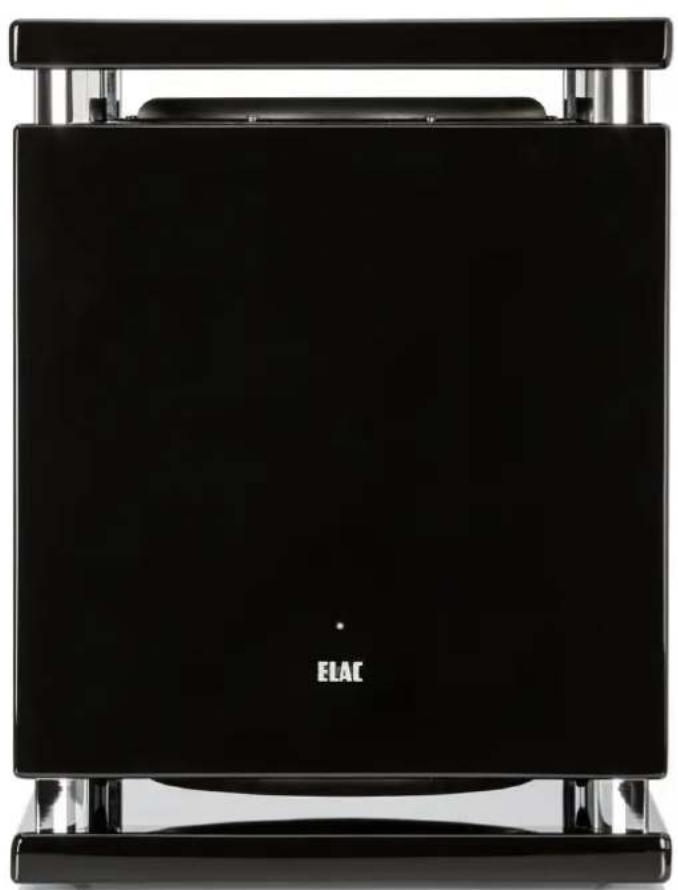
natural_image
Black ELAC device with metallic frame and front panel (no visible text or symbols on body)Congratulations on the purchase of your ELAC subwoofer that has been designed in accordance with strict quality and environmental requirements. Please read the instruction manual carefully.
We recommend keeping it in a safe place for future reference. Please note the enclosed safety instructions.
Please follow the instructions and keep the safety instructions. Heed all warnings on the appliance and in the manual.
Contents
Controls and Connections....20
Advantages of BASH® Technology 22
The "SUB CONTROL" APP 22
Connecting the Subwoofer 27
Setup Tips 31
Overload Protection. 32
Troubleshooting 33
Warranty 33
Specifications.... 34

1. VOLUME / MODE


line
| Parameter | Value | | ----------------- | ----- | | Central Frequency | 20 | | Bandwidth | 200 | | Bandwidth | wide | | Gain(DB) | -10 | | Gain(DB) | +10 |4. PHASE
7. DELAY
line
| Measurement | Value | | ----------- | ----- | | Measured | 8.4 | | Filter Applied | 120.0 |Controls and Connections
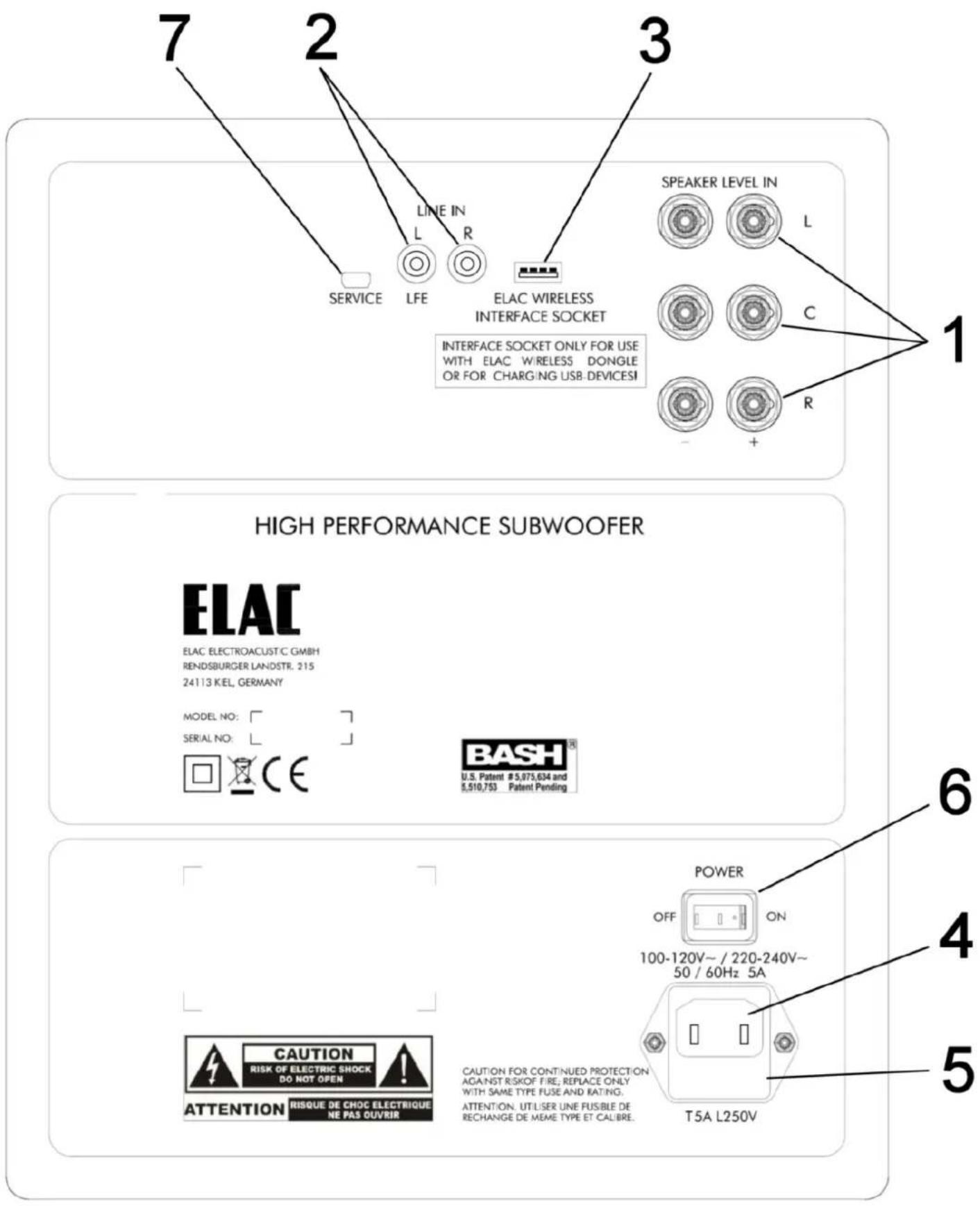
1 SPEAKER LEVEL IN
These are input sockets for connecting the ELAC subwoofer to the loudspeaker outputs of a power amplifier or surround receiver.
The bass frequencies of the incoming audio signals at the "LINE IN" and "SPEAKER LEVEL IN" sockets are combined and reproduced via the subwoofer.
The input circuit is a symmetrically floating design that allows the ELAC subwoofer to function like a passive speaker. This means that amplifiers with bridge circuits can be safely connected. Compared with passive loudspeakers, however, the current or power drawn is much lower (around 1/40th) and is independent of frequency. A 2 x 2.5 mm ^2 cable is normally recommended. Please insert the wires carefully into the terminals. Short circuits caused by protruding wires touching the adjacent wire or the housing must be avoided at all costs
2 LINE IN L / LFE - R
These RCA input sockets are used to connect the ELAC Subwoofer to the stereo line output of a pre-amplifier or the "BASS" / "SUB OUT" / "LFE" output of a surround-sound amplifier/surround receiver. A standard mono line-level cable fitted with RCA plugs is used for these connections. These plugs should not be plugged in or pulled out during operation.
3 ELAC WIRELESS INTERFACE SOCKET
Input socket for connecting the optional ELAC wireless receiver dongle. With the help of this dongle, you can add wireless connectivity to your active subwoofer. By using ELAC wireless technology, you can avoid laying RCA cables to the subwoofer.
Tip: If you do not wish to use ELAC wireless technology, you can also use the special "ELAC Wireless Interface Socket", for example, to charge your cell phone or mp3 player (the subwoofer must be switched on and the operating status LED must light up). Simply connect the charging cable for your device to this USB socket.
ELAC accepts no liability for any damage caused to your device.
4 AC Power Socket
Please insert the IEC plug at the end of the supplied mains power cable here.
5 Fuse Holder
Should a replacement fuse be required, only fuses with the rating printed on the rear of the loudspeaker may be used.
ATTENTION: The ELAC subwoofer is only fully disconnected (isolated) from the mains supply when the power plug is pulled out! Always disconnect the subwoofer from the mains before re-placing the fuse.
6 POWER (ON/OFF)
The device is switched on and off by the power switch.
After the audio cables and the power supply have been connected using the power cable provided, you can turn on the mains switch. If the device will not be used for an extended period, it should be switched off to avoid unnecessary power consumption.
ATTENTION: The ELAC subwoofer is only fully disconnected (isolated) from the mains supply when the power plug is pulled out! When the power plug is plugged in and the power switch is on, there is a residual current flow even in stand-by mode (indicated by the white LED on the front).
7 Service Connection
This socket is provided for service purposes and is not used for normal operation.
Advantages of BASH® Technology
The BASH ^® technology implemented in the amplifier module of the ELAC subwoofer offers the customary impressive power reserves but with much lower levels of distortion. This is achieved by using an audiophile class A/B power amplifier whose supply voltage is regulated by a class D amplifier circuit to prevent any unnecessary power losses and to achieve the efficiency of a class D amplifier. Therefore, BASH ^® technology combines the advantages of both technologies.
Since the audio signal is amplified in the analogue domain, the high-frequency interference typical of digital amplifiers is eliminated. This design results in a low-noise amplifier with lower electromagnetic interference emissions.
The absence of crossover distortion, which is a problem in traditional class D designs where the switching speed of the transistors is limited, yields a further improvement in total harmonic distortion.
Your ELAC subwoofer incorporates an advanced, digital control system. Analog rotary potentio meters and switches have been replaced by a digital signal processor (DSP), which allows you to adjust your subwoofer conveniently and accurately. All parameters, such as volume, cutoff frequency, phase etc., as well as the automatic calibration function, can be conveniently adjusted with the help of the free APP.
The digital control system also eliminates the possibility of unwanted changes to controls and settings.
Note: The APP used to control the subwoofer does not require any complicated connections to your home broadband (WLAN) network. The control system operates using Bluetooth® Low Energy (BLE).
Please go to the relevant source and download the "SUB CONTROL" APP required to control the subwoofer. For Apple® iPhone® and iPod® users, this is the Apple® App Store®. Android® users should visit the Google® Play Store®.
Enter "ELAC" or "SUB CONTROL" as a search term and look for the icon shown below.
Please note that your mobile device must support Bluetooth® Standard 4.0. This is the case for the majority of devices sold as of mid-2013. If necessary, check the accompanying documentation for your mobile device or contact the manufacturer's support hotline.
Note: In case your mobile device needs a 4 digit code during the subwoofer-pairing-procedure, please enter four times zero („0000“).


1. VOLUME / MODE
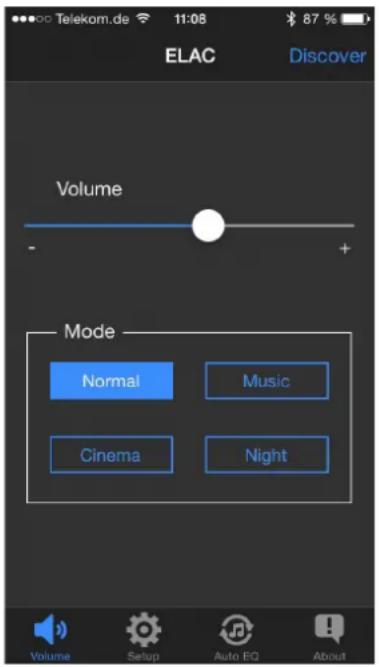
VOLUME: The "Volume" parameter is used to set the volume of the subwoofer. This setting together with the volume of the other loudspeakers in your HiFi or surround-sound system should result in a balanced sound. As a general rule, the subwoofer output should be set so that does not dominate the sound. Excessive bass very quickly leads to a muddy and vague soundstage.
MODE: Your subwoofer offers 4 different sound presets, which you can select using the "MODE" buttons. "NORMAL" is the linear basic setting that is suitable for most applications. "MUSIC" adds a subtle emphasis to the low bass range, while "CINEMA" slightly boosts the "dramatic" bass frequencies around 90 Hz. The "NIGHT" mode reduces the maximum volume so that you can still enjoy bass reinforcement when listening at night.
2. SETUP
From the "SETUP" screen, you can access the other parameters via sub-menus.
3. LOWPASS
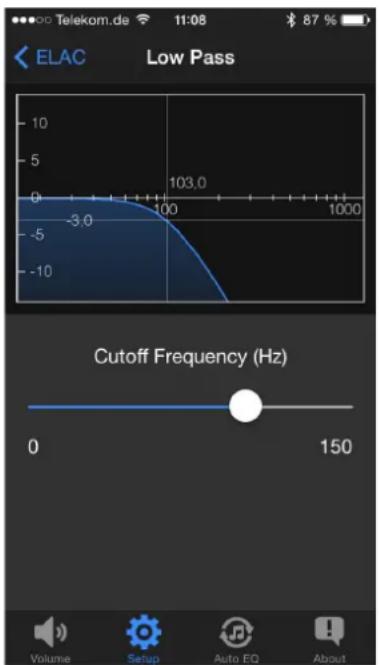
The upper limit of the frequency range that the subwoofer is to reproduce is set using the „CUTOFF FREQUENCY“ parameter. Audio signals above this cutoff frequency are progressively rolled off by the subwoofer, so that they are no longer audible. The setting for this cutoff frequency depends on the respective loudspeaker configuration on the one hand, but also on its placement and personal listening taste on the other.
The table below is provided as a rough guide for settings.
Loudspeaker configuration Cutoff frequency on the ELAC Subwoofer
Surround-sound system with LFE channel Max
HiFi stereo system with small loudspeakers 80 Hz – Max
Satellite/subwoofer system (stereo) 80 Hz – 100 Hz
HiFi stereo system with larger bookshelf 50 Hz – 70 Hz
loudspeakers, smaller floorstanding loudspeakers
(like most ELAC loudspeakers)


line
| Parameter | Value | | ----------------- | ----- | | Central Frequency(Hz) | 20 | | Bandwidth | 200 | | Narrow | wide | | Gain(DB) | -10 | | Gain(DB) | +10 |4. PHASE
Selecting the correct phase ensures that the bass signals reproduced by the subwoofer blend seamlessly with those from the main loudspeakers.
If the subwoofer and main loudspeakers are operating in phase, this results in homogeneous bass reproduction across the entire bass frequency range, with no „holes“ and no peaks that manifest themselves as a droning bass sound at specific frequencies.
The correct setting for the phase adjustment must be determined by listening tests. Play a piece of music that contains a wide range of different bass frequencies. The phase is correctly set if no frequency stands out unpleasantly and all frequencies are reproduced at a consistent volume.
5. AUTO ON / OFF
The „AUTO ON/OFF“ function is used to activate or deactivate the auto-on function. „AUTO = ON“ is the normal setting. The ELAC subwoofer is kept in power-saving standby model (LED glows very dim). A sensor continuously monitors the inputs. Once a sufficiently strong bass signal is detected, the power output stage is activated. Within a few tenths of a second, the subwoofer is ready for operation and the LED glows brighter. If no further input signals are detected, the ELAC subwoofer remains for approximately 15 minutes in fully operational mode before returning to stand-by mode.
The sensitivity of the auto-on function („AUTO ON THRESHOLD“) can be set from 1 – 10 mV. The correct sensitivity for your application will depend on the (pre-) amplifier used. A value of between 3 and 6 is generally suitable.
If AUTO ON/OFF is deactivated, the subwoofer is permanently fully activated and will no longer switch to stand-by mode.
6. PARAMETRIC EQUALIZER
The parametric equalizer allows you to adjust the „CENTRAL FREQUENCY“ as well as the „BAND-WIDTH“ and „GAIN“ settings.
This not only allows you to boost specific frequency ranges but also lets you selectively filter out annoying room resonances ("droning" or "booming bass").
To attenuate an annoying room resonance, you must first pinpoint the frequency that is causing it. The most effective method is to use a test CD of pure tones in the bass frequency range. Start by playing the bass notes in sequence. If one bass note sounds unnaturally loud, this is the room resonance that you can damp with the help of the equalizer. To do this, set the CUTOFF FREQUENCY control to the frequency determined using the test CD. Select a „NARROW“ bandwidth and reduce the GAIN control until the bass note is reproduced with the same apparent loudness as the other frequencies.
To selectively boost a particular frequency range, you should increase the bandwidth slightly (move the control towards „WIDE“) and then carefully adjust the „GAIN“ setting to avoid any unnatural „droning“ in the sound reproduction.

bar
| Frequency | Value | | --------- | --------- | | 23 Hz | -56.27 db | | 20 Hz | -68.90 db |7. DELAY
The "DELAY" parameter allows you to set a delay time for the music signal before it is played back through the subwoofer. This feature is particularly useful, for example, if the subwoofer has to be placed nearer to the listening position than the main loudspeakers. Increasing the delay time by 1 millisecond ("msec") will have the same effect as moving the subwoofer approximately 33 cm further away from the listening position. Consequently, a setting of 20 milliseconds would be equivalent to increasing this distance by approximately 6.6 meters.
If you are using a surround-sound amplifier equipped with an automatic calibration function, it will automatically set the delay time internally. In this case, you should set the delay for the subwoofer to minimum.
8. AUTO EQ
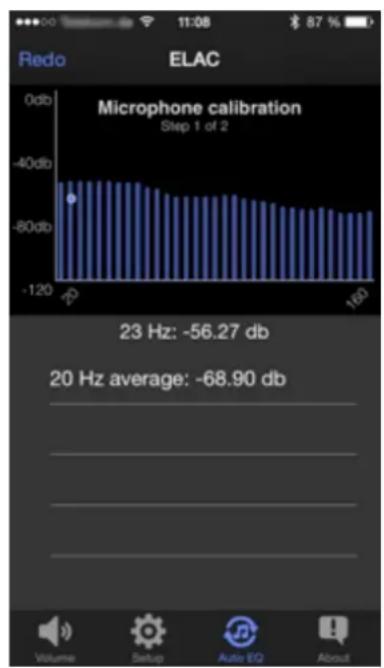
Your subwoofer is equipped with an automatic calibration function. This activates the subwoofer via the APP and instructs it to play back the measurement signals and uses the built-in microphone in your smartphone to record the measurement curve.
Automatic room calibration is performed in 2 steps, the first of which involves calibrating the measurement environment, i.e., the microphone and the sound reproduction chain. In step 2, the actual room frequency response is measured.
Follow the instructions in the APP to carry out a successful measurement.

bar
| Frequency | Average (dB) | | --------- | ------------ | | 20 | -68.90 | | 23 | -71.40 | | 26 | -78.00 | | 30 | -80.50 |When you start the measurement, you will first be asked to hold the smartphone close to the sound opening of the subwoofer (on the SUB 2050 or SUB 2070, this is the gap between the bottom plate and the cabinet). The measurement can then be started. Once the calibration step is completed, the actual room measurement can be performed. To do this, hold your smartphone at the listening position and start step 2.

line
| Time | Measured (dB) | Filter Applied (dB) | |------|---------------|---------------------| | 0 | -80 | -60 | | 10 | -75 | -85 | | 20 | -70 | -80 | | 30 | -65 | -75 | | 40 | -60 | -70 | | 50 | -55 | -65 | | 60 | -50 | -60 | | 70 | -45 | -55 | | 80 | -40 | -50 | | 90 | -35 | -45 | | 100 | -30 | -40 | | 110 | -25 | -35 | | 120 | -20 | -30 | | 130 | -15 | -25 | | 140 | -10 | -20 | | 150 | -5 | -15 | | 160 | 0 | -10 | | 170 | 5 | 0 | | 180 | 10 | 5 | | 190 | 15 | 10 | | 200 | 20 | 15 | | 210 | 25 | 20 | | 220 | 30 | 25 | | 230 | 35 | 30 | | 240 | 40 | 35 | | 250 | 45 | 40 | | 260 | 50 | 45 | | 270 | 55 | 50 | | 280 | 60 | 55 | | 290 | 65 | 60 | | 300 | 70 | 65 | | 310 | 75 | 70 | | 320 | 80 | 75 | | 330 | 85 | 80 | | 340 | 90 | 85 | | 350 | 95 | 90 | | 360 | 100 | 95 | | 370 | 105 | 100 | | 380 | 110 | 105 | | 390 | 115 | 110 | | 400 | 120 | 115 | | 410 | 125 | 120 | | 420 | 130 | 125 | | 430 | 135 | 130 | | 440 | 140 | 135 | | 450 | 145 | 140 | | 460 | 150 | 145 | | 470 | 155 | 150 | | 480 | 160 | 155 | | 490 | 165 | 160 | | 500 | 170 | 165 | | Note: The actual values for 'Measured' and 'Filtered' are not provided in the code. The 'Measured' and 'Filtered' values are estimated based on the chart labels. The 'Measured' and 'Filtered' values are not explicitly labeled in the code. There is only one data series in the 'Measured' and 'Filtered' columns. The 'Filtered' column contains the corresponding values for 'Measured' and 'Filtered'.After the measurement is successfully completed, the measured room frequency response is displayed along with the automatically calculated filter function.
Press "Apply" to use the filter data to compensate the frequency response. Press "Redo" to start another measurement.
Once you have accepted the measurement with "Apply", the equalization curve is retained until it is overwritten by a new measurement.
You can deactivate the automatically calculated frequency response compensation at any time by switching off the AUTO EQ function in the SETUP menu (see picture at point 2).
Connecting the Subwoofer
A subwoofer is connected to a HiFi or surround-sound system using RCA and/or loudspeaker cables. The variants described below provide an overview of the different possible applications.
You should also refer to the operating instructions for the AV receiver and the other loudspeakers used in the setup.
Digital surround-sound systems
Standard connection LFE IN (Low Frequency Effect IN)
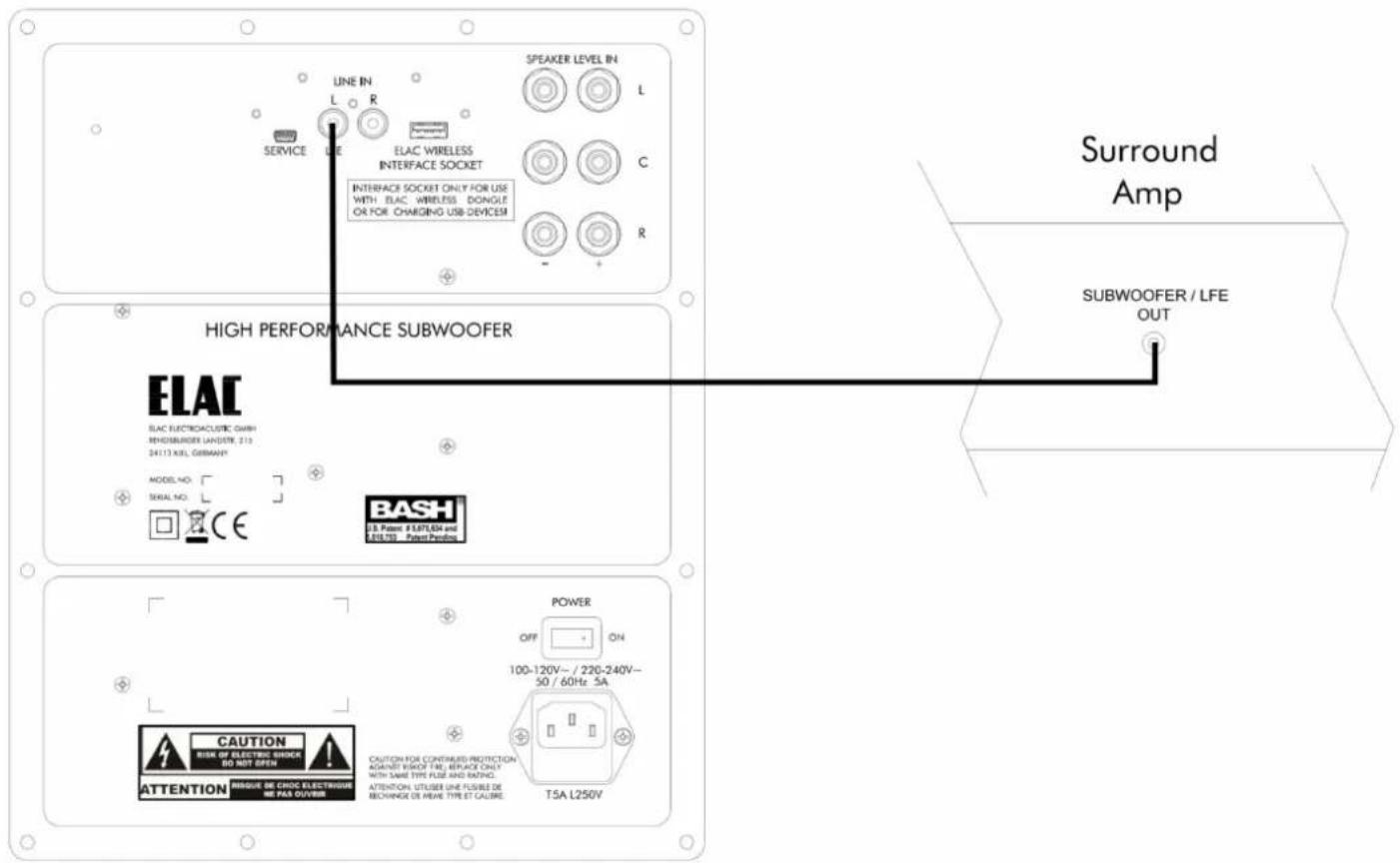
The rear panel on most surround-sound amplifiers includes a special RCA output socket ("BASS" / "SUB OUT" / "LFE") for connecting an active subwoofer. This output is connected to the "LFE" input socket on the subwoofer using a mono RCA cable. Since this RCA connection only sends bass signals to the subwoofer, the "CUTOFF FREQUENCY" parameter on the subwoofer can be set to the maximum value.
If your surround-sound amplifier does not have a "SUB OUT", or if the soundstage achieved using the standard connection method described here is not satisfactory due to the bass management function in the AV receiver, you can also use the "Advanced connection variant" (see page 28) as an alternative.
Conventional HiFi systems
Standard connection (stereo RCA)

This is the standard connection variant used in conjunction with a stereo (pre-) amplifier.
If you want to connect the subwoofer to the output from a stereo amplifier, make sure that the outputs to the main loud-speakers are still carrying signals. This is the case for most PRE-OUT sockets.
The "CUTOFF FREQUENCY" must be adjusted to suit the main loudspeakers.
Digital surround-sound systems
Advanced connection variant (bass management is performed by the subwoofer)

flowchart
graph TD
    A["Speaker Level"] --> B["High Performance Subwoofer"]
    B --> C["Surround Amp"]
    C --> D["Speaker Out"]
    D --> E["BEAC"]
    D --> F["BEAT"]
    D --> G["DAB"]
    style A fill:#f9f,stroke:#333
    style B fill:#ccf,stroke:#333
    style C fill:#cfc,stroke:#333
    style D fill:#fcc,stroke:#333
    style E fill:#ffc,stroke:#333
    style F fill:#cfc,stroke:#333
    style G fill:#ffc,stroke:#333
In this configuration, you must connect the "SPEAKER LEVEL IN" sockets on the subwoofer to the loudspeaker terminals on the AV receiver using loudspeaker cables.
The corresponding loudspeakers (Center or Main) must then be set to "LARGE" in the menu on the AV receiver.
This connection variant bypasses the bass management in the AV receiver for the front channels, which frequently results in a more harmonious soundstage across the bass range.
Connecting the subwoofer in parallel to the loudspeakers does not place any additional load on the amplifier, as the input circuitry in the subwoofer is merely using the voltage information and is not drawing any additional power.
HiFi stereo system
Bass support for HiFi loudspeakers
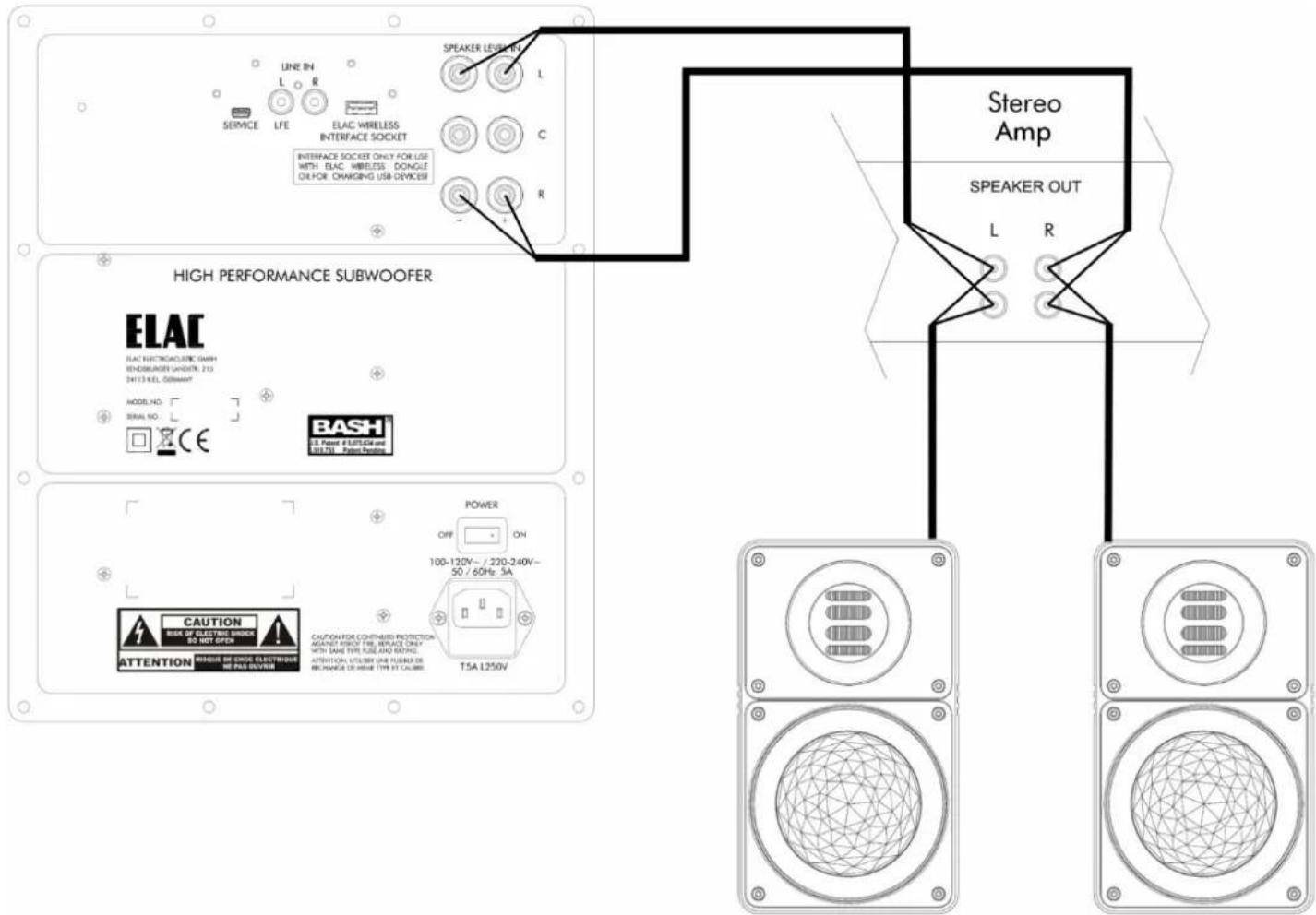
The loudspeakers receive the full signal directly from the amplifier with the subwoofer providing support and reinforcement down to the lowest frequency ranges. For best results, we recommend not setting the cutoff frequency on the subwoofer too low., i.e., creating a significant overlap with the main speakers and maintaining a moderate output level on the subwoofer. It is particularly important to set the phase correctly (see page 24).
Connecting the subwoofer in parallel to the loudspeakers does not place any additional load on the amplifier, as the input circuitry in the subwoofer is merely using the voltage information and is not drawing any additional power.
Setup Tips
General advice
A minimum free space of 10 cm between the subwoofer and the wall is required for proper cabling and cooling.
Some ELAC subwoofers are down-firing or provide a bass diaphragm on the bottom. Therefore, they are equipped with mounted feet in order to maintain a minimum distance between the underside of the subwoofer and the floor. If you want to place objects on the ELAC subwoofer, make sure that they do not slip and that they are protected from vibrations. Many shops for car accessories sell special mats that prevent slipping. With a mat of rubber or felt, it is possible and may well make sense to place a loudspeaker on an ELAC subwoofer.
The influence of room acoustics
'Low frequencies need space' - this is an important yet ambiguous statement when applied to subwoofers. For practical purposes the following facts may be more useful:
The low crossover frequency limit of the ELAC subwoofer at near-maximum levels is below 30 Hz, depending on the product. This corresponds to a sound wave with a length of approx. 10 meters. Nevertheless, low bass can also be heard in small rooms (extreme example: headphones). However, some peculiarities should be taken into account. In a closed, box-shaped room less than 7–8 m in length, the center of the room should be avoided as a listening position if you want good bass. Like waves in a bathtub, the energy "rolls" back and forth between both ends of the room and the alternating pressure build-up is focused at these ends until it overflows. The lowest pressure remains exactly in the middle which means no low bass. The following table shows the frequency at which this effect is the strongest.
Distance between parallel walls Frequency of pressure minimum in the middle be-tween the walls
10 m 17 Hz
8m 21Hz
6m 29Hz
5 m 34 Hz
4 m 43 Hz
3 m 57 Hz
2,5 m (room height) 68 Hz
The effect appears exactly in the range where a Subwoofer should show its strength. It applies to all parallel boundary surfaces, even to the floor and ceiling, if these are solidly constructed. The solution is simple: move the listening position away from the center of the room - even a difference of just 50 cm is sufficient to make low bass audible again.
If the listener is sitting directly adjacent to a wall, bass reproduction is often too strong. This can be balanced by reducing the levels at the subwoofer. However, for all higher frequencies and a more natural spatial impression, it is better to move the listening position away from the walls. According to the acoustic theory of low frequencies in small, closed rooms the location of the listener and subwoofer can be exchanged without affecting the acoustic results. Thus the best position can be easily found by mounting the subwoofer at the potential listening position, walking around in the room to locate the place where the bass is reproduced most evenly, and then placing the subwoofer there.
Although the theory cannot be relied upon totally and low bass should not be judged alone (without the main speakers), the recommendation to never place the subwoofer/ listener exactly in the middle of the room or centrally in front of long walls, still holds true. Due to its flexibility, and frequency range, the ELAC subwoofer can take full advantage of a location near a wall or in a corner. The minimum free rear space required for cooling and cabling is 10 cm. A greater distance from the wall is recommended only if changing the "PHASE" does not result in a better bass reproduction. Shifting the subwoofer by 0.5 - 2 m (depending on the crossover frequency) may clarify the situation. Good bass can be obtained in open rooms and with slightly asymmetric placements. Irregularities in the building, sometimes even just an open door, may have a surprising and often positive effect.
Under practical conditions, the position of the ELAC subwoofer cannot be located by ear and therefore it does not need to be placed exactly between the main speakers. A position on a side wall, even behind the listener, is also possible, especially with a low crossover frequency. Once optimization is complete, the subwoofer may even be placed out of sight.
There is only one serious restriction which should be observed: a subwoofer should not be placed much closer to the listener than the main speakers (max. 1 m). A larger distance is better (i.e. a position behind the main speakers up to approx. 1 m, or from special subwoofer outputs and when reproducing surround video effects up to 3 m.)
In addition to maximum sound pressure, the bass quality can be improved by using a pair of ELAC subwoofers. If both subwoofers are connected to one source (mono), the second unit should be placed asymmetrically to all the other loudspeakers, not directly beside the first one. This ensures even and less resonant bass, typical of large open rooms, can also be achieved in small rooms. If however, two subwoofers are operated in true stereo mode, they should be placed at approximately the same distance from the respective main speaker and the listener, with a maximum difference of 0.5 – 1 m depending on the crossover frequency.
Where two ELAC subwoofers are used in parallel (or stereo), both should be set to the same level. With some digital sound formats (e.g. Dolby Digital) all channels, including the rears, are driven with full dynamics and bandwidth, even frequencies in the sub-audible ranges are often transmitted. Thus, you may find that the rear channels perform better with a subwoofer of their own. For this, the universal connection options of the ELAC subwoofer can be used. In larger rooms, the set-up of a second or third subwoofer may also be useful, depending on the size and model.
Overload Protection
A special feature of your ELAC subwoofer is the overload protection. It provides clear bass reproduction and ensures that there are no distortions from overdriving the amplifier and / or the driver units. ELAC uses a frequency and power dependent electronic stabilization program.
ELAC's subwoofers perform similarly to that of a car, where the electronic stabilization program controls the car's stability to keep it in its lane in all situations. In comparison to conventional subwoofers without overload protection, it is almost impossible to overload active subwoofers which provide it.
Troubleshooting
| Symptom Possible cause | Remedy | |
| No audible signal | Blown mains fuse Check/replace mains fuse | |
| No mains connection Check mains switch, plugs and socket | ||
| No input signal | Check input connections, replace RCA cables, check signal source (is a different audio component fed by the same source playing correctly?) | |
| Output level too low | Output level from source is too low (pre-amp, surround decoder) | Increase output level of pre-amp (min 0.2 Volts), reduce power amp again to compensate or: slightly reduce gain for main (center, effect) speakers, to compensate increase master volume |
| Max output slightly too low (living-room) | Placement of subwoofer too “open” | Place subwoofer in front of a wall or a corner. |
| Uneven sound Incorrect phase setting | Vary the phase control adjuster, if no signal difference, move subwoofer by 0.5 – 2 m and repeat. | |
| Sound during loud tracks somewhat distorted especially loud buzzing noises in surround mode | Centre or effect speakers are being overloaded by their power amps | Reduce center or effect level at surround decoder; use center mode ‘normal’ |
| Loud hum | Contact problems with RCA connector (adapter for extensions) | Check all connections; reduce the level on ELAC sub to -30 dB; the outer rings of the RCA plugs may have to be adjusted. |
| Soft hum (during pauses) | Hum from source, ground loop with RCA multi-connections | Check the ELAC sub for inherent hum: with you ear near the speaker there may be a slight hum, but none at the listening position. |
Warranty
The conditions of warranty are subject to the laws in different countries and regulated by the terms of the respective international ELAC representatives. If you have not bought your appliances in Germany, please check the terms with your retailer. Warranty can be covered by any ELAC authorized retailer or the international representative authorized to distribute ELAC products (EU contract retailers). Should you require service under warranty, the complete appliance, together with the warranty card and the receipt must be supplied to the retailer.
- Contents
- VOLUME / MODE
- PHASE
- DELAY
- SPEAKER LEVEL IN
- LINE IN L / LFE - R
- ELAC WIRELESS INTERFACE SOCKET
- AC Power Socket
- Fuse Holder
- POWER (ON/OFF)
- Service Connection
- Advantages of BASH® Technology
- SETUP
- LOWPASS
- Loudspeaker configuration Cutoff frequency on the ELAC Subwoofer
- AUTO ON / OFF
- PARAMETRIC EQUALIZER
- AUTO EQ
- Connecting the Subwoofer
- Digital surround-sound systems
- Conventional HiFi systems
- Standard connection (stereo RCA)
- HiFi stereo system
- Setup Tips
- General advice
- The influence of room acoustics
- Distance between parallel walls Frequency of pressure minimum in the middle be-tween the walls
- Overload Protection
- Troubleshooting
- Warranty
Brand : ELAC
Model : SUB 2050
Category : Subwoofer