
Varialite FW-1845 - Headphones Exibel - Free user manual and instructions
Find the device manual for free Varialite FW-1845 Exibel in PDF.


| Type de produit | Wireless over-ear headphones |
| Brand | Exibel |
| Model | Varialite FW-1845 |
| Dimensions (folded) | 180 x 160 x 80 mm |
| Weight | 250 g |
| Power source | Rechargeable lithium-ion battery, 400 mAh, 3.7V |
| Battery life | Up to 20 hours |
| Connectivity | Bluetooth 5.0, range up to 10 m |
| Main functions | Volume control, play/pause, track skip, call handling, passive noise isolation, variable LED lighting |
| Cleaning and maintenance | Clean with a soft, dry cloth. Do not use chemicals. |
| Safety precautions | Do not expose to moisture. Do not disassemble. Use only supplied charger. |
| Spare parts and repairability | Replaceable ear pads. Battery replacement by professional only. |
| General information | Compatible with most Bluetooth devices. Integrated controls. |
Frequently Asked Questions - Varialite FW-1845 Exibel
User questions about Varialite FW-1845 Exibel
0 question about this device. Answer the ones you know or ask your own.
Ask a new question about this device
Download the instructions for your Headphones in PDF format for free! Find your manual Varialite FW-1845 - Exibel and take your electronic device back in hand. On this page are published all the documents necessary for the use of your device. Varialite FW-1845 by Exibel.
USER MANUAL Varialite FW-1845 Exibel
English 3
Art.no Svenska 8
Please read the entire instruction manual before using the product and then save it for future reference. We reserve the right for any errors in text or images and any necessary changes made to technical data. In the event of technical problems or other queries, please contact our Customer Services (see address details on the back).
Safety
- Never subject the headphones to high temperatures, dust, heavy vibration, impacts, water or moisture.
- Do not place the headphones where there is a risk of them falling into water or other liquid.
- Do not expose the headphones to direct sunlight for prolonged periods.
- Never attempt to tamper with or modify the headphones in any way.
- Only use the supplied charger cable.
- Do not leave the headphones on charge for longer than necessary when they are not in use. Discontinue charging during thunderstorms.
- Check your local regulations regarding mobile phone use in combination with driving.
- Shut off both the headphones and mobile phone in areas where you are requested to do so, such as hospitals, aircraft or explosive environments.
Buttons and functions
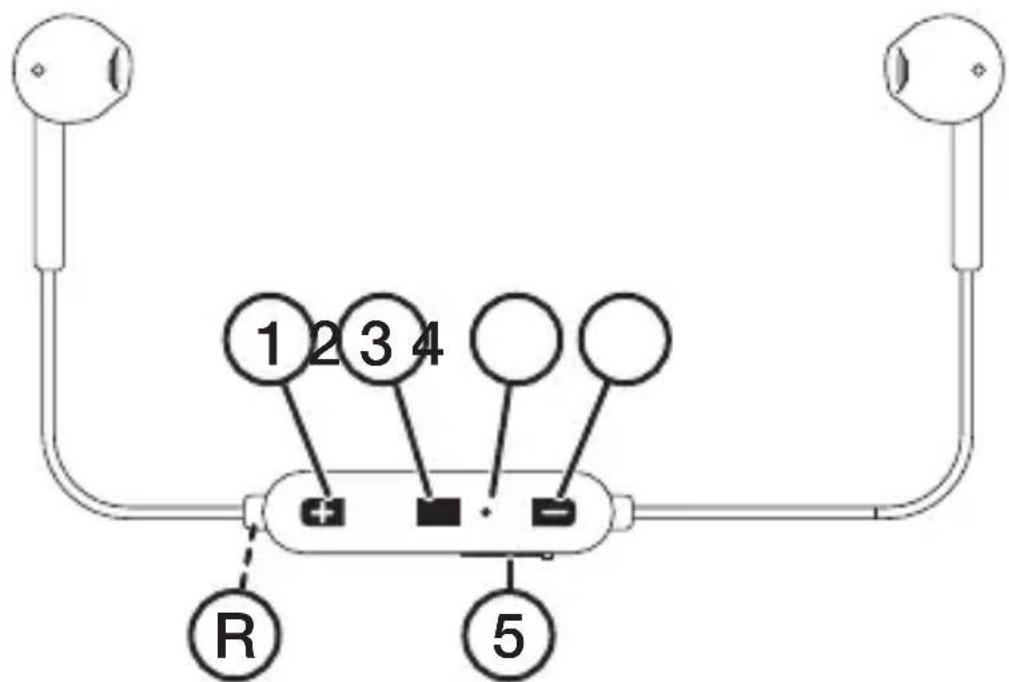
- [ + ] Next track, increase volume
- [☐] On/off, play/pause, pairing
- LED indicator
- [–] Previous track, decrease volume
- Micro-USB port for the included charger cable
Charging
Charge the battery for 1–1.5 hours before using the earphones for the first time.
- Connect the included charger lead to the earphones' charging port and to a computer or other USB charger.
- The LED indicator (3) shines red when charging is in progress.
- The LED indicator shines blue when the battery is fully charged.
Operating instructions On/off button
On – to use the earphones with a new external device
Follow the instructions in the Bluetooth connection section below.
On – to use the earphones with a previously paired external device
Hold in [☐] for approximately 3 seconds. Release [ ] when the LED indicator flashes blue.
Off
Hold in [☐] for 4 seconds. Release [☐] when the LED indicator shines red.
Bluetooth connection
- Hold in [☐] for approximately 5 seconds. Release [☐] when the LED indicator flashes red/blue.
- Activate Bluetooth mode on the device that you want to connect the earphones to.
- The earphones will appear on your device as Varialite. Select it to pair with the device.
- When contact has been established the LED indicator will indicate a successful connection by flashing blue every 8 seconds.
- Start playback on your external Bluetooth device. Set the initial volume level on the external device and fine-tune the level using the volume controls on the earphones.
- Playback can be controlled from your external Bluetooth device and the buttons on the earphones in accordance with the Buttons and functions section above.
Note:
- The earphones will automatically connect to the last connected device if they are on and Bluetooth is activated on the last connected device.
- If you are prompted to enter a PIN code on your device, you should enter 0000 (four zeroes). Certain devices may also require you to approve the connection.
- If you receive a call while listening to music via Bluetooth, playback will be stopped automatically. Once the call ends, music playback will automatically be resumed (if your phone settings supports this).
Call management
- Answering an incoming call: Press [ ☐ once.
• Ending a call: Press [ □] once. - Rejecting an incoming call: Hold in [ - ] for 2 seconds.
- Calling the last number dialled: Press [☐] 2 times in quick succession.
Voice control
Note: Applies only to certain models of telephone.
When playback is stopped and no telephone call is in progress, the voice control feature of your phone can be activated by pressing in [☐] for 2 seconds.
Audio listening
Note: Applies only to certain models of telephone.
- Go forward to the next track: Hold [ + ] pressed in.
- Go back to the previous track: Hold [ - ] pressed in.
- Increase the volume: Press [ + ] once.
- Decrease the volume: Press [ - ] once.
- A beep sound is emitted when the max or min volume level is reached.
- Play/pause: Press [ □] once.
Care and maintenance
- Clean the headphones using a lightly moistened cloth. Use only mild cleaning agents, never solvents or corrosive chemicals.
- Make sure that the battery is fully charged if you do not intend to use the head phones for a long time. The battery should be charged every 3 months when the headphones is not being used, in order for the battery to maintain full capacity.
Troubleshooting guide
| The earphones will not switch on. | Make sure that the battery is charged.Refer to the Charging section above. |
| The battery does not charge. | Make sure that:The computer is switched on and not in standby mode.The adaptor is plugged in to a wall socket.The Micro-USB cable is correctly connected to both the earphones and the computer/adaptor. |
| Won’t connect to the external device. | Place the earphones next to the device that you are trying to connect them to.Make sure that:Both devices are switched on.The Bluetooth function is enabled on the device you are trying to connect to. |
| Poor or no sound. | Adjust the volume on both your telephone and the earphones.Make sure that the Bluetooth connection has been properly established.Test the playback from your telephone before connecting it.Try playback using another file or track, the one you are attempting to play may be corrupt.Make sure that no other wireless devices are disrupting the Bluetooth connection.Make sure that your telephone is within the 10 m earphones receiving range. |
Responsible disposal
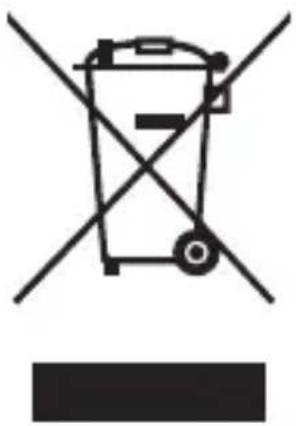
This symbol indicates that this product should not be disposed of with general household waste. This applies throughout the entire EU. In order to prevent any harm to the environment or health hazards caused by incorrect waste disposal, the product must be handed in for recycling so that the material can be disposed of in a responsible manner. When recycling your product, take it to your local collection facility or contact the place of purchase. They will ensure that the product is disposed of in an environmentally sound manner.
Specifications
Bluetooth V 4.1
Compatible with A2DP, AVRCP, HFP, HFPV
Range 10 m
Cable length 54 cm
Charging time 1–1.5 hours
Listening time Up to 4 hours
Trådlösa hörlurar
Art.nr 38-9225-1,-2,-3,-4 Modell Varialite / FW-1845
Specifikationer
Bluetooth V 4.1
Kompatibla med A2DP, AVRCP, HFP, HSPV
Räckvidd 10 m
Kabellängd 54 cm
Laddtid Ca 1–1,5 tim
Spesifikasjoner
Bluetooth V 4.1
Kompatibel med A2DP, AVRCP, HFP, HSPV
Rekkevidde 10 m
Tekniset tiedot
Bluetooth V 4.1
Declaration of Conformity
This declaration of conformity is issued under the sole responsibility of the manufacturer.
has been manufactured in full compliance with the requirements of the RE-directive 2014/53/EU and relevant harmonized standards
har tillverkats i full överensstämmelse med kraven i 2014/53/EU och relevanta harmoniserade standarder / har blitt produsert i full overensstemmelse med kravene i 2014/53/EU og relevante harmoniserte standarder / on valmistettu noudattaen kokonaisuudessaan koskevan direktiivin 2014/53/EU ja asiaankuuluvat yhdenmukaistetut standardit / wurde in voller Übereinstimmung mit den Anforderungen von 2014/53/EU sowie relevanten harmonisierten Normen hergestellt.
Reference to harmonized standards used, or reference to the specifications in which declaration of conformity is declared:
Hänvisning till de harmoniserade standarder som använts eller hänvisningar till de specifikationer som försäkran om överensstämmelse deklareras: / Referere til harmoniserte standarder som brukes, eller henvisninger til spesifikasjonene der samsvarserklæring er erklärt: / Viittaus yhdenmukaistettuihin standardeihin tai viittaus eritelmiin, jossa vaatimusten mukaisuusvakuutus on julistettu: / Verweis zu den verwendeten harmonisierten Normen oder Verweise auf die Spezifikationen, die der Konformitätserklärung zugrunde liegen:
Article 3.1a (Health): EN 62479:2010
Article 3.1a (Safety): EN 60950:2006
+A11:2009+A1:2010
+A12:2011+A2:2013
Article 3.1b (EMC): EN 301 489-1 V1.9.2
EN 301 489-17 V2.2.1
Article 3.2 (Radio): EN 300 328 V1.9.1
Signed for and on behalf of:
Alvinor Widushim
Ellinor Wickström
Product Compliance Manager
Insjön, Sweden, 2018-11-27
CLAS OHLSON AB, SE-793 85 INSJÖN, SWEDEN
KUNDTJÄNST tel: 0247/445 00
fax: 0247/445 09
e-post: kundservice@clasohlson.se
INTERNET
www.clasohlson.se
BREV Clas Ohlson AB, 793 85 INSJÖN
NORGE
KUNDESENTER tlf.: 23 21 40 00
faks: 23 21 40 80
e-post: kundesenter@clasohlson.no
INTERNETT
www.clasohlson.no
POST
Clas Ohlson AS, Postboks 485 Sentrum, 0105 OSLO
SUOMI
ASIAKASPALVELU puh.: 020 111 2222
10 – 13 Market Place
Kingston upon Thames
Surrey
KT1 1JZ
DEUTSCHLAND
KUNDENSERVICE
Hotline: 040 2999 78111
E-Mail: kundenservice@clasohlson.de
Homepage
www.clasohlson.de


- SAFETY
- BUTTONS AND FUNCTIONS
- CHARGING
- OPERATING INSTRUCTIONS ON/OFF BUTTON
- OFF
- BLUETOOTH CONNECTION
- NOTE
- CALL MANAGEMENT
- VOICE CONTROL
- AUDIO LISTENING
- CARE AND MAINTENANCE
- RESPONSIBLE DISPOSAL
- SPECIFICATIONS
- TRÅDLÖSA HÖRLURAR
- SPECIFIKATIONER
- SPESIFIKASJONER
- TEKNISET TIEDOT
- DECLARATION OF CONFORMITY
- REFERENCE TO HARMONIZED STANDARDS USED, OR REFERENCE TO THE SPECIFICATIONS IN WHICH DECLARATION OF CONFORMITY IS DECLARED
- NORGE
- SUOMI
- DEUTSCHLAND
Brand : Exibel
Model : Varialite FW-1845
Category : Headphones