
IP19 - Alarm clock radio Clas Ohlson - Free user manual and instructions
Find the device manual for free IP19 Clas Ohlson in PDF.


| Product Type | Alarm Clock Radio |
| Brand | Clas Ohlson |
| Model | IP19 |
| Dimensions (approx.) | 20 x 15 x 10 cm |
| Weight (approx.) | 0.5 kg |
| Power Supply | AC adapter (included) or 3 x AAA batteries (backup) |
| Radio Bands | FM (87.5 - 108 MHz) |
| Alarm Modes | Radio or buzzer |
| Snooze Function | Yes, 9 minutes |
| Sleep Timer | Yes, up to 90 minutes |
| Display | LED, adjustable brightness |
| Clock Format | 12h or 24h selectable |
| Dual Alarms | Yes, independent settings |
| Audio Output | Built-in speaker, 3.5 mm headphone jack |
| Care and Cleaning | Wipe with a soft, dry cloth. Do not use liquids or abrasives. |
| Safety | Place on a stable surface; keep away from moisture and heat sources. |
| Spare Parts & Repairability | Contact Clas Ohlson support for replacement adapters. No user-serviceable parts inside. |
| General Information | Designed for bedside use. Manual in PDF available online. |
Frequently Asked Questions - IP19 Clas Ohlson
User questions about IP19 Clas Ohlson
0 question about this device. Answer the ones you know or ask your own.
Ask a new question about this device
Download the instructions for your Alarm clock radio in PDF format for free! Find your manual IP19 - Clas Ohlson and take your electronic device back in hand. On this page are published all the documents necessary for the use of your device. IP19 by Clas Ohlson.
USER MANUAL IP19 Clas Ohlson
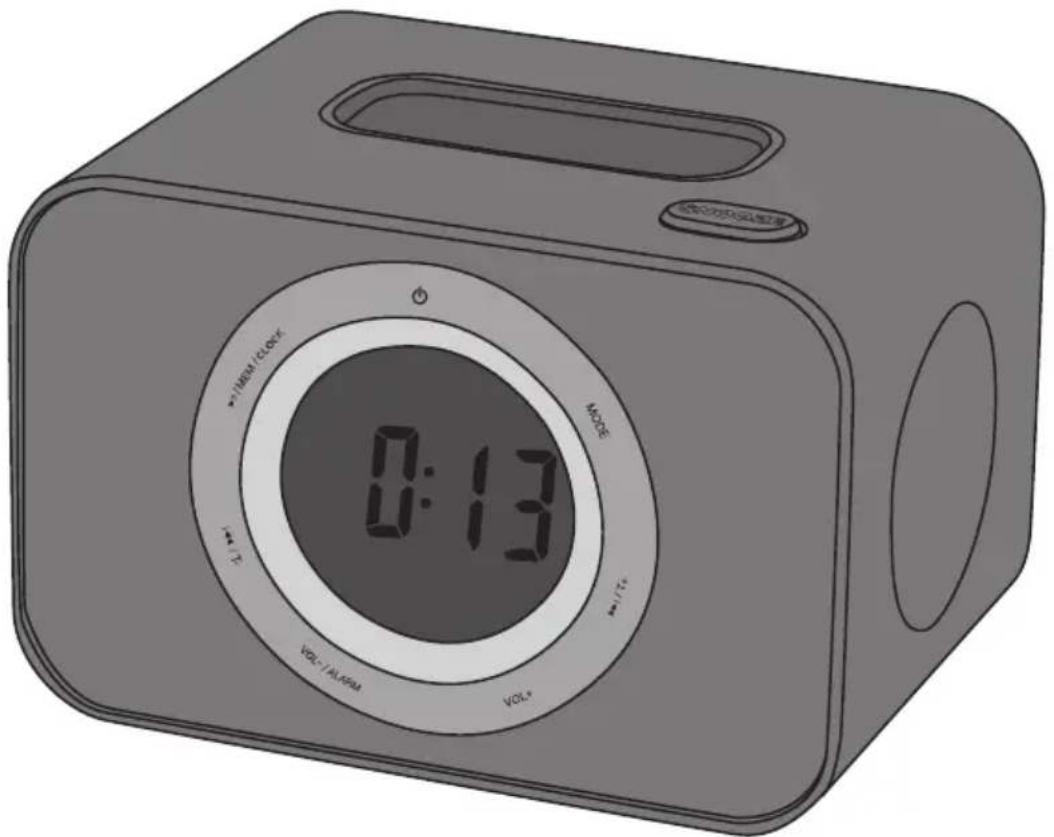
Clock Radio Docking Station for iPhone/iPod
Klockradio med dockningsstation för iPhone/iPod Klokkeradio med dokkingstasjon for iPhone/iPod Kelloradio, jossa telakointiasema iPhonelle/iPodille Radiowecker mit Dockingstation für iPhone/iPod
| Art.no | Model | Art.no | Model |
| 18-8286 | IP19 | 38-4790 | IP19 |
| 18-8287 | IP19 | 38-4791 | IP19 |
| 18-8288 | IP19 | 38-4792 | IP19 |
Ver. 20140402
Clock Radio Docking Station for iPhone/iPod
Art.no 18-8286 Model IP19
18-8287 IP19
18-8288 IP19
38-4790 IP19
38-4791 IP19
38-4792 IP19
Please read the entire instruction manual before using the product and save it for future reference. We reserve the right for any errors in text or images and any necessary changes made to technical data. If you have any questions regarding technical problems please contact our customer services.
Safety
- Do not place the device near any source of open flames, such as candles, fireplaces, etc.
- Make sure that the wall socket that is used is easily accessible since this is the only way to completely disconnect it from the electrical system.
- Do not expose the device to direct sunlight, hot, cold or dusty environments. Do not expose the device to strong vibrations or shock.
- Do not place the product so that it is exposed to moisture or splashing water.
Product description
- Clock radio docking station for iPhone/iPod
- FM radio
- Clock
- Alarm with snooze
- Sleep timer
• 3.5 mm audio socket for external audio sources
• Time synchronisation with you iPhone/iPod - Snooze and sleep function
Buttons and functions
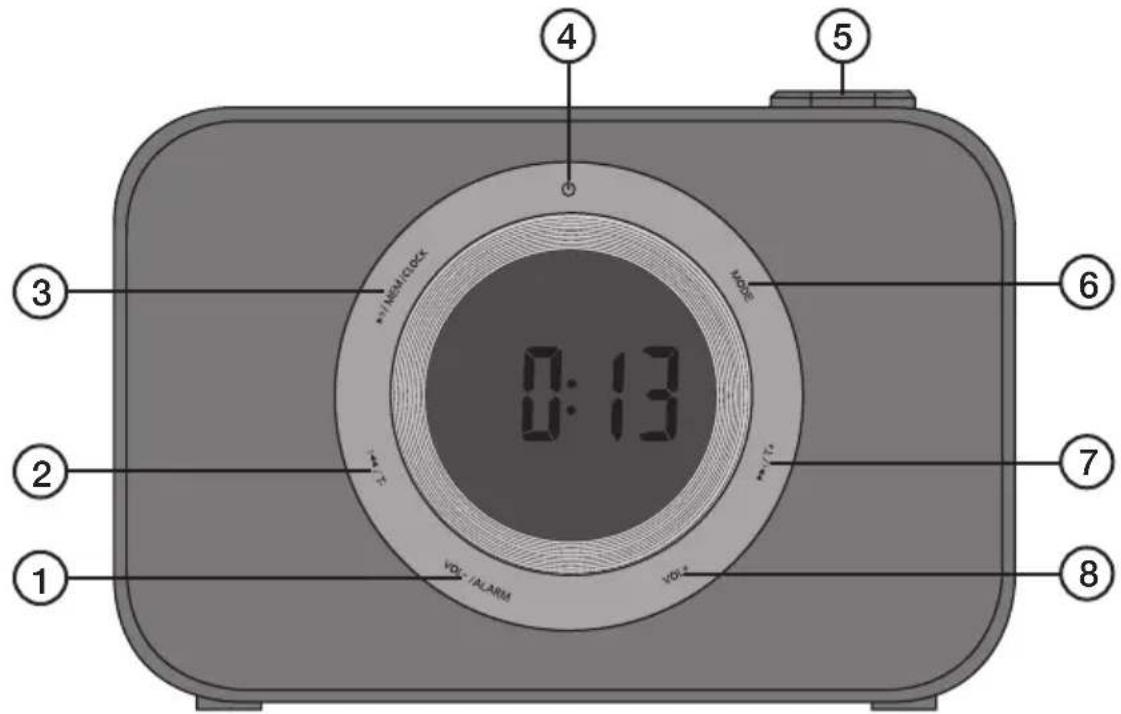
- [VOL-/ALARM] Decreases volume, enters alarm settings.
- [I◄◄/T-] Scans radio stations down the frequency band (hold in for quick-search), previous track and fast rewind.
- [▶II/MEM/CLOCK] Play/pause, preset stations and time settings.
- [⏻] On/off
- [SNOOZE] Sleep/light: Snooze, sleep timer and backlight.
- [MODE] Function selector, select between iPhone/iPod, FM-radio or AUX.
- [▶▶I/T+] Scans radio stations up the frequency band (hold in for quick-search), next track and fast forward.
-
[VOL + ] Increases volume
-
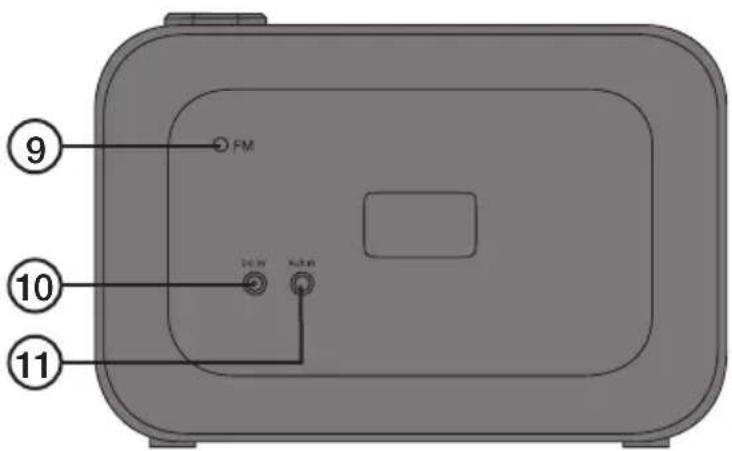
FM aerial
-
Mains adaptor socket.
-
AUX-in, 3.5 mm audio socket for external audio sources.
Operation
- Plug the mains adaptor into a wall socket and then into the socket on the back of the unit.
- Turn the clock radio on by pressing [ ◎once.
iPhone/iPod playback
- Connect your iPhone/iPod to the dock connection. Use plastic adaptor holders for better support if needed (not included). Note: Be careful not to damage your iPod/ iPhone or the dock during the docking process.
- Select a setting by pressing [MODE] until the iPhone/iPod symbol appears in the display. Playback will start automatically.
- Control playback by following the Buttons and functions section described above. No play/pause symbols appear on the device's display. These will appear on your iPhone/iPod.
Incoming calls
Playback is muted for all incoming calls. The ringtone will be heard from the device's loudspeaker instead.
Time synchronisation
The device doesn't have a backup battery for keeping time during power cuts. Instead, it synchronises time with your iPhone/iPod every time it is docked.
The device will sync to the time of the iPhone/iPad connected to it.
FM radio
- Select the setting by pressing [MODE] until the FM radio symbol appears in the display.
- Scan for radio stations by following the Buttons and functions section described above.
To save a radio station as a preset
- Select the desired radio station.
- Hold in [▶II/MEM/CLOCK] until "P 01" (preset slot 1) flashes on the display.
- Press [I◀◀/T-] or [▶▶I/T+] to select the desired preset slot (1–20).
- Press [▶II/MEM/CLOCK] to save the station as a desired preset.
- Press [▶II/MEM/CLOCK] to select between presets you have saved.
AUX
- Connect an external audio source to the 3.5 mm socket on the back of the device.
- Select the setting by pressing [MODE] until the "AUX" symbol appears in the display.
- Start playback on the external audio source.
- Adjust volume to the desired level. The volume may need to be adjusted both on the clock radio and the external device.
Setting the clock
- With the clock radio turned off, hold in [▶II/MEM/CLOCK] until the hours display begins to flash.
- Press [I◀◀/T-] or [▶▶I/T+] to set the hours. Press [▶II/MEM/CLOCK] again to confirm.
- The minutes display will then begin flashing. Press [I◀◀/T-] or [▶▶I/T+] to set the minutes. Press [▶II/MEM/CLOCK] again to confirm and return to normal time display.
Setting the alarm
- With the clock radio turned off, hold in [VOL-/ALARM] until the hours display begins and the clock symbol begins to flash. The alarm type symbol will also show. Press [I◄◄/T-] or [►►I/T+] to set the hours. Press [VOL-/ALARM] again to confirm.
- The minutes display will begin flashing. Press [I◀◀/T-] or [▶▶I/T+] to set the minutes. Press [VOL-/ALARM] again to confirm.
- The alarm type symbol will then begin to flash. Press [I◄◄/T-] or [►►I/T+] to select the type/source of the alarm e.g. from the alarm clock, FM radio or your iPhone/iPod. Press [VOL-/ALARM] again to confirm.
- To activate or deactivate the alarm, press [VOL-/ALARM] twice in quick succession.
Snooze
Press [SNOOZE] when the alarm sounds. The alarm will pause for nine minutes and then sound again. If [💡] is pressed to turn off the alarm, the alarm will repeat at the same time on the following day.
Sleep timer
Press [SNOOZE] to set the sleep timer for 120, 90, 60, 30, 15 minutes or OFF.
Display backlight
With the clock radio turned off, press [SNOOZE] to set the backlight setting. Three settings are available.
Care and maintenance
Clean the product using a lightly moistened cloth. Only use mild cleaning agents, never solvents or corrosive chemicals.
Troubleshooting guide
| The clock radio will not switch on. | Check that the mains adaptor is connected properly to both the clock radio and wall socket.Is the wall socket live?Check that the mains adaptor is not damaged in any way. |
| No sound. Check the volume. | Make sure that the right source is selected e.g. that the iPhone/iPod is showing when you wish to listen from your iPhone/iPod.Have you activated the pause function on the clock radio, on your iPhone/iPod or on any connected external device? |
Disposal
This product should be disposed of in accordance with local regulations. If you are unsure how to proceed, contact your local authority.
Specifications
Size 140 × 110 × 95 ~mm
| Art.nr 18-8286 | Modell IP19 |
| 18-8287 | IP19 |
| 18-8288 | IP19 |
| 38-4790 | IP19 |
| 38-4791 | IP19 |
| 38-4792 IP19 |
| Art.nr. 18-8286 | Modell | IP19 |
| 18-8287 | IP19 | |
| 18-8288 | IP19 | |
| 38-4790 | IP19 | |
| 38-4791 | IP19 | |
| 38-4792 | IP19 |
Bruk
| Tuotenro 18-8286 | Malli IP19 |
| 18-8287 | IP19 |
| 18-8288 | IP19 |
| 38-4790 | IP19 |
| 38-4791 | IP19 |
| 38-4792 IP19 |
| 18-8287 | IP19 |
| 18-8288 | IP19 |
| 38-4790 | IP19 |
| 38-4791 | IP19 |
| 38-4792 | IP19 |
Postal 10 – 13 Market Place
Kingston Upon Thames
Surrey
KT1 1JZ
Deutschland
- Clock Radio Docking Station for iPhone/iPod
- Safety
- Product description
- Buttons and functions
- Operation
- iPhone/iPod playback
- Incoming calls
- Time synchronisation
- FM radio
- To save a radio station as a preset
- AUX
- Setting the clock
- Setting the alarm
- Snooze
- Sleep timer
- Display backlight
- Care and maintenance
- Troubleshooting guide
- Disposal
- Specifications
- Bruk
- Deutschland
Brand : Clas Ohlson
Model : IP19
Category : Alarm clock radio