
LXC DD18-2 - Drill Cocraft - Free user manual and instructions
Find the device manual for free LXC DD18-2 Cocraft in PDF.


| Product Type | Cordless Drill |
| Model | LXC DD18-2 |
| Brand | Cocraft |
| Voltage | 18 V |
| Battery Type | Li-Ion |
| Chuck Type | Keyless |
| Chuck Capacity | 1.5 - 13 mm |
| Max Drilling Diameter (Steel) | 13 mm |
| Max Drilling Diameter (Wood) | 35 mm |
| No-Load Speed | 0 - 550 / 0 - 2000 rpm |
| Max Torque | 45 Nm |
| Number of Torque Settings | 20 + 1 drill mode |
| Weight (without battery) | 1.2 kg |
| Dimensions (L x H x W) | 210 x 200 x 65 mm |
| Power Source | Battery (18 V Li-Ion) |
| Main Functions | Drilling, Screwdriving, Hammer drilling (if model variant) |
| Forward/Reverse | Yes |
| Variable Speed Trigger | Yes |
| LED Work Light | Yes |
| Belt Clip | Yes |
| Cleaning | Wipe with dry cloth; keep ventilation slots clear |
| Maintenance | Regularly check chuck and carbon brushes; replace if worn |
| Safety Features | Lock-on button, safety switch, overload protection |
| Spare Parts Availability | Contact authorized service center; battery, chuck, brushes available |
Frequently Asked Questions - LXC DD18-2 Cocraft
User questions about LXC DD18-2 Cocraft
0 question about this device. Answer the ones you know or ask your own.
Ask a new question about this device
Download the instructions for your Drill in PDF format for free! Find your manual LXC DD18-2 - Cocraft and take your electronic device back in hand. On this page are published all the documents necessary for the use of your device. LXC DD18-2 by Cocraft.
USER MANUAL LXC DD18-2 Cocraft
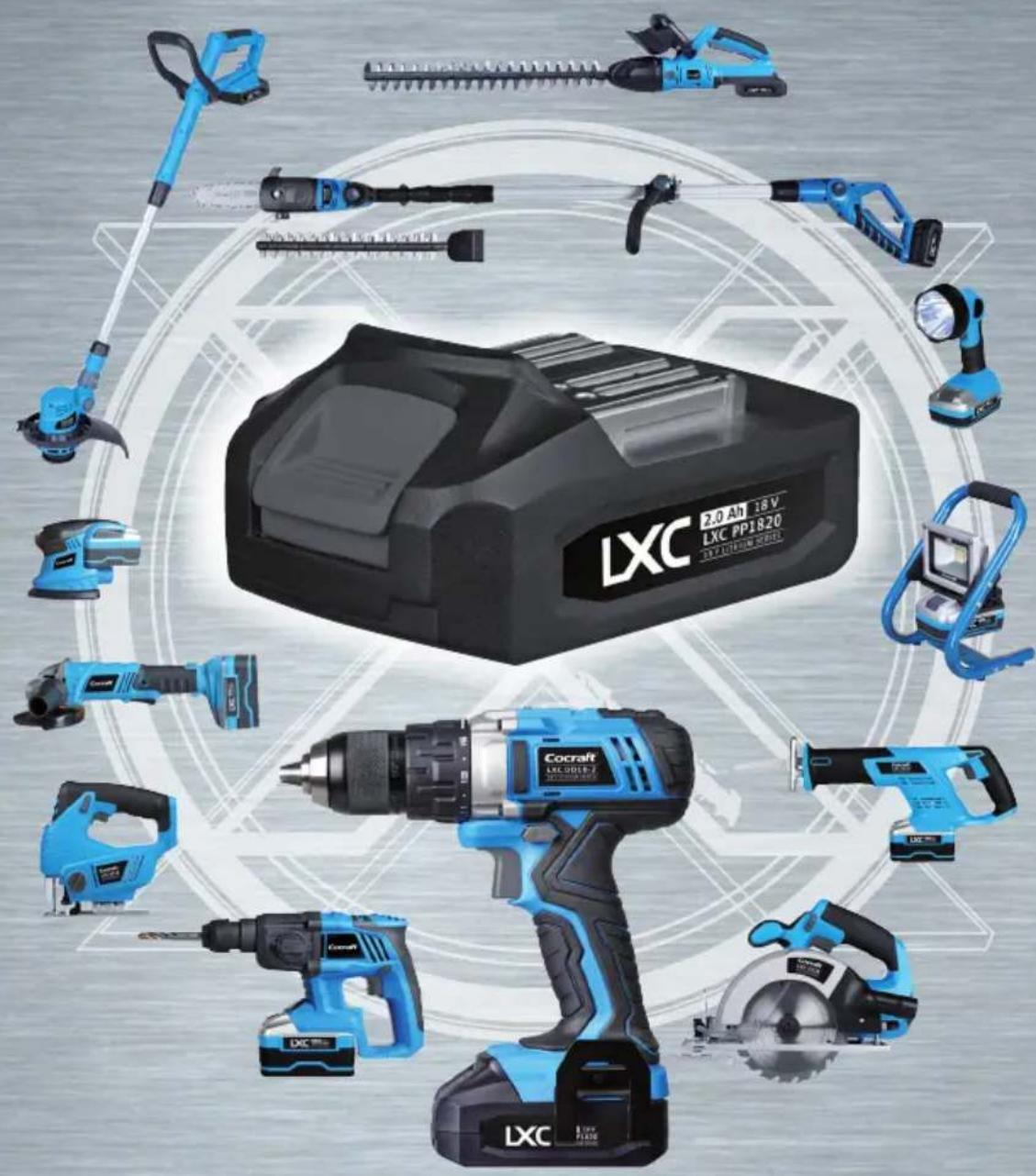
Cocraft LXC is a tool system incorporating lithium-ion technology for an entire series of Cocraft power tools. A single universal battery and charger is all that is needed to power the entire series.

LITHIUM XROSS CONNECT

Important!
Read the entire instruction manual carefully and make sure that you fully understand it before you use the equipment. Keep the manual for future reference.
Viktig information:
natural_image
Blue and black Cocrift LXC DD18-2 EV Ladder Series electric drill (no visible text or symbols on the device body)Art.no Model
18-3580
40-9504
DJC159SZ-180-UK
DJC159SZ-180
Ver. 20160204
Original instructions
Bruksanvisning i original
Originalbruksanvisning
Postal 10 - 13 Market Place
Kingston Upon Thames
Surrey
KT1 1JZ
DEUTSCHLAND
Please read the entire instruction manual before using the product and then save it for future reference. We reserve the right for any errors in text or images and any necessary changes made to technical data. If you have any questions concerning technical problems please contact our Customer Services.
Safety
General Power Tool Safety Warnings - Personal Safety
WARNING! Read all safety warnings and all instructions. Failure to follow the warnings and instructions may result in electric shock, fire and/or serious injury.
SAVE ALL WARNINGS AND INSTRUCTIONS FOR FUTURE REFERENCE.
The term "power tool" in the warnings refers to your mains-operated (corded) power tool or battery-operated (cordless) power tool.
1) Work area safety
a) Keep work area clean and well lit. Cluttered or dark areas invite accidents.
b) Do not operate power tools in explosive atmospheres, such as in the presence of flammable liquids, gases or dust. Power tools create sparks which may ignite the dust or fumes.
c) Keep children and bystanders away while operating a power tool. Distractions can cause you to lose control.
2) Electrical safety
a) Power tool plugs must match the outlet. Never modify the plug in any way. Do not use any adapter plugs with earthed (grounded) power tools. Unmodified plugs and matching outlets will reduce risk of electric shock.
b) Avoid body contact with earthed or grounded surfaces, such as pipes, radiators, ranges and refrigerators. There is an increased risk of electric shock if your body is earthed or grounded.
c) Do not expose power tools to rain or wet conditions. Water entering a power tool will increase the risk of electric shock.
d) Do not abuse the cord. Never use the cord for carrying, pulling or unplugging the power tool. Keep cord away from heat, oil, sharp edges or moving parts. Damaged or entangled cords increase the risk of electric shock.
e) When operating a power tool outdoors, use an extension cord suitable for outdoor use. Use of a cord suitable for outdoor use reduces the risk of electric shock.
f) If operating a power tool in a damp location is unavoidable, use a residual current device (RCD) protected supply. Use of an RCD reduces the risk of electric shock.
3) Personal safety
a) Stay alert, watch what you are doing and use common sense when operating a power tool. Do not use a power tool while you are tired or under the influence of drugs, alcohol or medication. A moment of inattention while operating power tools may result in serious personal injury.
b) Use personal protective equipment. Always wear eye protection. Protective equipment such as dust mask, non-skid safety shoes, hard hat, or hearing protection used for appropriate conditions will reduce personal injuries.
c) Prevent unintentional starting. Ensure the switch is in the off-position before connecting to power source and/or battery pack, picking up or carrying the tool. Carrying power tools with your finger on the switch or energising power tools that have the switch on invites accidents.
d) Remove any adjusting key or wrench before turning the power tool on.
A wrench or a key left attached to a rotating part of the power tool may result in personal injury.
e) Do not overreach. Keep proper footing and balance at all times. This enables better control of the power tool in unexpected situations.
f) Dress properly. Do not wear loose clothing or jewellery. Keep your hair, clothing and gloves away from moving parts. Loose clothes, jewellery or long hair can be caught in moving parts.
g) If devices are provided for the connection of dust extraction and collection facilities, ensure these are connected and properly used. Use of dust collection can reduce dust related hazards.
4) Power tool use and care
a) Do not force the power tool. Use the correct power tool for your application.
The correct power tool will do the job better and safer at the rate for which it was designed.
b) Do not use the power tool if the switch does not turn it on and off. Any power tool that cannot be controlled with the switch is dangerous and must be repaired.
c) Disconnect the plug from the power source and/or the battery pack from the power tool before making any adjustments, changing accessories, or storing power tools. Such preventive safety measures reduce the risk of starting the power tool accidentally.
d) Store idle power tools out of the reach of children and do not allow persons unfamiliar with the power tool or these instructions to operate the power tool. Power tools are dangerous in the hands of untrained users.
e) Maintain power tools. Check for misalignment or binding of moving parts, breakage of parts and any other condition that may affect the power tool's operation. If damaged, have the power tool repaired before use.
Many accidents are caused by poorly maintained power tools.
f) Keep cutting tools sharp and clean. Properly maintained cutting tools with sharp cutting edges are less likely to bind and are easier to control.
g) Use the power tool, accessories and tool bits, etc. in accordance with these instructions, taking into account the working conditions and the work to be performed. Use of the power tool for operations different from those intended could result in a hazardous situation.
5) Battery tool use and care
a) Recharge only with the charger specified by the manufacturer. A charger that is suitable for one type of battery pack may create a risk of fire when used with another battery pack.
b) Use power tools only with specifically designated battery packs. Use of any other battery packs may create a risk of injury and fire.
c) When battery pack is not in use, keep it away from other metal objects, like paper clips, coins, keys, nails, screws or other small metal objects, that can make a connection from one terminal to another. Shorting the battery terminals together may cause burns or a fire.
d) Under abusive conditions, liquid may be ejected from the battery; avoid contact. If contact accidentally occurs, flush with water. If liquid contacts eyes, additionally seek medical help. Liquid ejected from the battery may cause irritation or burns.
6) Service
a) Have your power tool serviced by a qualified repair person using only identical replacement parts. This will ensure that the safety of the power tool is maintained.
Drill Safety Warnings
a) Use auxiliary handle(s), if supplied with the tool. Loss of control can cause personal injury.
b) Hold power tool by insulated gripping surfaces, when performing an operation where the cutting accessory may contact hidden wiring.
Cutting accessory contacting a "live" wire may make exposed metal parts of the power tool "live" and could give the operator an electric shock.
Safety Warnings for battery pack
a) Do not dismantle, open or shred cells or battery pack.
b) Do not short-circuit a battery pack. Do not store battery packs haphazardly in a box or drawer where they may short-circuit each other or be short-circuited by conductive materials. When battery pack is not in use, keep it away from other metal objects, like paper clips, coins, keys, nails, screws or other small metal objects, that can make a connection from one terminal to another. Shorting the battery terminals together may cause burns or a fire.
c) Do not expose battery pack to heat or fire. Avoid storage in direct sunlight.
d) Do not subject battery pack to mechanical shock.
e) In the event of battery leaking, do not allow the liquid to come into contact with the skin or eyes. If contact has been made, wash the affected area with copious amounts of water and seek medical advice.
f) Seek medical advice immediately if a cell or battery pack has been swallowed.
g) Keep battery pack clean and dry.
h) Wipe the battery pack terminals with a clean dry cloth if they become dirty.
i) Battery pack needs to be charged before use. Always refer to this instruction and use the correct charging procedure.
j) Do not maintain battery pack on charge when not in use.
k) After extended periods of storage, it may be necessary to charge and discharge the battery pack several times to obtain maximum performance.
I) Battery pack gives its best performance when it is operated at normal room temperature (20 ± 5 °C).
m) When disposing of battery packs, keep battery packs of different electrochemical systems separate from each other.
n) Recharge only with the specified charger. Do not use any charger other than that specifically provided for use with the equipment.
A charger that is suitable for one type of battery pack may create a risk of fire when used with another battery pack.
o) Do not use any battery pack which is not designed for use with the equipment.
p) Keep battery pack out of the reach of children.
q) Retain the original product literature for future reference.
r) Remove the battery from the equipment when not in use.
s) Dispose of properly.
General safety instructions for batteries and chargers
- Never attempt to dismantle a battery.
- Never store a battery in direct sunlight or at temperatures above 40 °C.
- Only charge the battery when the ambient temperature is between +5 and 40 °C.
- Never expose the battery or charger to water.
Vibration
- The measurement of the vibration emission level declared in this instruction manual has been carried out in accordance with a standardised test method described in EN 60745 and can be used for comparing one power tool with another.
- The measurement method may also be used for a preliminary assessment of vibration exposure.
- The declared vibration emission level applies when the power tool is used in accordance with this instruction manual. If however, the power tool is used for other purposes and with other accessories or has not been properly maintained, the vibration emission level could increase significantly over the total working period.
- For an exact assessment of the vibration exposure, the times when the tool is switched off or running idle should also be taken into account. This significantly reduces the vibration exposure over the total working period. Decide upon safety measures to protect the operator from the effects of vibration during all types of use.
Product safety symbols

Read the entire instruction manual.

Always use safety glasses.

Always use ear protection.

For indoor use only.
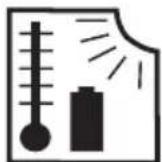
max 50 °C

Protect the battery against heat, e. g., against continuous intense sunlight, fire, water, and moisture. Danger of explosion.
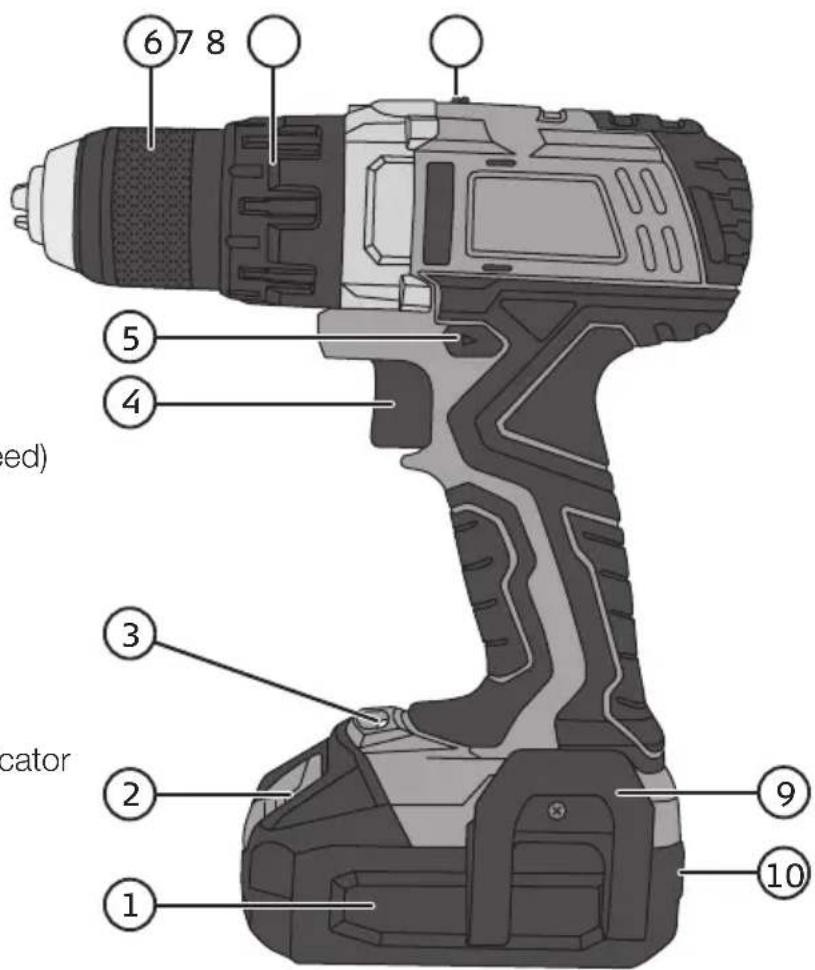
Product description
- 18 V 2 Ah battery
- Battery release button
- Light
- Power trigger (variable speed)
- Forward/reverse selector
- Keyless chuck
- Torque adjustment ring
- Gear selector
- Belt clip
- Battery charge status indicator
Functions
Power trigger
Select forward or reverse using the rotation selector (5). The rotation selector also has a middle setting which locks the power trigger. If the selector is set to this middle position, the drill will not start. The drill/driver is started and stopped by squeezing or releasing the power trigger (4).
The drill/driver is equipped with a variable speed control, which makes it extremely practical for driving screws. The more the power trigger is squeezed, the higher the speed of the chuck.
Light
The drill/driver is equipped with a light (3) which is positioned close to the battery so that it can light up the work area without being obscured by the chuck. The light comes on when the power trigger is squeezed and goes off when the power trigger is released.
Battery charge status indicator
The battery has a charge status indicator (10) consisting of 3 LEDs and which is activated by pressing a button.
When the battery is fully charged to 100 %, all three LEDs, green, yellow and red will shine. At 80 % capacity the green LED will go out. When only 20 % of the battery capacity remains the yellow LED will go out and only the red LED will shine.
If none of the LEDs shines, the battery is completely discharged and needs charging.
Screwdriver mode
Use the torque adjustment ring (7) to set a suitable torque setting. The correct torque setting will disengage the drive at the preset torque to prevent screws from being over-tightened or driven in too far. The setting should be based on the type and size of screw and the material being screwed into. Always start at the lowest setting and increased in increments to find the correct setting.
Drill mode
Set the ring (7) to drill mode.
High / Low gear
The gear selector (8) has two settings: Position 1: 0–400 rpm, position 2: 0–1500 rpm.
Charging
Note: The battery needs to be charged fully before initial use.
- Remove the battery from the drill/driver by pressing the battery release button (2) and pulling out the battery. If the battery feels hot after heavy use, allow it to cool properly before charging it.
- Connect the charger to a wall socket. The green LED will come on.
- Insert the battery into the charger. Whilst the battery is charging, the green LED will shine steadily and the red LED will flash once per second. (Should the battery be fully charged when it is put into the charger, nothing will happen i.e. the green LED will keep shining steadily and the red LED will remain off).
- Once charging is complete, press the battery release catch and remove it from the charger.
The charger indicates the charging status as follows
- Steady green light and red light off: The charger is connected to the mains.
- Red light flashing once per second and steady green light: Charging is in progress.
- Steady green and red light: The battery has been fully charged.
- Red light flashing three times per second and steady green light: Faulty battery.
- The charging time for a 2.0 Ah battery is approx. 55 min, and for a 4.0 Ah battery approx. 105 min.
- The battery may become warm during charging. This is completely normal.
- The battery and charger function best at normal room temperature. Do not charge the battery in direct sunlight or in temperatures below 5 °C. The temperature range for charging is 5–40 °C.
- When the battery becomes discharged, the electronics of the battery will turn the drill off automatically.
- For long-term storage (months) the battery should first be fully charged.
Overload protection and other safety features
The drill/driver and its battery have a number of safety features that prevent damage to the machine and battery during use.
- During short high-load situations the overload protection may turn off the drill/driver and battery. This protection resets automatically. Release the trigger, wait a few seconds, ensure that there is no-load and restart the drill. The drill/driver should now function normally again.
- During high-load situations for an extended period of time the overheating protection will turn off the drill/driver and battery. Self-resetting once the drill/driver returns to normal operating temperature. Let the machine cool properly before trying to restart it. Adverse temperatures can occur in direct sunlight and should therefore be avoided.
- The battery has low-voltage protection which comes into effect when the battery becomes discharged. The low-voltage protection turns off the machine automatically and the battery should then be recharged.
Changing drill and screwdriver bits
The drill/driver has a keyless chuck which enables drill or screwdriver bits to be changed with one hand. Twist the chuck to the left to tighten, to the right to untighten. Make sure that the bit sits centred and secured in the chuck.
Drilling tips and advice
- When drilling into slippery materials, like tiles, you should place a strong piece of tape on the area in which you wish to drill to prevent the bit from wandering.
- When drilling into metal you should first use a centre punch to make a small indentation at the spot where you wish to drill. This indentation will help hold the bit in place and prevents it from wandering when you drill.
- When drilling into metal you should also use cutting oil to assist in drilling and to preserve the machine and drill bit.
• Always use a clamp or vice to hold the workpiece. - When drilling into walls, make sure not to damage water pipes, electricity cables or gas pipes.
Care and maintenance
• Always keep the motor ventilation openings free from dust and debris.
- Clean the product using a lightly moistened cloth. Only use mild cleaning agents, never solvents or corrosive chemicals.
- For long-term storage (months) the battery should first be fully charged.
Troubleshooting guide
| Problem Possible cause Solution | ||
| The machine does not start. | Flat/discharged battery. Recharge the battery. | |
| The battery is overheated. Let the battery cool down. | ||
| Worn brushes. Contact our Customer Services. | ||
| Faulty power trigger. | ||
| The machine is slow and/or shuts off. | Blunt or damaged drill bit. Replace drill bit. | |
| Too much pressure applied. Decrease applied pressure. | ||
| Flat/discharged battery. Recharge the battery. | ||
| The battery is overheated. Let the battery cool down. | ||
| The motor is overheated. Let the machine cool down. | ||
| Unusual sounds and/or strong vibrations. | The drill/screwdriver bit is not centred or incorrectly fitted. | Make sure that the drill/screwdriver bit is centred, correctly inserted and securely fixed. |
| Sparks in the motor. | Faulty brushes. Contact our Customer Services. | |
| Winding short circuited. | ||
| Dirty commutator. | ||
Responsible disposal
This symbol indicates that this product should not be disposed of with general household waste. This applies throughout the entire EU. In order to prevent any harm to the environment or health hazards caused by incorrect waste disposal, the product must be handed in for recycling so that the material can be disposed of in a responsible manner. When recycling your product, take it to your local collection facility or contact the place of purchase. They will ensure that the product is disposed of in an environmentally sound manner.
Specifications
No-load speed 0–400/1500 rpm
Battery 18 V 2.0 Ah lithium-ion LXC series
(4.0 Ah battery available as an accessory)
Torque settings 15 plus a drill setting, max 45 Nm
Charging time approx. 55 mins for 2.0 Ah battery / 105 mins for 4.0 Ah battery
Sound level LpA: 70.7 dB(A), uncertainty KpA: 3 dB(A)
LwA: 81.7 dB(A), uncertainty KwA: 3 dB(A)
Vibration value a 0.896 m/s ^2 , K: 1.5 m/s ^2
a_h,D 1.393 m/s ^2 , K: 1.5 m/s ^2 (Drilling in metal)
Weight 1.6 kg with 2.0 Ah battery or 1.9 kg with 4.0 Ah battery
Skruvdragare
Art.nr 18-3580 Modell DJC159SZ-180-UK
40-9504
DJC159SZ-180
ah,D 1,393 m/s², K: 1,5 m/s² (borrning i metall)
ca. 105 minutter for 4,0 Ah-batteri.
Lyd LpA: 70,7 dB(A), Unøyaktighet KpA: 3 dB(A) LwA: 81,7 dB(A), Unøyaktighet KwA: 3 dB(A)
Vibrasjonsverdi a_h 0,896 m/s ^2 , K: 1,5 m/s ^2 a_h,D 1,393 m/s ^2 , K: 1,5 m/s ^2 (boring i metall)
Declaration of Conformity
Declares that this product complies with the requirements of the following directives and standards
Manager Technique & Quality
Insjön, Sweden, 2016-02-03
LXC
LITHIUM XROSS CONNECT
18V LITHIUM SERIES
- Important!
- Viktig information:
- DEUTSCHLAND
- Safety
- General Power Tool Safety Warnings - Personal Safety
- 1) Work area safety
- 2) Electrical safety
- 3) Personal safety
- 4) Power tool use and care
- 5) Battery tool use and care
- 6) Service
- Drill Safety Warnings
- Safety Warnings for battery pack
- General safety instructions for batteries and chargers
- Vibration
- Product safety symbols
- Product description
- Functions
- Power trigger
- Light
- Battery charge status indicator
- Screwdriver mode
- Drill mode
- High / Low gear
- Charging
- The charger indicates the charging status as follows
- Overload protection and other safety features
- Changing drill and screwdriver bits
- Drilling tips and advice
- Care and maintenance
- Troubleshooting guide
- Responsible disposal
- Specifications
- Skruvdragare
- Declaration of Conformity
- LXC
- LITHIUM XROSS CONNECT
- 18V LITHIUM SERIES
Brand : Cocraft
Model : LXC DD18-2
Category : Drill