
AirCO2ntrol 31.5000 - Multimeter TFA - Free user manual and instructions
Find the device manual for free AirCO2ntrol 31.5000 TFA in PDF.


| Product Type | CO2 Monitor / Air Quality Meter |
| Measured Parameters | CO2 concentration, Temperature, Humidity |
| CO2 Measurement Range | 0 – 9999 ppm |
| CO2 Accuracy | ±50 ppm or ±5% of reading |
| Temperature Range | 0°C to 50°C (32°F to 122°F) |
| Temperature Accuracy | ±1°C |
| Humidity Range | 20% to 90% RH |
| Humidity Accuracy | ±5% RH |
| Display | Backlit LCD |
| Power Supply | 3 x AAA batteries (included) or USB power |
| Battery Life | Approx. 18 hours (without backlight) |
| Dimensions | 140 x 70 x 25 mm (5.5 x 2.8 x 1.0 in) |
| Weight | 150 g (5.3 oz) without batteries |
| Data Logging | Up to 5000 records with date/time stamp |
| Alarm Function | Adjustable CO2 alarm with audible and visual alerts |
| Calibration | Manual calibration at 400 ppm (fresh air) or auto baseline calibration |
| Maintenance & Cleaning | Clean with a soft, dry cloth; avoid solvents |
| Safety | For indoor use only; keep away from water and heat sources |
| Spare Parts / Repairability | Batteries are user-replaceable; no other user-serviceable parts |
Frequently Asked Questions - AirCO2ntrol 31.5000 TFA
User questions about AirCO2ntrol 31.5000 TFA
0 question about this device. Answer the ones you know or ask your own.
Ask a new question about this device
Download the instructions for your Multimeter in PDF format for free! Find your manual AirCO2ntrol 31.5000 - TFA and take your electronic device back in hand. On this page are published all the documents necessary for the use of your device. AirCO2ntrol 31.5000 by TFA.
USER MANUAL AirCO2ntrol 31.5000 TFA
Air CO _2 ntrol 3000
Perfectly designed for monitoring the environment (CO2-concen trantion) in public buildings, incl. open collector
Operating Instruction 6
1. Einleitung

natural_image
Diagram of a device rear panel with labeled ports and indicators (no readable text or symbols)5. MODE Funktionen
2.2. Turn ON/OFF the ALARM
(gem. ASHRAE: American Society of Heating, Refrigeration and Air conditioning Engineers).
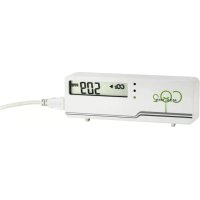
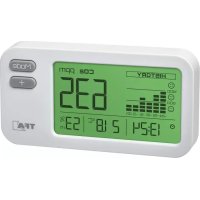
Thank you very much for purchasing one of our products. Before operating the data logger please read this manual carefully. You will get useful information for understanding all functions. AirCO 2 nroI 3000 is a portable, accurate handheld CO 2 monitor. In addition to measuring the CO _2 concentration, this device can also measure the ambient temperature. It uses NDIR technology to improve the long term stability.
2. Kindly note
- Check if the contents of the package are undamaged and complete.
- Please do not use scouring agents to clean the instrument, use a dry cloth instead. Do not allow any liquid into the interior of the device.
- Please store the measuring instrument in a dry and clean place.
- Avoid any force like shocks or pressure to the instrument.
- No responsibility is taken for irregular or incomplete measuring values and their results, the liability for subsequent damages is excluded!
Warning: suffocation! Accessories contain small parts
Caution! Risk of electrocution!
- Plug the device only into a mains socket installed within your country's electrical safety regulations and with a correct
mains voltage (see nameplate). - The mains socket must be located near the equipment and it must be easily accessible.
- Unplug the device immediately if any fault occurs.
- The instrument and the mains adapter must not come into contact with water or moisture. Only suitable for operation in dry interiors.
-
Do not use the unit if the housing or the mains adapter are damaged.
-
Keep the unit out of reach of persons (including children) who cannot fully appreciate the potential risks of handling electrical equipment.
- Only use the supplied mains adapter.
- Do not pull the plug out of the socket by its lead.
- Route the mains lead so that it does not come into contact with sharp-edged or hot objects.
! Important information on product safety! - Do not expose the device to extreme temperatures, vibration or shock.
3. Delivery contents
- CO₂ measuring device with 24-hour data logger function
- Manufacturer Testing Certificate
• Operation manual
• 6 VDC from external AC/DC adapter
4. Features at a Glance
- The built-in Data logger can store 48 sets of CO, and temperature in the past 24 hours; one log per 30 minutes.
- Max/Min mode can record the maximum and minimum concentration of CO_2 since the device has been last turned on,
- NDIR Sensor
• The Alarm mode will sound at 1000 PPM, the ASHRAE limit. The Alarm can be turned off. - open collector
-
The RCFS Mode can recover the original factory settings after the CO₂ device has been recalibrated, altered, or damaged.
-
Power Button
-
Up Button
- LED Light
- Power inlet
-
Battery Cover
-
Enter Button
- Mode Button
- Function Label
- RJ45 socket
-
AA Batteries*4
-
Down Button
- LCD Display
9.Gas Entry Hole - Housing Stand
00 1055
co.iu05"
The 2007
C.3

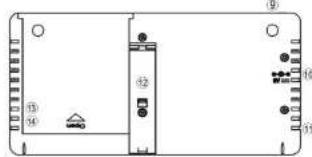
natural_image
Diagram of a device rear panel with labeled ports and indicators (no readable text or symbols)5. MODE functions
There are several Modes which we can adjust the setting parameters. These modes are Alti Mode, Alarm Mode, Outside Mode, Ucal Mode, Datalogger Mode, MaxMin Mode and rcFS Mode in sequence.
| ALTI Compensate the pressure changes with appropriate altitude of location when measure. | 1065°205° | |
| ALARM | Alarm while CO2concentration exceed one threshold. Alarm sound can be on or off. | 1065°205° |
| OUTSIDE | Modify the outside CO2concentration, for defining the ventilation rate. | 1065°205° |
| CALI | Calibrate the sensor while the reading deviates from the actual CO2concentration. | 1065°205° |
| DATALOGGER | Show the past CO2and Temperature records in the past 24 hours. | 1065°205° |
| MaxMin | Show the Max and Min CO2reading before being cleared or powered off after PowerOn. | 1065°205° |
| rcFS | Recover the factory setting, if the device cannot show accurate reading. | 1065°rcFS |
6. OPERATION INSTRUCTIONS
■ PowerOn
Press Power button(1) to turn on the device after placing 4 AA batteries into the battery holder or AC adapter plug into the DC socket. Once power on, CO₂ reading will show after 15 seconds of warm up.
■ WarmUp
It lasts approximately 1min before WARMUP disappears; all the functions will not response during warm up.
■ User Mode
After warm up, the device will stabilize and display the normal CO₂ Reading (Upper Display)- remain visible at all times.
■ Temp and Ventilation Rates (Lower Display)
The Up/Down button(4/3) allows you to scroll through the Temperature and Ventilation Modes. When pressing the Up button, the lower display will go through the following sequence: Temp°C -> Temp°F -> Vent Rate Ips -> Vent Rate cfm/p
* Note: Ips refers to Liter Per Second Per Person; cfm/p refers to Cubic Feet Per Minute Per Person
■ Operation of Mode Adjustment
1. ALTI Mode:
1.1. Press the Mode Button (5), ALTI flashes
1.2. Press Mode (5) to alter between m(meters) and ft(feet)
1.3. Press Up/Down (4/3) to adjust the altitude (Step=100m/500ft)
1.4. Press the Enter Button (2), save or leave the ALTI Mode, return to UserMode
2. ALARM Mode
2.1. Adjust the alarm level
2.1.1. Press the Mode button (5), until ALARM flashes
2.1.2. Press Enter Button(2). "CO ." icon flashes.
2.1.3. Press Up/Down(4/3) to adjust the alarm level (≥ 1,000 ppm, interval is ±100ppm; <1,000 ppm, interval is ±50 ppm)
2.1.4. Press the Enter (2), save the setting and return to UserMode.
2.2. Turn ON/OFF the ALARM
2.2.1. Press the Mode button (5), until "Speaker Icon" flashes.
2.2.2. Press Enter Button (2)
2.2.3. Press Up/Down (4/3) to turn on/off the ALARM.
2.2.4. Press the Enter (2), save the setting and return to UserMode.
3.OUTSIDE Mode
\*\* Note: Ventilation Rate
Ventilate rate represents how much air is introduced into the indoor space from the outside. Low values indicate low ventilation rates and potentially poor air quality. High levels indicate excessive ventilation and potential excessive energy usage. To obtain an accurate measurement, reading should be taken 2–3 hours after occupancy has stabilized in a space or at a peak in daily CO₂ concentrations. In indoor air quality control, CO₂ value is an indicator of ventilation rate. 400ppm (Parts Per Million) is the default CO₂ concentration outside (according to ASHRAE: American Society of Heating, Refrigeration and Air conditioning Engineers).
3.1. Press the Mode button (5), until OUTSIDE flashes
3.2. Press Enter (2), show OUTSIDE, CO, and PPM flash Press Up/Down (4/3) to adjust the reading
3.3. Press the Enter (2), save the setting and return to UserMode. After modification, the VENT Rate will change
4. CALI Mode
The CO2 monitor has been calibrated in the factory and should recalibrate every 12 months with a specified concentration of CO2 . Sensor drift usually occurs in linearity. Please follow below steps.
4.1. If battery icon shows low power, please replace new batteries or use AC adapter
4.2. Press the Mode button (5), until CALI flashes
4.3. Press Enter (2), CALI shows on display
4.4. Adjust the lower display to ambient CO _2 value by Up/Down (4/3) Button.
4.5. Press Mode button (5) more than 10 sec., CALIBRATING flashes. Calibration will be done after 5 min and LCD will
appear "PASS". If LCD appear "FAIL", please calibrate once again.
4.6. Press Enter (2), return to UserMode
5. DATA LOGGER Mode
AirCO 2 ntrl 3000 has a built-in datalogger, which can provide users the past CO 2 and temperature readings within the past 24 hours.
5.1. Press the Mode button (5), until DATALOGGER flashes
5.2. Press Enter (2).CO . and Temperature show up
Press Up/Down (4/3) to page up/down the reading.
5.3. Press the Enter (2), return to UserMode
6. MaxMin Mode
AirCO 2 ntrol 3000 has a built-in MaxMin mode, which can provide users the Maximum and Minimum CO 2 readings since the device has last been turned on.
6.1. Press the Mode button (5), until MAX MIN flashes
6.2. Press Enter button (2), MAX and MIN CO, reading alternatively shows
6.3. "CLR" will flash if press Up/Down (4/3)
Press Enter (2).to CLEAR the MAX and MIN record
6.4. Press Mode or Enter (5), leave rcFS Mode, return to UserMode
7. rcFSMode:
If user set or calibrated the sensor wrongly, you can recover the factory setting
7.1. Press the Mode button (5), until rcFS flashes on the lower display
7.2. Press Enter (2), "no" shows on the upper display
7.3. Press Up/Down (4/3), "no" change to "yes" Press Enter (2), Factory Setting will reload, return to UserMod
7.4. Press Enter (5), leave rcFS Mode, return to UserMode;
7. SPECIFICATIONS (Preliminary Version)
Method - NDIR, Display - LCD Independent CO₂ and Temperature readings. Calculates and Displays Ventilation Rates Sample Method - Diffusion or flow through (50 \~200 ml/min)
Performance CO _2
Measurement Range: 0-3,000 ppm display
Display Resolution: 1ppm at 0\~1000ppm; 5ppm at 1001\~2000ppm; 10ppm at 2001\~3000ppm
Repeatability: ±20 ppm
Temperature Dependence: ±0.1% of reading per °C or ±2 ppm per °C, whichever is greater, referenced to 25°C
Pressure Dependence: 0.13% of reading per mm Hg (Corrected via user input for altitude)
Response Time: < 2min for 63% of step change
Warm-Up Time: < 60 seconds at 22°C
Calibration Interval: 12 months, offset adjustment using single gas at 0-1000 ppm CO _2 . Full factory calibration available
Performance - Temperature
Temperature Range: Display 32 to 122°F (0 to 50°C)
Display Resolution: 0.1°F (0.1°C)
Display Options: °F / °C, or Off. Set with Up / Down button
Response Time: 20-30 minutes (case must equilibrate with environment)
Outputs: OC: Normally Low, 100mA max. @ 24 VDC. Adjustable setpoint, factory setting is 1000ppm, hysteresis is 50ppm One RJ-45 Connector digital output
General Operating Conditions Operating Temperature: 32-122°F (0-50°C) 0-95% RH, non-condensing Storage Temperature: -4 to 140°F (-20 to 60°C)
Power Supply (two types)
Battery type:
External:
Two power supply types
Alkaline, AA* 4 (80 hours)
6 VDC from external AC/DC adapter which is included in package (Use speci-
fied AC adapter only)
Power Requirement 160 mA Peak, 15 mA average from 6V
Input: AC 100\~240V, 50/60Hz, 0.18A
Output: DC 6.0V, 0.5A, 3.0W
Average active efficiency: 76,72%
Noload power consumption: 0.06W
Dimensions/ Weight (including batteries):
24.3×81.1×165 mm (0.96×3.19×6.50 inch) / 273.6 grams (9.65 oz)

CAUTION
The device can be supplied either by batteries or an AC adapter.
DO NOT install batteries and plug in an AC adapter at the same time.
LCD ERROR MESSAGES:
The device incorporates visual diagnostic messages as follows:

Error 3, it is displayed when the temperature being measured is outside of the measurement range.

Error 5\~6, it is necessary to reset the device. To reset it, turn the instrument off, remove the battery and wait for a

minimum of one minute, reinsert the battery and turn on. If the error message remains please contact the Service
Department for further assistance.
8. Explanation of symbols

UK This sign certifies that the product meets the requirements of the EEC directive and has been tested according to
the specified test methods.
9. Waste disposal
This product and its packaging have been manufactured using high-grade materials and components which can be recycled and reused. This reduces waste and protects the environment. Dispose of the packaging in an environmentally friendly manner using the collection systems that have been set up.
Disposal of the electrical device: Remove non-permanently installed batteries and rechargeable batteries from the device and dispose of

them separately. This product is labelled in accordance with the EU Waste Electrical and Electronic Equipment Directive (WEEE).
This product must not be disposed of in ordinary household waste. As a consumer, you are required to take end-of-life devices to
a designated collection point for the disposal of electrical and electronic equipment, in order to ensure environmentally-compatible
disposal. The return service is free of charge. Observe the current regulations in place!
Disposal of the batteries: Batteries and rechargeable batteries must never be disposed of with household waste. They contain pollutants such

as heavy metals, which can be harmful to the environment and human health if disposed of improperly, and valuable raw materials
such as iron, zinc, manganese or nickel that can be recovered from waste. As a consumer, you are legally obliged to hand in used
batteries and rechargeable batteries for environmentally friendly disposal at retailers or appropriate collection points in accordance with national or local regulations. The return service is free of charge. You can obtain addresses of suitable collection points from your city council or local authority.
The names for the heavy metals contained are: Cd = cadmium, Hg = mercury, Pb = lead. Reduce the generation of waste from batteries by using batteries with a longer lifespan or suitable rechargeable batteries. Avoid littering the environment and do not leave batteries or battery-containing electrical and electronic devices lying around carelessly. The separate collection and recycling of batteries and rechargeable batteries make an important contribution to relieving the impact on the environment and avoiding health risks.
WARNING! Damage to the environment and health through incorrect disposal of the batteries!
DOSTMANN electronic GmbH


- Air CO _2 ntrol 3000
- Einleitung
- MODE Funktionen
- Turn ON/OFF the ALARM
- Kindly note
- Warning: suffocation! Accessories contain small parts
- Delivery contents
- Features at a Glance
- MODE functions
- OPERATION INSTRUCTIONS
- ■ PowerOn
- ■ WarmUp
- ■ User Mode
- ■ Temp and Ventilation Rates (Lower Display)
- ■ Operation of Mode Adjustment
- ALTI Mode:
- ALARM Mode
- Adjust the alarm level
- 3.OUTSIDE Mode
- \*\* Note: Ventilation Rate
- CALI Mode
- DATA LOGGER Mode
- MaxMin Mode
- rcFSMode:
- SPECIFICATIONS (Preliminary Version)
- Performance CO _2
- Performance - Temperature
- Power Supply (two types)
- CAUTION
- LCD ERROR MESSAGES:
- Explanation of symbols
- Waste disposal
- DOSTMANN electronic GmbH
Brand : TFA
Model : AirCO2ntrol 31.5000
Category : Multimeter