
IT-400DTM - Loudspeaker Monacor - Free user manual and instructions
Find the device manual for free IT-400DTM Monacor in PDF.


| Product Type | Passive PA Speaker |
| Model | IT-400DTM |
| Brand | Monacor |
| Power Handling (RMS) | 400 W |
| Impedance | 8 Ω |
| Frequency Response | 50 Hz – 20 kHz |
| Sensitivity (1W/1m) | 98 dB |
| Dimensions (H x W x D) | 600 x 380 x 320 mm |
| Weight | 18 kg |
| Driver Configuration | 15" woofer + 1" compression driver |
| Input Connectors | 2 x Speakon NL4 |
| Enclosure Material | Plywood with black paint |
| Grille Material | Steel with acoustic foam |
| Pole Mount Socket | Yes, 35 mm |
| Flying Points | M8 threaded inserts |
| Operating Temperature | 0°C to 40°C |
| Storage Temperature | -20°C to 60°C |
| Humidity Range | 10% to 90% non-condensing |
| Maintenance | Clean with dry cloth; do not use solvents |
| Safety | Do not expose to rain or moisture; use proper rigging |
| Spare Parts Availability | Contact Monacor for replacement drivers or grille |
| Repair | Refer to qualified service personnel |
Frequently Asked Questions - IT-400DTM Monacor
User questions about IT-400DTM Monacor
0 question about this device. Answer the ones you know or ask your own.
Ask a new question about this device
Download the instructions for your Loudspeaker in PDF format for free! Find your manual IT-400DTM - Monacor and take your electronic device back in hand. On this page are published all the documents necessary for the use of your device. IT-400DTM by Monacor.
USER MANUAL IT-400DTM Monacor
IT-400DTM
Bestellnummer • Order Number 1000811
BEDIENUNGSANLEITUNG
INSTRUCTION MANUAL
https://www.audinate.com/products/software/dante-controller
https://www.audinate.com/learning/technical-documentation
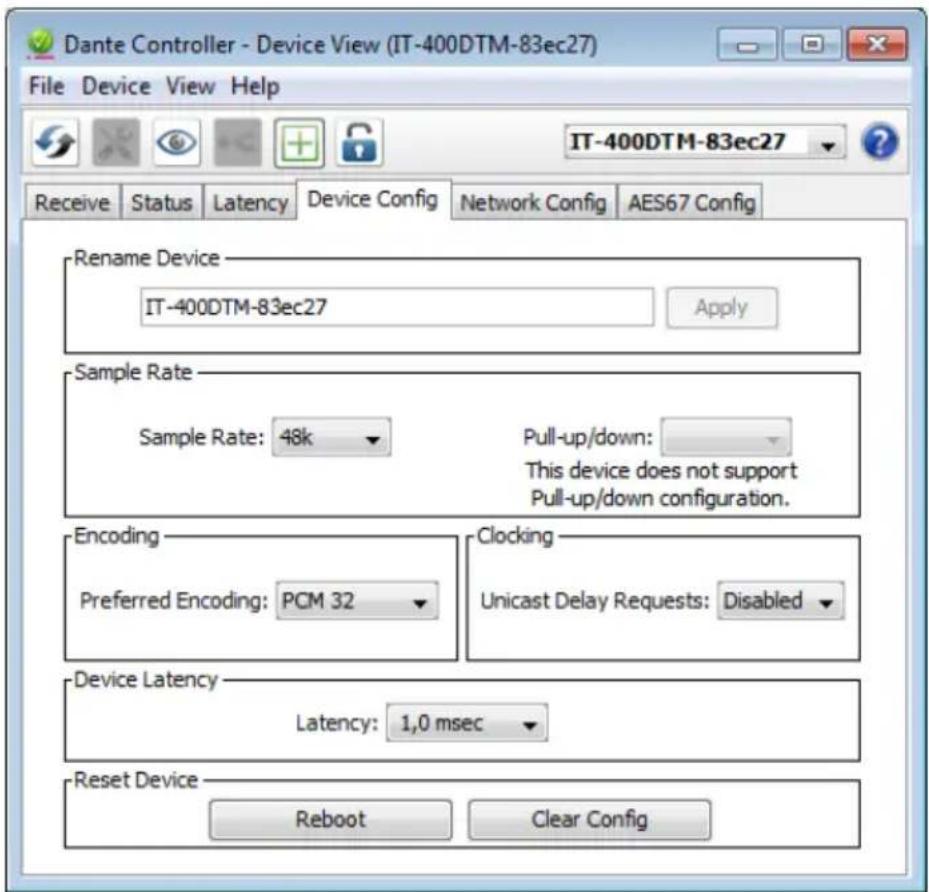
③ „Device View“ vom IT-400DTM
Abtastrate: 44,1–96 kHz
Datenschnittstelle
Active Music Horn for Dante Networks
These instructions are intended for audio system installers with knowledge of network technology. Please read the instructions carefully prior to operation and keep them for later reference.
1 Applications
This active horn speaker is suited for versatile PA applications, especially for fixed installation (e. g. for background sound and announcements). Due to its weatherproof ABS housing (IP 66), the speaker is also suitable for outdoor applications.
The speaker is designed as a 2-way system and features an Ethernet interface that allows the speaker to be integrated into a Dante audio network as a receiver of audio signals. The speaker is supplied with power via the network (Power over Ethernet).
1.1 Dante
Dante, an audio network developed by the company Audinate, allows transmission of up to 512 audio channels at the same time. Dante (Digital Audio Network Through Ethernet) uses a common Ethernet standard and is based on the Internet protocol. The transmission of audio signals is uncompressed and synchronized, with minimum latency. The advantage over analog audio signal transmission is a cost-effective connection of components via standard network cables and low susceptibility to interference, even in case of long transmission paths. In addition, signal routing between components that have once been connected can be changed by software at any time. In the Dante network, devices configured as transmitters are used as signal sources. By means of the program “Dante Virtual Soundcard” from the company Audinate, computers can also be used as signal sources, e.g. to feed audio files replayed on the computer to the Dante network.
The speaker IT-400DTM is equipped with one Dante receiving channel. The receiving channel is assigned to any transmitting channel in the Dante network via the Dante configuration program "Dante Controller" (chapter 5).
2 Important Notes
The product corresponds to all relevant directives of the EU and is therefore marked with C.€
The product corresponds to the relevant UK legislation and is therefore marked with UKCA.
- Protect the product against extreme temperatures (admissible ambient temperature range: -20°C to +50°C ).
- For cleaning, only use a soft cloth, dry or slightly wet; never use aggressive detergents or chemicals.
- No guarantee claims for the product and no liability for any resulting personal damage or material damage will be accepted if the product is not correctly used, if it is not safely installed or not expertly repaired.

If the product is to be put out of operation definitively, dispose of the product in accordance with local regulations.
3 Installation
Use the mounting bracket to fasten the speaker at a suitable place. For alignment, release the locking screws of the bracket, move the speaker accordingly, and retighten the screws.
4 Connection to a Dante network
For integrating the speaker into a Dante network, knowledge of network technology is indispensable.
Use a Cat 5 cable or Cat 6 cable to connect the RJ45 jack of the speaker to an Ethernet switch that supports at least Fast Ethernet (transmission rate 100 Mbit /s) and provides PoE+ (Power over Ethernet according to the standard IEEE 802.3at-2009). For outdoor installation, use the accessories provided to make the connection cable weatherproof.
The interface of the speaker is preset to automatic address assignment; configuration via the program "Dante Controller" is possible (chapter 5.1).
Once the speaker is supplied with power, it will boot up and then be ready for operation.
5 Configuration of the Dante Network
IT-400DTM is configured as a receiver in the Dante network by means of the program "Dante Controller", available as a free download on the website of the company Audinate. The settings made via the program will be saved in the corresponding transmitters and receivers of the Dante network so that the program is only required for network configuration but not for normal operation.
Via the following Internet address, download and install the program "Dante Controller" on the computer on which the program is to run:
https://www.audinate.com/products/software/dante-controller
5.1 Configuration of the device with the Dante Controller
1) Start the Dante Controller.
2) Wait for the desired Dante transmitter and IT-400DTM to appear in the matrix (under "Receivers").
Note: If IT-400DTM or one of the devices fails to appear, the reason may be that
– the corresponding device has not been switched on
– the device is in a different subnet
- the device is not able to synchronize with the other Dante devices.
However, if one of the two last-mentioned reasons applies, the Dante device should at least appear under the tab "Device Info" or "Clock Status" in the "Network View" window. It may solve the problem to switch the device off and on again or to disconnect and reconnect the LAN connection. For further information please refer to the user manual of the Dante Controller from Audinate.
3) In the menu bar of the Dante Controller, select "Device / Device View" or use the short-cut Ctrl+D. The "Device View" window will open.
4) Select "IT-400DTM" in the drop-down menu appearing in the bar beneath the menu bar.
5) The third bar can be used to indicate information on the device and to make settings. Select the tab "Device Config" (fig. 3).
6) In the field "Rename Device", the name used for the device in the Dante network can be changed (e.g. to a specific name referring to the place of installation). Click "Apply" to confirm the change.
7) Adjust the "Sample Rate" to the desired Dante transmitter or set a different common sample rate for both devices, if required.
8) Use the tab "Network Config" to change the network settings for the Dante interface of IT-400DTM, if required.
5.2 Routing with the Dante Controller
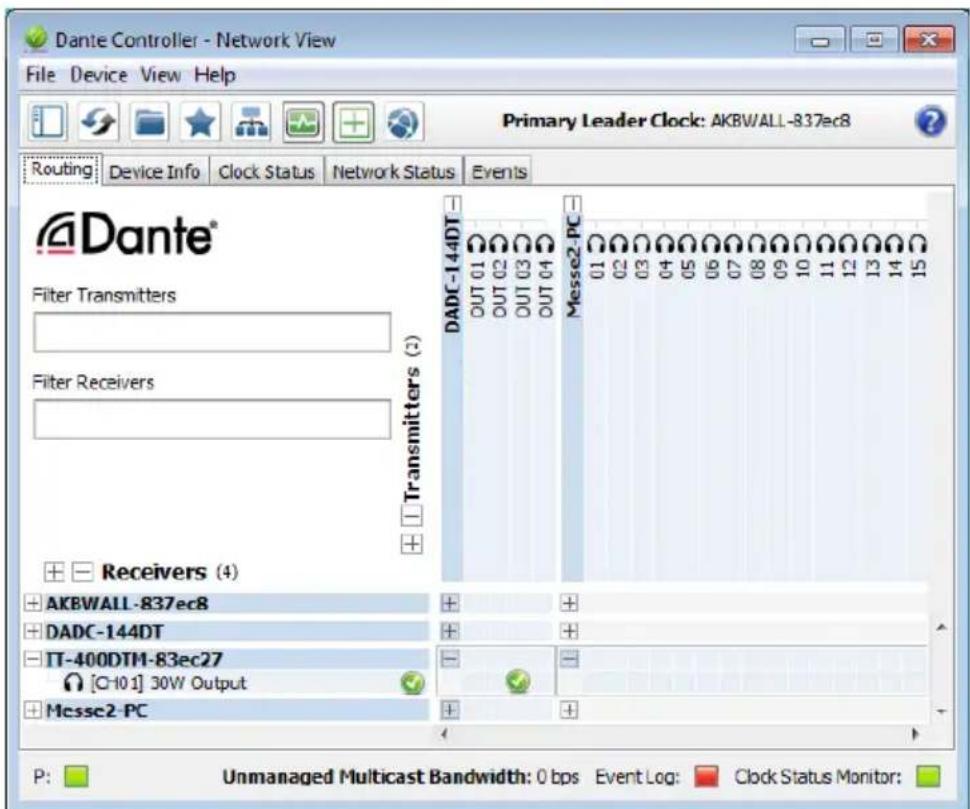
In the “Network View” window under the “Routing” tab, the transmitters of the Dante network are arranged in columns and the receivers in rows. The transmitting and receiving channels of the devices can be assigned to each other via this matrix.
1) Click on the ⊕ in the column of the desired Dante transmitter to display its transmitting channels and click on the ⊕ in the row of IT-400DTM to display its receiving channel (fig. 4).
2) Navigate from the column of the desired transmitting channel to the row of the receiving channel of IT-400DTM and click the field at the intersection point.
3) Wait for the field to show a green circle with a white check mark √.
An English user guide for the Dante Controller is available for download on the Audinate website:
https://www.audinate.com/learning/technical-documentation
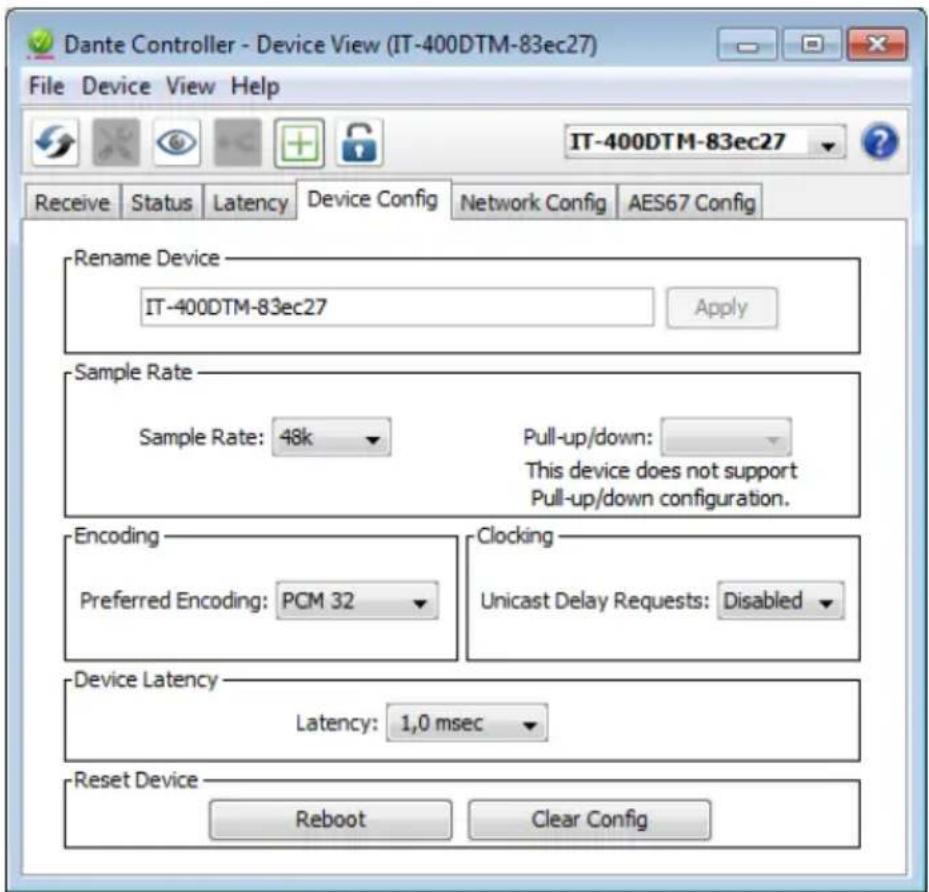
③ "Device View" of IT-400DTM

④ Audio routing from the signal source DADC-144DT to the receiver IT-400DTM
6 Level adjustment
The speaker itself has no control elements. The volume is adjusted via an audio signal from a Dante signal source (transmitter) with a corresponding digital level value.
Only set the signal level at the signal source to such a value that the sound from the speaker is not distorted.
CAUTION

Never adjust the audio system to a very high volume. Permanent high volumes may damage your hearing!
7 Specifications
System: 2-way system
Frequency range: ..... 100–20 000 Hz
Speaker configuration
Bass speaker: ..... ∅ 16 cm (6")
Tweeter: 25 mm (1")
Sensitivity: 98dB/W/m
Max. SPL: 113 dB
Radiation angle
horizontal: ......100°
vertical: 60°
Amplifier power
(nominal power): ..... 30W
Dante input signal
Number of channels: .. 1
Resolution: 16–32 bits
Sampling rate: ..... 44.1–96 kHz
Data interface
Ethernet:.... RJ45 jack
Power supply
Power over Ethernet: . . PoE+
in accordance with
IEEE 802.3at-2009
Admissible
ambient temperature: ... -20 °C to +50 °C
Housing: .... ABS
IP rating:.... IP66
Mounting bracket: ..... stainless steel
Dimensions
Width: 420 mm
Height: 335 mm
Depth: 400 mm
Weight: 6.1 kg
Subject to technical modification.


- IT-400DTM
- ACTIVE MUSIC HORN FOR DANTE NETWORKS
- 1 APPLICATIONS
- 1.1 DANTE
- 2 IMPORTANT NOTES
- 3 INSTALLATION
- 4 CONNECTION TO A DANTE NETWORK
- 5 CONFIGURATION OF THE DANTE NETWORK
- 5.1 CONFIGURATION OF THE DEVICE WITH THE DANTE CONTROLLER
- 5.2 ROUTING WITH THE DANTE CONTROLLER
- 6 LEVEL ADJUSTMENT
- 7 SPECIFICATIONS
Brand : Monacor
Model : IT-400DTM
Category : Loudspeaker