
WS 9245 - Thermostat Techno Line - Free user manual and instructions
Find the device manual for free WS 9245 Techno Line in PDF.


| Product Type | Wireless Temperature Station with Outdoor Sensor |
| Brand | Techno Line |
| Model | WS 9245 |
| Indoor Temperature Range | -9.5°C to +59.5°C (resolution 0.5°C) |
| Outdoor Temperature Range | -39.5°C to +59.9°C (resolution 0.1°C) |
| Transmission Frequency | 868 MHz |
| Maximum Transmission Range | 80 meters (open space) |
| Power Supply - Station | 2 x AA (IEC LR6, 1.5V) |
| Power Supply - Transmitter | 2 x AAA (IEC LR3, 1.5V) |
| Battery Life - Station | Approximately 24 months (alkaline) |
| Battery Life - Transmitter | Approximately 12 months (alkaline) |
| Station Dimensions (L x W x H) | 79.8 x 29 x 127 mm |
| Transmitter Dimensions (L x W x H) | 32.4 x 14.1 x 86.5 mm |
| Display | LCD with time (24h), indoor & outdoor temperature, MIN/MAX records, low battery indicator |
| Functions | Manual time setting, MIN/MAX reset, low battery warning, wall mount or table stand |
| Indoor Reading Interval | Every 20 seconds |
| Outdoor Data Reception Interval | Every 5 seconds |
| Outdoor Sensor Protection | Rain-proof casing |
| Compliance | R&TTE Directive 1999/5/EC |
Frequently Asked Questions - WS 9245 Techno Line
User questions about WS 9245 Techno Line
0 question about this device. Answer the ones you know or ask your own.
Ask a new question about this device
Download the instructions for your Thermostat in PDF format for free! Find your manual WS 9245 - Techno Line and take your electronic device back in hand. On this page are published all the documents necessary for the use of your device. WS 9245 by Techno Line.
USER MANUAL WS 9245 Techno Line
R&TTE Directive 1999/5:EC
Congratulations on purchasing this temperature station with wireless 868 MHz transmission of outdoor temperature and display of indoor temperature. With two easy to use function keys, this innovative product is ideal for use in the home or office
FEATURES:
Temperature station

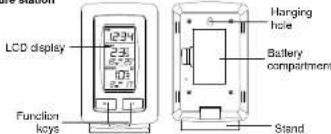
18
The Temperature Station
- Manual time setting (hour and minute display)
• Time display 24-hour time format
• Temperature display in degree - Indoor and outdoor temperature display with MIN/MAX records
- Low battery indicator
• Wireless transmission at 968 MHz
• Signal recaption intervals at 5 seconds
• Wall mounting or table standing - Wall mounting of table standing

• Remote transmission of outdoor temperature to Temperature
Station by 868 MHz signals
- Rain proof casing
• Wall mounting and table-standing
• Mounting at a sheltered place. Avoid direct rain and
sunshine
SETTING UP:
Note: this temperature station can only receive one transmitter only.
-
First, insert the batteries to the transmitter (see "How to install and replace batteries in the Temperature transmitter" below).
-
Within 30 seconds of powering up the transmitter, insert the batteries to the Temperature Station (see 'How to install and replace batteries in the Temperature station' below). Once the batteries are in place, all segments of the LCD will light up quietly. Following the indoor temperature, the time as 0:00 will be displayed. If they are not shown in LCD after 80 seconds, remove the batteries and wait for at least 60 seconds before reinserting them. Once the indoor data is displayed user may proceed to the next step.
-
After the batteries are inserted, the Temperature Station will start receiving data signal from the transmitter. The outdoor temperature should then be displayed on the Temperature station. If this does not happen after 2 minutes, the batteries will need to be removed from both units and cars from step 1.
-
In order to ensure sufficient 868 MHz transmission however, this should under good conditions be a distance no more than 80 meters between the final position of the Temperature Station and the transmitter (see notes on "Positioning" and "868 MHz Reception").
HOW TO INSTALL AND REPLACE BATTERIES IN THE TEMPERATURE STATION
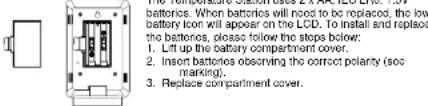
HOW TO INSTALL AND REPLACE BATTERIES IN THE TEMPERATURE TRANSMITTER
MANOMITTER
The Temperature transmitter uses 2 x AAA, IEC LR3, 1.5V batteries.
When batteries will need to be replaced, the low battery icon will serve on the LCD of the Temperature Station. To install and replace
appear on the LCD of the Temperature Station. To install and replace the batteries, please follow the steps below:
the batteries, please follow the steps below 1. Remove the battery compartment cover.
2. Insert the batteries, observing the correct polarity (see
E. Insert the ba
marking)
3. Replace the battery holder to the unit.
marking).
3. Replace the battery holder to the unit.

Note:
In the event of changing batteries in any of the units, all units need to be reset by following the setup procedures. This is because a random security code is assigned by the transmitter at start-up and this code must be received and stored by the Temperature Station in the first few minutes of power supplying.
BATTERY CHANGE
It is recommended to replace the batteries in all units regularly to ensure optimum accuracy of these units. (Battery life - see Specifications)

Please participate in the preservation of the environment. Return used batteries to an authorized depot.
FUNCTION KEYS:
The Temperature Station has only two easy to use function keys:
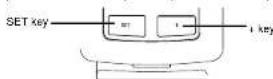
SET key
- Press and hold for about 3 seconds to enter the Manual setting mode.
+ key
- Press to make adjustment in the setting mode.
- Press and hold to reset all MIN/MAX records
LCD SCREEN AND SETTINGS:
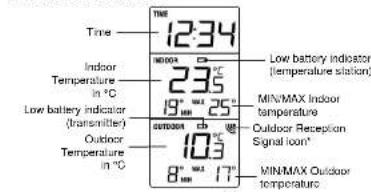
* When the signal from the transmitter is successfully received by the Temperature Station, this icon will be switched on. (If not successful, the icon will not be shown on the LCD). User can therefore easily see whether the last reception was successful ('ON' icon) or not ("OFF" icon). On the other hand, the short blinking of the icon shows that a reception is being done at that time.
MANUAL TIME SETTING:
To manually set the time of the Temperature Station:

-
Press and hold the SET key for 3 seconds to enter the manual time setting mode.
-
The hour digit of the time display will be flashing.
-
Press the + key to adjust the hour (press and hold to allow last advance). Press
-
The minute digit will be flashing. Press the + key to adjust the minute (press and
hold to allow fast advance). Press SET key once more to return to normal display.
Note:
If no buttons are pressed within approximately 8 seconds while in setting mode, the unit will return to normal operating mode.
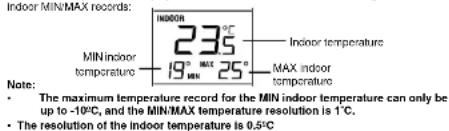
VIEWING THE INDOOR TEMPERATURE AND MIN/MAX
The indoor temperature is displayed in the second section of the LCD along with the
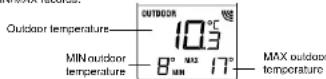
VIEWING THE OUTDOOR TEMPERATURE AND THE MIN/MAX
The outdoor temperature is displayed in the last section of the LCD along with the outdoor MIN/WAY records.
Note:
• The minimum/maximum temperature resolution is 1°C.
• The resolution of the outdoor temperature is 0.1 ^2 C
TO RESET THE MIN-MAX DATA:
The MIN/MAX temperature can be reset manually by pressing and holding the + key for about 3 seconds. This will reset all indoor and outdoor MIN/MAX temperature to current indoor and outdoor temperatures.
LOW BATTERY INDICATOR
Low battery indicator is displayed on the LCD when the batteries require changing.
868 MHz RECEPTION CHECK
The Temperature Station should receive the outdoor temperature data within a few minutes after setup. If the temperature data are not received about 2 minutes after setup (the signal reception index does not appear, please check the following points:
- The distance of the Temperature Station or transmitter should be at least 1.5 to 2
meters away from any interfering sources such as computer monitors or TV sets.
- Avoid positioning the Temperature Station onto or in the immediate proximity of metal window frame
Metal window frames.
- Using other electrical products such as headphones or speakers operating on the same signal frequency (868MHz) may prevent correct signal transmission and
receptiva
- Neighbors using electrical devices operating on the 868MHz signal frequency can also cause interference.
Note:
When the 968MHz signal is received correctly, do not re-open the battery cover of either the transmitter or the Temperature Station, as the batteries may spring free from the contacts and force a false reset. If this happens accidentally, all units must be reset (see Setting up above) otherwise transmission problems may occur. The transmission range is about 80 m from the transmitter to the Temperature Station (in open space). However, this depends on the surrounding environment and interference levels. If no reoption is possible despite the observation of these factors, all system units have to be reset (see Setting up above).
POSITIONING THE TEMPERATURE STATION:
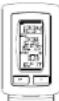
Table standing
The Temperature Station comes attached with a table stand, which provides the option of table standing the unit in addition to wall mounting.
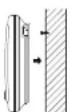
To wall mount:
Before wall mounting, please check that the outdoor temperature values
can be received from the desired locations
-
Fix a screw (not supplied) into the desired wall, leaving the head extended out by about 5mm.
-
Hang the Temperature Station of
-
Hang the Temperature Station onto the screw. Remember to ensure that it looks into place before releasing
onshore that it looks like plate before floating.
POSITIONING THE REMOTE TEMPERATURE TRANSMITTER:

The remote temperature transmitter can be placed onto any flat surface or wall mounted using the bracket which doubles as a stand or wall mount base.
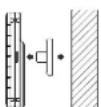
To wall mount:
- Secure the bracket onto a desired wall using the screws
and plastic anchors. - Glip the remote temperature transmitter onto the bracket.
Note: The mounting surface can affect the transmission range. If, for instance, the unit is attached to a piece of metal, it may then
we recommend not to place the unit on any metal surfaces or in any position where a large metal or highly polished surface is in the immediate vicinity (garage doors, double glazing, etc.). Before securing in place, please ensure that the Temperature Station can receive the 868MHz signal from the temperature transmitter at the positions that you wish to place them.
CARE AND MAINTENANCE:
- Extreme temperatures, vibrations and shocks should be avoided as these may cause damage to the unit and give inaccurate forecasts and readings.
- When cleaning the display and casings, use a soft damp cloth only. Do not use solvents or securing agents as they may mark the LCD and casings.
- Do not submerge the units in water. Furthermore, fix all parts in place where the units are adequately protected against moisture and rain.
- Immediately remove all low powered batteries to avoid leakage and damage.
Replace only with new batteries of the recommended type.
- Do not make any repair attempts to the unit. Return them to their original point of purchase for repair by a qualified engineer. Opening and tampering with the unit may invalidate their guarantee.
- Do not expose the units to extreme and sudden temperature changes, this may lead to rapid changes in forecasts and readings and thereby reduce their accuracy.
SPECIFICATIONS:
Temperature measuring range
Indoor : -9.5°C to +59.5°C with 0.5°C resolution
("OF.L" displayed if outside this range)
Outdoor : -39.5°C to +59.9°C with 0.1°C resolution
("OF.L" displayed if outside this range)
Indoor Temperature checking interval: every 20 seconds
Outdoor data checking interval : every
Power consumption
Temperature Station : 2 x AA, IEC LR6, 1.5V
Outdoor Temperature Transmitter : 2 x AAA, IEC LR3, 1.5V
Battery life cycle (Alkaline batteries recommended)
Temperature Station : approximately 24 months
Outdoor Temperature Transmitter: approximately 12 months
Dimensions (L x W x H)
Temperature Station : 79.8 x 29 x 127mm
Outdoor Temperature Transmitter : 32.4 x 14.1 x 86.5mm
LIABILITY DISCLAIMER:
The electrical and electronic wastes contain hazardous substances. Disposal of electronic waste in wild country and/or in unauthorized grounds strongly damages the environment.
- Please contact your local or/and regional authorities to retrieve the addresses of legal dumping grounds with selective collection.
• All electronic instruments must from now on be recycled. User shall take an active part in the reuse, recycling and recovery of the electrical and electronic waste.
- The unrestricted disposal of electronic waste may do harm on public health and the quality of environment.
As stated on the gift box and labeled on the product, reading the "User manual" is highly recommended for the benefit of the user. This product must however not be thrown in general rubbish collection points.
The manufacturer and supplier cannot accept any responsibility for any incorrect
readings and any consequences that occur should an inaccurate reading take place.
This product is designed for use in the home only as indication of the temperature and other weather data.
This product is not to be used for medical purposes or for public information. The specifications of this product may change without prior notice. This product is not a toy. Keep out of the reach of children. No part of this manual may be reproduced without written authorization of the manufacturer.
R&TTE Directive 1999/5/EC
Summary of the Declaration of Conformity: We hereby declare that this wireless transmission device does comply with the essential requirements of R&TTE Directive 1998/5/EC.

Brand : Techno Line
Model : WS 9245
Category : Thermostat