
MA 10260 - Thermostat Techno Line - Free user manual and instructions
Find the device manual for free MA 10260 Techno Line in PDF.


| Product Type | Wireless Thermo-Hygrometer Sensor for MOBILE-ALERTS System |
| Model | MA 10260 (compatible with MA10200 / MA10230) |
| Brand | Techno Line |
| Power Supply | 2x AA (LR06) alkaline batteries |
| Battery Life | Approximately 2 years |
| Temperature Measuring Range | -39.9°C to +59.9°C |
| Temperature Accuracy | ±1°C |
| Humidity Measuring Range | 20% to 99% |
| Humidity Accuracy | ±5% |
| Measurement Interval | Every 7 minutes |
| Transmission Range | Up to 100 meters in open area |
| Transmission Frequency | 868 MHz |
| Maximum Transmission Power | 4.47 dBm |
| Pairing Method | Scan QR code on sensor via MOBILE-ALERTS app |
| Required Gateway | MOBILE-ALERTS gateway (sold separately) |
| Intended Use | Indoor temperature and humidity monitoring |
| Placement | Well-ventilated area, preferably on interior side of exterior walls |
| Battery Type | AA (LR06) alkaline only |
| Disposal | Dispose of batteries and device separately from household waste at designated collection points |
| Certification | Complies with RED Directive 2014/53/EU |
Frequently Asked Questions - MA 10260 Techno Line
User questions about MA 10260 Techno Line
0 question about this device. Answer the ones you know or ask your own.
Ask a new question about this device
Download the instructions for your Thermostat in PDF format for free! Find your manual MA 10260 - Techno Line and take your electronic device back in hand. On this page are published all the documents necessary for the use of your device. MA 10260 by Techno Line.
USER MANUAL MA 10260 Techno Line
MA10200 thermo-hygrometer sensor

MOBILE-ALERTS Sensor
This is a sensor for the "MOBILE-ALERTS" system, it can be used with this system only. To use the sensor you need a MOBILE-ALERTS gateway.
Sensor set up
Open the battery compartment of the temperature sensor and put in 2x AA batteries with the correct polarity.
Add Sensor
Open the app, dashboard is displayed. Tap "Add new sensor" and scan the QR code on the back of the temperature sensor. Then set a name for the sensor.
Specifications
Batteries: 2 x mignon (LR06, AA) alkaline
Battery life: approx. 2 years
Measuring range temperature: -39.9^ to +59.9^
Accuracy: 1 °C
Measuring range humidity: 20-99%
Accuracy: 5%
Measurement intervals: 7 minutes
Transmission range: 100m (open area)
Transmission frequency: 868 MHz
Maximum transmission
power: 4.47dBm
More information and detailed instructions can be found in the app at "Info" or at www.mobile-alerts.eu
Summary of the Declaration of Conformity: We hereby declare that this device does comply with the requirements of RED Directive 2014/53/EU.
The declaration of Conformity can be found at: www.mobile-alerts.eu/technoline/doc

Old batteries do not belong into general household waste. You are obliged to return used batteries to your vendor or collection points.

Electrical devices have to be disposed separately from the general household waste. Take your old electronics to your local waste collection point or recycling centre.


Quick reference MA10230 Indoor climate station
MOBILE-ALERTS sensor
This is a sensor for the "MOBILE-ALERTS" system, it can be used with this system only. To use the sensor you need a MOBILE-ALERTS gateway.
Sensor set up
Open the battery compartment of the sensor and insert 2x AAA (LR03, Micro) batteries with correct polarity.
Add sensor
Open the app, dashboard is displayed. Tap "Add new sensor" and scan the QR code on the back of the temperature sensor. Then set a name for the sensor.
Display
The device determines in addition the current indoor temperature and humidity, the average humidity over different time periods (3h, 24h, 7 days and 30 days). This is indicated on a scale of 20 to 80% on the display and transmitted to the server.
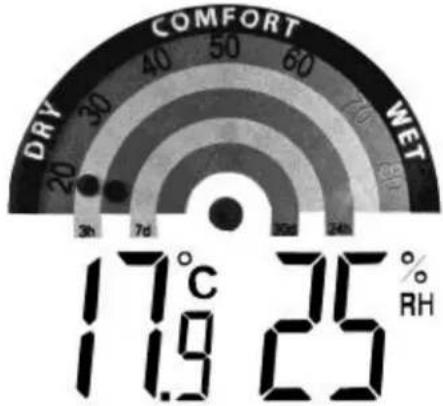
gauge
| Metric | Value | | :--- | :--- | | Temperature (°C) | 17 | | Humidity (%) | 35 | | Rainfall (RH) | 11.9 | | Drip Rate (R/W) | 25 | | DRY (Dry) | 20 | | DRY (30) | 30 | | DRY (40) | 40 | | DRY (50) | 50 | | DRY (60) | 60 | | DRY (70) | 70 | | DRY (80) | 80 | | DRY (90) | 90 | | DRY (100) | 100 | | DRY (110) | 110 | | DRY (120) | 120 | | DRY (130) | 130 | | DRY (140) | 140 | | DRY (150) | 150 | | DRY (160) | 160 | | DRY (170) | 170 | | DRY (180) | 180 | | DRY (190) | 190 | | DRY (200) | 200 | | DRY (210) | 210 | | DRY (220) | 220 | | DRY (230) | 230 | | DRY (240) | 240 | | DRY (250) | 250 | | DRY (260) | 260 | | DRY (270) | 270 | | DRY (280) | 280 | | DRY (290) | 290 | | DRY (300) | 300 | | DRY (310) | 310 | | DRY (320) | 320 | | DRY (330) | 330 | | DRY (340) | 340 | | DRY (350) | 350 | | DRY (360) | 360 | | DRY (370) | 370 | | DRY (380) | 380 | | DRY (390) | 390 | | DRY (400) | 400 | | DRY (410) | 410 | | DRY (420) | 420 | | DRY (430) | 430 | | DRY (440) | 440 | | DRY (450) | 450 | | DRY (460) | 460 | | DRY (470) | 470 | | DRY (480) | 480 | | DRY (490) | 490 | | DRY (500) | 500 | | DRY (510) | 510 | | DRY (520) | 520 | | DRY (530) | 530 | | DRY (540) | 540 | | DRY (550) | 550 | | DRY (560) | 560 | | DRY (570) | 570 | | DRY (580) | 580 | | DRY (590) | 590 | | DRY (600) | 600 | | DRY (610) | 610 | | DRY (620) | 620 | | DRY (630) | 630 | | DRY (640) | 640 | | DRY (650) | 650 | | DRY (660) | 660 | | DRY (670) | 670 | | DRY (680) | 680 | | DRY (690) | 690 | | DRY (700) | 700 | | DRY (710) | 710 | | DRY (720) | 720 | | DRY (730) | 730 | | DRY (740) | 740 | | DRY (750) | 750 | | DRY (760) | 760 | | DRY (770) | 770 | | DRY (780) | 780 | | DRY (790) | 790 | | DRY (800) | 800 | | DRY (810) | 810 | | DRY (820) | 820 | | DRY (830) | 830 | | DRY (840) | 840 | | DRY (850) | 850 | | DRY (860) | 860 | | DRY (870) | 870 | | DRY (880) | 880 | | DRY (890) | 890 | | DRY (900) | 900 | | DRY (910) | 910 | | DRY (920) | 920 | | DRY (930) | 930 | | DRY (940) | 940 | | DRY (950) | 950 | | DRY (960) | 960 | | DRY (970) | 970 | | DRY (980) | 980 | | DRY (990) | 990 | | DRY (1000)| 100 |After starting up the device, it takes times in accordance with the interval until an average humidity value is displayed. Before the first average value the point on the scale is flashing slowly at 50%, in the app "--" is displayed.
Placement of the sensor
The unit should be placed in the indoor in a location with good ventilation, not in a cabinet. Mounting on a wall is possible too. Preference is given to the placement on the inside of exterior walls, as they are particularly susceptible to mold growth.
Technical Data
Batteries: 2x AA (LR03, Micro)
alkaline
Battery life: approx. 2 years
Measuring range temperature: -9.9 °C to + 59.9 °C
Accuracy: 0.8 °C
Measuring range humidity: 1%-99% rH
Accuracy: from 0°C - 30°C +/-3%
else +/-4%
Measurement interval: every 6s
Transmission interval: at measurement
difference of > 1°C
or > 3% rH immediately
otherwise every 10
minutes
Transmission range: 100m (open area)
Transmission frequency: 868 MHz
Maximum transmission
power: -4.82dBm
More information and detailed instructions can be found in the app at "Info" or at www.mobile-alerts.eu
Summary of the Declaration of Conformity: We hereby declare that this device does comply with the requirements of RED Directive 2014/53/EU.
The declaration of Conformity can be found at: www.mobile-alerts.eu/technoline/doc

Old batteries do not belong into general household waste. You are obliged to return used batteries to your vendor or collection points.

Electrical devices have to be disposed separately from the general household waste. Take your old electronics to your local waste collection point or recycling centre.


Brand : Techno Line
Model : MA 10260
Category : Thermostat