ManualGo.com
KD-R401 - Car stereo JVC - Free user manual and instructions
Find the device manual for free KD-R401 JVC in PDF.


Download the instructions for your Car stereo in PDF format for free! Find your manual KD-R401 - JVC and take your electronic device back in hand. On this page are published all the documents necessary for the use of your device. KD-R401 by JVC.
USER MANUAL KD-R401 JVC
Thank you fr purchasing a JVC product. Please read all instructions carefuly before operation, to ensure your complete understanding and to obtain the best
IMPORTANT FOR LASER PRODUCTS
1. CLASS 1 LASER PRODUCT
ENGLISH possible performance from the unit.
2. CAUTION: Do not open the top cover. There are no user serviceable parts inside the unit; leave all servicing to
ualified senice personnel.
3. CAUTION: Visible and/or invisible class 1M laser radiation when open. Do not view directly with optical
Less Aovon à lavomEMNT vs RuoacEn MAR Sn Ve Er [Om a (rm, Bleu on néon, LENS coma RE se. TERME, OuE| É funon Lens noce Battery Les Information for Users on Disposal of Old Equipment and Batteries [European Union only] These symbol indicate that the product and the battery with this symbol should not be disposed as general household waste at its end-of-life. If you wish to dispose of this product and the battery please do so in accordance with applicable national legislation or other rules in our country and munidpality. By disposing of this product correct, you will help to conserve natural resources and will help prevent potential negative effects on the environment and human health. Notice: The ign Pb belou the symbol for batteries indicates that this battery contains lead Warni If you need to operate the unit while driving, be sure to Look around carefuly or you may be involved in a traffic accident. Caution on volume setting: Digital devices (CD/USB) produce very litle noise compared with other sources. Lower the volume before playing these digital sources to avoid damaging the speakers by sudden increase of the output level. For safety... + Do not raise the volume level too much, as this will block outside sounds, making driving dangerous. = Stop the car before performing any complicated operations. Temperatur le the ca I you have parked the car for a long time in hot or cold weather, wait until the temperature in the car becomes normal before operating the unit.
l'E © CS DER Bi Detaching the control panel CONTENTS Detaching the control panel.. Attaching the control panel . How to reset your unit How to forcibly eject a disc. OPERATIONS Basic operatio! Preparation Listening to the radi Disc operation: Listening to the USB device EXTERNAL DEVICES Listening to the other external components Using the remote controller —RM-RK50 SETTINGS Selecting a preset sound mode. Menu operations Color settings (for KD-R501)
$ REFERENCES + Your preset adjustments wil also be erased. More aboutthis unit J 2
Troubleshootin B How to forcibly eject a disc Maintenance + Specifications.
+ You can fordiby eject the loaded dis even ifthe disc is locked. Tolock/unlock the dis, see page 10. This marks used to indicate + Be careful not to drop the disc when it ejects. Tum the control dial to make a + IFthis does not work, reset your unit. selection, then press to confirm the selection. 3 — | | ENo200 kD-R50t_005A tinad 3 & anoo8 2:1145 PM | |
ENGLISH [1] + FM/AM: Select preset station. Ho] Detach the panel. + C/USB: Select folder. [fi] Change the display information. [21 + Tum on the power. [12] + FM/AM: Search for station. + Attenuate the sound (ifthe power is on). + CD/USB: Select track. + Tumoffthe power [Hold]. 3] Return to the previous menu. [31 Select the source. [4] Remote sensor & FM — CD*2— USB > AUX IN*2 > AM*3 — = You can control this unit with an optionally & {back to the beginning) purchased remote controller. For details, see [4] + Enterlist operations. page 13. = Enter Menu setting [Hold]. [5] AUX (auriliarÿ) input jack [5] + Control the volume” or select items [Turn]. [6] USB (Universal Serial Bus) input jack + Confirm the selection [Press]. + FM: Enter SSM preset mode [Hold] + CD/USB: Enter playback mode [Hold]. *1° Also known as “Control dial” in this manual. Pause/resume playback” [Press]. *2 You cannot select "CD'as the playback source no [6] Loading slot disc is in the unit. [7] Display window *3 You cannot select these sources ifthey were disabled [8] Eject disc. in the Menu (see “SRC SELECT” in ‘Menu [8] + Activate/deactivate TA Standby Reception. operations” on page 19). + Enter PTY Searching mode [Hold]. #4 You can still adjust the volume during pause when the selected source is CD/USB. Before resume playback, check to be sure that you ‘have not raise the volume level too much. 501: You can change the display and button lumination (see “COLOR! on page 17). — 1 | ENO2-09_KD-R501_ 009 findd 4 enons 11:10 «au | |
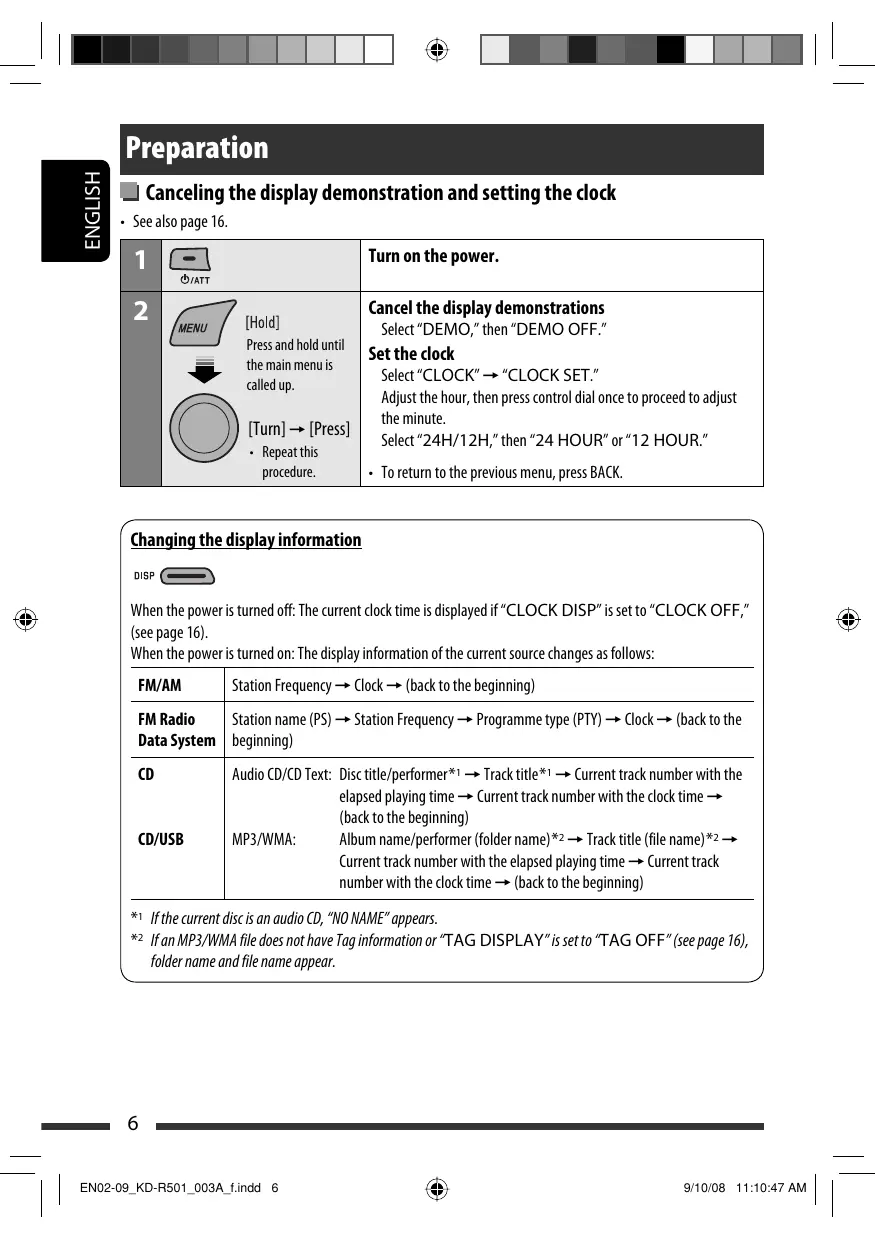
M Canceling the display demonstration and setting the dock + See also page 16. ENGLISH
Turn on the power. IHoidl Press and hold until the main menu is called up.
[um] — [Press] + Repeatthis procedure. Cancel the display demonstrations Select" DEMO," then “DEMO OFF." Set the clock Select "CLOCK" — "CLOCK SET." Adjustthe hour, then press control dial once to proceed to adjust the minute. Select “24H/12H," then “24 HOUR" or “12 HOUR." = Toretumn to the previous menu, press BACK. Changing the display information ‘When the power is turned off: The current clock time is displayed if“ CLOCK DISP” is set to “CLOCK OFF," (see page 16). ‘When the power is turned on: The display information ofthe current source changes as follows: FM/AM Station Frequency > Clock > (back to the beginning) FM Radio | Station name (PS) —» Station Frequency — Programme type (PTY) -> Clock > (backto the Data System | beginning) Co] Audio CD/CD Text: Discitle/performer*1 — Tracktitle*1 —» Current track number with the elapsed playing time » Current track number with the clock time {back to the beginning) CD/USB MP3/AWMA: Album name/performer (folder name) *2 —+ Track title (file name)*2 > Current track number with the elapsed playing time > Current track number with the clock time —» (back to the beginning) folder name and le name appear. #1 Ifthe current disc is an audio CD, “NO NAME” appears. #2 Ifan MP3/WMA le does not have Tag information or TAG DISPLAY"is set to "TAG OFF” (see page 16), es 6 | ENO2-09_KD-R501_ 009 findd 6 eos 1st@er au | |
stening to the radio Select “FM” or “AM.” Search for a station to listen—Auto Search. When a station is tuned in, searching stops. To stop searching, press the same button again. + You can also search for a station manually—Manual Search. Hold either one of the buttons until “M” flashes on the display, then press it repeatedly. = When receiving an FM stereo broadcast with suffient signal strength, the ST
rm] indicator lights up on the display. I Improving the FM reception (When an FM stereo broadcast is hard to receive, activate monaural mode or better reception. + See also page 17. Hold]
Reception improves, but stereo effect will be lost. = The MO indicator lights up on the display. To restore the stereo effect, repeat the same procedure to select" MONO OFF." The MO indicator goes of. | ENO2-09_KD-R501_ 009 findd 7 I Storing stations in memory Automatic presetting (FM)—SSM (Strong- station Sequential Memory] You can preset up to 18 stations for FM. À While listening to a station... Hold] 2 Select the preset number range you want to store.
SSM 01-06 <> SSM 07-12 <> S5M 13-18 [um] 3 vi, 2SSM = Local FM stations with the strongest signals are searched and stored automatically. + To stop searching, press @-« V/2»1 À. [Press] To preset other 6 stations, repeat from step 1 again. Continued on the next page OPERATIONS
Manual presetting (FM/AM) The following features are available only for FM You «an preset up to 18 stations for FM and 6 stations Radio Data System stations. 5 EU DE: Storing FM station of 92.50 MHz into preset @ Searching for FM Radio Data 2 number “04." g FE) : System programme—PTY Search e @& You cn tune in to station broadcasting your favorite _ 92 50MH| programme by searching for a PTY code. 1 The last selected PTY cod (A) [Hole] à ss ec code 2 Select preset number “04.” TR Ppears. ( 2 Select one of your favorite programme types à © araPTY code. Eur] 3 ie — tHod PO4= A] WEVMORY 3 Start searching for your favorite programme. Mi Selecting preset station [Press] e®,{ 0 Cf Ifa station is broadasting a programme ofthe = same PTY code as you have selected, that station is tuned in.
To activate TA Standby Reception TheTP (Trafic Programme) me indicator either lights up or flashes. + Hfthe TP indicator lights up, TA Standby Reception is activated. + Ifthe TP indicator flashes, TA Standby Reception is not yet activated. (This occurs when you are listening ‘to an FM station without the Radio Data System signals required for TA Standby Reception.) To activate the reception, tune in to another station providing these signals. The TP indicator will top flashing and remain it. To deactivate the TA Standby Reception The TP indicator goes of. PTY Standby Reception PTY Standby Reception allows the unit to switch temporarly to your favorite PTY programme from any source other than AM. To activate and select your favorite PTY code for PTY Standby Reception, see page 17. The PTY indicator either lights up or flashes. = HÉthe PTY indicator lights up, PTY Standby Reception isactivated. + lÉthe PTY indicator flashes, PTY Standby Reception is not yet activated. To adivate the reception, tune in to another station providing these signals. The PTY indicator will stop flashing and remain li. To deactivate the PTY Standby Reception, select PTY OFF" for the PTY code (see page 17). The PTY indicator goes of. | ENO2-09_KD-R501_ 009 findd 9 Mi Tracing the same programme — Network-Tracking Reception When driving in an area where FM reception is not suffident enough, this unit automatically tunes in to another FM Radio Data System station ofthe same network, possibly broadcasting the same programme with stronger signals (see the lustration below).
rm] When shipped from the factory, Network-Tracking Reception is activated. To change the Network-Tracking Reception setting, see“AF-REG" on page 17. Programme A broadcasting on different frequency areas (01-05) Mi Automatic station selection — Programme Search Usually when you select a preset number, the station preset in that number is tuned in. Ifthe signals from the FM Radio Data System preset station are not sufficient for good reception, this unit, using the AF data, tunes in to another frequency possibly broadeasting the same programme as the original preset station is broadcasting The unit takes some time to tune in to another station using programme search. + See also page 17. PTY codes NEWS, AFFAIRS, INFO, SPORT, EDUCATE, DRAMA, CULTURE, SCIENCE, VARIED, POP M (music), ROCK M (music), EASY JM {music LIGHT M (music, CLASSICS, OTHER M (music,
WEATHER, FINANCE, CHILDREN, SOCIAL, RELIGION, PHONE
IN, TRAVEL, LEISURE, JAZZ, COUNTRY, NATION M (music, OLDIES, FOLK M (music, DOCUMENT OPERATIONS
Turn on the power. Insert a disc. All tracks will be played repeatediy until you change ‘the source or eject the disc. Stop playing and ejecting the disc
+ “NO DISC” appears. Press SRCto listen to another playback source. Prohi g disc ejection wa Æ To cancelthe prohibition, repeat the same procedure.
Selecting a track/folder D 4 © [Turn] — [Press] + For MP3/WMA discs, select the desired folder, then the desired rack by repeating the control dial procedures. 2 To return to the previous menu, press BACK.
| EM10-15_KD-R501_009A findd 10 Pressing (or holding) the following buttons allows you
[Press/Pause/resume playback MP3/WMA: Select folder
[Press]Select track THold] Reverse/fast-forward track eos Moss au | |
Mi Selecting the playback modes You can use only one ofthe following playback modes atatime.
[Turn] — [Press] REPEAT TRACK RPT Repeats current track FOLDER RPT MP3/WMA: Repeats current folder RANDOM FOLDER RND MP3/WMA: Randomly plays all tracks of current folder, then tracks of next folders ALL RND Randomiy plays all tracks + To cancel repeat play or random play, select “RPT OFF" or“RND OFF." = Toreturn to the previous menu, press BACK. stening to the USB device This unit can play MP3/WMA tracks stored in a USB device. Alltracks will be played repeatediy until ou change the source or detach the USB device. USB inputjack o USB memory If a USB device has been attached. Playback starts from where it has been stopped previously. + Ifa different USB device is currently attached, playback starts from the beginning. To stop play and detach the USB device Straightly pull it out from the unit. + Press SRC to listen to another playback source. You can operate the USB device in the same way you operate the files on a disc. (See pages 10 and 11.) Continued on the next page
| EM0-15_KD-R501_002A findd 11 aon08 2:48:30 PM |
Cautions: + You cannot connect a computer to the USB input + Avoïd using the USB device fit might hinder your terminal ofthe unit. ED safety driing Make sure al important data has been backed up to ü - ons BA + Do not pull out and attach the USB device repeatedly avoid losing the data. CR mile "READING is shown on the display. + Do notleave a USB device in the car, expose to direct ED . 0 notstartthe car engine a USB device is sunlight, or high temperature to avoid deformation connected. or cause damages to the device. 2 This unit may not be able to play the files depending * 50me USB devices may notwork immediately after on the type of USB device. You turn on the power. 2 Operation and power supply may not work as + Formore details about USB operations, see page 22. intended for some USB devices. Listening to the other external components You cn connect an extemal component to AUX (auxliary input jack on the control panel. Preparation: Make sure "AUX ON" selected in the “SRC SELECT” + “AUX IN”setting, see page 19. se ===) Select “AUX IN." = Turn on the connected component and start playing the source. & / Se Adjust the volume. & [um] _ Adjust the sound as you want (see pages 14 and 15). Connecting an external component to the AUX input jack © Le QE mme | Portable audio player, et.
Using the remote controll RM-RK5O This unit can be remotely controlled asinstructed here {vith an optionally purchased remote controller. We recommend that you use remote contraller RM-RK5O with your unit. Installing the lithium coin battery (CR2025] CR2025 + Danger of explosion if battery is incorrectlyreplaced. Replace only with the same or equivalent type. Battery shall not be exposed to excessive heat such as sunshine, fire, or the like. Hthe effectiveness ofthe remote controller decreases, replace the battery. Before using the remote controller: + Aim the remote controller directly at the remote sensor on the unit. + DO NOT expose the remote sensor to bright light (direct sunlight or artificial lighting). Remote sensor | EN10-15_KD-R501_ 009 findd 13 1] + Tumsthe power on if pressed brefy or attenuates the sound when the power is on. + Turns the power off if pressed and held. [21 + Changes the preset stations. + Changes the folder ofthe MP3/WMA. [3] Adjusts the volume level. [4] Selects the sound mode. [5] Selects the source. [8] + Searches for stations if pressed brief. 2 Fast-fonwards or reverses the track if pressed and held. + Changes the trad if pressed brief. Warning (to prevent accidents and damage): + Do not install any battery other than CR2025 orits equivalent. Do not leave the remote controller in a place (such as dashboards) exposed to direct sunlight for a long time Store the battery in a place where children cannot reach. Do not recharge, short, disassemble, heat the battery, or dispose ofitin a fire. Do not leave the battery with other metallic materials. Do not poke the battery with tweezers or similar tools. Wrap the battery with tape and insulate when throwing away or saving it. EXTERNAL DEVICES
Selecting a preset sound mode You can select a preset sound mode suitable to the music genre. + See also page 16. ] (Hot
Mi Storing your own sound mode You can store your own adjustments in memory. À Select "USER" for "EQ." Hold] [Turn] — [Press] Goo GS -user 2 While “USER” is shown on the display. THold] 3 Selectatone.
4 Adjust the sound elements of the selected tone. [Turn] —+ [Press] E] Adjustthe frequency. [2] Adjustthe level. [31 Adjustthe Q-slope. Sound | Range/selectable items elements BASS | MIDDLE | TREBLE Frequency 60Hz 0.5kHz |10.0kHz 80Hz 10kHz |12.5kHz 100Hz |15kHz |15.0kHz 200Hz |2.5kHz |17.5kHz Level —06to |-06to |-06to +06 +06 +06 Q Q1.0 00.75 Fixed Q1.5 0125 à wo @ 5 Repeat steps 3 and 4 to adjust other sound characteristics. The adjustment made will be stored automatically. SETTINGS
1 Callupthemenu. THold] ENGLISH 2 Select the desired item. 3 Repeat step 2 if necessary. + Toreturn to the previous menu, press BACK. [Turn] [Press] = To exit from the menu, press DISP or MENU. Initial: Underlined Category | Menu items Selectable settings, [reference page] e | + DEMOON : Display demonstration will be activated automatically ifno S (Display operation is done for about 20 seconds, [6]. demonstration [+ DEMOOFF : Cancels. CLOCKDISP* |: CLOCKON : Clocktimeisshownon the display atall times whenthe Clock display power is turned off. + CLOCKOFF : Cancels; pressing DISP will show the docktime for about 5 seconds when the power is turned off, [6]. Se [OLOCKSET 2 Adjustthe hour, then the minute, [6] S |Gocksetting initial: 0:00) PTT + 24HOUR See also page 6 for setting. Time display mode | + 12 HOUR & CLOCKADJ*? |: AUTO The built-in dock is automatically adjusted using the CT Clock adjustment (clock time) data in the Radio Data System signal. “OFF Gncels. > 2 Select a preset sound mode suitable to the music genre. “ |Equalier USER, ROCK, CLASSIC, POPS, HIP HOP, JAZZ DIMMER + DIMMERON : Dims the display and buttonilumination. Dimmer + DIMMEROFF _: Cancel. SCROLL*? + SCROLLONCE _: Scrolls the displayed information once. = [saol + SCROLLAUTO _: Repeatsscrolling (at 5-second intervals). 5 + SCROLLOFF : Cancek. EA Pressing DISP for more than one second can scroll the display regardless ofthe setting. TAGDISPLAY |: TAGON 2 Shows the Tag information while playing MP3/WMA Tag display tracks. + TAGOFF : Gnces. *1° Ifthe power supply is not interrupted by turning off the ignition key of your car, it is recommended to select “CLOCK OFF”t0 save the cars battery. *2 Takes effect only when CT data is received. *3 Some characters or symbols will not be shown correctiy (or will be blanked) on the display. ns 1 6 | EM16-21_KD-R501_ 009 findd 16 eos tro au | |
Category | Menu items Selectable settings, [reference page] AF-REG*+ + AFON = When the currently received signals become weak, the unit Alternative switches to another station (the programme may differ frequency/ from the one currently received), [9] regionalization = The AFindicator lights up. reception + AF-REGON : When the currently received signals become weak, the unit switches to another station broadcasting the same programme. = The AF and REG indicators light up. + OFF : CGncels. PTV-STANDBY** |PTYOFF,PTY : Activates PTY Standby Reception with one ofthe PTY PTY standby codes codes, [9]. œ [TAVOLUME** |VOLUMEOO : (Initial: VOLUME 15) 2 |rrffic — VOLUME 50 F Jannouncement | (or VOLUME 00 volume — VOLUME 30)*5 P-SEARCH** |: SEARCHON : Activates Programme Search, [9] Programme search |: SEARCH OFF: Cancels. MONO*5 + MONOON : Activate monaural mode to improve FM reception, but Monaural mode stereo effect will be lost, [7]. + MONOOFF _: Restore the stereo effect. & IF BAND + AUTO 2 Increases the tuner selectiviy to reduce interference noises & Intermediate between adjacent stations. (Stereo effect may be lost.) frequency band |: WIDE 2 Subject to interference noises from adjacent stations, but sound quality will not be degraded and the stereo effect will remain. & [oLorot 2 Select one ofthe preset or user color for display and button (except T/P/ & 2 |-coLor>, &ATT/A) illumination. 8 2 [user (For customize color settings, “USER,” see page 19.) æ 2 |MENUCOLOR |: OFF : Gncels. 8 2 |Menucolor + 0N 2 Changes the display and button (except T/P/6/ATT/A) 22 illumination during menu, list search and playback mode EF operations. *4 Only for FM Radio Data System stations. *s Depends on the amplifier gain control. *6 Displayed only when the source is ‘FM. Continued on the next page CE SETTINGS Rp | EM16-21_KD-R501_ 009 findd 17 eos 11234044 | |
| REX | Category | Menuitems | Selectable settings, [reference page] FADER®7* [ROG-F06 : Adjustthefrontand rear speaker output balance. ZT : a Fader (initial: 00) D BALANCE*® [LO6-RO6 : Adjusttheleftand right speaker output balance. & Balance (initial: 00) LOUD + LOUDOFF : Cancel. Loudness + LOUDON : Boostlowand high frequences to produce a well-balanced sound at a low volume level VOLADJUST | VOLADI-05 : Presetthe volume adjustment level ofeach source (except Volume adjust | — FM), compared to the FM volume level. The volume level VOL AD) +05 wilautomatically increase or decrease when you change the {initial VOL source. ADJ00) + Before making an adjustment, select the source you want to adjust. = “VOL AD FIX" appears on the display if FM" is selected as the source. © [VOMODE |: SUBW 2 Selectifthe REAR LINE OUT terminas are used for connecting S |Lneoutput a subwoofer (through an external amplifier). < )mode + REAR 2 Selectifthe REAR LINE OUT terminas are used for connecting the speakers (through an external amplifer. SUB.WFREQ® |: LOW 2 Frequendies lower than 72 Hz are sent to the subwoofer. Subwoofer + MD 2 Frequendes lower than 111 Hz are sent to the subwoofer. & cutofffrequency |+ HIGH 2 Frequencies lower than 157 Hzare sent to the subwoofer. SUB.W LEVEL” |SUBWOO : Adjustthe subwoofer output level. Subwooferlevel | —SUBW08 (Initial: SUB-W 04) BEEP + BEEPOFF : Deactivates the key touchtone. Keytouchtone |: BEEPON : Acivates the key touchtone. TELMUTING |: MUTING1/ : Select either one which mutes the sounds while using a Telephone MUTING2 celllarphone. muting + MUTINGOFF _: Cancel. AMP GAIN" |: LOWPOWER : VOLUME 00 — VOLUME 30 (Selecifthe maximum power Amplifir gain of each speakers ess than 50 W to prevent damaging the control speaker.)
+ HIGH POWER: VOLUME 00 — VOLUME 50
#7. fyou are using a two-speaker system, set the fader level to “00.” *8 This adjustment will not affect the subwoofer output. *9 Displayed only when ‘L/O MODE"; set to “SUB.W." #10 The volume level automatically changes to “VOLUME 30"if you change to ‘LOW POWER" with the volume level set higher than “VOLUME 30." a LL | EM16-21_KD-R501_009A findd 18 eos trs au | |
| EM16-21_KD-R501_ 009 findd 19 Category |Menuitems | Selectable settings, [reference page] BE JAM + AMOFF Disable “AM” in source selection. Æ |AMstation + AMON Enable “AM' in source selection, [4]. CRIUTE + AUXOFF Disable “AUX IN” in source selection. % |Auälaryinput |: AUXON Enable “AUX IN” in source selection, [4]. “11 Displayed only when any source other than "AM" selected. *12Displayed only when any source other than “AUX IN" selected. Color settings (for KD-R501) M] Creating your own color 5 Select a primary color. — USER Color You can create your own colors—"DAY COLOR‘ or {Tum] — [Press] “NIGHT COLOR." DAY COLOR: _ Used whenDIMMER" is setto [rec | “DIMMER OFF." NIGHT COLOR: Used when "DIMMER" is setto “DIMMER ON." 6 Adjust the level (00 to 31) ofthe selected primary color.
æf IHold] & [um] — [Press] 2 Select" COLOR" + “USER." 1f"00" is selected for all the primary colors, nothing ©) run Pres aprem he dép 7 Repeat steps 5 and 6 to adjust other primary 3 While “USER” is shown on the display... colors. © Hold] 8 Exit from the setting. 4 2 Hfno operation is done for about 30 seconds, the [Turn] — [Press] operation will be canceled.
ns 2 | EM16-21_KD-R501_ 009 findd 20 More about tl Ii Basic operations Turning on the power + By pressing SRC button on the unit, you can also turn on the power. the source is ready, playback also starts. Turning off the power + Hfyoutum offthe power while listening to a track, playback will start from where it had been stopped previously next time you turn on the power. General = Ifyou change the source while listening to a disc, playback stops. Next time you select “CD” as the playback source, playback wil start from where it had been stopped previously. = Ifno operation s done for about 30 seconds after pressing MENU button, the operation will be nceled. Ii Tuner operations Storing stations in memory + During SSM search... — All previously stored stations are erased and the stations are stored anew. — When SM is over, the station Stored in the lowest preset number will be automatically tuned in. + When storing a station manuall, the previously preset station is erased when a new station is stored in the same preset number. FM Radio Data System operations + Network-Tracking Reception requires two types of Radio Data System signals—l (Programme Identification) and AF (Alternative Frequency) to work correct. Without receiving these data correctly, Network-Tracking Reception will not operate correct}. Ifa Traffic Announcement is received by TA Standby Reception, the volume level automatically changes to the preset level (TA VOL) ifthe current level is lower than the preset level. When Alternative Frequency Reception is activated {with AF selected), Network-Tracking Reception is also activated automatically. M Disc operations Caution for DualDisc playback + The Non-DVD side of a “DualDisc” does not comply with the “Compact Disc Digital Audio” standard. Therefore, the use of Non-DVD side of a DualDisc on this product may not be recommended. General This unit has been designed to reproduce CDs/CD Texts, and CD-Rs (Recordable)/CD-RWs {Rewritable) in audio CD (CD-DA), MP3/WMA formats. + When a discis inserted upside down, “PLEASE” and “EJECT" appear alternately on the display. Press À to eject the disc. + MP3 and WMA “tracks” (words “file” and “track” are used interchangeably) are recorded in “folders." + While fast-forwarding or reversing on an MP3 or WMA disc, you «an only hear intermittent sounds. eos tres au | |
Playing a CD-R or CD-RW + Use only “finalized” CD-Rs or CD-RWs. 2 This unit can only play back iles of the same type as those detected first if a disc includes both audio CD (CD-DA) files and MP3/WMA files. = This unit can play back multi-session discs; however, undlosed sessions will be skipped while playing. + Some CD-Rs or CD-RWS may not play back on this unit because of their disc characteristics, or for the following reasons: = Discs are dirty or scratched. — Moisture condensation has occurred on the lens inside the unit. = The pickup lens inside the unit s dirty — The files on the CD-R/CD-RW are written using the “Packet Write” method. = There are improper recording conditions (missing data, etc.) or media conditions (stained, scratched, warped, etc). + CD-RWs may require a longer readout time since the reflectance of CD-RW is lower than that of regular CDs. + Do not use the following CD-Rs or CD-RW: — Discs with stickers, labels, or a protective seal stuck to the surface. = Discs on which labels can be directly printed by an inkjet printer. Using these discs under high temperature or high humidity may cause malfunctions or damage to the unit. Playing an MP3/WMA disc + This unit can play back MP3/AWMA files with the extension code <.mp3> or <.wma> (regardless of the letter case—upper/lower). 2 This unit can show the names of albums, artists {performer), and Tag (Version 1.0, 1.1, 2.2, 2.3, or 2.4) for MP3 files and for WMA files. «This unit can display only one-byte characters. No other characters can be correctly displayed. | EM16-21_KD-R501_002A findd 21 = This unit can play back MP3/MA files meeting the conditions below: — Bitrate of MP3: 32 kbps — 320 kbps — Sampling frequency of MP3: 32 kHz, 44.1 kHz, 48 kHz (for MPEG-1) 16kHz, 2.05 KHz, 24 kHz (or MPEG-2) Bitrate of WMA: 32 kbps — 320 kbps — Sampling frequency of WMA: 22.05 kHz, 32 kHz,
Disc format: 150 9660 Level 1/Level 2, Romeo, Joliet, Windows extension. = The maximum number of characters for file/foder names vary depending on the disc format used includes 4 extension characters—<.mp3> or <mma>). — 1509660 Level 1: up to 12 characters — 10 9660 Level 2: up to 31 characters — Romeo: up to 64 characters — Jolit: up to 32 characters — Windows extension: up to 64 characters = This unit can recognize a total of 512 files, 255 folders, and 8 hierarchical levels. This unit can play back fes recorded in VBR (variable bit rate). Files recorded in VBR have a discrepancy in the elapsed time display, and do not show the actual elapsed time. I particular, this difference becomes noticeable after performing the search function. = This unit cannot play backthe following files: — MP3 files encoded in MP3i and MP3 PRO format. — MP3 files encoded in an inappropriate format. — MP3 files encoded with Layer 1/2. — WMA iles encoded in losless, professional, and voice format. — WMA iles which are not based upon Windows Media® Audio. — WMA iles copy-protected with DRM. — Files which have data such as AIFF, ATRAG, etc. The search function works but search speed is not constant.
Continued on the next page REFERENCES
ENGLISH | EN2-27_KD-R501_009A findd 22 Playing MP3/WMA tracks from a USB device + While playing from a USB device, the playback order may diff from other players. 2 This unit may be unable to play back some USB devices or some files due to their characteristics or recording conditions. + Depending on the shape ofthe USB devices and connection ports, some USB devices may not be attached proper or the connection might be loose. + Connect one USB mass storage class device to the unit atatime. Do not use a USB hub. + Hfthe connected USB device does not have the correct files, “CANNOT PLAY" appears. + This unit can show Tag (Version 1.0, 1.1, 2.2, 2.3,0r 2.4) for MP3 files and for WMA files. 2 This unit can play back MP3/WMA iles meeting the conditions below: — Bitrate of MP3: 32 kbps — 320 kbps — Sampling frequency of MP3: 32 kHz, 44.1 kHz, 48 KHz (for MPEG-1) 16kHz, 22.05 kHz, 24 KHz (for MPEG-2) — Bitrate of WMA: 32 kbps — 320 kbps — Sampling frequency of WMA: 22.05 kHz, 32 kHz,
+ This unit cn play back MP3 files recorded in VBR {variable bit rate). + The maximum number of characters for: — Folder names : 32 characters — File names : 32 characters — MP3 Tag : 64 characters — WMA Tag : 32 characters + This unit cn recognize a total of 5 000 files, 255 folders (255 files per folder including folder without unsupported files), and of 8 hierarchies. 2 This unit does not support SD card reader. = This unit cannot recognize a USB device whose rating is other than 5 V and exceeds 500 mA. + USB devices equipped with special functions such as data security functions cannot be used with the unit. + Do not use a USB device with 2 or more partitions. This unit may not recognized a USB device connected through a USB card reader. = This unit may not play back files in à USB device properly when using a USB extension cord. = This unit cannot play backthe following files: — MP3 files encoded with MP3i and MP3 PRO format. — MP3 files encoded in an inappropriate format. — MP3 files encoded with Layer 1/2. — WMA filles encoded in lossless, professional, and voice format. — WMA files not based on Windows Media® Audio. Ejecting a disc or removing a USB device + Ifthe ejected disc is not removed within 15 seconds, itis automatically inserted into the loading slot again to protect it from dust. After ejecting a disc or removing a USB device, “NO DISC" or “NO USB" appears and you cannot operate some ofthe buttons. Insert another disc, reattach a USB device, or press SRC to select another playback source. Mi Menu operations + Hfyou changethe"AMP GAIN" setting from “HIGH POWER" to LOW POWER while the volume level is set higher than “VOLUME 30," the unit automatically changes the volume level to “VOLUME 30." tan 008 2324 pu | |
| RU ) © CONSRRE DUR |
oubleshooting (What appears to be trouble is not always serious. Check the following points before calling a service center. Symptoms Remedies/Causes + Sound cannot be heard from the speakers. + Adjust the volume to the optimum level. + Check the cords and connections. Æ . Theunit does notworkatall. Reset the unit (see page 3). Ë + “AUX IN” cannot be selected. Check the"SRC SELECT” —+ “AUX IN setting (see page 19). + KD-RSO1: Nothing appear onthe display. KD-R501: Checkthe USER Color settings (see page 19) + SSMautomatic presetting doesnot work. Store stations manually. = + Staticnoïse while listeningtotheradio. Connect the aerial firmly. + “AM” cannot be selected. Check the"SRC SELECT” — “AM” setting (see page 19).
- Disc cannot be played back. Insert the dis correctiy + CD-R/CD-RW cannot be played back. «Insert a finalized CD-R/CD-RW. + Tracks on the CD-R/CD-RW cannot be + Finalize the CD-R/CD-RW with the component which | skipped. you used for recording. 2 Disc cn neïther be played back norejected. + Unlock the disc (see page 10). = Ejectthe disc forcibly (see page 3). Disc sound is sometimes interrupted. = Stop playback while driving on rough roads + Change the disc. = Check the cords and connections Discs in general = “NO DISC" appears on the display. Insert a playable disc into the loading slot.
- “PLEASE" and 'EJECT” appearaltemnately | Press À, theninsert a disc correct}. on the display. Disc cannot be played back. * Use disc with MP3/WMA trade recorded in a format FE] compliant with 150 9660 Level 1, Level 2, Romeo, or HE Jolet Sa + Add the extension code <.mp3> or <wma> tothe file names. Continued on the next page EE LEON OSR 23 mm | EN2-27_KD-R501_009A findd 23 anon8 2:58:42 pu | |
| RU ) © CONSRRE DUR |
ns 2 2 ENGLISH Symptoms Remedies/Causes = Noise is generated. Skip to another track or change the disc. (Do not add the extension code <.mp3> or <.wma> to non-MP3 or WMA tracks.)
- Alongerreadout time is required {READING Keeps flashing on the display). Do not use too many hierarchical levels and folders. È + Trade do notplaybackinthe orderyou The playback order is determined when the files are Æ haveintendedthem to play. recorded. Æ - The clapsed playingtimeis notcorrect.……| This sometimes occurs during playback. This is caused by = how the tracks are recorded on the disc. + “NO FILE” appears on the display. Selected folder is an empty folder”. Select another folder that contains MP3/WMA tracks.
- Folder that is physically empty or folder that contains data but does not contain valid MP3/WMA track. « The correct characters are not displayed This unit can only display letters (upper case), numbers, {e.g. album name). and a limited number of symbols. + Noise is generated. The track played backis not an MP3/WMA track. Skip to another ile. (Do not add the extension code <.mp3> or <wma> to non-MP3 or WMA tracks.) + "READING" keeps fashing on the display. + Readout time varies depending on the USB device. + Do not use too many hierarchy or folders. + Turn offthe power then on again. + Reattach the USB device again. + “NO FILE" appears on the display. Selected folder is an empty folder”. Select another folder # that contains MP3/WMA tracks. É * Folder that is physically empty or folder that contains = data but does not contain valid MP3/WMA track. SN + Tradks/olders are notplayedbackinthe The playback order is determined by the write-in time Sn orderyouhaveintended stamp. The first track/folder written into the USB device a will be the first track/folder for playback.
= "CANNOT PLAY" flashes on the display. + "NO USB" appears on the display. «The unit cannot detectthe USB device. + Attach a USB device that contains tracks encoded in an appropriate format. + Reattach the USB device again. + Correct characters are not displayed (e.g. This unit can only display alphabets (upper case), album name). numbers and à limited number ofsymbos. + While playing atrack, sound is sometimes The MP3/WMA tracks have not been propery copied into interrupted. the USB device. Copy MP3/WMA tracks again into the USB device, and try again. + Microsoft and Windows Media are either registered trademarks or trademarks of Microsoft Corporation in the United States and/or other countries. | EN2-27_KD-R501_009A findd 24
I How to dean the connectors Frequent detachment will deteriorate the connectors. To minimize this possibility, periodically wipe the connectors with a cotton swab or cloth moistened with alcohol, being careful not to damage the connectors. Connectors I Moisture condensation Moisture may condense on the lens inside the unitin the following cases: + After starting the heater in the car. + Hit becomes very humid inside the car. Should this occur, the unit may malfunction. In this «se, eject the disc and leave the unit tumed on for a few hours until the moisture has evaporated. I How to handle discs Whenremoving a discfrom its Centerholder case, press down the center holder ofthe case and if the discout, NS holding by the edges. + Always hold the disc by the edges. Do not touchits recording surface. When storing a disc in its case, gentl insert the disc around the center holder (with the printed surface facng up). + Make sure to store discs in cases after use. | EN2-27_KD-R50_009A findd 25 I To keep discs clean A dirty disc may not play correctly. Sn Ifa disc does become dirty, wipe it with a soft cloth in a straight line from center / ? toedge. + Do not use any solvents (for example, conventional record deaner, spray, thinner, benzine, etc. to dean discs I To play new discs New discs may have some rough spots around the inner and outer edges. 1f such a disc is used, this unit may reject the disc. To remove these rough spots, rub the edges with a pendl or ball-point pen, etc. Do notuse the following discs: Single CD (8 cm disc) Warped disc & Sticker and sticker residue Stick-on label
Unusual shape Transparent or semi- transparent parts on ts recording area REFERENCE
Maximum Power Output: Front/Rear: 50 W per channel Continuous Power Output (RMS): Front/Rear: 19 W per channel into 4 0, 40 Hz to 20 000 Hz at no more than 0.8% total harmonic distortion. Load Impedance: 40 (40 to 8 0 allowance) Tone Control Range: Bass: +12 dB (60 Hz, 80 Hz, 100 Hz, 200 Hz) Q1.0,01.25, Q1.5, 02.0 Middle: +12 dB (0.5 kHz, 1.0 kHz, 1.5 KHz, 2.5 kHz) 0.75, Q1.0, Q1.25 Treble: +12 dB (10.0 kHz, 12.5 kHz, 15.0 kHz,
1.3 kg (excluding accessories)
Design and spedfications are subject to change without notice. REFERENCE: