
ACP-42CC120AERI - Air-conditioner Vivax - Free user manual and instructions
Find the device manual for free ACP-42CC120AERI Vivax in PDF.


| Product type | Portable air conditioner |
| Cooling capacity (BTU) | 12000 |
| Heating capacity (BTU) | 12000 |
| Coverage area | Up to 350 sq. ft. |
| Energy efficiency ratio (EER) | 2.6 |
| Power supply | 115 V ~ 60 Hz |
| Power consumption (cooling) | 1200 W |
| Power consumption (heating) | 1250 W |
| Current | 10.5 A |
| Refrigerant type | R410A |
| Air flow (high) | 400 CFM |
| Noise level (low/high) | 52 / 56 dBA |
| Dimensions (W x D x H) | 16.5 x 15.4 x 28.7 in. |
| Weight | 62 lbs |
| Remote control | Yes |
| Timer function | 24-hour |
| Sleep mode | Yes |
| Auto restart | Yes |
| Filter type | Washable |
| Installation type | Window kit included |
| Warranty | 1 year limited |
Frequently Asked Questions - ACP-42CC120AERI Vivax
User questions about ACP-42CC120AERI Vivax
0 question about this device. Answer the ones you know or ask your own.
Ask a new question about this device
Download the instructions for your Air-conditioner in PDF format for free! Find your manual ACP-42CC120AERI - Vivax and take your electronic device back in hand. On this page are published all the documents necessary for the use of your device. ACP-42CC120AERI by Vivax.
USER MANUAL ACP-42CC120AERI Vivax
natural_image
Illustration of hands installing or adjusting a grid panel inside a rectangular frame (no text or symbols visible)Sl. 6-1
natural_image
Technical line drawing of a solar panel installation with an inset showing structural details (no text or symbols)Sl. 6-2
natural_image
Illustration of a hand using a vacuum cleaner to clean or regulate a surface (no text or symbols present)Sl. 6-3
natural_image
Simple line drawing of a faucet spraying water onto a grid-patterned surface (no text or symbols)Sl. 6-4
7. SLJEDEĆI ZNAKOVI NISU PROBLEMI KLIMATSKOGA UREĐAJA
1. znak: Sustav ne radi
Prikaz načina rada
Prikazuje trenutni način rada. Uključujući auto( ), cool( ), dry( ), heat ) (Nije primjenjivo za uređaje specijalizirane isključivo za hlađenje), fan( ) i natrag do auto( ).

Indikator prijenosa
flowchart
graph TD
    A["Start"] --> B["Off"]
    B --> C["Set"]
    C --> D["2 hours later after setting"]
    D --> E["5 hours later after setting"]
natural_image
Illustration of a grid installation with hands installing components (no text or symbols)Sl. 6-1
natural_image
Architectural diagram of a solar panel installation with a magnified inset showing structural details (no text or labels)Sl. 6-2
natural_image
Illustration of a hand using a vacuum cleaner to clean or operate on a grid-patterned surface (no text or symbols)Sl. 6-3
natural_image
Simple line drawing of a faucet spraying water onto a grid-patterned surface (no text or symbols)Sl. 6-4
7. SLEDEĆI SIMPTOMI NISU PROBLEM U RADU KLIMA UREĐAJA
1. simptom: Sistem ne radi
■ Klima uređaj ne počinje da radi odmah pošto je pritisnut taster ON/OFF na daljinskom upravljaču.
Ako svetli lampica, sistem je u normalnom stanju. Da bi se sprečilo preopterećenje, klima uređaj započinje sa radom tri minute pošto je pritisnut taster ON (upaljeno).
Ako lampica i indikator PRE-DEF (tipovi hlađenja i grejanja) ili samo indikator ventilatora (tip samo za hlađenje) svetle, to znači da ste odabrali model za grejanje. Ako kompresor nije počeo sa radom, to znači da je aktivirana zaštita od hladnog vazduha i ventilator se ne pokreće nekoliko minuta.
2. simptom: Prebacivanje u način rada VENTILACIJA tokom trajanja načina rada HLAĐENJE
■ Kako bi se sprečilo inje u unutrašnjosti isparivača, sistem će se automatski prebaciti u način rada ventilatora, odn. vratiti se hlađenju ubrzo posle toga.
■ Kada sobna temperatura padne na podešenu temperaturu, kompresor se gasi, a unutrašnji uređaj nastavlja da radi samo kao ventilator: kada se podigne temperature, kompresor ponovno uključuje. Isto je i sa načinom rada GREJANJE.
3. simptom: Bela magla izlazi iz uređaja
Simptom 3.1: Unutrašnji uređaj
Kad je vlažnost visoka tokom hlađenja, ako je unutrašnji uređaj izuzetno prljav, raspodela temperature unutar prostorije postaje neujednačena. Potrebno je očistiti unutrašnji uređaj. Zahvat zahteva kvalifikovanu osobu.
3. FAN (Ventilator) taster
Koristi se za biranje brzine ventilatora u četiri koraka:

4. SLEEP (Spavanje) taster
Aktivirati/Deaktivirati sleep funkciju. Može da zadrži najprijatniju temperaturu a istovremeno da štedi energiju. Ova funkcija dostupna je isključivo u COOL, HEAT ili AUTO načinu rada.
DOWN (Dole) taster (^ )
Pritisnite ovaj taster za smanjenje unutrašnje temperature za 1°C do 17°C.
6. TIMER ON Taster
Funkcija odvlaživanja
Uređaj je uključen u struju. Indikator operacija na ekranu unutrašnjeg uređaja počinje svetluca.
Funkcija programatora
Priskom na taster TIMER ON možete da podesite vreme automatskog paljenja uređaja. Priskom na taster TIMER OFF možete da podesite vreme automatskog gašenja uređaja.
flowchart
graph TD
    A["Start"] --> B["Off"]
    B --> C["Set"]
    C --> D["2 hours later after setting"]
    D --> E["5 hours later after setting"]
natural_image
Illustration of hands installing or adjusting a grid panel with a magnified inset showing the structure (no text or symbols present)Fig. 6-1
natural_image
Technical line drawing of a mechanical assembly with an inset showing a detailed cross-section (no text or symbols)Fig. 6-2
natural_image
Line drawing of a hand using a vacuum cleaner to clean or operate on a grid-patterned surface (no text or symbols)Fig. 6-3
natural_image
Simple line drawing of a faucet spraying water onto a grid-patterned surface (no text or symbols)Fig. 6-4
7. SHENJAT E MEPOSHTME NUK JANE PROBLEM PAJISJES SE KLIMES
1. shenja: Sistemi nuk punon
Shfaqje mode
Shfaqet duke shtypur ON / OFF butonin.
Kontrollues funksioni
flowchart
graph TD
    A["Start"] --> B["Off"]
    B --> C["Set"]
    C --> D["2 hours later after setting"]
    D --> E["5 hours later after setting"]
COOL/HEAT/FAN MENYRA E PUNES
natural_image
Illustration of hands installing or adjusting a grid panel inside a rectangular frame (no text or symbols)Sl. 6-1
natural_image
Architectural cross-section diagram of a solar panel installation with an inset showing structural details (no text or labels)Sl. 6-2
natural_image
Line drawing of a hand using a vacuum cleaner to clean or regulate a surface (no text or symbols present)Sl. 6-3
natural_image
Simple line drawing of a faucet spraying water onto a grid-patterned surface (no text or symbols)Sl. 6-4
7. SLJEDEĆI ZNAKOVI NISU PROBLEMI KLIMATSKOGA UREĐAJA
1. znak: Sistem ne radi
3. FAN (Ventilator) Taster
Koristi se za biranje brzine ventilatora u četiri koraka:

4. SLEEP (Spavanje) Taster
Aktivirati/Deaktivirati sleep funkciju. Može zadržati najudobniju temperaturu te istovremeno štediti energiju. Ova funkcija dostupna je isključivo na COOL, HEAT ili AUTO načinu rada.
NAPOMENA: Dok je uređaj u funkciji na SLEEP načinu rada, isto bi se poništilo kada bi se pritisnuo taster MODE, FAN SPEED ili ON/OFF.
5. UP (Gore) Taster (^)
Pritisnite ovaj taster za povećanje unutrašnje temperature za 1°C do 30°C.
DOWN (Dolje) Taster (^)
Pritisnite ovaj taster za smanjenje unutrašnje temperature za 1°C do 17°C.
6. TIMER ON Taster
Pritisnite ovaj taster za namještanje vremena automatskog pokretanja uređaja. Svaki pritisak tastera će povećati postavku automatske sinhronizacije za 30 minuta. Kada postavljeno vrijeme prikaže 10, svaki idući pritisak tastera će povećati postavku automatske sinhronizacije za 60 minuta. Za poništavanje programa automatske sinhronizacije, jednostavno podesite vrijeme automatskog pokretanja programa na 0.0.
7. TIMER OFF Taster
Pritisnite ovaj taster za namještanje vremena za automatsko gašenje uređaja. Svaki pritisak tastera će povećati postavku automatske sinhronizacije za 30 mintuta. Kada postavljeno vrijeme prikaže 10, svaki idući pritisak tastera će povećati postavku automatske sinhronizacije za 60 minuta. Za poništavanje programa automatske sinhronizacije, jednostavno podesite vrijeme automatskog pokreatanja programa na 0.0.
8. DIRECT Taster
Prikaz načina rada
Prikazuje trenutni način rada. Uključujući auto( ), cool( ), dry( ), heat ) (Nije primjenjivo za uređaje specijalizovane isključivo za hlađenje), fan( ) i nazad do auto( ).
Indikator prijenosa
Funkcija odvlaživanja
Osigurajte da je uređaj uključen u struju. Indikator operacija na ekranu unutrašnjeg uređaja počinje svjetlucati.
flowchart
graph TD
    A["Start"] --> B["Off"]
    B --> C["Set"]
    C --> D["2 hours later after setting"]
    D --> E["5 hours later after setting"]
All the pictures in this manual are for explanation purpose only. They may be slightly different from the air conditioner you purchased(depend on model). The actual shape shall prevail.
CONTENTS
- IMPORTANT SAFETY INFORMATION 3
2.PARTS NAMES 5
3.AIR CONDITIONER OPENRATIONS AND PERFORMANCE 6
4.HINTS FOR ECONOMICAL OPERATION 7
5.ADJUSTING AIR FLOW DIRECTION 7
6.MAINTENANCE 8
7.FOLLOWING SYMPTOMS ARE NOT AIR CONDITIONER 10 TROUBLES
8.TROUBLESHOOTING 11
1. IMPORTANT SAFETY INFORMATION
To prevent injury to the user or other people and property damage, the following instructions must be followed. Incorrect operation due to ignoring of instructions may cause harm or damage.
The safety precautions listed are divided into two categories. In either case, important safety information is listed which must be read carefully.

WARNING
Failure to observe a warning may result in death. The appliance shall be installed in accordance with national wiring regulations.

CAUTION
Failure to observe a caution may result in injury or damage to the equipment.

WARNING
Ask your dealer for installation of the air conditioner.
Incomplete installation performed by yourself may result in a water leakage, electric shock, and fire.
Ask your dealer for improvement, repair, and maintenance.
Incomplete improvement, repair, and maintenance may result in a water leakage, electric shock, and fire.
In order to avoid electric shock, fire or injury, or if you detect any abnormality such as smell of fire, turn off the power supply and call your dealer for instructions.
Never let the indoor unit or the remote controller get wet.
It may cause an electric shock or a fire.
Never press the button of the remote controller with a hard, pointed object.
The remote controller may be damaged.
Never replace a fuse with that of wrong rated current or other wires when a fuse blows out.
Use of wire or copper wire may cause the unit to break down or cause a fire.
It is not good for your health to expose your body to the air flow for a long time.
Do not insert fingers, rods or other objects into the air inlet or outlet.
When the fan is rotating at high speed, it will cause injury.
Never use a flammable spray such as hair spray,
lacquer or paint near the unit.
It may cause a fire.
Never touch the air outlet or the horizontal blades while the swing flap is in operation.
Fingers may become caught or the unit may break down.
Never put any objects into the air inlet or outlet.
Objects touching the fan at high speed can be dangerous.
Never inspect or service the unit by yourself.
Ask a qualified service person to perform this work.
Do not dispose this product as unsorted municipal waste. Collection of such waste separately for special treatment is necessary.
Do not dispose of electrical appliances as unsorted municipal waste, use separate collection facilities.
Contact you local government for information regarding the connection systems available.
If electrical appliances are disposed of in landfills or dumps, hazardous substances can leak into the groundater and get into the food chain, damaging your health and well-being.
To prevent refrigerant leak, contact your dealer.
When the system is installed and runs in a small room, it is required to keep the concentration of the refrigerant, if by any chance coming out, below the limit. Otherwise, oxygen in the room may be affected, resulting in a serious accident.
The refrigerant in the air conditioner is safe and normally does not leak.
If the refrigerant leaks in the room, contact with a fire of a burner, a heater or a cooker may result in a harmful gas.
Turn off any combustible heating devices, ventilate the room, and contact the dealer where you purchased the unit.
Do not use the air conditioner until a service person confirms that the portion where the refrigerant leaks is repaired.

CAUTION
Do not use the air conditioner for other purposes.
In order to avoid any quality deterioration, do not use the unit for cooling precision instruments, food, plants, animals or works of art.
Before cleaning, be sure to stop the operation, turn the breaker off or pull out the supply cord.
Otherwise, an electric shock and injury may result.
In order to avoid electric shock or fire, make sure that an earth leak detector is installed.
Be sure the air conditioner is grounded.
In order to avoid electric shock, make sure that the unit is grounded and that the earth wire is not connected to gas or water pipe, lightning conductor or telephone earth wire.
In order to avoid injury, do not remove the fan guard of the outdoor unit.
Do not operate the air conditioner with a wet hand.
An electric shock may happen.
Do not touch the heat exchanger fins.
These fins are sharp and could result in cutting injuries.
Do not place items which might be damaged by moisture under the indoor unit.
Condensation may form if the humidity is above 80%, the drain outlet is blocked or the filter is polluted.
After a long use, check the unit stand and fitting for damage.
If damaged, the unit may fall and result in injury.
To avoid oxygen deficiency, ventilate the room sufficiently if equipment with burner is used together with the air conditioner.
Arrange the drain hose to ensure smooth drainage.
Incomplete drainage may cause wetting of the building, furniture etc.
Never touch the internal parts of the controller.
Do not remove the front panel. Some parts inside are dangerous to touch, and a machine trouble may happen.
Never expose little children, plants or animals directly to the air flow.
Adverse influence to little children, animals and plants may result.
Do not allow a child to mount on the outdoor unit or avoid placing any object on it.
Falling or tumbling may result in injury.
Do not operate the air conditioner when using a room fumigation - type insecticide.
Failure to observe could cause the chemicals to become deposited in the unit, which could endanger the health of those who are hypersensitive to chemicals.
Do not place appliances which produce open fire in places exposed to the air flow from the unit or under the indoor unit.
It may cause incomplete combustion or deformation of the unit due to the heat.
Do not install the air conditioner at any place where flammable gas may leak out.
If the gas leaks out and stays around the air conditioner, a fire may break out.
The appliance is not intended for use by young children or infirm persons without supervision.
This appliance can be used by children aged from 8 years and above and persons with reduced physical, sensory or mental capabilities or lack of experience and knowledge if they have been given supervision or instruction concerning use of the appliance in a safe way and understand the hazards involved. Children shall not play with the appliance. Cleaning and user maintenance shall not be made by children without supervision.
This appliance is not intended for use by persons (including children) with reduced physical, sensory or mental capabilities, or lack of experience and knowledge, unless they have been given supervision or instruction concerning use of the appliance by a person responsible for their safety.
Children should be supervised to ensure that they do not play with the appliance.
If the supply cord is damaged, it must be replaced by the manufacturer, its service agent or similarly qualified persons in order to avoid a hazard.
Do not operate your air conditioner in a wet room such as a bathroom or laundry room.
2. PARTS NAMES
The air conditioner consists of the indoor unit, the outdoor unit, the connecting pipe and the remote controller. (See Fig.2)
■ Function indicators on indoor unit display panel
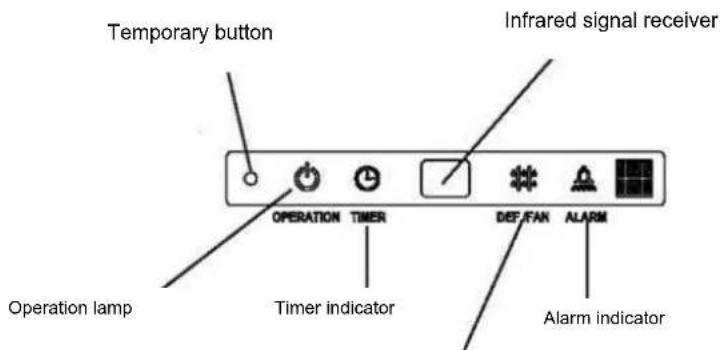
PRE-DEF indicator(cooling and heating type) or fan only indicator(cooling only type)
Display panel Fig.2-1
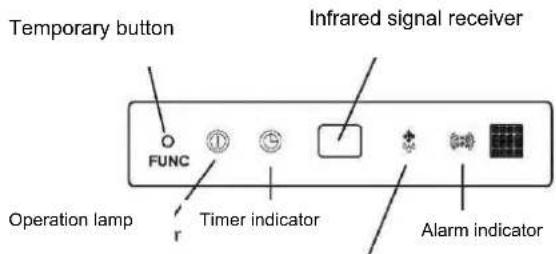
PRE-DEF indicator(cooling and heating type) or fan only indicator(cooling only type)
Display panel Fig.2-2
This function is used to operate the unit temporarily in case you misplace the remote controller or its batteries are exhausted. Two modes including AUTO and FORCED COOL can be selected through the TEMPORARY BUTTON on the air-in grill control box of the indoor unit. Once you push this button, the air conditioner will run in such order: AUTO, FORCED COOL, OFF, and back to AUTO.
1. AUTO
The OPERATION lamp is lit, and the air conditioner will run under AUTO mode. The remote controller operation is enabled to operate according to the received signal.
2. FORCED COOL
The OPERATION lamp flashes, the air conditioner will turn to AUTO after it is enforced to cool with a wind speed of HIGH for 30 minutes. The remote controller operation is disabled.
3. OFF
The OPERATION lamp goes off. The air conditioner is OFF while the remote controller operation is enabled.
NOTE
This manual does not include Remote Controller Operations, see the<
3. AIR CONDITIONER OPERATIONS AND PERFORMANCE
Use the system in the following temperature for safe and effective operation.
The Max operation temperature for the air conditioner (Cooling/Heating).
Table 3-1
| Temperature Mode | Outdoor temperature | Room temperature |
| Cooling operation | 0°C ~ 50°C / 32 °F~122°F | 17°C ~ 32°C(62 °F ~ 90°F) |
| -15°C ~ 50°C / 5 °F~122°F(for the models with low temperature cooling system) | ||
| Heating operation(cooling only type without) | -15°C ~ 24°C / 5 °F~76°F | 0°C ~ 30°C / 32 °F~86°F |
| Dry operation | 0°C ~ 50°C / 32 °F~122°F | 17°C ~ 32°C(62 °F ~ 90°F) |
NOTE
1 If air conditioner is used outside the above conditions, it may cause the unit to function abnormally.
2 The phenomenon is normal that the surface of air conditioning may condense water when the relative larger humidity in room, please close the door and window.
3 Optimum performance will be achieved within these operating temperature range.
■ Three-minute protection feature
A protection feature prevents the air conditioner from being activated for approximately 3 minutes when it restarts immediately after operation.
■ Auto-restart function
- Power failure during operation will stop the unit completely.
- When the power restores, the OPERATION indicator on the indoor unit starts flashing. For the unit without Auto-restart feature, to restart the operation, push the ON/OFF button on the remote controller. For the unit with Auto-restart feature, the unit restarts automatically with all the previous settings preserved by the memory function.
■ Refrigerant Leakage Detection(optional):
With this new technology, the dipsplay area will appear EC (if applicable) and the LED indication lamps continue flashing when the outdoor unit detects refrigerant leakage.
■ Louver Angle Memory Function(optional):
For some models, the machine is special designed with louver angle memory function. Power failure during operation or pressing the ON/OFF button on the remote controller will stop the unit completely. When the power restores or pressing the ON/OFF button on the remote controller again, the unit restarts automatically with the previous open angle of the horizontal louver by the memory function. So we strongly recommend that the open angle of the horizontal louver should not be set too small, in case the condensed water forms and drops from the horizontal louver. Press the Manual control button and the open angle of the horizontal louver will be restored to the standard angle.
The following should be noticed to ensure an economical operation.
■ Adjust the air flow louver properly and avoid direct air flow to room inhabitants.
■ Adjust the room temperature properly for a comfortable environment. Avoid excessive heating or cooling.
■ Prevent direct sunlight during cooling operation by using curtains or blinds.
■ Ventilate often. Extended use requires special attention to ventilation.
- Keep doors and windows closed. If the doors and windows remain open, air will flow out of your room causing a decrease in the cooling or heating effect.
■ Never place objects near the air inlet or the air outlet of the unit. It may cause deterioration in the effect or stop the operation.
■ Set the timer
If you don't plan to use the unit for a long time, please take the batteries from the remote controller. When the power is on, some energy will be consumed, even if the air conditioner isn't in operation. So please disconnect the power to save energy.
- Keep the indoor unit and remote controller at least 1 m away from televisions, radios, stereos, and other similar equipment. Failing to do so may cause static or distorted pictures.
■ A dirty air filter will reduce cooling or heating efficiency, please clean it once two weeks.
5. ADJUSTING AIR FLOW DIRECTION
While the unit is in operation, you can adjust the air flow louver to change the flow direction and naturalize the room temperature evenly. Thus you can enjoy it more comfortably.
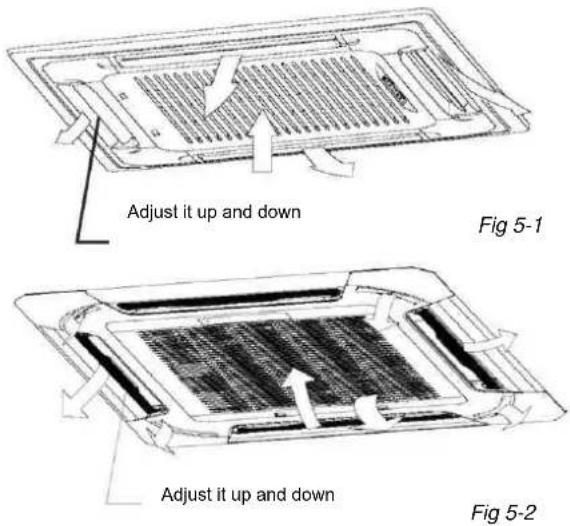
■ Set the air flow direction.
Press the SWING button to adjust the louver to the desired position and press this button again to maintain the louver at this position.
■ Adjust the air flow direction automatically.
Press the SWING button, the louver will swing automatically. While this function is set, the swing fan of indoor unit runs; otherwise, the swing fan doesn't run. The swing scale of every side is 30^ . When the air conditioner isn't in operation (including when TIMER ON is set), the SWING button will be invalid.
6. MAINTENANCE
CAUTION
Before you clean the air conditioner, be sure the power supply is off.
Check if the wiring is not broken off or disconnected.
Use a dry cloth to wipe the indoor unit and remote controller.
A wet cloth may be used to clean the indoor unit if it is very dirty.
Never use a damp cloth on the remote controller.
Do not use a chemically-treten duster for wiping or leave such material on the unit for long.
it may damage or fade the surface of the unit.
Do not use benzine, thinner, polishing powder, or similar solvents for cleaning.
These may cause the plastic surface to crack or deform.
■ Maintenance after a long stop period
(eg. at the beginning of the season)
Check and remove everything that might be blocking inlet and outlet vents of indoor units and outdoor units.
Clean air filters and casings of indoor units.
Refer to "Cleaning the air filter" for details on how to proceed
and make sure to install cleaned air filters back in the same
position.
Turn on the power at least 12 hours before operating the unit in order to ensure smoother operation. As soon as he power is turned on, the remote controller displays appear.
■ Maintenance before a long stop period
(eg. at the end of the season)
Let the indoor units run in fan only operation for about half a day in order to dry the interior of the units.
Clean air filters and casings of indoor units. Refer to "Cleaning the air filter" for details on how to proceed and make sure to install cleaned air filters back in the same position.
■ Cleaning the air filter
The air filter can prevent the dust or other particulate from going inside. In case of blockage of the filter, the working efficiency of the air conditioner may greatly decrease. Therefore, the filter must be cleaned once two weeks during long time usage.
If the air conditioner is installed in a dust place, clean the air filter frequent.
If the accumulated dust is too heavy to be cleaned, please replace the filter with a new one(replaceable air filter is an optional fitting).
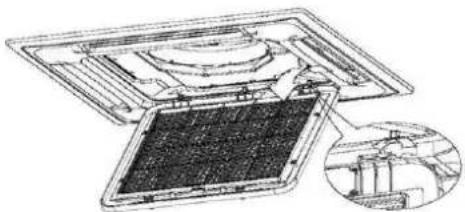
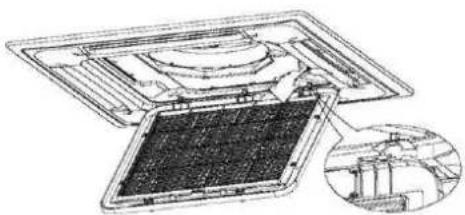
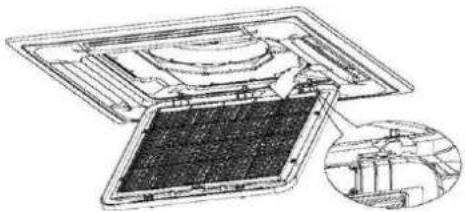
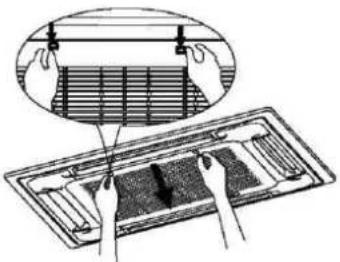
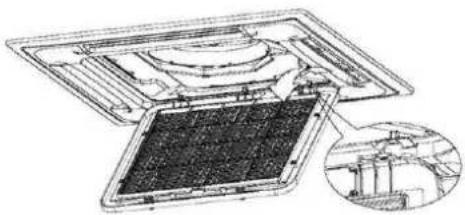
1 Open the air-in grill
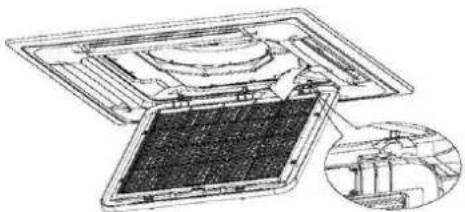
Push the grill switches towards the middle simultaneously as indicated in Fig.6-1. Then pull down the air-in grill.
The control box cables ,which are originally connected with the main body electrical terminators must be pulled off before doing as indicated above.
2 Take out the air-in grill (together with the air filter shown in Fig.6-1)
Pull the air-in grill down at 45^ and lift it up to take out the grill.
3 Dismantle the air filter.
4 Clean the air filter
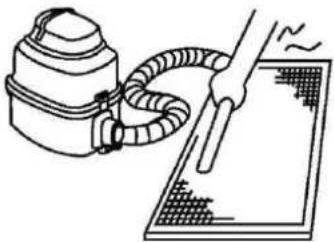
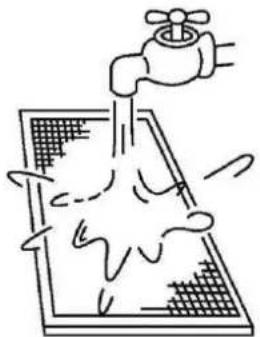
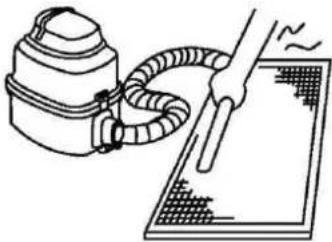
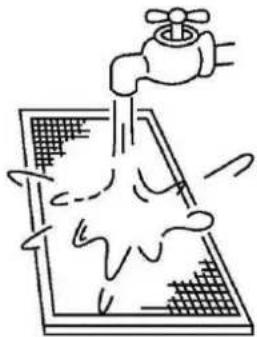
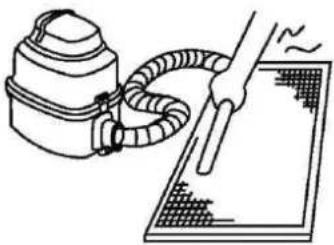
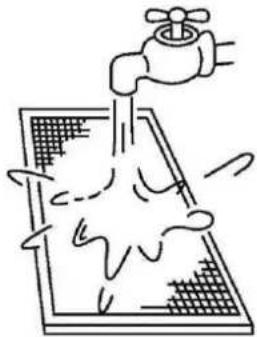
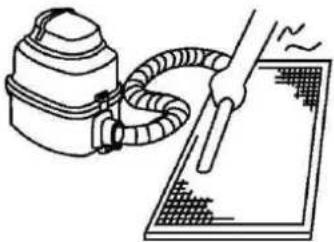
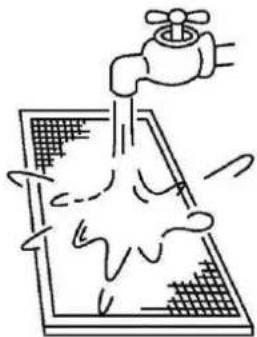
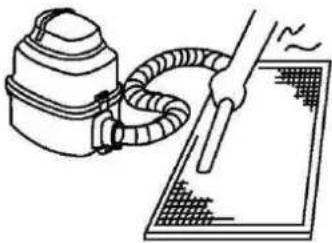
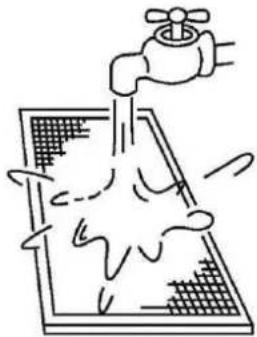
Vacuum cleaner or pure water may be used to clean the air filter. If the dust accumulation is too heavy, please use soft brush and mild detergent to clean it and dry out in cool place.
• The air-in side should face up when using vacuum cleaner. (See Fig. 6-3)
• The air-in side should face down when using water. (See Fig. 6-4)
CAUTION
Do not dry out the air filter under direct sunshine or with fire.
5 Re-install the air filter.
6 Install and close the air-in grill in the reverse order of step 1 and 2 and connect the control box cables to the corresponding terminators of the main body.
natural_image
Illustration of hands installing or adjusting a grid panel inside a rectangular frame (no text or symbols)Fig 6-1
natural_image
Technical line drawing of a mechanical assembly with an inset showing a close-up of a component (no text or symbols present)Fig 6-2
natural_image
Line drawing of a hand using a vacuum cleaner to clean or operate on a grid-patterned surface (no text or symbols)Fig 6-3
natural_image
Simple line drawing of a faucet spraying water onto a grid-patterned surface (no text or symbols)Fig 6-4
7. FOLLOWING SYMPTOMS ARE NOT AIR CONDITIONER TROUBLES
Symptom 1: The system does not operate
■ The air conditioner does not start immediately after the ON/OFF button on the remote controller is pressed. If the operation lamp lights, the system is in normal condition. To prevent overloading of the compressor motor, the air conditioner starts 3 minutes after it is turned ON.
■ If the operation lamp and the "PRE-DEF indicator(cooling and heating type) or fan only indicator(cooling only type)" light, it means you choose the heating model. When just starting, if the compressor has not started, the indoor unit appears "anti cold wind" protection because of its overflow outlet temperature.
Symptom 2: Change into the fan mode during cooling mode
In order to prevent the indoor evaporator frosting, the system will change into fan mode automatically, restore to the cooling mode after soon.
- When the room temperature drops to the set temperature, the compressor goes off and the indoor unit changes to fan mode; when the temperature rises up, the compressor starts again. It is same in the heating mode.
Symptom 3: White mist comes out of a unit
Symptom 3.1: Indoor unit
When humidity is high during cooling operation If the interior of an indoor unit is extremely contaminated, the temperature distribution inside a room becomes uneven. It is necessary to clean the interior of the indoor unit. Ask your dealer for details on cleaning the unit. This operation requires a qualified service person
Symptom 3.2: Indoor unit, outdoor unit
■ When humidity is high during cooling operation If the interior of an indoor unit is extremely contaminated, the temperature distribution inside a room becomes uneven. It is necessary to clean the interior of the indoor unit. Ask your dealer for details on cleaning the unit. This operation requires a qualified service person.
■ When the system is changed over to heating operation after defrost operation Moisture generated by defrost becomes steam and is exhausted.
Symptom 4: Noise of air conditioners cooling Symptom 4.1: Indoor unit
■ A continuous low "shah" sound is heard when the system is in cooling operation or at a stop.
When the drain pump (optional accessories) is in operation, this noise is heard.
■ A "pishi-pishi" squeaking sound is heard when the system stops after heating operation.
Expansion and contraction of plastic parts caused by temperature change make this noise.
Symptom 4.2: Indoor unit, outdoor unit
■ A continuous low hissing sound is heard when the system is in operation.
This is the sound of refrigerant gas flowing through both indoor and outdoor units.
A continuous low hissing sound is heard when the system is in operation.
This is the sound of refrigerant gas flowing through both indoor and outdoor units.
■ A hissing sound which is heard at the start or immediately after stopping operation or defrost operation.
This is the noise of refrigerant caused by flow stop or flow change.
Symptom 4.3: Outdoor unit
■ When the tone of operating noise changes. This noise is caused by the change of frequency.
Symptom 5: Dust comes out of the unit
■ When the unit is used for the first time in a long time. This is because dust has gotten into the unit.
Symptom 6: The units can give off odours
■ The unit can absorb the smell of rooms, furniture, cigarettes, etc., and then emit it again.
Symptom 7: The outdoor unit fan does not spin.
■ During operation. The speed of the fan is controlled in order to optimize product operation.
8. TROUBLESHOOTING
8.1 Troubles and causes of air conditioner
If one of the following malfunctions occur, stop operation, shut off the power, and contact with your dealer.
■ The operation lamp is flashing rapidly (5Hz).
This lamp is still flashing rapidly after turn off the power and turn on again. (See in Table 8-1)
■ Remote controller receives malfunction or the button does not work well.
■ A safety device such as a fuse, a breaker frequently actuates.
■ Obstacles and water enter the unit.
■ Water leaks from indoor unit.
■ Other malfunctions.
If the system does not properly operate except the above mentioned cases or the above mentioned malfunctions is evident, investigate the system according to the following procedures. (See in Table 8-2)
8.2 Troubles and causes of remote controller
Before asking for serving or repairing, check the following points.
(See in Table 8-3)
| NO. | Malfunction | display (nixie tube) | timer lamp | running lamp (flashes per second) |
| 1 | Indoor EEPROM error | E0 | OFF | 1 |
| 2 | Communication malfunction between indoor and outdoor units | E1 | OFF | 2 |
| 3 | Indoor fan speed malfunction | E3 | OFF | 4 |
| 4 | Indoor room temperature sensor open circuit or short circuit | E4 | OFF | 5 |
| 5 | Evaporator coil temperature sensor open circuit or short circuit | E5 | OFF | 6 |
| 6 | Refrigerant leakage detection malfunction | EC | OFF | 7 |
| 7 | Water-level alarm malfunction | EE | OFF | 8 |
| 8 | Communication malfunction between two indoor units (for twins model) | E8 | OFF | 9 |
| 9 | Other malfunction of twins model | E9 | OFF | 10 |
| 10 | Current overload protection | F0 | ON | 1 |
| 11 | Outdoor room temperature sensor open circuit or short circuit | F1 | ON | 2 |
| 12 | Outdoor condenser pipe temperature sensor error | F2 | ON | 3 |
| 13 | Discharging air temperature sensor error | F3 | ON | 4 |
| 14 | Outdoor EEPROM error | F4 | ON | 5 |
| 15 | Outdoor fan speed malfunction (Only for DC fan motor) | F5 | ON | 6 |
| 1 | T2b sensor error | F6 | ON | 7 |
| 17 | Lifting panel communication checking channel is abnormal | F7 | ON | 8 |
| 18 | Lifting panel malfunction | F8 | ON | 9 |
| 19 | Lifting panel is not closed | F9 | ON | 10 |
| 20 | Inverter module IPM protection | P0 | Flash | 1 |
| 21 | High/Low voltage protection | P1 | Flash | 2 |
| 22 | High temperature protection of compressor top | P2 | Flash | 3 |
| 23 | Outdoor low temp. protection | P3 | Flash | 4 |
| 24 | Compressor drive error | P4 | Flash | 5 |
| 25 | Mode conflict | P5 | Flash | 6 |
Table 8-2
| Symptoms | Causes | Solution |
| Unit does not start | Power failure.Power switch is off.Fuse of power switch may have burned.Batteries of remote controller exhausted or other problem of controller. | Wait for the comeback of power. Switch on the power.Replace the fuse.Replace the batteries or check the controller. |
| Air flowing normally but completely can't | Temperature is not set correctly.Be in 3 minutes protection of compressor. | Set the temperature properly.Wait. |
| Units start or stop frequently | Refrigerant is too little or too much.Airor no concreting gas in the refrigerating circuit.Compressor is malfunction.Voltage is too high or too low.System circuit is blocked. | Check leakage, and rightly recharge refrigerant.Vacuum and recharge refrigerant.Maintenance or change compressor. Install manostat. |
| Low cooling effect | Outdoor unit and indoor unit heat exchanger is dirty.The air filter is dirty.Inlet/outlet of indoor/outdoor units is blocked.Doors and windows are openSunlight directly shine.Too much heat resource.Outdoor temp. is too high.Leakage of refrigerant or lack of refrigerant. | Find reasons and solution. Clean the heat exchanger. Clean the air filter.Eliminate all dirties and make air smooth.Close doors and windows.Make curtains in order to shelter from sunshine.Reduce heat source.AC cooling capacity reduces (normal). |
| Low heating effect | Outdoor temperature is lower than 7 C.Doors and windows not completely closed.Leakage of refrigerant or lack of refrigerant. | Check leakage and rightly recharge refrigerant.Use heating device.Close doors and windows.Check leakage and rightly recharge |
Table 8-3
| Symptoms | Causes | Solution |
| The fan speed can not be changed. | ·Check whether the MODE indicated on the display is "AUTO" | When the automatic mode is selected, the air conditioner will automatically change the fan speed. |
| ·Check whether the MODE indicated on the display is "DRY" | When dry operation is selected, the air conditioner automatically change the fan speed. The fan speed can be selected during "COOL", "FAN ONLY", and "HEAT". | |
| The remote controller signal is not transmitted even when the ON/OFF button is pushed. | ·Check whether the batteries in the remote controller are exhausted. | The power supply is off. |
| The TEMP. indicator does not come on. | ·Check whether the MODE indicated on the display is FAN ONLY | The temperature cannot be set during FAN mode. |
| The indication on the display disappears after a lapse of time. | ·Check whether the timer operation has come to an end when the TIMER OFF is indicated on the display. | The air conditioner operation will stop up to the set time. |
| The TIMER ON indicator goes off after a lapse of certain time. | ·Check whether the timer operation is started when the TIMER ON is indicated on the display. | Up to the set time, the air conditioner will automatically start and the appropriate indicator will go off. |
| No receiving tone sounds from the indoor unit even when the ON/OFF button is pressed. | Check whether the signal transmitter of the remote controller is properly directed to the infrared signal receiver of the indoor unit when the ON/OFF button is pressed. | Directly transmit the signal transmitter of the remote controller to the infrared signal receiver of the indoor unit, and then repeatedly push the ON/OFF button twice. |
CONTENTS
Handling the remote controller.... 2
Remote controller Specifications 3
Function buttons.... 4
Indicators on LCD 6
How to use the buttons.... 7
Auto operation 7
Cooling/Heating/Fan operation 7
Dehumidifying operation.... 8
Adjusting air flow direction 8
Timer operation 9
SLEEP function.... 12
Handling the remote controller
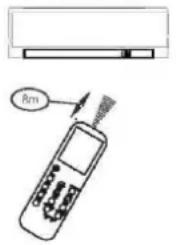
Location of the remote controller.
- Use the remote controller within a distance of 8 meters from the appliance, pointing it towards the receiver. Reception is confirmed by a beep.

CAUTIONS
- The air conditioner will not operate if curtains, doors or other materials block the signals from the remote controller to the indoor unit.
- Prevent any liquid from falling into the remote controller. Do not expose the remote controller to direct sunlight or heat.
If the infrared signal receiver on the indoor unit is exposed to direct sunlight, the air conditioner may not function properly. Use curtains to - prevent the sunlight from falling on the receiver.
If other electrical appliances react to the remote controller, either move these appliances or consult your local dealer.
Replacing batteries
The remote controller is powered by two dry batteries(R03/LR03X2) housed in the rear part and protected by a cover.
(1) Remove the cover by pressing and sliding off.
(2) Remove the old batteries and insert the new batteries, placing the (+) and (-) ends correctly.
(3) Reattach the cover by sliding it back into position.
(4)
NOTE: When the batteries are removed, the remote controller erases all programming. After inserting new batteries, the remote controller must be reprogrammed.

CAUTIONS
- Do not mix old and new batteries or batteries of different types.
- Do not leave the batteries in the remote controller if they are not going to be used for 2 or 3 months.
- Do not dispose batteries as unsorted municipal waste. Collection of such waste separately for special treatment is necessary.
Remote Controller Specifications!
| Model | RG52C1/BG(C)E. |
| Rated Voltage | 3.0V(Dry baeries R03/LR03X2) |
| Signal Receiving Range | 8m (when using 3.0 voltage, it gets 11m) |
| Environment | -5°C~ 60°C |
Performance Feature!
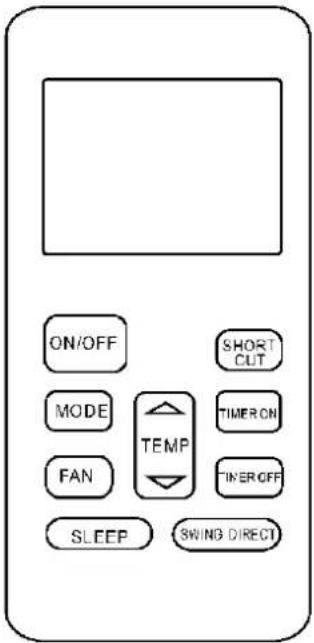
NOTE:
Buttons design might be slightly different from the actual one you purchased depending on individual models.
All the functions described are accomplished by the indoor unit. If the indoor unit has no this feature, there is no corresponding operation happened when press the relative button on the remote controller.
Function buttons
flowchart
graph TD
    A["1 ON/OFF"] --> B["2 MODE"]
    B --> C["3 FAN"]
    C --> D["4 SLEEP"]
    D --> E["5 SHORT OUT"]
    E --> F["6 TIME ON"]
    F --> G["7 TIMER OFF"]
    G --> H["8 GIVING DIRECT"]
    H --> I["9"]
    style A fill:#f9f,stroke:#333
    style B fill:#ccf,stroke:#333
    style C fill:#cfc,stroke:#333
    style D fill:#fcc,stroke:#333
    style E fill:#cff,stroke:#333
    style F fill:#ffc,stroke:#333
    style G fill:#cfc,stroke:#333
    style H fill:#fcc,stroke:#333
    style I fill:#cfc,stroke:#333
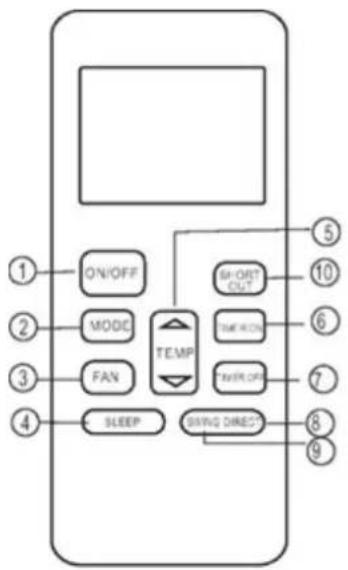
1. ON/OFF Button
Operation starts when this button is pressed and stops when this button is pressed again.
2. MODE Button
Each time the button is pressed, the operation mode is selected in a sequence of following:

flowchart
graph LR
    A["AUTO"] --> B["COOL"]
    B --> C["DRY"]
    C --> D["HEAT"]
    D --> E["FAN"]
NOTE: Heat mode is for Cooling & Heating models only.
3. FAN Button
Used to select the fan speed in four steps:

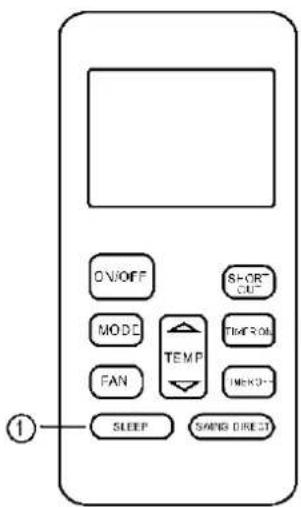
4. SLEEP Button
Active/Disable sleep function. It can maintain the most comfortable temperature and save energy. This function is available on COOL, HEAT or AUTO mode only.
NOTE: While the unit is running under SLEEP mode, it would be cancelled if MODE, FAN SPEED or ON/OFF button is pressed.
5. UP Button( ^ )
Push this button to increase the indoor temperature setting in 1^ C increments to 30^ C.
DOWN Button( ^ )
Push this button to decrease the indoor temperature setting in 1^ C increments to 17^ C.
6. TIMER ON Button
Press this button to initiate the auto-on time sequence. Each press will increase the auto-timed setting in 30 minutes increments. When the setting time displays 10, each press will increase the auto-timed setting 60 minutes increments. To cancel the auto-timed program, simply adjust the auto-on time to 0.0.
7. TIMER OFF Button
Press this button to initiate the auto-off time sequence. Each press will increase the auto-timed setting in 30 minutes increments. When the setting time displays 10, each press will increase the auto-timed setting 60 minutes increments.
To cancel the auto-timed program, simply adjust the auto-off time to 0.0
8. DIRECT Button
Used to change the louver movement and set the desired up/down air flow direction. The louver changes 6^ in angle for each press.
9. SWING Button
Pressing the button less than 2 seconds to activate the horizontal louver swing up and down automatically. Pressing the button long to activate the vertical louver swing left and right automatically.
NOTE: The left and right swinging of vertical louver function is only for some models.
10. SHORTCUT Button
• Used to restore the current settings or resume previous settings.
- On the first time connecting to the power, if push the SHORTCUT button, the unit will operate on AUTO mode, 26^ , and fan speed is Auto.
- Push this button when remote controller is on, the system will automatically revert back to the previous settings including operating mode, setting temperature, fan speed level and sleep feature(if activated). And transmit the signals to the unit.
- If push this button when remote controller is off, the system will only resume the previous settings and will not transmit the signals to the unit. And the sleep feature is disable.
- If pushing more than 2 seconds, the system will automatically restore the current operation settings including operating mode, setting temperature, fan speed level and sleep feature(if activated).
Indicators on LCD
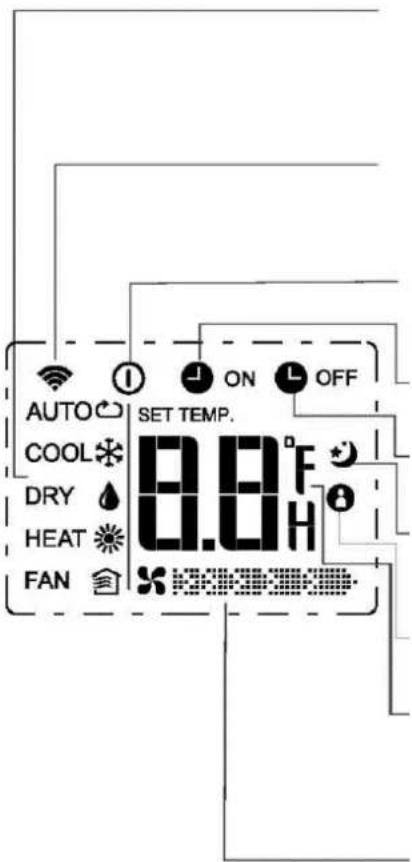
Mode display
Displays the current operation mode. Including auto( ), cool( ), dry( ), heat ) (Not applicable to cooling only models), fan( and back to auto( ).
Transmission Indicator
This transmission indicator lights when remote controller transmits signals to the indoor unit.
ON/OFF display
Displayed by pressing the ON/OFF button. Press the ON/OFF button again to remove.
TIMER ON display
Displayed when TIMER ON time is set.
TIMER OFF display
Displayed when TIMER OFF time is set.
"Sleep Display
Displayed under sleeping operation. Press the SLEEP button again to remove.
FOLLOW ME Display(on some models)
Displayed when FOLLOW ME function is activated.
Temp./Timer display
Displays the temperature setting(17°C\~30°C). When you set the operating mode to FAN, no temperature setting is displayed. And if in the TIMER mode, shows the ON and OFF settings of the TIMER.
Fan speed display
Displays the selected fan speed, AUTO(no display) and three fan speed levels (LOW) (MED) "HIGH" can be indicated.
The fan speed is AUTO when the operating mode is either AUTO or DRY.
Note:
All indicators shown in the figure are for the purpose of clear presentation. But during the actual operation only the relative functional signs are shown on the display window.
How to use the buttons!
flowchart
graph TD
    A["ON/OFF"] --> B["MODE"]
    B --> C["FAN"]
    C --> D["SLEEP"]
    D --> E["SWING DIRECT"]
    F["SHORT OUT"] --> G["TURRY ON"]
    G --> H["TURRY OFF"]
    I["2"] --> J["TEMP"]
    K["4"] --> L["1"]
    M["3"] --> N["2"]
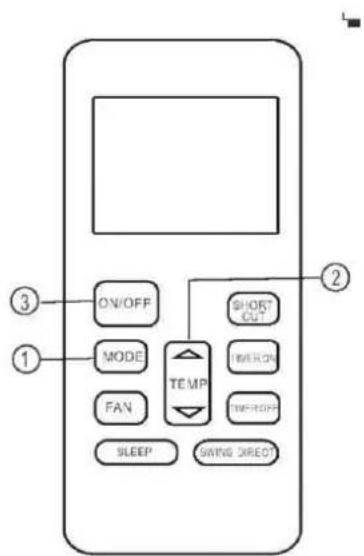
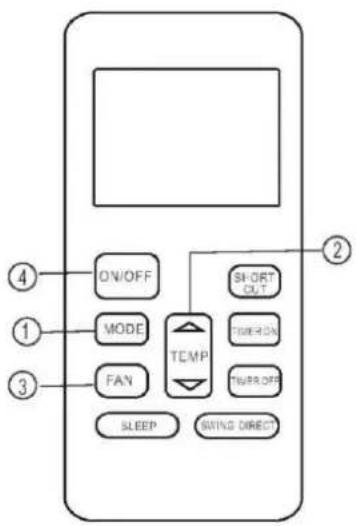
Auto operation
Ensure the unit is plugged in and power is available. The OPERATION indicator on the display panel of the indoor unit starts flashing.
-
Press the MODE button to select Auto.
-
Press the UP/DOWN button to set the desired temperature. The temperature can be set within a range of 17^ C\~ 30^ C in 1^ C increments.
-
Press the ON/OFF button to start the air conditioner.
NOTE
-
In the Auto mode, the air conditioner can logically choose the mode of Cooling, Fan, and Heating by sensing the difference between the actual ambient room temperature and the setting temperature on the remote controller.
-
In the Auto mode, you can not switch the fan speed. It has already been automatically controlled.
-
If the Auto mode is not comfortable for you, the desired mode can be selected manually.
Cooling /Heating/Fan operation
Ensure the unit is plugged in and power is available.
-
Press the MODE button to select COOL, HEAT(cooling & heating models only) or FAN mode.
-
Press the UP/DOWN buttons to set the desired temperature. The temperature can be set within a range of 17^ 30^ in 1^ increments.
-
Press the FAN button to select the fan speed in four steps- Auto, Low, Med, or High.
-
Press the ON/OFF button to start the air conditioner.
NOTE
In the FAN mode, the setting temperature is not displayed in the remote controller and you are not able to control the room temperature either. In this case, only step 1, 3 and 4 may be performed.
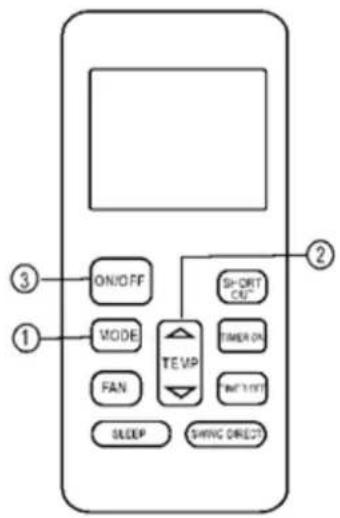
Dehumidifying operation
Ensure the unit is plugged in and power is available. The OPERATION indicator on the display panel of the indoor unit starts flashing.
- Press the MODE button to select DRY mode.
- Press the UP/DOWN buttons to set the desired temperature. The temperature can be set within a range of 17^ C\~ 30^ C in 1^ C increments.
- Press the ON/OFF button to start the air conditioner.
NOTE
In the Dehumidifying mode, you can not switch the fan speed. It has already been automatically controlled.
Adjusting air flow direction
Use the SWING and DIRECT button to adjust the desired airflow direction.
- When push the DIRECT button, the horizontal louver changes 6 degree in angle for each push.
- When push the SWING button less than 2 seconds, the louver will swing up and down automatically. When push the SWING button long, the louver will swing left and right automatically.
NOTE: When the louver swing or move to a position which would affect the cooling or heating effect of the air conditioner, it would automatically change the swing/moving direction.
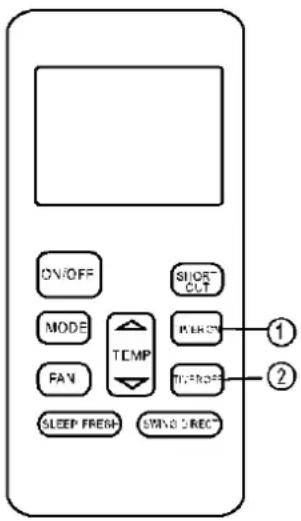
Timer operation
Press the TIMER ON button can set the auto-on time of the unit. Press the TIMER OFF button can set the auto-off time of the unit.
To set the Auto-on time.
- Press the TIMER ON button. The remote controller shows TIMER ON, the last Auto-on setting time and the signal "H" will be shown on the LCD display area. Now it is ready to reset the Auto-on time to START the operation.
- Push the TIMER ON button again to set desired Auto-on time. Each time you press the button, the time increases by half an hour between 0 and 10 hours and by one hour between 10 and 24 hours.
- After setting the TIMER ON, there will be a one second delay before the remote controller transmits the signal to the air conditioner. Then, after approximately another 2 seconds, the signal "h" will disappear and the set temperature will re-appear on the LCD display window.
To set the Auto-off time.
- Press the TIMER OFF button. The remote controller shows TIMER OFF, the last Auto-off setting time and the signal "H" will be shown on the LCD display area. Now it is ready to reset the Auto-off time to stop the operation.
- Push the TIMER OFF button again to set desired Auto-off time. Each time you press the button, the time increases by half an hour between 0 and 10 hours and by one hour between 10 and 24 hours.
- After setting the TIMER OFF, there will be a one second delay before the remote controller transmits the signal to the air conditioner. Then, after approximately another 2 seconds, the signal "H" will disappear and the set temperature will re-appear on the LCD display window.

CAUTION
When you select the timer operation, the remote controller automatically transmits the timer signal to the indoor unit for the specified time. Therefore, keep the remote controller in a location where it can transmit the signal to the indoor unit properly.
The effective operation time set by the remote controller for the timer function is limited to the following settings: 0.5, 1.0, 1.5, 2.0, 2.5, 3.0, 3.5, 4.0, 4.5, 5.0, 5.5, 6.0, 6.5, 7.0, 7.5, 8.0, 8.5, 9.0, 9.5, 10, 11, 12, 13, 14, 15, 16, 17, 18, 19, 20, 21, 22, 23 and 24.
Example of timer setting
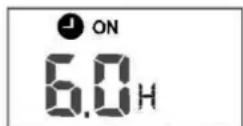
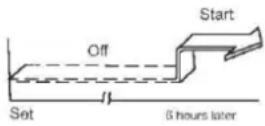
TIMER ON
(Auto-on Operation)
The TIMER ON feature is useful when you want the unit to turn on automatically before you return home. The air conditioner will automatically start operating at the set time.
Example:
To start the air conditioner in 6 hours.
- Press the TIMER ON button, the last setting of starting operation time and the signal "H" will show on the display area.
- Press the TIMER ON button to display "6.0H on the TIMER ON display of the remote controller.
- Wait for 3 seconds and the digital display area will show the temperature again. The "TIMER ON" indicator remains on and this function is activated.
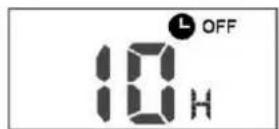
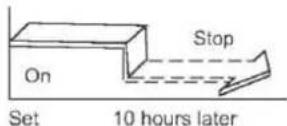
TIMER OFF
(Auto-off Operation)
The TIMER OFF feature is useful when you want the unit to turn off automatically after you go to bed. The air conditioner will stop automatically at the set time.
Example:
To stop the air conditioner in 10 hours.
- Press the TIMER OFF button, the last setting of stopping operation time and the signal "H" will show on the display area.
- Press the TIMER OFF button to display "10H" on the TIMER OFF display of the remote controller.
- Wait for 3 seconds and the digital display area will show the temperature again. The "TIMER OFF" indicator remains on and this function is activated.
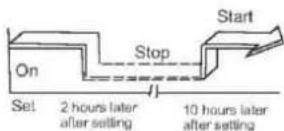
COMBINED TIMER
(Setting both ON and OFF timers simultaneously)
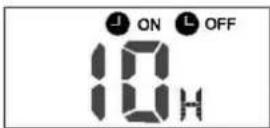
(On — Stop — Start operation)
This feature is useful when you want to stop the air conditioner after you go to bed, and start it again in the morning when you wake up or when you return home.
Example:
To stop the air conditioner 2 hours after setting and start it again 10 hours after setting.
- Press the TIMER OFF button.
- Press the TIMER OFF button again to display 2.0H on the TIMER OFF display.
- Press the TIMER ON button.
- Press the TIMER ON button again to display 10H on the TIMER ON display.
- Wait for 3 seconds and the digital display area will show the temperature again. The "TIMER ON OFF" indicator remains on and this function is activated.
flowchart
graph TD
    A["Start"] --> B["Off"]
    B --> C["Set"]
    C --> D["2 hours later after setting"]
    D --> E["5 hours later after setting"]
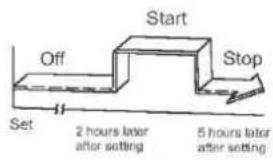
(Off — Start — Stop operation)
This feature is useful when you want to start the air conditioner before you wake up and stop it after you leave the house.
Example:
To start the air conditioner 2 hours after setting, and stop it 5 hours after setting.
- Press the TIMER ON button.
- Press the TIMER ON button again to display 2.0H on the TIMER ON display.
- Press the TIMER OFF button.
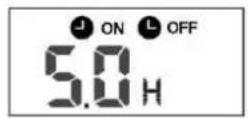
- Press the TIMER OFF button again to display 5.0H on the TIMER OFF display.
- Wait for 3 seconds and the digital display area will show the temperature again. The "TIMER ON OFF" indicator remains on and this function is activated.
NOTE: The timer setting(TIMER ON or TIMER OFF) that in sequence occurs directly after the set time will be activated first.
SLEEP/FRESH function
- The sleep function enables the unit to automatically increase(cooling) or decrease(heating) 1^ per hour for the first two hours, then hold steady for the next 5 hours, after that the unit will stop operation. It can maintain the most comfortable temperature and save energy. NOTE: The SLEEP function is only available under Cooling, Heating and AUTO operations.
CONTENTS
- SAFETY PRECAUTION 2
- SUMMARIZE 2
- FUNCTION SUMMARY.... 2
- NAME AND FUNCTION OF INDICATORS ON THE WIRE CONTROLLER.... 3
- INSTALLATION METHOD .... 4
- NAME AND OPERATION OF THE BUTTON ON THE WIRE CONTROLLER....4
- USING METHOD....6
AUTOMATIC OPERATION 6
COOLING/HEATING/FAN ONLY OPERATION....6
DRY OPERATION 6
TIMER SETTING....6
TIMER ON AND TIMER OFF BOTH 6
CHANGE TIMER 6
8.TECHNICAL INDICATION AND REQUIREMENT....7
- This manual gives detailed description of the precautions that should be brought to your attention during operation.
- In order to ensure correct service of the wired controller please read this manual carefully before using the unit.
- For convenience of future reference, keep this manual after reading it.
- The wired controller will reset to factory setting with auto mode, auto fan and 24^ C( 76^ F) setting temperature when the air conditioner restarts after power failure.
And this may cause inconsistent displays on the wired controller and on the air conditioner. You need to readjust the running status through the wired controller.
1. SAFETY PRECAUTIONS
The following contents are stated on the product and the operation manual, including usage, precautions against personal harm and property loss, and the methods of using the product correctly and safely. After fully understanding the following contents (identifiers and icons), read the text body and observe the following rules.
Identifier description
| Identifier | Meaning |
| Warning | Means improper handling may lead to personal death or severe injury |
| Caution | Means improper handling may lead to personal injury or property loss. |
| [Note]: 1. “Harm” means injury, burn and electric shock which need long-term treatment but need no hospitalization2. “Property loss” means loss of properties and materials. | |
Icon description
| Icon | Meaning | |
 | It indicates forbidding. The forbidden subject-matter is indicated in the icon or by images or characters aside. | |
 | It indicates compulsory implementation. The compulsory subject-matter is indicated in the icon or by images or characters aside. | |
Warning
 Warning Warning | Delegate installation | Please entrust the distributor or professionals to install the unit. The installers must have the relevant know-how. Improper installation performed by the user without perm ission may cause fire, electric,shock, personal injury or water leakage. |
 UsageWarning UsageWarning | Forbid | Do not spray flammable aerosol to the wire controller directly. Otherwise, fire may occur. |
| Forbid | Do not operate with wet hands or let water enter the wire controller. Otherwise, electric shock may occur. |
2. SUMMARIZE
Usage condition:
- Power supply: 5V DC.
- Operation temperature:
-15^(-5^) +43^(+109^). - Operation humidity: 40%-90%, RH.
3. FUNCTION SUMMARY
Main function:
- Connecting to indoor unit by A, B, C, D, E termina.;
- Button setting action mode.
- LCD display.
- Timer for rest time.
4. NAME AND FUCTION OF INDICATORS ON THE CONTROLLER
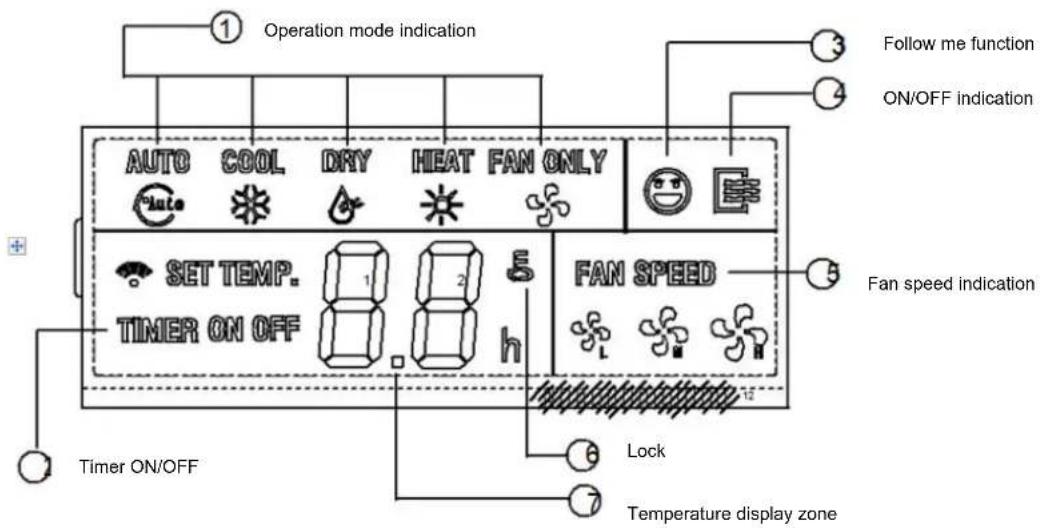
1. Operation mode indication:
When press "MODE" button, the following mode can be selected in circle. Auto→Cool →Dry→Heat→Fan only→Auto. For cooling only model, heat mode is skipped.
2. Timer :
When adjust setting on time or only on time is set, the "ON" is lighted. When adjust setting off time or only off time is set, the "OFF" is lighted. If on and off timer are both set, the "ON" and "OFF" are both lighted.
3. Follow me function:
There is a temperature sensor inside the wire controller, after setting temperature, it will compare the two temperatures, and the space of wire controller will be the same as setting temperature. It is available under cooling, heating, auto mode.
4. ON/OFF indication :
When it is on, the icon display, otherwise it is extinguished.
5. Fan speed indication :
There are four fan modes : low, middle, high, auto. For some models, no middle fan then the middle fan is seen as high speed.
6. Lock:
When the " LOCK " button is pressed, the icon appear and other buttons is unable, press again, the icon disappear.
7. Temperature display zone:
Generally it displays setting tempera-ture, it can be adjusted by press temperature button ▲ and ▼. But in fan mode, no display here.
5. INSTALLATION METHOD
flowchart
graph TD
    A["Wire controller"] --> B["5-way terminal"]
    B --> C["5-Core Shield Cable"]
    C --> D["Indoor Unit"]
    D --> E["Emitter tube"]
    E --> F["RUN"]
    E --> G["GND"]
    style A fill:#f9f,stroke:#333
    style D fill:#ccf,stroke:#333
    style E fill:#cfc,stroke:#333
    style F fill:#fcc,stroke:#333
    style G fill:#fcc,stroke:#333
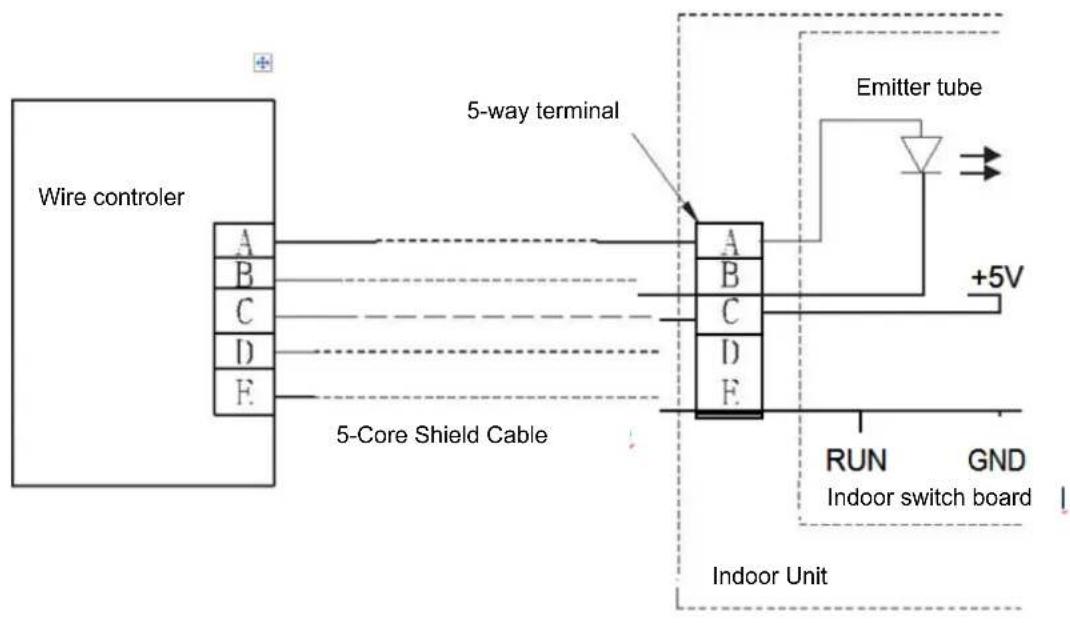
When a wire controller is needed, a small 5-way terminal should be added, fix an infrared emitter with gumwater near the receiver on the switch board. Connect its anode and cathode to A and B, and +5V, GND, RUN to C, D, E on the switch board.
6. NAME AND OPERATION OF THE BUTTON ON THE WIRE CONTROLLER
NOTE
All the pictures in this manual are for explanation purpose only. There may be slightly different from the wire controller you purchased(depend on model). The actual shape shall prevail.
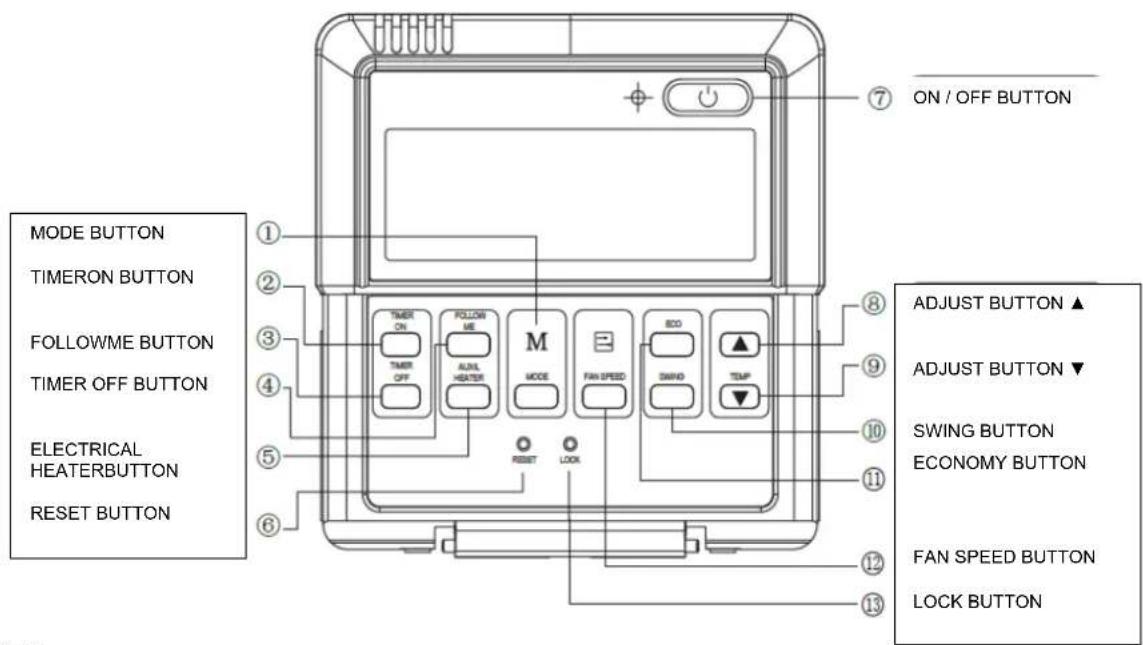
- Mode botton:
When press this botton, the operation mode change as the following sequence:

Remark: For the cooling only model, the heating mode is skipped.
- Timer on button :
Press this button, timer on function is active. Then every press, the time increase 0.5h, after 10h, 1h increase-ment after each press. If cancel this Function, just set it to "0.0".
- Timer off button:
Press this button, timer off function is active. Then every press, the time increase 0.5h, after 10h, 1h increase-ment after each press. If cancel this function, just set it to "0.0".
4.Follow me button :
When under cool, heat and auto mode, press this button, follow me function is active. Pressing the ON/OFF button or MODE button will not cancel the Follow me feature. This function is disable when the unit is off or under DRY or FAN mode. Pressing the FOLLOW ME button again will cancel the follow me feature.
5.Electrical heater button :
If press this button in heat mode, electri-cal heater function become ineffective.
- Reset button(hidden):
Use a 1mm stick to press in the little hole, then the current setting is canceled. The wire controller enter into original state.
7.ON/OFF button:
When in off state, press this button, the indicator is on, the wire controller enter into on state, and send setting information to in door Pcb. When in on state, press this button, the indicator is off, and send instruction. If timer on or timer off has been set, it concel this setting then send instruction to stop the machine.
- Adjust button ▲:
Set indoor temperature up. If press and hold on, it will increase at 1^ C( 2^ F) per 0.5 second.
- Adjust button ▼ :
Set indoor temperature down. if press and hold on, it will decrease at 1°C(2°F) per 0.5 second.
- Swing button:
First press, start swing function; second press, stop swing. (Match to some model with swing function).
- Economy operation button :
press this button, the indoor unit operates in economy mode, press again, exit this mode (it may be ineffective for some models)
- Fan speed button:
press this button consecutively, the fan speed will circle as follow:

- Lock button(hidden):
When you push the LOCK button, all current settings are locked in and the wire controller does not accept any operation except that of the LOCK button. Use the lock mode when you want to prevent setting from being changed accidentally or play fully. Push the LOCK button again when you want to cancel the LOCK mode.
7. USING METHOD
AUTOMATIC OPERATION
Connect to power, indoor operation lamp flash.
- Press "MODE" button, select "AUTO"
- Press the button "▲" and "▼", set temperature you want, generally it is among 17°C(62°F)\~30°C(88°F);
- Press "ON/OFF" button, operation lamp is on, the air-conditioner work in auto mode, indoor fan is auto, and can not be changed. Auto is displayed on LCD. Press ON/OFF button again to stop.
- Economy operation is valid in auto mode.
- In event of power interruption such as a blackout, the air conditioner stops once. But it restarts automatically and performs previous operation when the power supply is resumed.
- Press "MODE" button, select "COOL", "HEAT" or "FAN ONLY" mode.
- Press temperature adjust button to select setting temp.
- Press "FAN SPEED" button to select high/mid/low/auto.
- Press "ON/OFF" button, indoor unit operation lamp on, it works in selected mode. Press "ON/OFF" button again, it stops to work.
Remark: When in fan mode, no tempera-ture can be set.
DRY OPERATION
- Press "MODE" button, select "DRY" mode.
- Press temperature adjust button to select setting temp.
- Press "ON/OFF" button, indoor unit operation lamp on, it works in dry mode. Press ON/OFF button again, it stops to work.
- In dry mode, economy operation and fan speed are ineffective.
TIMER SETTING
Timer on only:
- Press "TIME ON" button, it displays "SET" on LCD, and displays "H" and "ON", it is waiting for timer on setting.
- Press "timer" on button repeatedly to adjust time setting.
- If press this button and hold on, the time will increase at 0.5h, after 10h, it increase at 1h.
- After setting 0.5 second, the wire controller send timer on information, it is finished.
Timer off only:
- Press "TIME OFF" button, it displays "SET" on LCD, and displays "H" and ON, it is waiting for timer on setting.
- Press "TIME OFF" button repeatedly to adjust time setting.
- If press this button and hold on, the time will increase at 0.5h, after 10h, it increase at 1h.
- After setting 0.5 second, the wire controller send timer off information, it is finished.
TIMER ON AND TIMER OFF BOTH
- Set timer on time as the correspond-ing step1 and 2.
- Set timer off time as the correspond-ing step1 and 2.
- Timer off time must be longer than timer on time.
- 0.5 second after setting, the wire controller send information.the setting is finished.
CHANGE TIMER
If there is a need of changing timer time, press corresponding button to revise it. If cancel timer, change timer time to 0.0.
NOTE
The timer time is relative time, that is delay after setting time (i, e: setting time is 8:05 A,M). So when imer is set, the standard time can not be adjusted.
8. TECHNICAL INDICA-TION AND REQUIRE-MENT
EMC and EMI comply with the CE certification requirements.
JAMSTVENI LIST
VIVAX
HR
za klima uređaj
JAMSTVO
Broj jamstva
Tip uređaja
Vanjska Jedinica
Unutarnja J.1
Unutarnja J.2
Unutarnja J.3
Unutarnja J.4
Datum prodaje
Broj računa

M.P.
OPĆI PODACI
Kupac
Adresa
Poštanski broj
Grad
Telefon
MONTAŽA KLIMA UREĐAJA
Servis / Montazer
Datum montaže

M.P.