
CityJam Pro - Rollerblades Infiniton - Free user manual and instructions
Find the device manual for free CityJam Pro Infiniton in PDF.


| Product Type | Electric Scooter |
| Model | CityJam Pro |
| Brand | Infiniton |
| Dimensions (Unfolded) | 1130 x 455 x 1220 mm |
| Dimensions (Folded) | 1130 x 450 x 580 mm |
| Net Weight | 15.3 kg |
| Max Speed | 25 km/h |
| Typical Range | 40-45 km |
| Max Slope | Approx. 15% |
| Traversable Terrain | Asphalt/flat pavement; obstacles < 1 cm; gaps < 3 cm |
| Operating Temperature | -10°C to 40°C |
| Storage Temperature | -20°C to 50°C |
| IP Rating | IP54 |
| Battery Nominal Voltage | 36 VDC |
| Battery Capacity | 450 Wh |
| Charging Time | ~5 hours |
| Motor Nominal Power | 350 W |
| Charger Input | 100-240V ~ 50/60Hz |
| Charger Output | 42 VDC, 2.9 A |
| Brake Light | LED rear light |
| Riding Modes | Energy Saving, Standard, Sport |
| Bluetooth | 2.4 GHz, Max RF Power 100 mW |
| Recommended Age | 14+ years |
| Maximum Payload | 100 kg |
| Required Rider Height | 155-200 cm |
| Maintenance | Clean with soft wet cloth; avoid alcohol, gasoline, acetone; do not use power washer or hose |
| Safety | Always wear helmet; do not ride in rain; avoid high speed over bumps; one rider only |
| Folding Mechanism | Quick release lever and safety hook |
Frequently Asked Questions - CityJam Pro Infiniton
User questions about CityJam Pro Infiniton
0 question about this device. Answer the ones you know or ask your own.
Ask a new question about this device
Download the instructions for your Rollerblades in PDF format for free! Find your manual CityJam Pro - Infiniton and take your electronic device back in hand. On this page are published all the documents necessary for the use of your device. CityJam Pro by Infiniton.
USER MANUAL CityJam Pro Infiniton
natural_image
Black electric scooter with wheels and a red antenna (no visible text or symbols)Contenido
natural_image
Line drawing of a scooter with extended boom and wheels (no text or symbols)01


natural_image
Line drawing of a single electric scooter with two wheels and a handle (no text or symbols)natural_image
Line drawing of a scooter with wheels and a magnified inset showing the front wheel (no text or symbols)5 Primer viaje

CITYJAM Pro App
natural_image
Line drawing of a scooter next to a smartphone (no text or symbols)2 Enclenda el CITYJAM Pro. Parpadear á el icono de Bluetooth, que indica que el CITYJAM Pro est á esperando a conectarse
INFANTON
9th Anniversary of October
natural_image
Three identical line drawings of a person standing with arrows indicating motion or movement (no text or symbols)natural_image
Simple line drawing of a person standing in the rain using a bicycle (no text or symbols)WARNING
Failure to follow these instructions could lead to serious injury.
NO conduzca sobre badenes u otros baches a ALTA VELOCIDAD.
natural_image
Simple line drawing of a person riding a bicycle inside a door, with another person standing nearby (no text or symbols)natural_image
Illustration of a person using a scooter with a hand icon, no text or symbols presentnatural_image
Line drawing of a person riding a bicycle (no text or symbols)natural_image
Line drawing of a person riding a bicycle on a road with a car nearby (no text or symbols)natural_image
Three identical line drawings of a person riding bicycles, each with directional arrows indicating motion (no text or symbols)natural_image
Simple line drawing of a person riding a bicycle with motion lines indicating speed (no text or symbols)natural_image
Line drawing of a person riding a scooter with a backpack (no text or symbols)natural_image
Line drawing of a person cleaning a scooter with a tool (no text or symbols)natural_image
Line drawing of two people riding a scooter, one holding an adult's helmet and the other carrying a child's helmet (no text or symbols)natural_image
Diagram of a person riding an electric scooter with a close-up inset showing the wheel and gear (no text or symbols)natural_image
Line drawing of a person riding a scooter with a smartphone (no text or symbols)natural_image
Two cartoon illustrations of a person riding a scooter, showing different motion poses (no text or symbols)natural_image
Line drawing of a person riding a scooter with a device, no text or symbols presentDo not ride when the ambient temperature is outside the machine operation temperature (see Specifications) because low/high temperature will limit the maximum power/torque. Doing so could cause personal injury or property damage due to slips or falls.
www.p510.com.cn
- 陈
11 ESPECIFICACIONES
natural_image
Black electric scooter with two wheels and a red handle (no visible text or symbols)Contents
1 Riding Safety 02
2 Packing List 04
3 Diagram 05
4 Assembling Your 1.10 06
5 First Ride 07
6 Charging 08
7 Learning to Ride 08
8 Warnings 10
g Folding and Carrying 14
10 Maintenance 15
11 Specifications 16
12 Certifications 17
13 Trademark and Legal Statement 20
14 Contact 21
Thanks for choosing the CITYJAM Pro!
Thanks for choosing the CITYJAM Pro!
Your CITYJAM Pro is a recreational product with mobile app, allowing you to connect with other riders. Enjoy your ride and connect with riders worldwide!
natural_image
Line drawing of a three-wheeled scooter with extended legs and wheels (no text or symbols)inanton
98. Diamah al Fuente
1 Riding Safety
- The CITYJAM Pro is a recreational product. Before mastering riding skills, you need to practice. INFINITON WORLD ELECTRONIC S.L. is NOT responsible for any injuries or damage caused by a rider's inexperience or failure to follow the instructions in this document.
- Please understand that you can reduce the risk by following all the instructions and warnings in this manual, but you cannot eliminate all the risks. Remember that whenever you ride the CITYJAM Pro you risk injury from loss of control, collisions, and falls. When entering into public spaces always comply with the local laws and regulations. As with other vehicles, faster speeds require longer braking distance. Sudden braking on low traction surfaces could lead to wheel slip, or falls. Be cautious and always keep a safe distance between you and other people or vehicles when riding. Be alert and slow down when entering unfamiliar areas.
- Always wear a helmet when riding. Use an approved bicycle or skateboard helmet that fits properly with the chin strap in place, and provides protection for the back of your head.
- Do not attempt your first ride in any area where you might encounter children, pedestrians, pets, vehicles, bicycles, or other obstacles and potential hazards.
- Respect pedestrians by always yielding the right of way. Pass on the left whenever possible. When approaching a pedestrian from the front, stay to the right and slow down. Avoid startling pedestrians. When approaching from behind, announce yourself and slow down to walking speed when passing. Please obey local traffic laws and regulations if situation is different.
- In places without laws comply with the safety guidelines outlined in this manual. INFINITION WORLD ELECTRONIC S.L. is not responsible for any property damage, personal injury/death, accidents, or legal disputes caused by violations of the safety instructions.
- Do not allow anyone to ride your L10 on his/her own unless they have carefully read this manual and followed the New Rider Tutorial in the App. The safety of new riders is your responsibility. Assist new riders until they are comfortable with the basic operation of the L10. Make sure each new rider wears a helmet and other protective gear.
- Before each ride check for loose fasteners and damaged components. If the CITYJAM Pro makes abnormal sounds or signals an alarm, immediately stop riding. Diagnose your CITYJAM Pro via the CITYJAM Pro App and call your dealer/distributor for service.

- Be alert! Scan both far ahead and in front of your CITYJAM Pro — your eyes are your best tool for safely avoiding obstacles and low traction surfaces (including, but not limited to, wet ground, loose sand, loose gravel, and ice).
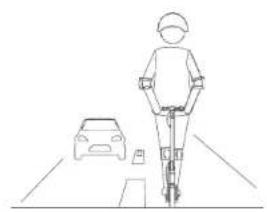
- To reduce risk of injury, you must read and follow all "CAUTION" and "WARNING" notices in this document. Do not ride at an unsafe speed. Under no circumstance should you ride on roads with motor vehicles. The manufacturer recommends riders be 14+ years old. Always follow these safety instructions:
A. People who should not ride the L10 include:
i. Anyone under the influence of alcohol or drugs.
ii. Anyone who suffers from disease that puts them at risk if they engage in strenuous physical activity.
iii. Anyone who has problems with balance or with motor skills that would interfere with their ability to maintain balance.
iv. Anyone whose weight is outside the stated limits (see Specifications).
v. Pregnant women.
B. Riders under the age of 18 years old should ride under adult supervision.
C. Comply with local laws and regulations when riding this product. Do not ride where prohibited by local laws.
D. To ride safely, you must be able to clearly see what is in front of you and you must be clearly visible to others.
E. Do not ride in the snow, in the rain, or on roads which are wet, muddy, icy, or that are slippery for any reason. Do not ride over obstacles (sand, loose gravel, or sticks). Doing so could result in a loss of balance or traction and could cause a fall.
- Do not attempt to charge your CITYJAM Pro if, the charger, or the power outlet is wet.
- As with any electronic device, use a surge protector when charging to help protect your CITYJAM Pro from damage due topower surges and voltage spikes. Only use the Ibsun supplied charger. Do not use a charger from any other different product models.
- Use only INFINITON approved parts and accessories. Do not modify your CITYJAM Pro. Modifications to your CITYJAM Pro could interfere with the operation of the L10, could result in serious injury and/or damage, and could void the Limited Warranty.

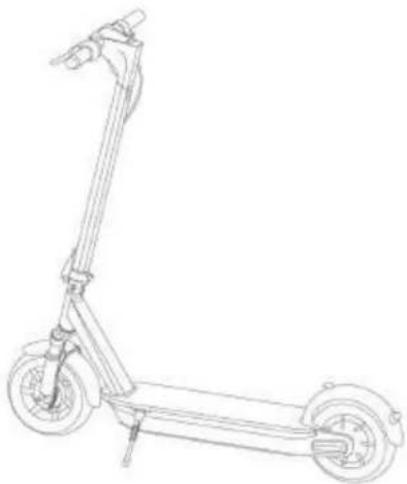
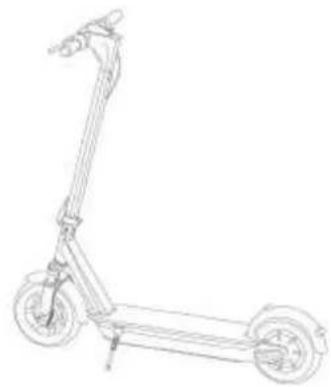
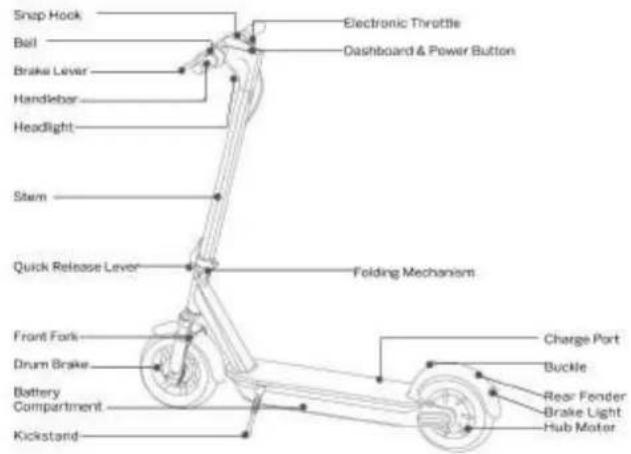
2 Packing List 3 Diagram
Assembled CITYJAM Pro User Materials
natural_image
Line drawing of a three-wheeled scooter with wheels and suspension (no text or symbols)
Accessories
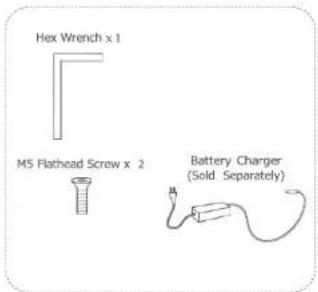
When unpacking your CITYJAM Pro, please verify that the above items are included in the package. If you are missing any components, please contact your dealer/distributor or nearest service center (see Contact in the user manual). After verifying that all components are present and in good condition, you can assemble your new L10.
Please retain the box and packaging materials in case you need to ship your CITYJAM Pro in the future.
Remember to power off your CITYJAM Pro and unplug the power cord before assembling, mounting accessories, or cleaning the mainframe.

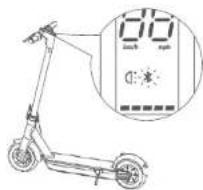
Dashboard & Power Button
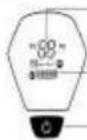
Speedometer: Display the current speed of the CITYJAM Pro.
Bluetooth: The icon indicates that the CITYJAM Pro has been successfully connected to the mobile device.
Battery Level: The battery power is indicated by 4 bars, each representing approximately 25% of a full battery.
Crusie mode. Keep a speed for 6 seconds, the crusie mode is turned on automatically.
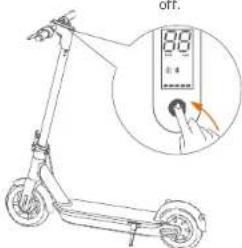
Power Button: Press the button to turn the CITYJAM Pro on; and press and hold the button for 2 seconds to turn the CITYJAM Pro off. When the L10 is on, press the button to switch between speed modes (P1=15km/h, P2=25km/h), and double press to turn the headlight on/off.
infanton
4 Assembling Your L10
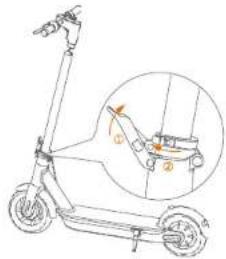
- Unfold the handlebar stem and fasten it. Then unfold the CITYJAM Pro to support the CITYJAM Pro.
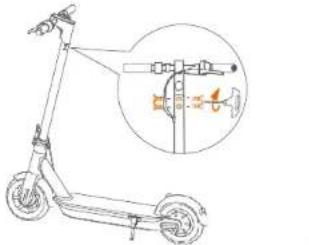
- Install six screws (two on each side) with the included hex wrench.
natural_image
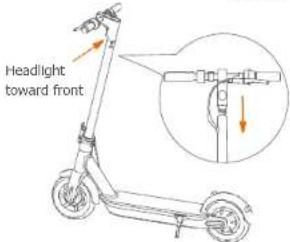
Line drawing of a scooter with an inset showing the engine compartment (no text or symbols)- Firmly connect the wires inside the handle and the stem. Slide the handle onto the stem. Be aware of the correct orientation.
- Verify that your CITYJAM Pro can be powered on and
5 First Ride

L10 Scooter App
There are safety risks when learning to ride the CITYJAM Pro. You must read the Riding
Safety via the App before your first ride.
For your safety, your new CITYJAM Pro is not activated and will beep occasionally after Power ON.
Until activated, the CITYJAM Pro maintains very low riding speed, and cannot be ridden with full function. Install the App on your mobile device (with Bluetooth 4.0 or above), connect to the CITYJAM Pro with Bluetooth, and follow the App instructions to activate your CITYJAM Pro and enjoy the full performance.

Install the App and register/login.
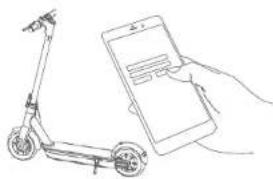
natural_image
Line drawing of a scooter next to a smartphone (no text or symbols)
Power on the CITYJAM Pro. A blinking Bluetooth Icon indicates the CITYJAM Pro Is waiting
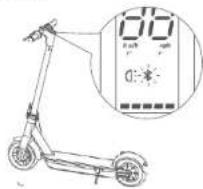

Click "Vehicle"→"Scan for Vehicle" to connect to your CITYJAM Pro.
The CITYJAM Pro will beep when the connection is successful. The Bluetooth icon will stop blinking and remain illuminated.
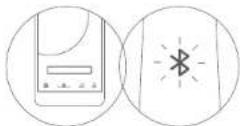

Follow the App instructions to active the CITYJAM Pro and learn how to ride safely. CITYJAM Pro Have fun!
inanton
Mik Uurich at Tugels
14 Charging
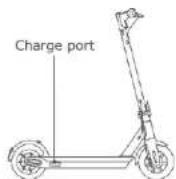
Charging step tips

Open the charge port cover.

Insert the charge plug.

Close the charge port cover when finished.
WARNING
Do not charge if the charge port or power cord is wet.
Do not charge or use your battery if it is damaged or see trace of water.
Close the charge port cover when not charging.
15 Learning to Ride
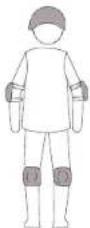
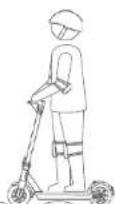
Wear an approved helmet and other protective gear to minimize any possible injury.

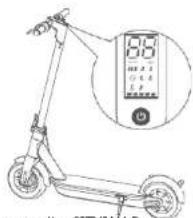
- Power on the CITYJAM Pro and check
the power level indicator. Charge the CITYJAM Pro if the battery level is low.
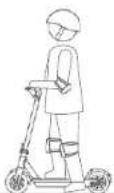
4. Stand on the footrest with one foot and push off with another foot to start gliding.
natural_image
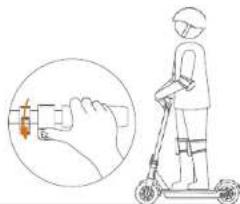
Illustration of a person using a scooter with a hand pointing to the battery (no text or symbols present)- Put your other foot on the footrest to keep both feet stable. Press the throttle on the right hand to speed up when you are
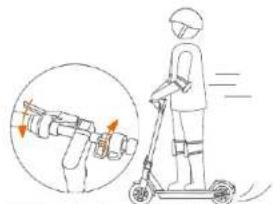
- Slow down by releasing the throttle; and brake by squeezing the brake lever.
balanced.
Note, for your safety, the motor will not engage until the CITYJAM Pro reaches 3.1 mph (5 km/h).
natural_image
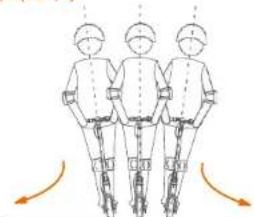
Three identical line drawings of a person in safety gear, viewed from behind, with curved arrows indicating motion or movement (no text or symbols)- To turn, shift your body weight and turn the handle slightly.
WARNING
When hard braking, you risk serious injury due to loss of traction and falls. Maintain a moderate speed and look out for potential hazards.
infliton
16 Warni
ngs
natural_image
Simple line drawing of a person standing in the rain with a stick and bucket, no text or symbols presentWARNING
Failure to follow these instructions could lead to serious injury.

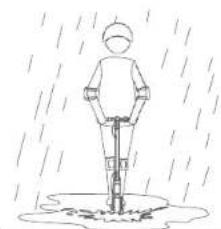
DO NOT ride the CITYJAM Pro in
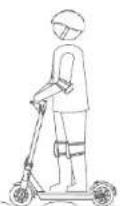
DO NOT ride over speed bumps, thresholds, or other bumps at HIGH SPEED.
the rain. DO NOT get wet.
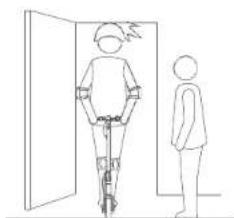
natural_image
Line drawing of a person riding a bicycle through a door, with another person standing beside (no text or symbols)

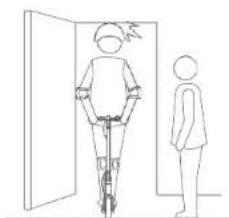
Watch your head when
passing through doorways.
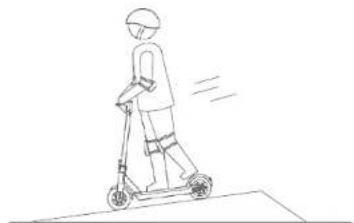
natural_image
Line drawing of a person riding a scooter with motion lines indicating speed (no text or symbols)
Do not keep your feet on the rear fender.

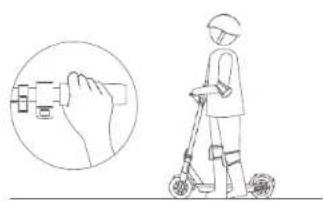
natural_image
Illustration of a person using a scooter with a hand icon pointing to the device (no text or symbols present)
DO NOT press the throttle when walking with the CITYJAM Pro.
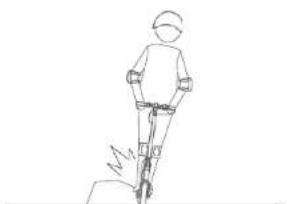
natural_image
Line drawing of a person walking with a bicycle (no text or symbols)
Avoid contacting obstacles with the 'tire/wheel.
natural_image
Line drawing of a person riding a motorcycle (no text or symbols)
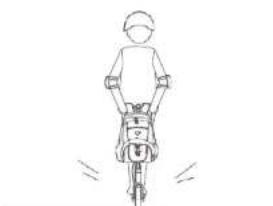
DO NOT carry heavy objects on the handlebar.
natural_image
Line drawing of a person riding a scooter with a backpack (no text or symbols)
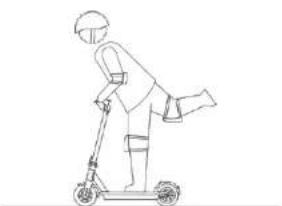
DO NOT ride the CITYJAM Pro with only one foot.
infanton
With church as Tuete
natural_image
Line drawing of a person riding a bicycle on a road with a car nearby (no text or symbols)DO NOT ride on public roads, motorways, or highways.
natural_image
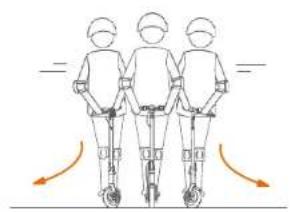
Three identical human figures standing vertically with motion arrows indicating vertical motion (no text or symbols)DO NOT rotate the handle violently while driving at high speed.
natural_image
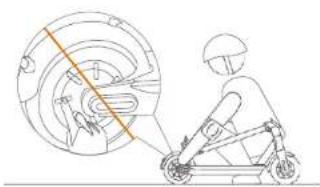
Line drawing of a person riding a scooter with a magnified inset showing the wheel (no text or symbols)DO NOT touch the hub motor after riding because it can get hot.
natural_image
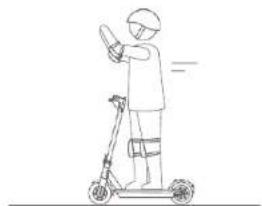
Line drawing of a person riding a scooter with a smartphone (no text or symbols)DO NOT take your hands off the handlebar while riding. Do not ride with one hand only.
natural_image
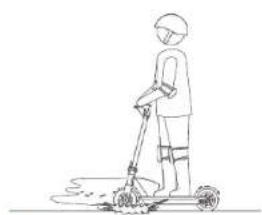
Line drawing of a person cleaning a scooter with a broom (no text or symbols)DO NOT ride through puddles or other bodies of water.
natural_image
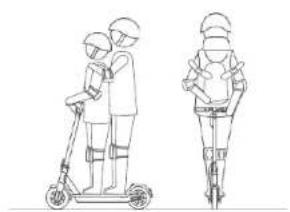
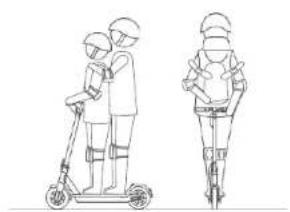
Line drawing of two people riding a scooter, viewed from the side (no text or symbols)The CITYJAM Pro is for one rider only. Do not carry any passengers. Do not carry a child. Do not ride when pregnant.
natural_image
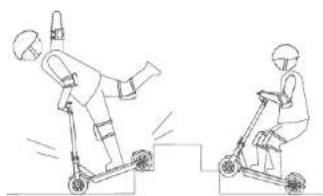
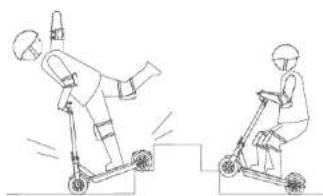
Two line drawings of a person riding a scooter, one performing a jump and the other on a side view (no text or symbols)DO NOT ride up and down stairs or jump over obstacles.
natural_image
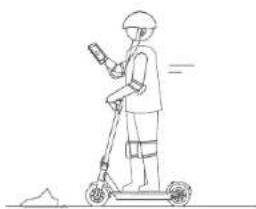
Line drawing of a person riding a scooter with a device, no text or symbols presentDo not use mobile phone or wear earphones when operating the CITYJAM Pro.
WARNING
Always keep both hands on the handlebar or you risk serious injury due to loss of balance and falls.
17 Folding and Carrying
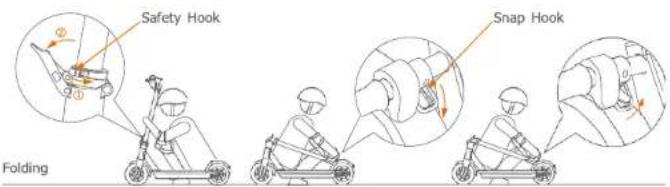
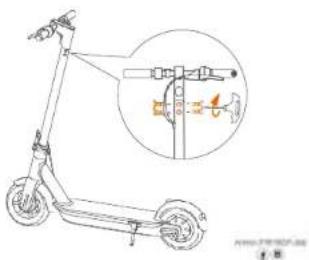
Turn off your CITYIAM Pro. Turn the safety hook counterclockwise and open the quick release lever.
Align the snap hook and the buckle and hook them.
Disengage the snap hook from the buckle. Fold the handlebar stem up, close the quick release lever and turn the safety hook clockwise.
Carrying
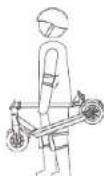
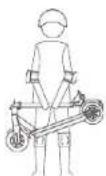
When your CITYJAM Pro is folded up, lift it by the stem to carry.

18 Maintenance
Cleaning and Storage
Use a soft, wet cloth to wipe the mainframe clean. Dirt hard to remove can be scrubbed with a toothbrush and toothpaste, then cleaned with a soft, wet cloth.
NOTE
Do not wash your CITYJAM Pro with alcohol, gasoline, acetone, or other corrosive/volatile solvents. These substances may damage the appearance and internal structure of your CITYJAM Pro. Do not wash your CITYJAM Pro with a power washer or hose.
WARNING
Make sure the CITYJAM Pro is powered OFF, the power cord is unplugged, and the rubber cap on the charge port is tightly sealed before cleaning; otherwise you may damage the electronic components.
Store your CITYJAM Pro in a cool, dry place. Do not store it outdoors for extended periods of time. Exposure to sunlight and temperature extremes (both hot and cold) will accelerate the aging process of the plastic components and may reduce battery life.
Battery Pack Maintenance
Do not store or charge the battery at temperatures outside the stated limits (see Specifications). Do not puncture the battery. Refer to your local laws and regulations regarding battery recycling and/or disposal.
A well maintained battery can perform well even after many miles of riding. Charge the battery after each ride and avoid draining the battery completely. When used at room temperature (70°F [22°C]) the battery range and performance is at its best; whereas using it at temperatures below 32°F (0°C) can decrease range and performance. Typically, at -4°F (-20°C) range can be half that of the same battery at 70°F (22°C). Battery range will recover when temperature rises. More details are available in the App.
NOTE
Typically, a fully charged battery should retain power for 120-180 days. A low-power battery should retain power for 30-60 days. Remember to charge the battery after each use. Completely draining the battery may cause permanent damage to the battery. Electronics inside the battery record the charge-discharge condition of the battery; damage caused by over-charging or under-charging will not be covered by the Limited Warranty.
WARNING
Do not attempt to disassemble the battery. Do not touch battery contacts. Do not dismantle or puncture the casing. Keep the battery contacts away from metal objects to prevent short circuit. Risk of fire and electric shock. No user serviceable parts. Do not charge or use your battery if it is damaged or see trace of water.
WARNING
Do not ride when the ambient temperature is outside the machine operation temperature (see Specifications) because low/high temperature will limit the maximum power/torque. Doing so could cause personal injury or property damage due to slips or falls.

19 Specificatio
| Item | L10 | |
| Dimensions | Unfold: Length x Width x Height | 1130 x 455 x 1220 mm |
| Fold: Length x Width x Height | 1130 x 450 x 580 mm | |
| Weight | Net | 15,3 kg |
| Rider | Payload | -30.0 -100.0 kg |
| Recommended Age 14+ years | ||
| Required Height | 155-200 cm | |
| Machine Parameters | Max. Speed | 25 km/h |
| Typical Range ^[1] | 40-45 km | |
| Max. Slope | Approx. 15% | |
| Traversable Terrain | asphalt/flat pavement; obstacles < 0.4 in (1 cm); gaps < 1.2 in (3 cm) | |
| Operating Temperature | -10-40°C | |
| Storage Temperature | -20-50°C | |
| IP Rating | IP54 | |
| Duration of Charging | ~ 5 h | |
| Battery | Nominal Voltage | 36 VDC |
| Max. Charging Voltage | 42 VDC | |
| Charging Temperature | 0-40°C | |
| Nominal Capacity | 450Wh | |
| Battery Management System | Over-heating, short circuit, over-current and over-charge protection | |
| Number Of Batteries | 1 | |
| Motor | Nominal Power | 350 W |
| Charger | Output Power | 121 W |
| Input Voltage | 100-240V ~ 50/60Hz | |
| Output Voltage | 42 VDC | |
| Output Current | 2.9 A | |
| Features | Brake Light | LED rear light |
| Riding Modes | Energy Saving mode, Standard mode and Sport mode |
[1] Typical Range: tested while riding under full power, 165.3 lbs (75.0 kg) load, 77°F (25°C), 9.3 mph (15 km/h) on average on pavement.
| Bluetooth | Frequency Band(s) | 2.4000–2.4835GHz |
| Max. RF Power | 100mW |
2024年1月1日
4
20 Certifications
Federal Communications Commission (FCC) Compliance Statement for USA
This device complies with part 15 of the FCC rules. Operation is subject to the following two conditions: (1) This device may not cause harmful interference, and (2) this device must accept any interference received, including interference that may cause undesired operation.
NOTE
This equipment has been tested and found to comply with the limits for a Class B digital device, pursuant to part 15 of the FCC Rules. These limits are designed to provide reasonable protection against harmful interference in a residential installation. This equipment generates, uses and can radiate radio frequency energy and, if not installed and used in accordance with the instructions, may cause harmful interference to radio communications. However, there is no guarantee that interference will not occur in a particular installation. If this equipment does cause harmful interference to radio or television reception, which can be determined by turning the equipment off and on, the user is encouraged to try to correct the interference by one or more of the following measures:
—Reorient or relocate the receiving antenna.
—Increase the separation between the equipment and receiver.
—Connect the equipment into an outlet on a circuit different from that to which the receiver is connected.
—Consult the dealer or an experienced radio/TV technician for help.
This equipment complies with FOC radiation exposure limits set forth for an uncontrolled environment.
Industry Canada (IC) Compliance Statement for Canada
This device complies with Industry Canada license-exempt RSS standard (s). Operation is subject to the following two conditions: (1) this device may not cause interference, and (2) this device must accept any interference, including interference that may cause undesired operation of the device.
CAN ICES-3 (B)/NMB-3(B)
Neither ibsun Inc. nor Ibsun is responsible for any changes or modifications not expressly approved by ibsun Inc. or Ibsun. Such modifications could void the user's authority to operate the equipment.
INFINITON
8th district to Puerto
Important WEEE information

WEEE Disposal and Recycling Information Correct. Disposal of this product. This marking indicates that this product
should not be disposal with other household wastes throughout the EU.
To prevent possible harm to the environment or human health from uncontrolled waste disposal, recycle it responsible to promote the sustainable reuse of materials resources. To return your used device, please use the return and collection systems or contact the retailer where the product was purchased. They can take this product for environmental safe recycling.
Battery recycling information for the European Union

Batteries or packaging for batteries are labeled in accordance with European Directive 2006/66/EC and amendment 2013/56/EU concerning batteries and accumulators and waste batteries and accumulators. The Directive determines the framework for the return and recycling of used batteries and accumulators as applicable throughout the European Union. This label is applied to various batteries to indicate that the battery is not to be thrown away, but rather reclaimed upon end of life per this Directive.
In accordance with the European Directive 2006/66/EC and amendment 2013/56/EU, batteries and accumulators are labeled to indicate that they are to be collected separately and recycled at end of life. The label on the battery may also include a chemical symbol for the metal concerned in the battery (Pb for lead, Hg for mercury, and Cd for cadmium). Users of batteries and accumulators must not dispose of batteries and accumulators as unsorted municipal waste, but use the collection framework available to customers for the return, recycling, and treatment of batteries and accumulators. Customer participation is important to minimize any potential effects of batteries and accumulators on the environment and human health due to the potential presence of hazardous substances.
Before placing electrical and electronic equipment (EEE) in the waste collection stream or in waste collection facilities, the end user of equipment containing batteries and/or accumulators must remove those batteries and accumulators for separate collection.
21 Common Failures and Solutions
3) The display board is working but the motor doesn't work Reason analysis and Solutions
A. The brake handle is damaged
d. Pull out the socket of the brake handle (normally open type brake handle) to see if the motor works, if it does, then it is the failure of brake handle, replace it.
B. The speed regulating steering handle is damaged.
c. Check the speed regulating steering handle and motor hall switch to see if they are short-circuited or not. Short circuit is easier to happen in wet weather and will cause continuous damage of the controller.
C. The motor is damaged.
f. Check the motor ball switch and turning handles signal. If the controller shell gets very hot when turned on, it is usually caused by the short circuit of the internal power tube of the controller, then cut off the power and replace it.
4) Charging failure
Reason analysis and Solutions
A. The battery charging port is loose.
c. Change a good charging port.
B. The connection of the charger plug is not well.
d. Change a good changer connector.
3) Can't turn on the scooter
Reason analysis and Solutions
A. The battery is dead.
b. Charge the scooter for 1-2 hours according to the user manual.
B. The power button is out of order.
b. Check the power button to see if it is stuck or not.
24


PROCEDURE IN CASE OF FAILURE OF AN INFINITION PRODUCT
Dear customers, to request technical and consent to repair at your information product, you have our website, operating 24 hours a day and 7 days a week.
Garcia Marán 2023.10.15
To streamline all procedures, the following information should always be indicated:
•Name and surname
-Telephone 1
- Telephone 2
•Full address
- Postal Code
•Population
• Brand
- Product model
- Serial number
• Failure presented by the product
If they wish, they can request technical assistance through the number 902 676 518 or 958
087 169, available only for white range products (except for free-standing microwaves).


INFINITON
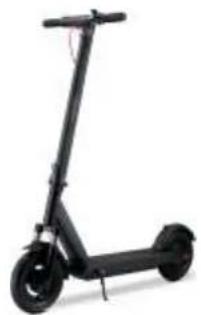
CityJAM Pro
scooter eléctrico
Manual de usuario
User's manual
Manual de usuário
natural_image
Black electric scooter with wheels and a red antenna (no visible text or symbols)Conteúdo
natural_image
Line drawing of a three-wheeled scooter with wheels and suspension (no text or symbols)INFANTON
natural_image
Line drawing of a two-wheeled scooter with wheels and a handle (no text or symbols)User Materials

Accessories
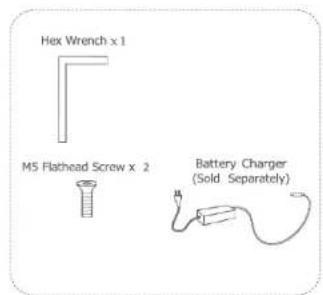
- Instale seis parafusos (dois de cada lado) com a chave sextavada incluída.
natural_image
Line drawing of a scooter next to a smartphone (no text or symbols)natural_image
Illustration of a person using a scooter with a hand pointing to the battery (no text or symbols present)natural_image
Three identical line drawings of a person in a standing position with motion arrows indicating direction (no text or symbols)natural_image
Simple line drawing of a person standing in the rain with a stick and bucket, no text or symbols presentnatural_image
Line drawing of a person standing next to a door, with another person visible in the background (no text or symbols)natural_image
Line drawing of a person riding a scooter with motion lines indicating speed (no text or symbols)natural_image
Illustration of a person using a scooter with a hand gesture diagram (no text or symbols)natural_image
Line drawing of a person in a hard hat and safety harness standing on a slope (no text or symbols)natural_image
Line drawing of a person riding a motorcycle (no text or symbols)natural_image
Line drawing of a person riding a scooter with a backpack (no text or symbols)natural_image
Line drawing of a person riding a bicycle on a road with a car nearby (no text or symbols)natural_image
Three identical human figures standing vertically with motion arrows indicating vertical motion (no text or symbols)natural_image
Line drawing of a person riding a scooter with a magnified inset showing the wheel (no text or symbols)natural_image
Line drawing of a person riding a scooter with a smartphone (no text or symbols)natural_image
Line drawing of a person cleaning a scooter with a broom (no text or symbols)DO NOT ride through puddles or other bodies of water.
natural_image
Line drawing of two people riding a scooter, viewed from the side (no text or symbols)The CITYJAM Pro is for one rider only. Do not carry any passengers. Do not carry a child. Do not ride when pregnant.
natural_image
Two line drawings of a person riding a scooter, one performing a jump and the other on a side view (no text or symbols)natural_image
Line drawing of a person riding a scooter with a device, no text or symbols present| Item | L10 | |
| Dimensions | Unfold: Length x Width x Height | 1130 x 455 x 1220 mm |
| Fold: Length x Width x Height | 1130 x 450 x 580 mm | |
| Weight | Net | 15,3 kg |
| Rider | Payload | 30.0 -100.0 kg |
| Recommended Age 14+ years | ||
| Required Height | -200155 cm | |
| Machine Parameters | Max. Speed | 25 km/h |
| Typical Range ^TM | 40-45 km | |
| Max. Slope | Approx. 15% | |
| Traversable Terrain | oschalt/flat pavement; obstacles < 0.4 in (1 cm); gaps < 1.2 in (3 cm) | |
| Operating Temperature | -10-40°C | |
| Storage Temperature | -20-50°C | |
| IP Rating | JP54 | |
| Duration of Charging | ~ 5 h | |
| Battery | Nominal Voltage | 36 VDC |
| Max. Charging Voltage | 42 VDC | |
| Charging Temperature | 0-40°C | |
| Nominal Capacity | 450Wh | |
| Battery Management System | Over-heating, short circuit, over-current and over-charge protection | |
| Number Of Batteries | 1 | |
| Motor | Nominal Power | 350 W |
| Charger | Output Power | 121 W |
| Input Voltage | 100-240V ~ 50/60Hz | |
| Output Voltage | 42 VDC | |
| Output Current | 2.9 A | |
| Features | Brake Light | LED rear light |
| Riding Modes | Energy Saving mode, Standard mode and Sport mode |
| Bluetooth | Frequency Band(s) | 2.4000–2.4835GHz |
| Max. RF Power | 100mW |
natural_image
Blank white image with a thin black border (no text, symbols, or markings)- Contenido
- Primer viaje
- Contents
- Thanks for choosing the CITYJAM Pro!
- Riding Safety
- Packing List 3 Diagram
- Assembling Your L10
- First Ride
- Charging
- WARNING
- Learning to Ride
- Warni
- Folding and Carrying
- Maintenance
- Cleaning and Storage
- NOTE
- Battery Pack Maintenance
- Certifications
- 3) The display board is working but the motor doesn't work Reason analysis and Solutions
- The brake handle is damaged
- The speed regulating steering handle is damaged.
- The motor is damaged.
- 4) Charging failure
- The battery charging port is loose.
- The connection of the charger plug is not well.
- 3) Can't turn on the scooter
- The battery is dead.
- The power button is out of order.
- CityJAM Pro
- Conteúdo
Brand : Infiniton
Model : CityJam Pro
Category : Rollerblades