
TC-FW 100 - Soldering iron EINHELL - Free user manual and instructions
Find the device manual for free TC-FW 100 EINHELL in PDF.


| Product Type | Flux-cored welding set (self-shielding, no gas required) |
| Brand | Einhell |
| Model | TC-FW 100 |
| Mains Connection | 230 V ~ 50 Hz |
| Welding Current Range | 45 - 90 A |
| Duty Cycle | 10% at 90 A, 60% at 45 A (at 40°C ambient) |
| Rated Idling Voltage | 31 V |
| Welding Wire Diameter | 0.9 mm |
| Max. Wire Spool Weight | 0.4 kg |
| Fuse Rating | 16 A |
| Weight | 14 kg |
| Protection Class | IP 21 S |
| Welding Current Adjustment | 2 levels via switch |
| Wire Feed Speed | Continuously adjustable via controller |
| Overheating Protection | Thermostat with control lamp |
| Included Accessories | Welding screen, safety glass, handle, carrying strap, gas nozzle, contact tube, feed roller set |
| Proper Use | Self-shielding flux-cored welding on clean metal surfaces |
| Maintenance | Regular cleaning with cloth; keep air vents dust-free |
| Spare Parts | Feed roller, contact tube, gas nozzle, wire core, mass tongs |
| Storage | Dry, dark, above freezing (5-30°C) |
Frequently Asked Questions - TC-FW 100 EINHELL
User questions about TC-FW 100 EINHELL
0 question about this device. Answer the ones you know or ask your own.
Ask a new question about this device
Download the instructions for your Soldering iron in PDF format for free! Find your manual TC-FW 100 - EINHELL and take your electronic device back in hand. On this page are published all the documents necessary for the use of your device. TC-FW 100 by EINHELL.
USER MANUAL TC-FW 100 EINHELL
GB Original operating instructions Filler wire welding set
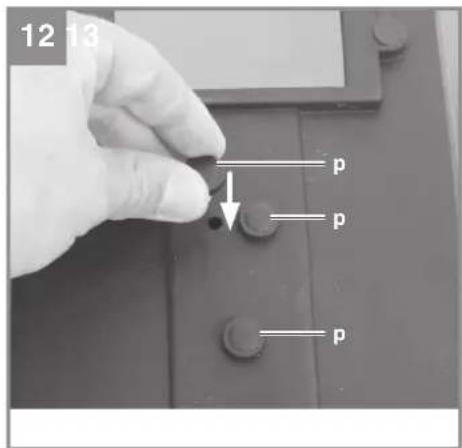
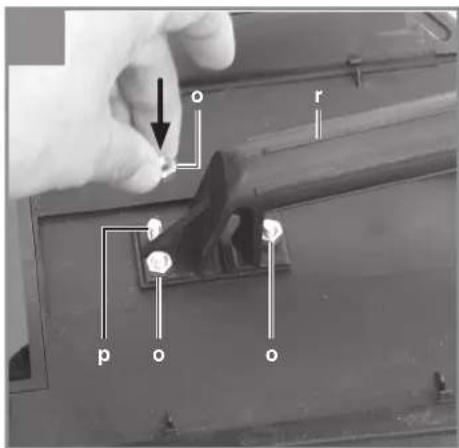
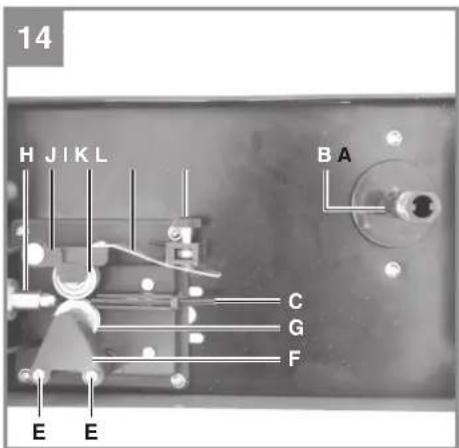
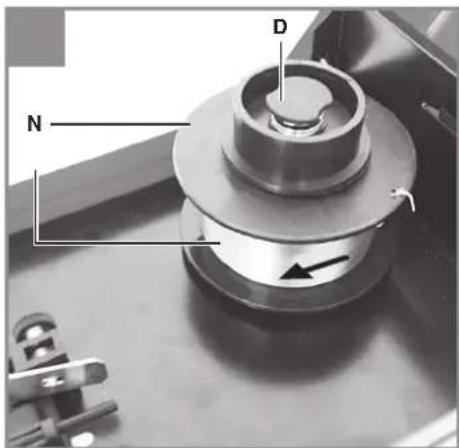
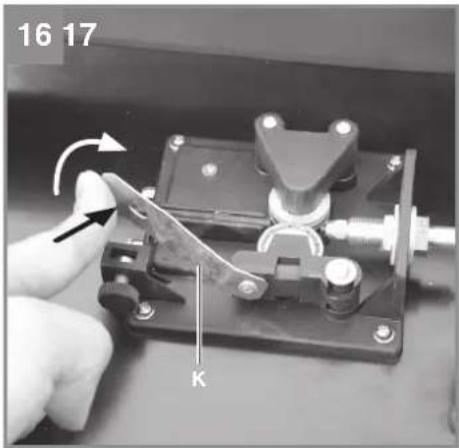
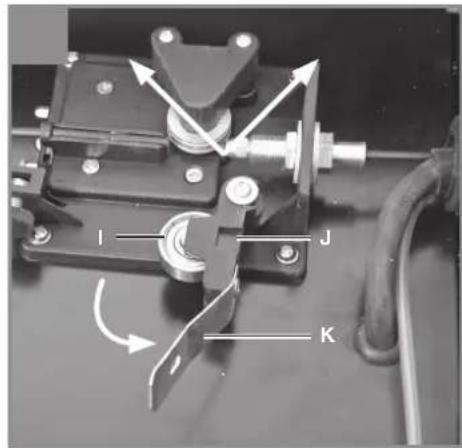
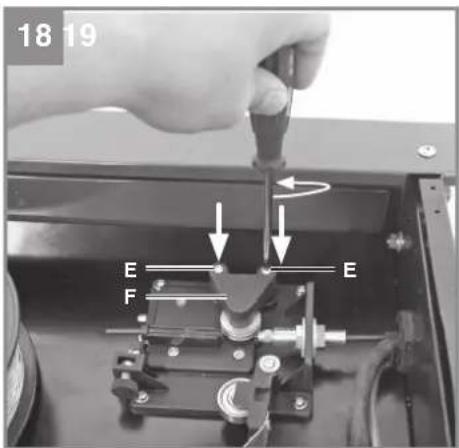
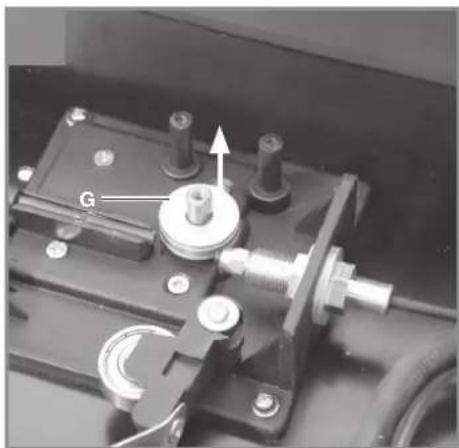
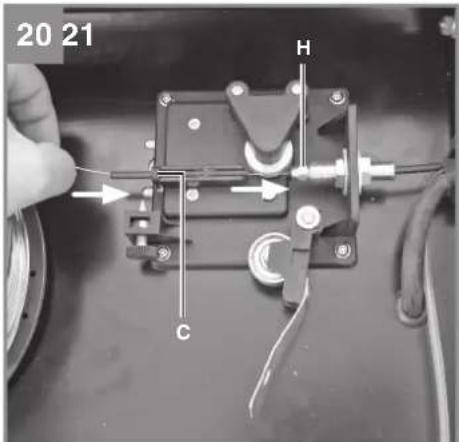
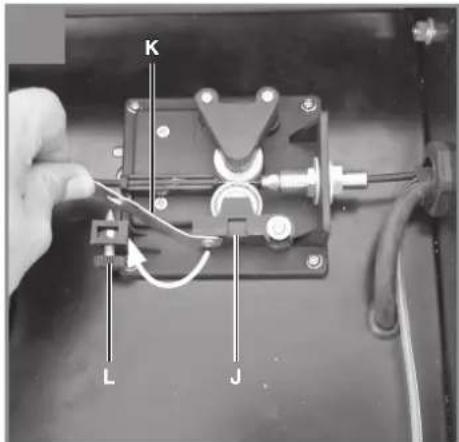
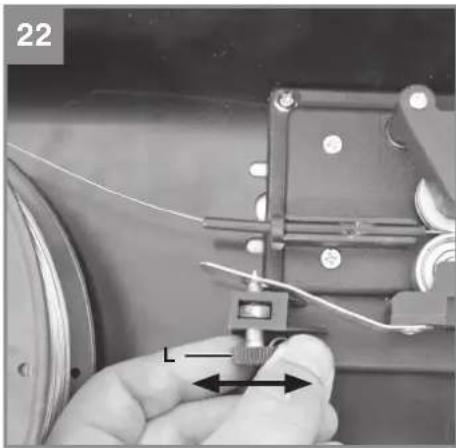
Table of contents
- Safety regulations
- Layout and items supplied
- Proper use
- Symbols and technical data
- Before starting the equipment
- Operation
- Replacing the power cable
- Cleaning, maintenance and ordering of spare parts
- Disposal and recycling
- Storage
- Troubleshooting

Danger! - An electric shock from the welding electrode can be fatal

Danger! - The inhaling of welding fumes can harm your health

Danger! - Welding sparks can cause an explosion or fire

Danger! - Welding arc radiation can damage your eyes and injure your skin

Danger! - Electromagnetic fields can disturb the operation of pacemakers

Danger! Danger from electric shock


Danger! - Read the operating instructions to reduce the risk of injury

Caution! Wear special welders' gloves. Hot glowing particles may fly about while you are welding. You should therefore wear special welding gloves to protect your hands and arms.
Danger!
When using the equipment, a few safety precautions must be observed to avoid injuries and damage. Please read the complete operating instructions and safety regulations with due care. Keep this manual in a safe place, so that the information is available at all times. If you give the equipment to any other person, hand over these operating instructions and safety regulations as well. We cannot accept any liability for damage or accidents which arise due to a failure to follow these instructions and the safety instructions.
1. Safety regulations
The corresponding safety information can be found in the enclosed booklet.
Danger!
Read all safety regulations and instructions.
Any errors made in following the safety regulations and instructions may result in an electric shock, fire and/or serious injury.
Keep all safety regulations and instructions in a safe place for future use.
2. Layout and items supplied
2.1 Layout (Fig. 1-8)
- Carrying strap
- Thermostat control lamp
- Housing cover
- ON/OFF switch
- Welding wire speed controller
- Switch for welding current adjustment
- Mains plug
- Earth terminal
- Hose package
- Welding nozzle
- Burner
- Fastening screw for housing cover
- Welding screen
- Burner switch
k. 1 x Safety glass frame
I. 1 x Welding glass
m. 1 x Transparent safety glass
n. 2 x Safety glass retaining bushes
o. 3 x Nut for handle
p. 3 x Screws for handle
q. 2 x Safety glass retaining pin
r. 1 x Handle
s. 1 x Welding screen frame
2.2 Items supplied
Please check that the article is complete as specified in the scope of delivery. If parts are missing, please contact our service center or the sales outlet where you made your purchase at the latest within 5 working days after purchasing the product and upon presentation of a valid bill of purchase. Also, refer to the warranty table in the service information at the end of the operating instructions.
- Open the packaging and take out the equipment with care.
- Remove the packaging material and any packaging and/or transportation braces (if available).
- Check to see if all items are supplied.
- Inspect the equipment and accessories for transport damage.
- If possible, please keep the packaging until the end of the guarantee period.
Danger!
The equipment and packaging material are not toys. Do not let children play with plastic bags, foils or small parts. There is a danger of swallowing or suffocating!
Welding set • Original operating instructions - Safety instructions
3. Proper use
The flux cored welding set is designed for self-shielding flux cored welding using suitable wire. The additional application of gas is not required.
The machine is to be used only for its prescribed purpose. Any other use is deemed to be a case of misuse. The user / operator and not the manufacturer will be liable for any damage or injuries of any kind caused as a result of this.
Important information about the power connection
This equipment falls under Class A of the standard EN 60974-10, i.e. it is not designed for use in residential areas in which the power supply is based on a public low-voltage supply system because given unfavorable conditions in the power supply the equipment may cause interference. If you want to use the equipment in residential areas in which the power supply is based on
GB
a public low-voltage supply system, you must use an electromagnetic filter which reduces the electromagnetic interference to the point where the user no longer notices any disturbance.
In industrial parks or other areas where the power supply is not based on a public low-voltage supply system, the equipment can be used without such a filter.
General safety information
It is the user's responsibility to install and use the equipment properly in accordance with the instructions issued by the manufacturer. If electromagnetic interference is noticed, it is the user's responsibility to eliminate said interference with the technical devices mentioned in the section "Important information about the power connection".
Reduction of emissions
Main current supply
The welder must be connected to the main current supply in accordance with the instructions issued by the manufacturer. If interference occurs, it may be necessary to introduce additional measures, e.g. fitting a filter to the main current supply (see above in the section "Important information about the power connection"). The welding cables should be kept as short as possible.
Pacemakers
Persons using an electronic life support device (e.g. a pacemaker) should consult their doctor before they go near electric sparking, cutting, burning or spot-welding equipment in order to be sure that the combination of magnetic fields and high electric currents does not affect their devices.
For commercial users the guarantee period is 12 months and for normal users 24 months, beginning from the date of purchase.
4. Symbols and technical data
EN 60974-1
European standard for arc welding sets and welding power supplies with limited on time
U s
Standardized operating voltage
U0
Rated idling voltage
U1
Mains voltage
∅ mm
Welding wire diameter
I1e
Effective value of the highest line current
I1max
Rated maximum mains current
l2
Welding current
~ 50 Hz
Mains frequency
IP 21 S
Protection type
X
On-load factor

Single-phase mains connection

Self-shielding flux cored welding

Symbol for falling characteristic curve
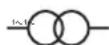
Single-phase transformer

Do not store or use the equipment in wet or damp conditions or in the rain
GB

Read the operating instructions carefully before using the welding set and follow them
Mains connection: 230 V ~ 50 Hz Welding current: 45-90 A
| Duty cycle X% 10 60 | ||
| Weldingcurrent I2 (A): 90 45 |
Rated idling voltage U0: 31 V Max. welding wire drum: 0.4 kg Welding wire diameter 0.9 mm Fuse: 16 A Weight: 14 kg
The welding times apply for an ambient temperature of 40°C.
5. Before starting the equipment
5.1 Assembly (Fig. 7-13)
5.1.1 Fitting the carrying strap (1)
Guide the carrying strap (1) through the slit on the rear of the equipment, over the housing cover (3), and through the slit on the front of the equipment. Connect the ends of the carrying strap as shown in Figure 5 and adjust the strap to the required length.
Fitting the welding screen (13)
- Place the welding glass (I) and the transparent safety glass (m) over it in the frame for the safety glass (k) (Fig. 7).
- Press the safety glass retaining pins (q) into the holes in the welding screen frame (s) from the outside (Fig. 8).
- Place the frame for the safety glass (k) with the welding glass (l) and transparent safety glass (m) from the inside into the recess in the welding frame (s), press the safety glass retaining bushes (n) onto the safety glass retaining pins (q) until they engage to secure the frame for the safety glass (k). The transparent safety glass (m) must be on the outside (Fig. 9).
- Bend the top of the welding screen frame (s) inwards (Fig. 10/1) and fold down the top corners (Fig. 10/2). Now bend the outer sides of the welding screen frame (l) inwards (Fig.
10/3) and connect them by pressing the top corners and outer sides together. When the retaining pins engage, you should be able to hear 2 clear clicks on each side (Fig. 10/4).
- When the top corners of the welding screen are connected as shown in Figure 11, place the screws for the handle (p) from the outside through the three holes in the welding screen (Fig. 12).
- Turn over the welding screen and place the handle (r) over the threads on the three screws for the handle (p). Secure the handle (r) to the welding screen using the three nuts for the handle (o) (Fig. 13).
5.2 Mains connection
- Before you connect the equipment to the mains supply, make sure that the data on the rating plate are identical to the mains data.
- The equipment may only be operated from properly earthed and fused shock-proof sockets.
5.3 Fitting the wire spool (Fig. 1, 2, 3, 14 - 22) The wire spool is not supplied.
5.3.1 Wire types
Various welding wires are required for different applications. The welding set can be used with welding wires with a diameter of 0.9 mm. The appropriate feed rollers and contact tubes are supplied with the set. The feed roller, contact tube, and wire cross-section must always match each other.
5.3.2 Wire spool capacity
Wire spools with a maximum weight of 0.4 kg can be fitted in the welding set.
5.3.3 Inserting the wire spool
- Unlock the housing cover (Fig. 1) by turning the fastening screw (Fig. 6/12) through 90° and flip open the cover.
- Check that the windings on the spool do not overlap so as to ensure that the wire can be unwound evenly.
Description of the wire guide unit (Fig. 14-22)
A Wire spool B Spool holder C Guide tube E Screws for feed roller holder F Feed roller holder G Feed roller H Hose package mounting
1 Pressure roller
J Pressure roller holder K Pressure roller spring L Adjusting screw for counter-pressure
Inserting the wire spool (Fig. 14, 15)
Place the wire spool (A) on the spool holder (B).
Ensure that the end of the welding wire is unwound on the side of the wire guide, see arrow.
Inserting the welding wire and adjusting the wire guide (Fig. 16-22)
- Push the pressure roller spring (K) upwards and swing it forwards (Fig. 16). • Pull the pressure roller holder (J) with the pressure roller (I) and pressure roller spring (K) downwards (Fig. 17).
- Undo the screws for the feed roller holder (E) and pull off the feed roller holder (F) upwards (Fig. 18).
- Check the feed roller (G). The appropriate wire thickness must be specified on the top of the feed roller (G). The feed roller (G) is fitted with two guide grooves. Turn the feed roller (G) over if necessary or replace it. (Fig. 19).
- Position the feed roller holder (F) again and secure it.
- Remove the gas nozzle (Fig. 2/10) from the burner (Fig. 2/11) by turning it clockwise, unscrew the contact tube (Fig. 3/15). (Fig. 2–3). Place the hose package (Fig. 1/9) on the floor as straight as possible pointing away from the welding set.
- Cut off the first 10 cm of the welding wire to produce a straight cut with no shoulders, warping or dirt. Deburr the end of the welding wire.
- Push the welding wire through the guide tube (C) between the pressure and feed rollers (G/I) into the hose package mounting (H). (Fig. 20) Carefully push the welding wire by hand into the hose package until it projects out of the hose package by approx. 1 cm at the burner (Fig. 2/11).
- Undo the adjusting screw for counter-pressure (L) a few turns. (Fig. 22).
- Push the pressure roller holder (J) with pressure roller (I) and pressure roller spring (K) upwards again and attach the pressure roller spring (K) to the adjusting screw for counter-pressure (L) again (Fig. 21).
- Now set the adjusting screw for counter-pressure (L) so that the welding wire is positioned firmly between the pressure roller (I) and feed roller (G) without being crushed. (Fig. 22).
Screw the appropriate contact tube (Fig. 3/15) for the welding wire diameter on to the burner (Fig. 2/11) and fit the gas nozzle (Fig. 2/10), turning it clockwise.
6. Operation
6.1 Setting
Since the welding set must be set to suit the specific application, we recommend that the settings be made on the basis of a test weld.
6.1.1 Setting the welding current
The welding current can be set to 2 different levels using the welding current adjustment switch (Fig. 1/6). The required welding current depends on the material thickness, the required penetration depth and the welding wire diameter.
6.1.2 Setting the wire feed speed
The wire feed speed is automatically adjusted to the current setting. The final wire feed speed setting can be made on the welding wire speed controller (Fig. 1/5). It is advisable to start with the medium setting and to re-adjust the speed as necessary. The required quantity of wire depends on the material thickness, the penetration depth, the welding wire diameter and also the size of the gap to be bridged between the workpieces you wish to weld.
6.2 Electrical connection
6.2.1 Mains connection
See point 5.2
6.2.2 Connecting the earth terminal (Fig. 1/8)
Connect the welding set's earth terminal (8) in the immediate vicinity of the welding position if possible. Ensure that the contact point is bare metal.
6.3 Welding
When all the electrical connections for the power supply and welding current circuit have been made, you can proceed as follows:
The workpieces for welding must be clear of paint, metallic coatings, dirt, rust, grease and moisture in the area where they are to be welded.
Set the welding current and wire feed (see 6.1.1 - 6.1.3) as required.
Hold the welding screen (Fig. 4/13) in front of your face and move the welding nozzle to the point on the workpiece where you wish to complete the weld. Now press the burner switch (Fig. 2/14).
When the arc is burning, the welding set will feed wire into the weld pool. When the weld nugget is large enough, move the burner slowly along the required edge. Move it to and fro if necessary to enlarge the weld pool a little.
Find the ideal setting of the welding current and wire feed speed by carrying out a test weld. Ideally an even welding noise will be audible. The penetration depth should be as deep as possible, but the weld pool must not be allowed to fall through the workpiece.
Do not remove the slag until the weld has cooled. If you want to continue a welding job on an interrupted weld seam, the slag from your initial attempt must first be removed.
6.4 Safety equipment
6.4.1 Thermostat
The welding set is fitted with an overheating guard that protects the welding transformer from overheating. If the overheating guard trips, the control lamp (2) on your set will be lit. Allow the welding set to cool for a time.
7. Replacing the power cable
Danger!
If the power cable for this equipment is damaged, it must be replaced by the manufacturer or its after-sales service or similarly trained personnel to avoid danger.
8. Cleaning, maintenance and ordering of spare parts
Danger!
Always pull out the mains power plug before starting any cleaning work.
8.1 Cleaning
- Keep all safety devices, air vents and the motor housing free of dirt and dust as far as possible. Wipe the equipment with a clean cloth or blow it with compressed air at low
pressure.
• We recommend that you clean the device immediately each time you have finished using it. - Clean the equipment regularly with a moist cloth and some soft soap. Do not use cleaning agents or solvents; these could attack the plastic parts of the equipment. Ensure that no water can seep into the device. The ingress of water into an electric tool increases the risk of an electric shock.
8.2 Maintenance
There are no parts inside the equipment which require additional maintenance.
8.3 Ordering replacement parts:
Please quote the following data when ordering replacement parts:
• Type of machine • Article number of the machine • Identification number of the machine - Replacement part number of the part required For our latest prices and information please go to www.isc-gmbh.info
9. Disposal and recycling
The equipment is supplied in packaging to prevent it from being damaged in transit. The raw materials in this packaging can be reused or recycled. The equipment and its accessories are made of various types of material, such as metal and plastic. Never place defective equipment in your household refuse. The equipment should be taken to a suitable collection center for proper disposal. If you do not know the whereabouts of such a collection point, you should ask in your local council offices.
10. Storage
Store the equipment and accessories in a dark and dry place at above freezing temperature. The ideal storage temperature is between 5 and 30 °C. Store the electric tool in its original packaging.
11. Troubleshooting
| Fault Cause | Remedy | |
| Feedrollerdoes not turn | - Power supply not connected- Wire feed controller set to 0 | - Check connection- Check setting |
| Feed roller turns, but does not feed any wire | - Incorrect roller pressure (see 5.3.3)- Roller brake set too fi rmly (see 5.3.3)- Dirty / damaged feed roller (see 5.3.3)- Damaged hose package- Contact tube wrong size / dirty / worn (see 5.3.3)- Welding wire welded to the gas nozzle / contact tube | -Checksetting- Check setting- Clean or replace- Check the wire guide jacket- Clean or replace- Release |
| After a lengthy period of use the welding set does not work any longer, the thermostat (3) control light is lit | - The welding set has overheated due to being used for too long and a failure to observe the reset time | - Leave the set to cool down for at least 20 – 30 minutes |
| Very poor weld - Incorrect current / feed setting (see 6.1.1/6.1.2) | -Checksetting | |

For EU countries only
Never place any electric power tools in your household refuse.
To comply with European Directive 2012/19/EC concerning old electric and electronic equipment and its implementation in national laws, old electric power tools have to be separated from other waste and disposed of in an environment-friendly fashion, e.g. by taking to a recycling depot.
Recycling alternative to the return request:
As an alternative to returning the equipment to the manufacturer, the owner of the electrical equipment must make sure that the equipment is properly disposed of if he no longer wants to keep the equipment. The old equipment can be returned to a suitable collection point that will dispose of the equipment in accordance with the national recycling and waste disposal regulations. This does not apply to any accessories or aids without electrical components supplied with the old equipment.
The reprinting or reproduction by any other means, in whole or in part, of documentation and papers accompanying products is permitted only with the express consent of the iSC GmbH.
Subject to technical changes
GB
Service information
We have competent service partners in all countries named on the guarantee certificate whose contact details can also be found on the guarantee certificate. These partners will help you with all service requests such as repairs, spare and wearing part orders or the purchase of consumables.
Please note that the following parts of this product are subject to normal or natural wear and that the following parts are therefore also required for use as consumables.
| Category Example | |
| Wear parts* Feed roller, wire core, mass tongs | |
| Consumables* Welding wire, nozzles, contact tube | |
| Missing parts |
* Not necessarily included in the scope of delivery!
In the effect of defects or faults, please register the problem on the internet at www.isc-gmbh.info. Please ensure that you provide a precise description of the problem and answer the following questions in all cases:
• Did the equipment work at all or was it defective from the beginning? • Did you notice anything (symptom or defect) prior to the failure? • What malfunction does the equipment have in your opinion (main symptom)? Describe this malfunction.
GB
Warranty certificate
Dear Customer,
All of our products undergo strict quality checks to ensure that they reach you in perfect condition. In the unlikely event that your device develops a fault, please contact our service department at the address shown on this guarantee card. You can also contact us by telephone using the service number shown. Please note the following terms under which guarantee claims can be made:
- These guarantee terms apply to consumers only, i.e. natural persons intending to use this product neither for their commercial activities nor for any other self-employed activities. These warranty terms regulate additional warranty services, which the manufacturer mentioned below promises to buyers of its new products in addition to their statutory rights of guarantee. Your statutory guarantee claims are not affected by this guarantee. Our guarantee is free of charge to you.
- The warranty services cover only defects due to material or manufacturing faults on a product which you have bought from the manufacturer mentioned below and are limited to either the rectification of said defects on the product or the replacement of the product, whichever we prefer. Please note that our devices are not designed for use in commercial, trade or professional applications. A guarantee contract will not be created if the device has been used by commercial, trade or industrial business or has been exposed to similar stresses during the guarantee period.
- The following are not covered by our guarantee:
- Damage to the device caused by a failure to follow the assembly instructions or due to incorrect installation, a failure to follow the operating instructions (for example connecting it to an incorrect mains voltage or current type) or a failure to follow the maintenance and safety instructions or by exposing the device to abnormal environmental conditions or by lack of care and maintenance.
- Damage to the device caused by abuse or incorrect use (for example overloading the device or the use or unapproved tools or accessories), ingress of foreign bodies into the device (such as sand, stones or dust, transport damage), the use of force or damage caused by external forces (for example by dropping it).
- Damage to the device or parts of the device caused by normal or natural wear or tear or by normal use of the device.
- The guarantee is valid for a period of 24 months starting from the purchase date of the device. Guarantee claims should be submitted before the end of the guarantee period within two weeks of the defect being noticed. No guarantee claims will be accepted after the end of the guarantee period. The original guarantee period remains applicable to the device even if repairs are carried out or parts are replaced. In such cases, the work performed or parts fitted will not result in an extension of the guarantee period, and no new guarantee will become active for the work performed or parts fitted. This also applies if an on-site service is used.
- To make a claim under the guarantee, please register the defective device at: www.isc-gmbh.info. Please keep your bill of purchase or other proof of purchase for the new device. Devices that are returned without proof of purchase or without a rating plate shall not be covered by the guarantee, because appropriate identification will not be possible. If the defect is covered by our guarantee, then the item in question will either be repaired immediately and returned to you or we will send you a new replacement.
Of course, we are also happy to offer a chargeable repair service for any defects which are not covered by the scope of this guarantee or for units which are no longer covered. To take advantage of this service, please send the device to our service address.
Also refer to the restrictions of this warranty concerning wear parts, consumables and missing parts as set out in the service information in these operating instructions.
Subject to change without notice
- TABLE OF CONTENTS
- DANGER
- SAFETY REGULATIONS
- LAYOUT AND ITEMS SUPPLIED
- LAYOUT (FIG. 1-8)
- ITEMS SUPPLIED
- PROPER USE
- IMPORTANT INFORMATION ABOUT THE POWER CONNECTION
- GB
- GENERAL SAFETY INFORMATION
- REDUCTION OF EMISSIONS
- PACEMAKERS
- SYMBOLS AND TECHNICAL DATA
- EN
- ∅ MM
- IP 21 S
- BEFORE STARTING THE EQUIPMENT
- ASSEMBLY (FIG. 7-13)
- FITTING THE CARRYING STRAP (1)
- FITTING THE WELDING SCREEN (13)
- MAINS CONNECTION
- WIRE TYPES
- WIRE SPOOL CAPACITY
- INSERTING THE WIRE SPOOL
- DESCRIPTION OF THE WIRE GUIDE UNIT (FIG. 14-22)
- INSERTING THE WIRE SPOOL (FIG. 14, 15)
- INSERTING THE WELDING WIRE AND ADJUSTING THE WIRE GUIDE (FIG. 16-22)
- OPERATION
- SETTING
- SETTING THE WELDING CURRENT
- SETTING THE WIRE FEED SPEED
- ELECTRICAL CONNECTION
- CONNECTING THE EARTH TERMINAL (FIG. 1/8)
- WELDING
- SAFETY EQUIPMENT
- THERMOSTAT
- REPLACING THE POWER CABLE
- CLEANING, MAINTENANCE AND ORDERING OF SPARE PARTS
- CLEANING
- MAINTENANCE
- ORDERING REPLACEMENT PARTS
- DISPOSAL AND RECYCLING
- STORAGE
- TROUBLESHOOTING
- SERVICE INFORMATION
- WARRANTY CERTIFICATE
Brand : EINHELL
Model : TC-FW 100
Category : Soldering iron