
Thyra - Fan FAKIR - Free user manual and instructions
Find the device manual for free Thyra FAKIR in PDF.


| Product Type | Tower Fan |
| Brand | Fakir |
| Model | Thyra |
| Dimensions (HxWxD) | 120 x 30 x 30 cm |
| Weight | 5 kg |
| Power Supply | 220-240 V ~ 50-60 Hz |
| Power Consumption | 45 W |
| Speed Settings | 3 speeds (low, medium, high) |
| Oscillation | 80° horizontal oscillation |
| Timer | Up to 8 hours |
| Remote Control | Included (battery not included) |
| Airflow | Up to 1200 m³/h |
| Noise Level | 35-55 dB(A) |
| Safety Features | Overheat protection, tip-over switch |
| Cleaning | Wipe with a damp cloth, do not use abrasive cleaners |
| Filter Type | Washable pre-filter |
| Spare Parts Availability | Contact Fakir customer service |
| Warranty | 2 years |
| Color | Black/White |
Frequently Asked Questions - Thyra FAKIR
User questions about Thyra FAKIR
0 question about this device. Answer the ones you know or ask your own.
Ask a new question about this device
Download the instructions for your Fan in PDF format for free! Find your manual Thyra - FAKIR and take your electronic device back in hand. On this page are published all the documents necessary for the use of your device. Thyra by FAKIR.
USER MANUAL Thyra FAKIR
natural_image
White electric fan with mesh grille and brand logo (no visible text or symbols on body)THYRA
DE Ballon Ventilator
EN Balloon Type Fan
natural_image
Symbol of a waste bin with no text or labels, crossed by black X marks and a horizontal bar below (no text or symbols present)
natural_image
Simple line drawing of an open box with an upward arrow inside (no text or symbols)
WARNUNG!
natural_image
Four-step diagram showing the installation of a fan-shaped device from a stand to a base, with no visible text or symbols.natural_image
Silhouettes of people interacting with a microphone, showing motion arcs around it (no text or symbols)
HINWEIS!
natural_image
Line drawing of a remote control unit with a battery and arrow indicating direction (no text or symbols)Information about the operating instructions ....18
Responsibility 18
Safety is Important....18
Warnings on operating instructions....19
CE Conformity declaration ....19
Intended Use 19
Unauthorized use ....19
Unpacking....20
Security Warnings 20
Box Contents 22
Product Description 22
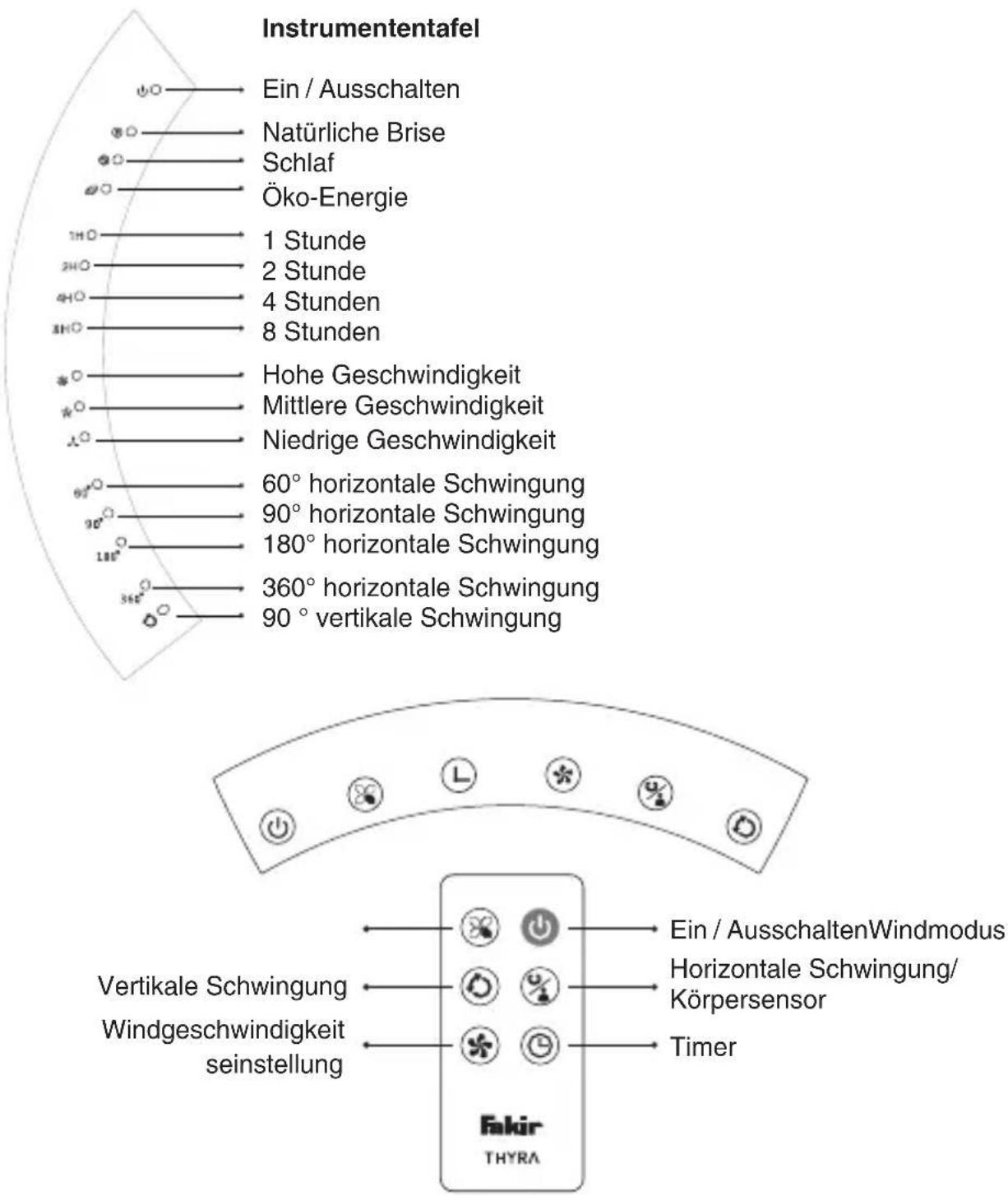
Indicator Panel 23
Technical Specifications 23
Installing the Product 24
Operating....24
Extra Features 28
Maintenance And Cleaning.... 28
Storage 29
Troubleshooting 29
Other Issues and Troubleshooting 30
Recycling 30
Shipping....30
Thank you for choosing a Fakir THYRA Balloon Type Fan appliance. Our appliance has been designed and manufactured to work seamlessly for a long time.
Information about the operating instructions
You may be used to use similar products, but please take time to read the user guide. This guide has been prepared for you to get the best performance out of the products you have purchased.
Responsibility
In case of any damage that may occur as a result of use not in compliance with the instructions in this manual and the device is used in a place outside of its own area of use, and is repaired elsewhere other than the authorized services of Fakir, Fakir Elektrikli Ev Aletleri Dış Tic. A.Ş. does not assume any responsibility.
Safety matters
Read these operating instructions carefully before using the appliance for your safety and others'. Keep this manual in a safe place for future use. If you pass the appliance on, pass on the manual too. Remove all the packages; however, keep them until you are sure that the device is working.
NOTE!
Emphasizes tips and other useful information in the operating manual.

WARNING!
Indicates notices which, if ignored, can result in risk of in jury or death.

CAUTION!
Indicates notices of risks that can result in damage to the appliance or breaking it down.
Warnings related to operating instruction
CE Compliance notice
Complies with 2014/30/EU “Electromagnetic Compatibility Directive”, 2014/35/EU “Low Voltage Directive”, The CE mark is on the device type label.
Intended Use
Product model is designed for household use. It is not suitable for business or industrial use. In case of any failure arising from otherwise use, our authorized services will provide out of warranty service.
Unauthorized use

WARNING!
- This appliance can be used by children aged from 8 years and above and persons with reduced physical, sensory or mental capabilities or lack of experience and knowledge if they have been given supervision or instruction concerning use of the appliance in a safe way and understand the hazards involved.
• Children should not play with this appliance - Cleaning and maintenance shall not be carried out by children without supervision.
- Keep the packing materials away from the children. Choking risk!
- Children younger than 3 years shall be kept away from the appliance if they are not supervised constantly.
- This appliance may be used by persons (including children) with limited physical, sensory or mental capabilities, or with limited experience and/or knowledge, only under the supervision of a person responsible for their safety, or in accordance with the instructions of that person.
- Children shall be supervised to ensure that they do not play with the appliance.
- This appliance shall not be used for play.
- Children older than 3 years and younger than 8 years may switch the appliance on and off only if they are under supervision or are informed of the safe use of the appliance and if they understand the hazards that may be caused by the appliance. In this respect, it is a prerequisite for the appliance to be in normal usage position or that it is installed properly.
- Children older than 3 years and younger than 8 years shall not plug the appliance to the electrical outlet, adjust the appliance, and do not perform any cleaning or maintenance operations.
- The appliance shall not be used without supervision.
Unpacking
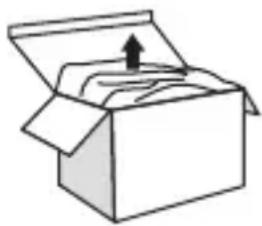
Unpack the appliance and before starting to use it check for damages and malfunctions. If there is any malfunction or damage to the equipment, do not use the appliance and get in contact with Fakir Authorized Service.
Repair works shall only be undertaken by Fakir service. Repairs that are inadequate or carried out by unauthorized personnel may pose harm to the user.
natural_image
Simple line drawing of an open box with an upward arrow on the top face (no text or symbols)
WARNING!
Never use a defective appliance.

NOTE!
Keep the packaging for storage and future transports.
NOTE!
Keep this user manual for future use.
Security Warnings
When utilizing an electrical appliance, the precautions below shall always be taken in order to prevent fire, shock or personal injuries
- Using electrical appliances may be dangerous, so please read the user's manual before using the appliance.
- Before plugging the appliance, into the power outlet ensure that the voltage matches the rated value specified in the type label.
- In an event where the appliance or the cord is damaged, do not use the appliance and contact authorized Fakir service.
- If the appliance cord is damaged, it shall be replaced only by authorized Fakir service center.
- Before cleaning the appliance, unplug it.
- Make sure to unplug the appliance when it is not in use, or moving the appliance, or installing or removing parts, and while cleaning.
- Use the appliance only with its authentic accessories.
- Do not pull from the cord, use the plug to unplug the appliance.
- Never touch the plug/socket with wet hands.
- The children are not aware of the threats posed by the electrical appliance. Do not ever let children to play with electrical appliances. Special care must be exercised where children and vulnerable people are present.
-
Do not try to place a metal or any other item inside the appliance.
-
Installation shall be completed in align with the regulations and manufacturer instructions.
- Do not cover the appliance, otherwise it may cause the appliance to suffer significant damage or start fire!
- Do not spray pesticides or flammable aerosols on the appliance. It may damage the appliance.
- Do not place items at appliance air inlet or outlets. Otherwise it may damage the appliance and may cause electric shock risk.
- Do not place the air outlet right across little children. May cause sickness and affect the children's health.
- Before operating the appliance ensure the power cord is clean and plugged.
- If there is an unpleasant odour or an abnormal noise, immediately unplug the appliance.
- Do not fold the power cord or place heavy items on it. It may cause short circuiting.
- Do not wash the appliance with water. It may cause short circuiting and damage the appliance.
- Do not use the appliance near bathtubs, shower or near pools.
- Keep the unit away from walls, curtains and other flammable materials to protect against fire.
- Do not try to pry your fingers in through the operating appliance mesh.
- If the appliance will not be operated for extended periods of time or the user will keep it away, turn it off and unplug.
- To avoid electromagnetic interference, keep the appliance away from appliances such as TV or radio at least 1 meter away.
- Do not expose appliance to direct sunlight.

WARNING!
Never use defective appliances. There is a risk of electrocution.

CAUTION!
If the appliance fan is not rotating, turn the appliance off immediately and unplug it. Remedy the issue before re-using it.

CAUTION!
Keep heat sources and direct sunlight. High temperature may damage the appliance.
Box Contents:
Main body 1
Support column 1
Round base 1
Remote control 1
Remote control holder 1
Screw 1
Tightening ring 1
Tightening wrench 1
Operating manual 1
Service list 1
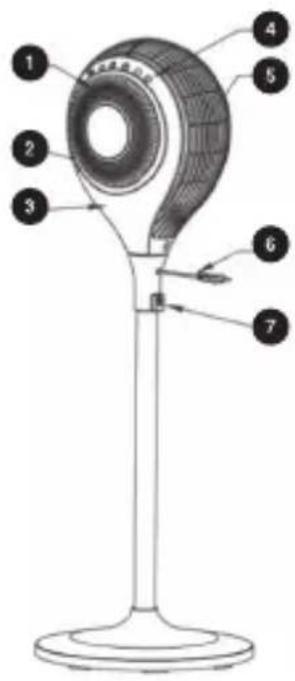
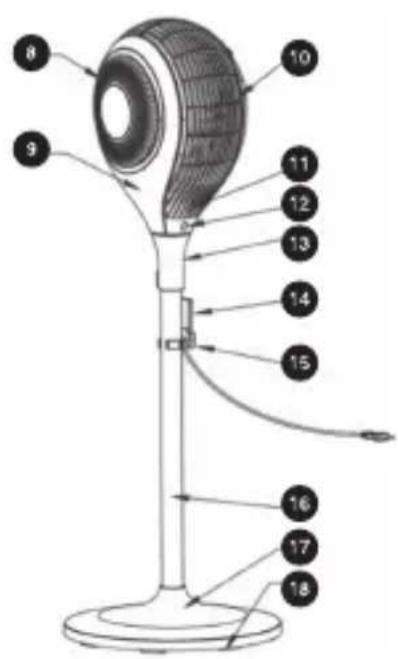
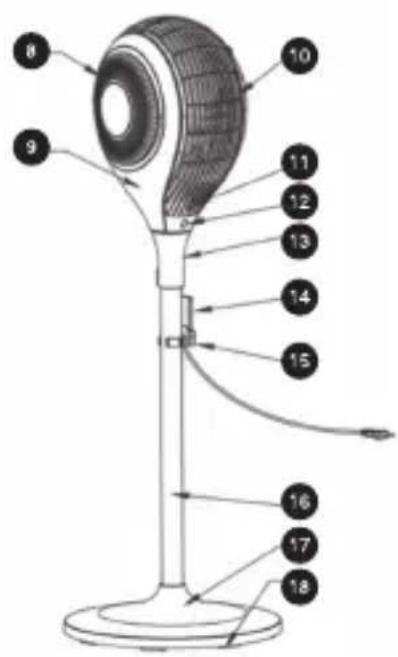
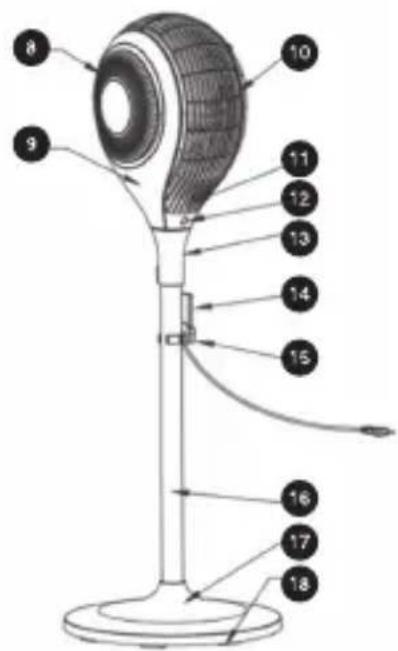
Product Description
- Decorative Lid
- LED indicator lights
- Front Panel
- Touchscreen control panel
- Side body
- Power cord
- Screw inlet
- Back air inlet
- Rear panel
- Air outlet holes
- Infrared body sensor
- Remote control sensor
- Oscillation base
- Remote control
- Remote control holder
- Support column
- Base
- Weighted balancers
Technical Specifications
| Voltage 220-240 V | Timer: 1-8 hours | ||
| Frequency | 50Hz | Net weight (KG) | 6.8 kg |
| Power | 65W | Gross weight (KG) | 8.25 kg |
| Sound Level ≤55db | Lifetime: 10 years | ||
| Air Flow 120 m | ^3/h | ||
| Humidity | ≤95% | ||
| Product Dimensions | 0370mmx1148.3mm | ||
Installing the Product
- Remove the parts from the package.
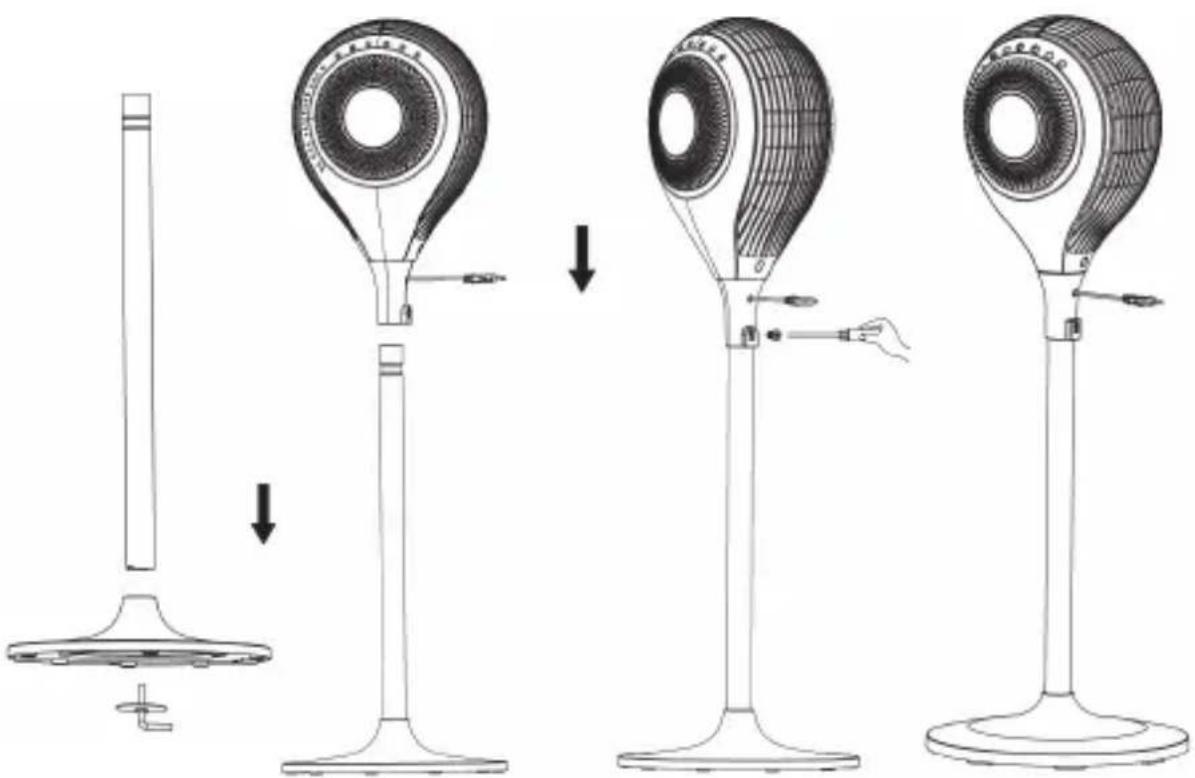
- Place one end of the Support column to the base and tighten the tightening ring as seen in the figure, with the tightening wrench. (Diagram 1)
- Place the main body on the Support column. (Diagram 2)
- To attach the main body to the Support column, tighten the screw as seen in the figure. (Diagram 3)
- Following installation, place it on a level surface and plug it in align with the instructions. (Diagram 4)
natural_image
Line drawings of a three-step electric fan installation process, showing step-by-step assembly from base to top (no text or symbols)When the appliance is connected, the LED lights will have lit for 2 seconds and 2 beeps will sound. This indicate that the appliance is correctly installed and ready for operation. Then the unit switches to standby mode and LED lights turn off. In this mode only ON/OFF button will respond.

Two Beeps indicates that the appliance is “connected”, a single Beep is heard when the display functions are operated.
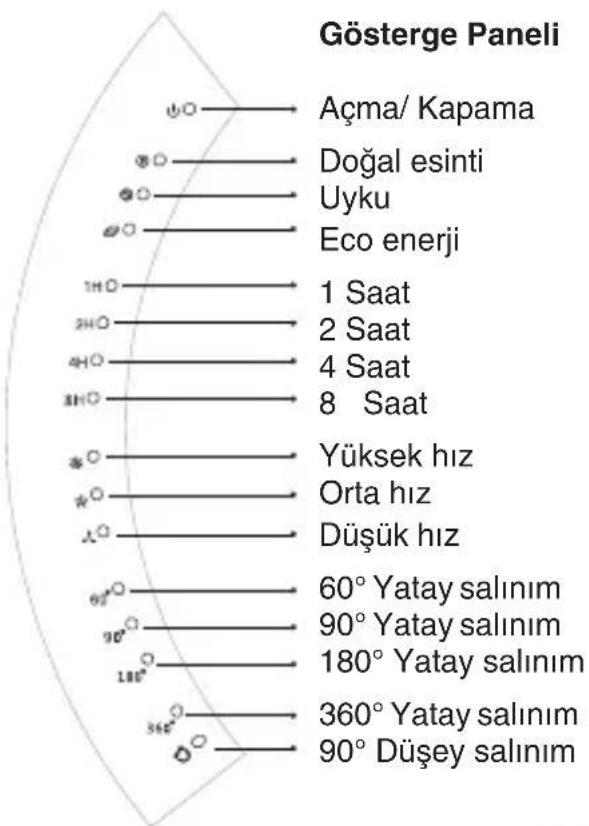
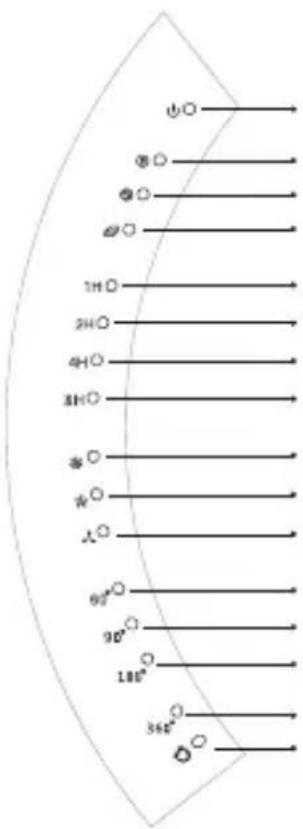
1. ON/OFF
Plug in the appliance.
To turn on the appliance press the On/Off button.
Then it can be switched to the desired mode.
2. MODE
A) NORMAL:
Default mode is “NORMAL” mode. When the appliance is first turned on, it will operate on Normal mod, however this is not indicated in the LED screen.
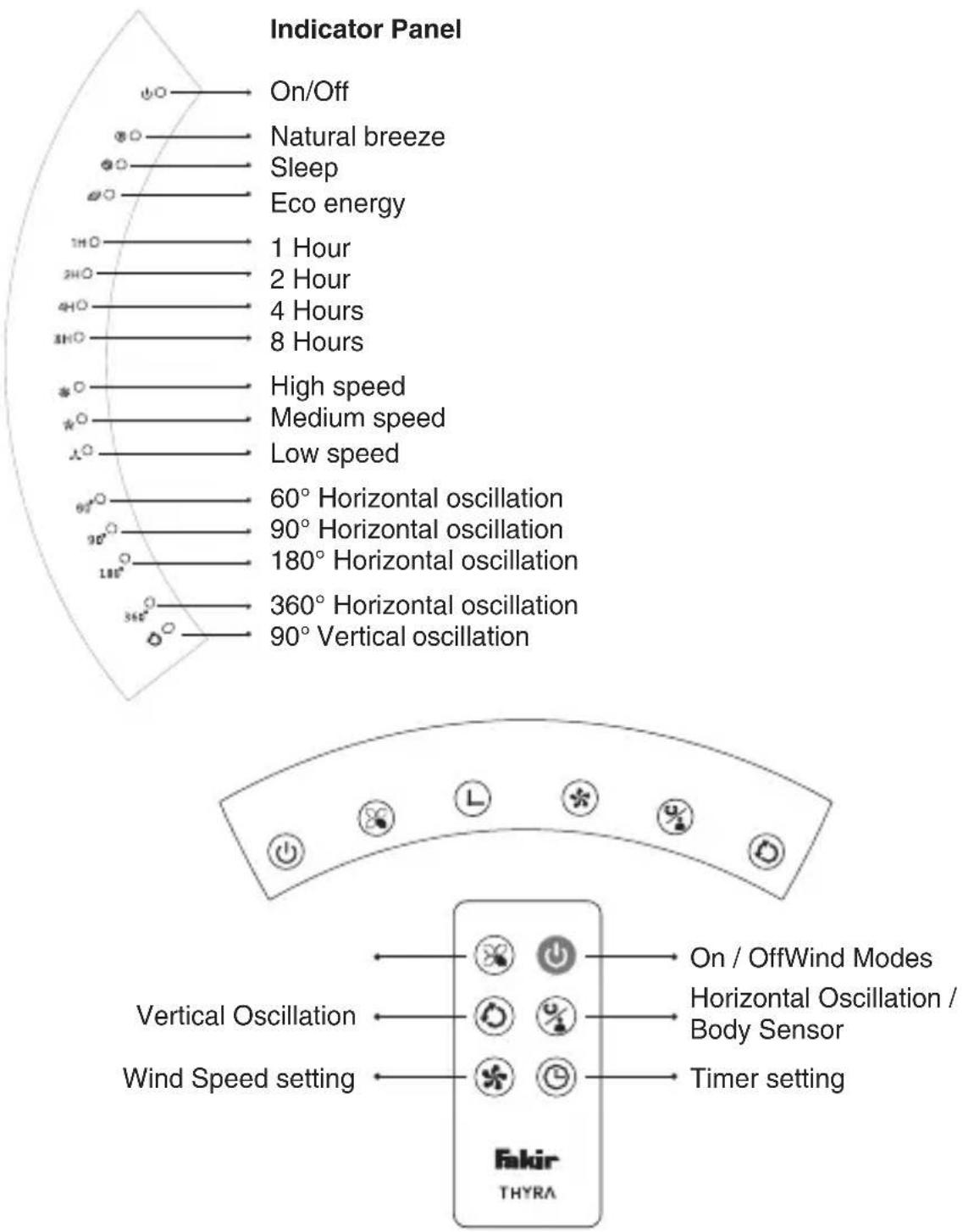
Other modes (Natural breeze, sleep and Eco energy) are on the front panel. To switch to other modes, press 📋 button.
At each mode the wind can be adjusted as high, medium or low
B) NATURAL BREEZE:
This mode applies a variable wind speed. This mode can be used in high, medium or low wind speed levels.
C) SLEEP:
This mode provides a softer, a more natural breeze. It is perfect for cooling down rapidly as you sleep and to keep cool as the night temperatures drop.
This mode can also be applied for high, medium or low levels and operates as below.
High speed: The first 30 minutes HIGH wind speed; next 30 minutes MEDIUM wind speed; the remainder at low wind speed.
Medium speed: The first 30 minutes MEDIUM wind speed; the remainder at LOW Wind speed.
Low speed: Operates at low wind speed.
C) ECO ECO ENERGY:
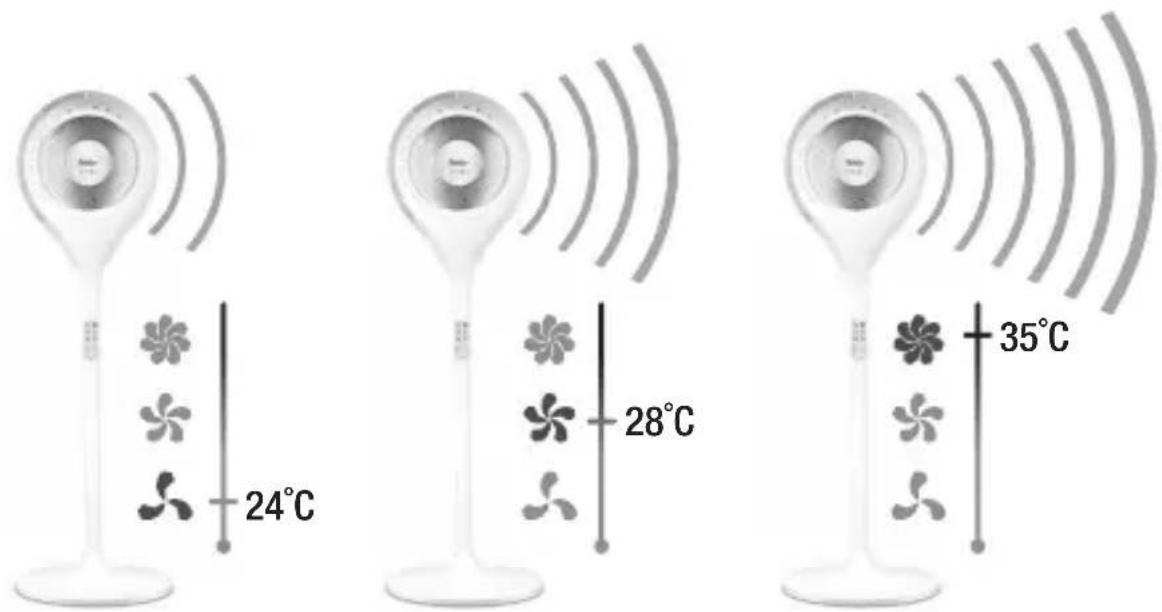
This mode adjusts the wind speed based on room temperature. HIGH speed when lower than 29^ C, MEDIUM speed between 25^ C - 29^ C, LOW speed when lower than 25^ C.

Speed button and speed indicator do not operate in this mode. It is adjusted automatically.
3. TIMER:
The appliance is operated without the timer active.
By pressing the timer button ⏻ the desired time (1-8 hours) can be adjusted.
Next to the time adjusted on the indicator panel, the LED light is lit.
When the timer is set, the appliance operates in countdown mode and when the time ends, it is turned off.
4. ⭐ SPEED
You can select HIGH, MEDIUM or LOW speeds by pressing the speed button. These speed modes can be applied on NORMAL, NATURAL BREEZE, SLEEP modes to achieve the desired speeds.
5. HORIZONTAL OSCILLATION / INFRARED BODY SENSOR
When operating, you can press 📋 button to switch between 0°, 60°, 90°, 180°, 360°, body sensor respectively.
INFRARED BODY SENSOR
When the appliance is operated for the first time the body sensor is active.
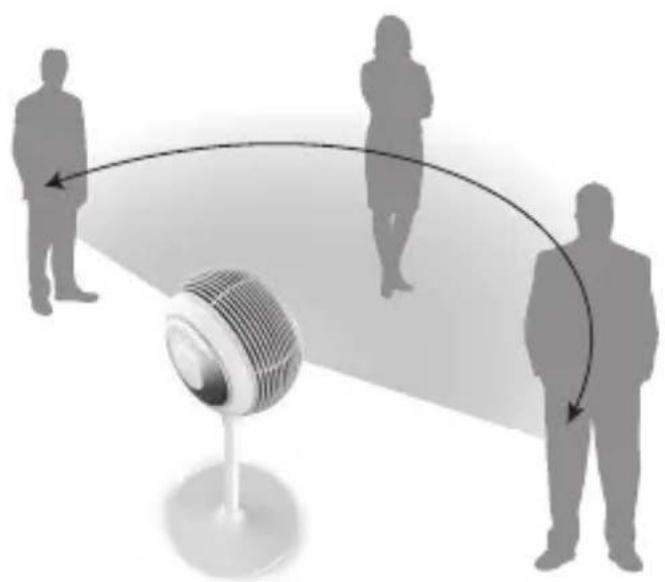
To activate the body sensor function manually, keep pressing HORIZONTAL OSCILLATION / BODY SENSOR button for 3 seconds until you hear two Beeps. Four horizontal oscillation LED indicator light in sequence.
The appliance rotates 360^ to detect the people in 2 meters and determine the suitable rotation arc. The appliance detects the people and items with a temperature higher than 37^ C and after each detection, it emits a sound.
The appliance returns to its starting position after 360-degree oscillation and then selects the most suitable oscillation angle. Then it starts moving in the detected angle. To cancel body oscillation, press the same button again.
natural_image
Silhouettes of people interacting with a microphone on a platform, no text or symbols presentNOTE!
After the appliance determining the rotation angle, people moving in the room will not change the appliance determined rotation angle, for this reason in order to initiate determination process, the body sensor shall be initiated once more.
NOTE!
If the appliance do not determine a user, it will move 360 degrees again for detection.
6. 90° VERTICAL OSCILLATION
When the appliance is operated for the first time, there will be no vertical oscillation. To initiate vertical oscillation press 📋 button. On the display, the vertical oscillation LED light will be lit. Press the button again to turn it off. To switch the appliance to standby mode, press On /Off button.
NOTE!
The last wind speed settings and oscillation settings are recorded in appliance standby mode. Other modes (normal/sleep/eco energy) and timer settings are not recorded. When the appliance is operated again, it will operate in the same settings.
NOTE!
In standby mode, the appliance shall be plugged in.
Extra Features
A) Automatic Energy Saving
If the appliance is not operated for 1 minute, LED lights automatically darken by 30%. If you press a button again, they will be lit.
B) Record Function
When switched to standby mode, the appliance records the last speed and oscillation settings but other modes (Natural breeze, Sleep and Eco Energy) and timer settings are not recorded.
Remote Control Battery Inserting Instructions
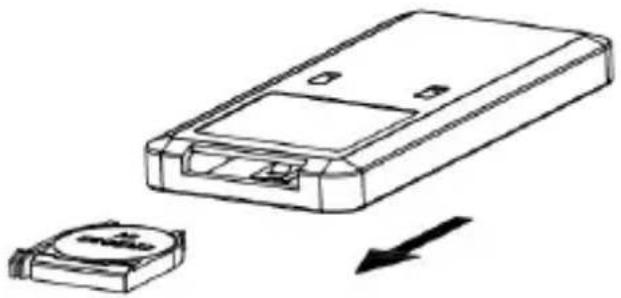
- Push the cap behind the remote control to the direction of arrows, then pull it free.
- Insert the batteries in align with their polarities. (CR2032 3V)
- After inserting or replacing the battery, push the cap back.
natural_image
Line drawing of a remote control box with a separate battery component and directional arrow (no text or symbols)Maintenance And Cleaning
You can use a soft brush to clean the appliance.
Wipe the outer surface of the appliance with a damp cloth. Do not wash directly with water.
Do not spray water on any part of the appliance.

If there is any dust or dirt on the front mesh and the cap of the fan, it will affect the air outlet performance. It is recommended to be cleaned twice a month.

Unplug the appliance before cleaning and servicing.

Never use alcohol or solvent based cleaners. Otherwise, you may harm your device. Clean your appliance with a soft, damp dry cloth.
Storage
- If the appliance will not be used for an extended period of time, pack the appliance.
• After packing, place it at a dry and well-ventilated place.
NOTE!
Before you call Customer Service, check whether you can correct the problem/ fault yourself. For this purpose, please see the "TROUBLESHOOTING" section. If you can not resolve the problem/error, please call Customer Service: Before calling please make ready the model name and product serial number. You can find this information on the RATING LABEL of your product. Help Line: (+90 212) 444 0 241
Troubleshooting
Body Sensor and troubleshooting
- Why the appliance Beeps more than once to a person?
This is normal. The appliance may Beep to indicate that it detected where the body starts and where ends. - How does the appliance adjust the angle after locked to rotation arc?
The appliance adjusts automatically to lowest setting of 30^ rotation arc or based on the number of people, in order to ensure cooling for the persons.
- Why does the appliance Beeps and detects people not present?
The accuracy of the body sensor is influenced by many factors. One of the main factors is the proximity of the people. Therefore, it may detect different objects and may classify them wrongfully as humans.
• How does the body sensor operate?
Infrared body detector classifies any item with a temperature higher than 37^ C as human.
Other Issues and Troubleshooting
| Problem Root Cause Remedy | ||
| Appliance Does Not Operate | It may be unpluggedAppliance may be off No power on the outlet Cable may be damaged | Plug it Operate the Appliance Try another outlet Call Authorized Service |
| No Oscillation Oscillation is not on Motor unit may be malfunctioning | Turn on oscillation Call Authorized Service | |
| Noisy Operation Foreign particulates may be stuck | Clean foreign particulates | |
Recycling
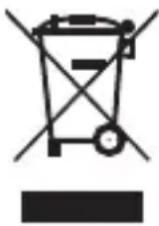
Dispose of the device according to the environmental regulations applicable in your country.
Electrical waste must not be disposed of together with household waste.
Dispose the device to the waste baskets designated for electrical waste. The packaging of the device consists of recycling-capable materials.

Throw out them in suitable recycling bins. You can put used dust bags and filters in general trash cans.
This appliance is compatible with 2012/19/EU WEEE directive.
Shipping
Carry the appliance in the original package or a similar, well-padded package to prevent damage to the appliance.
Türkçe
TR
natural_image
Simple line drawing of an open box with an upward arrow inside (no text or symbols)
UYARI!
natural_image
Line drawings of a four-step industrial fan installation process, showing step-by-step assembly from base to top (no text or symbols)Diyagram 1 Diyagram 2 Diyagram 3 Diyagram 4
Çalıştırma
natural_image
Silhouettes of people interacting with a microphone, showing motion arcs around it (no text or symbols)NOT!
natural_image
Line drawing of a remote control box with a separate battery component and directional arrow (no text or symbols)Bakim ve Temizlik
natural_image
Simple line drawing of an open box with an upward arrow on the lid (no text or symbols)
ПРЕДУПРЕЖДЕНИЕ!
ИНДИКАТОРНАЯ ПАНЕЛЬ
natural_image
Four-step diagram showing the installation of a fan-shaped device from a stand to a base, with no visible text or symbols.natural_image
Silhouettes of people interacting with a microphone, showing curved arrows indicating interaction (no text or symbols)
ПРИМЕЧАНИЕ!
natural_image
Line drawing of a remote control device with a separate battery component and directional arrow (no text or symbols)natural_image
Simple line drawing of an open box with an upward arrow on the lid (no text or symbols)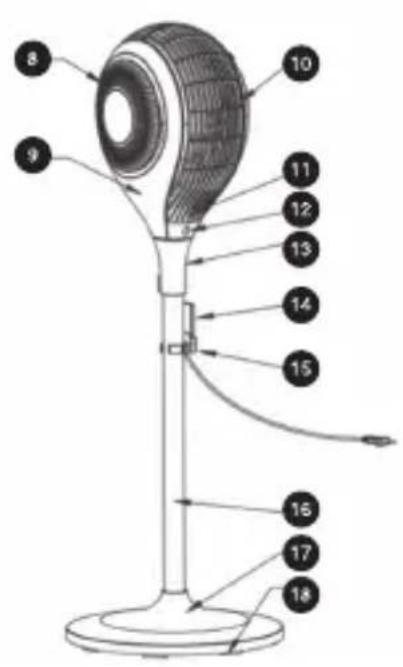
محتويات الغلاف:
natural_image
Silhouettes of people interacting with a microphone, showing interaction arcs (no text or symbols)ملاحظة!
natural_image
Line drawing of a remote control unit with a battery and arrow indicating direction (no text or symbols)التنظيف والعناية

- THYRA
- WARNUNG!
- HINWEIS!
- Information about the operating instructions
- Responsibility
- Safety matters
- NOTE!
- WARNING!
- CAUTION!
- Warnings related to operating instruction
- CE Compliance notice
- Intended Use
- Unauthorized use
- Unpacking
- Security Warnings
- Box Contents:
- Product Description
- Installing the Product
- ON/OFF
- MODE
- A) NORMAL:
- B) NATURAL BREEZE:
- C) SLEEP:
- C) ECO ECO ENERGY:
- TIMER:
- ⭐ SPEED
- HORIZONTAL OSCILLATION / INFRARED BODY SENSOR
- INFRARED BODY SENSOR
- 90° VERTICAL OSCILLATION
- Extra Features
- A) Automatic Energy Saving
- B) Record Function
- Remote Control Battery Inserting Instructions
- Maintenance And Cleaning
- Storage
- Troubleshooting
- Body Sensor and troubleshooting
- Other Issues and Troubleshooting
- Recycling
- Shipping
- Türkçe
- TR
- UYARI!
- Çalıştırma
- NOT!
- Bakim ve Temizlik
- ПРЕДУПРЕЖДЕНИЕ!
- ИНДИКАТОРНАЯ ПАНЕЛЬ
- ПРИМЕЧАНИЕ!
- محتويات الغلاف:
Brand : FAKIR
Model : Thyra
Category : Fan