
Nomad-Jet 100 - Printer OLIVETTI - Free user manual and instructions
Find the device manual for free Nomad-Jet 100 OLIVETTI in PDF.


| Product Type | Portable Inkjet Printer |
| Dimensions (W x D x H) | 30 cm x 15 cm x 5 cm |
| Weight | 1.5 kg |
| Power Supply | AC Adapter (100-240V) or NiMH Rechargeable Battery |
| Print Technology | Thermal Inkjet |
| Print Resolution | Up to 600 x 600 dpi (black and color) |
| Print Speed | 4 ppm (mono), 2 ppm (color) |
| Paper Sizes | A4, A5, Letter, Legal, Envelopes |
| Paper Feed Capacity | 100 sheets input tray |
| Connectivity | Parallel Port, IrDA Infrared |
| Compatible Operating Systems | Windows 95/98/ME/2000, Mac OS |
| Cartridge Type | Olivetti Black and Tri-Color Ink Cartridges |
| Battery Life | Up to 100 pages per charge |
| Display | 2-line LCD Status Display |
| Noise Level | Less than 45 dB |
| Duty Cycle | 500 pages per month |
| Included Software | Printer Drivers, Utility Software |
| Maintenance and Cleaning | Clean print heads with built-in utility; use recommended paper |
| Safety Precautions | Do not expose to moisture; unplug before cleaning |
| Spare Parts and Repairability | Ink cartridges, power adapter, battery available online; limited user repair |
| General Information | Portable design with carrying handle; suitable for mobile printing |
Frequently Asked Questions - Nomad-Jet 100 OLIVETTI
User questions about Nomad-Jet 100 OLIVETTI
0 question about this device. Answer the ones you know or ask your own.
Ask a new question about this device
Download the instructions for your Printer in PDF format for free! Find your manual Nomad-Jet 100 - OLIVETTI and take your electronic device back in hand. On this page are published all the documents necessary for the use of your device. Nomad-Jet 100 by OLIVETTI.
USER MANUAL Nomad-Jet 100 OLIVETTI
natural_image
A couple sitting on a sofa using a tablet device, with a printer and coffee cup nearby (no visible text or symbols)

OLIVETTI NOMAD-JET 100
PORTABLE PRINTER

natural_image
Exterior view of a modern office building (no signage)CAN YOU IMAGINE A SMALLER, MORE PRACTICAL INK-JET PRINTER WITH A COLOUR PRINTING CAPABILITY THAN THE OLIVETTI NOMAD-JET 100? PUT IT IN YOUR BRIEFCASE AND IT'S THE PERFECT TRAVELLING COMPANION. ITS DIMENSIONS MAY HAVE BEEN CUT TO A MINIMUM, BUT ITS PERFORMANCE AND ERGONOMICS ARE ON A PAR WITH A DESKTOP DEVICE. THE OLIVETTI NOMAD-JET 100 ALSO FEATURES A NEW IRDA PORT FOR WIRELESS CONNECTION TO THE PC. ADD TO ALL THIS A POWER SYSTEM THAT RUNS ON A BATTERY PACK OR ALKALINE BATTERIES, AND YOU'LL SEE WHY THE NOMAD-JET 100 IS THE PERFECT CHOICE FOR BUSINESS TRAVELLERS, AND WHY IT PROVES SO POPULAR AMONG PROFESSIONALS IN THE BANKING, INSURANCE, CHEMICALS AND PHARMACEUTICALS INDUSTRIES.
NOMAD-JET 100

natural_image
Two black electronic devices with batteries and connectors, placed on an orange background (no visible text or symbols)extremely lightweight: just 1.1 kg without batteries
natural_image
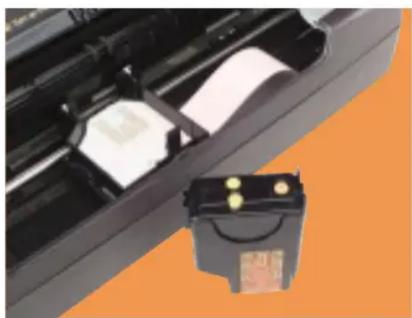
Close-up of a battery pack with two white cards and a black connector, set against an orange background (no visible text or symbols)equipped to print in black and white or colour
OUTSTANDING FREEDOM AND COMPLETE INDEPENDENCE.
The Olivetti Nomad-Jet 100 is the ideal portable printer. Small, light-weight, it has everything you need to work completely independently. Because in addition to its USB and parallel ports, this device features a new infrared IrDA port for wireless communication with the PC, up to a distance of a metre.
The Olivetti Nomad-Jet 100 also comes with accessories that let you power it anywhere you go: a Ni-Mh battery pack for 240 pages; a mains power supply; alkaline batteries and even an adapter for connection to the cigarette lighter in your car.
PUT SOME COLOUR IN YOUR WORK.
With its 600x300 dpi bubble ink-jet technology, the Nomad-Jet 100 guarantees sharp printing quality to make sure the documents you produce always live up to expectations. In addition to perfect black printing, the Nomad-Jet 100 can also provide
bright, saturated colour printing, using the new Oichrome driver.
PRINTING QUALITY.
The Olivetti Nomad-Jet 100 is a top-performing compact professional, which successfully combines a printing speed of 4 pages per minute with excellent quality.
That's not all: it also comes with a broad selection of resident fonts and character attributes.
MINIMAL DIMENSIONS TO KEEP WEIGHT DOWN.
The Nomad-Jet 100 takes up the least possible space with its integrated paper feed and exclusive vertical paper management system. This is the only portable printer where the printed paper comes out in a vertical direction, to avoid taking up valuable space; so you can use the machine without taking it out of the case. Weighing in at just 1.1 kg, the Nomad-Jet 100 is the ideal companion for every appointment.

natural_image
Four electronic devices with labeled components, including charging cables, batteries, and a battery pack (no visible text or symbols)slim adapter (1), car lighter adapter (2), alkaline batteries (3), battery pack Ni-MH (4).
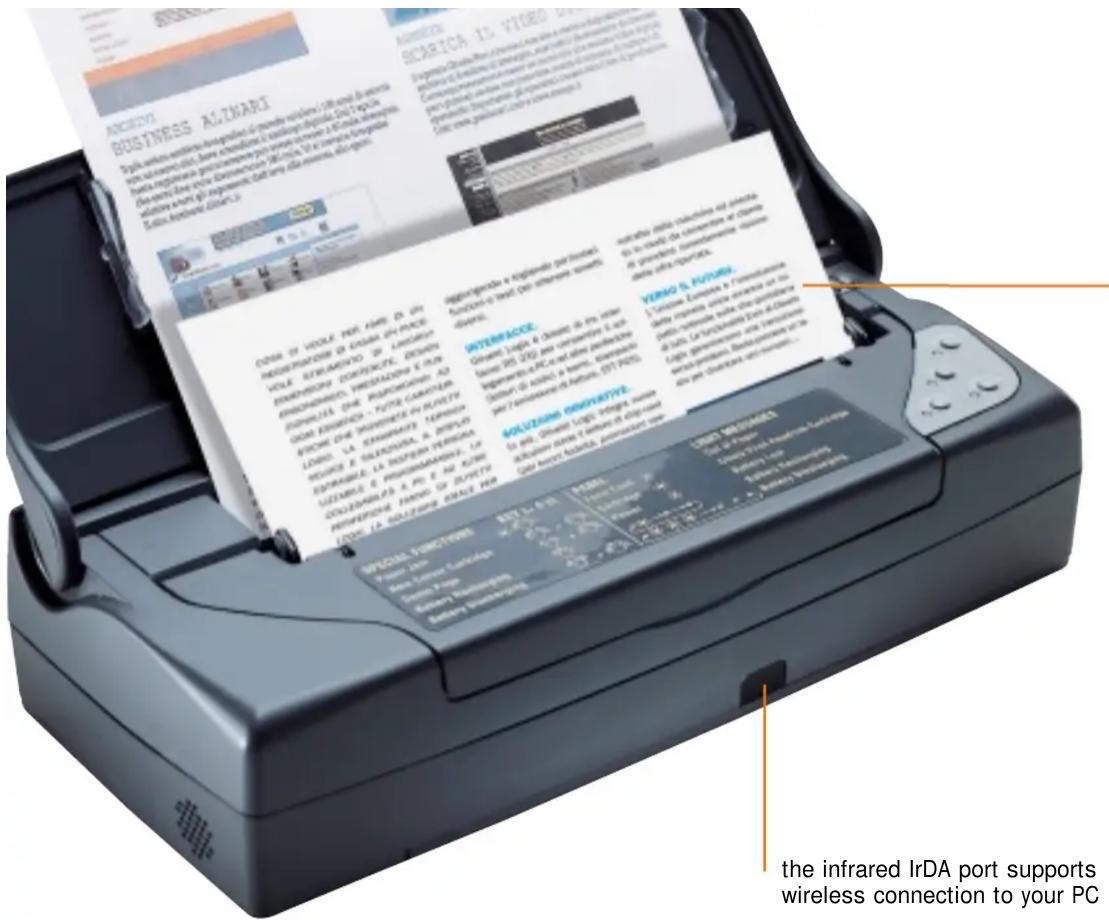
minimum dimensions, thanks to vertical paper entry and exit system
the infrared IrDA port supports wireless connection to your PC

NOMAD-JET 100
Ink-jet portable printer
compact and light
TECHNICAL SPECIFICATIONS
Technology
Bubble ink-jet
Nozzles
51 colour nozzles
50 black nozzles
B/W resolution
600 x 300 dpi
Colour resolution
600 x 300 dpi
B/W speed (Draft mode)
4 ppm
Colour speed (Draft mode)
2 ppm
Control Protocol
PCL3, HP DJ 500
Resident fonts
Portrait: Courier, Team Nordic, Letter Gothic,
BF Team, Linea.
Landscape: Courier, Letter Gothic
Paper format
A4, Letter, Legal
Page orientation
Portrait and Landscape
Line length
80 columns (10 cpi)
Paper feed
Automatic 20-sheet feed
Interfaces
IEEE 1284B parallel, USB, Infrared
RAM
128 KB
Consumption
2W sleep, 6W standby, 20W printing
Operating systems
DOS; Win 3.1x, Win 95/98/2000/NT; Win Me
Power sources
Ni-Mh battery pack (duration: 240 pages)
Slim adapter
Car lighter adapter
Alkaline batteries
Noise level
Approximately 50 dB(A)
Dimensions (mm)
300 (width), 67 (height), 132 (depth)
Weight
1.1 Kg (without batteries).
OLIVETTI NOMAD-JET 100
PORTABLE PRINTER
www.olivettitecnost.com
olivetti
@HOME@OFFICE
The registered trademarks
in this document are the property
of their respective owners.
With the right to vary
technical specifications.
The Nomad-Jet 100 is distributed
by Olivetti Tecnost.
an Olivetti Group company.
Printed in Italy.
Tip. Ivreagrafica (08/ 01)
Code: 3888253-00
Brand : OLIVETTI
Model : Nomad-Jet 100
Category : Printer