
IAN 071380 - Uncategorized SILVERCREST - Free user manual and instructions
Find the device manual for free IAN 071380 SILVERCREST in PDF.


| Product Type | Digital Luggage Scale |
| Brand | SilverCrest |
| Model | IAN 071380 |
| Measuring Range | 0.2 – 50 kg / 0.5 – 110 lb |
| Graduation | 0.05 kg / 0.1 lb |
| Power Supply | 2 × 1.5 V AAA batteries |
| Display | LC display with weight, unit, and HOLD indicator |
| Functions | Tare (zero reset), HOLD (auto-freeze), automatic switch-off, unit selection (kg/lb) |
| Key Components | Battery compartment, strap, hook, triangle ring, ON/OFF/TARE switch, screw for battery cover |
| Cleaning | Use a slightly moist, fluff-free cloth; mild soap solution for stubborn dirt. No chemical cleaners or abrasives. |
| Safety Features | Overload protection (ERR display), polarity protection, low battery indicator (10 display) |
| Battery Safety | Do not recharge, short-circuit, or open non-rechargeable batteries. Dispose according to regulations. |
| Environmental Conditions | Avoid extreme temperatures, strong vibrations, direct sunlight, magnetic fields, moisture. |
| Included Items | 1 luggage scale, 2 × AAA batteries, 1 instruction manual |
| Intended Use | Weighing luggage; not for medicines or commercial use |
| Disposal | Recycle packaging; dispose of device and batteries at appropriate collection points per local regulations |
Frequently Asked Questions - IAN 071380 SILVERCREST
User questions about IAN 071380 SILVERCREST
0 question about this device. Answer the ones you know or ask your own.
Ask a new question about this device
Download the instructions for your Uncategorized in PDF format for free! Find your manual IAN 071380 - SILVERCREST and take your electronic device back in hand. On this page are published all the documents necessary for the use of your device. IAN 071380 by SILVERCREST.
USER MANUAL IAN 071380 SILVERCREST
ES
Digital luggage scale
Operation and Safety Notes
DE AT CH
DigitaleKofferwaage

ESInstruccionesde
utilización y de
seguridad Página 5
IT / MT
natural_image
Color palette bar with grayscale swatches and a central crosshair symbol (no text or labels)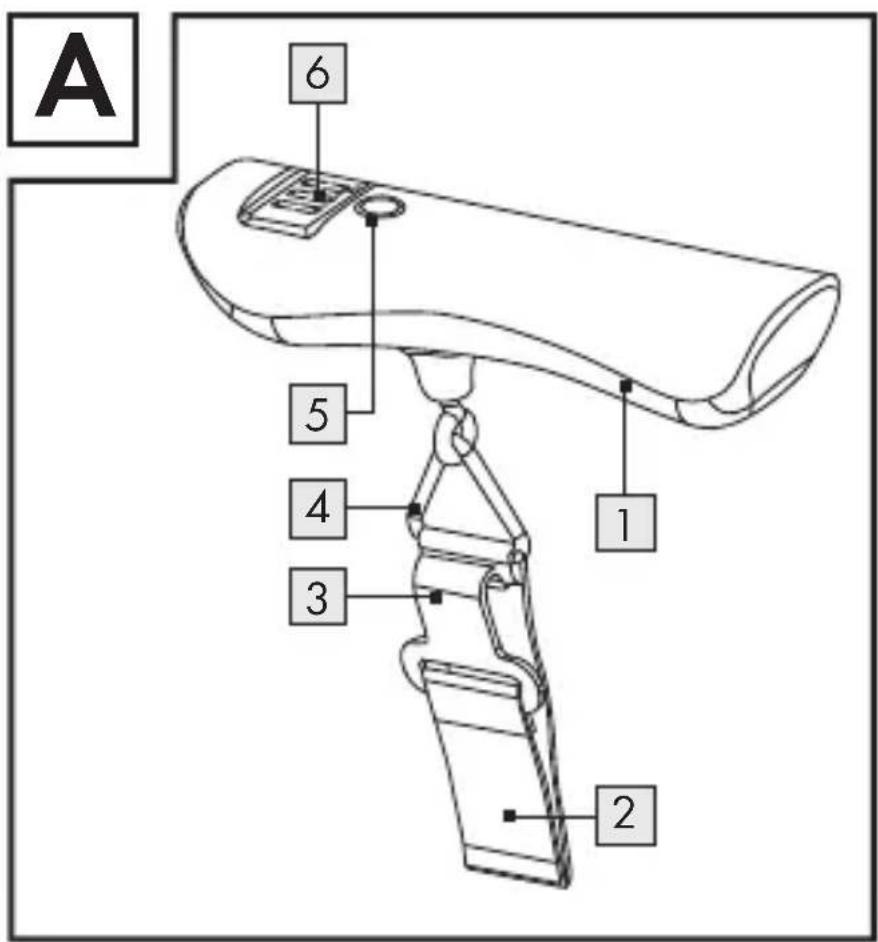
natural_image
Color palette bar with grayscale swatches and a central crosshair symbol (no text or labels)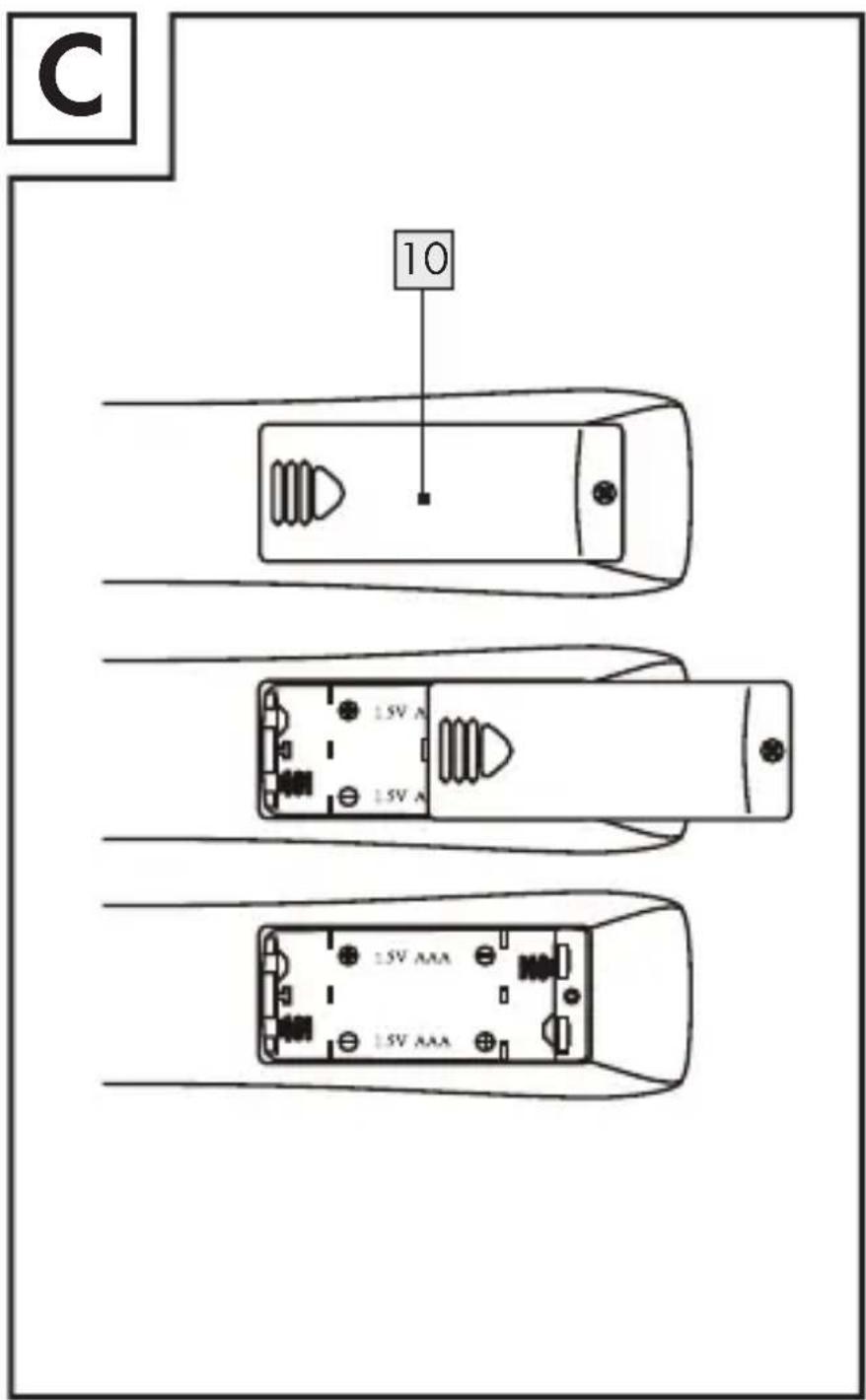
natural_image
Color palette bar with grayscale swatches and a central target symbol (no text or labels)natural_image
Color palette bar with grayscale swatches and a central target symbol (no text or labels)natural_image
Color palette bar with grayscale swatches and a central target symbol (no text or labels)
natural_image
Color palette bar with grayscale swatches and a central target symbol (no text or labels)natural_image
Color palette bar with grayscale swatches and a central target symbol (no text or labels)natural_image
Color palette bar with grayscale swatches and a central target symbol (no text or labels)natural_image
Color palette bar with grayscale swatches and a central crosshair symbol (no text or labels)natural_image
Color palette bar with grayscale swatches and a central target symbol (no text or labels)natural_image
Color palette bar with grayscale swatches and a central target symbol (no text or labels)natural_image
Color palette bar with grayscale swatches and a central target symbol (no text or labels)● = ERR
© = Balanza sobrecargada.
natural_image
Color palette bar with grayscale swatches and a central crosshair symbol (no text or labels)natural_image
Color palette bar with grayscale swatches and a central target symbol (no text or labels)- Limpieza
natural_image
Color palette bar with grayscale shades and a central crosshair symbol (no text or labels)natural_image
Color palette bar with grayscale swatches and a central target symbol (no text or labels)natural_image
Color palette bar with grayscale swatches and a central target symbol (no text or labels)natural_image
Color palette bar with grayscale shades and a central target symbol (no text or labels)natural_image
Color palette bar with grayscale swatches and a central target symbol (no text or labels)natural_image
Color palette bar with grayscale swatches and a central crosshair symbol (no text or labels)natural_image
Color palette bar with grayscale swatches and a central target symbol (no text or labels)
natural_image
Color palette bar with grayscale swatches and a central target symbol (no text or labels)■ Smaltire le batterie in base alle norme in vigore relative allo smaltimento.
- Messa in funzione
natural_image
Color palette bar with grayscale swatches and a central crosshair symbol (no text or labels)natural_image
Color palette bar with grayscale swatches and a central target symbol (no text or labels)natural_image
Color palette bar with grayscale swatches and a central target symbol (no text or labels)natural_image
Color palette bar with grayscale swatches and a central target symbol (no text or labels)natural_image
Color palette bar with grayscale swatches and a central target symbol (no text or labels)natural_image
Color palette bar with grayscale shades and a central target symbol (no text or labels)Smaltimento

natural_image
Color palette bar with grayscale swatches and a central crosshair symbol (no text or labels)natural_image
Color palette bar with grayscale swatches and a central target symbol (no text or labels)natural_image
Color palette bar with grayscale swatches and a central target symbol (no text or labels)Material fornecido
natural_image
Color palette bar with grayscale swatches and a central target symbol (no text or labels)natural_image
Color palette bar with grayscale swatches and a central target symbol (no text or labels)natural_image
Color palette bar with grayscale swatches and a central target symbol (no text or labels)Ao colocar as pilhas,
natural_image
Color palette bar with grayscale swatches and a central target symbol (no text or labels)natural_image
Color palette bar with grayscale swatches and a central target symbol (no text or labels)Utilização
Pesagem
natural_image
Color palette bar with grayscale swatches and a central target symbol (no text or labels)natural_image
Color palette bar with grayscale swatches and a central target symbol (no text or labels)natural_image
Color palette bar with grayscale swatches and a central target symbol (no text or labels)● = ERR
natural_image
Color palette bar with grayscale swatches and a central target symbol (no text or labels)natural_image
Color palette bar with grayscale swatches and a central target symbol (no text or labels)Limpeza
natural_image
Color palette bar with grayscale shades and a central crosshair symbol (no text or labels)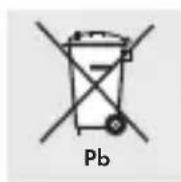
Intended use......Page 63
Description of parts ....Page 63
Technical data......Page 64
Included items ......Page 65
Safety instructions......Page 65
Safety instructions
for batteries ......Page 67
Preparing for use
Inserting/replacing batteries...Page 70
Operation
Weighing......Page 71
Changing the unit of weight...Page 73
Troubleshooting ......Page 74
Cleaning Page 76
natural_image
Color palette bar with grayscale swatches and a central target symbol (no text or labels)Digital Luggage Scale
Intendeduse
The device is intended for weighing articles of luggage. It is not intended for weighing medicines or non-permitted materials. Any use other than that described above or any modification of the product is not permissible and will result in damage. Misuse may also result in other life-threatening risks and injury. The product is for private use only. Not for commercial use.
• Description of parts
1 Battery compartment 2 Strap
natural_image
Color palette bar with grayscale swatches and a central target symbol (no text or labels)3 Hook
4 Triangle ring
5 ON/OFF/TARE switch
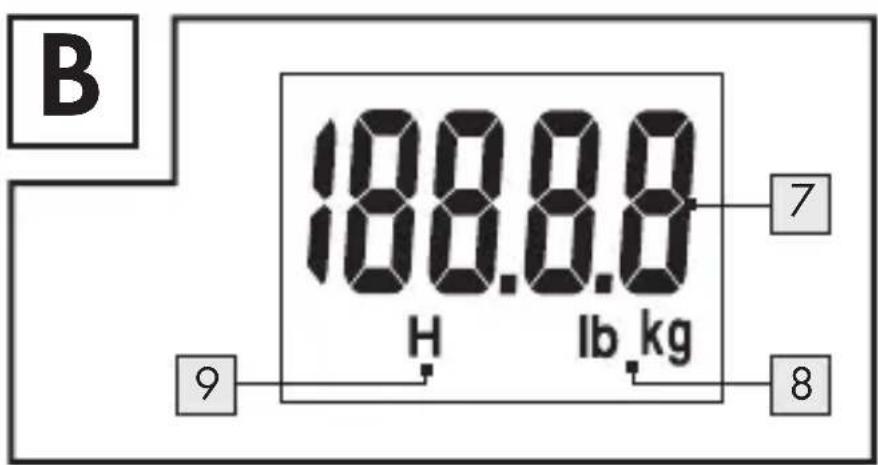
6 LC display
7 Weight
8 Unit of weight
9 HOLD display (H)
10 Battery compartment cover

- Technical data
Measuring range: 0.2–50 kg/
0.5-110lb
Gradation: 0.05 kg / 0.1 lb
Batteries: 2 × 1.5 ~V
= = AAA
natural_image
Color palette bar with grayscale swatches and a central target symbol (no text or labels)- Included items
1 Luggage scale
2 Batteries 1.5 V---AAA
1 Instructions for use

Safety instructions
WARNING! Children or persons who lack the knowledge or experience to use the device or whose physical, sensory or intellectual capacities are limited must never be allowed to use the device without supervision or instruction by a person responsible for their safety. Children should be supervised in order to ensure that they do not play with the appliance.
natural_image
Color palette bar with grayscale swatches and a central crosshair symbol (no text or labels)
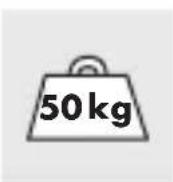
CAUTION! RISK OF
INJURY! The load on the
scale must not exceed
50 kg. Otherwise the product may be damaged.

Do not expose the product to
- extreme temperatures,
- strong vibrations,
- heavy mechanical loads,
- direct sunlight
- magnetic fields,
- moisture.
These can damage the product.

Check the product for damage before use. Never use a damaged product.

WARNING!
Never open the hous-
ing of the product. This can result in injury and damage to the product. Repairs must be carried out by an electrician only.
natural_image
Color palette bar with grayscale swatches and a central target symbol (no text or labels)- Do not allow anyone inexperienced to use the product. Make sure that anyone intending to use the product has read the operating manual and is capable of operating the product safely.

Safetyinstructions for batteries
WARNING! Keep batteries away from children. Do not leave batteries lying around. They could be swallowed by children or pets. In the event of swallowing a battery, contact a doctor immediately.
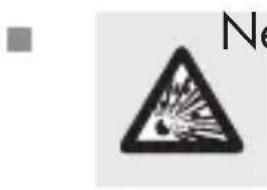
Never recharge, short-circuit and/ or open non-recharge-able batteries. Never throw
natural_image
Color palette bar with grayscale swatches and a central target symbol (no text or labels)batteries into fire or water. Otherwise there is danger of explosion.
When inserting the battery, ensure the correct polarity! The correct polarity is shown inside the battery compartment. Otherwise there is danger of explosion.
Do not subject the batteries to extreme environmental conditions or temperatures, such as those near heating radiators. There is then a danger of leaking.
■ Remove spent batteries from the device immediately. Otherwise the battery is more likely to leak!
■ Always replace both batteries. Use only batteries of the same type.
■ Never use new and spent batteries together.
natural_image
Color palette bar with grayscale shades and a central target symbol (no text or labels)Check regularly to make sure the batteries in the device are not leaking.
Spent or damaged batteries may irritate the skin on contact; so always wear suitable protective gloves in these circumstances!
- Do not let the fluid from a leaking battery come into contact with your skin, eyes or mucous membranes. In the event of contact with fluid leaking from a battery, thoroughly flush the affected area with water and / or seek the advice of a doctor!
If necessary, clean the contacts on the batteries and on the device itself before inserting them.
■ Remove the batteries from the device if it will not be used for a prolonged period.


natural_image
Color palette bar with grayscale swatches and a central target symbol (no text or labels)- Insert the batteries carefully into the battery compartment. Otherwise there is a danger of damage to the product.
■ Dispose the batteries according to the disposal instructions.
● Preparing for use

- Inserting/replacing batteries
☐ Release the screw on the battery compartment cover 10 using a small crosshead screwdriver (not included).
Open the battery compartment.
☐ Remove the spent batteries if need be.
☐ Insert 2 1.5 V AAA batteries into the battery compartment.
natural_image
Color palette bar with grayscale swatches and a central target symbol (no text or labels)Note: Make sure you insert the batteries with the correct polarity.
☐ Close the battery compartment by screwing in the screw with a cross-head screwdriver.
Operation
Weighing
□ Guide the strap 2 through the grip of the article of luggage and hang the hook 3 in the triangle 4 ring.
Before lifting the article of luggage, press the ON/OFF/TARE switch 5 to switch on the device. The strap must not be under tension when the device is switched on. After switching on, two signal tones are sounded.
natural_image
Color palette bar with grayscale swatches and a central target symbol (no text or labels)Note: In the LC display 6, the weight "0.00 kg/0.0 lb" should appear. If it does not, you can reset the display to "0.00 kg/0.0 lb" by pressing the ON/OFF/TARE switch again.
Now slightly raise the scale with the article of luggage. Make sure the scale is horizontal and balanced. The LC display now shows the weight of the article of luggage; after 2–3 seconds the display is frozen and displayed for approx. 1 minute. During this time the word HOLD (H) 9 appears in the display. Then the device switches off by itself.
Note: The heavier the article of luggage, the longer the weighing process lasts.
☐ Press the ON/OFF/TARE switch while the weight is being displayed to
natural_image
Color palette bar with grayscale swatches and a central target symbol (no text or labels)reset the display to "0.00 kg/0.0 lb". You will hear a signal. Now you may start another weighing process.
☐ Press the ON/OFF/TARE switch and hold for approx. 3 seconds to switch off the device. After switching off, a signal tone is sounded.
- Changing the unit of weight
☐ Press the ON/OFF/TARE switch 5 and hold while the device is switched off.
☐ Release the ON/OFF/TARE switch as soon as "0.00kg/0.0lb" appears in the LC display 6. The weight unit 8 "kg" or "lb" blinks.
natural_image
Color palette bar with grayscale swatches and a central target symbol (no text or labels)☐ Press the ON/OFF/TARE switch to select between the units.
Note: If you do not press the ON/OFF/TARE switch for more than approx. 3 seconds, the device always saves the setting that was made.
☐ Begin the weighing process as described in section "Weighing".

- Troubleshooting
● = Fault
● = Reason
O = Solution
● = ERR
● = The scale is overloaded.
O = Remove the overload.
natural_image
Color palette bar with grayscale swatches and a central target symbol (no text or labels)● = ERR stays on in the LC display.
● = The overload has caused a malfunction of the weighing process.
O = Switch the scale off and then on again.
● = 10
● = The batteries are too weak. You cannot bring the scale into use.
O = Replace the batteries (see section "Inserting/ replacing batteries").
● = The device cannot be switched on.
● = The batteries may be spent.
O = Exchange the batteries (see section "Inserting/ replacing batteries"). If the device still cannot be switched on, please contact the service centre.
Note: This device has delicate electronic components. Therefore interference may
natural_image
Color palette bar with grayscale swatches and a central target symbol (no text or labels)occur when it is near devices which transmit radio signals.
If errors occur in the display, remove any such devices from the vicinity of the product. In the case of such malfunctions, remove the batteries briefly and then insert them again.
- Cleaning
- Do not use chemical cleaners, scouring agents or sharp objects for cleaning the device, otherwise the product could be damaged. The product can otherwise be damaged.
□ Clean the product using a slightly moist, fluff-free cloth. For more stubborn dirt you may also apply a weak soap solution to the cloth.
natural_image
Color palette bar with grayscale shades and a central target symbol (no text or labels)- Disposal

The packaging is made entirely of recyclable materials, which you may dispose of at local recycling facilities.
Contact your local refuse disposal authority for more details of how to dispose of your worn-out product.
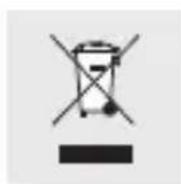
To help protect the environment, please dispose of the product properly when it has reached the end of its useful life and not in the household waste. Information on collection points and their opening hours can be obtained from your local authority.
Faulty or used batteries must be recycled in accordance with Directive 2006/66/EC. Return the batteries and / or the device through the appropriate collection facilities.
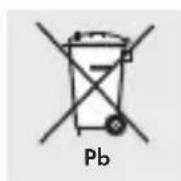
Environmentaldamage through incorrect disposal of the batteries!
Batteries may not be disposed of with the usual domestic waste. They may contain toxic heavy metals and are subject to hazardous waste treatment rules and regulations. The chemical symbols for heavy metals are as follows: Cd = cadmium, Hg = mercury, Pb = lead. That is why you should dispose of used batteries at a local collection point.
EMC €
78 GB/MT
natural_image
Color palette bar with grayscale swatches and a central target symbol (no text or labels)- Teilebeschreibung
natural_image
Color palette bar with grayscale swatches and a central target symbol (no text or labels)Lieferumfang
natural_image
Color palette bar with grayscale swatches and a central target symbol (no text or labels)natural_image
Color palette bar with grayscale swatches and a central target symbol (no text or labels)natural_image
Color palette bar with grayscale swatches and a central target symbol (no text or labels)
natural_image
Color palette bar with grayscale swatches and a central crosshair symbol (no text or labels)natural_image
Color palette bar with grayscale swatches and a central target symbol (no text or labels)natural_image
Color palette bar with grayscale swatches and a central target symbol (no text or labels)natural_image
Color palette bar with grayscale swatches and a central target symbol (no text or labels)natural_image
Color palette bar with grayscale swatches and a central target symbol (no text or labels)● = Fehler
● = Grund
O = Lösung
92 DE/AT/CH


natural_image
Color palette bar with grayscale swatches and a central target symbol (no text or labels)natural_image
Color palette bar with grayscale swatches and a central target symbol (no text or labels)natural_image
Color palette bar with grayscale swatches and a central target symbol (no text or labels)- Reinigung
natural_image
Color palette bar with grayscale swatches and a central target symbol (no text or labels)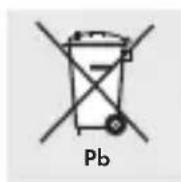
natural_image
Color palette bar with grayscale shades and a central target symbol (no text or labels)IAN 71380
Milomex Ltd.
c/o Milomex Services
Hilltop Cottage
Barton Road
Pulloxhill
Bedfordshire
MK45 5HP
UK

Model No.: Z31123
Version: 01 / 2012