
Dog Camera D605 - Video camera eufy - Free user manual and instructions
Find the device manual for free Dog Camera D605 eufy in PDF.


| Product Type | Pet Camera with Treat Dispenser |
| Brand | Eufy |
| Model | Dog Camera D605 |
| Camera Resolution | HD (estimated) |
| Field of View | Wide angle (estimated) |
| Night Vision | Yes (estimated) |
| Two-Way Audio | Yes (speaker and microphone) |
| Treat Capacity | 8 treats (max diameter 20 mm) |
| Connectivity | Wi-Fi via eufy Pet app |
| Power Input | 12V DC, 2A (adapter included) |
| Operating Temperature | 0°C to 40°C (32°F to 104°F) |
| Indoor Use Only | Yes |
| Status LED | Blue (connected), Red (disconnected), Flashing blue (connecting/recording), Green (starting/treat launch) |
| Setup | Scan QR Code via eufy Pet app |
| Maintenance | Clean treat container regularly; remove residue |
| Regulatory Compliance | FCC Part 15 Class B |
| Dimensions | Estimated: 20 x 15 x 15 cm |
| Weight | Estimated: 0.5 kg |
Frequently Asked Questions - Dog Camera D605 eufy
User questions about Dog Camera D605 eufy
0 question about this device. Answer the ones you know or ask your own.
Ask a new question about this device
Download the instructions for your Video camera in PDF format for free! Find your manual Dog Camera D605 - eufy and take your electronic device back in hand. On this page are published all the documents necessary for the use of your device. Dog Camera D605 by eufy.
USER MANUAL Dog Camera D605 eufy
natural_image
Line drawing of a portable electronic device with two circular buttons and a handle (no text or symbols)Anker Innovations Limited. All rights reserved.eufy Pet and eufy Pet Logo are trademarks of Anker Innovations Limited, registered in the United States and other countries. All other trademarks are the property of their respective owners.
51005002903 V2
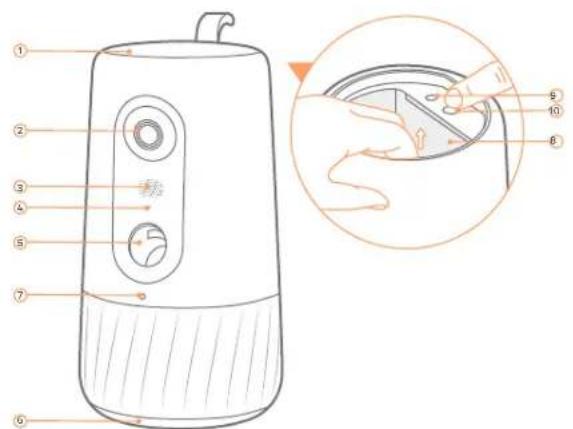
1 Treat Container Lid
7 Status LED
2 Camera
Blue: Connected.
- Flashing red: Disconnected.
- Flashing blue: Connecting / Someone is watching live video / Recording a video.
3 Speaker
· Green: Starting or restarting the system.
· Green for 10 seconds: Launching treats.
4 Microphone Treat Container:8 uits dog treats less than 20 mm.
5 Treat Launching Port SYNC B9ton
6 Residue Lid Release Button: Press and hold to take out the treat container.
2/ POWERING DOG CAMERA D605
Connect Dog Camera D605 to power with the power port on the bottom.
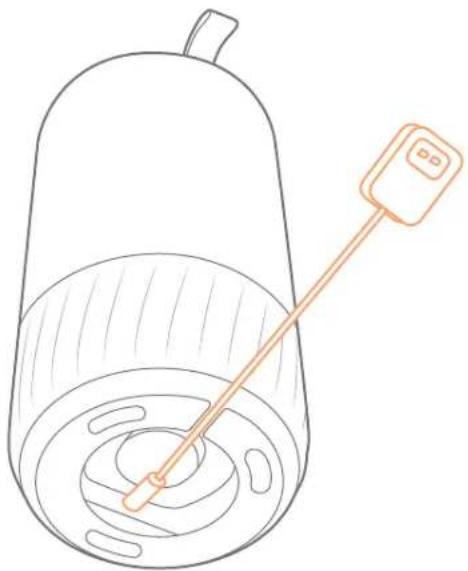
natural_image
Line drawing of a cylindrical container with a stirring rod and a small rectangular object attached to the top (no text or symbols)3/ADDING TO EUFY PET APP
- Download and install the eufy Pet app, then sign up for an account.

- Scan the QR Code on the bottom using the eufy Pet app and follow on-screen instructions to complete the setup.
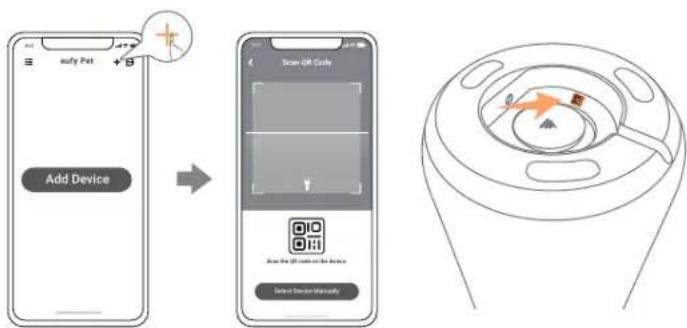
flowchart
graph LR
    A["Add Device"] --> B["Scan QR Code"]
    B --> C["Device Interface"]
    style A fill:#f9f,stroke:#333
    style B fill:#ccf,stroke:#333
    style C fill:#cfc,stroke:#333
4/ REGULAR MAINTENANCE
Clean treat container regularly.
- Remove residue regularly: remove the lid and pour out residue.
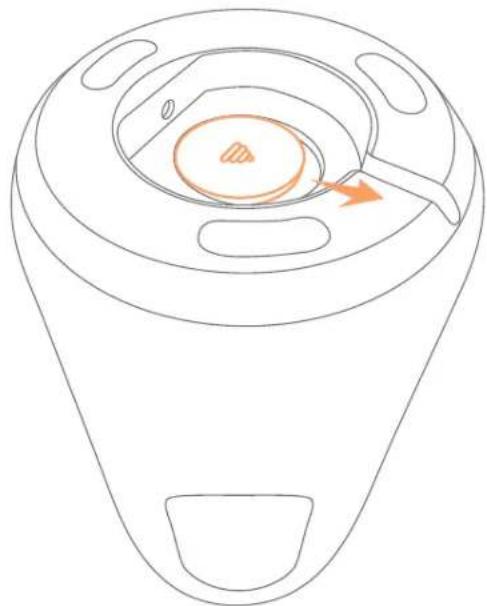
natural_image
Line drawing of a device casing with internal components and an orange arrow indicating direction (no text or symbols)5/NOTICE
The adapter shall be installed near the equipment and shall be easily accessible. Do not use the Device in the environment at too high or too low temperature, never expose the Device under strong sunshine or too wet environment. The suitable temperature for the product and accessories is 0^ C to 40^ C ( 32^ F to 104^ F).
When supplying, please place the device in an environment that has a normal room temperature and good ventilation.
It is recommended to supply the device in an environment with a temperature that ranges from 5^ C\~ 25^ C ( 41^ F to 77^ F).
Please ensure to use only the adapter offered by the manufacturer. Using unauthorized adapter may cause danger and violate the authorization of the projector and the guarantee article.
This adapter is for indoor use only. The rated output voltage/current of the adapter is 12VDC/2A. The plug of adapter considered as disconnect device.
Your product is designed and manufactured with high quality materials and components, which can be recycled and reused.
FCC Statement
This device complies with Part 15 of the FCC Rules. Operation is subject to the following two conditions: (1) this device may not cause harmful interference, and (2) this device must accept any interference received, including interference that may cause undesired operation.
Warning: Changes or modifications not expressly approved by the party responsible for compliance could void the user's authority to operate the equipment.
Note: This equipment has been tested and found to comply with the limits for a Class B digital device, pursuant to Part 15 of the FCC Rules. These limits are designed to provide reasonable protection against harmful interference in a residential installation.
This equipment generates, uses and can radiate radio frequency energy and, if not installed and used in accordance with the instructions, may cause harmful interference to radio communications. However, there is no guarantee that interference will not occur in a particular installation. If this equipment does cause harmful interference to radio or television reception, which can be determined by turning the equipment off and on, the user is encouraged to try to correct the interference by one or more of the following measures:
(1) Reorient or relocate the receiving antenna. (2) Increase the separation between the equipment and receiver. (3) Connect the equipment into an outlet on a circuit different from that to which the receiver is connected. (4) Consult the dealer or an experienced radio / TV technician for help.
FCC Radio Frequency Exposure Statement
The device has been evaluated to meet general RF exposure requirements. The device can be used in fixed / mobile exposure condition. The min separation distance is 20 mm.
Notice: Shielded cables
All connections to other computing devices must be made using shielded cables to maintain compliance with FCC regulations.
The following importer is the responsible party.
Company Name: POWER MOBILE LIFE, LLC
Address: 10900 NE 8TH ST, STE 501, BELLEVUE, WA 98004
Telephone: 1-800-988-7973
製品概要
おやつの容器の蓋
7 LED インジケーター
② カメラ
青色:接続済み
赤色の点滅:接続解除済み
natural_image
Line drawing of a cylindrical container with a stirring rod and a small rectangular object attached to the top (no text or symbols)08 JP JP
3/EUFY PET アプリへの追加
4/定期メンテナンス
natural_image
Line drawing of a device interior with a central circular component and a handle (no text or symbols)10 JP JP
5/注意事项
① 간식 용기 뚜껑
7 상태 LED
② 카메라
·파란색:연결됨
빨간색으로 잠박임:연결 해제됨
③ 스피커
natural_image
Line drawing of a container with a stirring rod and lid, no text or symbols present14 KO KO
3/EUFY PET 앱에 추가하기
4/정기 유지관리
natural_image
Line drawing of a device casing with internal components and an orange arrow indicating a specific area (no text or symbols)16 KO KO
5/주의
Customer Support: support@eufylife.com
Anker Innovations Limited
Room 1318-19, Hollywood Plaza, 610 Nathan Road, Mongkok, Kowloon, Hong Kong

@EufyOfficial@EufyOfficial@EufyOfficial

Brand : eufy
Model : Dog Camera D605
Category : Video camera