
BAS 2 - Uncategorized Imperial - Free user manual and instructions
Find the device manual for free BAS 2 Imperial in PDF.


| Product Type | Portable Bluetooth Speaker |
| Dimensions (W x H x D) | 87 mm x 33 mm x 62 mm |
| Weight | 155 g |
| Power Supply | Built-in 3.7V 600mAh Li-ion battery |
| Output Power | 3 W |
| Bluetooth Version | 4.2 |
| Maximum SD Card Capacity | 32 GB (Micro SD) |
| Charging Time | Approx. 1.5–2 hours (5V DC 1A) |
| Battery Life | Approx. 3 hours at medium volume |
| Frequency Range | 100 Hz – 20 kHz |
| Supported Audio Formats | MP3, WMA, WAV |
| USB Specifications | USB 2.0 / USB 1.1 compatible |
| Operating Temperature | 0 °C – 40 °C |
| Controls | On/Off, Volume +/-, Track +/-, Bluetooth/Mode, Reset |
| Indicator LED | Indicates Bluetooth pairing, charging, and operation status |
| Accessories Included | USB charging cable, wrist strap, user manual |
| Hands-Free Function | Yes (built-in microphone) |
| Cleaning | Only with a dry cloth |
| Safety Features | Over-temperature protection, short-circuit protection (via charger) |
| Disposal | Do not dispose as household waste; recycle at designated collection points |
Frequently Asked Questions - BAS 2 Imperial
User questions about BAS 2 Imperial
0 question about this device. Answer the ones you know or ask your own.
Ask a new question about this device
Download the instructions for your Uncategorized in PDF format for free! Find your manual BAS 2 - Imperial and take your electronic device back in hand. On this page are published all the documents necessary for the use of your device. BAS 2 by Imperial.
USER MANUAL BAS 2 Imperial
natural_image
Two modern portable electronic devices with grid patterns and buttons, one in silver and one in red (no visible text or symbols)IMPERIAL BAS 2

www.digitalbox.de
D
E

natural_image
Color palette bar with grayscale shades and a central crosshair symbol (no text or labels)D
INHALTSVERZEICHNIS
natural_image
Color palette bar with grayscale shades and a central crosshair symbol (no text or labels)natural_image
Color palette bar with grayscale shades and a central crosshair symbol (no text or labels)D
3. LIEFERUMFANG
D
natural_image
Black portable electronic device with grid pattern and control buttons (no visible text or symbols)2
natural_image
Line drawing of a USB cable with two connectors (no text or symbols)
3
4

7
IMPERIAL BAS 2


D
4. ABBILDUNGEN


Bedienungsanleitung
8
bda_IMPERIAL_BAS 2_04_17.indd 8 09.05.17 11:22

5. FUNKTIONEN
- Indikator LED
D
5. FUNKTIONEN
8. USB Anschluss
D
natural_image
Hand pointing at a wall-mounted device with buttons (no text or symbols visible)
D
Bedienungsanleitung
12


D
natural_image
Color palette bar with grayscale shades and a central crosshair symbol (no text or labels)D
6.4. SD Karten Modus
natural_image
Simple line drawing of a hand inserting a USB into a device panel (no text or symbols)
natural_image
Color palette bar with grayscale shades and a central crosshair symbol (no text or labels)D
natural_image
Illustration of a hand interacting with a device screen (no text or symbols visible)
D
D
natural_image
Simple line drawing of a trash bin with no text or symbolsBedienungsanleitung
20

10. SERVICE UND SUPPORT
D
natural_image
Two modern portable electronic devices with grid-patterned surfaces, one metallic and one red, shown against a plain background (no visible text or symbols)IMPERIAL BAS 2
imperial
23
www.digitalbox.de
TABLE OF CONTENTS
E 1. INTRODUCTION....25
-
SAFETY INSTRUCTIONS ..... 26
-
DELIVERY CONTENTS....29
-
IMAGES 30
-
FUNCTIONS .... 31
-
OPERATION 32
6.1. Switching the Device on/off 33
6.2. Establishing a Bluetooth Connection....34
6.3. Pairing the Bluetooth device to another device ..... 35
6.2. Establishing a Bluetooth Connection.... 35
6.4. SD Card Mode 36
6.5. Telephone Hands-free Function ..... 36
6.6. Charge/Card Reader Function 37
7.TECHNICAL SPECIFICATION....39
8.TROUBLESHOOTING 40
-
DISPOSAL INSTRUCTIONS .....42
-
SERVICE AND SUPPORT 43
-
CE-MARKING 44
User manual
24


natural_image
Color palette bar with grayscale shades and a central crosshair symbol (no text or labels)1. INTRODUCTION
Thank you for choosing the IMPERIAL BAS 2.
With this Bluetooth speaker, you can play music files wirelessly from your smartphone or Micro SD card.
If you are using the IMPERIAL BAS 2 for the first time, please read these instructions carefully and keep them for future reference.
Only by following these instructions can you enjoy the full functionality of the device.
This user manual will help you with the
- intended
- safe
• advantageous use of the device
E

We assume that the operator of the BAS 2 has a general understanding of entertainment electronics and their use.

Any person who
- assemblies
- connects
- operates
- cleans
- disposes of
this device must have knowledge of the entire content of this operating manual.
You should always keep this operating manual close to the device
25
IMPERIAL BAS 2

2. SAFETY INSTRUCTIONS
E
2.1. Basic Safety Instructions
- In the event of a malfunction, disconnect the speaker from the USB power source.
- Do not expose the device to rain or moisture.
- Never open the casing.
- Only connect the device to a properly installed mains socket via a charger.
- Disconnect the power supply unit from the mains socket when not using the device for an extended period. When disconnecting the power supply unit, only pull at the adapter, not the cord.
- In the event of a thunderstorm, unplug the device's power supply unit from the mains socket.
- If foreign bodies or liquids enter the device, immediately disconnect it from the USB power source. Have the device inspected by qualified personnel before using it again.
- Please ensure that the power source is easily accessible.
- Do not bend or squeeze the cable connections.
- If the power cord is damaged, you will have to get the device repaired by a professional before using it again.
- Do not allow children to use the device unattended.
• Always leave the maintenance work to qualified personnel. Otherwise, you are putting yourself and others at risk. - In the event of a malfunction, disconnect the device from the power source.
- Spare parts must be ordered directly from the manufacturer.
User manual
26


natural_image
Color palette bar with grayscale shades and a central crosshair symbol (no text or labels)2. SAFETY INSTRUCTIONS
- Modifications to the device will result in the expiration of the manufacturer's responsibility.
- Remove the protective foils.
- This device should only be cleaned with a dry cloth.
Risk of distraction
In certain situations, the use of this device may affect your concentration.
(e.g. when driving, using the road or operating machinery).
Please read the legal regulations that restrict or prohibit the use of headphones.
Please do not use the device if it hinders the ability to hear other environmental sounds.
Risk of hearing damage
Listening to music or other audio content, especially via headphones, can result in hearing damage. Please check the volume before inserting the earplugs into your ears.
Charging the device
Only use the included charging cable to charge the device and only charge the device via a USB connection.
IMPERIAL BAS 2

natural_image
Color palette bar with grayscale shades and a central crosshair symbol (no text or labels)2. SAFETY INSTRUCTIONS
E Protection against RF energy
The device generates an electromagnetic field. It complies with the limit values for protection against RF energy. Please take note of any signs in your environment which prohibit or restrict the operation of electronic devices. This may apply, for example, in hospitals, petrol stations, at fuel pumps or at airports.
In the event of warning signs, please switch the device off immediately.
The components contained in the device generate electromagnetic energy and magnetic fields. These can affect medical devices such as pacemakers or defibrillators. Therefore, please keep a safe and sufficient distance between this device and medical devices.
If you have reason to believe that this device is interfering with a medical device, switch the device off immediately.
Small Parts
Keep the device out of the reach of small children, as some parts could result in suffocation if accidentally swallowed.
Operating Temperature
Only operate the device in temperatures between 0 °C and 35 °C. Do not expose the device to extreme fluctuations in temperature or humidity.
User manual
28



3. DELIVERY CONTENTS
Before using the device for the first time, please check that all of the delivery contents have been supplied.
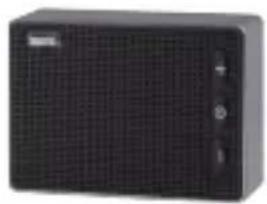
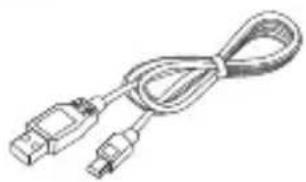
The following components are included in the delivery contents:
- BAS 2
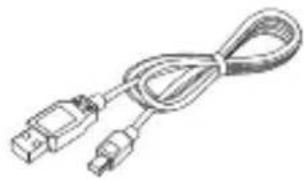
- USB charging cable
- User manual
- Wrist strap
E

1
natural_image
Black portable electronic device with grid pattern and control buttons (no visible text or symbols)2
natural_image
Line drawing of a USB cable with two connectors (no text or symbols)
3

4

29
IMPERIAL BAS 2


- IMAGES
E


User manual
30
bda_IMPERIAL_BAS 2_04_17.indd 30 09.05.17 11:24

5. FUNCTIONS
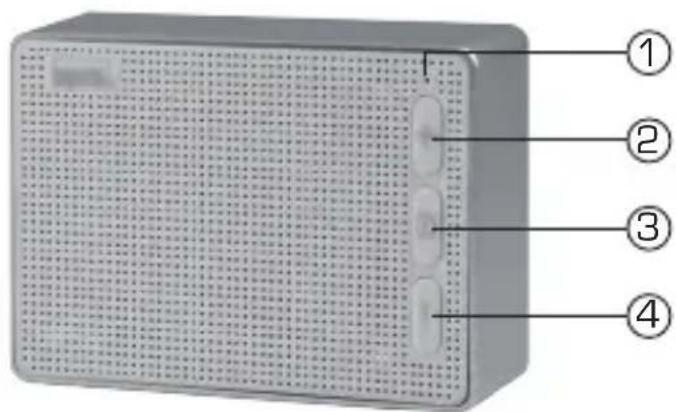
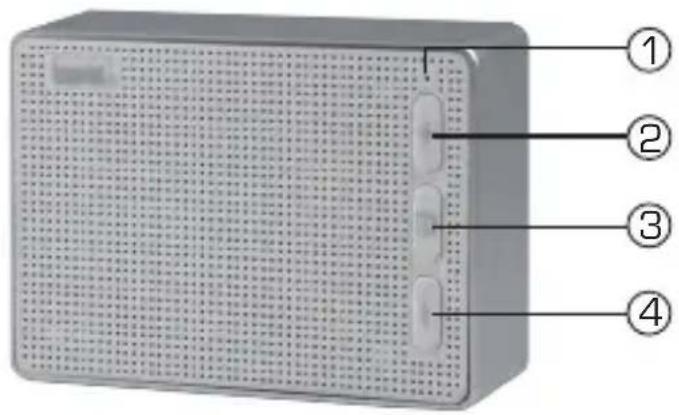
- Indicator LED displays the various operating states.
- Next Track/ Volume + Press this button to select the next track when playing a file on the SD card. Hold this button down to increase the volume.
- On/Off button Press this button for 2 seconds to switch on or switch off the device. Press this button for less than 2 seconds to pause or resume music playback. Press this button for less than 2 seconds to answer an incoming telephone call if the speaker is connected to a mobile telephone or smartphone.
- Previous Track/ Volume - Press this button to select the previous track when playing a file on the SD card. Hold this button down to decrease the volume.
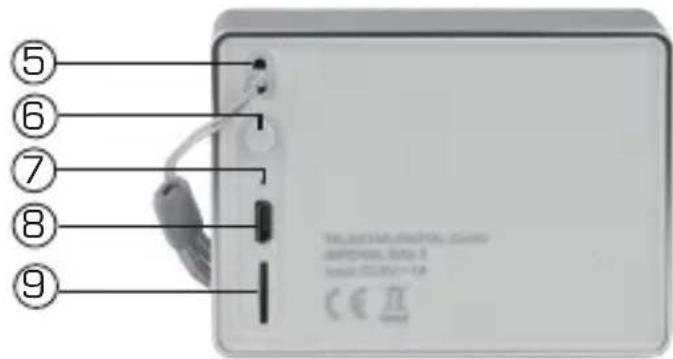
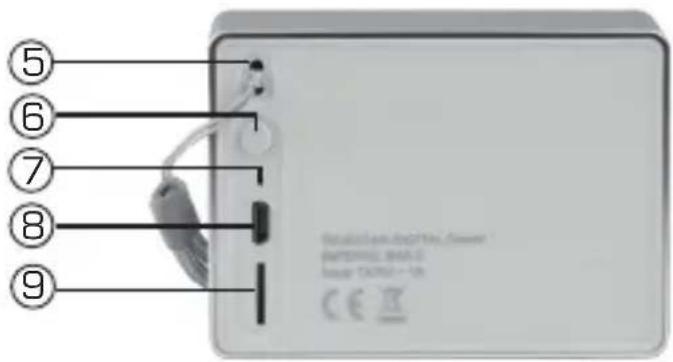
- Wrist strap eyelet
- Bluetooth / Mode
Press this button for 2 seconds to switch off Bluetooth Mode and to switch to SD card Mode. - Reset Press this button with a pointed object to reset the device in the event of a malfunction.
IMPERIAL BAS 2

5. FUNCTIONS
E 8. USB port
Connect the supplied cable to the radio using a USB power source. Via the USB port, you can also access the data on the inserted SD card.
9. SD card slot.
Insert a Micro SD card into the SD card slot to play music from the Micro SD card.
6. OPERATION
Charging the device
Before using the device for the first time, we recommend charging the device for approximately 2 hours.
Connect the device to a USB power source, such as a PC, USB charger or notebook, using the supplied USB charging cable. Once the device is connected to the power supply, it will start to charge.


User manual
32


6.1. Switching the Device on/off
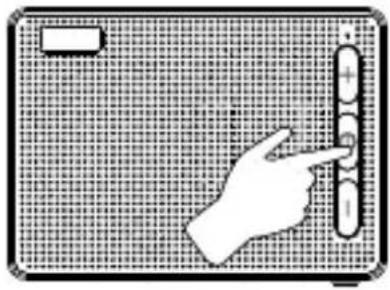
Press and hold the ON/OFF button (3) for approximately 2 seconds.
The device will switch on. A brief tone will sound.
E
natural_image
Illustration of a hand pointing at a vertical bar on a grid-patterned background (no text or symbols)
The indicator LED [1] will start to flash.
The device will enter Bluetooth mode and will search for available Bluetooth devices.

To switch off the device, press and hold the ON/OFF button [3] again for approximately 2 seconds.
33
IMPERIAL BAS 2


6.2. Establishing a Bluetooth Connection
E
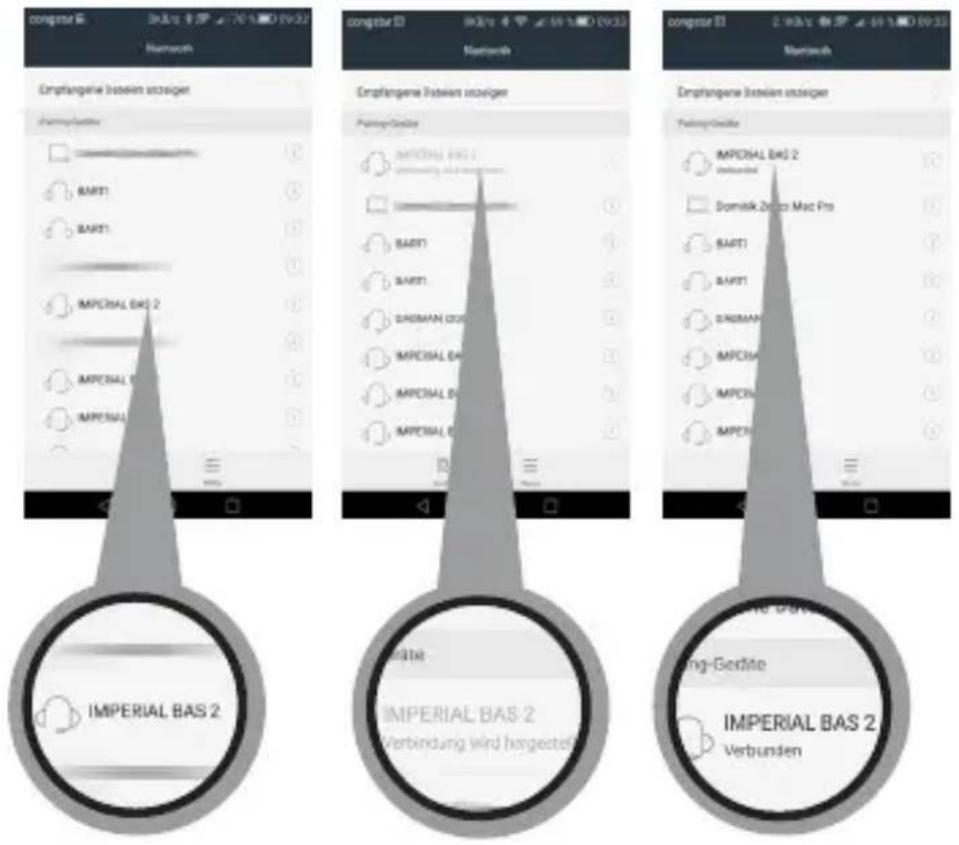
To establish a Bluetooth connection with a Bluetooth-enabled device, please follow these steps:
Switch the BAS 2 on using the ON/OFF button (3).
The blue indicator LED will flash.
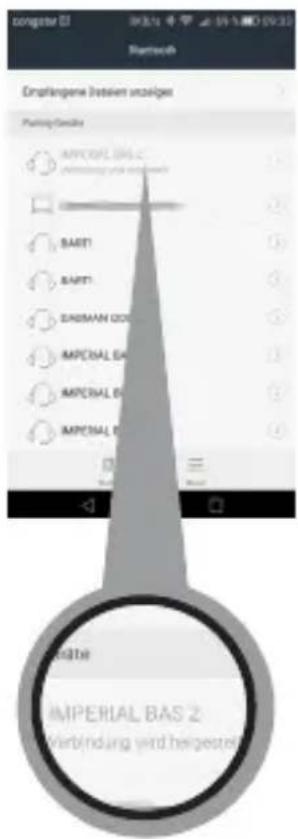
Open the Bluetooth settings on your tablet or smartphone and perform a search for Bluetooth devices.
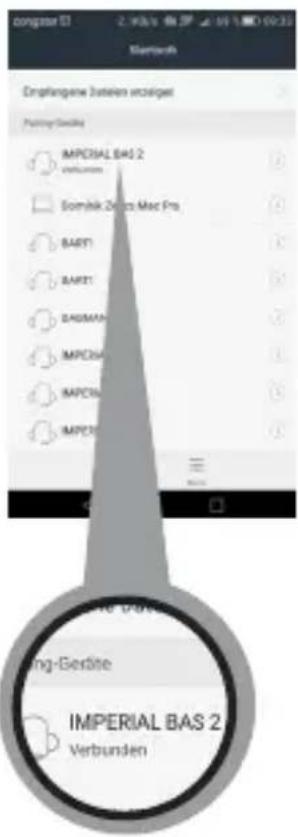
Once the search has finished, please select the device IMPERIAL BAS 2 and establish a connection.
User manual
34

6.2. Establishing a Bluetooth Connection
If a password prompt appears on your tablet or smartphone, enter the password 0000.
Once you have established the connection, the indicator LED will remain solid blue. You can now play music files from your smartphone or tablet via the speaker.
The next time the speaker is switched on, it will automatically connect to the last connected tablet or smartphone. A new search is only required if you would like to pair the speaker with another device.
E
6.3. Pairing the Bluetooth device to another device
If you would like to pair the speaker with another device, press the Bluetooth button [6] on the back of the device for approximately
2 seconds. A warning tone will sound. The speaker will no longer connected via Bluetooth.
The indicator LED will start to flash.
Now you can connect a new tablet or smartphone via Bluetooth following the steps described in section 6.2.
If you would like to reconnect the speaker to a tablet or smartphone which has already been connected to the speaker, press the On/Off button (3)
for less than 2 seconds. This will restore the connection. You should hear a confirmation tone.

IMPERIAL BAS 2


6.4. SD Card Mode
E In addition to a Bluetooth connection, the device can also play music from an SD card.
Insert an SD card into the SD card slot.
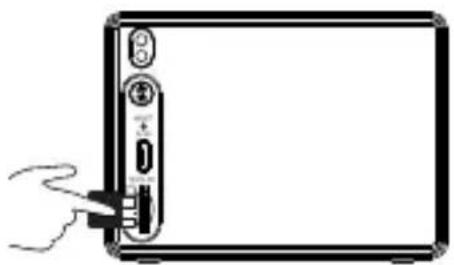
natural_image
Simple line drawing of a hand inserting a USB into a device panel (no text or symbols)
Press the On/Off button to switch on the device.
Press the Bluetooth button (6) on the back of the device.
The speaker will automatically start to play music files stored on the
SD card.
Press button (2) briefly to select the next track.
Hold button (2) down to increase the volume.
Press button (4) briefly to select the previous track.
Hold button (4) down to decrease the volume.

6.5. Telephone Hands-free Function
You can use the speaker as a hands-free kit for your smartphone if the smartphone is connected to the speaker via Bluetooth.
User manual
36


6.5. Telephone Hands-free Function
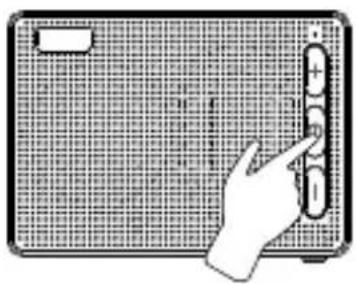
If you receive a telephone call while listening to music via Bluetooth, you can answer the call via the speaker.
Press button (3) ☐ to answer the call. Press button (3) ☐ again to end the call.
E
natural_image
Hand interacting with a grid-patterned device (no text or symbols visible)

6.6. Charge/Card Reader Function
To charge the speaker, connect the device to a USB charger using the supplied USB cable.
It is recommended to use a 5V / 1A USB charger. Once the device is connected to a power source, the internal battery will start to charge.
The indicator LED will stay red.
Note:
The speaker will automatically switch off after 10 minutes if no music is played via Bluetooth or the SD card during this time or after the Bluetooth connection has been disconnected.
37
IMPERIAL BAS 2


natural_image
Color palette bar with grayscale shades and a central crosshair symbol (no text or labels)6.6. Charge/Card Reader Function
E To edit, delete, or add files to the SD card, switch off the speaker and connect it to a PC with the USB cable. Insert an SD card into the SD card slot.
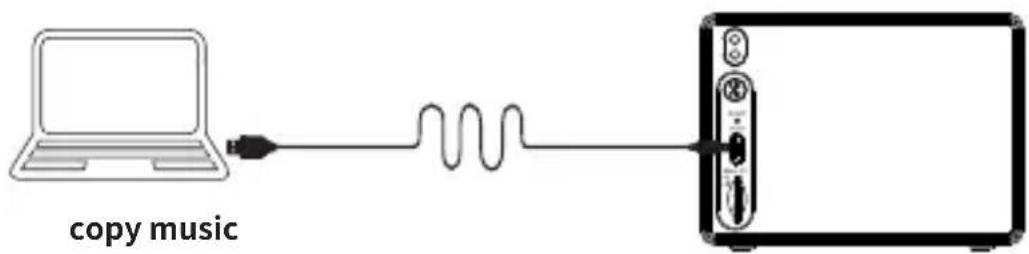
Switch on the speaker.
The PC will now recognise the device as a data carrier.
You can add or delete music files from the SD card.


User manual
38
bda_IMPERIAL_BAS 2_04_17.indd 38

09.05.17 11:25

7.0. Technical Specifications
| System | |
| Output | 3W |
| Bluetooth version | 4.2 |
| SD memory card | Maximum 32 GB |
| Power supply | 3.7V 600mA Li-ion battery |
| Frequency range | 100Hz- 20KHz |
| USB specifications | USB 2.0 / USB 1.1 compatible |
| Charging time | For DC 5V 1A approx. 1.5 -2 hours |
| Battery life | At medium volume, approx. 3 hours |
| File formats | MP3, WMA, WAV |
| Dimensions | 87mm x 33mm x 62mm |
| Weight | 155 g |
| Operating temperature | 0 °C - 40 °C |
E

39
IMPERIAL BAS 2

- TROUBLESHOOTING
| Symptom | Possible cause and solution |
| No sound when connected via Bluetooth | Paired Bluetooth device not switched on.Volume set too low Increase the volume on the BAS 2. Restart the BAS 2. |
| Cannot connect to a Bluetooth device | Pairing mode has not been activated on the desired Bluetooth device.Make sure that the desired device is in pairing mode. Only then it is possible to connect to the DABMAN 1.Distance between both devices is too greatDecrease the distance between the two devices and perform another Bluetooth search. |
| Disconnection or interruption of music playback via Bluetooth | Distance between tablet/smartphone and speaker is too great.Decrease distance from the device.Tip: The distance should not exceed 10 m. |
User manual
40


- TROUBLESHOOTING
| Fault | Possible cause and solution |
| SD card not recognised. | Formatting of the SD card might be incorrect.Please format the SD card to FAT 32. |
| Music file format might not be supported.Please ensure that the music files on the SD card are saved in the following format: MP3, WMV, WAV | |
| No sound during Bluetooth playback | Volume on BAS 2 is too low.Please increase the volume.Press the On/Off button briefly. |
| Cannot switch on the BAS 2 | Press the RESET button on the device. |
E

41
IMPERIAL BAS 2


9. DISPOSAL INSTRUCTIONS
E
The packaging for your device consists entirely of recyclable materials.
Please dispose of these appropriately in accordance with the „Dual System“.
At the end of its service life, this product must not be disposed of as normal household waste but must be disposed of at a recycling collection point for electric and electronic equipment.

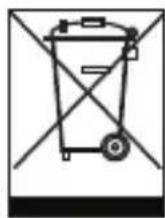
The symbol on the product, instruction manual or packaging indicates this.

The materials are recyclable according to their labeling.
The reuse and recycling of old materials and devices makes an important contribution to protecting the environment.
Please ask your municipal administration for the location of a suitable disposal point.
Please ensure that electronic waste and empty batteries are disposed of properly and are not disposed of as household waste.
User manual
42

10. SERVICE AND SUPPORT
Dear Customer,
Thank you for choosing a product from our company.
Our product meets legal requirements and was manufactured under constant quality control.
The technical specifications are the most recent at the time of printing.
Subject to change.
The warranty period for the IMPERIAL DABMAN d10 meets the legal requirements at the time of purchase.
We also offer our telephone HOTLINE service with professional help.
Our service area provides professional specialists to answer queries.
Here you can ask any questions you have regarding IMPERIAL products and receive tips for locating a possible fault.
Our technicians are available Monday - Friday 8:00 to 16:45 at the following telephone number:
02676 / 95 20 101
or by e-mail at: service@telestar.de
If the Service Hotline is unable to help you, send your device, preferably in its original packaging, or at least packed securely for
transport, to the following address:
TELESTAR - DIGITAL GmbH
Service Center
Your device bears the CE marking and complies with all relevant EU standards.
TELESTAR DIGITAL GmbH hereby declares that this
IMPERIAL BAS 2 complies with the essential requirements and other relevant provisions of EMC Directive
The declaration of conformity for this product can be found at:
All technical specifications and functions described in these operating instructions are valid at the time of printing and are subject to change without notice.
We assume no liability for misprints and errors.
Copy and reproduction permitted only with the express permission of TELESTAR-DIGITAL GmbH.
May 2017
User manual
44


- D
- INHALTSVERZEICHNIS
- LIEFERUMFANG
- ABBILDUNGEN
- FUNKTIONEN
- USB Anschluss
- SD Karten Modus
- SERVICE UND SUPPORT
- TABLE OF CONTENTS
- INTRODUCTION
- SAFETY INSTRUCTIONS
- E
- Basic Safety Instructions
- E Protection against RF energy
- Small Parts
- Operating Temperature
- DELIVERY CONTENTS
- FUNCTIONS
- E 8. USB port
- SD card slot.
- OPERATION
- Switching the Device on/off
- Establishing a Bluetooth Connection
- Pairing the Bluetooth device to another device
- SD Card Mode
- Telephone Hands-free Function
- Charge/Card Reader Function
- DISPOSAL INSTRUCTIONS
- SERVICE AND SUPPORT
Brand : Imperial
Model : BAS 2
Category : Uncategorized