
BAS 1 - Uncategorized Imperial - Free user manual and instructions
Find the device manual for free BAS 1 Imperial in PDF.


| Product Type | Electronic Device |
| Brand | Imperial |
| Model | BAS 1 |
| Dimensions (approx.) | 25 x 15 x 10 cm |
| Weight (approx.) | 0.8 kg |
| Power Supply | 100-240 V, 50/60 Hz |
| Power Consumption | 12 W |
| Main Functions | Basic operation, indicator lights, adjustable settings |
| Operation | Button control, LED display |
| Cleaning Instructions | Wipe with a soft, damp cloth; do not use abrasive cleaners. |
| Maintenance | Check connections periodically; store in a dry place. |
| Safety Warnings | Keep away from water and heat sources; unplug when not in use. |
| Spare Parts | Contact Imperial customer service for replacement parts. |
| Repairability | Serviceable by qualified technician only. |
| Warranty | 2 years limited warranty. |
| Package Contents | Device, power adapter, user manual |
Frequently Asked Questions - BAS 1 Imperial
User questions about BAS 1 Imperial
0 question about this device. Answer the ones you know or ask your own.
Ask a new question about this device
Download the instructions for your Uncategorized in PDF format for free! Find your manual BAS 1 - Imperial and take your electronic device back in hand. On this page are published all the documents necessary for the use of your device. BAS 1 by Imperial.
USER MANUAL BAS 1 Imperial
natural_image
Two black cylindrical electronic devices with white lids, no visible text or symbolsIMPERIAL BAS 1 Bluetooth Mini Speaker


Inhalt
fsms GmbH, Welser Straße 79, A-4060 Leon- ding
Table of contents

- Preface 17
- Your safety is important! 17
- Scope of delivery 18
3.1. Images 19 - Getting started 21
4.1. Bluetooth mode 22
4.1.1. Establish connection 22
4.1.2. Music playback 23
4.1.3. Phone mode 24
4.2. TF mode 24
4.3. AUX mode 25 - Troubleshooting 27
- Technical data 28
- Technical support 29
1. Preface
Thank you for choosing this high-quality product. This manual is kept brief because we know you want to start using the product in stead of reading this manual. However for the best listening experience you need some basic information on the usage of the product. How to use and what it is for, we will explain in this manual – as brief as possible and extended if necessary.
2. Your safety is important!
Even if loudspeaker systems in general are not dangerous, we want to point out some possible risks of these kinds of speakers while using it. This way we can protect you and your environment against unnecessary danger. Please follow below simple rules:
- Do not use the speaker if extreme attention is expected from you, for example if you are participating in traffic.
- Protect your hearing against high volumes. Avoid continuously increasing the volume as your hearing gets used to a certain volume.

- The speaker can influence pacemakers and implanted defibrillators due to the integrated magnetic fields. For safety please keep at least 3 cm between the headphones and above mentioned medical devices.
- Use the speaker only in surroundings as described in the technical data section. Too high temperatures and humidity can cause damage to the integrated rechargeable battery and even cause fire or explosions.
3. Scope of delivery
Please check the scope of delivery before using the BAS 1 for the first time. The delivery contents includes following items:
• IMPERIAL BAS 1 (white or black edition)
- Charging cable (USB - Micro USB)
• 3.5mm Audio cable
- User manual, Warranty card
3.1. Images
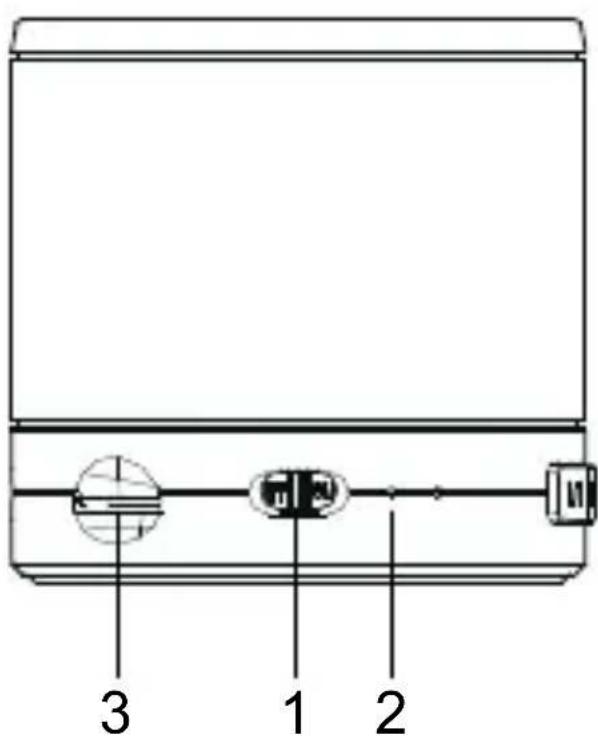
- On-off switch
(Position left off, position right on)
- Status LED
red = charging, green
= charged, blue
(flashing) = Bluetooth
mode connection
search, blue (per-
manent) = Bluetooth
mode connected,
orange = TF mode &
AUX mode
- TF card reader
for micro SD card

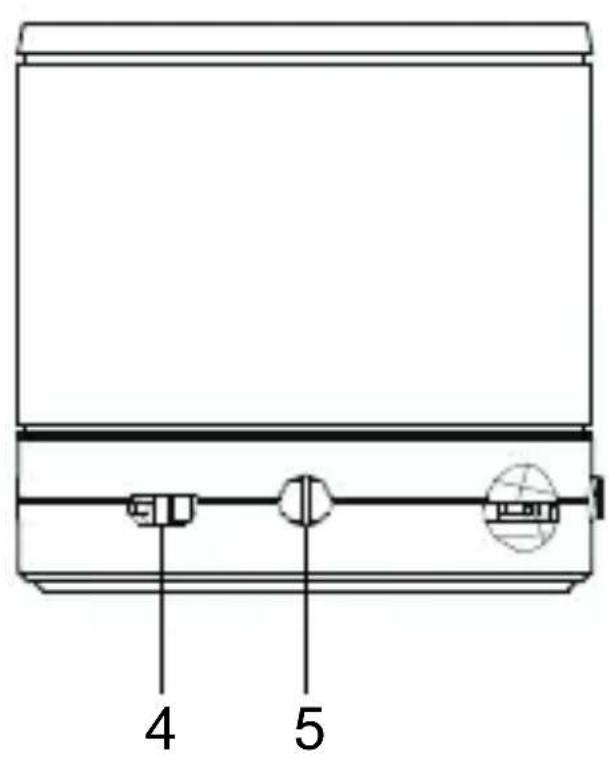
- Micro USB port
Charging port for in- ternal battery via char- ging cable (included)
- Cinch port
For connection of external devices via cable (included), operation in AUX mode
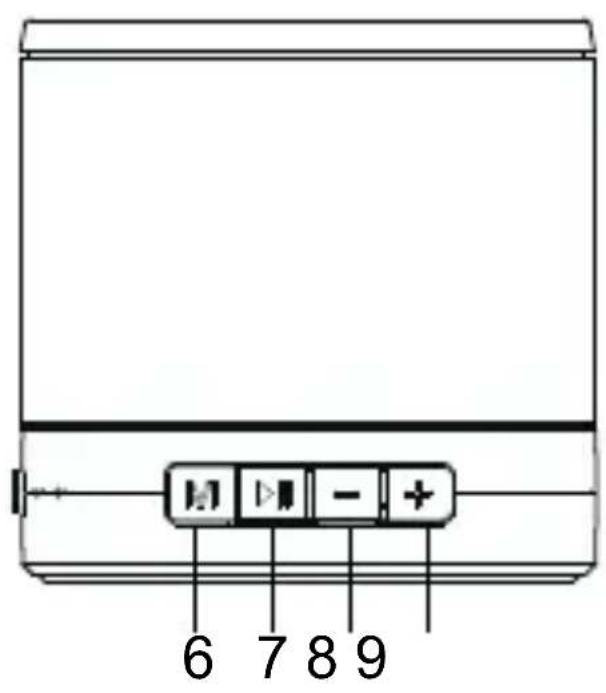
- (M) button
To switch between Bluetooth, TF and AUX mode
- (> II) button
Start/pause of music playback; pick up phone call
- (-) button
Previous track (Bluetooth & TF mode), decrease playback volume
- (+) button
Next track (Bluetooth & TF mode), increase playback volume

4. Getting started
Before getting started, we recommend to fully charge the IMPERIAL BAS 1 by using the USB charging cable. Please follow the procedure:
- Connect the charging cable to the BAS 1's micro USB port.
- Set up a connection between the BAS 1 and a charging device that provides a USB port with 5V DC output power, such as Laptop or PC and activate this device.
- The status LED (see image 2) flashes red, the charging process takes about two hours.
- After the battery is fully charged, the colour of the status LED will change from red to green.
Hint: in order to maintain the battery power, we recommend to disconnect the BAS 1 from the charging device as soon as the charging process is completed.
4.1. Bluetooth mode
After charging the BAS 1 according to point 4, the speaker system is ready to use. The IM-PERIAL BAS 1 may be used in three different modes that can be selected by pushing the (M) button (see image 6).
4.1.1. Establish connection
Bluetooth operation is the speakers' preset-mode. Please follow the procedure:
- Turn on the BAS 1 by putting the slide switch (see image 1) to „on“ position. The BAS 1 is activated, there is a ringing sound and the status LED (see image 2) is flashing blue.
- Activate Bluetooth mode on the device you wish to connect with the BAS 1. To activate Bluetooth mode may differ from device to device, so please check the user manual of the device you wish to connect.
- As soon as the connection is established, there is an acoustic signal and the blue status LED (see image 2) illuminates permanently.
- The BAS 1 may be used with the connected device.
Hint: the pairing operation needs to be made only once. If you want to reconnect the device after a pause, it will set up automatically as soon as you switch on the BAS 1. If you want to connect a new device via Bluetooth, cut the established connection by pushing and holding the (>II) button (see image 7). The status LED starts flashing blue and you may connect another device.

4.1.2. Music playback
To play back music via the BAS 1, just start the player of your Bluetooth device. The playback may be controlled via the BAS 1's buttons:
- Push the (> ll) button to start or pause the music playback.
- Short press the (-) button to go to the previous track; long press the (-) button to decrease the playback volume.
- Short press the (+) button to go to the next track; long press the (+) button to increase the playback volume.
4.1.3. Phone mode

If you have paired a smart phone to the BAS 1 via Bluetooth, you may also use the speakers' phone mode of the speaker. The phone mode may be operated as follows:
- When receiving an incoming call on your phone, the music playback is paused and a ring tone sounds to signal the call over the speaker.
- Push the (> II) button to answer the call, the BAS 1 works similar to a hands-free car kit.
- Via (-) or (+) the call volume may be adjusted during the phone call.
- To end a call you need to press the (> ll) button. After ending the call, the music playback restarts automatically.
- If you want to reject an incoming call, press and hold the (-) button.
4.2. TF mode
Thanks to the internal micro SD card reader, the BAS 1 may also be used to directly play back music files from memory cards. To enter this mode, please proceed as follows:
- Insert a micro SD card into the card reader (see image 3). Please note that the card needs to be inserted facedown.
- Turn on the BAS 1 by putting the slide switch (see image 1) to „on“ position.
- If the inserted micro SD card contains MP3 music files, the playback will start automatically and the orange status LED (see image 2) illuminates permanently.
- The operation under TF mode is similar to the operation under Bluetooth mode (see chapter 4.1.2.).
Hint: If you want to switch to TF mode during Bluetooth operation, just push the (M) button (see image 6).
4.3. AUX mode
Via AUX mode, the BAS 1 may be used to play back music from devices to be connected with a 3.5mm audio cable (included). The AUX mode may be operated as follows:
- Connect an external device (e.g. MP3 player) via the included 3.5mm audio cable to the BAS 1's the cinch port (see image 5).

- Turn on the BAS 1 by putting the slide switch (see image 1) to „on“ position.
- Turn on the playback device and commence the music playback.
- Push the (M) button (see image. 6) to set the BAS 1 to AUX mode. The status LED will switch to orange.
- You can start and pause the music play-back via the (> ll) button. The (-) and (+) buttons may be used to adjust the volume.
5. Troubleshooting
| Problem Cause Solution | ||
| BAS 1 may not be switched on | Battery empty | Reload battery |
| No music playback audible | 1. BAS 1 in wrong mode2. Playback device switched off3. Cable connection not correct4. Volume is set too low | 1. Change mode with (M) button2. Switch on playback device3. Check cable connection4. Increase volume on playback device or on BAS 1 through pushing (+) button |


| Problem Cause Solution | ||
| Bluetooth connection failure | 1. BAS 1 in wrong mode2. Bluetooth deactivated | 1. Change mode with (M) button2. Switch on Bluetooth and connect |
| Bluetooth connection requires password | Bluetooth version on device < BT3.0 | Enter password (standard: „0000“) |
6. Technical data
| Active mono speaker |
| Output power: 3W/4Ω |
| Frequency range: 100 Hz - 18 KHz |
| Driver unit: φ 40mm |
| Bluetooth 3.0/2.1 + EDR/2.0/1.2/1.1 |
| Battery type: 3.7V/430mAh Li-Polymer |
| Charging voltage: 5V DC via USB cable |
3.5mm Cinch Audio In
1999/5/EG-conform
E
7. Technical support
If your BAS 1 doesn't work properly, this doesn't necessarily mean that the item is broken. Our technical support will try to solve your problem. Please feel free to contact us via email over service @telestar.de.
If we cannot solve your problem this way, please send the item to following address:
TELESTAR Servicecenter, Am Weiher 14, 56766 Ulmen, Germany.

Brand : Imperial
Model : BAS 1
Category : Uncategorized