
TE-CD 18-2 Li-i 2B - Drill EINHELL - Free user manual and instructions
Find the device manual for free TE-CD 18-2 Li-i 2B EINHELL in PDF.


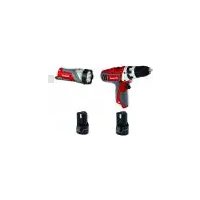
| Product Type | Cordless Drill |
| Model | TE-CD 18-2 Li-i 2B |
| Brand | Einhell |
| Voltage | 18 V |
| Battery Type | Lithium-Ion |
| Number of Batteries Included | 2 |
| Chuck Capacity | 10 mm (3/8") |
| Max Torque | 30 Nm |
| Speed (No Load) | 0 - 550 rpm |
| Drilling Capacity (Steel) | 10 mm |
| Drilling Capacity (Wood) | 20 mm |
| Weight (with battery) | 1.5 kg |
| Dimensions (L x W x H) | 200 x 65 x 200 mm |
| Charger Model | Einhell 18 V charger (included) |
| Charging Time | Approx. 60 min per battery |
| Key Features | 2-speed gearbox, variable speed trigger, LED work light, belt clip |
| Safety Features | Overload protection, electronic cell protection, soft grip handle |
| Maintenance | Keep ventilation slots clean, store in dry place, check carbon brushes periodically |
| Spare Parts Availability | Batteries, charger, chuck, carbon brushes available through Einhell service |
| Reparability | Modular design allows easy replacement of worn parts |
| General Information | This drill is suitable for drilling in wood, metal, and plastic, and for screwdriving |
Frequently Asked Questions - TE-CD 18-2 Li-i 2B EINHELL
User questions about TE-CD 18-2 Li-i 2B EINHELL
0 question about this device. Answer the ones you know or ask your own.
Ask a new question about this device
Download the instructions for your Drill in PDF format for free! Find your manual TE-CD 18-2 Li-i 2B - EINHELL and take your electronic device back in hand. On this page are published all the documents necessary for the use of your device. TE-CD 18-2 Li-i 2B by EINHELL.
USER MANUAL TE-CD 18-2 Li-i 2B EINHELL
GB Original operating instructions Cordless Impact Drill
8


South America

-2-


BR
Índice
- Safety regulations
- Layout and items supplied
- Proper use
- Technical data
- Before starting the equipment
- Operation
- Cleaning, maintenance and ordering of spare parts
- Disposal and recycling
- Storage
- Charger indicator
GB

Caution - Read the operating instructions to reduce the risk of inquiry

Wear ear-muffs. The impact of noise can cause damage to hearing.

Wear a breathing mask. Dust which is injurious to health can be generated when working on wood and other materials. Never use the device to work on any materials containing asbestos!

Wear safety goggles. Sparks generated during working or splinters, chips and dust emitted by the device can cause loss of sight.

Change the gear only when the drill is at a standstill. If you fail to observe this point, the gearing may be damaged.

Store the battery only in dry rooms with an ambient temperature of +10°C to +40°C. Place only charged batteries in storage (charged at least 40%).

Safety class II

For use in dry rooms only.
GB
Danger!
When using the equipment, a few safety precautions must be observed to avoid injuries and damage. Please read the complete operating instructions and safety regulations with due care. Keep this manual in a safe place, so that the information is available at all times. If you give the equipment to any other person, hand over these operating instructions and safety regulations as well. We cannot accept any liability for damage or accidents which arise due to a failure to follow these instructions and the safety instructions.
1. Safety regulations
Danger!
Read all safety regulations and instructions.
Any errors made in following the safety regulations and instructions may result in an electric shock, fire and/or serious injury.
Keep all safety regulations and instructions in a safe place for future use.
General safety instructions for electric tools
The term “electric tool” used in the safety instructions refers to electric tools operated from the mains power supply (with a power cable) and to battery operated electric tools (without a power cable).
1. Workplace safety
a) Keep your work area clean and well illuminated. Untidy or unlit work areas can result in accidents.
b) Do not operate the electric tool in an environment where there is a risk of explosions and where there are infl ammable liquids, gases or dust. Electric tools produce sparks which could set the dust or vapours alight.
c) Keep the electric tool out of the reach of children and other persons. If there is a distraction, you may lose control of the appliance.
2. Electrical safety
a) The plug from this electric tool must fit into the socket. The plug should never be altered in any way. Never use adapter plugs together with earthed electric tools. Unaltered plugs and correct sockets reduce the risk of an electric shock.
b) Avoid bodily contact with earthed surfaces such as pipes, heating, ovens and fridges. The risk of electric shock is increased if your body is earthed.
c) Keep the tool out of water and away from moisture. The ingress of water into an electric tool increases the risk of an electric shock.
d) Do not use the power cable to carry the electric tool, to hang it up or to pull it out of the socket. Keep the cable away from heat, oil, sharp edges and moving parts of the appliance. Damaged or entangled cables increase the risk of an electric shock.
e) If you are working outdoors with an electric tool, only use extension cables which are designed specifically for this purpose. Using specially designed outdoor extension cables, the risk of electric shock is reduced.
f) If operation of the electric tool in a damp environment can not be avoided, use a earth-leakage circuit-breaker. The earth-leakage circuit-breaker reduces the risk of an electric shock.
a) Be careful, watch what you are doing and use an electric tool sensibly. Do not use the tool if you are tired or under the influence of drugs, alcohol or medication. A moment of distraction when using the electric tool can result in serious injuries.
b) Wear personal protection equipment and always wear safety goggles. Wearing personal protection (such as dust masks, non-slip safety shoes, safety helmet or ear protection, depending upon the type and use of the electric tool) reduces the risk of injury.
c) Make sure that the appliance cannot start up accidentally. Ensure that the electric tool is switched off before you connect it to the power supply and/or insert the battery, or pick up or carry the tool. If your finger is on the switch whilst carrying the electric tool or if you connect the appliance to the mains when it is switched on, this can lead to accidents.
d) Remove keys and wrenches before switching on the electric tool. A tool or key which comes into contact with rotating parts of the appliance can lead to injuries.
e) Avoid abnormal working postures. Make sure you stand squarely and keep your balance at all times. In this way, you can control the electric tool better in unexpected
3. Safety of persons
GB
circumstances.
f) Wear suitable work clothes. Do not wear loose clothing or jewellery. Keep hair, clothes and gloves away from moving parts. Loose clothing, jewellery or long hair can get trapped in moving parts.
g) If vacuuming devices and draining devices can be fi tted, make sure that these are correctly attached and correctly used. The use of a dust extraction system can reduce the danger posed by dust.
- Usage and treatment of the electric tool
a) Do not overload the appliance. Use the correct tool for your work. You will be able to work better and more safely within the given performance boundaries.
b) Do not use an electric tool with a defective switch. An electric tool that cannot be switched on or off is dangerous and must be repaired.
c) Pull the plug out of the socket and/or remove the battery before making any adjustments to the appliance, changing accessories or put the appliance down. This safety measure prevents starting the electric tool unintentionally.
d) Keep unused electric tools out of the reach of children. Do not allow people who are not familiar with the appliance or who have not read these instructions to use the appliance. Electric tools are dangerous if they are used by inexperienced people.
e) Clean your electric tool carefully. Check whether moving parts are functioning properly and not jamming, whether parts are broken or damaged enough that the functioning of this electric tool is affected. Damaged parts must be repaired before using the appliance. Many accidents are caused by badly maintained electric tools.
f) Keep your cutting tools sharp and clean. Carefully maintained cutting tools with sharp cutting edges will jam less and are easier to control.
g) Make sure to use electric tools, accessories, spare parts, etc. in accordance with these instructions. Take the conditions in your work area and the job to perform into account. Using electric tools for any purpose other than the one for which they are intended can lead to dangerous situations.
- Using and handling the cordless tool
a) Only charge the batteries in chargers that are recommended by the manufacturer. A charger that is designed for a certain type of battery may pose a fi re risk if it is used with other types of battery.
b) Use only the correct batteries in the electric tools. The use of other batteries may result in injuries and a fire risk.
c) Keep unused batteries away from paper clips, coins, keys, nails, screws and other metallic objects that could cause a short circuit between the contacts. A short circuit between the battery contacts may cause burns or a fi re.
d) In case of incorrect use, fl uid may escape from the battery. Avoid contact with it. If you touch it by accident, rinse the affected area with water. If you get the fl uid in your eyes, also seek medical advice. Leaking battery fl uid can cause skin irritation or burns.
6. Service
a) Have your electric tool repaired only by trained personnel and/or the authorized service agent, using only genuine spare parts. This will ensure that your electric tool remains safe to use.
Special safety information
We pay a great deal of attention to the design of every battery pack to ensure that we supply you with batteries which feature maximum power density, durability and safety. The battery cells have a wide range of safety devices. Each individual cell is initially formatted and its electrical characteristic curves are recorded. These data are then used exclusively to be able to assemble the best possible battery packs. Despite all the safety precautions, caution must always be exercised when handling batteries. The following points must be obeyed at all times to ensure safe use.
Safe use can only be guaranteed if undamaged cells are used. Incorrect handling can cause cell damage.
Important: Analyses confirm that incorrect use and poor care are the main causes of the damage caused by high performance batteries.
GB
Information about the battery
-
The battery pack supplied with your cordless tool is not charged. The battery pack has to be charged before you use the tool for the first time.
-
For optimum battery performance avoid low discharge cycles. Charge the battery pack frequently.
-
Store the battery pack in a cool place, ideally at 15°C and charged to at least 40%.
-
Lithium-ion batteries are subject to a natural ageing process. The battery pack must be replaced at the latest when its capacity falls to just 80% of its capacity when new. Weakened cells in an aged battery pack are no longer capable of meeting the high power requirements and therefore pose a safety risk.
-
Do not throw battery packs into an open fire. There is a risk of explosion!
-
Do not ignite the battery pack or expose it to fire.
-
Do not exhaustively discharge batteries. Exhaustive discharge will damage the battery cells. The most common cause of exhaustive discharge is lengthy storage or non-use of partly discharged batteries. Stop working as soon as the performance of the battery falls noticeably or the electronic protection system triggers. Place the battery pack in storage only after it has been fully charged.
-
Protect batteries and the tool from overloads. Overloads will quickly result in overheating and cell damage inside the battery housing without this overheating actually being apparent externally.
-
Avoid damage and shocks. Replace batteries which have been dropped from a height of more than one meter or which have been exposed to violent shocks without delay, even if the housing of the battery pack appears to be undamaged. The battery cells inside the battery may have suffered serious damage. In this respect, please also read the waste disposal information.
-
If the battery pack suffers overloading and overheating, the integrated protective cut-off will switch off the equipment for safety reasons. Important. Do not press the ON/OFF switch any more if the protective cut-off has actuated. This may damage the battery pack.
-
Use only original battery packs. The use of other batteries may result in injuries, explosion and a fire risk.
Information on chargers and the charging process
-
Please check the data marked on the rating plate of the battery charger. Be sure to connect the battery charger to a power supply with the voltage marked on the rating plate. Never connect it to a different mains voltage.
-
Protect the battery charger and its cable from damage and sharp edges. Have damaged cables repaired without delay by a qualified electrician.
-
Keep the battery charger, batteries and the cordless tool out of children's reach.
-
Do not use damaged battery chargers.
-
Do not use the supplied battery charger to charge other cordless tools.
-
In heavy use the battery pack will become warm. Allow the battery pack to cool to room temperature before commencing with the charging.
-
Do not over-charge batteries. Do not exceed the maximum charging times. These charging times only apply to discharged batteries. Frequent insertion of a charged or partly charged battery pack will result in over-charging and cell damage. Do not leave batteries in the charger for days on end.
-
Never use or charge batteries if you suspect that the last time they were charged was more than 12 months previously. There is a high probability that the battery pack has already suff ered dangerous damage (exhaustive discharge).
-
Charging batteries at a temperature below 10^ C will cause chemical damage to the cell and may cause a fire.
-
Do not use batteries which have heated during the charging process, as the battery cells may have suffered dangerous damage.
-
Do not use batteries which have suffered curvature or deformation during the charging process or which show other non-typical symptoms (gassing, hissing, cracking,...)
-
Never fully discharge the battery pack (recommended depth of discharge max. 80%) A complete discharge of the battery pack will lead to premature ageing of the battery cells.
-
Never charge the batteries unsupervised.
GB
Protection from environmental influences
- Wear suitable work clothes. Wear safety goggles.
- Protect your cordless tool and the battery charger from moisture and rain. Moisture and rain can cause dangerous cell damage.
- Do not use the cordless tool or the battery charger near vapors and infl ammable liquids.
- Use the battery charger and cordless tools only in dry conditions and an ambient temperature of 10-40°C.
- Do not keep the battery charger in places where the temperature is liable to reach over 40^ C. In particular, do not leave the battery charger in a car that is parked in the sunshine.
- Protect batteries from overheating. Overloads, over-charging and exposure to direct sunlight will result in overheating and cell damage. Never charge or work with batteries which have been overheated – replace them immediately if possible.
- Storage of batteries, battery chargers and cordless tools. Store the charger and your cordless tool only in dry places with an ambient temperature of 10-40°C. Store your lithium-ion battery pack in a cool, dry place at a temperature of 10-20°C. Protect them from humidity and direct sunlight. Only place fully charged batteries in storage (charged at least 40%).
- Prevent the lithium-ion battery pack from freezing. Battery packs which were stored below 0^ C for more than 60 minutes must be disposed of.
- When handling batteries beware of electrostatic charge: Electrostatic discharges cause damage of the electronic protection system and the battery cells. Avoid electrostatic charging and never touch the battery poles.

Rechargeable batteries and cordless electric machines and tools contain materials that are potentially harmful to the environment.
Additional safety instructions
- Wear ear plugs when using hammer drills. The impact of noise can cause damage to hearing.
- Use the additional handles supplied with the tool. Losing control of the machine can cause injuries.
- Hold the tool by the insulated handles when carrying out work during which the plug-in tool could strike concealed power cables or its own mains lead. Contact with a live cable will also make the metal parts of the tool live and will cause an electric shock.
2. Layout and items supplied
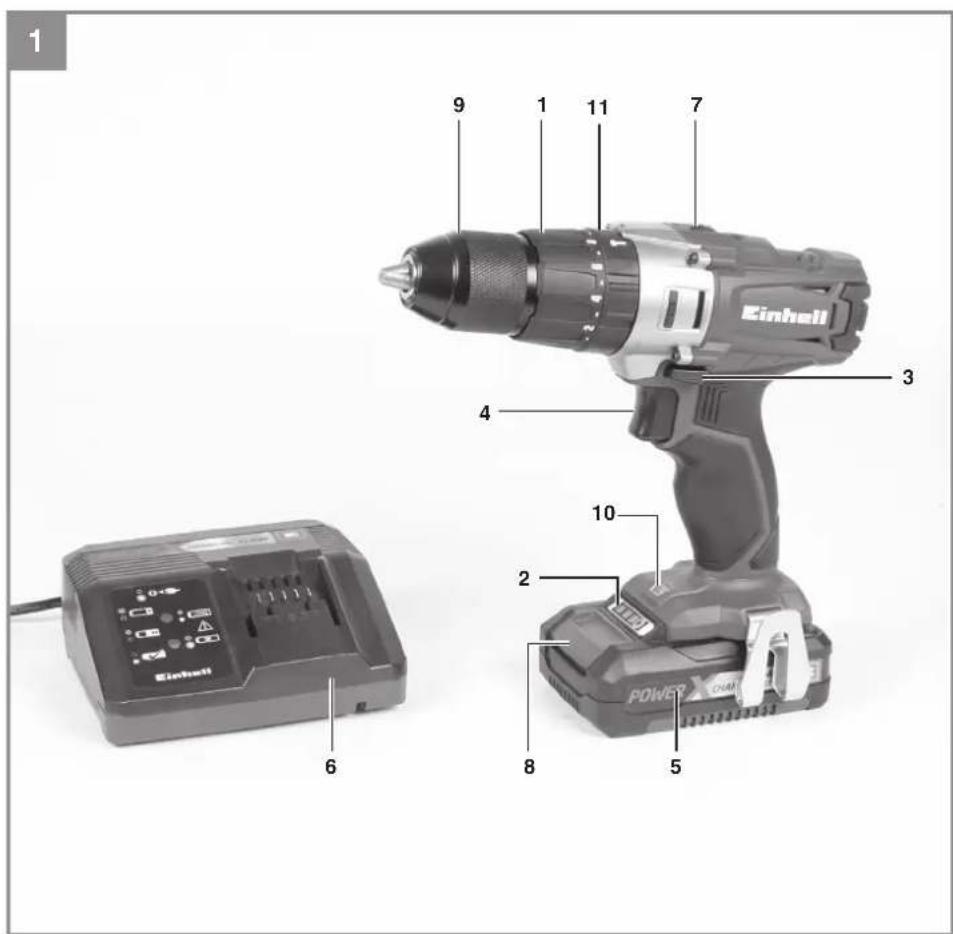
2.1 Layout (Fig. 1)
- Torque selector
- Battery capacity indicator
- Changeover switch
- ON/OFF switch
- Battery pack
- Battery charger
- Selector switch for 1st/2nd gear
- Pushlock button
- Quick-change drill chuck
- LED lamp
- Selector switch for driving/drilling/impact drilling
2.2 Items supplied
Please check that the article is complete as specified in the scope of delivery. If parts are missing, please contact our service center or the sales outlet where you made bought the product within the maximum days indicated by the consumer protection laws of your country and upon presentation of a valid bill of purchase. Also, refer to the warranty table in the service information at the end of the operating instructions.
- Open the packaging and take out the equipment with care.
- Remove the packaging material and any packaging and/or transportation braces (if available).
- Check to see if all items are supplied.
- Inspect the equipment and accessories for transport damage.
- If possible, please keep the packaging until the end of the guarantee period.
GB
Danger!
The equipment and packaging material are not toys. Do not let children play with plastic bags, foils or small parts. There is a danger of swallowing or suffocating!
• Cordlessdrill/screwdriver
- Battery charger
- Battery
• Original operating instructions
3. Proper use
The cordless impact drill/driver is designed for tightening and undoing screws, for drilling in wood, metal and plastic, and for impact drilling in stone, in each case when using the appropriate bits.
The equipment is to be used only for its prescribed purpose. Any other use is deemed to be a case of misuse. The user / operator and not the manufacturer will be liable for any damage or injuries of any kind caused as a result of this.
Please note that our equipment has not been designed for use in commercial, trade or industrial applications. Our warranty will be voided if the machine is used in commercial, trade or industrial businesses or for equivalent purposes.
4. Technical data
See warranty card of your country.
Sound and vibration
Sound and vibration values were measured in accordance with EN 60745.
Wear ear-muff s.
The impact of noise can cause damage to hearing.
Total vibration values (vector sum of three directions) determined in accordance with EN 60745.
Warning!
The specified vibration value was established in accordance with a standardized testing method. It may change according to how the electric equipment is used and may exceed the specified value in exceptional circumstances.
The specified vibration value can be used to compare the equipment with other electric power tools.
The specified vibration value can be used for initial assessment of a harmful effect.
Keep the noise emissions and vibrations to a minimum.
- Only use appliances which are in perfect conditions.
• Service and clean the appliance regularly.
• Adapt your working style to suit the appliance.
• Do not overload the appliance. - Have the appliance serviced whenever necessary.
• Switch the appliance off when it is not in use.
• Wear protective gloves.
Residual risks
Even if you use this electric power tool in accordance with instructions, certain residual risks cannot be rules out. The following hazards may arise in connection with the equipment's construction and layout:
- Lung damage if no suitable protective dust mask is used.
- Damage to hearing if no suitable ear protection is used.
- Health damage caused by hand-arm vibrations if the equipment is used over a prolonged period or is not properly guided and maintained.
Limit the operating time.
All stages of the operating cycle must be considered (for example, times in which the electric tools are switched off and times in which the tool is switched on but operates without load).
5. Before starting the equipment
Be sure to read the following information before you use your cordless screwdriver for the first time:
- Charge the battery pack with the charger supplied. An empty battery pack requires a charging period of approximately 0.5-1 hour.
- Only ever use sharp drill bits and screwdriver bits which are suitable for the purpose and in faultless condition.
GB
- Always check for concealed electric cables and gas and water pipes when drilling and screwing in walls.
6. Operation
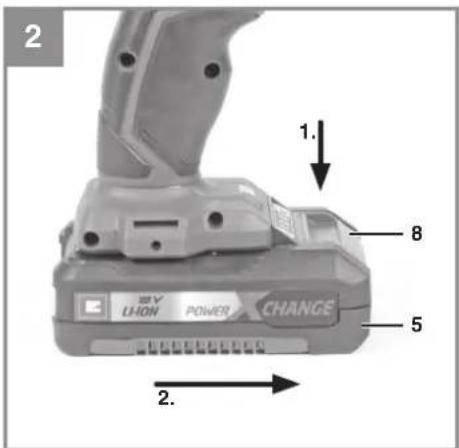
6.1 Charging the LI battery pack (Fig. 2-3)
- Remove the battery pack (5) from the handle, pressing the pushlock buttons (8) downwards to do so.
- Check that your mains voltage is the same as that marked on the rating plate of the battery charger. Insert the power plug of the charger (6) into the mains socket outlet. The green LED will then begin to fl ash.
- Push the battery pack onto the battery charger.
In section 10 "Charger indicator" you will find a table with an explanation of the LED indicator on the charger.
If the battery pack fails to become charged, please check
• whether there is voltage at the socket-outlet
- whether there is proper contact at the charging contacts on the charger.
If the battery still fails to become charged, please return
• thecharger
• the battery pack to our Customer Service Department.
To ensure that the LI battery pack provides long service you should take care to recharge it promptly. You must recharge the battery pack when you notice that the power of the cordless screwdriver drops.
6.2 Torque setting (Fig. 4 / Item 1) Important! The tool must be at a standstill when you set the torque with the setting ring.
The cordless screwdriver is fitted with a mechanical torque selector.
The torque for a specific size of screw is selected with the set-collar (1). The correct torque depends on several factors:
• on the type and hardness of material in question
• on the type and length screws used
- on the requirements needing to be met by the screwed joint.
The clutch disengages with a grating sound to indicate when the set torque is reached.
6.3 Selector switch for driving/drilling/impact drilling (Fig. 4/Item 11)
- For driving purposes, set the selector switch (11) to the „Screw“ position. The torque is adjusted via the torque setting (1) (see point 6.2).
- For drilling purposes, set the selector switch (11) to the „Bit“ position. The slip coupling is now off and the maximum torque is available regardless of the torque setting (1).
- For impact drilling purposes, set the selector switch (11) to the „Hammer“ position. The slip coupling is now off and the maximum torque is available regardless of the torque setting (1).
Important! Change the torque setting (1) and the selector switch for driving/drilling/impact drilling (11) only when the equipment is at a standstill.
6.4 Forward/Reverse switch (Fig. 5 / Item 3)
With the slide switch above the On/Off switch you can select the direction of rotation of the battery-powered drill/screwdriver and secure it against being switched on accidentally. You can choose between clockwise and anticlockwise rotation. To avoid causing damage to the gearing it is advisable to change the direction of rotation only when the tool is at a standstill. The On/Off switch is blocked when the slide switch is in centre position.
6.5 On/Off switch (Fig. 5 / Item 4)
Infi nitely variable speed control is possible with the On/Off switch. The further you press the switch, the higher the speed of the battery-powered drill/screwdriver.
6.6 Changing over from 1st gear to 2nd gear (Fig. 4 / Item 7)
You can work at a higher or lower speed depending on the position of the selector switch. To avoid damaging the gear unit you should only change over gears when the tool has stopped.
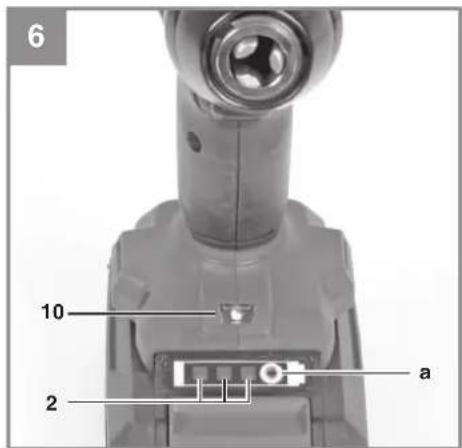
6.7 Battery capacity indicator (Fig. 6 - Item 2)
Press the battery capacity indicator switch (a). The battery capacity indicator (2) shows the charge status of the battery using 3 LEDs.
GB
All 3 LEDs are lit:
The battery is fully charged.
2 or 1 LED(s) are lit:
The battery has an adequate remaining charge.
1 LED blinks:
The battery is empty, recharge the battery.
All LEDs blink:
The battery pack has undergone exhaustive discharge and is defective. Do not use or charge a defective battery pack.
6.8 LED lamp (Fig. 6 / Item 10)
The LED lamp (10) can be used in poor lighting conditions to illuminate the area where you want to drill or screw. The LED lamp (10) will be lit automatically as soon as you press the ON/OFF switch (4).
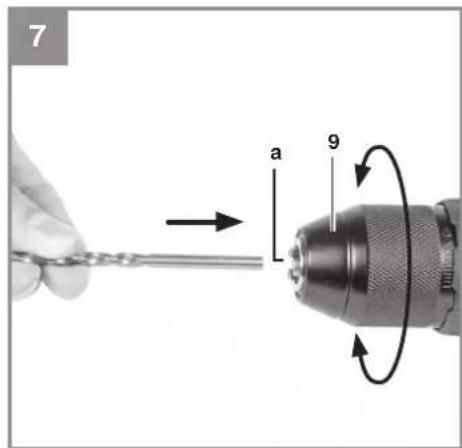
6.9 Changing the tool (Fig. 7)
Important. Set the changeover switch (3) to its centre position whenever you carry out any work (for example changing the tool, maintenance work, etc.) on the cordless screwdriver.
- The cordless screwdriver is fitted with a quick-action chuck (9) with an automatic spindle stop.
- Open the chuck (9). The chuck opening (a) must be large enough to hold the tool (drill bit or screwdriver bit).
- Select the suitable tool. Push the tool as far as possible into the chuck opening (a).
- Tighten the chuck (9) and then check that the tool is secure.
6.10 Screwdriving
We recommend using self-centering screws (e.g. Torx screws, recessed head screws) designed for reliable working. Be sure to use a bit that matches the screw in shape and size. Set the torque, as described elsewhere in these operating instructions, to suit the size of screw.
7. Cleaning, maintenance and ordering of spare parts
Danger!
Always pull out the mains power plug before starting any cleaning work.
7.1 Cleaning
- Keep all safety devices, air vents and the motor housing free of dirt and dust as far as possible. Wipe the equipment with a clean cloth or blow it with compressed air at low pressure.
• We recommend that you clean the device immediately each time you have finished using it. - Clean the equipment regularly with a moist cloth and some soft soap. Do not use cleaning agents or solvents; these could attack the plastic parts of the equipment. Ensure that no water can seep into the device. The ingress of water into an electric tool increases the risk of an electric shock.
7.2 Carbon brushes
In case of excessive sparking, have the carbon brushes checked only by a qualified electrician and/or an authorized service agent.
Danger! The carbon brushes should not be replaced by anyone but a qualified electrician or the authorized service technician.
7.3 Maintenance
There are no parts inside the equipment which require additional maintenance.
7.4 Ordering replacement parts:
Please quote the following data when ordering replacement parts:
• Type of machine
• Article number of the machine
• Identification number of the machine
• Replacement part number of the part required
GB
8. Disposal and recycling
The equipment is supplied in packaging to prevent it from being damaged in transit. The raw materials in this packaging can be reused or recycled. The equipment and its accessories are made of various types of material, such as metal and plastic. Never place defective equipment in your household refuse. The equipment should be taken to a suitable collection center for proper disposal. If you do not know the whereabouts of such a collection point, you should ask in your local council offices.
9. Storage
Store the equipment and accessories in a dark and dry place at above freezing temperature. The ideal storage temperature is between 5 and 30°C. Store the electric tool in its original packaging.
The reprinting or reproduction by any other means, in whole or in part, of documentation and papers accompanying products is permitted only with the express consent of the iSC GmbH.
Subject to technical changes
10. Charger indicator
| Indicator status | Explanations and actions | |
| Red LED Green LED | ||
| Off | Flashing | Ready for useThe charger is connected to the mains and is ready for use; there is no battery pack in the charger |
| On Off Charging | The charger is charging the battery pack in quick charge mode. | |
| Off On The battery is 85% charged and ready for use.(Charging time for 1.5 Ah battery: 30 min)(Charging time for 2.0 Ah battery: 40 min)(Charging time for 3.0 Ah battery: 60 min)(Charging time for 4.0 Ah battery: 80 min)(Charging time for 5.2 Ah battery: 130 min)The unit then changes over to gentle charging mode until the battery is fully charged.(Total charging time for 1.5 Ah battery: approx. 40 min)(Total charging time for 2.0 Ah battery: approx. 50 min)(Total charging time for 3.0 Ah battery: approx. 75 min)(Total charging time for 4.0 Ah battery: approx. 100 min)(Total charging time for 5.2 Ah battery: approx. 140 min)Action:Take the battery pack out of the charger. Disconnect the charger from the mains supply. | ||
| Flashing Off | Adapted charging | The charger is in gentle charging mode.For safety reasons the charging is performed less quickly and takes more than 1 hour. The reasons can be:- The battery pack has not been used for a very long time or an already fl at battery was further discharged (exhaustive discharge).- The battery pack temperature is outside the ideal range (between 25^ C and 45^ C).Action:Wait for the charging to be completed; you can still continue to charge the battery pack. |
| Flashing Flashing Fault | Charging is no longer possible. The battery pack is defective.Action:Never charge a defective battery pack.Take the battery pack out of the charger. | |
| On On Temperature fault | The battery pack is too hot (e.g. due to direct sunshine) or too cold (below 0^ C).Action:Remove the battery pack and keep it at room temperature (approx. 20^ C) for one day . | |
BR
e-mail. homeservice2008@hotmail.com
(Línea Eléctrica)
e-mail. servicyc@yahoo.com
Cali - Valle del Cauca
S.I.E. Service Solutions
Avenida Ferrocarril No. 32B 26, La Francia
Tel. +57 (8) 266 0606 - 2644013
e-mail. repuestos@sieservice.com
Servifer del Tolima
Carrera 4 Tamana No. 31 - 45, La Francia
Tel. +57 316 8084916
e-mail. sfdeltolima@gmail.com
La Dorada - Caldas
Tecnibobinados
Dir. Carrera 2 No. 20 - 71, Barrio Obrero
Tel. +57 312 2120634
e-mail.tecnobibinados-jair@hotmail.com
Leticia - Amazonas
Dir. Carrera 50 No. 41 – 90, Palace
Tel. +57 (4) 444 3215
e-mail.emergenciatecnica@hotmail.com
Granada - Meta
Dir. Carrera 2 No. 8 – 23, San Agustín
Tel. 314 4737985
E-mail. odilioval@hotmail.com
Monteria – Cordoba
CRG Servitools
Calle 38 No. 2 – 18, Centro
Tel. +57 322 6953118 - 304 5386810
e-mail. crgservitools@hotmail.com
Nariño - Pasto
Dir. Calle 19 No. 18 – 40 Local 10
Tel. +57 (2) 736 4645
e-mail. ceseelsas@gmail.com
Neiva – Huila
Dir. Carrera 7 No. 3 – 16, Centro
Tel. +57 (8) 872 2126
ventas@construequiposdelhuila.com
CO
Pereira – Risaralda
Electrocenter
Dir. Carrera 7 No. 29 - 33, Centro
Tel. +57 (6) 345 3689
e-mail. electrocenter_pereira@hotmail.com
Pitalito – Huila
Agrotec Pitalito
Dir. Carrera 6 No. 3 – 45, Ba Trinidad
Tel. +57 319 2604410
e-mail. agrotecpitalito@hotmail.com
Santa Marta – Magdalena
Comercializadora Metropolitana Ltda
Dir. Calle 11 No. 5 - 82, Centro
Tel. +57 (5) 431 4323
metropolitanacomercializadora@gmail.com
Saravena – Arauca
Cacharrería Acxel
Dir. Calle 27 No. 13 – 13
Tel. +57 (7) 882 1639
e-mail. cacharreriacxel@hotmail.com
Sincelejo – Sucre
Electroaires de la costa
Dir. Carrera 18 No. 23 – 67, Centro
Tel. +57 (5) 276 5031
e-mail. frioairescosta@hotmail.com
- BR
- Índice
- GB
- Danger!
- Safety regulations
- General safety instructions for electric tools
- Workplace safety
- Electrical safety
- Safety of persons
- Service
- Special safety information
- Information about the battery
- Information on chargers and the charging process
- Protection from environmental influences
- Additional safety instructions
- Layout and items supplied
- Layout (Fig. 1)
- Items supplied
- Proper use
- Technical data
- Sound and vibration
- Wear ear-muff s.
- Warning!
- Keep the noise emissions and vibrations to a minimum.
- Residual risks
- Limit the operating time.
- Before starting the equipment
- Operation
- Charging the LI battery pack (Fig. 2-3)
- Torque setting (Fig. 4 / Item 1) Important! The tool must be at a standstill when you set the torque with the setting ring.
- Selector switch for driving/drilling/impact drilling (Fig. 4/Item 11)
- Forward/Reverse switch (Fig. 5 / Item 3)
- On/Off switch (Fig. 5 / Item 4)
- Changing over from 1st gear to 2nd gear (Fig. 4 / Item 7)
- Battery capacity indicator (Fig. 6 - Item 2)
- All 3 LEDs are lit:
- or 1 LED(s) are lit:
- LED blinks:
- All LEDs blink:
- LED lamp (Fig. 6 / Item 10)
- Changing the tool (Fig. 7)
- Screwdriving
- Cleaning, maintenance and ordering of spare parts
- Cleaning
- Carbon brushes
- Maintenance
- Ordering replacement parts:
- Disposal and recycling
- Storage
- Charger indicator
- CO
Brand : EINHELL
Model : TE-CD 18-2 Li-i 2B
Category : Drill