
CR700 - Dash cam Navitel - Free user manual and instructions
Find the device manual for free CR700 Navitel in PDF.


| Product Type | Dash Cam |
| Brand | Navitel |
| Model | CR700 |
| Dimensions (approx.) | 8.5 x 5.0 x 3.0 cm |
| Weight (approx.) | 95 g |
| Power Supply | 12-24 V DC (car cigarette lighter adapter) |
| Battery | Built-in rechargeable Li-ion battery 180 mAh |
| Display | 2.7 inch LCD screen |
| Recording Resolution | Full HD 1920x1080p |
| Viewing Angle | 170° wide angle lens |
| Night Vision | Infrared LEDs for low-light recording |
| Memory Card Support | MicroSD up to 128 GB (Class 10 or higher) |
| Loop Recording | Continuous recording with automatic overwrite |
| G-Sensor | Built-in impact sensor for automatic event recording |
| Parking Mode | Motion detection recording when parked |
| GPS | Built-in GPS module for location and speed logging |
| Mounting | Suction cup mount for windshield |
| Maintenance & Cleaning | Clean lens with microfiber cloth; avoid solvents. |
| Safety | Use only supplied charger; do not disassemble. |
| Spare Parts & Repairability | Contact customer support for spare parts; not user-serviceable. |
| General Information | Manual available for download as PDF. |
Frequently Asked Questions - CR700 Navitel
User questions about CR700 Navitel
0 question about this device. Answer the ones you know or ask your own.
Ask a new question about this device
Download the instructions for your Dash cam in PDF format for free! Find your manual CR700 - Navitel and take your electronic device back in hand. On this page are published all the documents necessary for the use of your device. CR700 by Navitel.
USER MANUAL CR700 Navitel
Thank you for purchasing this NAVITEL® product.
CR700 is a multifunctional high-definition DVR with many functions and features that are described in this User Manual. Please, read the manual carefully before using the device, and keep it for future reference.
Device layout
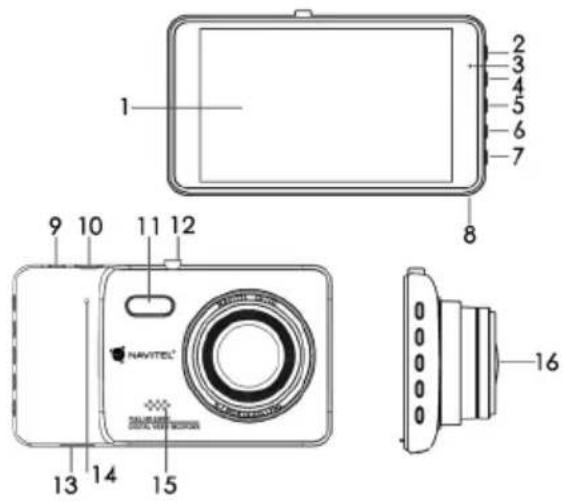
- LCD screen 9. AV input
- Mode 10. USB
- LED Indicator light 11. LED lamp
- Up 12. Mount
- Power/OK 13. SD card slot
- Down 14. Reset
- Menu 15. Speaker
- Microphone 16. Camera

NAVITEL*
Buttons
| Button Functions | |
| Power/OK | Press and hold for 3 seconds to turn the device on/off.InVideo Recordmode, press to start recording; press again to stop.InCapturemode, press to take a picture.InPlaybackmode, press to select a file, or pause/unpause a video.In the menu, press to select a menu item. |
| Menu Press to access | Mode Settings menu. Press again to access Setup menu. |
| Mode | Press to switch betweenVideo Record,Capture,andPlaybackmodes. |
| Up/Down | In the menu, press to highlight the next/previous menu item or file.InVideo Recordmode, press Down to protect the current recording.InCapturemode, press to zoom in or out. |
| Reset If the device is not responding, press to reset. | |
Device functions
Video Connect the device to an external power supply and it will start recording automatically (indicated by the flashing blue light). Press the OK button to stop recording (the blue light will become steady). Press OK again to record another video. Each video will be saved automatically.
Photo In Video Record mode, press the Mode button to enter Capture mode, press the OK button to take a photo (it will be saved automatically).
Playback In Video Record mode, press the Mode button twice to enter Playback mode; press the Up and Down buttons to select a file; press the OK button to play a file. During playback, press OK to pause/unpause; press the Up and Down keys to fast forward/rewind.
Lock file In Video Record mode, press Down to protect the current recording. A key symbol will appear at the bottom of the screen. In Playback mode, select a file, press Menu and select Protect, then Lock Current or Lock All. Protected files cannot be deleted or overwritten. Select Unlock Current/Unlock All to remove protection.
Record audio Record video with or without sound.
Loop recording This setting allows saving the recording in separate files every few minutes. For example, if set to 5 minutes, 1 hour of footage will be saved as 12 five minute fragments. If the memory card is full, all unprotected files will be overwritten in the order they were created.
WDR Wide Dynamic Range provides more dynamic range and detailed image. Disabled by default.
G-sensor If the vehicle is hit by something, the DVR will automatically lock the current video;
LED lamp Turn on when it's dark to improve image brightness.

NAVITEL*
Parking monitor In shutdown state, if vibration is detected, the device will turn on automatically and start recording. The file will be protected (locked). If nothing happens for over a minute, the device will shut down.
Plate number Enter a plate number to be added to video recordings. Press Up and Down to select a character, OK to enter it, Mode to switch between types of characters (letters, numbers, etc). Disabled by default.
Battery Red indicator lights up when the device is plugged into an external power supply; as the battery is charging, the red will gradually dim; the red light going out means the battery is full.
Screen Saver The device can automatically shut off the screen to reduce power consumption; time interval can be set in the Screen Saver menu.
Installation
- Stop the car engine.
- Put the SD card into the DVR.
Note: use a high-speed SD card (Class6 above); capacity should be within 8-256 GB. - Secure the device on the windshield with the bracket.
- Connect the car charger to the cigarette lighter socket.
- Connect the USB interface to the car charger with the charger extension cord.
Note: charger extension cord can be placed along the edge of the windscreen. - Adjust the camera position; make sure the lens is facing parallel to the ground.
- Start the engine; check whether the device is installed correctly.
Note: if the device is installed correctly, the indicator will glow red; the device will start up and begin recording (indicated by flashing blue light.
Precautions
- Use our special adapter; using a different adapter may cause irreparable harm to the device.
- Do not use the device in humid or hot environment.
- Keep the lens clean.
- Do not disassemble the device without authorization.
- Strictly abide by the relevant national laws. This product is not to be used for illegal purposes.

NAVITEL*
Specifications
| Processor NOVATEK NT96655 | |
| Display 4" | |
| Recording format MOV | |
| Image format JPG | |
| Image resolution 12M | |
| Storage SD card | |
| SD card capacity 256GB max | |
| USB USB2.0 | |
| Power USB2.0 DC5V 1.5A | |
| Frequency 50HZ/60HZ | |
| Battery | 200mAh 3.7V Recharge-able battery |
| Working current 700mA | |
| Microphone/speaker Supported | |
| Language | Czech, English, French, German, Polish, Russian, Slovak, Spanish |
Note: the specifications may change due to upgrades.
Wstep
Drogi kliencie!
Declaration of conformity

Intended for use in EU
Product Description: DVR – car digital video recorder
Marketing Name: NAVITEL CR700
Product Name: D402
Manufacturer Name: Shenzhen Roverstar Technology Co., Ltd
Manufacturer Address: Block B1, Gaoxinjian Industrial Park, Fuyong Town, Bao'an, Shenzhen, 518103, China
Importer Name: NAVITEL s.r.o.
Importer Address: U Habrovky 247/11, Praha 4 – Krč, 140 00, Czech Republic
We hereby declare, that the product is in compliance with the essential requirements of 2014/30/EU Directive and following standards:
EN 60950-1:2006+A11:2009+A1:2010+A12:2011+A2:2013
EN55022:2010
EN61000-3-2:2014
EN61000-3-3:2013
EN55024:2010
and with RoHS 2011/65/EU Directive concerning restrictions on the use of specific hazardous substances in electrical and electronic equipment.
Date: 28/09/2016 Person responsible for declaration:
natural_image
Green spherical logo with abstract rings and starburst elements (no text or symbols)NAVITEL®
Brand : Navitel
Model : CR700
Category : Dash cam